Reading view
MacVoices #26181: Flip The Script – MacPaw’s Post-Keynote Perspective and AI-First App Development Strategy
MacVoices #26169: NAB – RØDE Introduces RodeLink 2 UHF Wireless and AI Podcast Editing
MacVoices #26155: NAB – Jim Tierney of Digital Anarchy on Beauty Box Video and ShotNotes
Thirty Years of Intelligent Design Predicting the Unexpected Genome
Anthropic says it will watermark text generated by its AI models
Airtable joins Evernote, Brightcove, WeTransfer and AOL in Bending Spoons portfolio
Bending Spoons has snapped up Airtable to add to its portfolio of software companies, alongside AOL, Evernote, WeTransfer, Brightcove and Vimeo
Airtable made its name as a builder of low/no code database services, aimed particularly at non-technical staff, but is now one of many vendors facing financial difficulties in the face of the SaaS/AIpocalypse. The arrival of AI coding tools, which offer non-technical employees more flexible ways to build business applications, has hit demand for its services.
Bending Spoons bought Airtable in a deal it valued at just $1.285 billion, a far cry from the $11.7 billion Airtable was worth at its peak.
Bending Spoons has built its portfolio by buying once-successful companies like Airtable that have struggled to cope with newer, nimbler competitors or failed to adapt to emerging technologies. Bending Spoons takes these companies, cuts costs and markets them aggressively with the goal of returning them to profitability.
“Airtable is a pioneering brand reshaping how teams organize data and manage critical workflows. We’re committed to investing in Airtable for the long run, and doubling down on its core strength: bringing teams and workflows together in one flexible workspace. We plan to expand what can be done across the full spectrum of work and make Airtable even more valuable to customers at every scale,” said Luca Ferrari, Bending Spoons CEO and co-founder.

Visual Studio Code 1.132 advances built-in dictation
Visual Studio Code 1.132, the latest version of Microsoft’s popular, open-source code editor, has been released. The brings improvements to built-in dictation, side chats, and support for commenting on web elements in the integrated browser.
VS Code 1.132 was released August 5. The update can be downloaded for Windows, Linux, and macOS at code.visualstudio.com.
With VS Code 1.132, the built-in multilingual dictation function lets developers dictate in multiple languages using an on-device model that follows language preference or detects the language automatically. The built-in dictation converts speech to text in chat inputs, editors, and terminals. Dictation now uses multilingual Nemotron 3.5 as the default on-device model. Plus, terminal dictation now applies shell-aware cleanup, so spoken commands preserve shell syntax.
Also in VS Code 1.132, developers can open a side chat by typing /bt in the chat input. A side chat shares the context and prompt cache of the primary chat, but allows developers to ask the agent questions about the current turn without interrupting the turn. Similarly, developers can select text in a chat response to ask contextual questions about that response.
Other new capabilities and improvements in VS Code 1.132:
- The integrated browser adds support for selecting web page elements and annotating them with agent feedback. Users can trigger this mode by using the
workbench.action.browser.addElementCommentToChatkeyboard shortcut. - Active development continues on the agent host, a new VS Code feature that lets users connect to the same agent session from multiple VS Code windows. The agent host runs agent harnesses such as Copilot, Claude, and Codex in a dedicated process based on the Agent Host Protocol (AHP).
- In the previous release, Microsoft introduced the hybrid Markdown editor, which combines rendered Markdown with in-place editing and agent-actionable comments. In this release, Markdown diffs can be opened in the hybrid Markdown editor.
- Expanded terminal output in chat now reflows to the available width as the view is resized. Previously, output used a fixed width, which caused lines to wrap too early and left unused space in wider views.

The Utility App Flood Won’t Last

The App Store is evolving at a breakneck pace not seen since its earliest days. We saw the first glimmers of what was to come early in 2025, but it wasn’t until late last year that the tsunami of apps developed with the help of AI agents really took hold.
Since then, veteran developers are releasing new apps and updating existing ones faster than ever, and new developers are releasing their first apps in droves. Today, supply is dramatically up, demand is flat, and quality is seemingly simultaneously up and down, depending on where you look.
How these forces play out long-term is anyone’s guess, but it’s worth examining because, just as Federico’s link to Bryan Irace’s post about agentic coding tools foreshadowed the rise of tools like Codex and Claude Code, today’s trends are sparks that have the potential to become tomorrow’s App Store wildfires or simply fizzle out.
Utility apps are on the front lines of this change. The TechCrunch story I linked in April picked up on this trend:
Another interesting tidbit from Appfigures is that the Utilities app category moved up the top five chart.
If anything, the trend has accelerated in the months since.
It’s not surprising at all that utility apps have taken off. They’ve been a staple of new developers since long before agents came along. That’s because many are UI wrappers around command line tools. That isn’t a knock against the developers of those apps; most users don’t want to open Terminal to convert a video or audio file to another format using ffmpeg, for example. By building a great UI around command line tools, developers have made them far easier to use.
However, the relative simplicity and narrow scope of many utility apps have made them a natural fit for AI agents, too. That’s why the App Store (and my inbox) is deluged with Mac menu bar and single-screen iPhone and iPad utility apps.
On the one hand, the abundance of utilities has been great for users. More choice means you’re more likely to find the app that perfectly fits your needs.
On the other hand, though, I don’t think what’s happening in the category is sustainable and expect to see it dramatically shift again in the coming months. As we’ve seen from reporting by The New York Times, app supply is outstripping demand by orders of magnitude, which will drive down prices. That alone is likely to cause the utility app market to shrink. But there’s more to it than that.
Remember, the demand shifts that The New York Times reported, based on Sensor Tower numbers, are for the entire App Store, where download numbers have grown 2-3% this year and last. I expect utility downloads to actually shrink in the coming months – again, because of agents. Utilities, especially simple ones, are exactly the sorts of apps that are becoming trivially easy for power users – the very users these utilities are made for – to create themselves. From frontier labs‘ model improvements to a growing number of app-building tools from those same labs and third parties, it’s never been easier to build a web or native app yourself.
And although I agree with people, like Nilay Patel, who say the notion that everyone will build their own software is overblown, the utility market is different. Your average person is not downloading apps to adjust the frame rate and file format of a video or downloading YouTube videos to watch later. But those are exactly the sort of things that people who are using agents are doing with them, whether they’re having an agent do those things directly via a command line tool in an app like Codex or Claude Code or building an app to do the same thing. That’s going to put even more pressure on the category.
That said, I think there will always be a cohort of users who would rather pay for an app than build it themselves, so I’m not predicting the demise of utilities in general – just the end of today’s frothy market. I also think there remains a place for simple utilities that solve hard problems with clever solutions. Not every utility is a UI wrapper for a terminal command. Plenty of apps feature original solutions or thoughtful and unconventional remixes of disparate tools.
Utilities aren’t going away, but just like other App Store deluges, the trend will recede. It’s just that this time, it’s likely to flip faster than usual.

Visual Studio Code 1.131 zeroes in on subagents
Microsoft has shipped Visual Code 1.131, an update to its code editor with improvements for monitoring subagents, dictation, and Markdown editing.
Released July 29, Visual Studio Code 1.131 can be downloaded for Windows, Linux, or Mac at code.visualstudio.com.
An enhancement to the Agents window in VS Code 1.131 allows developers to see what a running subagent is doing without opening its conversation. For each subagent, the main conversation now shows the model used by the subagent, how long the subagent has been running, and the tool the subagent is actively calling.
A preview of built-in dictation across VS Code gives developers dictation capabilities without having to install the VS Code Speech extension. The transcription service works in chat inputs, text editors, and the terminal, Microsoft said. A single speech session and microphone selection are shared across all three surfaces, which prevents overlapping recordings and keeps dictated text in the intended location, according to the company. This is an experimental feature.
VS Code 1.131 also introduces a hybrid Markdown editor in the Agents window, allow users to view Markdown files, edit them in place, and add comments that an agent can act on. By using “Reopen editor with”, developers can switch easily between the text editor and the new Markdown editor, both in the Agents window and editor windows. The hybrid Markdown editor is an experimental feature.
For accessibility, screen reader users now can read terminal output at their own pace while commands continue to produce output. Set terminal.integrated.accessibleViewPreserveCursorPosition to always preserve the cursor position in the terminal Accessible View, including when new content arrives. Existing true and false values continue to work. Terminal live updates also use a non-interrupting ARIA status announcement instead of an assertive alert. Output remains available to screen readers without repeatedly interrupting other speech.
VS Code 1.131 followed VS Code 1.130 by one week. VS Code 1.132 should arrive soon.

Visual Studio Code 1.130 dresses up Agents window
Microsoft has released Visual Studio Code 1.130, an update to the code editor that brings several improvements to the Agents window, along with enhancements to the agent host and the terminal.
VS Code 1.130 was released on July 22, one week after VS Code 1.129. Developers can access the release for Windows, Linux, or Mac from code.visualstudio.com.
With the new release, the Agents window gets updates that make it easier to review changes and manage chats. File-level diff statistics help users assess the size of each file’s changes when scanning a multi-file diff. The window also gets a more compact multi-file diff that makes it easier to review changes, Microsoft said. The Agents window is a dedicated window in VS Code that lets users run and track multiple agent sessions in parallel across their projects, without opening each workspace in a separate window.
Also with VS Code 1.130, assisted permissions for agent tool calls are available in the agent host. With assisted permissions, the LLM evaluates the risk of each tool call and decides whether the tool can run or should require the user’s approval. The setting to enable assisted permissions is chat.assistedPermissions.enabled. In another agent host improvement, quick chats running on the agent host now use compact, single-line rows in the sessions list. Regular sessions retain a second line with change statistics, status, and timestamps.
VS Code users now can open file links from Git diff output in the terminal when Git’s diff.mnemonicPrefix option is enabled. VS Code recognizes prefixes such as i/ for the index and w/ for the working tree, and removes the prefix from the link target so the correct file opens. When mnemonic prefixes are enabled, VS Code also recognizes the numeric prefixes produced by git diff --no-index.
Timestamps for chat requests and responses now are displayed when users hover over the message toolbar. You can disable this through the chat.verbose setting.

One app is all Apple needs to make iPad damn near perfect

iPad is a great option for students, writers, artists and many more. But not developers. It’s time to change that.
(via Cult of Mac - Your source for the latest Apple news, rumors, analysis, reviews, how-tos and deals.)

Running Simulators Inside Claude Code for Mac

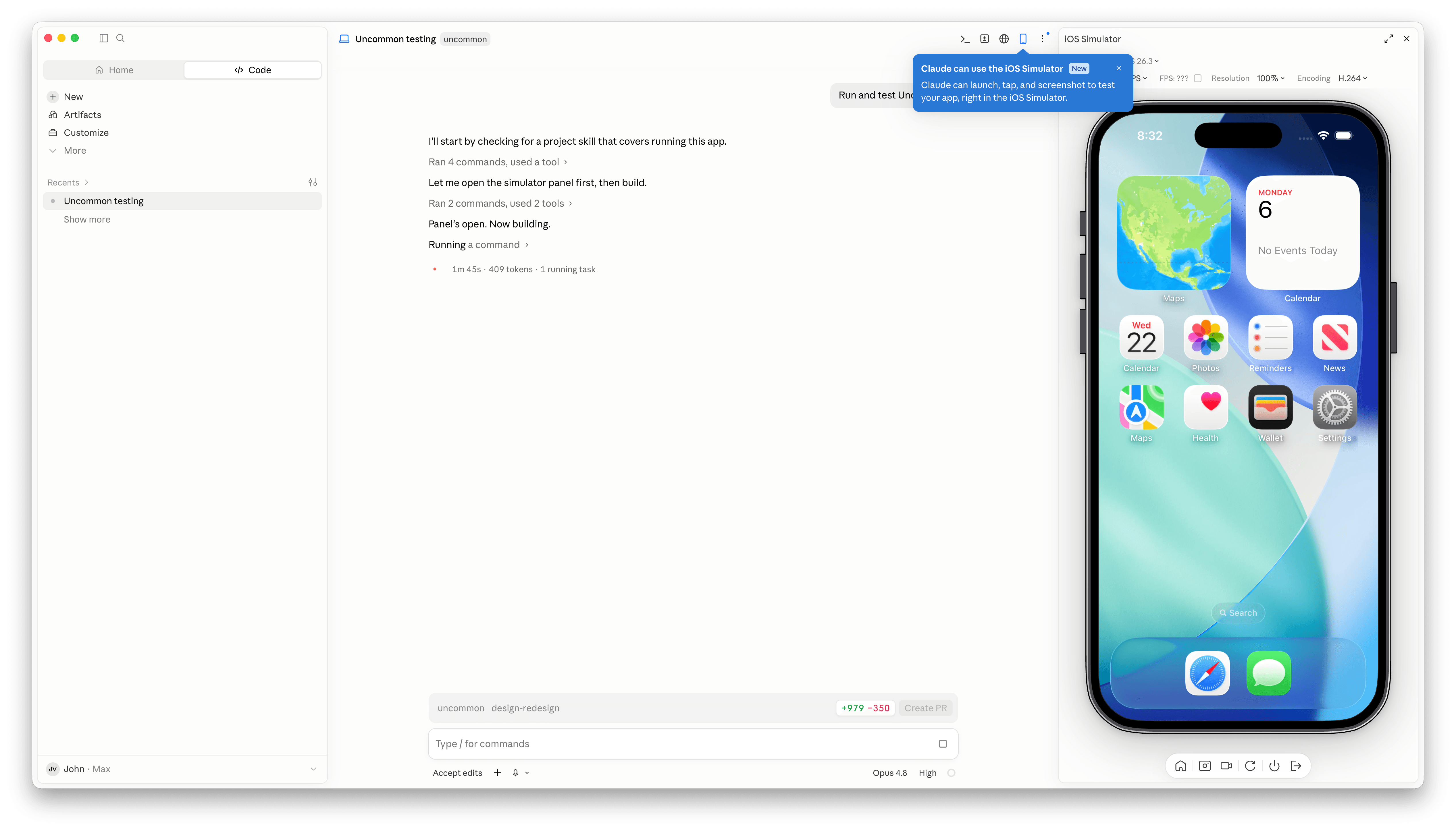
Claude Code has a new simulator button.
Claude Code’s Mac desktop app has added Apple simulator support, and although it’s billed as “iOS Simulator Support,” it actually works with any iOS, iPadOS, visionOS, or watchOS simulator you have installed.
The process of setting up a simulator is simple. A new button with an iPhone icon appears when you open an existing project. Click it and a new iPhone simulator pane opens to the right by default. However, clicking on the name of the simulator reveals a list of every available simulator. You can also run multiple simulators at once, but that immediately made my aging M1 Max Mac Studio start to chug a little.

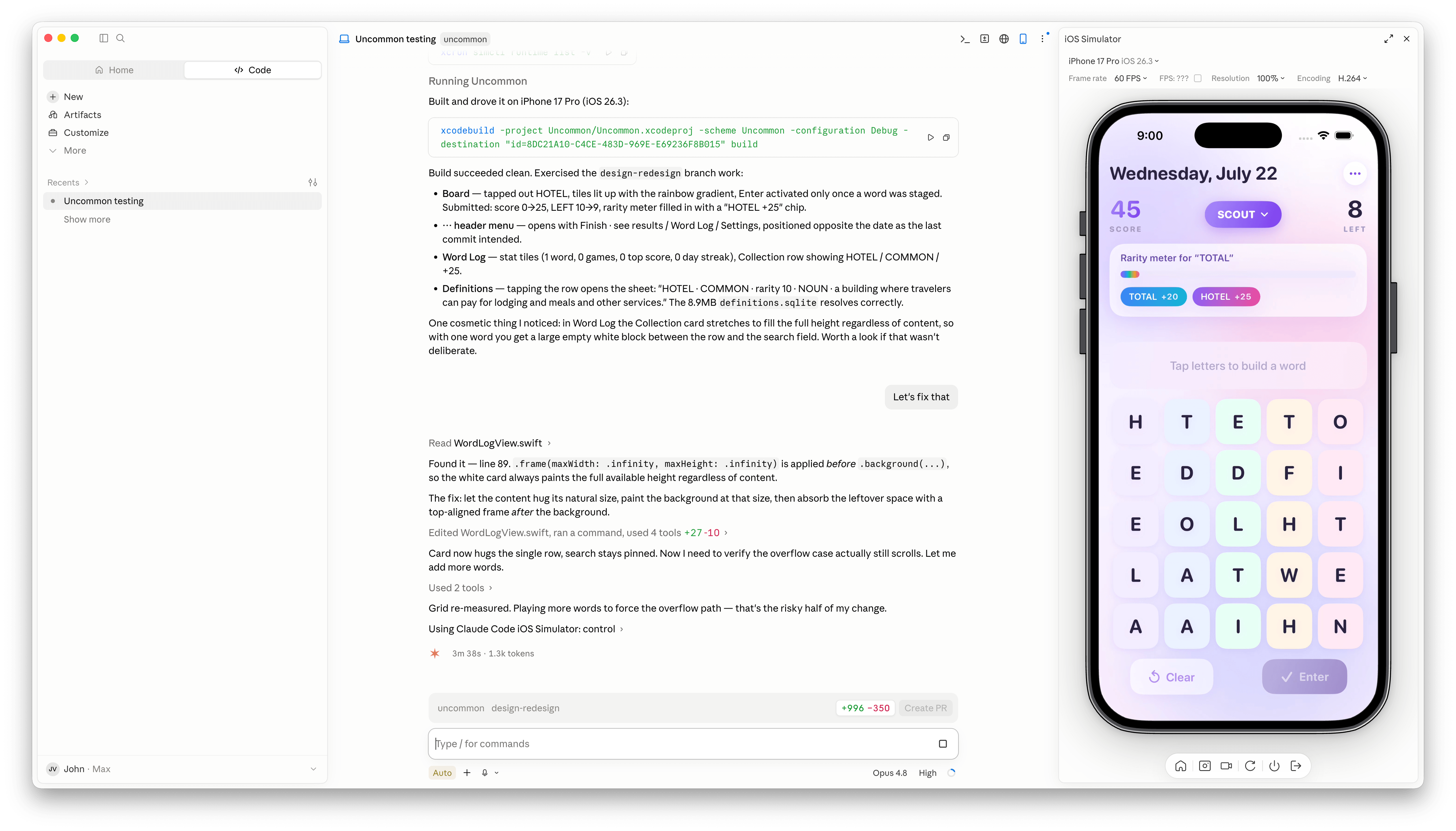
With access to your running app, Claude Code is more effective at debugging UI bugs.
Once you have the simulators that you want open, simply ask Claude Code to run and test your app, and it gets to work, building the app, installing it in the simulator, opening it, and poking around. I loaded up a simple word game I’ve been playing with, and after a few minutes, Claude Code found a UI bug while controlling the simulator. I asked it to fix the issue, which it did, then tested and committed. My testing has been limited, but so far it looks like a simple, effective loop.
It’s also worth noting that Claude Code is running the simulator directly inside the Claude app. This is not computer use, meaning windows aren’t going to be opening and getting in your way as you work on something else. All in all, the addition of the simulator, like the inclusion of an in-app sandboxed browser a couple of weeks ago, is a great update to Claude Code.
Visual Studio Code 1.129 introduces dedicated agent host
Microsoft has released Visual Studio Code 1.129, an update to its free, popular code editor that features a dedicated agent host and an editor panel in the Agents window. The updated editor also allows users to run terminal commands from chat prompts with a !prefix and offers a preview of a modern UI for the workbench.
Released July 15, VS Code 1.129 can be downloaded from code.visualstudio.com for Windows, Linux, and Mac.
Microsoft is rearchitecting how agent sessions work in VS Code around the agent host — a dedicated process that runs agent harnesses such as Claude, Copilot, and Codex, based on the Agent Host Protocol (AHP). Since a session lives in its own process, the same session can be connected to and rendered from multiple VS Code windows at once. The agent host’s Copilot agent is powered by the Copilot SDK, which means that its behavior and functionality is aligned with the Copilot CLI, the standalone GitHub Copilot app, and other Copilot products. The agent host is being rolled out to users in the editor window and the Agents window. It’s enabled through the chat.agentHost.enabled setting.
The Agents window shows conversation with an agent next to a detail area for the files and changes it produces. This release introduces a redesigned editor panel that brings the editor and the detail area together into one docked pane with a shared tab bar, so reviewing an agent’s work feels like working in the main editor instead of switching between separate panels.
Other new features and improvements in VS Code 1.129:
- Users now can prefix chat messages with a
!to run their contents as terminal commands. This works in agent host sessions, both in the editor and in the Agents window. - Developers can now use Bring Your Own Key (BYOK) models in the Agents window when selecting the Copilot harness running on the agent host.
- Developers can preview a modernized VS Code UI that updates the look and feel of the editor workbench. This is currently an experimental feature that can be enabled with the
workbench.experimental.modernUIsetting.
VS Code 1.129 follows Visual Studio Code 1.128, released July 13. An update, VS Code 1.129.1, fixes three bugs including remote agent hosts failing to start.

SpamSieve 3.3.1
SpamSieve 3.3.1 is an update of my Mac e-mail spam filter that improves the filtering accuracy and includes various optimizations, fixes, and updates for macOS 27. Some interesting engineering issues were:
I’m still supporting macOS 10.13, but the app can now build with the macOS 12 deployment target in preparation for Xcode 27. The way Swift handles calling deprecated APIs remains annoying. You need workarounds like protocols to suppress a warning in a particular region of code. Often, I am updating to a newer API, but I want to continue using the old one on earlier versions of macOS. Right now I am heavily testing on macOS 26, so I would like to only deploy the new code there. Sometimes the initial versions of APIs are buggy, and I don’t want to have to retest every feature on every version. But Swift doesn’t like me to gate the calls to macOS 26 and later if the new API was actually introduced in, say, macOS 11.
The most risky update was probably switching to the Swift API for
Scanner. This is tricky because the current scan position changes from being based on UTF-16 indexes toString.Index. And in some cases my code was intentionally scanning into the middle of a combining character. I was really glad to have extensive tests here.Recent versions of Tahoe introduced a Core Data bug that broke save recovery (when invalid Unicode can’t be written to the database and we have to fix it up first). When the error comes in, SpamSieve looks under the
NSDetailedErrorsKeykey, but the value of this key is"NSDetailedErrorsKey"while the actual error info is under the key"NSDetailedErrors".Database corruption combined with a Core Data bug and two Swift behaviors were causing crashes. The root problem, I think, is that in this situation Core Data neglects to set the error pointer for
-[NSManagedObjectContext countForFetchRequest:error:]. Normally, Swift would detect this and throw a genericnilError. However, this method signals errors by returningNSNotFoundinstead ofnil. It’s annotated asswift_error(nonnull_error), which I think means that Swift doesn’t even look at the return value, only the (unset) error. So my code was receivingNSNotFoundon the non-error path, treating it as a real count, and doing some math with it, which (by default in Swift) leads to a crash if there’s overflow. Now my code checks forNSNotFoundand usesInt.addingReportingOverflow().I reimplemented Core Data batch fetching because of two problems with the
fetchBatchSizeoption. First, it logs spurious errors when fetching from multiple stores at once. Second, it leads to high memory use. It will load objects in batches, but it never releases the earlier batches. You can manually refault objects that you no longer need, but it will still hold onto the full object shells, which can add up. My implementation only holds onto IDs, and it can fetch the IDs using a different context than the objects to push more work to background threads.I’m now using
String.makeContiguousUTF8()in various places to avoid slow iteration of bridged strings.There was a regression where some menu code could crash on macOS 10.13.
-[NSMenu setItemArray:]is only available on macOS 10.14 and later, whereas the getter is always available. With old Objective-C, the two methods could be annotated with separate availabilities. The Objective-C property syntax doesn’t allow this, so there’s no way for the compiler to flag calls where the setter is missing.The AppleScript support works much better with large data sets. The key, I think, is to never return an array to Cocoa for a scripting property/element. First, if you give it a lazy array it will sometimes try to access all the elements even if it only needs a few. And, second, AppleScript will run out of memory if the array is too large. By using indexed accessors, you can maintain laziness and only convert one object to a descriptor at a time. By caching a batch-fetching collection, you can limit the number of fetches and respond quickly when AppleScript requests individual objects.
Previously:
Xcode 26.6
Xcode 26.6 includes Swift 6.3 and SDKs for iOS 26.5, iPadOS 26.5, tvOS 26.5, macOS 26.5, and visionOS 26.5. Xcode 26.6 supports on-device debugging in iOS 15 and later, tvOS 15 and later, watchOS 8 and later, and visionOS. Xcode 26.6 requires a Mac running macOS Tahoe 26.2 or later.
[…]
Google Gemini is now available in the coding assistant.
Xcode adds support for the Agent Client protocol.
[…]
Launch Time similar-app goals have been refined for improved accuracy, establishing new baselines.
Previously:
Xcode 27’s Device Hub
You manage all the devices that appear in Xcode as run destinations using Device Hub.
Run your app on simulated devices in Device Hub to quickly evaluate new features and fix bugs, and to see how your interface works on devices that you don’t have physical access to. Run your app on physical devices to test features or services that have hardware dependencies or investigating performance issues. For more information, see Running your app on simulated or physical devices.
Device Hub is undoubtedly a major surprise. It integrates simulators, physical device management, system state testing, and dynamic size adjustment into a new workflow. Its impact on day-to-day development experience may be more direct than that of many individual APIs. That said, iPhone apps now also support dynamic size adjustment, which will bring new challenges for developers, especially in terms of data and state organization. Adapting to different sizes is not something that can be solved merely by relying on dynamic layout containers. In many scenarios, large and small sizes correspond to very different navigation logic.
Xcode 27 introduced, among other new features, a new Device Hub app for developers that takes the place of the Simulator app. Where Simulator relied on separate windows for each device, Device Hub brings them all together into a single window where each simulated device is the detail view from a source list of devices on the left. It’s a more organized approach, made necessary by the wide variety of platforms Apple and Apple platform app developers have to build and test against.
[…]
In releases prior to Xcode 27, you could resolve this by importing the root public certificate into the simulated OS. On iOS, this could be done by dragging and dropping the
.cerfile onto the Simulator device window. Nothing would appear to happen, but you could then navigate to Settings, General, About, Certificate Trust Settings and mark the certificate as trusted.[…]
In Xcode 27 with Device Hub, this process is much more uniform. […] While this new process does require you to wrap certificates in an Apple Configurator profile, this is much more consistent with how Apple’s device management system works, as it relies on signed profiles with policies, not loose
.cerfiles. And now, just by adding the.mobileconfigto the Profiles section of the device inspector, the embedded certificate is automatically marked as trusted, greatly speeding up installation on new virtual devices.
I get what Apple is trying to do with the Device Hub, but it’s nowhere near as usable and as useful as the iOS Simulator (in this seed)
Device Hub is missing the “pixel accurate” and “point accurate” zoom options and that’s not acceptable.
Maybe someday the Simulator/Device Hub might even be able to output screenshots in the same orientation as the emulated device 😛
Thanks to the remote control / screen sharing features of Device Hub, I can remotely navigate to Settings and start a software update on all my iOS27 devices without having to go collect them around the house 👌
For all of Apple’s nonsense about adding iPhone Mirroring to the EU, the new Device Hub (iOS Simulator) lets you remote-control your physical iOS devices just fine. I don’t think the DMA has an opt-out for developer tools 😛
It’s such a shame for now that Xcode 27’s Device Hub doesn’t support remote screen sharing with iOSes earlier than 27. I wish the screen sharing functionality was part of the developer disk image, and backported to iOS 26 and even iOS 18. Having a physical device plugged in somewhere is so much faster than booting a Simulator.
Previously:
Update (2026-06-26): Léo Natan:
Xcode 27’s “Device Hub” is a broken shitshow, but most importantly, it lacks the Debug menu, where you could toggle slow animations and simulate memory warnings. Apple works tirelessly to destroy any good tool they used to have.
He has a thread of issues. Hopefully these will be addressed before it’s out of beta.
Update (2026-07-01): Craig Hockenberry:
The Device Hub sometimes doesn’t kill CoreSimulator processes when you quit the app (not sure if this is a bug or intentional). Given that each device uses several hundred processes, the memory/processing impact is significant.
You’ll probably want to keep an eye on how many you have running: use right-click on the simulator in the list to “Shut Down” as necessary.
Core AI Announced
Discover Core AI, Apple’s new framework for on-device AI model deployment. Tour the ecosystem, from Python libraries for converting, authoring, and optimizing models, to a Swift API for simple plug-and-play inference and advanced use cases with strict latency and memory requirements. Explore the new Core AI models repository with ready-to-run examples for popular architectures. See how deep Xcode integration, including ahead-of-time model compilation, streamlines the workflow so you can deliver smarter, more responsive app experiences.
Dive into Core AI model authoring and optimization:
Dive into the complete custom model deployment workflow for Apple silicon with the new Core AI framework. Discover powerful techniques for authoring models using custom Metal kernels, alongside platform-aware compression strategies. The new Core AI Debugger offers deep intrinsic analysis, and AI-assisted workflows guide you from initial concept to optimized on-device execution.
Integrate on-device AI models into your app using Core AI:
Discover a curated collection of popular open-source models — including Qwen, Mistral, SAM3, and more — optimized for Apple silicon using the new Core AI Framework. Learn how to download, run, and benchmark models on your Mac, and integrate them into your app with just a few lines of code. Explore a new workflow for model compilation and on-device specialization to speed up first-time model load. Find out how to profile and optimize runtime performance with Core AI tools in Xcode.
Core AI Documentation (Hacker News):
Core AI helps you build, run, and deploy AI models in your app. Designed with Apple silicon in mind, Core AI allows your app to use the latest model architectures and inference techniques across the CPU, GPU, and Neural Engine. The Swift API makes common tasks simple, while giving you more control over model specialization, caching, and inference performance when needed.
Previously:
WWDC 2026 Links
General:
- Keynote / SOTU / Videos / YouTube
- Unofficial WWDC App / Script to Title Videos in EagleFiler
- OS Beta / Xcode Beta
- macOS 27 Installers / IPSW / Creating Install Disk With DropDMG
- Sample Code
- Group Lab Summaries
- WWDC.ai Session Summaries / Viewing Guide
Documentation:
- Updates / AppKit / Foundation / Swift / SwiftData / Security / SwiftUI / UIKit / Xcode / App Intents / Core Spotlight / Foundation Models
- Xcode Release Notes / macOS / iOS & iPadOS / Safari / tvOS / visionOS / watchOS
- Design / Resources
- New Frameworks / App Intents Testing / Core AI / CrashReportExtension / DiskImageKit / Visual Intelligence
- Technotes
Sessions:
- AppKit / UIKit / Privacy and Security / Power and Performance / TextKit
- Design / Icon Composer / Names / Brand / Search
- Swift / gRPC / MLX / Lab
- SwiftData / Code-along / Lab
- SwiftUI / With AppKit and UIKit / Lazy / Graphics Effects / Drag and Drop / Beginners Lab / Lab / Lab
- Xcode / Device Hub / Testing / Cloud / MetricKit / Lab
- Coding Intelligence / ML and AI Lab
- Agents / Instruments / Prototypes / Translate
- Core Spotlight / PaperKit / Shortcuts / Visual Intelligence / Web Extensions / WidgetKit
- Core AI / Authoring and Optimization / On-Device Models
- App Intents / Advanced / AppIntentsTesting / App Schemas / Code-along
- Foundation Models / Agentic / Evaluations / Image Understanding / LLM Provider / Private Cloud Compute / Security
Podcasts:
- Accidental Tech Podcast
- AppStories
- The Dalrymple Report
- Dithering
- Empower Apps
- MacBreak Weekly
- Mac Power Users
- The Talk Show
- Upgrade
Previously:
SigLens acquisition targets one of Apple’s biggest headaches: Buggy apps

Apple's SigLens acquisition brings Cupertino an app-monitoring tool that could make Xcode’s debugging tools a whole lot smarter.
(via Cult of Mac - Your source for the latest Apple news, rumors, analysis, reviews, how-tos and deals.)