❌

Normal view

NetNewsWire 7.2

19 October 2026 at 22:08

Brent Simmons:

We’ve released NetNewsWire 7.2 for Mac with a new column view layout: choose View > Use Column Layout to switch.

I really missed this feature from the old NetNewsWire, so I was happy to see its return. Now that I’m using it, I have mixed feelings. I love the columns, how I can scan the titles without the feed names and dates getting in the way. But some titles aren’t very informative, so I miss how the iOS-style view shows a little preview of the article’s body. I wish I could see that, either appended after the title itself or in a second line below it.

We’ve also added a second long-requested feature: you can now hide unread counts or replace them with a •, so you don’t have to deal with the anxiety of an ever-increasing unread count and the feeling like you have to get caught up.

Here are the other changes.

Previously:

DropDMG 3.7.2

19 October 2026 at 22:07

DropDMG 3.7.2 is a maintenance update of my app for disk images and archives.

  • It still works back to macOS 10.13, but this will probably be the last such release. There’s no reason the code can’t continue to run there, but soon I will be switching to Xcode 27, which deploys back to macOS 12.

  • From some reason, this build was hard to submit to the Mac App Store. altool kept retrying, or something, right at the end of the upload. There’s usually a delay before a build shows up in App Store Connect, but this time I saw it there before altool had finished running.

  • I also ran into trouble submitting the app for review. It kept showing a spinner or reporting errors when I tried to save the build, and also when adding it for review.

  • The actual review was pretty quick by modern standards—three days including a weekend. It warned me ahead of time that review “can take up to 48 hours.”

  • When I was approving the build for release, it asked if I was “enjoying” App Store Connect and wanted me to rate the app.

Previously:

Chrome Supports JPEG XL

13 October 2026 at 03:04

Toni Sagrista Selles (Hacker News):

In a dramatic turn of events, the Chromium team has reversed its Obsolete tag, and has decided to support the format in Blink (the engine behind Chrome/Chromium/Edge). Given Chrome’s position in the browser market share, I predict the format will become a de factor standard for images in the near future.

[…]

I’ve been following JPEG XL since its experimental support in Blink. What started as a promising feature was quickly axed by the team in a bizarre and ridiculous manner. First, they asked the community for feedback on the format. Then, the community responded very positively. And I don’t only mean a couple of guys in their basement. Meta, Intel, Cloudinary, Adobe, ffmpeg, libvips, Krita, and many more. After that came the infamous comment[…]

[…]

To top it off, a couple of weeks ago, the PDF Association announced their intent to adopt JPEG XL as a preferred image format in their PDF specification.

Michael Larabel (Slashdot):

JPEG-XL image support is back in the very latest Google Chrome/Chromium codebase. Back in December they merged jxl-rs as a pure Rust-based JPEG-XL image decoder from the official libjxl organization. At the end of December they did more JPEG-XL plumbing with the enums and build flags for the support.

Luca Versari et al. (via Jarek Duda):

We’re excited to announce that Chrome is shipping decoding support for the JPEG XL (.jxl) image format starting from Chrome 155. JPEG XL is a next-generation image format designed to meet the needs of modern web developers and photographers. It offers 30-50% better compression than JPEG, lossless compression, built-in HDR support, lossless JPEG transcoding, and more.

In general, we recommend trying both AVIF and JPEG XL to get the best results. We expect that JPEG XL is most helpful for high-fidelity or lossless compression, especially of photographic images or in cases in which fine-grained progressive decoding is preferred.

Previously:

OpenAI’s Dots

9 October 2026 at 20:42

John Voorhees:

Earlier this week, I was at OpenAI’s annual DevDay conference where it launched Dots, a personal agent that lives inside the ChatGPT app.

[…]

Dots are persistent, cloud-based agents that use the plugins and other tools you’ve connected to ChatGPT, after you allow them to do so. Your Dot has its own virtual Linux computer to assist you with your work. And at first, your Dot, which is depicted by a colorful character you can customize, doesn’t have access to anything else. However, as you give your Dot tasks that need access to other tools, it will ask for your permission to access other tools.

[…]

But being a cloud-based agent has its downsides, too. Out of the box, your Dot can’t access your computer’s files and apps. That’s easily fixed by clicking or tapping on your Dot and granting it access to your Mac, so it can use the Mac alongside its own VM.

Previously:

Opening a File’s Git History in Tower

7 October 2026 at 19:48

Tower 18:

But something has changed: thanks to AI coding agents like Claude Code and Codex, even the most devoted GUI fans are now spending more and more time in the terminal. You kick off a task, the agent does its thing… and then you want to actually see what happened.

That’s where Tower shines, so we felt the path from the terminal to Tower deserved a serious upgrade. With Tower 18, the Tower Command Line Tool (gittower) is no longer just a way to open a repository — it takes you to exactly the place you want to look at.

I’ve been wanting this for 15 years or so. Thanks, AI! You still can’t open a file in Tower by dragging it onto the Dock icon. Nor can you just pass it to gittower and have it figure out which repo it belongs to. But if your working directory is already within the working copy, you can now use gittower to open the file history. I’ve written a script that finds the current file in the frontmost app (BBEdit, Xcode, or Finder) and opens it in Tower.

Previously:

Apple Intelligence Reports

2 October 2026 at 19:41

Howard Oakley:

In Golden Gate there are currently three sources of records of AI transactions. Those handled entirely on-device appear only to be recorded by Unified log entries, while interactions with Siri are provided in a detailed transcript in the new Siri app.

[…]

Although that transcript includes external references implying that an off-device model was used, no explicit information is given, and entries don’t make clear what information left the device, or whether that was handled by PCC or Apple’s secure implementation in Google Cloud.

Apple’s documentation refers users to the Apple Intelligence Report (AIR) available from Privacy & Security settings. When enabled, this will generate at the user’s request, a report covering the last 15 minutes or 7 days of AI interactions which “may include personal data such as messages and text you enter in intelligent writing tools.”

Glenn Fleishman:

Because of the peculiar nature of AI large language models (LLMs), Apple has to “talk” to Siri AI just like we talk to ChatGPT or Claude. But what does Apple say in these system prompts?

[…]

The report is formatted in JSON (JavaScript Object Notation), which is not meant to be read by humans. However, you can open it in a JSON reader, such as the free JSON Viewer, for a color-coded view that’s easier to examine, or cut and paste it into a text editor or word processor. Reports can get large, though, and JSON Viewer only handles files up to 10 MB. Try OK JSON if you hit that limit ($24.99 with a 7-day free trial). Neither app soft-wraps long lines, so I copy the prompts into BBEdit ($59.99, free mode available) for searching and viewing.

Howard Oakley:

I pointed out that the bulk of most AIRs are privateCloudComputeRequests, metadata for requests processed by PCC, whose main contents are attestation bundles. Those are provided in Protobuf format, and encoded using Base64, making them difficult to access.

However, Apple states that “you can parse, canonicalize, and verify attestation bundles from the Apple Intelligence Report using the pccvre attestation subcommands.” This article explains how you can do that without compromising the security of your Mac, using a Virtual Machine.

Howard Oakley:

Once you’re happy the AIR will be worth browsing, return to that setting and click on the Export Activity button. Be sure to save that AIR with the default .json extension.

[…]

Provided you’re running macOS Golden Gate, download the first beta of my new app AIRer from here: AIRer100

[…]

If there are records in that AIR, they will be listed by time and date, with the oldest at the top, in the left sidebar. Select one of them, and its useful contents will be displayed in the main part of AIRer’s window.

Previously:

EagleFiler 1.9.22

1 October 2026 at 20:55

EagleFiler 1.9.22 is a maintenance release of my Mac file/note organizer and e-mail archiving app. This version works around various bugs in macOS 27, adds capture support for the Thorium Web browser, and improves importing from Mariner Paperless.

  • macOS 27 broke several things with drag and drop out of Apple Mail. Simply trying to read a URL from the pasteboard will cause a hang while it waits forever for the pasteboard server (FB24803817). The same thing happens when using PasteboardSetPasteLocation() and reading kPasteboardTypeFileURLPromise directly, which I was doing (instead of using newer API) to work around bugs in older versions of macOS. EagleFiler now uses NSFilePromiseReceiver for drags from Mail on macOS 27, which works better, but I also had to work around a bug where Mail would promise superfluous files for which the reader callback was never invoked at all.

  • macOS 27 also seems to include various regressions when reading PDF and Word files, producing invalid strings containing NUL characters. Also, displaying certain PDF files worked fine on macOS 26 but now crashes.

  • I also ran into (and worked around) a bug where macOS 27’s NSTextView would get into an infinite layout loop when displaying an attributed string that included images.

  • Drag and drop from Airmail is still an issue. When using the newer drag APIs, it will often hang Airmail or not produce a file, and this also happens with other apps like Finder as the destination. EagleFiler works around this using older APIs with Airmail and tries to report a helpful error when there’s trouble. Single-message drags work best.

  • I’ve also been investigating a problem where saving a file with a colored tag in iCloud Drive will, a few seconds later, change the color to gray, but I don’t have a solution for this.

Previously:

Not Muse in the App Store

28 September 2026 at 19:52

Jeff Johnson:

The Muse from Meta app description says at the beginning, “Muse is your personal AI agent that gets things done, always working on what matters to you.” The Muse AI app description says at the beginning, “Muse is your professional AI agent that gets work done, always helping move important tasks forward.” Near the end, the Muse from Meta app description has the heading “SMART, BUT STILL LEARNING.” Near the end, the Muse AI app description has the heading “POWERFUL, BUT STILL LEARNING.”

In other words, Muse AI is a blatant copy of Muse from Meta, the latter of which is currently the #1 iOS App Store download in the United States. I don’t know where Muse AI ranks in the iOS App Store, but I do know that it’s currently the #20 Mac App Store download in the US.

And the real Muse app isn’t in the Mac App Store, so it has no competition.

By the way, I’d also like to draw your attention to the #11 Mac App Store download, as shown in my screenshot above: App for Instagram º. Yes, the app name includes the º character, a phenomenon I’ve written about before.

[…]

The top search result for “VLC” in the Mac App Store is Video Player for VLC, developed by muhammad faisal jabbar, not by VideoLAN. VLC for Mac is distributed outside the Mac App Store. You may notice a similarity between the icon of the official VLC app in the iOS App Store and the icon of Video Player for VLC.

Previously:

Update (2026-09-29): John Gruber:

“Muse AI” is now gone, but “App for Instagram °” and “Video Player for VLC” are both still there.

Jeff Johnson:

The Reddit commenter claims that the scams receiving public attention are “the tip of the iceberg from a limited, outsider perspective,” which is an accurate metaphor, yet the commenter and I have dramatically different interpretations of that metaphor. For the commenter, the iceberg represents the vast number of scams allegedly caught by Apple app review but not seen by the public; for me, the iceberg represents the vast number of scams not caught by Apple app review and not seen by the public either. To put the argument another way, the commenter appears to assume that the majority of scams in the App Store receive widespread public attention, in blog posts such as mine or in the news media, so the relatively small number of stories we hear is indicative of a relatively small number of scams in the App Store, whereas my own impression is that the vast majority of scams in the App Store do not receive widespread public attention. Scam hunting is not my job, merely an occasional hobby. It’s so easy for me to find scams, they practically fall into my lap whenever I look. I could spend all day every day finding and listing App Store scams, if I were sufficiently motivated (I’m not). You would think that someone working for Apple would be sufficiently motivated, by a paycheck, to spend all day every day finding and listing and most importantly removing App Store scams, but I’ve seen no evidence of it.

I think Johnson is right about the iceberg. Most of the scams that get publicity are at the top of the charts. One view is that all the scam apps that Apple misses end up being popular. What are the odds? The other is that we notice them because they’re popular and that there’s also a vast number of deceitful or dangerous apps lurking.

Dan Moren:

Speaking of App Store shortcomings, I really hate when I want to see how much an app costs and I get this impenetrable list of IAP options. It’s impossible to know without installing and opening the app what the payments options are. Be great if Apple helped make this clearer—which options are actually available? What are their various plans (monthly, weekly, etc.)?

Meta AI for Mac and Muse

28 September 2026 at 19:51

Zac Hall:

The new Meta AI desktop app is version 1.0 beta at launch and weighs just 16MB once installed.

Based on initial inspection, it runs natively on Apple silicon Macs with macOS 15 or later, using an AppKit and SwiftUI shell with WebKit for richer chat content. In other words, this is not an Electron app or a repackaged iPad release.

It includes Mac-specific hooks, making the desktop experience more robust than the Meta AI mobile app.

Karissa Bell:

The Mac app brings a few new capabilities compared with Meta AI’s existing website and mobile app. For example, it enables users to share part of their screen so the assistant can “see” what they’re working on and provide more specific answers.

Juli Clover:

The app is primarily meant for businesses and content creators, and it integrates with Facebook and Instagram. It incorporates analytics tools so it can answer questions about performance, and connects with Google Workspace for document access. Google Workspace access requires a professional Facebook or Instagram account.

John Gruber:

Passes the Settings window sniff test too — it actually has a Settings window.

[…]

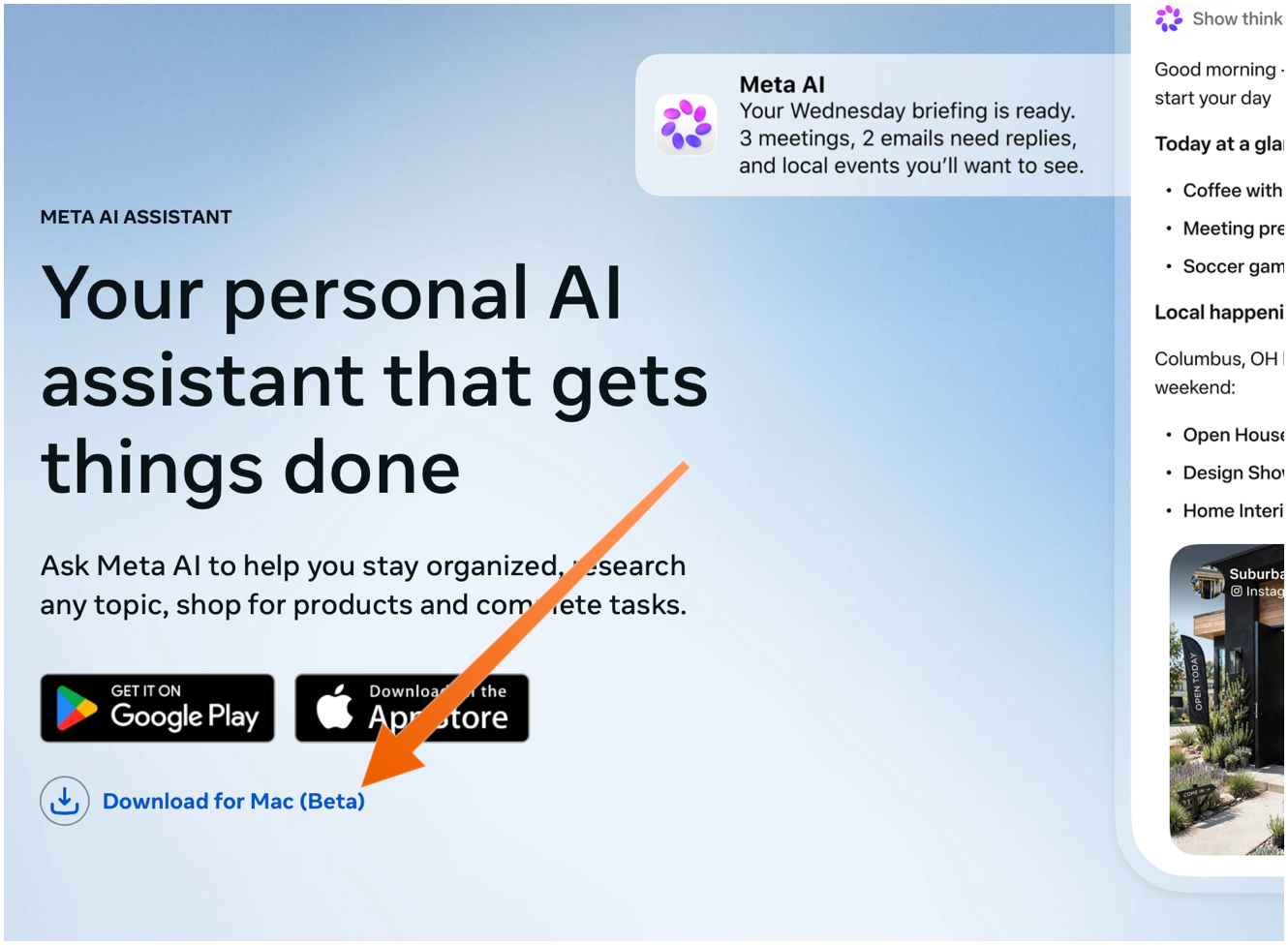
The Mac app is not available in the App Store. You need to download it directly from Meta’s web page, using the “Download for Mac (Beta)” link. The ChatGPT and Claude Mac apps aren’t in the Mac App Store either — they do too many things outside the App Store’s mandatory sandbox (and probably use APIs require that special entitlements in the App Store too).

Sarah Perez:

Meta’s new AI assistant app, Muse, is now available on Mac.

On the Mac, Muse can interact with your files, messages, calendar, notes, and mail, all within their native applications.

Terrence O’Brien:

Jason Aten, a contributing editor at Inc Magazine, posted on Threads screenshots of an interaction he had with Muse in which the assistant asks him some questions about a conversation he was having in Messages.

The problem is that Aten says he didn’t give Muse access to his messages. When asked how it knew about the contents of his messages, Muse replied, “I saw the notification previews, not your message history. I haven’t been reading your texts.” Aten continued to push, asking how Muse was receiving message previews, it didn’t have a good answer.

M.G. Siegler:

The number one response I’ve gotten to my thoughts on Meta’s Muse personal assistant agent is some variation of “I will never trust Meta with my data.” But the number two response is arguably more interesting (and related): “Why didn’t Google build this?”

Pieter Arntz:

Mac security researcher Patrick Wardle says it’s trivial to turn Muse into “the ultimate backdoor.”

[…]

According to Ars Technica, Wardle found that a locally running application or terminal command could alter an undocumented Muse configuration setting that controls the server used for dictation transcription. By redirecting dictation traffic to an attacker-controlled server, an attacker could capture voice prompts and obtain the authentication token for the victim’s Muse account.

John Gruber:

Four days later and Muse still holds the #1 spot in the U.S. iOS App Store.

See also: Joanna Stern.

Alexandr Wang (Watts Martin, John Gruber):

Here’s the best part: we have no idea what people will want. The world until now has been shaped by the small number of fanatics who have somehow found a way to make their wants real. But we’ve never seen humanity with every single person’s agency fully switched on. Eight billion people who just need to write their dream down in order to get started making it happen.

So we built Muse to help people build the world they want.

Damien P. Williams:

So uhhhhhh… Apparently meta’s muse “AI” is just straight up doxxing people to strangers on FB marketplace???

Via Mike Masnick:

Almost all of Meta’s PR about Muse was about how careful they had been to set it up not to do things like this, how they delayed the launch by months to carefully design it so it could be trusted. And then…

Previously:

Grok Bot

28 September 2026 at 19:51

SpaceXAI (MacRumors):

Grok Bot is in beta and available today for SuperGrok, SuperGrok Plus, and SuperGrok Heavy; Cursor Pro, Pro+, and Ultra; and Cursor Teams Standard and Premium subscribers on desktop and iOS. Grok Bot comes with its own usage, separate from your Grok and Cursor plans, so anything you hand off to a Bot won’t count against your existing usage. Download the app, create your first teammate, and start handing off work.

[…]

Inside SpaceXAI, that already looks like real, multi-step coordinated jobs being handled: a sales Bot updating the CRM with call transcript notes and drafting follow-ups, an ops Bot seating new hires and processing invoices received in Gmail, and an engineering Bot reproducing a bug in the product UI, filing the ticket, and handing the fix off to a debugging Bot.

[…]

People inside SpaceXAI often run multiple Bots in parallel, with one to manage the others. A chief of staff sits on top, with a specialist for each lane: inbox management, expenses, recruiting, bug fixes, or operations. Instead of multiple agents you have to manage, Grok Bot gives you a small team that can work in parallel so you’re not the middleman.

Artificial Analysis (Hacker News):

Grok 4.6 gains 5 points over Grok 4.5 on the Intelligence Index just over one month after its release, or +23 points compared to Grok 4.3. This brings SpaceXAI back to the intelligence frontier alongside OpenAI, behind only Anthropic.

Kun Chen:

i’m 80% sure Grok Bot was originally built by the Cursor product team, and got rebranded after the acquisition

John Bai:

Believe it or not, the original Grok Bot started as an exploration of what an ambient computer assistant might look like.

I wanted to give an expressive face to a helper that could also use your computer. The character evolved, but that sense of presence stuck around.

Dare Obasanjo:

A real dilemma. People whose opinions on tech topics I take seriously are saying good things about Grok Bot.

It sounds like it nailed OpenClaw/Hermes for the masses but as a point of principle I don’t use MechaHitler. I would love an overview of what it gets right that everyone else missed.

I don’t trust xAI (or Meta) with my data, but it doesn’t seem like Siri AI can do all that much. So far, I’ve been too busy to do much with agents, even on a test Mac. But I don’t think agents are going away, so there’s a tension here that will need to be resolved eventually. My guess is that most people will throw caution to the wind in order to get results. Maybe Google will have something more trustworthy and powerful by then.

Previously:

OpenClaw 2.0

28 September 2026 at 19:51

Juli Clover:

OpenClaw for iOS can be used alongside an existing gateway as a secure node for chat, voice approvals, sharing, and device-aware automation.

The iOS app replaces iPhone and iPad workarounds that involved using Telegram or WhatsApp for on-the-go access.

Hannes Rudolph (Hacker News):

This update touches every part of OpenClaw, including installation, messaging, memory, skills, models, automations, the browser and native apps, plugins, security, and a very long tail of fixes. We started by simplifying installation and rebuilding the browser app as a first-class experience, but doing that properly meant carrying the cleanup through the rest of OpenClaw until it became OpenClaw 2.0.

Previously:

FruitMenu Redux

25 September 2026 at 20:26

Rosyna Keller:

FruitMenu Redux revives a utility (FruitMenu) that brings lost Mac OS Classic features to Mac OS X. Specifically, it restores the fully customizable Apple menu.

It’s no longer a haxie that works by patching the operating system. Now, it’s a regular app that hooks into other apps (e.g. to switch to a particular window) using the accessibility APIs.

The first step was to implement every FruitMenu feature that’s still possible in the current macOS security environment. That immediately ruled out features requiring patching menus (sigh, I really miss patching menus) and features that require privileges now gated behind restricted entitlements. I also added support for viewing and executing Shortcuts.

[…]

Additionally, you can set a hotkey to any item you add to FruitMenu Redux!

[…]

Because SwiftUI doesn’t support dynamic menus, I had to rewrite all the menu code to use AppKit’s NSStatusItem and NSMenu as NSMenu is now a first-class citizen on macOS and fully supports dynamic submenu building. This means that FMR doesn’t even try to build the contents of a folder under you actually attempt to show the contents of the folder. Not only is this significantly faster, but it also uses significantly less memory.

FruitMenu is now available (Mastodon):

A built-in visual editor displays your menu on the left and a library of over 30 item types on the right. You drag items from one to the other (almost like Font/DA Mover, the best UX ever created). The library includes files and folders, submenus, Running Applications (and you can enable an option to show open windows and tabs), Mounted Volumes, Recent Items, Force Quit, Sleep, Restart, Shut Down, Shortcuts, Software Update, separators, System Settings panes, and more!

Anything you put in the FruitMenu Redux Items folder in your Library also appears in Files, folders, and aliases.

$10 (with $7 intro price), not in the Mac App Store because of accessibility.

Rosyna Keller:

OMG, Core Transferable, why do I have to declare a public UTI in my info.plist for internally dragging from one list in my app to another list in my app?! It’ll never be decoded by another app!

This was the fix to a bug I reported. With the new SwiftUI drag API, you apparently have to declare private internal drag types in your plist (on Tahoe, but not on Golden Gate).

Xounds, which plays sounds in response to user interface actions, is also back. Unlike FruitMenu, this one never appealed to me—I actually prefer to have the audio muted most of the time. I do find it interesting that it supports the old sound set files from Mac OS 8. Apple dropped the APIs for playing these way back during the 64-bit transition, but Xounds knows how to extract and play the audio.

Previously:

OmniFocus 4.9

23 September 2026 at 20:33

Ken Case:

OmniFocus 4.9 adds support for Siri AI, optional new date parsing assistance via Apple Intelligence, and a range of new and updated App Intents exposed as Shortcuts actions.

[…]

In our testing we’ve found that the new Siri AI hasn’t yet learned how to work with app capabilities that it hasn’t specifically been trained on, even for App Intents that are available in Shortcuts and Spotlight. For example, its understanding of how to work with OmniFocus is based on how it’s been trained to work with the Reminders app. Our work in OmniFocus 4.9 means that Siri now knows about “reminders” in OmniFocus (i.e. actions and Inbox items), “lists” (i.e. projects) which contain reminders, and any “groups” (i.e. folders) that lists have been organized into. Siri can assign and edit reminder due dates, flags, repeat schedules, and notes and image attachments in OmniFocus. This is another great leap forward! But as soon as you try to go beyond what Reminders can do, you find its limits: for example, it doesn’t understand the distinction between due dates, planned dates, and defer dates.

Siri also doesn’t really understand much about how our document-based apps work, because Apple hasn’t trained it on our specific apps or anything equivalent. So, Siri doesn’t know how to make an outline, or a diagram, or a Gantt chart. We expect this to improve over time—after all, we’ve worked with other language models that do understand how to make those things—but it’s important to understand Siri’s current limits.

[…]

With Siri AI, Spotlight becomes even more important as a source for personal context. You can ask Siri about content in your OmniFocus database, so Siri can summarize the actions you’ve completed this week, or tell you what items you might consider working on soon.

My favorite change in OmniFocus 4.9 seems less exiting, but I’m irrationally happy about it. Last year, as part of the Liquid Glass update, they redesigned the Perspectives Bar on iOS to automatically collapse and expand as you scroll. I found the animations distracting, it messed up my muscle memory, and it required lots of extra taps. In 4.9, there’s a new Show Perspective Bar option, which you can set to Automatically (the 4.8 behavior), Manually (stay collapsed but expand when you tap), or Always (show the expanded state all the time, nothing moves). This is, of course, what I chose.

I’m still seeing the previously mentioned glitches in the Mac app with tabbing, spontaneous tag collapsing, and the window moving itself between spaces. The iOS app sometimes still shows an out-of-date list of flagged actions.

Previously:

Carbon Copy Cloner 7.2

22 September 2026 at 21:36

Mike Bombich:

I remember seeing this one way back in Big Sur; you’d create a perfectly functional bootable copy of the system, but it wouldn’t show up in the Startup Disk Preference Pane. Apple ultimately resolved that issue in macOS Monterey, but now we’re seeing it again — unfixed in the Golden Gate release candidate.

The new CCC has a workaround, as does SuperDuper.

CCC 7.2 introduces a hybrid approach for bootable backups: as long as the source and backup OS versions are the same, CCC will update the backup incrementally without requiring any task configuration changes. This new approach will make many of the CCC-specific features available for bootable backup tasks, e.g. backup versioning, Quick Update, insight into what changes were made to the source between events. For the long stretches of time where your Mac’s OS isn’t getting updated every day, now you can enjoy the full benefits of the CCC backup solution.

These are great benefits for anyone that requires a bootable backup, but this isn’t a panacea. If the OS versions don’t match, the destination (and all backup versions) still must be erased and recloned; again, to offer the most reliably-bootable copy of macOS. We made improvements here, too. By default, CCC will ask for your approval before erasing the destination — this allows you to schedule your backup task without the fear of the backup getting automatically erased whenever the source OS is updated. That also allows you to retain the option of downgrading the source volume’s macOS, which you might want a day or so to assess.

Previously:

Airmail 26.037

21 September 2026 at 21:46

Today, Apple sent me an e-mail about the Airmail Mac e-mail client:

Thank you for subscribing to Airmail Pro Yearly. We wanted to let you know about an upcoming change to this subscription.

The developer, Bloop S.R.L, is raising the price of this subscription from $9.99 per year to $49.99 per year.

This is a big increase in percentage terms, but the new price is actually not out of line with subscriptions for other e-mail clients these days. There remains a free version that supports a single mail account.

They recently added an MCP:

Airmail now connects to AI assistants like Claude, Codex, and other compatible chatbots — so you can manage your email just by asking, in plain language.

Ask your assistant to find messages, summarize long threads, draft replies, tidy up your inbox, and organize folders. Airmail stays in control: everything runs on your Mac, and you decide what the assistant is allowed to do.

Most relevant to recent discussions here: does Airmail access Exchange accounts via the moribund EWS or the newer Graph API? They told me that it does not currently support Graph but that they will add that in a future update.

Previously:

McKinley 1.0

7 September 2026 at 19:18

Amy Worrall (Mastodon):

McKinley is an all-in-one studio for drawing and annotating SF Symbols. It bundles vector tools with knowledge of the SF Symbols structure, so you can edit one set of objects across multiple weights, sizes and colours. Import SVG or start from scratch, live preview your work using Apple’s own renderer, and export directly to Xcode, so you never need touch the SF Symbols app again!

[…]

Gone are the days of converting your strokes and shapes to outlined paths before export. Keep everything how you drew it, and let McKinley handle the output.

[…]

Link your project’s asset catalog to your McKinley document. Then when you make a change, hit the Sync keyboard shortcut and it’s immediately populated with your latest version.

[…]

McKinley is a Mac-assed Mac app: a native AppKit UI, Quick Look previews and thumbnails for your documents, a full AppleScript dictionary for batch work, and the whole user guide offline in Help.

$60, no subscription. It’s been a while since I had to deal with custom SF Symbols, but I remember it being a major pain. I haven’t had the chance to try McKinley with a real project yet, but it looks very well done. I love seeing a new app ship with documentation and extensive AppleScript support, including sample scripts that you can install right from its script menu.

Mario Guzmán:

The icon isn’t just a symbol but a whole artistic creation on a canvas.

Look at how your tools are on panels that could be individually opened on their own auxiliary window. I can’t stand the single-window, everything buried into a single-sidebar design we get these days.

Amy Worrall:

SF Symbols rendering does a surprising amount behind your back: it interpolates nine weights from three masters, applies optical size adjustments, resolves hierarchical opacity ladders, and changes some of this between OS releases. Any preview I rendered myself might diverge from the real thing in ways nobody would notice until the symbol was in an app looking subtly wrong. (Obviously I aim to get my canvas rendering with the exact same nuance as Apple’s renderer, but programmers are fallible and the fewer ways things can diverge, the better.)

Apple provides no API for “here’s my SVG, render it as a symbol”. For a normal app using a custom SF Symbol, the symbol is compiled from an Asset Catalog in Xcode into a .car file (a compiled asset catalog) at build time. But there’s no ‘build time’ when I want to update a preview in McKinley.

My workaround involves compiling your symbol into a .car file at runtime, on every edit, by patching bytes into a template, then loading that temporary .car file into McKinley via NSBundle.

Previously:

Update (2026-09-08): John Gruber:

I mean just look at McKinley. It’s both beautiful and quite obviously a serious professional tool.

Update (2026-09-11): Amy Worrall:

Anyone used any great implementations of dockable palettes? (Adobe’s don’t count, I don’t think they’re great!)

I’m not going to go back to sidebars, but some kind of options/flexibility might work, if it doesn’t get in the way!

Banktivity Document Model and Rewrite

7 September 2026 at 19:16

Ian Gillespie (2025):

Banktivity has traditionally been what’s known as a document-based app. It lets you create and open independent files (or documents), each with its own data. In contrast, many modern apps—Music, Calendar, Photos—are library-based. These apps typically have a single window and a unified data set.

We’ve long appreciated the flexibility our document model provides. But in practice, most of our customers use only a single file. And more critically, this architecture makes it much harder to integrate Banktivity with the broader Apple ecosystem.

[…]

The shift from a document-based model to the new Organizer framework marks a major step forward for Banktivity. It simplifies how users interact with their data while laying the foundation for deeper system integration, background syncing, and a more seamless multi-device experience.

This follows MoneyWell also getting rid of the document model. From my perspective, it’s a shame. I prefer the flexibility of being able to have different accounts in different documents, choosing where to store the documents, and even splitting the same account across multiple documents for performance reasons.

Ian Gillespie (2025):

Ledgers contain an entire, independent set of accounts, categories, investments, goals, budget and so on. Many customers will only have one Ledger for the finances they manage. But we also know there is a good number of customers out there that manage finances across family members, non-profits and small businesses – for these customers, support for multiple Ledgers is crucial.

[…]

While UI is what you see, most of the hard work has been in the architecture. The Library framework — the backbone that replaces our old document system — is in place. That means we can now reliably connect your Banktivity User Account with all of your Ledgers, whether local or synced to the cloud.

Ian Gillespie:

Refactoring Banktivity from a document-based app into a library-style app was a significant undertaking. It changed some very fundamental assumptions in the code. Ledgers can now be opened and closed in the background, multiple windows and scenes can be active at once, and the Organizer has to coordinate local files, cloud sync, user accounts and application state in ways the old document architecture never had to.

Banktivity 10.0 laid the foundation for that transition. With Banktivity 10.1, a major focus has been strengthening that foundation. We’ve spent a lot of time simplifying the underlying architecture, eliminating race conditions and threading issues, and improving how ledgers are opened, closed and managed.

Previously:

SoundSource Support Follow-Up

4 September 2026 at 20:19

Chris Barajas:

To spread the word, we announced SoundSource 6 on our blog and sent a mass mailing to our customer list. We also took a more targeted approach, contacting both existing and potential customers who’d previously reached out to us with specific requests. We went back to those folks to let them know about the changes that would interest them most.

[…]

A real live person writes every email response our support team sends, and that human touch takes time. The process is helped along by text snippets, replies that we write once and then reuse and adapt to answer common questions.

[…]

To decide if an email should be sent to a customer, we checked Help Scout’s conversation history, as well as our own custom app for their order history. For example, if someone requested several features across different emails, we’d pick the one that was most impactful, then delete other drafts to avoid inundating them with multiple messages.

Previously:

SuperDuper’s “Follow-Up”

31 August 2026 at 20:44

Dave Nanian:

Recent versions of xOS (that is, macOS, iOS, iPadOS, etc) have Data Protection Classes from A to D that get assigned to files and folders.

[…]

The thing is, though, is that these files and folders are inaccessible unless the user is logged in, and the screen is unlocked. A few seconds after the screen locks (or you log out), the keys are purged, and they cannot be read.

[…]

That means the files any application considers to be worth protection cannot be accessed when a backup usually happens.

[…]

You may have noticed that if you had an overnight backup, when you unlock your screen, a copy starts to run. It’s typically quite brief, thanks to ⚡️Turbo Smart Update, but it might surprise you anyway. […] During your overnight copy, SuperDuper kept track of the files that it couldn’t access due to their protection class. And now that it can access them, it’s making sure they get backed up.

This seems like the right thing to do. Time Machine also does it. A backup app should try to make as faithful a backup as possible. I kind of find it annoying, though. Sometimes it can’t do a Turbo Smart Update, and so the backup that should already be done may end up taking another 30 minutes or more. The best thing to do is schedule backups while you’re using your Mac to avoid SuperDuper needing to do such “follow-ups.”

I wrote some code to try to figure out which files I have that are using data protection. Interestingly, the URLFileProtection API seems to not work on macOS. I used the lower level getattrlist() instead. Nanian recommends fcntl(). I didn’t find any protected files that I actually care about, just caches and derived data from Apple’s own apps. But, in theory, Apple or a third-party app could be saving actual user data using data protection.

Previously:

Unforgetful 1.0

24 August 2026 at 21:41

Marco Arment:

Unforgetful isn’t a new productivity system to learn.

[…]

This is designed for a small number of short-term tasks. What do you need to do today, tomorrow, this week, or this month?

[…]

If you want tagging, folders, archives, or other ways to organize or file away tasks, this isn’t the app you’re looking for.

Unforgetful is for people who know that if they file away a task, it never gets done.

I’m an OmniFocus person. I love tagging, folders, and archives; I never want to see a notification for a to-do item. I prefer pull to push. So this is absolutely not the right tool for me. But I like the fresh thinking behind this app and how the various design choices interact to make it an opinionated tool for the right type of person.

Marco Arment:

Calendar alarms changed my life. Events without alarms don’t happen.

[…]

Most of my Reminders interaction has always been via Siri and notifications. And that fits me very well, with three major exceptions:

  1. If I say “Remind me to buy milk,” but I forget to specify a time (or Siri misses it), Reminders will never notify me, and I’ll never check the app, so it’ll be lost.
  2. If I inadvertently dismiss a Reminders notification without snoozing it, Reminders will never notify me about it again, so it’ll be lost.
  3. When I do snooze a Reminders notification, which I do a lot, the snooze options suck.

He has good solutions to these and other problems. I’m tempted to try out Unforgetful just for the purported quick capture of dictated reminders, however there’s no watch app.

Listen to Accidental Tech Podcast to hear about unfortunate limitations of EventKit. Reminders itself is interesting to me in that the (private) data model is now so rich, but I’m put off by the UI, the lack of export, and the limited support for driving it from the keyboard.

Previously:

❌