In a MacVoices After Dark supplemental, members of the panel continue their discussion of Apple’s HomeView and Apple TV announcements. Pricing, functionality, and real-world value are debated as they examine HomeView’s potential as a smart home controller, its limitations compared to an iPad, and possible future capabilities. Apple TV’s higher price raises questions about performance, […]
Can AI-powered vibe coding challenge established software companies? Photocraft and other Adobe application clones spark a discussion of their capabilities, legal questions, and the possibility of creating customized software. A live download offers a closer look at the applications. The conversation also explores the Swift Angels developer meetup, LinkedIn’s growing importance for professional networking, and generational differences in technology.
This session starts out by reviewing the third-party smart home devices for HomeView, their pricing, capabilities, and how they compare with more established options. TextExpander’s new free tier sparks a discussion of its limitations, business strategy, and competition from TextBlaze, Typinator, and Apple’s built-in text replacement. snippet restrictions, practical applications, and whether the free offering is worthwhile are examined by the panel. They also explore Apple’s HomeView ecosystem, Matter and Thread compatibility, third-party smart home devices, and the importance of privacy.
Apple’s new HomeView takes center stage (no pun intended) as the panel examines its design, features, pricing, and potential role in the smart home. From tabletop and wall-mounted models to HomeKit integration, FaceTime, calendars, and home automation, the discussion explores practical uses and limitations. Panelists who have already ordered HomeView share their buying decisions, while […]
Apple’s warning about AI agents misusing Full Disk Access sparks a debate over Mac security, privacy, and the potential consequences for developers and users. The MacVoices Live! panel examines Apple’s permission system, the need for more granular controls, and concerns about restricting legitimate applications and developer options. The discussion also questions Mark Zuckerberg’s involvement in drafting the White House’s voluntary AI regulatory accord and whether self-regulation is the best solution to potentially dangerous advances in AI.
The announcement that Apple’s making a home-related announcement on Tuesday was hardly unexpected. Most things Apple does these days are reported in advance, usually by Bloomberg’s Mark Gurman.
Apple… is nearing the launch of a new product category: a wall-mounted display that can control appliances, handle videoconferencing and use AI to navigate apps…. The company is gearing up to announce the device as early as March and will position it as a command center for the home, according to people with knowledge of the effort. The product, code-named J490, also will spotlight the new Apple Intelligence AI platform, said the people, who asked not to be identified because the work is confidential.
J490 did not, in fact, ship in March of 2025. The failed Apple Intelligence roll-out meant that the company had to push back the release of its AI-powered home products until after it could fix its AI issues and launch Siri AI last month.
It’s been a long time coming. Apple has made some runs at addressing the smart-home market in the past, but it’s never seemed to be part of a coherent, consistent strategy. (Many of us still can’t forgive it for abandoning the AirPort product line just as the advent of mesh networking would have provided the company opportunities that ended up accruing to companies like Eero, now a part of Amazon.)
Perhaps in new CEO John Ternus, Apple really does have a powerful internal advocate for the smart home. In a funny twist of fate, Apple’s intransigence in this category hasn’t really harmed its chances. Amazon and Google have been selling products similar to J490—touchscreen voice assistant home hubs—for years now, but they have failed to catch fire. I’ve used multiple Echo Shows and Google Nest Hubs in my kitchen over the years, and they have all been various degrees of terrible.
More broadly, the entire smart home market has suffered from fragmentation and mediocrity. Early devices were expensive, unreliable, and impractical. Things have gradually improved, and the tech giants have reached a detente that has made everything more interoperable. But even so, it’s really only this year that (for example) I feel like the smart lock has reached a level of tech capability that allows it to fulfill its promise, thanks to UWB support.
So is there a universe in which Apple rolls into this category at this late date and actually finds success where others have struggled to get traction? I’m not saying it’s a likely scenario, but it’s certainly possible. Apple’s track record with prioritizing user security and privacy is certainly an asset for anyone considering adding tech devices (especially ones with sensors) to their personal spaces. Apple’s tight device integration could also be a strong selling point for the many users who are fully bought in to the ecosystem.
So I’m saying there’s a chance.
The future of home is widgets?
The more I think about J490 or the HomePad or whatever it will ultimately be called—my money’s still on something with the HomePod name, possibly even just HomePod—the more I feel like it will expose Apple’s current thinking about the role of apps on its platforms. (Kind of an important topic.)
The wild success of the iOS App Store starting in 2009 transformed how Apple viewed the role of software in its operating system. Handed a big hammer, Apple saw nails everywhere. The Mac got an App Store, which exists, but I think nobody would consider a hit. The Apple Watch got an App Store, which also exists but seems kind of pointless. Messages got an App Store, which also exists, much to my surprise. And of course, tvOS was revamped under the premise that “the future of TV is apps,” but that future never really arrived.
Perhaps Apple has taken notice that the everything-has-an-App-Store strategy is really showing diminishing returns. The problem is, what do you do with a device like this forthcoming touchscreen? It doesn’t run iOS or tvOS, but apparently yet another variant of Apple’s omni-OS foundation. If it supports playing video from Apple TV but not Netflix, or podcasts from Apple Podcasts but not Overcast, or music from Apple Music but not Spotify, that’ll be frustrating. And the strength of the iPhone app ecosystem is one of Apple’s greatest assets.
So what’s Apple to do? My best guess is that it’s going to use some technology we’ve already seen to let your apps peek through on this new device from your iPhone. macOS Sequoia introduced the ability to display widgets and receive notifications directly from your iPhone—a feature that, given the timing, might actually have been invented for this as-yet-unreleased device!
In the long run, I wonder if the answer on devices that are ancillary to the iPhone—and I’ll throw the Apple Watch in here, too, since it already does this—is to allow app developers to include apps for alternate Apple platforms along with their existing App Store apps. You don’t actually need to use the watchOS App Store to download Apple Watch apps—you just get the iPhone app and your iPhone installs the app on your watch. If Apple wants real apps running on its smart home devices, perhaps they just transfer over from your iPhone.
In the meantime, projecting widgets doesn’t seem like a bad compromise to make the home hub more personal without requiring yet another App Store and all that complexity.
Of course, the next problem this product will face is that, as a device that sits in a home, it is probably going to need to interact with more than a single user. Beyond the Mac, Apple has struggled with the concept of multiple people using a single device. You can do it on Apple TV, but it’s not a great experience. You can do it, sort of, on HomePods. But if Apple is going to tie in the contents of a user’s iPhone with this home hub, it needs the device to be able to shift context on the fly and display content from a particular person’s iPhone, or (in the case of children or guests) someone without a paired iPhone at all.
Tricky stuff, and not a place where Apple has a great track record. Gurman’s reports suggest Apple is going to try a form of face recognition (that’s sub-Face ID level, but that’s probably okay for something found inside a home) in order to determine the context of which person is interacting with the device. We’ll see how it goes, and how responsive it can be if it’s got to connect to an iPhone and display widgets or load other personal data.
The Siri AI question
Then there’s the feature that has made these products all wait for their moment in the sun: Apple Intelligence. Apple has been slow to roll out iOS 27, probably to limit a surge of use of Siri AI on Apple’s servers. Numerous people have reported that Siri AI feels a little slower now than it did this summer, when the user base was smaller.
These products—not just the home hub, but next-generation HomePod mini speakers—will live or die with the functionality of Apple’s voice assistant. I’ve found Siri AI to be a pleasant surprise, an entirely functional voice assistant that replaced an entirely dysfunctional one. But if it fails me on my iPhone or iPad, I can just do things myself. That’s a lot less true on a device that’s meant to use voice as its primary interaction mode. Apple needs to get this right.
The rest of the story
Finally, there’s the question of how Apple will approach the entire smart home ecosystem. What product categories are worthy of Apple’s own brand name, and what ones can be served by preferred partners?
Gurman’s report this week that Apple is working with LG to build a smart lock and a series of security cameras, starts to answer that question. At least for now, it seems that Apple is going to approach this with three tiers: a few Apple-built products (home hub, speakers, TV box), some “second-party” products built in collaboration with Apple but released by LG and possibly others (cameras, lock), and presumably other Matter and Apple Home certified products that will receive Apple’s attention, promotion, and Apple Store placement.
I do wonder how Apple will make its decisions about what products it will decide to build itself. Will it go this far, but no further? Or do its LG collaborations give it time to figure out what categories could use a little bit of Apple magic? (Once again, I am imploring Apple to consider bringing back AirPort.)
That said, I’ve got a couple of Aqara 4K security cameras that work great, and the Aqara and Schlage UWB locks are pretty great. Apple doesn’t need to build products in new categories if other companies are making products that meet Apple’s standards. And maybe it’s hoping that its own moves here will set a direction and encourage further investment, so Apple doesn’t have to do everything itself.
After years of Apple never engaging with the smart home category for very long, this is an opportunity for a reset. What Apple announces on Tuesday will be a good start, but we’ve seen good starts from Apple before. It needs to keep its eye on the category, keep shipping new products, and continually improve its home software. If this is just a short-term lease, it’ll be pointless. Apple needs to get a mortgage and settle into its new home.
In my iOS and iPadOS 27 review, I wrote about one of the more interesting additions to the Shortcuts app for power users: automation triggers based on the contents of push notifications received on your device. As I explained, with this new trigger, you can create automations that run certain actions whenever a notification from a specific app, ideally containing a specific title or body text, arrives on your iPhone and iPad.
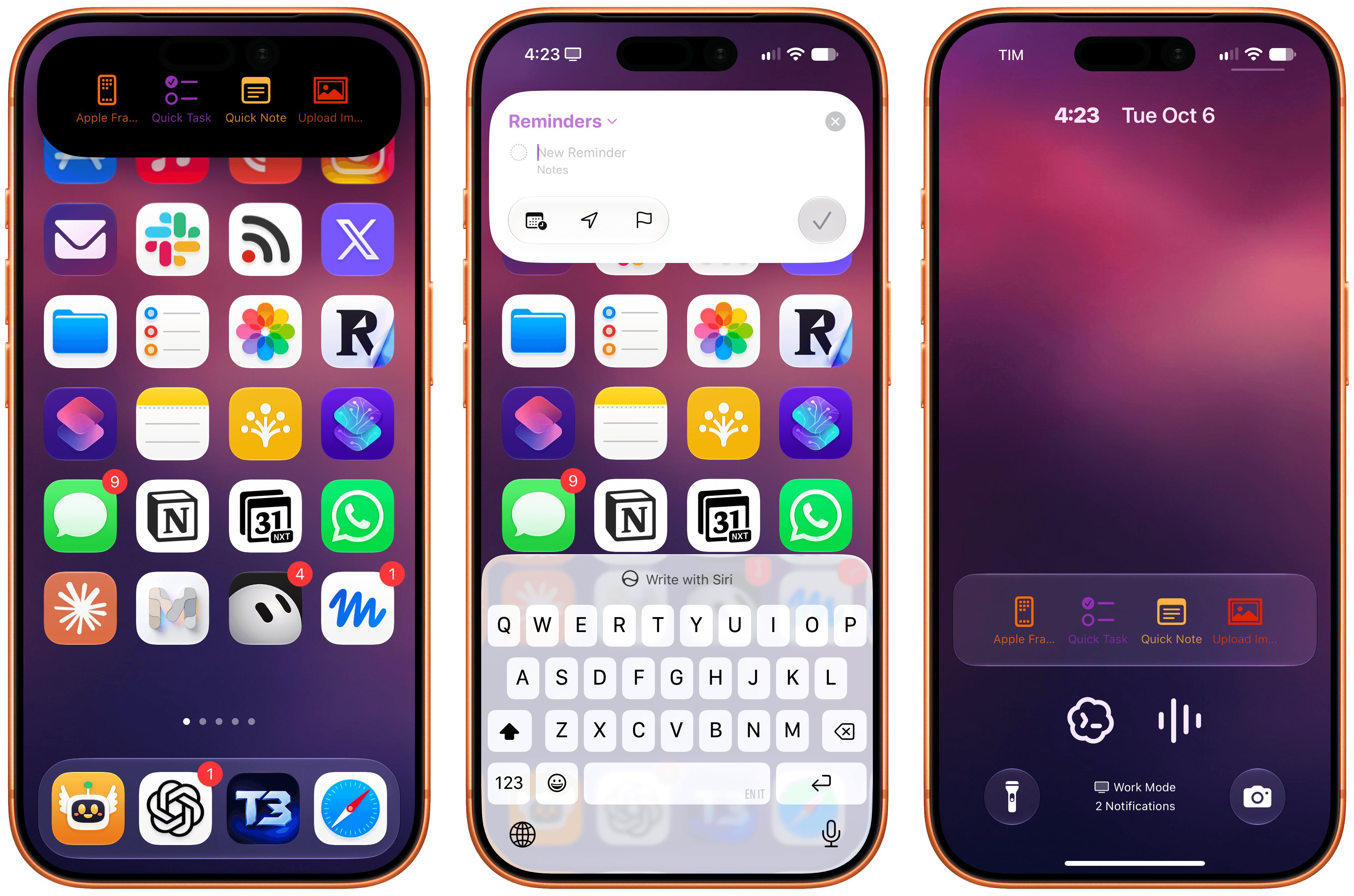
Deflector, a free utility by indie developer Cizzuk Shihu, leverages this feature in a fun and novel way: it lets you run any shortcut from your Shortcuts library directly – without launching the Shortcuts app first – from either the Dynamic Island or a Live Activity on the Lock Screen.
The concept isn’t new: we’ve seen shortcut launchers embedded in Live Activities before. What’s different is that while previous solutions relied on the Shortcuts URL scheme to open the Shortcuts app and then run a shortcut, Deflector’s approach is entirely self-contained in a Live Activity and doesn’t force you to lose the context of what you’re doing. Tap a shortcut, and it runs immediately – just like the Shortcuts widget works on the Home Screen.
The question is: how?
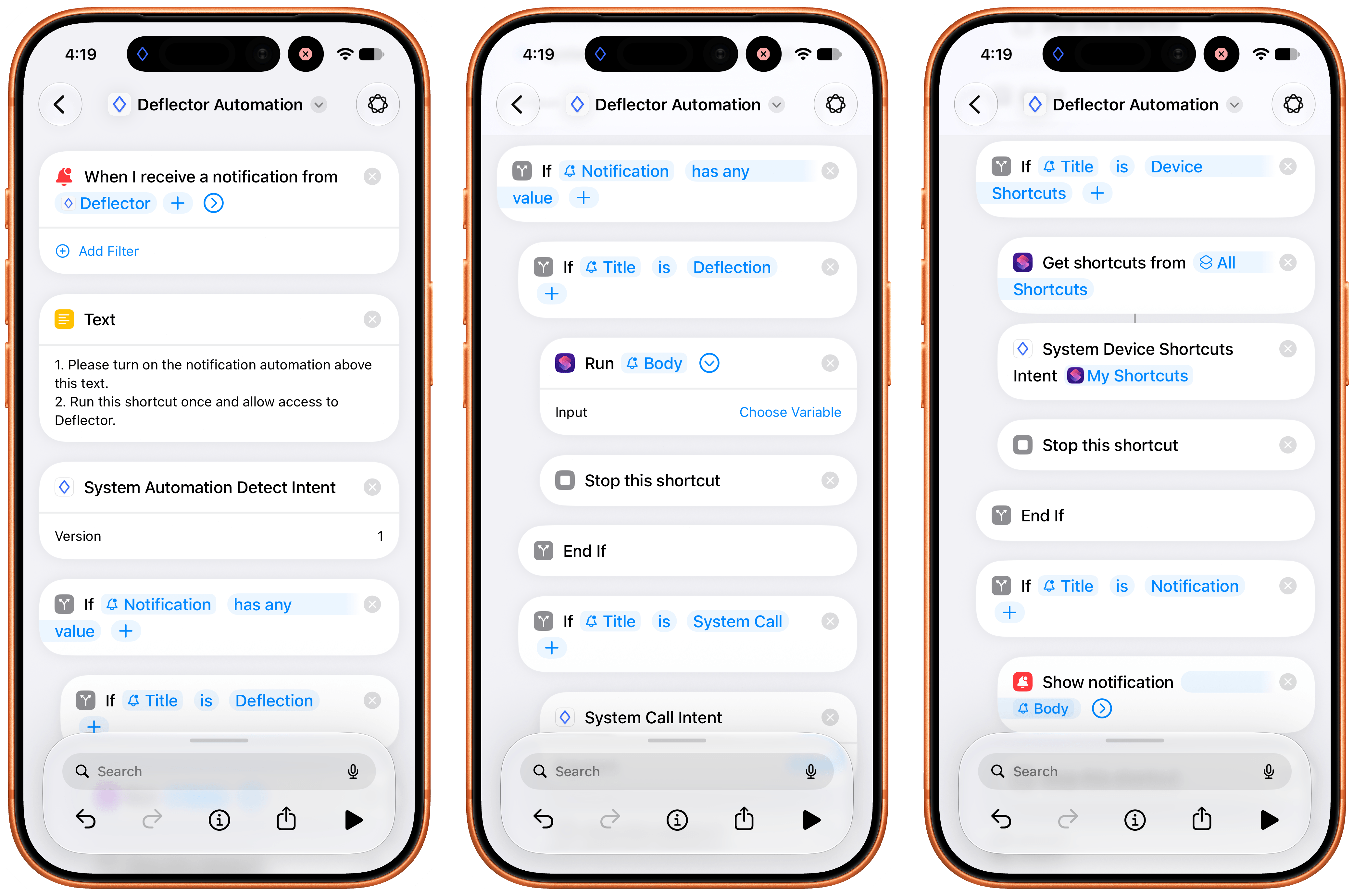
The ingenious implementation behind Deflector is the aforementioned automation support for notifications. When you install Deflector, you’re asked to also install a companion shortcut aptly called ‘Deflector Automation’. This shortcut, thanks to changes in iOS and iPadOS 27, contains a shareable automation that you need to enable, which is another major change of the Shortcuts app I covered here. Open the automation, and you’ll notice that it contains a notification trigger that parses the contents of a notification, allowing Shortcuts to run a shortcut directly via the native ‘Run Shortcut’ action.
The automation that powers Deflector.
And here lies the magic trick behind Deflector: whenever you tap a shortcut in its Live Activity, the app sends a notification to itself that contains the name of the shortcut you want to run in the body text of the notification. When the “self notification” arrives – and these are silent notifications that you won’t even see on-screen – the associated Shortcuts automation is triggered, the name of the shortcut is passed to the ‘Run Shortcut’ action, and voila – the shortcut runs, no x-callback-URL necessary.
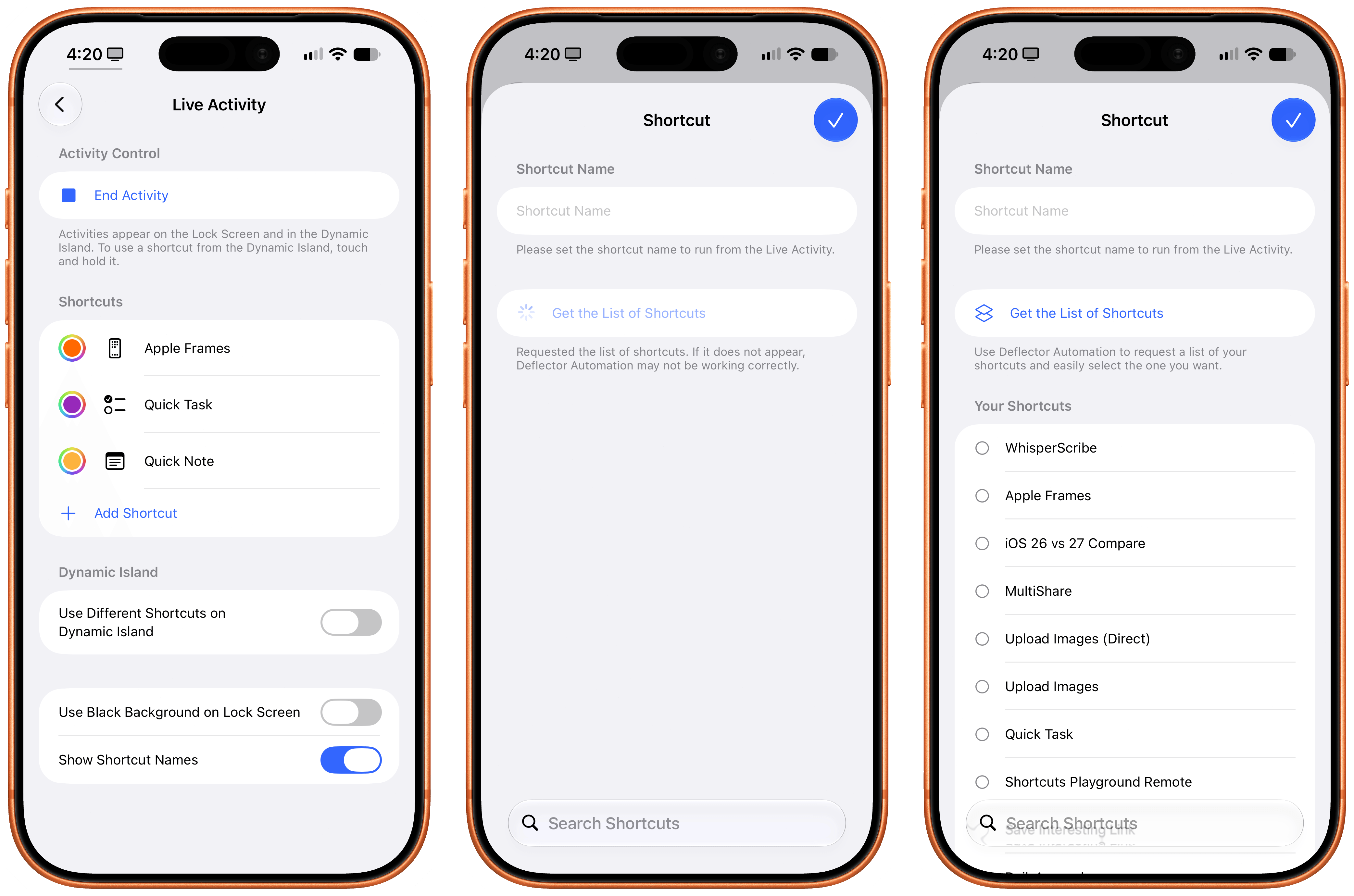
That’s all there is to Deflector, effectively. You can choose how many shortcuts you want to display in the Live Activity, and you can also choose an SF Symbol and color for each one. The process of fetching shortcuts from your library is handled by the same automation, which uses an App Intent and the ‘Get My Shortcuts’ action to pass the full list of your shortcuts back to Deflector in a couple of seconds. This is another novel implementation I’ve never seen anywhere else.
Adding new launchers in Deflector.
There are some optimizations I’d like to see in Deflector. There is, for instance, a one-second delay between tapping a shortcut and seeing the shortcut execute on-screen, which is most likely the time it takes for the notification to be sent, delivered, and parsed by Shortcuts behind the scenes. I also wish I could rename launchers in the Dynamic Island to use custom names: if you rename a launcher, it’ll break the ability for Deflector to find a matching shortcut in your library.
These are minor complaints about a free utility based on a genius workaround that has allowed me to launch shortcuts more quickly than before and, most importantly, tie two different sets of shortcuts to the Action button and the Dynamic Island. One of the reasons I still love writing about indie apps after all these years is exemplified by Deflector: in the right hands, new Apple APIs and frameworks can be applied by indie developers to ideas that Apple didn’t foresee in the first place.
The panel explores first impressions of Siri AI, from image searches, weather, news, and Vision Pro visual recognition to unexpected limitations involving apps and personal context. The discussion also covers Steve Jobs and Apple Store history, Steve Wozniak’s new merchandise venture, Apple’s wearable market strength, GM’s continuing retreat from CarPlay, and Tim Cook’s expanding diplomatic role.
Apple’s new $299 HomeView combines a HomePod speaker with a small touchscreen and Siri AI, but its limited app selection and unclear purpose make it hard to recommend until real-world use cases emerge.
The HomePod mini 2 brings Siri AI, an S10 chip, Wi-Fi 6E, and Sound Glow lighting to Apple’s smallest smart speaker. It also enables four-speaker surround sound with the new Apple TV 4K. Pre-orders are open now at $149.
Apple has announced a home-focused product launch for 13 October 2026. Expected products include a long-rumored touchscreen home hub alongside a new Apple TV 4K and HomePod mini. And more?
Hazel turns twenty this weekend. I’m a fan. People ask if I’m still using Hazel in the age of AI, and the answer is absolutely yes. Hazel still does a lot of great file management on your device without burning tokens or sacrificing your privacy. There’s definitely space for it on my hard drive still.
To mark the occasion, everything in the Noodlesoft store is 35% off through Monday night. No code required, the sale price is already showing:
Hazel 6: $42 → $27.30
Family Pack, up to five Macs in one household: $65 → $42.25
Upgrade from an earlier version: $20 → $13.00
For giggles, I’ve also marked the Hazel Field Guide 50% off for the week. Code: HAZELIS20
Machine vision is becoming a practical part of Apple’s U.S. factory training strategy, giving smaller manufacturers access to techniques that help production systems inspect what they make. The recent opening of the Houston manufacturing training center extends that effort into a working electronics production campus, while courses developed with Michigan State University introduce businesses to image analysis, machine learning, and automated quality checks.
For a manufacturer, the attraction can be straightforward: finding a missing component before a product leaves the line, identifying a surface defect before more material is added, or recognizing an assembly error while it can still be corrected cheaply.
These are manageable problems with measurable costs. They also offer an accessible starting point for businesses interested in AI but unsure where it belongs inside their operations.
Machine Vision Enters the Manufacturing Curriculum
The Apple Manufacturing Academy’s current course catalog includes Machine Learning with Vision, a course introducing machine learning and deep learning through practical activities using Apple devices. It sits alongside instruction in automation, quality fundamentals, manufacturing data, maintenance, and process improvement.
That placement gives the subject useful context. A camera can produce an image, but a factory needs a decision: accept the part, flag it for review, check its position, or investigate a process that may be drifting out of tolerance.
Machine vision connects image capture to those operational decisions. Some applications use established rules to measure dimensions or identify patterns. Others use machine learning to recognize acceptable variations and defects that are difficult to describe through fixed rules.
The academy’s public description confirms introductory activities with Apple devices. It does not identify a particular iPhone, Mac configuration, software framework, or industrial camera package that every participant must use.
For smaller businesses, the educational value is learning how to define an inspection problem before purchasing equipment. A company that understands what it needs to detect can have a much more productive conversation with an automation supplier.
Houston Brings Training Closer to Production
Apple opened its 20,000-square-foot Advanced Manufacturing Center on August 13. According to the Houston opening announcement, the free program offers small and medium-sized businesses instruction in advanced manufacturing, interactive labs, and experience with representative production equipment.
The first cohort worked with machine learning for quality control and advanced automation. Participants also explored production challenges, used a holographic table, and assembled and laser etched a product.
The location adds context: the center occupies the same Houston facility that builds advanced AI servers and is scheduled to begin Mac mini manufacturing this year. Its teaching program includes final assembly principles and design considerations for printed circuit board assembly.
Houston is the company’s second U.S. manufacturing learning site, following the Detroit academy established with Michigan State University in August 2025. By the Houston opening, Apple said the academy had helped nearly 1,000 workers, students, and entrepreneurs.
That figure measures people reached through the program. It should not be interpreted as 1,000 factories already operating AI inspection systems.
Apple Machine Learning Adapters
A Useful Inspection Starts With a Specific Problem
Imagine a small business assembling control panels. Each panel needs the same set of connectors, positioned correctly before the enclosure closes. A machine vision station could check for a missing connector while the assembly remains accessible.
The value comes from catching that error at the right moment. Discovering it after packaging creates extra handling and rework. Discovering it after delivery may involve a return, a service visit, and an unhappy customer.
A useful pilot would therefore begin with that single inspection point. The business could compare the existing process with the assisted one, recording missed defects, unnecessary rechecks, inspection time, and the cost of correcting mistakes.
The camera is only part of the exercise. Workers must agree on what constitutes a defect, collect representative examples, and decide what happens when the result is uncertain.
Those decisions draw heavily on experience already present on the factory floor. An operator may know that an unusual mark is harmless, while a barely visible change in alignment predicts a later assembly problem. Turning that knowledge into consistent inspection criteria is valuable work in its own right.
These are examples of how manufacturers could apply the training, rather than projects Apple has announced for individual participants.
Teaching Machine Vision to Handle Ordinary Variation
A demonstration can look impressive when every part arrives clean, centered, and evenly lit. Production introduces variation: different surface finishes, reflections, changing positions, and batches that look slightly different while remaining within specification.
The inspection system must distinguish those acceptable differences from actual failures. Otherwise, it can reject good products or allow defective ones to continue.
Industrial vision supplier Cognex’s deployment guidance recommends validating systems across product models, defect types, and manufacturing lines. It also describes an approach in which automated inspection handles preliminary checks while experienced inspectors review borderline cases.
For a business learning machine vision, that offers a realistic way to introduce the technology. Employees can compare its decisions with their own, investigate disagreements, and determine whether the results justify extending its role.
An inspection system also needs an owner after installation. Someone must understand when a product change requires new examples, when equipment needs attention, and when performance has slipped. Training that responsibility into the workforce helps prevent an initially successful project from becoming an unreliable fixture.
Smaller Manufacturers Are Already Applying the Training
The academy’s reach extends beyond companies producing consumer electronics. In its May update on participating manufacturers, Apple highlighted Block Imaging, a Michigan business that services and refurbishes medical imaging equipment.
The company hosted visitors during the academy’s Spring Forum and described applying techniques learned from Apple engineers and Michigan State experts to its operations. Apple reported that the academy had supported more than 150 American businesses at that point.
The announcement did not identify a particular machine vision deployment at Block Imaging or publish a percentage improvement attributable to visual inspection. It does provide an example of the training reaching businesses whose work differs substantially from building an iPhone.
That wider participation could benefit Apple indirectly. More capable domestic manufacturers can support equipment maintenance, tooling, components, and specialized production services. Participation itself does not establish a supplier relationship, but the skills can be used across customers and industries.
Access Without a Large Training Budget
The academy’s participation information says eligible small and medium-sized U.S. manufacturers can take courses free of charge. Online learning includes on-demand materials and interactive modules, while in-person sessions add workshops and more personalized instruction.
Digital badges are available for different topics, and completed course materials remain accessible for review. That gives a business room to train an employee around existing production commitments and return to the material when an actual project begins.
Free instruction does not remove the eventual cost of cameras, lighting, integration, maintenance, or employee time. It can help a manufacturer understand those costs before committing to a system.
The first proposal brought back to the factory might be modest: inspect one recurring defect at one station and record the results for several weeks. A supervisor can then weigh the time saved against the extra reviews, maintenance, and mistakes. That is the kind of evidence a business owner can use when deciding whether to install a second station.
Adam Engst explains why AI software development should be approached as an evolution, starting with safe, verifiable data analysis, advancing to simple scripts, and eventually building applications. He distinguishes programming from development, arguing that non-programmers can act as product managers who direct AI, demand security checks, define requirements, and create software tailored to problems existing apps do not solve. (3)
Our conversation with Adam Engst continues with an exploration of how AI can help non-programmers build sophisticated software by following professional development practices. Adam explains using specifications, architecture documents, and AI-guided decisions to create reliable apps, then examines the approach his app, SetShot, takes to macOS settings, privacy, security, user feedback, Cloudflare, GitHub, and minimizing sensitive data collection.
Adam Engst looks back at HyperCard as an early tool that democratized software creation, then connects its legacy to today’s AI-assisted development. He outlines how Claude helped turn an idea for tracking macOS setting changes into a working Mac app, SetShot. Adam discusses Xcode, GitHub, rapid iteration, and the value of visual feedback in his development process, and how AI lowers programming barriers without eliminating the need for thought, judgment, and effort.
A few months ago I added a “Report a Typo” feature to Six Colors. The goal was to give people a simple place to go — sixcolors.com/typo — if they found a mistake on the website. That Google form inserts the information into a Google Sheet, and a script attached to the Google Sheet kicks off a simple automation that sends me a notification in a couple different places.
This works pretty well. I’m using a very simple Google Apps script to fire off a webhook when there’s a new form submission. The webhook is running on Make.com, which we use for a bunch of simple web automations, but that’s an implementation detail. Make.com posts an item in a private Discord channel and also crafts a custom push notification to my phone using Pushover.
However, the moment I turned this feature on, I discovered the problem with asking people to report errors or typos: Some people see any open channel of communication as an open channel for any sort of communication. I immediately started getting more “this is more a comment than a question” items about articles than actual typo submissions. Commentary included personal preferences for writing style, web design, political references (real or imagined), and much more.
I’m going to make an admission: This sort of feedback is maddening. I want to be alerted about mistakes on the site so I can fix them promptly, but I am not interested in receiving push notifications regarding your opinion of the professionalism and appropriateness of my writing style.
Unfortunately, it’s an open form. There’s nothing to be done. Or is there?
This is a challenge that can’t really be solved by looking for a bunch of keywords. You need wholesale sentiment analysis of the entire submission. This is—brace yourself—actually a good use of a large language model.
I solved this problem by using a plug-in within Make.com that lets me get a reply back from a cloud LLM that uses a simple model with an API cost of pennies per use, but you could also just use Shortcuts to build a version of this automation that runs on a Mac (Tahoe or Golden Gate) using Apple’s built-in models. It works just fine in Shortcuts on my Mac, via the Use Model action. (See screenshot above.)
Here’s the prompt I’m currently using:
Your task is binary classification.
Input: a user-submitted comment about an article, claiming to report an error.
Output: one token only: ALLOW or REJECT.
Definition of ALLOW:
A concrete, objective, verifiable issue in the article. This includes:
* factual mistakes
* spelling, grammar, formatting mistakes
* broken or incorrect links
* wrong names, dates, numbers
* technical inaccuracies
* omissions of material consequences of a feature or change (e.g., failing to mention that a feature deletes stored Wi-Fi passwords)
Definition of REJECT:
Anything subjective. This includes:
* political disagreement
* tone or style complaints
* metaphor or comparison preferences
* ‘you should have covered X more’
* speculation about motives
* emotional reactions or rants
* admissions that it’s not actually a mistake
Classification rules:
1. If the comment identifies a specific factual, technical, or materially consequential issue in the article, return ALLOW.
2. If the issue would meaningfully affect reader understanding or use of a product/feature, treat it as an omission and return ALLOW.
3. If the comment is opinion, taste, politics, vibe, personal criticism, or preference, return REJECT.
4. If there is no concrete, verifiable claim about the article being wrong or incomplete, return REJECT.
5. If it’s off-topic or spam, return REJECT.
6. If it’s a short but simple phrase like “there not their” or “r/sheild/shield”, those are nerdier folks reporting typos and that’s fine, ALLOW.
Respond with exactly one of these two tokens: ALLOW or REJECT. No explanation.
Submission: [[insert report text here]]
This has worked surprisingly well. And, yes, all messages are logged in the original Google Sheet, so I can occasionally check to monitor the quality of the filtering and make sure that the system isn’t failing to pass on actual mistakes.
The Schlage Sense Pro is an unobtrusive match for my door hardware.
Back in March I took possession of an Aqara UWB Smart Lock, which allowed me to live out my Star Trek dreams by using Ultra Wideband technology to sense my arrival and unlock the door without any interaction from me. Now a second UWB lock has arrived on the scene, Schlage’s Sense Pro UWB smart lock. I’ve spent the last month locking and unlocking my front door with it, and it’s got some definite strengths over the Aqara lock—as well as some definite weaknesses.
Let’s start with the prices. The Aqara is $269, and the Schlage lock is $400. While it can be hard to justify a smart lock at any price, it’s extremely difficult to recommend one lock with much the same feature set over another when there’s this kind of price disparity.
And yes, these locks are very much playing by the same playbook: Both use UWB and Apple’s HomeKey technology to detect when your iPhone (11 or newer) or Apple Watch (Series 6 or newer) approaches your door, unlocking without having to wait or tap your device against the keypad. You can read my previous review for more about how this works, but it’s a huge improvement on both NFC tap-to-unlock and Bluetooth proximity detection, because it can wirelessly detect if you’re inside or outside the door—and only unlocks when you’re approaching from the outside.
The Schlage Sense Pro trades versatility for compactness and attractiveness. The Aqara lock is a big black slab, compared to a relatively squat keypad that comes in either black or satin nickel (a perfect match for my front door hardware). Schlage’s lock is undeniably better looking. It also has a light-up keypad so you can unlock it with a code, and you can program additional codes via the Schlage app or directly via the Apple Home app. And it supports NFC unlock, so if someone in your house doesn’t have a UWB device, they still have an avenue to electronically unlock the door via a tap.
Past Schlage smart locks—I used one for several years before buying the Aqara UWB model—offered a little 9-volt battery nubbin at the bottom of the outside to provide emergency power if the device’s batteries died and you needed to get into the house. This model has a USB-C port to do the same thing, and I don’t know about you, but I’m far more likely to source a USB-C cable (and an iPhone to provide power) than I am to find a 9-volt battery laying around outside my house.
Unlike the Aqara lock, the Schlage Sense Pro doesn’t have a thumbprint scanner or a physical key. The Aqara’s thumbprint scanner works but always seemed a bit pointless to me; the key, on the other hand, might have value if you like the idea of using a hide-a-key or giving a physical spare key to a friend. Alternately, it might seem unnecessary or even a security flaw. Trade-offs.
The interior deadbolt box is… less unobtrusive.
The Schlage Sense Pro is powered by four AA batteries that slide into the lock in a plastic sled; I found that if I was too forceful sliding the sled in, a battery occasionally popped out. I strongly prefer Aqara’s battery solution—a power-bank-style rechargeable battery pack that offers long life and a relatively easy USB charging path—to swapping AA batteries every so often.
My front door is not quite perfectly aligned, so automatic locks sometimes fail to lock it properly. The Schlage’s lock motor is forceful enough to do the job, but a lot less forceful than the Aqara’s, which would often have enough oomph to get the door closed even if it had to push really hard. In truth, though, both locks were equal in their ability to lock my weird door, though Aqara is much more aggressive in making a noise when it fails to lock the door, which I appreciated more than Schlage’s somewhat muted alert.
I also appreciated Aqara’s gesture to lock the door when leaving the house—you basically tap the pad anywhere—to be a lot easier to use than the Schlage lock, which requires you tap the top portion of the touch pad twice. I got used to the double-tap, but Aqara’s was faster and less fussy.
When testing the Schlage Sense Pro, I also ran into a very odd quirk where the lock became completely unresponsive until I pulled the battery sled out and put it back in—essentially, power cycling the lock. According to Schlage, this was likely due to a faulty lock and the company supplied me with a replacement that hasn’t shown any signs of the same issue.
Both locks do a great job of unlocking automatically. This is what the whole show is really about: If I walk up to a door with my watch on my wrist or my phone in my pocket, does the door unlock by the time I put my hand on the latch? Yes, almost all the time. Very occasionally there would be a slight pause when I reached the door, but almost never. It really is a magical feeling to have your door know that it’s you and unlock as you approach, and if you connect it to other HomeKit automations, you can have that unlock trigger other devices, like turning on your entryway lights.
In the end, the Schlage Sense Pro is a very nice lock, with a restrained look that I prefer to the Aqara’s industrial black block. Aqara’s extra locking methods (fingerprint, traditional key) are not really ones I feel are necessary. Yes, Aqara’s battery approach is better than Schlage’s, but I’ve been using AA-powered locks for ages, and it was fine, if a little annoying.
All in all, these locks are pretty close to even, with Schlage having the advantage in aesthetics. The problem is that the Schlage lock costs $130 more than the Aqara. If you don’t mind the extra charge for a more attractive lock, I won’t fault you, but for most people a smart lock is a bit of a splurge purchase as it is. It’s not the kind of product that can be snuck by household members who are less enthusiastic about technology, and sometimes the price tag is all it takes for the household to decide that it’s not worth doing.
The Schlage Sense Pro is a great product that brings that Star Trek feeling to my front door—but at a price that makes me wince. The first UWB lock that arrived on the scene, Aqara’s U400, is equally capable—and a lot cheaper.
When I was visiting my pal Myke Hurley in London last year, I noticed that he had a second display to the right of his main one. It was large and mounted vertically, and when he recorded a podcast, he kept all his recording information over there. I liked the idea of monitoring my recordings while they were going on, just for extra peace of mind, and a second display seemed like the right way to do it.
If only I had a second display! But I do, of course, because my main Mac is now a MacBook Pro. So I’ve taken to recording podcasts using the “Hurley Method,” with my Audio Hijack windows positioned on the laptop display, off to my left.
It’s nice, but if you know me, I quickly became frustrated by the number of clicks and drags I needed to perform every single time I record a podcast: Open up my laptop, open Audio Hijack, open the list of recording sessions, double-click on the one I’m using right now, then drag the window over to the laptop display.
So today I automated it.
None of my automations work if I haven’t opened the laptop, and while it sits next to my Mac in a nice stand from Twelve South, it’s closed most of the time. So my first step before moving windows to the laptop display is to make sure that the display is available! Fortunately, there’s a command-line command for that:
system_profiler SPDisplaysDataType
If you want, you can simplify the output by piping it through a grep command like system_profiler SPDisplaysDataType | grep -B1 "Resolution", but all I really want to do is search for the text string “Built-in”, which indicates that the laptop is open and its built-in display is running.
I automate most of my recording stuff using Keyboard Maestro macros triggered by an Elgato Stream Deck. So I built my automation into an existing macro in Keyboard Maestro, just adding a new if/then statement: If the calculation `SCREENCOUNT() > 1 returns true.
Then the macro runs the shell script, saves that to a local variable called LocalScreens, and it’s time for one more if/then statement, to ensure that this part of the macro only runs when more than one screen is attached and when the internal MacBook Pro display is active.
Unfortunately, the next step requires automating Audio Hijack, and while that app is very scriptable via JavaScript, and controllable via Shortcuts (or a plain text file?!), there’s no direct method of automating it from within Keyboard Maestro. So I created a basic Shortcut containing the JavaScript required to tell Audio Hijack to open a specific session by name, with the name passed to the Shortcut as input:
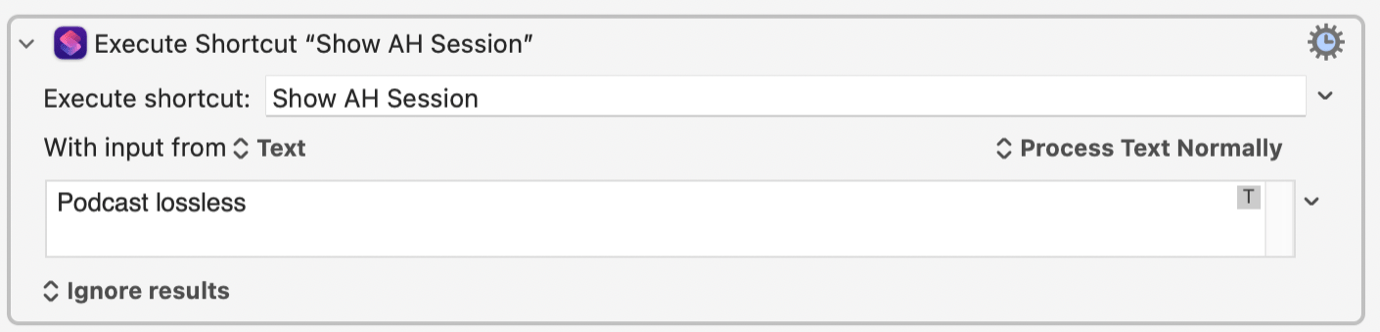
Then it’s a one-step item in Keyboard Maestro to run that shortcut with the name of my Audio Hijack session as the input:
(I wish this was cleaner and I didn’t need to run a shortcut. The alternative is to literally write out a text file containing the JavaScript and run it via a shell script. Is that cleaner? Doesn’t feel like it, but it’s more self-contained and doesn’t rely on the good graces of Shortcuts.)
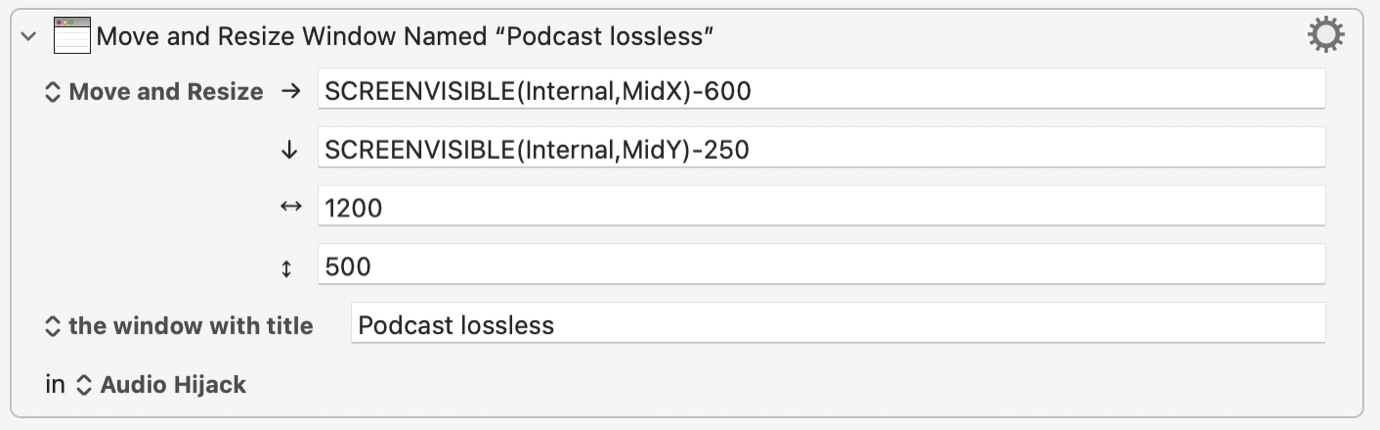
Now that I know that my MacBook Pro display is open and my Audio Hijack session window is open, it’s a one-step command in Keyboard Maestro to make the move:
This one’s a little tricky. I have to use the Move and Resize Window command, but instead of standard numerical values, I need to use custom “smart” values that Keyboard Maestro supports. In this case, horizontally it’s SCREENVISIBLE(Internal,MidX)-600 —essentially, 600 pixels to the left of the midpoint of the internal display—and vertically it’s SCREENVISIBLE(Internal,MidY)-250—250 pixels up from the midpoint of the display. You can play around with the dimensions until the window ends up in the right spot, and of course, at the right size.
And that was it. Now, when I press my recording button on my Stream Deck, if my laptop display is open, the session window will automatically pop open on my laptop display. I sure do like it when things happen on my computer automatically.
On-device AI takes center stage as the panel explores MacPaw’s work with Liquid AI, personal assistants, and workplace restrictions. The conversation also discusses the panel's experiences with AI note-taking recording consent and privacy in both business and health care.

 Login
Login