❌

Reading view

Carson Oliver and Apple’s Gaming Push

Giovanni Colantonio:

Seven years later, Apple Arcade hasn’t gone anywhere, and Apple itself hasn’t slowed its broader gaming efforts either. Between courting major publishers like Capcom to release their games on Mac to launching a proper gaming app, it’s clear that Apple still has its sights set on being a major player.

The latest example of that came this week as Apple launched an App Store event dubbed Indie Games Week. The week-long initiative saw Apple welcoming games like Vampire Crawlers to iOS and announcing an ambitious mobile version of No Man’s Sky. At the center of that push was Carson Oliver, the new head of App Store Worldwide following Phil Schiller’s sudden departure from the role this past August. The fact that one of his first acts in the role was spearheading an indie gaming showcase hints at where Oliver’s priorities might lie.

[…]

While Oliver sells the narrative with carefully worded precision, questions still linger around Apple’s wider gaming efforts. Continued investment in mixed reality gaming is uncertain given that Apple has reportedly cut down production of its Vision Pro headset due to underwhelming sales. And though Apple continues to court publishers and get games on iOS, we haven’t seen the full-throated support from major players like Capcom and Ubisoft in 2026 that was crucial to raising Apple’s gaming profile in 2023.

Previously:

  •  

DropDMG 3.7.2

DropDMG 3.7.2 is a maintenance update of my app for disk images and archives.

  • It still works back to macOS 10.13, but this will probably be the last such release. There’s no reason the code can’t continue to run there, but soon I will be switching to Xcode 27, which deploys back to macOS 12.

  • From some reason, this build was hard to submit to the Mac App Store. altool kept retrying, or something, right at the end of the upload. There’s usually a delay before a build shows up in App Store Connect, but this time I saw it there before altool had finished running.

  • I also ran into trouble submitting the app for review. It kept showing a spinner or reporting errors when I tried to save the build, and also when adding it for review.

  • The actual review was pretty quick by modern standards—three days including a weekend. It warned me ahead of time that review “can take up to 48 hours.”

  • When I was approving the build for release, it asked if I was “enjoying” App Store Connect and wanted me to rate the app.

Previously:

  •  

The App Store Review Process Needs Fixing

Lex Friedman (Mastodon):

Though allegedly focused on benefiting users (through better safety and compliance), App Store review in its current form mostly frustrates the people it claims to protect.

[…]

Those are all scammy apps that got through. Apple’s review capacity isn’t infinite. Every hour a reviewer spends poring over a bug-fix update to an app that’s been in the store for years is an hour not spent catching the fake LastPass app.

[…]

And the review process is fundamentally flawed anyway: It works best with developers who are trying to do the right thing. Plenty of apps pull their content, features, and behavior from servers their developers control. Feature flags, remote configuration, and web views mean an app can behave differently the day after approval than it did the day of vetting. A determined bad actor can get past App Review. An honest developer just waits in a slow, nebulous line.

[…]

At WWDC 2020, the company announced that bug fixes for apps already in the App Store would no longer be held up over guideline violations (except for legal issues); developers could address those problems in a subsequent update instead. That’s a good policy! Based on developer complaints I’ve seen, Apple hasn’t honored that agreement.

He suggests a Trusted Developer Program.

Previously:

  •  

Not Muse in the App Store

Jeff Johnson:

The Muse from Meta app description says at the beginning, “Muse is your personal AI agent that gets things done, always working on what matters to you.” The Muse AI app description says at the beginning, “Muse is your professional AI agent that gets work done, always helping move important tasks forward.” Near the end, the Muse from Meta app description has the heading “SMART, BUT STILL LEARNING.” Near the end, the Muse AI app description has the heading “POWERFUL, BUT STILL LEARNING.”

In other words, Muse AI is a blatant copy of Muse from Meta, the latter of which is currently the #1 iOS App Store download in the United States. I don’t know where Muse AI ranks in the iOS App Store, but I do know that it’s currently the #20 Mac App Store download in the US.

And the real Muse app isn’t in the Mac App Store, so it has no competition.

By the way, I’d also like to draw your attention to the #11 Mac App Store download, as shown in my screenshot above: App for Instagram º. Yes, the app name includes the º character, a phenomenon I’ve written about before.

[…]

The top search result for “VLC” in the Mac App Store is Video Player for VLC, developed by muhammad faisal jabbar, not by VideoLAN. VLC for Mac is distributed outside the Mac App Store. You may notice a similarity between the icon of the official VLC app in the iOS App Store and the icon of Video Player for VLC.

Previously:

Update (2026-09-29): John Gruber:

“Muse AI” is now gone, but “App for Instagram °” and “Video Player for VLC” are both still there.

Jeff Johnson:

The Reddit commenter claims that the scams receiving public attention are “the tip of the iceberg from a limited, outsider perspective,” which is an accurate metaphor, yet the commenter and I have dramatically different interpretations of that metaphor. For the commenter, the iceberg represents the vast number of scams allegedly caught by Apple app review but not seen by the public; for me, the iceberg represents the vast number of scams not caught by Apple app review and not seen by the public either. To put the argument another way, the commenter appears to assume that the majority of scams in the App Store receive widespread public attention, in blog posts such as mine or in the news media, so the relatively small number of stories we hear is indicative of a relatively small number of scams in the App Store, whereas my own impression is that the vast majority of scams in the App Store do not receive widespread public attention. Scam hunting is not my job, merely an occasional hobby. It’s so easy for me to find scams, they practically fall into my lap whenever I look. I could spend all day every day finding and listing App Store scams, if I were sufficiently motivated (I’m not). You would think that someone working for Apple would be sufficiently motivated, by a paycheck, to spend all day every day finding and listing and most importantly removing App Store scams, but I’ve seen no evidence of it.

I think Johnson is right about the iceberg. Most of the scams that get publicity are at the top of the charts. One view is that all the scam apps that Apple misses end up being popular. What are the odds? The other is that we notice them because they’re popular and that there’s also a vast number of deceitful or dangerous apps lurking.

Dan Moren:

Speaking of App Store shortcomings, I really hate when I want to see how much an app costs and I get this impenetrable list of IAP options. It’s impossible to know without installing and opening the app what the payments options are. Be great if Apple helped make this clearer—which options are actually available? What are their various plans (monthly, weekly, etc.)?

  •  

Meta AI for Mac and Muse

Zac Hall:

The new Meta AI desktop app is version 1.0 beta at launch and weighs just 16MB once installed.

Based on initial inspection, it runs natively on Apple silicon Macs with macOS 15 or later, using an AppKit and SwiftUI shell with WebKit for richer chat content. In other words, this is not an Electron app or a repackaged iPad release.

It includes Mac-specific hooks, making the desktop experience more robust than the Meta AI mobile app.

Karissa Bell:

The Mac app brings a few new capabilities compared with Meta AI’s existing website and mobile app. For example, it enables users to share part of their screen so the assistant can “see” what they’re working on and provide more specific answers.

Juli Clover:

The app is primarily meant for businesses and content creators, and it integrates with Facebook and Instagram. It incorporates analytics tools so it can answer questions about performance, and connects with Google Workspace for document access. Google Workspace access requires a professional Facebook or Instagram account.

John Gruber:

Passes the Settings window sniff test too — it actually has a Settings window.

[…]

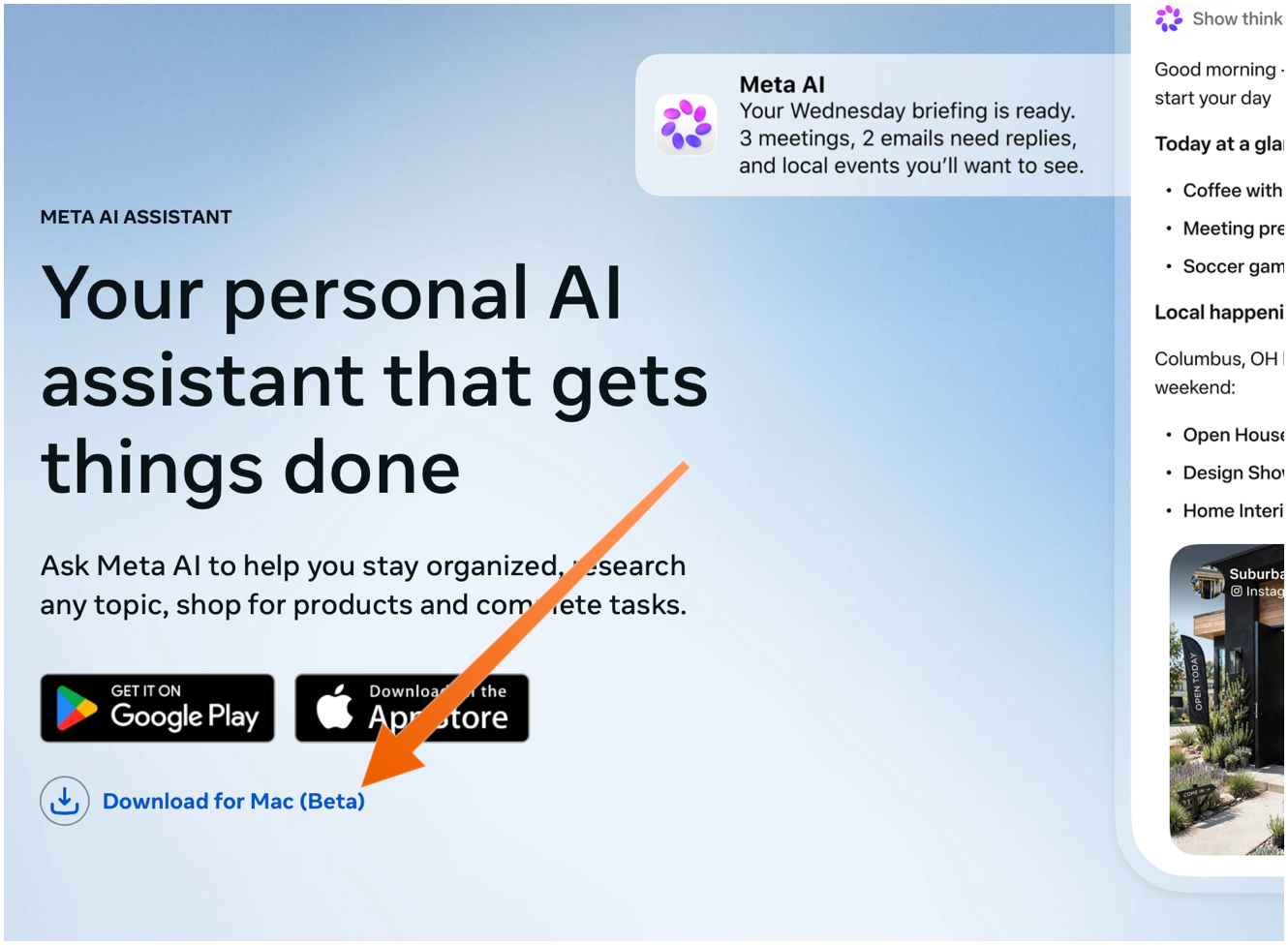
The Mac app is not available in the App Store. You need to download it directly from Meta’s web page, using the “Download for Mac (Beta)” link. The ChatGPT and Claude Mac apps aren’t in the Mac App Store either — they do too many things outside the App Store’s mandatory sandbox (and probably use APIs require that special entitlements in the App Store too).

Sarah Perez:

Meta’s new AI assistant app, Muse, is now available on Mac.

On the Mac, Muse can interact with your files, messages, calendar, notes, and mail, all within their native applications.

Terrence O’Brien:

Jason Aten, a contributing editor at Inc Magazine, posted on Threads screenshots of an interaction he had with Muse in which the assistant asks him some questions about a conversation he was having in Messages.

The problem is that Aten says he didn’t give Muse access to his messages. When asked how it knew about the contents of his messages, Muse replied, “I saw the notification previews, not your message history. I haven’t been reading your texts.” Aten continued to push, asking how Muse was receiving message previews, it didn’t have a good answer.

M.G. Siegler:

The number one response I’ve gotten to my thoughts on Meta’s Muse personal assistant agent is some variation of “I will never trust Meta with my data.” But the number two response is arguably more interesting (and related): “Why didn’t Google build this?”

Pieter Arntz:

Mac security researcher Patrick Wardle says it’s trivial to turn Muse into “the ultimate backdoor.”

[…]

According to Ars Technica, Wardle found that a locally running application or terminal command could alter an undocumented Muse configuration setting that controls the server used for dictation transcription. By redirecting dictation traffic to an attacker-controlled server, an attacker could capture voice prompts and obtain the authentication token for the victim’s Muse account.

John Gruber:

Four days later and Muse still holds the #1 spot in the U.S. iOS App Store.

See also: Joanna Stern.

Alexandr Wang (Watts Martin, John Gruber):

Here’s the best part: we have no idea what people will want. The world until now has been shaped by the small number of fanatics who have somehow found a way to make their wants real. But we’ve never seen humanity with every single person’s agency fully switched on. Eight billion people who just need to write their dream down in order to get started making it happen.

So we built Muse to help people build the world they want.

Damien P. Williams:

So uhhhhhh… Apparently meta’s muse “AI” is just straight up doxxing people to strangers on FB marketplace???

Via Mike Masnick:

Almost all of Meta’s PR about Muse was about how careful they had been to set it up not to do things like this, how they delayed the launch by months to carefully design it so it could be trusted. And then…

Previously:

  •  

OmniFocus 4.9

Ken Case:

OmniFocus 4.9 adds support for Siri AI, optional new date parsing assistance via Apple Intelligence, and a range of new and updated App Intents exposed as Shortcuts actions.

[…]

In our testing we’ve found that the new Siri AI hasn’t yet learned how to work with app capabilities that it hasn’t specifically been trained on, even for App Intents that are available in Shortcuts and Spotlight. For example, its understanding of how to work with OmniFocus is based on how it’s been trained to work with the Reminders app. Our work in OmniFocus 4.9 means that Siri now knows about “reminders” in OmniFocus (i.e. actions and Inbox items), “lists” (i.e. projects) which contain reminders, and any “groups” (i.e. folders) that lists have been organized into. Siri can assign and edit reminder due dates, flags, repeat schedules, and notes and image attachments in OmniFocus. This is another great leap forward! But as soon as you try to go beyond what Reminders can do, you find its limits: for example, it doesn’t understand the distinction between due dates, planned dates, and defer dates.

Siri also doesn’t really understand much about how our document-based apps work, because Apple hasn’t trained it on our specific apps or anything equivalent. So, Siri doesn’t know how to make an outline, or a diagram, or a Gantt chart. We expect this to improve over time—after all, we’ve worked with other language models that do understand how to make those things—but it’s important to understand Siri’s current limits.

[…]

With Siri AI, Spotlight becomes even more important as a source for personal context. You can ask Siri about content in your OmniFocus database, so Siri can summarize the actions you’ve completed this week, or tell you what items you might consider working on soon.

My favorite change in OmniFocus 4.9 seems less exiting, but I’m irrationally happy about it. Last year, as part of the Liquid Glass update, they redesigned the Perspectives Bar on iOS to automatically collapse and expand as you scroll. I found the animations distracting, it messed up my muscle memory, and it required lots of extra taps. In 4.9, there’s a new Show Perspective Bar option, which you can set to Automatically (the 4.8 behavior), Manually (stay collapsed but expand when you tap), or Always (show the expanded state all the time, nothing moves). This is, of course, what I chose.

I’m still seeing the previously mentioned glitches in the Mac app with tabbing, spontaneous tag collapsing, and the window moving itself between spaces. The iOS app sometimes still shows an out-of-date list of flagged actions.

Previously:

  •  

Promoções na App Store: Black Border 2, VENARI – Escape Room Adventure, Nível de bolha + Medições e mais!

Nesta terça-feira, confira e aproveite a nossa seleção de promoções na App Store!

Black Border 2, criado pelo pessoal da Monte Cervino, é um jogo de simulação de proteção de fronteira.

Como oficial, caberá a você analisar documentos e possíveis itens proibidos, para impedir a entrada de bandidos, terroristas e outros passageiros com documentação roubada ou falsificada.

Confira um vídeo:

Aproveite a oferta e boa diversão! Ah, o terceiro jogo da franquia também está em oferta:


Abaixo outros jogos/apps que, juntos, somam mais de R$50 em descontos:

Jogos

Jogo de aventura.

Jogo de ação.

Aplicativos

Nivelador.

Lista de compras.


Aproveite as ofertas e até amanhã! Lembrando que elas são sempre por tempo limitado, então é bom correr. 🏃

  •  

Promoções na App Store: Planet of Lana, Little Nightmares, Smart Calculator: All In One e mais!

Nesta terça-feira, confira, aproveite e economize com a nossa seleção de promoções na App Store!

Planet of Lana é uma bela aventura, desenvolvida pelo Wishfully Studios e publicada nas plataformas móveis pela Playdigious, e nosso destaque do dia.

O jogo nos conquista primeiro pelos olhos: cada cenário parece uma pintura em movimento, com cores vibrantes, que transforma o planeta alienígena em algo ao mesmo tempo acolhedor e misterioso.

A jornada de Lana e seu companheiro Mui se destaca pela atmosfera contemplativa, criando uma experiência com um tom esperançoso. O design dos puzzles é intuitivo e nos incentiva a observar o ambiente e experimentar soluções criativas.

Confira um vídeo:

Um jogo cuja história passeia pelo equilíbrio, natureza e conexão. Uma oferta imperdível! 🥹


Abaixo outros jogos/apps que, juntos, somam quase R$130 em descontos:

Jogos

Jogo de aventura.

Jogo de cartas.

Diversão matemática.

Aplicativos

Calculadora.

Utilitário para códigos QR.

Fotos panorâmicas.


Aproveite as ofertas e até amanhã! Lembrando que elas são sempre por tempo limitado, então é bom correr. ✈️

  •  

TestFlight Sort Order

Zac Hall (July):

Apple just updated TestFlight for iPhone, iPad, Mac, and more. The new version, 4.3, introduces “a search field to quickly find apps.”

John Gruber:

But when Apple implemented this change, they also changed the sort order of the list of apps you’re registered to test. Starting with this update, the list is sorted in alphabetical order. For as long as I can remember — perhaps dating back to when TestFlight was a third-party utility — the list was ordered by recency. The most recently updated app was at the top; the oldest at the bottom. Sorting by recency is really the only sort order that makes sense when you’re registered for dozens (or more) of apps. For me, trying to see if there is an update to a new app whose name starts with U now requires scrolling through over 100 items.

[…]

Also, if I consider the broader view, this really speaks to how much we’ve lost in terms of UI vocabulary. For decades, any list of items with names and dates could be sorted by name or date, ascending or descending, through the standard use of clickable headers at the top of every list. This was true for almost any such list in any app, on any platform — Mac, Windows, Unix, Amiga, whatever. This was just basic GUI stuff.

[…]

iOS in 2007 introduced a simplified UI vocabulary that omitted many of these baseline GUI features. That seemed like a reasonable trade-off for a device with a 3.5-inch display and fat fingers as the only input device. But then iOS became popular and Apple stopped bringing the richer UI vocabulary of the Mac to iOS[…]

And it starting bringing iOS limitations to the Mac.

It certainly shouldn’t have taken until July 2026 to be able to search in TestFlight, either. And being able to search, and see the results sorted alphabetically, shouldn’t mean you can no longer view the full list sorted by recency.

John Gruber:

Whatever is going on with this sort order, it isn’t affecting everyone. John Siracusa, amongst many others, has the same problem I do — his list is now alphabetical, and it’s driving him nuts too. Ryan Booker, amongst many others, still has his list sorted by recency.

John Gruber (September):

For both of us, yesterday’s v4.3.1 update fixes the bug.

But there should still be more sort options.

Previously:

Update (2026-09-16): John Voorhees:

Returning to reverse chronological order may seem like a small thing, but it’s made a world of difference in keeping up with the apps I test.

Search was near the top of my list of TestFlight wishes for years, and its addition made a meaningful difference to the app’s usability. But I’ve had a lot of TestFlight wishes over the years that are scattered across multiple articles, so I thought I’d share what else I’d like Apple to tackle with TestFlight[…]

  •  

Ternus and the App Store

Mark Gurman (tweet, John Gruber, Mastodon, 9To5Mac):

The Schiller exit is a bit more notable. Unlike Maestri, he still had a real job: The veteran executive ran the App Store and Apple Events. The App Store portion alone is no joke. It generates an estimated $30 billion a year and can be very challenging to manage. Apple’s app marketplace is loved by many consumers, but often criticized by developers and subjected to increasingly onerous regulations. It was a busy, all-encompassing gig and nowhere near a semiretirement.

[…]

But there’s a bit more to the story, I’m told. Ternus and services chief Eddy Cue want to make even more money from the App Store and figure out ways to raise margins and squeeze additional recurring revenue from the platform. Schiller, on the other hand, seems to believe that such moves will only further irk developers and governments. While there was no internal blowup or anything like that, it’s something he wanted no part of.

“Product guy” dreams about margins, forgets that people buy Apple hardware because of the software.

Tim Hardwick:

Apple admitted during its July earnings call that regulatory changes have started to weigh on its Services growth. Apple reported services revenue of $30.7 billion for the June quarter, a record for the period but short of the $31.4 billion that analysts expected.

Patrick Smith:

The hardware guys treating third-party developers like they do their suppliers has stifled Apple’s software platforms

M.G. Siegler:

I thought that perhaps with the move to John Ternus as CEO, it could also be an obvious time to revisit such policies. But I hadn’t considered that Apple could actually be in favor of making them more onerous.

See also: Mario Guzmán and Indie Simulator.

Previously:

Update (2026-09-22): See also: Decoder.

  •  

Ending the Golden Era for Backward-Compatible Apps

Matthias Gansrigler-Hrad:

I don’t appreciate being forced by Xcode 27 to drop support for macOS 10.13-11.0. It’s my decision which OSes I want to support, not Apple’s. Yes, I can keep Xcode 26 around until submissions require Xcode 27, but what then?

Originally, Xcode 27 was documented as supporting Big Sur on Intel Macs, but now the earliest is Monterey.

I’m frustrated, too, but it’s more honest than the recent releases that claimed to support deployment on older macOS versions when Apple clearly hadn’t tested that it actually worked. I filed bugs, and Apple kept responding that they’d fixed it, when they hadn’t.

Using old versions of Xcode isn’t a great solution because they aren’t supported on Golden Gate. Swift also makes it more difficult to call newer APIs when using an older SDK. You can’t just copy/paste a method prototype or constant value and conditionally use it when running on a newer OS.

Ighor July:

I eventually found a hidden workaround that changes the errors back into warnings. That is good news, but it does not make the concern disappear. The setting is undocumented, absent from the normal Xcode interface, and currently being tested only in a beta toolchain. The larger question is what Apple intends to enforce when Xcode 27 is final and, later, when App Store submission requirements move to its SDKs.

[…]

Apple’s current Xcode system requirements list Xcode 26 with deployment targets beginning at iOS 15 and macOS 11. Yet developers have been able to enter older targets manually. In an Apple Developer Forums discussion about Xcode 26, an Apple product manager explained that the published deployment target range is aligned with simulator support and on-device debugging. The accepted answer confirms that an iOS 13 target can still build even though it falls below the range in Apple’s table.

My own tests went further. Xcode 26.5 compiled a project targeting iOS 9.0. It warned that the target was older than the supported range, but the build succeeded. On macOS, I have compiled current apps with deployment targets as old as macOS 10.9. Xcode warned me, but it still produced working applications.

[…]

For iOS and iPadOS, staying on Xcode 26 is not a lasting option. Apple has repeatedly made a current Xcode and SDK mandatory for new App Store submissions. […] If any one of those conditions fails, iOS and iPadOS developers will have no normal App Store path for publishing new updates that still support versions older than 15.

Previously:

Update (2026-09-07): Léo Natan:

Just want to remind you guys that if you move to Xcode 27, the only “officially” supported and sanction Xcode for GG, UIDesignRequiresCompatibility is no longer respected across the 27 OSes (apps built with older Xcodes still are). So you might suddenly find out you have a lot of work ahead of you, adding support for the dreaded Glass. And 27 Glass is not the same as 26 Glass. That can be an issue if you skipped 26 altogether but still want to support it.

Previously:

Update (2026-09-11): Nick Lockwood:

I mostly ignored the Xcode 27 betas (mainly due to the barely-usable Device Hub) so I didn’t realize the passive-aggressive prompts to drop support for iOS < 15 that you get when submitting apps is being backed up by Xcode 27 refusing to compile apps at all unless you bump the deployment target 😧

  •  

App Store Moves From Phil Schiller to Eddy Cue

Juli Clover:

As Apple Fellow, Schiller continued to oversee the App Store and Apple events, but the role may not have left him with sufficient time for his own endeavors. In 2024, The Wall Street Journal said Schiller was working close to 80 hours a week.

[…]

Schiller is stepping down from overseeing the App Store and Apple product launches just as John Ternus is set to take over as Apple CEO.

[…]

Apple is moving the App Store to Eddy Cue, who oversaw it until 2015. Cue is Apple’s services chief and will reportedly be taking a more influential role under Ternus’ leadership. Carson Oliver, who has long been on the App Store team, will oversee its day-to-day operations.

Mr. Macintosh:

Phil Schiller was right there with Steve Jobs and Tim Cook at the start of Apple’s comeback in 1997-1998.

He is officially stepping back to only his Apple Fellow role.

Phil has a combined 35 years of service to Apple 1987 - 1993 & 1997 - today

Previously:

  •  

TabControl Scam and the App Review Queue

Jeff Johnson:

Despite my history of uncovering App Store frauds, I rarely go looking for these things intentionally! They’re just so pervasive and obvious, they jump out at me. In this case, I was looking at the list of top paid Safari extensions in the Mac App Store, because two of my own extensions are currently on the list, when I noticed the TabControl Extension.

[…]

The Mac App Store “screenshot” for the app is not actually a screenshot at all. If you look closely, that’s not the real Safari: the toolbar elements are wrong. I suspect that the image was AI-generated.

[…]

Another thing you should note in the fake screenshot is the “4.9 out of 5” stars, giving the impression that this is the App Store user rating of the app.

[…]

These purported reviews, all but one of which is 5 stars, are all in English. Yet none of them is in the US App Store. […] If you’ve ever looked through App Store user reviews, it’s unusual to find this naming format. […] the dates on the reviews, such as “Mar 12,” predate the release of TabControl Extension in the App Store!

John Gruber:

God only knows what this obvious AI slop scam is doing with the data from users’ Safari tabs. It’s currently the 12th or 13th most popular Safari extension in the App Store.

Jeff Johnson:

Coincidentally, on the same day well-known developer Marco Arment complained on social media that his new, unreleased Mac App Store app had been waiting 12 days for review by Apple.

Arment ended up waiting on hold—listening to an odd choice of music—to talk to App Review, which I didn’t realize was an option. His Unforgetful app is now approved.

Johnson continued browsing Safari extensions in the store:

The apps’s privacy policy is again on Google Drive, but the developer website link goes to https://aee5e5015.app-ads-txt.com, a suspicious URL. This website is barren and simply redirects back to the App Store[…] Did App Store review ever bother to click the developer website link?

[…]

In addition to the 41 apps, each of which required at least one submission to App Store review, I count across those 41 apps at least 327 updates, almost all of which have the same generic description for what’s new in the update: "Bug fixes and performance improvements." So that’s at least 368 submissions to App Store review, most within the past 12 months, from a single developer. In other words, the developer is averaging almost one submission per day. We can count only approved submissions; we have no idea how many submissions by the developer were privately rejected by App Store review.

I get the impression that Apple is asleep at the wheel. Is anyone at Apple counting submissions per developer? How many is too many? How many resources is one developer allowed to consume?

[…]

You may view it as a noble, democratic ideal to treat every app developer the same, but in reality this is the path to the crApp Store, full of scams and slop.

John Voorhees:

There’s no doubt that there is spam on the App Store, but the way to remove it is to target the spammers, not new developers, students, and hobbyists looking to build their ideas. I know that being an indie developer isn’t an easy way to make a living, but erecting barriers to submitting apps is the surest way to starve Apple platforms of fresh, innovative ideas.

John Voorhees:

I’d like to see App Store spam cleaned up as much as anyone, but the way to do it isn’t preferring well-known developers and those who can afford to pay more for special treatment.

Marc Palmer:

I don’t agree with paid tiers either. However it feels like there should be a natural brake applied to new developers and new apps. It’s no big deal if your first app takes a week or two to review (often did 10y ago), and as it matures & receives meaningful updates in the store, turnaround increases as trust and “value” (active users?) builds up. Like “tarpitting” new accounts. I think limiting the # of new apps you can add per month to say 1 or 2 would also help…

Jeff Johnson:

I was a new App Store developer myself ten years ago. My previous article didn’t propose any new barriers for those groups. To be clear, I did imply that no developer, whether new or not, should have more than 40 apps and average a new App Store submission every day of the year. I’m not aware of any prominent developer who has that many. Apparently, checking just now, Microsoft by my count has 38 App Store apps between iOS and Mac, which is a lot but still less than the 41 apps of the developer I discussed in my previous article who is definitely not one of the largest software developers in the world along with Microsoft. I do think it’s reasonable for Microsoft to pay a significantly higher developer fee to have those 38 apps reviewed than a smaller developer pays to have one app reviewed by Apple.

[…]

My contention is that Apple is actually wasting its own resources treating every developer like a potential spammer or scammer, even the developers who are known to be trustworthy, and this wasting of resources makes it harder on everyone, including new developers, students, and hobbyists. App review is grossly inefficient, and it’s clearly failing to scale to the increase in App Store submissions. What I propose is not raising the gates but rather lowering the gates for developers who have already proven trustworthy, so that Apple can focus its review efforts where they’re most needed.

I’m not sure that paying more would help anything. If scams are profitable, surely it would be worth them paying more, and then we’re back to square one. And I don’t want to create another situation like App Store Search Ads where providing poor service makes the revenue numbers go up. But I like the general idea of considering the account’s history, e.g. the way the Discourse forum gradually increases trust over time. It should count for something if you have a long history of following the rules and submitting updates to a small number of apps on a reasonable schedule vs. frequent spamming of submissions that don’t even have real release notes. It would not be fair for Microsoft to be able to cut in line, but giving spammers equal access to the review queue means they’ll use more than their share of Apple’s resources. That also seems unfair. The current system encourages frequent submissions, which also increases the overall load on the reviewers. I think the incentives need to be changed somehow. Maybe each account should get a certain number of “fast” submissions per month or year, after which you can still submit but it goes into a lower priority queue.

William Gallagher:

Even among more legitimate-seeming apps, though, Apple is ignoring clear problems. In AppleInsider research, for instance, we found that many price tiers listed for the “Simply Piano” app bore no relation to what the developer actually charges.

[…]

You shouldn’t have to be the one to investigate apps you want to try. That is the future of third-party App Stores, and that is a future to be fought.

But that future is here with the first-party App Store we already have. And this inability to trust an App Store is here, right now, because Apple will not do what it keeps saying it is doing and what it is charging developers to do.

Previously:

Update (2026-08-20): Eric deRuiter:

I wonder if there is already a separate queue, not for Marco or other established indies, but for the huge companies: Facebook, Spotify, Google, etc.

Jeff Johnson:

Apparently the App Store developer in question saw my article in the news, because the fake App Store reviews posted on the developer’s website were quickly removed, as reported by AppleInsider and confirmed by me. Until yesterday, the misleading “4.9 out of 5 stars” claim remained in the App Store. However, the developer released an update only hours ago with new screenshots that no longer include the misleading claim, thereby erasing all evidence of the previous fraud. Apple approved the developer’s update and, needless to say, did not remove the app from the App Store.

[…]

There are 59 reviews [of Authenticator ℠], 54 of which are 1 star, and 3 of which are 2 stars. Two of the reviews are 5 stars; of those, one is titled “space jam” and goes on to say, “i believe i can fly and touch the sky.” Anyway, the question is, how did the app manage ratings of 4.1 out of 5 when the reviews average 1.2 out of 5? (That’s a rhetorical question. I think we all know the answer.)

  •  

Pastebot 3 for Mac

John Voorhees:

What sets Pastebot 3 apart is its addition of deep automation tools. Not only does the update add MCP support, making it an excellent tool to use with Claude or ChatGPT/Codex, but it includes a brand new CLI that you or an agent can use from Terminal or incorporate into scripts you build.

[…]

New filters have been added that allow you to transform clippings using text transformations and even shell scripts. Using the ability to script custom filters, I’ve begun adding a few of my own to Pastebot for things like adding and removing bullets from multiple lines of text.

I’ve long been aware of this app but hadn’t paid much attention because I’m happy using LaunchBar as my clipboard and snippet manager. LaunchBar has some transformations built-in, and I’ve built up a collection of my own scripts, but it’s appealing that Pastebot comes with so many out of the box.

From Pastebot’s main UI, you can select multiple items at once and right-click to add them to a Stack, or you can pick them one at a time in any order you’d like. As you select items, they’re numbered in the order you’ll paste them into a document using a keyboard shortcut. It’s an excellent feature for filling out forms or copying data from one spreadsheet to another.

Juli Clover:

There are also rule-based Smart Pastebins for automatic organization, like every link or image copied from Safari. Smart Pastebins can be filtered by clipping size, type, file extension, creation date, text, text length, and more. Multiple parameters can be combined for detailed filtering, and custom notes can be added to clippings to make them easy to find via search.

[…]

Tapbots says Pastebot 3 was built to work with Apple's Universal Clipboard feature, and when enabled and active, anything you copy on your iPhone is saved in Pastebot automatically.

John Gruber:

Chief among my favorite features:

  • Remembers up to 1,500 clippings (up from a mere 1,000 in v2).
  • Syncs via iCloud. If I copy something on one Mac, it’s in my Pastebot history on my other Macs.
  • That sweet Tapbots UI.

Marcus Mendes:

Importantly, Pastebot 3 requires macOS 26 Tahoe or later and comes with a 14-day free trial. Users can buy the app directly from Tapbots for $39 or subscribe through the App Store for $2.99 per month or $24.99 per year.

[…]

The direct purchase includes one year of updates, with additional years available for $19 each. Users who stop paying for updates can continue using the latest version covered by their purchase. Pastebot 2 owners can also get a $12.99 upgrade discount by entering their existing license key at checkout.

scottybee:

They are not offering any upgrade path for MAS customers. The reason they stated was “upgrade pricing has always been our way of thanking people who bought directly from the site.”

Paul Haddad:

I generally try to avoid complaining about App Store review, since I do think they have a really hard job to do. But I’m about 2 more PB3 rejections from just giving up.

Previously:

  •  

Chrome Browser Default at the Top of the Mac App Store

Jeff Johnson (Mastodon):

Released less than a month ago by an unknown developer, Chrome Browser Default has somehow become a top download in the United States Mac App Store, alongside well-known developers Amazon, WhatsApp/Facebook/Meta, and Microsoft[…]

[…]

Chrome Browser Default is the top search result for “Google Chrome” in the Mac App Store. Chrome itself is distributed as a direct download from Google, outside the Mac App Store. Notice also that the Chrome Browser Default app icon resembles the Google Chrome app icon[…]

Both the name and icon violate Apple’s guidelines, and the preview images are not actually screenshots of the app. The App Store is great for distributing apps that piggyback on the names of popular apps. They’d be hard to find with a regular Web search, but in the App Store they appear at the top.

The app appears to do what the description says it does, though it’s quite primitive and likely vibe-coded. I can add rules, but I couldn’t find a way to edit or delete added rules, which is ridiculous. The developer’s privacy policy is on GitHub in a repository where most of the commits were co-authored by Claude.

[…]

At the bottom is a section that shows, allegedly, what “People are Saying” about the app. Yet none of these 5-star reviews are from the App Store. According to Google Search, the reviews are not from anywhere on the web.

Jeff Johnson:

This app is no longer available in the Mac App Store.

[…]

I have no idea why the Dutch name “Standaard Browser Wisselen” appears in the alert, because the App Store Purchased section says “Chrome Browser Default,” and my only Mac system language is English (US). The name of the developer in the App Store was Chinese, 立花 卢.

[…]

My suspicion is that Apple, not the developer, removed the app from the App Store, which explains why I can’t download it. Whether this removal was triggered by my blog post or by App Store user reports, I don’t know.

Craig Grannell:

Doesn’t say amazing things for the Mac App Store that I find it faster to search for something in a search engine than within the MAS itself. And that’s when I already know the name of what I’m looking for.

Previously:

  •  

How to Hide an Update in the Mac App Store

Jeff Johnson:

Although you can hide and unhide apps in your App Store purchase list, it turns out that hiding an app in the App Store purchase list does not hide the app in the updates list! I honestly can’t figure out the benefit of hiding an app in the App Store. The list of your purchased apps—a misnomer, as the list includes free apps—is practically unusable anyway: you can neither sort nor search the list. Maddeningly, the Mac App Store sorts your purchased apps by date of first install rather than by name, so it’s difficult even to scan the list manually to find a specific app.

[…]

You can clear the Updates list in the Mac App Store by deleting some cache files on disk, but that’s at best a momentary solution. The unwanted update will return eventually, or immediately if you use the Reload Page (⌘R) command.

A more lasting solution is, counterintuitively, to install the update. The trick is that you can keep more than one copy of a Mac App Store app on disk.

I wonder how long you can keep using the old version. You won’t be able to download it again. You can save a backup, but as some point a certificate will expire or you’ll get a new Mac and need a new receipt file. In theory, the store should be able to fetch one for you, but I wouldn’t rely on that long-term.

Previously:

  •  

App Store Personalized Recommendations and Keylogging

Sarah Perez:

This week, Apple announced a series of discovery features that will personalize app recommendations based on users’ interests and behavior, providing a new way for developers to have their app discovered.

At Apple’s Worldwide Developers Conference (WWDC), the iPhone maker introduced Personalized Collections in the App Store, which will showcase recommendations tailored to the individual. These will also include new “App Notes” that explain why the specific apps were recommended to you. Starting this week, you’ll find these new personalized suggestions in various places in the App Store, including the Apps or Games tab or on the Search tab.

Mysk:

Now Apple is putting the extensive identifiable analytics they collect in the App Store in action. They record every tap and there’s no way to turn it off.

They can even calculate your typing speed.

[…]

If you don’t like Apple Music privacy options, you can stream music from Spotify. But where else can you download apps on the iPhone?

The data is associated with your account and unencrypted.

Previously:

Update (2026-06-17): Mysk:

The screenshot in the sub-post was taken from a CSV file you get when requesting your data from Apple. It’s called “App Store Click Activity.” Every event contains 110 attributes 🤯

In this PDF, Apple describes the data points collected in this category.

I requested my own data yesterday but am still waiting for Apple to prepare it.

Mysk:

There’s an ongoing class action lawsuit against Apple related to this. In iOS 26, Apple added an option to “reset” the identifier associated with “usage statistics,” but we haven’t seen any effect for this option. The analytics are still identifiable and linked to the user.

See also: John Gruber, Thom Holwerda, MacRumors.

Update (2026-06-19): Mysk:

It is not only about recording your typing skills in the search field, the App Store app even reports how much time you spend on every part of an app description as you scroll, hence recording your reading skills 🙃.

Apple also forces iOS to open any App Store link in the App Store app, and that will immediately log a detailed event that user XYZ has viewed that particular app as well as the referrer.

[…]

This data collection is not new. Apple has been doing it at least since iOS 14 when we discovered it. All data collected is NOT anonymous. The data is associated with your Apple ID. This means that given a court order, Apple has to hand this data to law enforcement.

Mysk:

Just for fun, I generated a 1000-character text and pasted it in the search field in the App Store. Well, the analytics captured the entire text, linked it to my ID and sent it to Apple, before even pushing “enter”. Now imagine you accidentally paste something private in there🙃

Update (2026-06-23): I received my own personal data from Apple and can confirm that it does include my timestamped App Store search queries.

  •  

A Month with Logitech’s Innovative Mobi Fold Travel Mouse

I can’t recall the last time I was truly excited about a mouse. I primarily use a trackpad whether I’m at my desk or using a laptop. The trouble with a trackpad-only setup, though, is that I sometimes wind up with wrist and elbow pain. That’s why I keep a Logitech MX Master 4 mouse on my desk to balance out the stress on my arms.

But that only works if I’m at my desk. More and more, I’ve been turning to a MacBook Pro for working away from my desk at home or elsewhere. Those locations are always less ergonomic than sitting at my desk, causing wrist and elbow pain more quickly. Still, I’ve never made it a habit to bring a mouse with me, especially when I’m away from home, because it’s more than I want to carry – that is, until Logitech’s latest mouse, the Mobi Fold, came along.

The Logitech Mobi Fold is an impossibly small mouse that folds completely in half, reducing its footprint to about ⅓ the size of my iPhone 17 Pro Max and about twice its thickness. Unfolded, it’s close to the length of the MX Master 4 but narrower. The Mobi Fold is impressively full-featured, too, making it an excellent all-around travel mouse worth taking a closer look at.
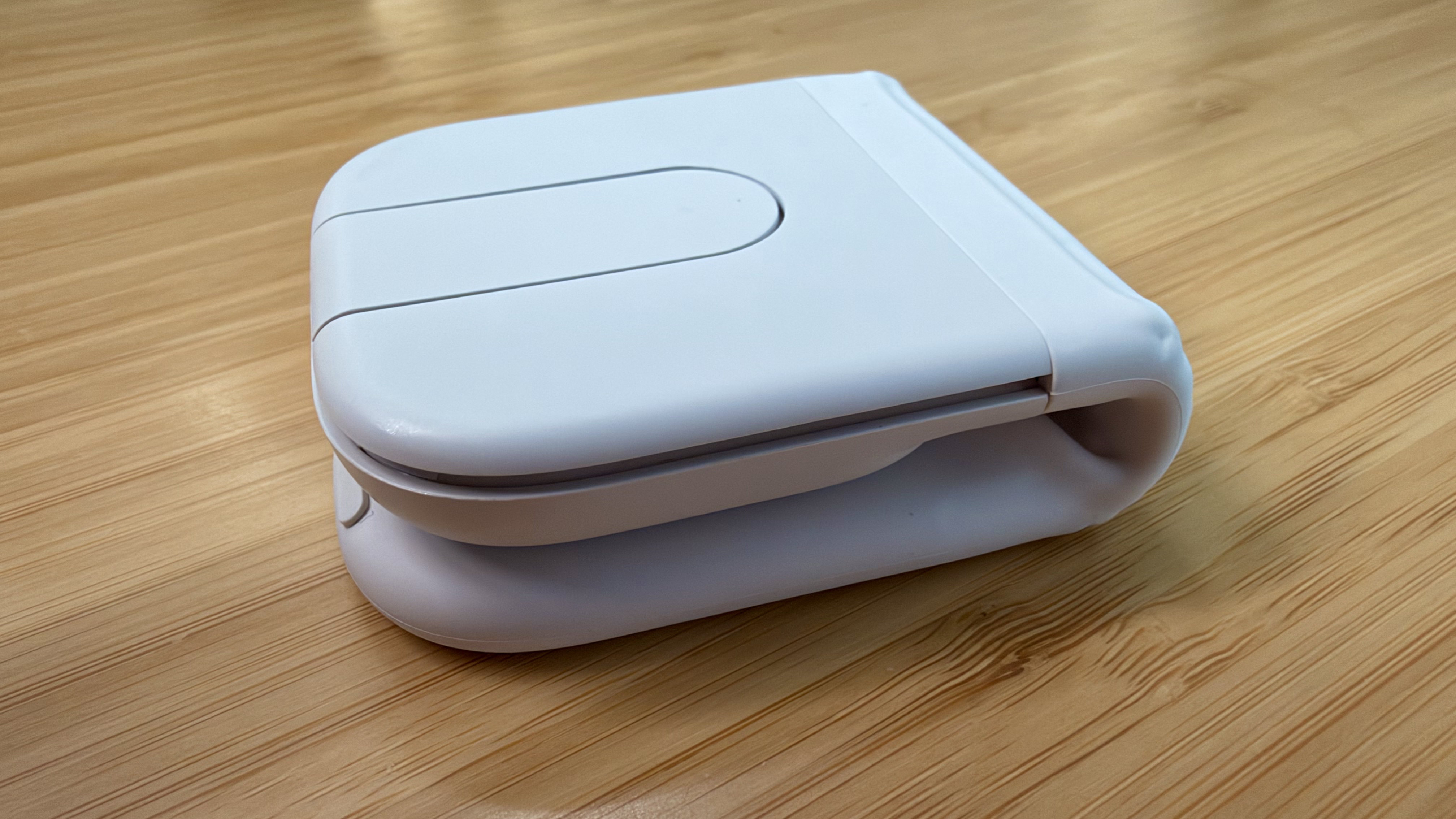
Folded, the Mobi Fold doesn't look much like a mouse.

Folded, the Mobi Fold doesn’t look much like a mouse.

I’ve been testing the Mobi Fold for about a month, and my favorite thing to do with it is fold it up, show it to someone, and ask them to guess what it is. No one has guessed correctly because a folding mouse just isn’t a thing most people have encountered before. Instead, the most common guess is that the Mobi Fold is a small battery for charging an iPhone, until I unfold it and the shape becomes more familiar.
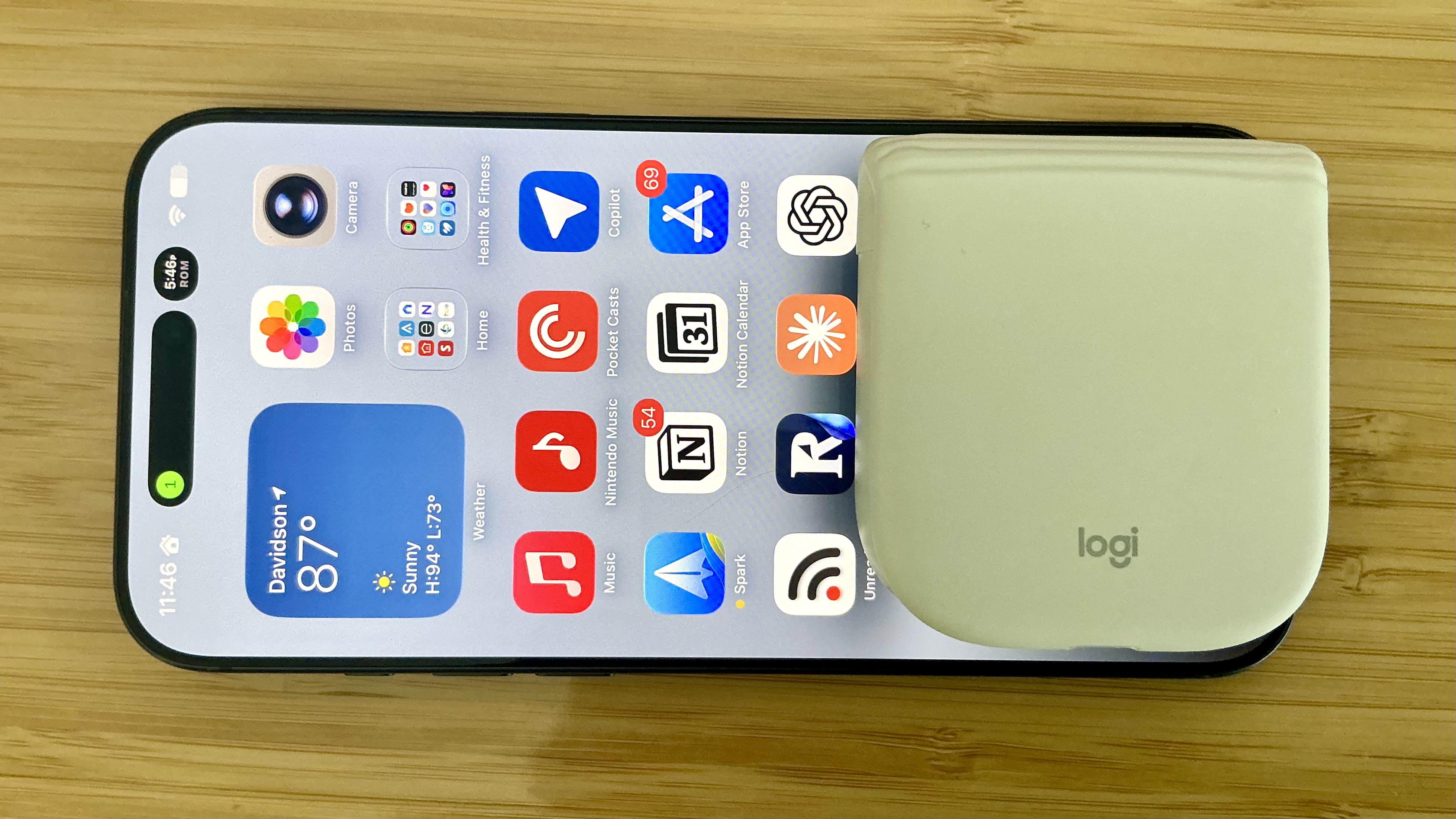
The Mobi Fold is tiny.
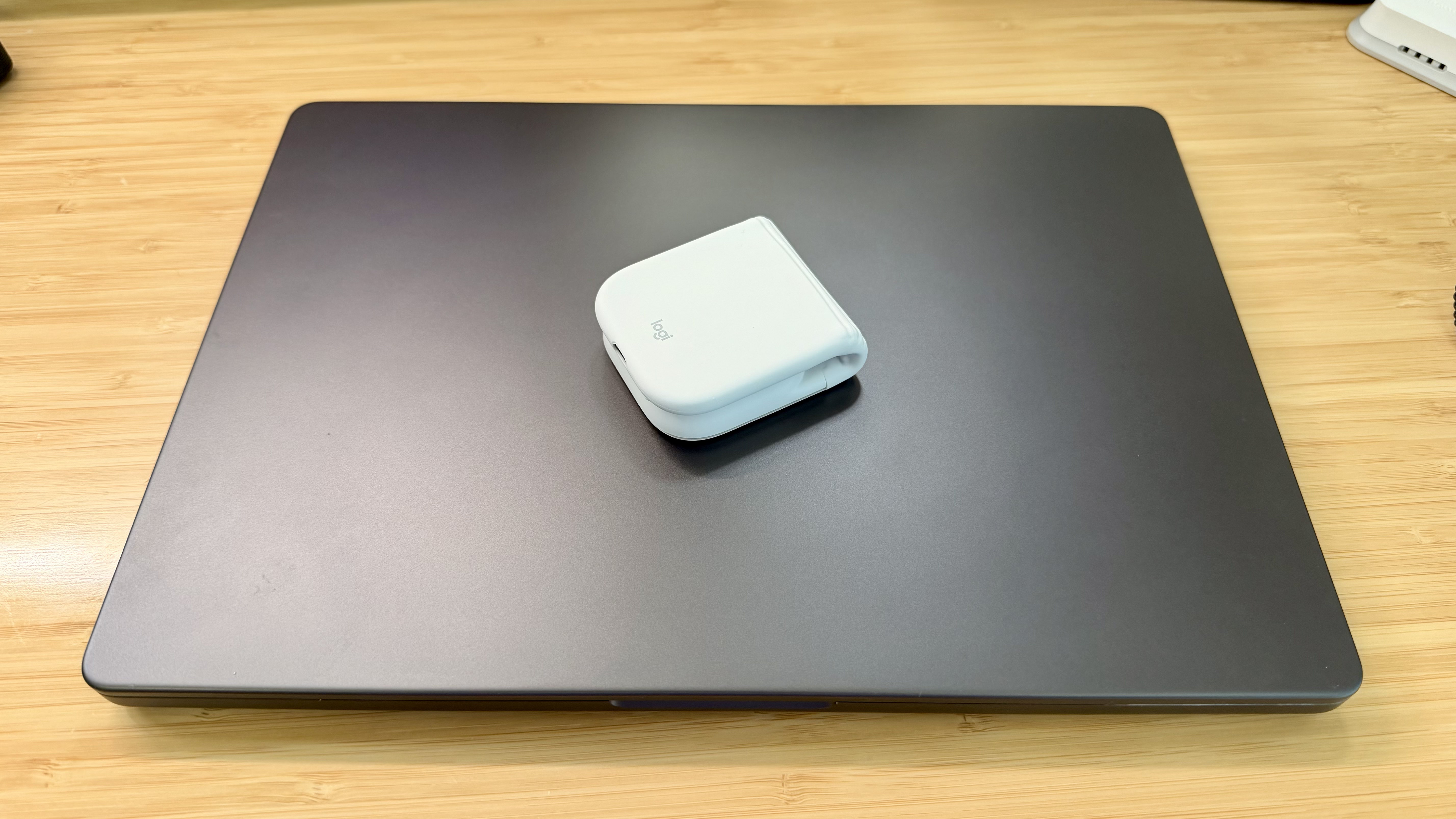
The Mobi Fold is tiny.

Really tiny.

Really tiny.

The Mobi Fold is powered by a rechargeable battery that Logitech says lasts for up to 33 days (and up to 22 hours on a one-minute quick charge). The device also turns itself on and off automatically when unfolded and folded, which I love. Plus, the Mobi Fold can connect to up to three devices, and it supports both Bluetooth connections and Logitech’s Bolt dongle (sold separately).

The Mobi Fold’s surface is a soft-touch plastic that feels comfortable in your hand, and it has three buttons arrayed across the front. The middle button doubles as a trackpad, allowing you to drag a finger across its surface to scroll and perform gestures like a double tap for zooming in and out of a webpage.
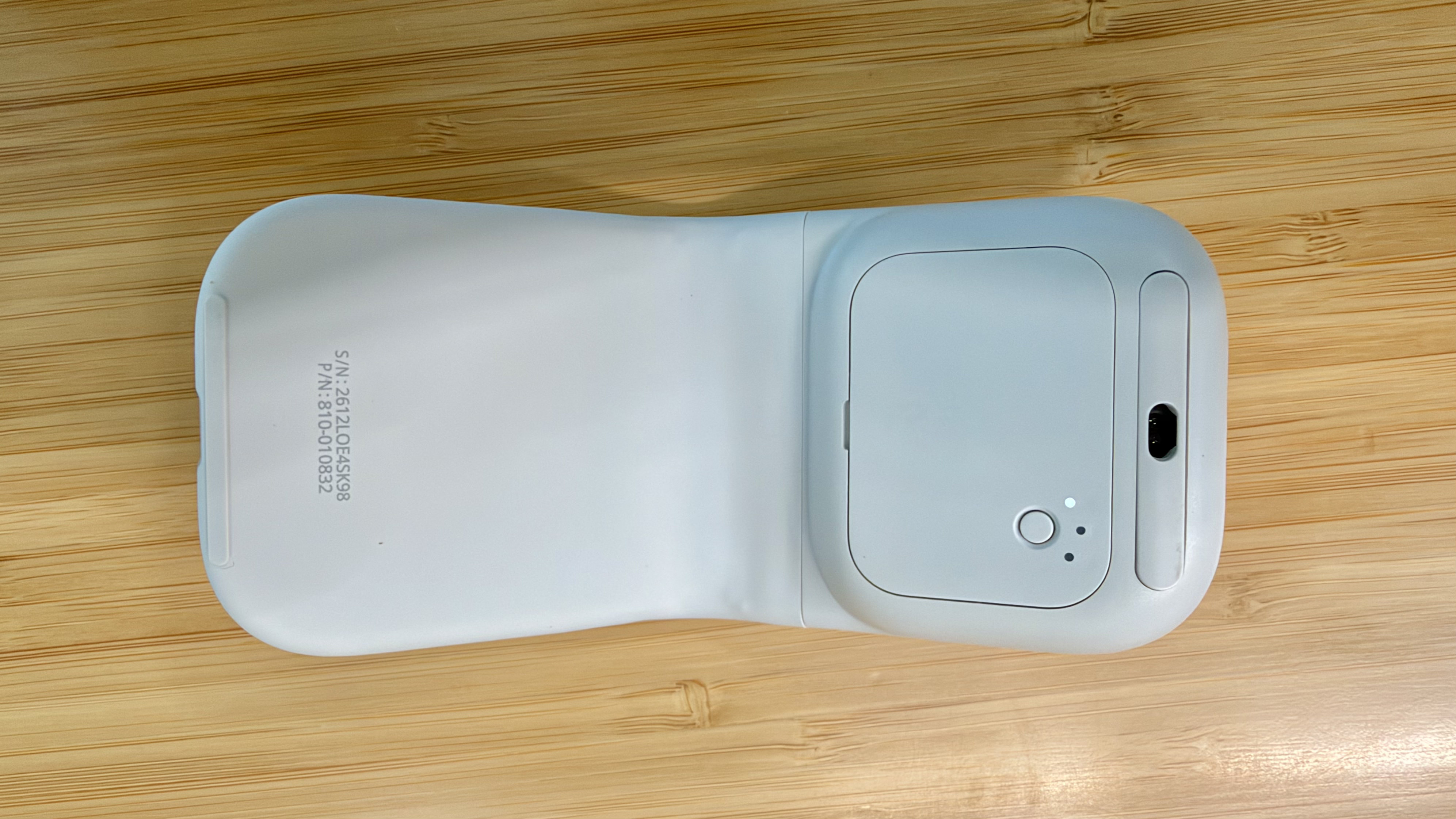
The Mobi Fold pairs with up to three devices.

The Mobi Fold pairs with up to three devices.

By default, tapping the front of the middle button navigates forward, while tapping the back navigates back in a browser. However, as with other Logitech mice, you can program the Mobi Fold’s buttons and gestures to:

  • perform different actions depending on the app you’re using,
  • control system settings like brightness and volume,
  • perform macro-like smart actions, and
  • display the Logitech Actions Ring, a customizable set of actions that are overlayed on your work environment.

That’s a lot of customization for a diminutive mouse, which I appreciate. However, because the Mobi Fold is typically my “long work sessions at the coffee shop” mouse, I’ve found that all I really need is its traditional point-and-click functionality.
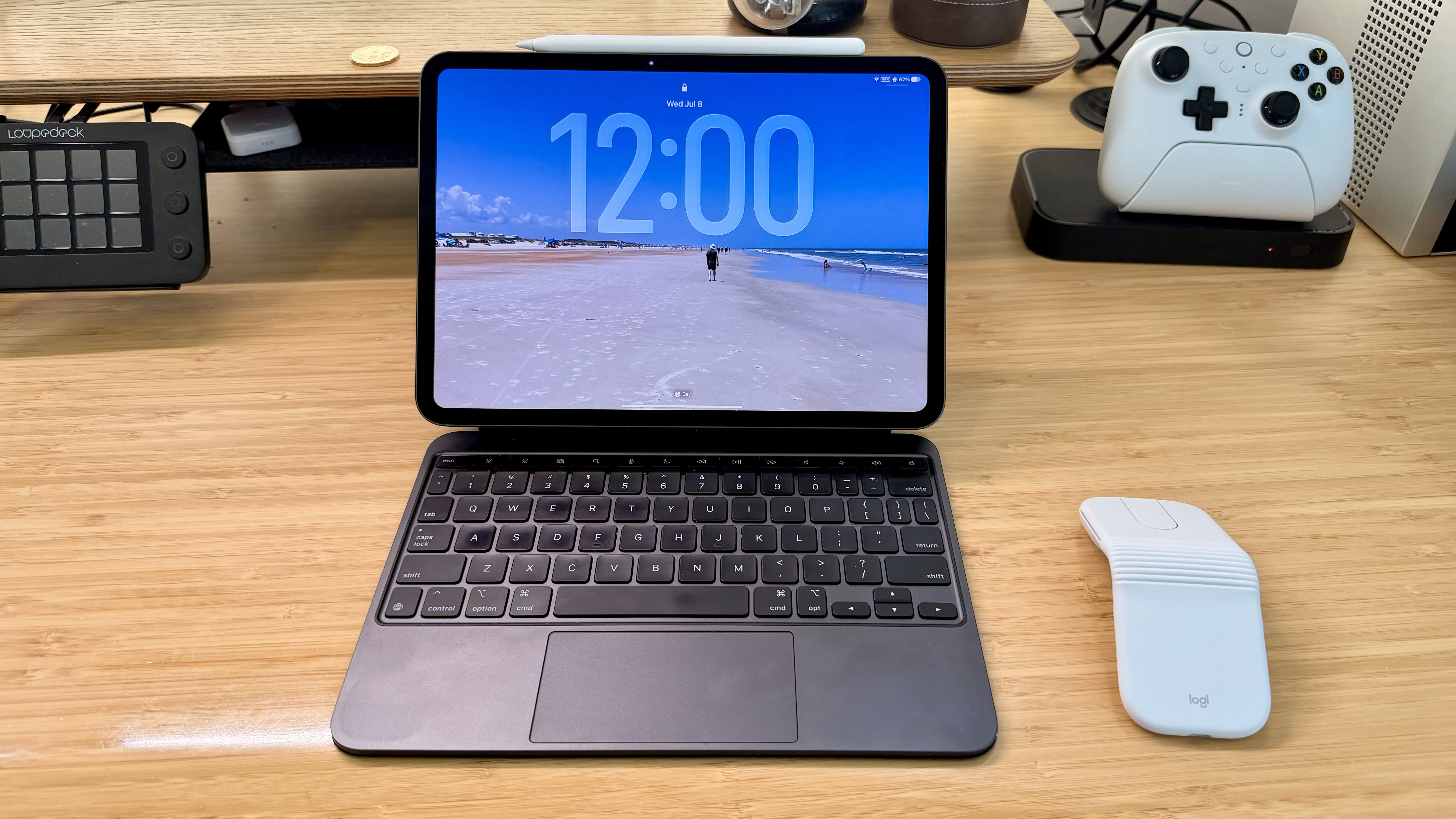
The Mobi Fold makes a good companion to an iPad.

The Mobi Fold makes a good companion to an iPad.

Ultimately, the Mobi Fold isn’t going to replace the MX Master 4 sitting on my desk, but it’s not meant to. I’ve fallen for the Mobi Fold just the same because its compact size and light weight make it a no-brainer to carry with me. I’ve also been pleasantly surprised at just how comfortable the Mobi Fold is to use, unfolding into a sturdy, angular shape that feels good in hand, unlike, say, Apple’s shallower Magic Mouse.

As a result, I really can’t recommend the Mobi Fold enough for on-the-go use with a Mac laptop or iPad. The combination of features in such a small, portable package sets it apart from every other mouse I’ve used and makes it well worth its $79.99 price tag.

The Mobi Fold is available in Graphite, Lilac, Off White, and Sand colors, both directly from Logitech and from Amazon.

  •  
❌