Login
LoginMeta says Muse has over 10M users, with shopping a top activity
21 October 2026 at 22:14
Meta Muse users are adopting the app for shopping and personal productivity, the company said during Q3 earnings. The AI app now has over 10M users.


Muse, the new general-purpose AI agent from Meta, can expose sensitive information when users share conversations through web links, researchers reported Monday. In response to questions from Ars about the behavior, Meta said it's suspending the sharing feature while the company reviews it and considers making changes.
Like many online services, Muse has allowed users to share searches, conversations, images, and similar content with other people. Such share features usually involve clicking an option to create a unique URL that anyone can use to load a page hosting the content. To keep potentially sensitive information from being accessible to unintended people, the URLs typically contain a long sequence of text that can’t be easily guessed.
Muse, which Meta CEO Mark Zuckerberg said last month was “built from the ground up for privacy and security,” seems to take the same precautions. But a central design decision for constructing URLs has made the links easy to discover. As a result, researchers from security firm Claroc said they were able to enumerate 6,800 links Muse users created for sharing conversations with others. After opening a few hundred of them, the researchers found information that was clearly not intended to be publicly available, including:

© Getty Images
Apple (Hacker News, MacRumors, Lobsters, TidBITS Talk):
Full Disk Access largely sidesteps these controls in order to allow backup apps to function properly on the Mac. Some developers are using Full Disk Access in ways that could put users at risk, exposing everything on their systems—including files, mail, messages, and even browsing history—without users’ full knowledge and understanding.
[…]
Going forward, we will introduce additional controls to ensure that users who genuinely wish to grant an app this extraordinary level of access can only do so with very explicit user action. Addressing this is critical. As AI agents become increasingly capable and autonomous, the risks associated with this level of access will grow substantially.
It was pretty obvious something like this would happen after the Muse accessing Messages news.
What we have is just one noisy, confused journalist, Jason Aten. He granted FDA to Muse but refuses to admit it, to the public or even to himself.
I see several issues with the current Full Disk Access system:
Backup apps need FDA, but so do many other types of apps. Often, they don’t need full disk access but rather they need to work around a missing or broken API. All of my apps except ToothFairy use FDA, not because I want to or because it’s easier to code, but because without it the user experience would be much worse or key features wouldn’t work at all.
There is no API for apps to see whether they have FDA or to request it from the user. It’s not like, say, accessing the user’s Contacts where macOS pops up a standard dialog and the app supplies a “reason” string to specify why it wants access. Instead, each app presents its own set of instructions for how to enable it deep in System Settings. It requires the confusing maneuver of first adding the app to the list; it doesn’t automatically show up with a slider switch next to it, like with other privacy settings. This adds an obstacle for users to get up and running with an app but doesn’t really provide additional security, just obscurity.
FDA is not granular. There’s no way for apps to request only the permissions they actually need. For example, SpamSieve wants to be able to access the user’s mail, but it doesn’t need or want to see their iMessages or browser history. This is bad for users because they may be exposing more information than they want to and bad for developers because some users will think your app isn’t worth the risks.
There is no way for the user to see what the app actually did. If it tells me that it wants FDA to access my mail but actually it mucked around with my Time Machine backup, how would I know?
Apple’s wording in System Settings is not very clear. I don’t think most users really understand what FDA is doing.
The previous items combine to create opportunities for malfeasance. It’s normalized that many apps that seem like they wouldn’t need full disk access do need FDA, so this makes it easier for apps to trick the user into granting it under false pretenses. Apple requires that apps coach the user through the process, so it’s normal that users mostly see text from the app (which might not be trustworthy) rather than standard text from Apple, as with other permissions prompts.
But the problem in the Muse case was not malfeasance. Rather, it seems that Muse asked Aten to enable FDA, but he doesn’t remember doing so or didn’t understand what he was doing. It sounds like Apple wants to make this consent more clear, which is good, but other issues would remain. As with the recent keychain story, this feels like a bandaid rather than a thoughtful solution to the real problem. The issues with FDA were clear when it was introduced 8 years ago, and many Radars were filed, but it’s been virtually unchanged since.
Apple seems to think that by making a scarier warning they can convince more users not to grant FDA—or at least perhaps deflect blame from Apple to the user if they later regret it. Maybe that solves Apple’s problem, but it doesn’t really solve the user’s problem. The user is installing Muse because it’s more capable than Siri. They probably do want it to access some protected data, e.g. so it can find information in their mail or messages. So they actually do need to give it FDA. Aside from deterrence, Apple is not actually protecting the user. And the deterrence is kind of sketchy. Rather than providing a safe way for users to choose what to share with a competing product, Apple is saying the only option is to share everything, and then discouraging that. Meanwhile, there’s no switch to turn off Apple Intelligence. It’s like they expect you to stay on eWorld and not download Netscape. I actually really liked eWorld, and the broad Internet wasn’t totally safe (though neither was eWorld), but that doesn’t seem like much of a strategy.
Below I’ve embedded […] a screen recording of a macOS Virtual Machine showing the first run experience of the Meta Muse app.
[…]
It’s important to note that macOS has no API for an app to request or acquire Full Disk Access. The only way for an app to receive Full Disk Access is via the Full Disk Access pane of System Settings, as shown in the video. Thus, the only thing an app can do is open the System Settings pane for the user, as also shown in the video. Once the user is in System Settings, it’s up to the user to manually grant Full Disk Access.
Without Full Disk Access, Muse cannot access the user’s Messages database. If it could, that would be a macOS zero day vulnerability.
[…]
Aten oddly writes as if the “if you give it Full Disk Access” earlier in the article were counterfactual, merely hypothetical, still insisting that he did not give Full Disk Access to Muse.
I really worry about just how much Apple is going to lock Full Disk Access down. I use it with several apps that couldn’t function properly without it, and would be severely hampered if I needed to authorize it manually every time they do something.
However, what Apple absolutely must not do is to make the mistake it made with macOS Sequoia over screen recording. Sure, this is also incredibly dangerous and very strong warnings are appropriate, but what Apple did then was to force us all to confirm these permissions on a weekly basis, as well as after every restart.
Well, this is certainly ominous news for backup programs.
Like it’s not hard enough to turn this stuff on…
Is Apple suggesting this capability could be limited in the future to backup applications alone? I do not like that.
[…]
Because of the lack of information available at present, I do not want to get too far ahead of myself, but I am concerned that it could be a significant curtailing of application permissions. It has the potential for further self-preferencing, as Apple will surely exempt Siri from the kinds of permissions requests it requires of third-party apps, even as it is updated with additional capabilities.
[…]
Call me a naïve little baby if you want, but I do not think preserving Siri’s dominance on Apple’s devices is the company’s reason for locking down Full Disk Access. But Apple’s existing restrictions are part of the reason Siri was awful for a decade. If it had the opportunity to compete with third-party replacements, I doubt it would have languished in a miserable state for as long as it did.
[Only] a handful of apps to which I’ve granted Full Disk Access are backup apps. Others include the Finder replacement Bloom, launchers like Alfred, the wonderful selection utility PopClip, Apple’s own Pixelmator Pro, Setapp, TestFlight, Supercharge, Madden NFL 27 Arcade Edition, Hazel, and many others. It’s a diverse selection of apps covering everything from Apple’s own apps to Mac utilities that are longtime favorites of MacStories readers, and even one Apple Arcade game.
[…]
On the one hand, it seems to suggest that users will simply have to jump through additional explicit hoops to grant Full Disk Access to their agents and other apps. On the other hand, claiming that Full Disk Access was designed solely for backup apps raises red flags that could signal that the company intends to restrict the kinds of apps that can use Full Disk Access. I sure hope not.
But there are plenty of legit uses for Full Disk Access. Just looking at my MacBook Air this morning, I’ve given that permission to three apps: Terminal, BBEdit, and SuperDuper. All apps that I trust with that level of power because of their long history and because in order to do what they do best (or at all), they need that access. (Interestingly, on my Mac mini, that list also includes SpamSieve, KnockKnock, and Shortcuts—though not BBEdit, for whatever reason.)
[…]
I think there is a good argument for protecting Full Disk Access further, but there’s also only so much you can do to protect a user from themselves. Ultimately, this is a cat-and-mouse game, and while I don’t want my data purloined or misused, I also don’t want my computer locked down to the point that I can’t use it for all the things I want to do.
To say that I’m nervous about what Apple’s solution will entail is a massive understatement. There is one aspect in which the Mac is the perfect agent host: Apple has, for decades, invested in a combination of scriptability, automation, and accessibility APIs (these are very often the same thing) that makes it remarkably well-suited to computer use. Then there is the fact that macOS is a certified Unix system; this means that agents — which are perfectly suited to the command line — have access to the entire universe of tooling built for Unix systems. And, of course, Mac hardware is amazing.
The problem is that for my particular use case — a headless, always-on Mac Mini that I primarily access from other computers and my phone through the ChatGPT and Claude apps — macOS is incredibly hostile. The biggest issue is GUI-only permission prompts that are invisible to software running on said computer, including agents.
[…]
This system is annoying but manageable on your primary Mac; it’s a disaster on a headless Mac running agents, for two reasons. First, agents write new programs all of the time, and in my case, those programs need access to devices on my network (SMB shares, for example, trigger a TCC warning). What I need is a permission layer for agents, not the programs they create; TCC is operating at the wrong level of abstraction.
Second, the TCC subsystem exposes its prompt in a protected space that no program can see; that means that programs silently fail and the agents don’t know why; what I have to do is remember that there is probably a permissions prompt on screen, log into the Mac Mini with screen-sharing software, and click OK.
Apple’d get a long way by just renaming the privilege. How many laypeople understand what a “disk” even is? Regular people just talk vaguely about how much “memory” their computer has - if they think about it at all other than when they run out of disk space - at which point, how many just think that means they have to buy a new computer? So, how about just “Full Access to All Your Data”? Call it what it basically is.
If Apple has time (or is especially motivated), it might also add more granular options to control what data apps can access. For example, instead of today’s single toggle that grants an app access to the broadly defined “data like Mail, Messages, Safari, Home, Time Machine backups, and certain administrative settings,” it might instead allow you to enable access to specific data on a per-app basis. This would allow, for example, Muse to access Mail and Safari, but not Messages or Time Machine.
With all the levels of entitlements and crap they added, I find it ironic that SIP is “only” implemented as “open up every damned thing to everyone” without more refined levels.
John:
I was frankly surprised when I learned FDA was for a machine, across user accounts, rather than for a single user. It seems like granting root, something the *nix community has tried to reduce and lock down for decades.
I certainly don’t trust anyone’s AI with root, and creating a weak, non-admin, user for AI experiments should be a safe path.
While [Gruber sees] this as a “why we can’t have nice things” moment, I see it as another case of Apple using privacy to limit competition in areas it currently lag behind.
I’d prefer to decouple trust in how my personal data is handled from trust in a particular platform or software vendor. That’s what I personally value about EU’s approach: give people rights over their information, make mishandling it a legal liability, and severely punish companies that break those rules.
Apple getting unique privileges to access sensitive data simply because they own the platform, and thus there is an implicit trust in their handling of it, feels like a brittle long-term strategy. If this works without causing anti-trust issues, it only makes Apple more dominant while locking out potentially useful software.
Previously:
Update (2026-10-06): See also: TidBITS Talk and Vitor.
Whether or not you would ever want to unleash AI agents on your Mac, Apple does need to refine Full Disk Access as a matter of urgency. But its design and engineering cannot be rushed. Merely adding to the complexity of current Privacy settings wouldn’t help users, many of whom already find privacy protection confusing and opaque.
it’s clear there’s consumer demand for automated access to iMessages, and instead of offering a proper API with audit trails and fine-grained controls Apple would rather force users to FDA then cry fowl when they grant FDA.
Previously:
Update (2026-10-14): Adam Engst:
63% of the more than 200 people who voted said they had granted Full Disk Access to 6 or more apps, with over half of those people saying they had given 11 or more apps that level of access. In short, Full Disk Access is essential to how many of us use our Macs.
At the same time, Full Disk Access feels a bit like a Band-Aid, partly because Apple hasn’t put enough thought into more granular permissions, forcing many apps to rely on Full Disk Access even when they don’t need all its capabilities.
[…]
Given that Apple’s statement about Full Disk Access seems to have been prompted by the release of Meta’s Muse AI agent, I would suggest Apple think more carefully about how such agents should be handled. They may legitimately need Full Disk Access, along with numerous other permissions, but beyond what would appear in an App Privacy Report, I would like to see them maintain complete logs of every permission-enabled action they take on your computer. Preferably in human-readable form.
Apple says it is changing its macOS privacy settings to stop third-party app developers from misusing them to access message histories.
Friday's announcement comes two weeks after tech columnist Jason Aten said that Meta’s new general-purpose AI agent Muse sent him an unsolicited notification referencing a thread between him and a co-worker over Apple Messages. Aten said he never granted Muse permissions to read his messages and had assumed they were off-limits. Social media last week blew up with masses of people who agreed and said the incident showed that AI assistants given access to calendars, emails, messages, shopping accounts, and other resources are akin to a skill saw or other power tool. While potentially useful, they can do real damage if not used carefully.
Meta CTO David Singleton joined the fray with a rebuttal that appeared solid. For Muse to access Apple Messages, a user must manually give it two privileges. One is full-disk access, a macOS system-level permission. The other is to enable a Messages connector setting in Muse.
© Aurich Lawson
The Muse from Meta app description says at the beginning, “Muse is your personal AI agent that gets things done, always working on what matters to you.” The Muse AI app description says at the beginning, “Muse is your professional AI agent that gets work done, always helping move important tasks forward.” Near the end, the Muse from Meta app description has the heading “SMART, BUT STILL LEARNING.” Near the end, the Muse AI app description has the heading “POWERFUL, BUT STILL LEARNING.”
In other words, Muse AI is a blatant copy of Muse from Meta, the latter of which is currently the #1 iOS App Store download in the United States. I don’t know where Muse AI ranks in the iOS App Store, but I do know that it’s currently the #20 Mac App Store download in the US.
And the real Muse app isn’t in the Mac App Store, so it has no competition.
By the way, I’d also like to draw your attention to the #11 Mac App Store download, as shown in my screenshot above: App for Instagram º. Yes, the app name includes the º character, a phenomenon I’ve written about before.
[…]
The top search result for “VLC” in the Mac App Store is Video Player for VLC, developed by muhammad faisal jabbar, not by VideoLAN. VLC for Mac is distributed outside the Mac App Store. You may notice a similarity between the icon of the official VLC app in the iOS App Store and the icon of Video Player for VLC.
Previously:
Update (2026-09-29): John Gruber:
“Muse AI” is now gone, but “App for Instagram °” and “Video Player for VLC” are both still there.
The Reddit commenter claims that the scams receiving public attention are “the tip of the iceberg from a limited, outsider perspective,” which is an accurate metaphor, yet the commenter and I have dramatically different interpretations of that metaphor. For the commenter, the iceberg represents the vast number of scams allegedly caught by Apple app review but not seen by the public; for me, the iceberg represents the vast number of scams not caught by Apple app review and not seen by the public either. To put the argument another way, the commenter appears to assume that the majority of scams in the App Store receive widespread public attention, in blog posts such as mine or in the news media, so the relatively small number of stories we hear is indicative of a relatively small number of scams in the App Store, whereas my own impression is that the vast majority of scams in the App Store do not receive widespread public attention. Scam hunting is not my job, merely an occasional hobby. It’s so easy for me to find scams, they practically fall into my lap whenever I look. I could spend all day every day finding and listing App Store scams, if I were sufficiently motivated (I’m not). You would think that someone working for Apple would be sufficiently motivated, by a paycheck, to spend all day every day finding and listing and most importantly removing App Store scams, but I’ve seen no evidence of it.
I think Johnson is right about the iceberg. Most of the scams that get publicity are at the top of the charts. One view is that all the scam apps that Apple misses end up being popular. What are the odds? The other is that we notice them because they’re popular and that there’s also a vast number of deceitful or dangerous apps lurking.
Speaking of App Store shortcomings, I really hate when I want to see how much an app costs and I get this impenetrable list of IAP options. It’s impossible to know without installing and opening the app what the payments options are. Be great if Apple helped make this clearer—which options are actually available? What are their various plans (monthly, weekly, etc.)?
The new Meta AI desktop app is version 1.0 beta at launch and weighs just 16MB once installed.
Based on initial inspection, it runs natively on Apple silicon Macs with macOS 15 or later, using an AppKit and SwiftUI shell with WebKit for richer chat content. In other words, this is not an Electron app or a repackaged iPad release.
It includes Mac-specific hooks, making the desktop experience more robust than the Meta AI mobile app.
The Mac app brings a few new capabilities compared with Meta AI’s existing website and mobile app. For example, it enables users to share part of their screen so the assistant can “see” what they’re working on and provide more specific answers.
The app is primarily meant for businesses and content creators, and it integrates with Facebook and Instagram. It incorporates analytics tools so it can answer questions about performance, and connects with Google Workspace for document access. Google Workspace access requires a professional Facebook or Instagram account.
Passes the Settings window sniff test too — it actually has a Settings window.
[…]
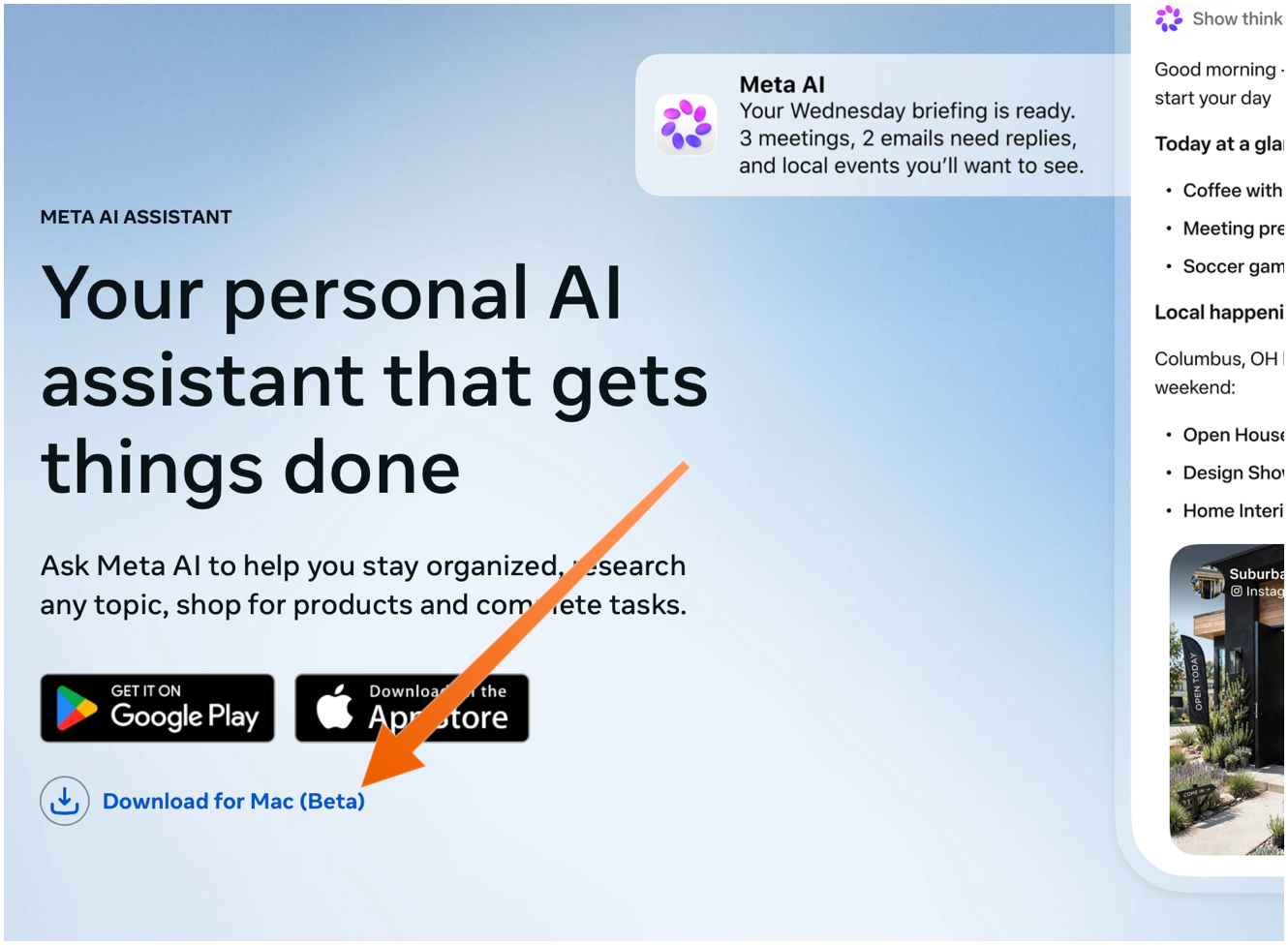
The Mac app is not available in the App Store. You need to download it directly from Meta’s web page, using the “Download for Mac (Beta)” link. The ChatGPT and Claude Mac apps aren’t in the Mac App Store either — they do too many things outside the App Store’s mandatory sandbox (and probably use APIs require that special entitlements in the App Store too).
Meta’s new AI assistant app, Muse, is now available on Mac.
On the Mac, Muse can interact with your files, messages, calendar, notes, and mail, all within their native applications.
Jason Aten, a contributing editor at Inc Magazine, posted on Threads screenshots of an interaction he had with Muse in which the assistant asks him some questions about a conversation he was having in Messages.
The problem is that Aten says he didn’t give Muse access to his messages. When asked how it knew about the contents of his messages, Muse replied, “I saw the notification previews, not your message history. I haven’t been reading your texts.” Aten continued to push, asking how Muse was receiving message previews, it didn’t have a good answer.
The number one response I’ve gotten to my thoughts on Meta’s Muse personal assistant agent is some variation of “I will never trust Meta with my data.” But the number two response is arguably more interesting (and related): “Why didn’t Google build this?”
Mac security researcher Patrick Wardle says it’s trivial to turn Muse into “the ultimate backdoor.”
[…]
According to Ars Technica, Wardle found that a locally running application or terminal command could alter an undocumented Muse configuration setting that controls the server used for dictation transcription. By redirecting dictation traffic to an attacker-controlled server, an attacker could capture voice prompts and obtain the authentication token for the victim’s Muse account.
Four days later and Muse still holds the #1 spot in the U.S. iOS App Store.
See also: Joanna Stern.
Alexandr Wang (Watts Martin, John Gruber):
Here’s the best part: we have no idea what people will want. The world until now has been shaped by the small number of fanatics who have somehow found a way to make their wants real. But we’ve never seen humanity with every single person’s agency fully switched on. Eight billion people who just need to write their dream down in order to get started making it happen.
So we built Muse to help people build the world they want.
So uhhhhhh… Apparently meta’s muse “AI” is just straight up doxxing people to strangers on FB marketplace???
Via Mike Masnick:
Almost all of Meta’s PR about Muse was about how careful they had been to set it up not to do things like this, how they delayed the launch by months to carefully design it so it could be trusted. And then…
Previously:
A Meta anunciou hoje o Muse, um agente de inteligência artificial generativa pessoal e privado que foi projetado pela empresa para ajudar usuários a explorar novas ideias e cumprir suas metas.
Focado no público em geral, ele é bem simples de usar. Basta dizer ao Muse o que precisa ser feito para que ele execute a tarefa — sem curva de aprendizado ou necessidade de experiência.
Posts relacionados
Usuários podem pedir-lhe que faça tarefas como enviar um email ou até mesmo reservar uma viagem, graças à capacidade do Muse de abrir o navegador, preencher formulários ou clicar em elementos da tela.
Ele se conecta aos apps e serviços que você usa no dia a dia, um por vez e sempre por sua escolha, em categorias como email e calendário, pagamentos, fitness e saúde, música e eventos ao vivo, restaurantes e compras, e casa inteligente. Os conectores integrados estão disponíveis nas configurações, e outros estão por vir. Se um serviço não estiver lá, mas tiver uma API pública, seu Muse pode configurar uma conexão usando credenciais fornecidas por você; e se não tiver API nenhuma, ele pode usar o serviço por meio de um navegador, do mesmo jeito que você faria.
Com a capacidade de continuar trabalhando mesmo depois de os usuários fecharem o app, o Muse é capaz de realizar pagamentos via Stripe e, futuramente, também suportará o Shop Pay.
Bastante proativo, o Muse se lembra do que é importante para o usuário e pode fazer sugestões sem a inserção de um prompt ou atuar com base em detalhes mencionados apenas uma vez.
Construído com base no Muse Spark, o modelo mais poderoso da Meta, o agente também conta com mecanismos avançados de segurança para proteger a sua interação com o usuário final.
Ele é executado em seu próprio computador dedicado na nuvem — que é onde os dados e credenciais para qualquer serviço conectado a ele são armazenados com segurança.
O Muse foi lançado nos Estados Unidos para a web, iOS e Android. Ele é grátis “para a maioria do que as pessoas precisam”, com planos de assinatura para pessoas que querem “fazer mais”.