❌

Reading view

Apple Music’s New Identity Turns Sound Into Moving Images

Apple Music unveiled a new brand identity on October 21, combining a revised wordmark, a sonic signature, and moving visuals shaped through physical experiments with sound. The project brings together Apple Music and TBWA\Media Arts Lab, with an original composition by British producer Fred again.. and NEST Acoustics providing the musical foundation.

The concept is described as “made by sound.” Rather than treating music as a soundtrack added after the visuals were finished, the creative process used audio to generate movement that could be filmed and incorporated into the identity.

The reveal explains how Apple Music intends to connect its visual and audio branding across different settings. The wordmark, musical-note symbol, filmed sequences, and short composition each contribute to that identity, while the rollout determines where audiences will encounter them.

Sound Becomes Part of the Image

According to Wallpaper’s account of the project, the team played musical notes through a transducer, which converts audio signals into physical vibrations. Those vibrations moved a shallow bath of mineral oil, producing ripples and shifting refractions.

The resulting patterns were captured on camera and became material for the visual design. Fred again.. and NEST Acoustics also developed a short composition that serves as the identity’s sonic signature.

The experimentation also influenced the composition. Fast Company reports that too many notes, or notes pitched too high, created excessive movement and made the image difficult to read. Those tests helped establish constraints for the musicians as they developed the sonic signature.

The result came from adjusting sound and image together. The team could observe how a musical choice changed the liquid’s movement, then refine the composition with the visual response in mind.

A Heavier Wordmark Joins the Moving Visuals

The refresh also changes the service’s typography. Wallpaper describes a customized version of Apple’s SF Pro typeface, with bold, lowercase lettering accompanying the Apple symbol.

The musical-note icon is another component of the system. Together, the lettering, symbol, motion, and sound create several ways to identify Apple Music, depending on the setting.

Those distinctions help explain why a single screenshot cannot represent the whole project. An app icon must remain recognizable at a small size. A video sequence can use time, movement, lighting, and audio to establish a different impression.

The new identity therefore needs to be considered both as a collection of individual elements and as a coordinated presentation. Someone may prefer the animated treatment while responding differently to the static lettering; those reactions concern different parts of the same design.

Introducing a new identity for Apple Music, physically shaped by an original composition from @fredagainagain1 and NEST Acoustics. https://t.co/LFXLIfexPL

— Apple Music (@AppleMusic) October 21, 2026

The Film Shows the Physical Production Process

A companion film documents the work behind the identity. iClarified’s coverage describes a 78-second sequence moving between the practical setup and the finished visuals.

The team submerged acrylic versions of the musical-note symbol and wordmark in mineral oil. Fast Company reports that the oil was selected for its viscosity, helping create the appearance of glass rippling under sound. Filming the moving liquid and refracted light produced the distortions seen in the finished sequences.

The behind-the-scenes approach makes the production method visible. It gives viewers something specific to examine: the relationship between a musical composition, a physical response, and the image recorded by the camera.

It also provides a useful distinction between inspiration and execution. Saying that a design is inspired by music is broad. Showing sound physically influencing the material being filmed explains how that idea entered the finished work.

The Rollout Extends Beyond the App Icon

Fast Company’s reporting identifies Apple Music, TBWA\Media Arts Lab, Fred again.., and NEST Acoustics as collaborators. It says the identity will begin appearing across original content and event programming this week, with marketing, product, and other experiences following later.

That describes a staged introduction rather than a single moment when every Apple Music surface changes. Viewers may encounter the new presentation in promotional or editorial material before seeing it consistently elsewhere.

The announcement is about branding. It does not, by itself, establish changes to subscription plans, playback quality, recommendations, or the music catalog. Those product details require separate announcements.

A stylized white musical note icon with a chromatic glow on a black background.
Image Credit: Apple Inc.

A Musical Idea Gives the Refresh Its Focus

The strongest part of the project is the clear relationship between its subject and its method. A service built around listening has used a composition to influence its visual identity, giving the sound and moving image a shared origin.

How successfully the elements work across everyday settings will become clearer as the rollout progresses. For now, the reveal offers a concrete account of creative collaboration—and a reason to look beyond the icon when assessing Apple Music’s new appearance.

The post Apple Music’s New Identity Turns Sound Into Moving Images appeared first on AppleMagazine.

💾

Enjoy the videos and music you love, upload original content, and share it all with friends, family, and the world on YouTube.
  •  

Nocturne Cast Reunites for New York Premiere Ahead of Apple TV Debut

Apple TV brought Nocturne to New York City on October 20, hosting the crime drama’s world premiere at Regal Union Square. Liev Schreiber, Zazie Beetz, and Stephen Graham attended the event ahead of the series’ October 30 streaming debut, following the first-look announcement covered in AppleMagazine’s introduction to Nocturne.

The red carpet screening marks the latest step toward the show’s release. For viewers, the distinction between the two dates is straightforward: the New York event celebrated the production, while general streaming availability begins the following week.

The Ensemble Comes Together in New York

According to Apple’s premiere announcement, attendees also included Rory Culkin, Chrissy Metz, Poorna Jagannathan, Gary Carr, and Landon Valentin. Writer, showrunner, and executive producer John Hlavin joined the cast.

Apple’s photographs document the gathering, including appearances by the three leads together and members of the wider ensemble. The event provides a fresh occasion to revisit the series as its release approaches, rather than announcing a change to its previously established schedule.

That timing is particularly useful for anyone who encountered the project when its first images appeared in July. The cast and premise are now attached to a specific viewing plan, with the opening episodes arriving before the end of October.

Liev Schreiber, Zazie Beetz, and Stephen Graham pose together at the New York Premiere for Apple TV+’s “Servant.”
Image Credit: Apple Inc.

A Detective’s Search Becomes Personal

Schreiber plays Jonah Lynn, a former soldier and homicide detective who leaves Philadelphia for a quieter life in western Pennsylvania. That retreat is threatened by serial killer Jurek Walter, played by Graham.

Beetz portrays FBI agent Saga Bauer, whom Jonah regards as a surrogate daughter. The search for a missing victim places her in direct confrontation with Jurek, bringing Jonah’s personal loyalties into the investigation.

The official Apple TV listing supplies another part of the setup: a person believed to have been one of Jurek’s victims unexpectedly turns up alive, prompting the effort to locate someone still missing.

Together, those elements establish a thriller built around both discovery and risk. The investigation has a concrete objective, while Jonah’s relationship with Saga gives the decisions surrounding it a personal cost. How the series develops that tension will become clearer when the episodes are available.

Two Lars Kepler Novels Provide the Foundation

Nocturne draws from The Sandman and Lazarus, part of the crime-fiction series published under the name Lars Kepler.

As the authors’ official website explains, Lars Kepler is the shared pen name of Alexandra Coelho Ahndoril and Alexander Ahndoril. Both were established writers before beginning their collaboration.

The source novels give the adaptation an existing world of characters and relationships, but viewers should not assume that every event will transfer directly to television. Combining material from two books creates room to reorganize the story around a different dramatic structure.

For readers familiar with the novels, that makes the adaptation’s choices part of the interest. For newcomers, Apple’s synopsis provides the essential starting point without requiring advance knowledge of the books or their later revelations.

The Team Behind the Opening Episodes

Rowan Joffé created Nocturne for television and serves as a writer and executive producer. Hlavin developed the series for television and also writes and executive produces.

Tim Van Patten directs the first two episodes and serves as an executive producer. His credits include Franklin and Masters of the Air. A+E Studios produces the drama in association with Range Studios.

Schreiber and Beetz also hold executive producer roles, with Beetz participating through her Sleepy Poppy production company. The credits connect the leading performers with the production beyond their onscreen characters, while the opening episodes will establish the finished show’s pace and tone.

Rory Culkin and Stephen Graham pose together in front of a backdrop at the New York Premiere of Nocturne.
Image Credit: Apple Inc.

Nocturne Begins With Two Episodes on October 30

Apple’s announced release plan calls for a 10-episode season. The first two installments arrive together on Friday, October 30, followed by one new episode each Friday through December 25.

That gives viewers two ways to approach the series: follow the investigation weekly from launch, or wait until the season has completed its run. The New York premiere does not change that arrangement, and the full season will not be available on opening day.

For now, the event brings the ensemble together just before audiences can begin assessing the drama themselves. October 30 is the date to remember for the first public streaming episodes; December 25 marks the scheduled completion of the season.

The post Nocturne Cast Reunites for New York Premiere Ahead of Apple TV Debut appeared first on AppleMagazine.

  •  

Gabriel Basso Joins Julia Garner in Apple TV’s Guilty Creatures

Gabriel Basso is joining Julia Garner in Apple TV’s Guilty Creatures, adding another series regular to the upcoming true-crime thriller. Based on Mikita Brottman’s nonfiction book, the adaptation explores a Florida murder and the years of secrecy that followed. Basso’s character has not yet been identified in the casting coverage.

Radio Times reported the casting on October 21, identifying Basso as a series regular. The actor is known for playing Peter Sutherland in Netflix’s The Night Agent, giving the Apple TV project a lead performer already familiar to thriller audiences.

For viewers familiar with Basso through The Night Agent, the project introduces a different kind of thriller premise: a story concerned with a murder’s prolonged psychological consequences and the relationships surrounding it.

Basso Joins an Expanding Ensemble

Basso joins previously announced series regulars Garner, Lewis Pullman, and Maddie Hasson. Mary-Louise Parker is attached in a recurring role.

Those distinctions establish the actors’ reported involvement without revealing how the adaptation will distribute the story among them. Basso’s casting does not yet identify which person he will portray or how his character connects to the central relationship.

That leaves a meaningful part of the announcement open. A recognizable actor can bring an audience to a project, but the character description will provide a clearer indication of what this particular role asks of him.

Garner’s involvement extends beyond acting: she is also an executive producer, and the project was developed through Tomorrow Studios’ first-look arrangement with her production company, Alma Margo. Basso’s addition expands the cast of a series whose lead performer is also involved behind the camera.

Guilty Creatures - A person with short, curly blonde hair and light eyes poses in front of vibrant pink and purple flowers, channeling Julia Garner’s elegance in a white outfit and natural makeup.
Image Credit: Getty Images

The Story Begins With a Florida Disappearance

The source material is Brottman’s nonfiction book, Guilty Creatures: Sex, God, and Murder in Tallahassee, Florida.

Published in July 2024 by Atria/One Signal Publishers, the book gives interested viewers a way to explore the underlying case before the adaptation arrives. It is a nonfiction account, so reading it will reveal events that the television series may choose to introduce gradually.

According to the publisher’s description, the book examines the relationships between Mike and Denise Williams and their longtime friends Brian and Kathy Winchester. Their shared lives were disrupted when Mike disappeared during a hunting trip on Lake Seminole on December 16, 2000.

The account follows the suspicions that developed afterward, including Brian’s subsequent marriage to Denise, and the long path toward uncovering what happened.

Brottman’s background also helps explain the book’s emphasis. Simon & Schuster identifies her as a writer and psychoanalyst, and describes the work as an examination of the psychology of people living with responsibility for a killing.

That provides context for the adaptation’s premise without establishing exactly how the television version will organize events. The book’s chronology, perspective, and emphasis may be reshaped for the screen.

Apple Has Positioned the Series Around Guilt and Secrecy

Apple officially announced Guilty Creatures on July 6. Its description centers on an adulterous relationship, a murder, and the emotional burden carried by two religious lovers over 18 years.

The premise gives the series a different emphasis from a straightforward search for a culprit. It creates room to examine the gap between public identity and private knowledge, and how a shared secret can influence a relationship over time.

That is the dramatic potential of the announced material, rather than an assessment of finished episodes. Casting news cannot establish the eventual balance between investigation, domestic drama, and psychological suspense.

It does, however, explain why the supporting ensemble matters. A story spanning years of concealed wrongdoing depends partly on the people around its central figures: what they notice, what they believe, and how their understanding changes.

Apple TV logo with a glowing apple icon and the letters "tv" on a vibrant gradient background, shifting from orange to purple and blue—reflecting the dynamic spirit of Apple TV competition. The small Apple logo appears in the bottom right corner.
Image Credit: AppleMagazine

Craig Gillespie Leads the Creative Team

Apple’s official series announcement names Craig Gillespie as director and executive producer, with Stuart Zicherman serving as showrunner and executive producer. Sarah DeLappe is adapting the book for television.

Tomorrow Studios is producing the series. The project was developed through its first-look arrangements with Garner’s Alma Margo and Gillespie’s Fortunate Jack Productions. Brottman is also an executive producer.

Gillespie’s previous credits include I, Tonya and Pam & Tommy, while DeLappe wrote Bodies Bodies Bodies. Zicherman’s credits include The Shrink Next Door and The Americans. Those backgrounds offer viewers a more concrete introduction to the filmmakers shaping the adaptation’s tone, writing, and direction.

A Premiere Date Is Still Unannounced

The casting reports do not provide a premiere date for Guilty Creatures. Basso’s addition should therefore be understood as a production update, rather than evidence that the series is approaching an imminent streaming release.

For viewers following the project, the next useful details will be character announcements and Apple’s release plans. The ensemble is becoming clearer, while the adaptation’s precise shape—and when audiences will be able to watch it—remains to be revealed.

The post Gabriel Basso Joins Julia Garner in Apple TV’s Guilty Creatures appeared first on AppleMagazine.
  •  

iPhone Duo Display Report Describes Temporary Wrinkles Around the Fold

An early iPhone Duo display report is drawing attention to how the folding area responds to pressure, adding a new question alongside the phone’s crease visibility. The phone’s inner display has a replaceable cover layer, while the latest report focuses on how the surface reportedly responds to pressure above the hinge.

The distinction matters. A fold that is difficult to see can still feel different when touched. Neither observation, on its own, establishes how the display will perform after months of everyday use.

The Report Centers on a Demonstration Video

An October 20 report from GSMArena attributes the footage to Weibo user Kang, with Ice Universe subsequently sharing it. According to the report, pressure causes the area above the hinge to depress and develop temporary wrinkles before appearing smooth again.

Kang reportedly observed similar behavior on multiple devices. That remains an attributed claim, rather than a published testing program with documented pressure levels, sample sizes, or repeatable measurements. The original Weibo post could not be independently accessed for this article.

The footage circulated before retail availability, but the cited report does not establish the provenance or condition of the devices shown. It should therefore not be presented as evidence of failures among retail customers. Multiple publications discussing the same clip also do not amount to independent durability tests.

A person holds an A20 Pro foldable smartphone open; one screen shows a photo of a woman, while the other displays app icons and a weather widget.
Image Credit: Apple Inc.

Crease Visibility and Surface Feel Are Separate Questions

Apple’s September 9 announcement describes a nano-textured finish intended to reduce reflections and minimize crease visibility. It also identifies a custom polymer cover, glass above and below the folding panel, adhesives that accommodate movement, and a titanium backing plate.

Apple also says the hinge supports the center of the display when the phone is open. That makes the reported pressure response relevant to assessing the finished design, although the announcement does not specify how much surface movement is expected under a fingertip.

That construction provides context, but it does not identify the cause of the reported behavior. The available footage cannot establish which layer is moving, how much force is being applied, or whether the response falls within Apple’s intended tolerances.

There are three different questions for reviewers to investigate. The first concerns appearance: whether the fold distracts from text, photographs, or video. The second concerns touch: whether a finger notices a change while crossing the center. The third concerns durability: whether repeated use produces lasting damage.

A demonstration of one property cannot settle all three. Temporary deformation deserves examination, but treating it as proof of an eventual screen failure would require evidence that has not been established here.

The Glass Explanation Remains Speculation

Ice Universe suggested variable-thickness glass as a possible explanation for the reported behavior. Separately, Corning describes a technology called VtG, which uses thinner glass at the hinge and thicker surrounding sections to balance flexibility and durability.

However, the existence of that technology does not establish that it is used in iPhone Duo, or that it explains the reported softness. Apple’s published construction details should not be combined with an unconfirmed supplier theory to create an apparently complete explanation.

A technical assessment would need more than a visible surface response. Useful evidence would include controlled measurements and an examination of the display assembly. Until then, assigning the behavior to a particular material would be premature.

A foldable iPhone Duo displaying a dashboard of widgets on the left screen and a messaging app thread on the right screen.
Image Credit: Apple Inc.

What a Useful Follow-Up Test Should Examine

The next step should be observation under ordinary use. Reviewers could examine whether the center feels different during scrolling, typing, or gestures, and whether that difference affects accuracy or comfort.

A separate controlled test could investigate pressure response, documenting the force applied, the condition of the device beforehand, and whether any change remains afterward. Keeping those evaluations separate would help readers distinguish an everyday interaction from a deliberate stress test.

Longer observation would also be valuable. A surface that returns to its previous appearance immediately presents a different question from one that develops a persistent mark. Photographs taken under consistent lighting could help document that difference without relying on memory or dramatic viewing angles.

What Buyers Can Take From the Report

Apple has scheduled initial iPhone Duo availability for October 23. Before drawing a purchasing conclusion from the clip, readers should look for assessments that identify the hardware tested, explain the method, and distinguish temporary movement from lasting damage.

For now, the report gives reviewers a specific issue to investigate. It does not establish a widespread defect, a guaranteed durability problem, or a reason to assume every device will behave identically. The useful follow-up is evidence showing how the folding area performs during normal handling and over time.

A white iPhone Duo foldable shown at an angle, revealing the triple-lens camera system on the back and a vibrant photo displayed on the internal screen.
Image Credit: Apple Inc.

The post iPhone Duo Display Report Describes Temporary Wrinkles Around the Fold appeared first on AppleMagazine.

  •  

Apple’s 2026 Designers of Tomorrow Explores Creativity Beyond the Screen

Apple’s 2026 Designers of Tomorrow exhibition opened October 20 at Hôtel de Maisons in Paris. Returning for a second year in collaboration with Design Miami, the showcase is curated by Rodman Primack and organized around the theme of presence. A similar exchange between digital exploration and physical production appears in Bünyamin Aydın’s work with iPad Pro for Les Benjamins, where sketches and shared references helped develop a fashion collection.

The featured participants are Salem S. Charabi, Isabel Rower, Yoonjeong Lee, and Parafernalia. Their work provides a starting point for examining a broader creative question: how can an object encourage someone to stop, pay attention, and engage with their surroundings?

For Apple readers, the exhibition also offers a different way to think about creative technology. The finished works invite attention through their materials and use, while digital tools operate behind the scenes.

Four Projects With Different Material Languages

Charabi’s The Eminence of Light combines palm fronds, banana paper, and limestone in a lantern developed with MacBook Pro sketching and 3D modeling.

Rower’s Padded Chair 1860 features a glossy finish and ceramic beaded fringe that makes sound when brushed. Her workflow includes documenting ideas on iPhone and arranging references in Keynote.

Lee’s New Form combines a wooden table and lamp, incorporating worn pencils and approximately 5,000 layers of veneer. She uses iPad Pro and Apple Pencil within a connected workflow.

Parafernalia’s Genki Matsumura and Sebastián Zorrilla created MonoAmbiente 1, a stainless steel piece that opens to reveal stools and a table. Their geographically separated collaboration involves shared sketches and communication apps. Apple describes the projects and their development in its exhibition announcement.

A hand uses a digital stylus to draw pencil sketches on an Apple tablet screen, which displays a drawing app toolbar for designers of tomorrow.
Image Credit: Apple Inc.

Presence Begins With What an Object Asks You to Notice

Together, the projects suggest several ways to interpret presence. Light can draw attention across a room. An unexpected sound can make a familiar action feel different. A recognizable material placed in an unfamiliar role can prompt a second look.

These are useful distinctions because attention is not always a matter of visual impact. An object may become interesting through movement, proximity, or participation. Looking at a photograph and encountering the work physically can therefore produce different experiences.

That is an editorial reading of the exhibition’s theme, rather than a measured finding about visitors. Whether a particular piece creates that response will depend on the person encountering it and the circumstances of the encounter.

Digital Planning Supports Physical Judgment

The workflows offer a practical reminder that creative work contains several different kinds of decisions. Sketching helps establish a possibility. Modeling can help examine relationships between components. Collecting references provides material for comparison.

None of those steps eliminates the need to make judgments about the finished object. A convincing image cannot, by itself, establish whether a surface feels right, a structure behaves as intended, or an interaction is satisfying.

For someone developing a personal project, the useful question is which stage needs support. A student organizing visual research may need a clearer reference archive. Two collaborators may need a more consistent way to exchange revisions. A maker exploring a complex form may benefit from investigating its geometry before committing materials.

The exhibition illustrates specific workflows, rather than prescribing one equipment list for every creative discipline.

A designer with short hair wearing a black sweater stands in a studio next to a marbled ceramic vessel.
Image Credit: Apple Inc.

Collaboration Is Part of the Design Process

Working with another person introduces a separate challenge: making an unfinished thought understandable. A sketch that feels obvious to its creator may leave a collaborator unsure about scale, construction, or purpose.

A useful shared reference gives both people something concrete to discuss. It can expose disagreements early, preserve an alternative worth revisiting, or clarify which version is currently under consideration.

For readers, that offers an approachable lesson without requiring a professional studio. Naming revisions clearly, recording why a decision changed, and keeping references accessible can make a small project easier to develop. The value comes from the working habit as much as the software involved.

Read the Showcase as a Set of Creative Examples

Apple positions the exhibition around its products’ role in design. That makes it a curated account with a clear commercial perspective, rather than an independent comparison of creative platforms. The featured experiences show how these designers work; they do not establish that equivalent results require identical devices.

The stronger takeaway is to examine the path from observation to finished object. Each stage needs a purpose: capturing something worth exploring, testing a possibility, communicating a revision, or assessing the physical result. For readers interested in making things, that process is the most useful part of the showcase—and something they can apply to their next project.

A Designer of Tomorrow uses an Apple stylus on a tablet screen to edit a digital illustration of a piece of furniture.
Image Credit: Apple Inc.

The post Apple’s 2026 Designers of Tomorrow Explores Creativity Beyond the Screen appeared first on AppleMagazine.

  •  

How to Edit an iPhone Voice Recording Without Losing the Original

Editing an iPhone voice recording starts with deciding what you want to change—and protecting the version you might need later. A pause before a presentation, an interruption halfway through a memo, and an incorrect sentence call for different editing choices.

For this walkthrough, imagine a short narration introducing a workshop. It starts with silence, includes an unnecessary aside, and gives the wrong day. The aim is to produce a clear final recording while keeping the untouched take available for comparison.

The steps below follow Apple’s Voice Memos instructions for iOS 27. If your iPhone runs another version, menu labels or the editing layout may differ.

Duplicate the Recording Before Editing

In Voice Memos, select your recording, open the ellipsis menu, and choose Duplicate. Apple’s duplication instructions explain that the copy appears below the original. Tap its name to rename it.

Use descriptive names such as “Workshop — Original” and “Workshop — Edit 01.” Open the working copy before making changes.

Duplicating first is especially helpful when you are learning the controls or deciding between several versions. It gives you a reference you can return to without needing to remember every cut. For an interview or lecture, preserving that reference also helps you check whether a shortened passage still represents what the speaker meant.

A smartphone screen displaying voice memo editing options, including a pop-up menu to share, rename, edit, view or copy transcripts, apply studio sound, or organize recordings.
Image Credit: AppleMagazine

Listen Before Choosing an Editing Tool

AppleMagazine’s guide to recording and transcribing audio on iPhone covers capturing spoken material. Once you have a recording, listen through it before deciding what to remove.

Our example narration reads:

“Welcome to the workshop. Let me start that sentence again. The session takes place on Thursday at ten. Please bring your notebook.”

Suppose the correct day is Friday. There are three separate jobs: shorten the silence around the narration, remove the unnecessary aside, and correct the schedule.

Write down those changes before touching the waveform. This simple checklist helps prevent a common editing mistake: concentrating on one awkward moment and overlooking an incorrect detail elsewhere.

Trim Unwanted Audio From the Ends

Select the working recording, open the ellipsis menu, and tap the trimming icon. Pinch outward to zoom in, then move the yellow handles around the audio you want to keep. Tap Play to preview the selection before choosing Trim, then tap Apply.

In our example, the useful selection begins just before “Welcome” and ends after “notebook.” Leave a little breathing room at both ends. Cutting exactly against the first or final sound can make a voiceover feel abrupt.

Listen for complete words rather than choosing boundaries solely by the waveform’s appearance. A quiet consonant may be harder to spot than a loud vowel, but losing it can make the opening sound clipped.

A smartphone screen displaying the iPhone Voice Memos app with a waveform, a play button, and a replace button for editing a recording.
Image Credit: AppleMagazine

Delete an Interruption Within the Recording

In the same trimming view, position the yellow handles around the unwanted passage and choose Delete, then apply the change. Apple’s editing guide distinguishes this from trimming: deleting removes the selected passage; trimming keeps it.

For the workshop narration, select “Let me start that sentence again.” Listen across the resulting join, paying attention to the rhythm between the introduction and the schedule.

A shorter recording is not automatically a better recording. Keep natural pauses that help listeners follow the message. When editing someone else’s speech, check that removing a hesitation or aside does not change the meaning or make separate thoughts sound like one statement.

Replace an Incorrect Spoken Line

Open the ellipsis menu and choose Edit Recording. Move the playhead to the correction’s starting point, tap Replace, and speak. Tap Pause when finished and preview the result. Replacement records over existing audio from that position.

For our example, rehearse “The session takes place on Friday at ten” before recording it. Aim for a similar pace and keep the iPhone at a consistent distance from your mouth. A noticeably different room sound or speaking volume can make the correction more distracting than the original mistake.

Start playback a few seconds before the correction and continue beyond it. That makes changes in tone, background noise and sentence rhythm easier to notice than listening to the replacement alone. If the transition sounds unnatural, rerecording the full sentence may produce a cleaner result than replacing only the day.

Check the sentence afterward, too. Do not assume a replacement of a different length will leave the following words intact. If the correction sounds cramped, consider recording a longer continuous passage on another working copy.

Save and Check the Finished Version

When finishing an edit, tap Done. Choose Save Recording to update the working copy, or Save as New Recording to create a separate edited version while preserving the recording you opened. Because this walkthrough starts with a duplicate, the untouched original remains separate—as long as you have been editing the copy.

Listen to the finished narration from beginning to end. Confirm the correct day, complete opening and closing words, and comfortable transitions around each edit. Comparing it with the untouched take can reveal a missing phrase that is easy to overlook when replaying only a few seconds.

Before sharing, give the finished version a clear name and verify that you have selected it. Keeping an identifiable original alongside a checked final recording makes future corrections easier—and lets you edit with confidence rather than treating every cut as your only chance.

The post How to Edit an iPhone Voice Recording Without Losing the Original appeared first on AppleMagazine.

  •  

Tenzing trailer reframes the historic first ascent of Mount Everest

Tenzing shifts one of mountaineering’s most famous stories toward the Himalayan climber whose name has long shared a place in history with Edmund Hillary. Apple Original Films has released the trailer for the upcoming adventure drama, with Genden Phuntsok playing Tenzing Norgay and Tom Hiddleston portraying Hillary during the 1953 expedition that reached the summit of Mount Everest.

Directed by Jennifer Peedom, the film reaches select theaters on October 9 before streaming globally on Apple TV on October 16. The cast also includes Willem Dafoe, Caitríona Balfe, Thinley Lhamo, and Tenzin Dalha.

Rather than presenting the expedition simply as a survival story about reaching the world’s highest point, the film approaches the ascent through Tenzing’s position within the British-led team, his relationship with the mountain, and the social divisions surrounding the expedition.

That perspective gives the familiar Everest story a different dramatic center.

Tenzing puts the Himalayan climber at the front of the story

Tenzing Norgay and Edmund Hillary reached the summit of Everest on May 29, 1953, during an expedition led by Colonel John Hunt. Their ascent became one of the defining achievements in mountaineering history, but the new film is explicitly structured around Tenzing rather than treating the two climbers as interchangeable figures.

Phuntsok plays Tenzing as an experienced Himalayan climber who has already spent years pursuing the possibility of reaching the summit. The story follows his attempt to secure a meaningful place on the climbing team instead of being viewed primarily as someone there to support Western expedition members.

Hiddleston’s Hillary enters that story as another outsider within the expedition hierarchy. Apple describes the relationship between the two men as one built gradually through mutual respect and trust as the dangers and pressures of the ascent increase.

Dafoe plays Hunt, the expedition leader, while Balfe portrays expedition secretary Jill Henderson, who becomes an ally to Tenzing. Thinley Lhamo plays Dawa, Tenzing’s wife, whose support forms another part of the film’s emotional foundation.

The Apple TV listing also identifies Johnny Flynn as George Mallory and Tenzin Dalha as a younger Tenzing.

The 125-minute film therefore has room to explore more than the final climb itself. Its central conflict begins before Tenzing and Hillary ever approach the summit.

Three men in rugged clothing pose in front of a weathered wall with wooden doors, reminiscent of a scene from an Apple Original Film. Two stand smiling, one has an arm resting on the shoulder of the third man—who sits on a wooden box, also smiling—as if waiting for Tom Hiddleston to join their Apple TV adventure.
Image Credit: Apple Inc.

The Everest story looks beyond conquest

One of the distinctions emphasized in Apple’s description of Tenzing is the different meaning the mountain holds for its characters.

The film contrasts the Western climbers’ view of Everest as something to be conquered with Tenzing’s reverence for Chomolungma as the sacred mother goddess.

That contrast gives director Jennifer Peedom a way to examine the expedition through competing cultural perspectives rather than framing the mountain solely as an obstacle.

The trailer also points toward tensions involving class, hierarchy, nationality, and the legacy of empire. Tenzing must establish that he belongs among the expedition’s climbers instead of accepting a supporting position defined by others.

Historical accounts from the Royal Geographical Society record that Hillary and Tenzing left their final camp on the morning of May 29, 1953, using supplemental oxygen. They reached the summit at approximately 11:30 a.m. after negotiating the steep section of rock and ice that became known as the Hillary Step.

The achievement has been recounted in books, documentaries, photographs, and films for decades. Tenzing approaches the material by asking how the same expedition looks when the Himalayan climber occupies the center of the frame.

Peedom shares story credit with Luke Davies, who wrote the screenplay.

The project is a natural fit for Peedom, whose filmmaking career has repeatedly engaged with mountains, extreme environments, and the people drawn to them. Here, however, the physical scale of Everest serves a character story built as much around identity and recognition as technical climbing.

Genden Phuntsok leads an established ensemble

Casting Tenzing Norgay was particularly consequential because the film surrounds its lead with several internationally recognizable performers.

Hiddleston arrives as Hillary with a career spanning major franchise work and dramatic television. Dafoe brings a more imposing presence to Hunt, while Balfe plays Henderson as one of the figures willing to challenge the assumptions surrounding Tenzing’s role.

Phuntsok nevertheless remains the narrative anchor.

Apple’s synopsis describes the climber’s journey as both a lifelong ambition and a spiritual calling. That gives the performance two demands: convincing audiences of Tenzing’s physical capability at extreme altitude while conveying why reaching Chomolungma carries meaning beyond becoming part of the first confirmed ascent of Everest.

Lhamo’s Dawa is also positioned as more than background to the expedition. Apple specifically identifies her encouragement as part of what drives Tenzing toward the opportunity, adding a personal relationship to a story otherwise dominated by expedition politics and physical risk.

Behind the camera, Davies joins Peedom as a producer. Desray Armstrong also produces, alongside Liz Watts, Iain Canning, and Emile Sherman of See-Saw Films.

See-Saw has an established relationship with Davies, whose previous screenwriting credits for the company include Lion. Norbu Tenzing, Simon Gillis, and David Michôd serve as executive producers.

A person wearing a fur hat and a coat with a fur collar looks into the distance, with mountains and a cloudy sky in the background, evoking the cinematic style of an Apple Original Film.
Image Credit: Apple Inc.

Tenzing gets a theatrical window before Apple TV

Apple is giving Tenzing a short theatrical run before bringing the film to its streaming service.

Select theaters will begin showing the movie on October 9, with the global Apple TV premiere following one week later on October 16. The Apple TV listing categorizes the film as a drama and adventure title and gives it a PG rating in the U.S. for thematic elements, language, smoking, and some peril.

The release continues Apple Original Films’ practice of using theatrical distribution selectively before making features available to subscribers.

For Tenzing, the cinema component has an obvious creative advantage. A film built around Everest, dangerous climbing conditions, and the physical scale of the Himalayas has material suited to a large screen, even as its narrative emphasis remains on the people inside that landscape.

The trailer arrives with less than a month remaining before the theatrical debut, giving Apple a relatively concentrated promotional window.

It also introduces Phuntsok to a much wider international audience alongside performers including Hiddleston, Dafoe, and Balfe without letting the better-known names displace the person identified in the title.

Tenzing will begin its theatrical run on October 9, followed by its Apple TV release on October 16. Its 1953 destination is already known; the new question is how the film reconstructs the journey by placing Tenzing Norgay’s perspective, relationships, and understanding of Chomolungma at the center of the ascent.

A man in a beige sweater and gray pants sits on the ground outdoors, surrounded by trees. He looks thoughtful, with his hands resting on his knees—his contemplative pose reminiscent of Tom Hiddleston’s quiet moments in Apple TV dramas. A cap lies on the ground beside him.
Image Credit: Apple Inc.

The post Tenzing trailer reframes the historic first ascent of Mount Everest appeared first on AppleMagazine.

💾

Tenzing centers Tenzing Norgay in Everest’s first confirmed ascent, starring Genden Phuntsok, Tom Hiddleston, Willem Dafoe, and Caitríona Balfe.
  •  

AirPods 5 bring stronger open-ear noise cancellation and smarter listening features

AirPods 5 bring Active Noise Cancellation to Apple’s most affordable current AirPods while pushing the open-ear design closer to capabilities previously associated with more expensive models. The new generation starts at $129 and uses redesigned acoustics and computational audio to remove up to 50% more external noise than AirPods 4 with Active Noise Cancellation.

Apple is also splitting the range into two versions. The standard $129 AirPods 5 include ANC and USB-C charging, while a $149 model adds a Wireless Charging Case, longer battery life, a case speaker for Find My, and volume adjustment directly from the stems.

Both models are available for preorder ahead of their September 18 release in the U.S. and more than 65 other countries and regions.

The changes make the distinction between Apple’s entry-level AirPods and its more advanced headphones less dependent on headline software features. Adaptive Audio, Transparency, Conversation Awareness, Personalized Spatial Audio, Live Translation, and Siri AI are all part of the AirPods 5 experience.

A person wearing a green and white sweater and wireless AirPods 5 sits at a table, focused on something in front of them, with an older man sitting nearby in a sunlit room with green window frames and indoor plants. The noise cancellation of their Apple earbuds allows them to concentrate fully despite the gentle hum of activity around them.
Image Credit: Apple Inc.

AirPods 5 push open-ear ANC further

Active Noise Cancellation is particularly difficult to implement in an open-ear earbud because there is no silicone tip forming a physical seal inside the ear canal.

Apple has approached that limitation with a new multiport acoustic architecture, revised computational audio algorithms, and the H2 headphone chip. The company says AirPods 5 can cancel up to 50% more noise than AirPods 4 with ANC.

That improvement does not turn the design into an AirPods Pro-style sealed earbud. AirPods 5 remain open-ear headphones, retaining the fit preferred by people who dislike the pressure or isolation associated with in-ear tips.

The acoustic system has also been redesigned around a wider variety of ear shapes. Next-generation Adaptive EQ continuously adjusts sound based on how each earbud sits, while Apple says the revised architecture produces richer and more detailed playback.

Transparency mode has been updated to reproduce voices and environmental sounds more naturally. Adaptive Audio can move between Transparency and noise cancellation according to surrounding conditions, while Conversation Awareness automatically reduces media volume when the wearer begins speaking to someone nearby.

Personalized Spatial Audio with dynamic head tracking remains supported for compatible music, movies, and other content.

AirPods 5 are rated IP57 for dust, sweat, and water resistance, making them better suited to workouts and changing weather conditions, although they are not waterproof.

Two AirPods 5 models create a meaningful $20 decision

Apple’s pricing makes the $149 Wireless Charging Case version more than a different charging option.

Standard AirPods 5 provide up to four hours of listening on one charge with ANC enabled and up to 20 hours when the USB-C case is included.

AirPods 5 with Wireless Charging Case increase those figures to five hours from the earbuds and up to 22 hours with the case while ANC is active.

The upgraded case can charge through USB-C, an Apple Watch charger, or a Qi-certified wireless charger. It also contains a speaker that can assist with locating the case through Find My.

The more expensive model introduces another difference directly on the earbuds. Users can swipe up or down on a stem to adjust volume, bringing a control familiar from AirPods Pro to Apple’s open-ear form factor.

That leaves buyers with a relatively straightforward tradeoff. The $129 version provides the central audio experience, including ANC, without requiring a step up for the main listening features. Spending another $20 adds more convenient charging, slightly longer battery life, Find My assistance from the case speaker, and physical volume adjustment.

Placing either AirPods 5 model in its charging case for five minutes provides about one additional hour of listening.

Two white Apple earbuds, resembling the latest AirPods 5, are shown on a plain light background, displaying their sleek, curved design and black speaker grilles. The earbud on the right has an “R” marking, indicating it is for the right ear. These earbuds feature open-ear noise cancellation for an immersive listening experience.
Image Credit: Apple Inc.

Siri AI and Live Translation extend the earbuds beyond music

AirPods 5 arrive as Apple makes voice interaction a larger part of the AirPods experience.

When paired with a compatible iPhone, Siri AI can be accessed hands-free. The assistant can work with personal context from information such as messages, emails, and photos, respond to open-ended questions, and perform supported actions in apps.

Head gestures remain part of the experience. Users can nod to accept certain Siri prompts or shake their head to decline them, allowing calls and notifications to be handled without speaking or touching the earbuds.

Live Translation provides another use for the microphones and ANC system.

After compatible languages are downloaded and the feature is configured through Apple’s Translate app, a user can hear another person’s speech translated through AirPods. Translation can be started through Siri, the iPhone Action button, the Translate app, or by pressing and holding both AirPods stems simultaneously.

When two people are each using compatible AirPods and supported iPhones, both participants can hear translated versions of the conversation in their chosen languages.

Live Translation requires an Apple Intelligence-enabled iPhone 15 Pro or later, compatible AirPods, current software, and the latest AirPods firmware, with availability varying by language and region. Apple also notes that generated translations can contain errors, making verification appropriate when accuracy is especially significant.

AirPods 5 narrow the gap within the lineup

The fifth-generation model represents a different kind of upgrade from simply adding another listening mode.

ANC is now standard across both AirPods 5 configurations, instead of requiring buyers to choose a separate ANC version as they did with AirPods 4. Apple has then moved the pricing distinction toward charging, battery endurance, Find My hardware, and physical controls.

The earbuds continue to use Bluetooth 5.3 and the H2 chip, with dual beamforming microphones, an inward-facing microphone, optical in-ear detection, motion and speech accelerometers, and force sensors built into the stems.

Each earbud weighs 4.3 grams, preserving the lightweight character of the open-ear line despite the additional capabilities.

The new acoustic architecture may be the more consequential change over time. Open-ear earbuds cannot rely on a tight seal to block surrounding sound, so gains in ANC depend heavily on microphone placement, acoustic design, fit, and real-time processing. Apple’s claim of up to 50% more noise removal over the previous generation represents a substantial step for that format rather than simply matching the behavior of sealed earbuds.

AirPods 5 start at $129, while AirPods 5 with Wireless Charging Case cost $149. Both reach stores on September 18, giving the open-ear AirPods line a standard feature set that now includes noise cancellation without pushing buyers to a higher-priced model to get it.

A white wireless earbud charging case, designed for Apple earbuds, is shown with a round magnetic charging cable positioned nearby, ready to connect. The background is plain and light-colored, emphasizing the sleek look and advanced features such as noise cancellation.
Image Credit: Apple Inc.

The post AirPods 5 bring stronger open-ear noise cancellation and smarter listening features appeared first on AppleMagazine.

  •  

iPhone Duo status icon combines Wi-Fi, cellular, and battery information

The iPhone Duo status icon introduces a new approach to information that has occupied the top edge of the iPhone display for nearly two decades. Instead of treating Wi-Fi, cellular signal, battery status, and other indicators as a conventional horizontal row, Apple has created a flexible circular system that sits in the corner of the foldable iPhone’s display.

Apple officially describes the feature as a “circular, flexible system” within the status bar rather than one fixed icon containing every piece of information at all times. The distinction is useful: the area can adapt according to context while consolidating status information into a smaller visual region.

It is part of a much larger rethink of iOS 27 specifically for iPhone Duo. The foldable device changes the proportions available to software, particularly when its 7.6-inch inner display is open, forcing Apple to reconsider interface elements that have traditionally stretched horizontally across an iPhone screen.

The status system is one of the smallest changes visually, but it illustrates how extensively Apple has adapted iOS around the new hardware.

Black icons on a light gray background: an iPhone Duo status icon for cellular signal strength, a Wi-Fi symbol, and a battery icon with low charge—each reflecting the clean design language of the iOS 27 status icon set.
Image Credit: Apple Inc.

iPhone Duo status icon replaces the traditional horizontal approach

Conventional iPhones distribute system information across the upper portion of the display. Cellular strength, network type, Wi-Fi connectivity, and battery status typically occupy space around the camera hardware and Dynamic Island.

iPhone Duo approaches that area differently.

Apple says its circular status system nestles into the corner of the screen and presents relevant information including Wi-Fi, cellular strength, battery status, and more. Rather than requiring a long horizontal strip, those indicators can occupy a compact area that works with the device’s unusual screen geometry.

The change is closely connected to the way iPhone Duo handles controls throughout iOS 27.

Apple has moved several interface elements to the side of the display. App navigation, toolbars, the Home Screen Dock, and some Lock Screen controls can use vertical space instead of occupying the familiar horizontal regions found on other iPhones.

The status system therefore becomes part of a vertical interface column rather than an isolated redesign.

This arrangement lets content use more of the display’s height while keeping frequently referenced system information visible. It also creates a consistent location for status details as users change how they hold or fold the device.

A flexible status system suits a foldable iPhone

A foldable phone presents an interface problem that a traditional slab-shaped iPhone does not have.

iPhone Duo can operate through its 5.4-inch outer display or its substantially larger 7.6-inch inner screen. The device can be opened completely, partially folded, rotated, or positioned like a small book.

A static status bar designed around one screen size and orientation would be less effective across those configurations.

Apple instead built iOS 27 so that interface elements can move as the physical device changes. Content reacts to folding, controls relocate, and layouts adjust around the hinge and available screen area.

Apple’s developer guidance provides additional detail about this philosophy. On iPhone Duo, navigation and toolbar controls share vertical space with system elements such as the status bar and Live Activities. When available room becomes limited, application controls can collapse into an overflow menu.

That makes the circular status area part of an adaptive system rather than a cosmetic flourish.

Developers do not need to manually reproduce the status treatment inside their apps. Apple’s standard interface frameworks handle much of the adaptation, especially when applications use native navigation, toolbar, and tab-bar components.

A smartphone lock screen displays the time 9:41 and the date Wed Apr 1, with a background of mountains under a starry night sky and an iPhone Duo status icon next to the Wi-Fi symbol in the corner, reminiscent of iOS 27.
Image Credit: Apple Inc.

Dynamic Island also moves to the side

The status area is not the only familiar piece of iPhone interface that changes position on iPhone Duo.

Apple has redesigned Dynamic Island so that it can sit vertically along the side of both the outer and inner displays. It can expand from that position to present alerts and Live Activities.

The relationship between Dynamic Island and the new circular status system is particularly interesting because Apple now has two dynamic interface areas operating along the same side of the screen.

One communicates persistent device information such as network and battery status. The other handles temporary activity, alerts, and live information.

Apple’s developer documentation refers to this section as shared vertical space. Application controls may also occupy it, meaning iOS has to continuously decide how much room is available and which elements deserve priority.

That is a major departure from the long-standing assumption that the upper corners of an iPhone screen simply contain a predictable row of small status symbols.

On Duo, those regions have become active parts of the interface layout.

Wi-Fi, cellular, and battery remain immediately recognizable

Consolidating status information creates a design challenge: efficiency cannot come at the expense of readability.

Users have spent years learning the meanings of Apple’s individual status symbols. Cellular bars indicate signal strength, the Wi-Fi symbol communicates wireless connectivity, and the battery icon provides an immediate indication of remaining power.

Apple has not discarded those familiar concepts.

Instead, the circular system changes how and where information is presented. The familiar status categories remain present while the container around them becomes more adaptable.

This is particularly useful on a device with two displays. Users should not need to relearn the meaning of basic connectivity information when moving from the outer screen to the inner display.

The same reasoning applies when iPhone Duo changes orientation. Apple can reorganize the status area without changing the fundamental visual vocabulary behind Wi-Fi, cellular, or battery information.

A hand holds a tablet displaying a video of two people talking in a field of purple flowers, with a transcript of their conversation visible on the right side of the screen and an iPhone Duo status icon appearing discreetly at the corner, reflecting the latest iOS 27 design.
Image Credit: Apple Inc.

iPhone Duo pushes the status bar beyond a fixed strip

The new design suggests a different direction for one of the oldest pieces of smartphone interface.

Status bars traditionally behave like reserved strips of screen space. Applications work around them, and their icons occupy predictable positions regardless of what is happening elsewhere.

iPhone Duo turns that space into something more fluid.

The circular system can coexist with a vertical Dynamic Island, changing application controls, Live Activities, and layouts that respond to the physical position of the foldable display. It becomes another component that iOS can arrange rather than a fixed row placed permanently along an edge.

There is no indication that Apple plans to bring the same circular status treatment unchanged to conventional iPhones. Its current implementation is specifically tied to iPhone Duo and the interface requirements created by the foldable hardware.

Still, the design provides a glimpse at how Apple can rethink even deeply established iPhone conventions when the shape of the device changes. When iPhone Duo reaches customers on October 23, the small circular area in the corner will be one of the most immediately visible examples: cellular strength, Wi-Fi, battery information, and other system details occupying a shared adaptive space instead of stretching across the display.

The post iPhone Duo status icon combines Wi-Fi, cellular, and battery information appeared first on AppleMagazine.

  •  

Screen Time adds Time Allowances and Ask to Browse with iOS 27

Screen Time has received one of its most substantial parental-control updates with iOS 27, iPadOS 27, and macOS 27, adding new ways for parents to manage how long children use categories of apps, which websites they can visit, and what content reaches them through Messages and FaceTime.

The features were previewed at WWDC in June and are now available as part of Apple’s latest operating-system releases. Rather than relying only on fixed app limits, the redesigned Screen Time gives parents a more flexible set of controls that can change throughout the day and adapt as a child gains access to more apps and services.

Among the additions are Time Allowances, Ask to Browse, a simpler child-device setup process, expanded Communication Safety protections, and faster controls for temporarily pausing or extending access.

Apple is also working with the American Academy of Pediatrics to adapt the organization’s Family Media Plan into guidance parents can reference when setting up devices and Screen Time.

Screen Time introduces Time Allowances by app category

Time Allowances give parents a daily amount of time that can apply across categories including Entertainment, Games, and Social Media.

That differs from managing each application individually. Parents can set time allowances for categories such as Entertainment, Games, and Social Media, then adjust those settings based on the needs of their household.

Apple provides suggested starting points based on a child’s age and guidance informed by clinical and child-development research. Those recommendations are optional, with parents able to change them based on their own household and the individual child.

The updated Screen Time also supports schedules that control which apps remain available at different periods of the day. Parents can therefore create separate access patterns around school, homework, evenings, and weekends rather than relying on one universal daily restriction.

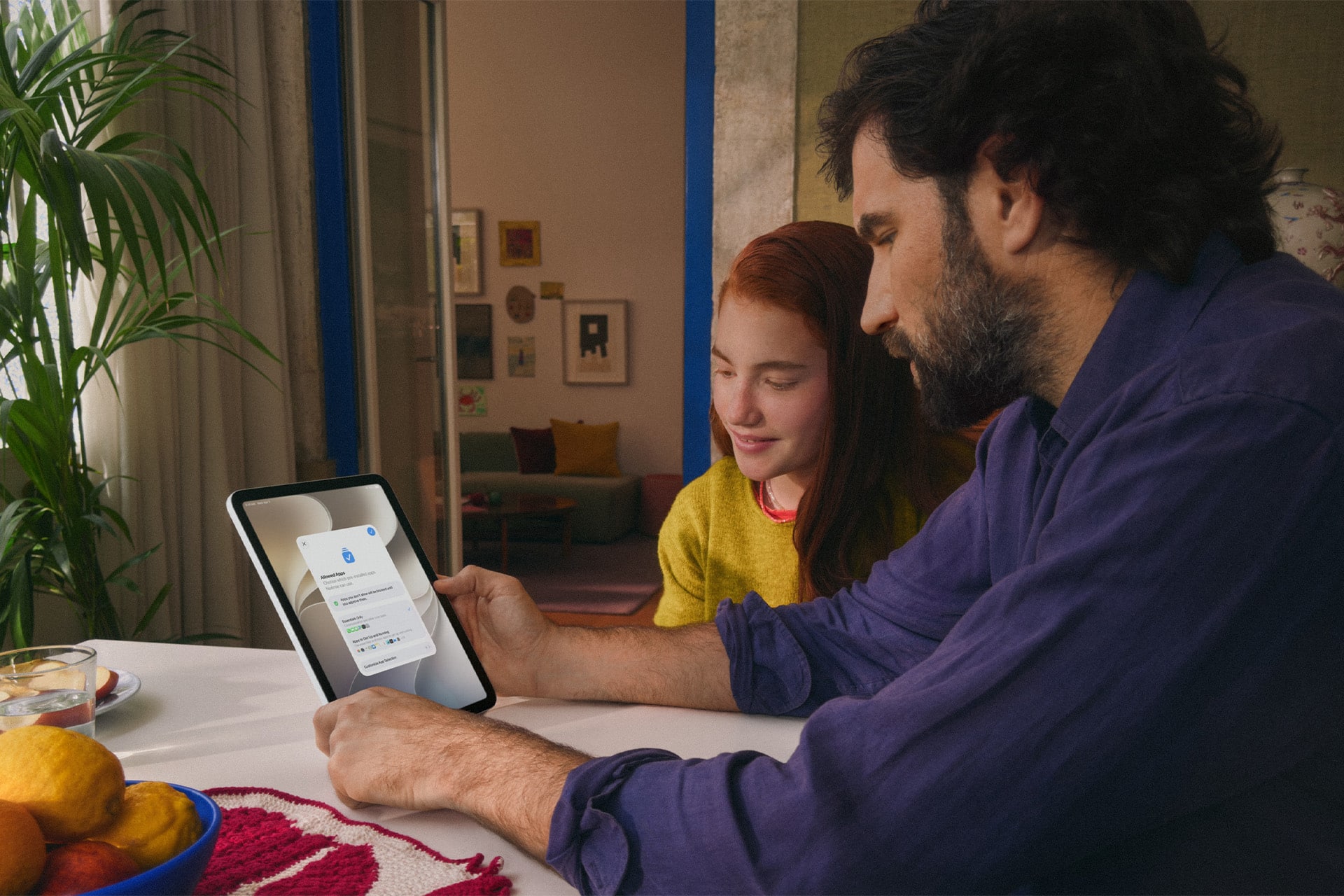
Temporary adjustments have been made easier as well. Parents can quickly limit access to apps and the web during periods such as meals, then restore access without rebuilding their existing restrictions. When a child reaches a limit, they can request additional time from a parent to complete an activity or finish a conversation.

The redesigned interface puts device usage and the most frequently used applications closer to the front, reducing the amount of navigation required to understand how a child is spending time on a device.

A man and a girl sit at a table looking at a tablet together. The screen displays an Apple parental controls login page. They are indoors with fruit and a plant on the table, creating a focused and collaborative atmosphere.
Image Credit: Apple Inc.

Ask to Browse extends parental approval into Safari

Ask to Browse brings a permission model already familiar from app downloads to the web.

When the feature is active, a child who attempts to visit a new website in Safari can be required to request permission first. The parent receives the request through Messages and can review it before allowing access.

The feature is available across iPhone, iPad, and Mac and works alongside existing web-content restrictions.

It complements Ask to Buy, which requires children to obtain permission before downloading or purchasing an app or making an in-app purchase. Apple has also expanded the initial setup process so a parent configuring a personal device for a child can choose which apps are available from the beginning.

Setup Assistant offers the option to provide only essential apps, use a recommended group, or manually choose which ones are permitted. More applications can then be introduced later as the parent decides the child is ready for them.

The approach gives parents a way to begin with a comparatively limited device instead of configuring a full standard account and removing unwanted access afterward.

Communication Safety expands beyond detected nudity

Communication Safety now intervenes when it detects gore or violent imagery in shared photos and videos, expanding protections that previously centered on nudity.

Apple says the feature works with content shared through areas including Messages and FaceTime, with the new protection also extending to live FaceTime calls.

Communication Safety is designed to intervene before a child views or shares detected sensitive material. Apple has previously built these protections around on-device analysis, allowing the system to identify content without requiring Apple to receive the underlying images.

Parents can also continue controlling who children communicate with. Contact-management settings can require approval before a child adds someone new and then communicates through Phone, Messages, or FaceTime.

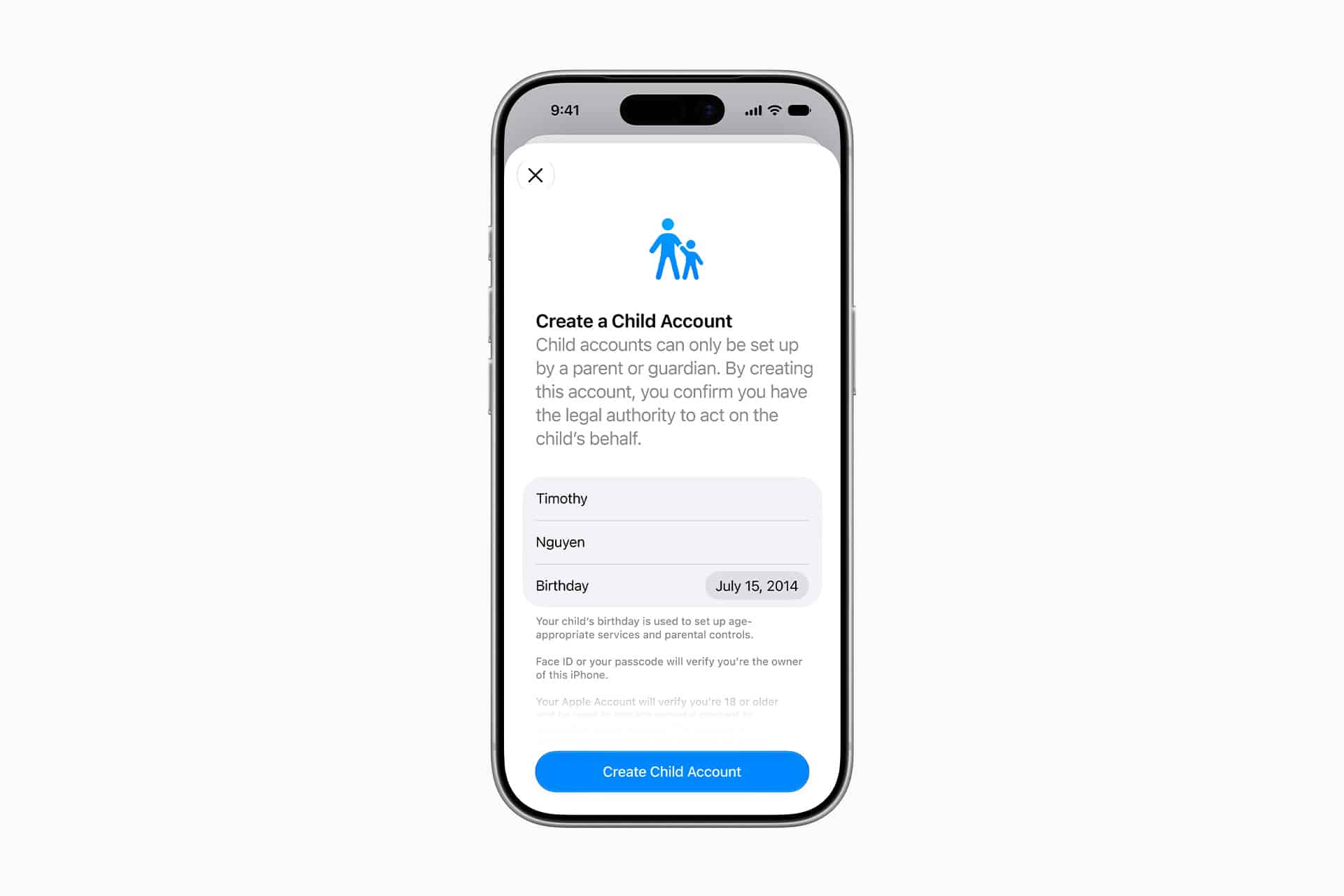
Child Accounts remain the foundation for these controls. Apple generally requires Child Accounts for children under 13, although the applicable age can vary by state, country, or region. Child Accounts remain available for family members up to age 18.

The accounts automatically activate age-based safeguards and connect parental controls through Family Sharing.

A smartphone screen displays a form to create a child account, showing fields for first name, last name, and birthday, with a blue "Create Child Account" button—ideal for setting up Apple parental controls.
Image Credit: Apple Inc.

iOS 27 requires the family’s devices to stay in sync

The new Screen Time controls arrive with one practical requirement: devices participating in the same Family Sharing setup need current software.

Apple says all devices in the Family Sharing group must be updated to the corresponding 27-generation releases — iOS 27, iPadOS 27, macOS 27, watchOS 27, and visionOS 27 — before the updated Screen Time controls can be used consistently across the family.

The family organizer, parent, or guardian must also update the parental-control configuration after the software upgrades.

That requirement is worth checking before troubleshooting a missing setting on one child’s device. If every device in the group cannot be updated, Apple says the family can continue using the previous version of Screen Time and its parental controls, but the new controls will not be available consistently across the group.

The features themselves also vary by platform. Ask to Browse and Time Allowances are available on iPhone, iPad, and Mac, while some Family Sharing and communication features extend to other devices.

Apple has launched a dedicated Child Safety site alongside the software release, collecting setup instructions, explanations of Child Accounts, Screen Time controls, communication protections, App Store age tools, Find My, and Apple Watch options for families.

The updated Screen Time controls are available now with iOS 27, iPadOS 27, and macOS 27, although individual features can vary by region, language, and hardware. For families upgrading several devices at once, checking every device in the Family Sharing group for its corresponding version 27 update is the most useful place to start.

The post Screen Time adds Time Allowances and Ask to Browse with iOS 27 appeared first on AppleMagazine.

  •  

iPhone 18 Pro exhibition puts three photographers behind Apple’s new camera system

iPhone 18 Pro is at the center of What Holds Us, a new photography exhibition built around three very different approaches to image-making. Alex Prager, Jack Davison, and Jimmy Chin shot the entire project on Apple’s latest Pro iPhone, using the device in environments ranging from a Los Angeles soundstage to a London warehouse and the high-altitude terrain of British Columbia.

Curated by Kathy Ryan, the former longtime director of photography for The New York Times Magazine, the exhibition examines connection through touch, shared experience, physical environments, and human relationships.

It also gives Apple a more ambitious showcase for the iPhone 18 Pro camera than a conventional product demonstration. Rather than presenting standardized comparisons or individual sample images. What Holds Us asks three established photographers to work within their own visual languages while using the phone as their sole camera.

The exhibition opens in New York City on September 18 and runs through September 20 before traveling to London and Shanghai in the coming months.

Wearing a headset, the person uses an iPhone 18 Pro to snap a photo out of the helicopter window, capturing snowy mountain peaks and a bright sunset—a scene reminiscent of Alex Prager’s cinematic style in “What Holds Us.”.
Image Credit: Apple Inc.

iPhone 18 Pro takes three very different photographic approaches

The project works partly because the three photographers have little stylistically in common.

Jimmy Chin took iPhone 18 Pro into the Bugaboo Mountains of southeastern British Columbia, working around snow, ice, steep climbing terrain, and winds reaching as high as 70 miles per hour.

His series focuses on trust and connection within climbing, with veteran mountaineer Conrad Anker appearing throughout the photographs. Some images place Anker as a small figure against vast mountain landscapes, while others move much closer to rock, snow, and glacial textures.

Chin used both the 48MP Fusion Ultra Wide and Telephoto cameras to shift between those extremes. The practical appeal was also straightforward: carrying a phone instead of a full conventional camera setup reduced the equipment required in an environment where weight and mobility affect every decision.

Jack Davison took almost the opposite approach. Shooting inside a former sugar warehouse in London, he created intimate portraits built around people interacting with clay and chalk.

Davison is known for high-contrast black-and-white imagery, and his contribution emphasizes texture, shadows, highlights, skin, and physical contact with the material. Some subjects appear partly covered in clay, while others manipulate it directly, leaving fingerprints and marks across the compositions.

For Davison, the smaller camera changed the relationship between photographer and subject. Without a large camera constantly positioned in front of his face, he could maintain more eye contact and work at closer range.

His use of slower shutter speeds, RAW capture, and multiple lenses also illustrates how Apple increasingly wants the Pro iPhone camera to function as a configurable photographic tool rather than simply a computational point-and-shoot system.

Alex Prager pushes the phone into large-scale production

Alex Prager’s section places iPhone 18 Pro inside a much more elaborate production environment.

Working on a Los Angeles soundstage, Prager created color-heavy scenes filled with crowds, confetti, staged city elements, costumes, and loosely choreographed movement. Some images use high viewpoints to turn groups of people into a continuous visual pattern, while tighter photographs isolate individual figures within the same constructed world.

The visual approach resembles film production more than spontaneous mobile photography, which gives the project another test for the phone. The camera has to preserve detail across numerous faces, costumes, props, highlights, and areas of movement while operating within scenes deliberately designed for large-format presentation.

Prager also treated the camera’s immediacy as part of the creative process rather than simply a convenience. The ease of moving between perspectives and capturing repeated moments allowed the scenes to evolve through improvisation instead of being locked into a single carefully prepared frame.

That approach aligns with a recurring theme across the exhibition: the phone becomes less intrusive without requiring the photographers to abandon their existing visual standards.

For Apple, it is a useful distinction. Professional photography campaigns built around smartphones can easily become exercises in technical proof, where the central question is whether a phone can imitate equipment already available to photographers. What Holds Us is more interested in how a smaller camera changes the way an artist works.

A blurred black-and-white image, reminiscent of Jack Davison’s evocative style, shows abstract human figures and arms moving around a large, textured rectangular block. The motion creates a dynamic, surreal effect that feels like a visual meditation on What Holds Us together.
Image Credit: Apple Inc.

Variable aperture gives the project a new technical foundation

The exhibition arrives alongside one of Apple’s most significant physical camera changes in years.

iPhone 18 Pro introduces variable aperture on its 48MP Fusion Main camera. The lens can operate at ƒ/1.48, ƒ/1.8, ƒ/2.8, or ƒ/4.0, changing both light intake and depth of field.

A wider ƒ/1.48 aperture is designed for stronger low-light performance, while narrower settings can retain more detail across different planes of an image. Apple also lets photographers select aperture settings manually through new Pro controls in the Camera app.

Those controls extend to shutter speed and white balance, with a histogram available for monitoring exposure. ProRAW remains available for photographers who want greater flexibility during post-production.

The rear camera system also includes 48MP Fusion Ultra Wide and 48MP Fusion Telephoto cameras, providing focal lengths from 13mm at the wide end through an optical-quality 8x option.

What Holds Us does not reduce the exhibition to those specifications, but the technical changes help explain why Apple chose photography, rather than video, for this particular campaign. Variable aperture affects choices that photographers traditionally make during capture, especially around available light and how much of a scene remains in focus.

What Holds Us extends the Shot on iPhone idea

Apple has spent years using Shot on iPhone campaigns to demonstrate camera quality through finished work rather than charts and controlled tests. What Holds Us pushes that format closer to a conventional curated exhibition.

Ryan connects the three bodies of work through the idea of human presence, but each artist interprets it differently. Chin finds it through dependence between climbers in hostile landscapes. Davison uses physical contact between people and clay. Prager builds populated fictional environments in which individual expressions emerge from larger crowds.

The images therefore function as an exhibition first and a hardware showcase second, even though the production is closely tied to the launch of iPhone 18 Pro.

That balance may be the most effective part of the campaign. Apple does not need to demonstrate that a modern iPhone can produce a technically competent photograph. The more interesting challenge is showing where its smaller size, computational processing, lens flexibility, RAW workflow, and new manual controls can alter the photographer’s decisions.

New York visitors will get the first opportunity to see how those images hold up away from a phone or computer display when What Holds Us opens September 18. After its three-day New York run, Apple says the exhibition will continue to London and Shanghai, giving the iPhone 18 Pro photography project a physical life beyond the launch campaign.

A man holds an iPhone 18 Pro to take a photo of another person, who stands shirtless with his arm raised in front of his face, against a dark backdrop in a studio setting reminiscent of an Alex Prager composition.
Image Credit: Apple Inc.

The post iPhone 18 Pro exhibition puts three photographers behind Apple’s new camera system appeared first on AppleMagazine.

  •  

Widow’s Bay makes Emmy history with 14 wins in its first season

Widow’s Bay has turned its first season into one of the most decorated comedy debuts in Emmy history, collecting 14 awards at the 78th Primetime Emmy Awards and giving Apple TV its biggest awards performance for a single series this year.

The comedy-horror series won Outstanding Comedy Series alongside major acting, writing, directing, casting, cinematography, music, production design, and sound honors. Its 14 victories also set a record for the most Emmy wins by a comedy series in a single season, surpassing the benchmark established by The Studio a year earlier.

The sweep came after Widow’s Bay entered the awards cycle with 19 nominations. Apple finished the 2026 Emmys with 29 awards overall, with Widow’s Bay accounting for nearly half of the total.

An older man in a plaid shirt gestures with his hands, as a woman with dark hair stands behind him, looking concerned. They are indoors in a dimly lit, concrete-walled room, reminiscent of the atmospheric settings often seen in Widow’s Bay screenings at AMC Theaters.
Image Credit: Apple Inc.

Widow’s Bay dominates the major Emmy categories

Matthew Rhys won Outstanding Lead Actor in a Comedy Series for his performance as Mayor Tom Loftis, the well-intentioned but frequently overwhelmed leader of a remote New England island community.

Kate O’Flynn won Outstanding Supporting Actress in a Comedy Series, while Stephen Root took Outstanding Supporting Actor. Betty Gilpin had already secured Outstanding Guest Actress during the Creative Arts Emmys.

Creator Katie Dippold won Outstanding Writing for a Comedy Series for the premiere episode, while Hiro Murai received Outstanding Directing for a Comedy Series. The Television Academy also recognized Murai as the first Asian director to win the comedy directing category.

Those awards gave the show victories across nearly every major creative discipline involved in building the series. Widow’s Bay also received Emmys for production design, casting, cinematography, original dramatic score, music supervision, sound editing, and sound mixing.

The breadth of the wins is notable because the show was not carried solely by one high-profile performance or writing prize. Acting, directing, writing, visual design, music, and technical execution all received separate recognition.

Apple says Widow’s Bay also earned more performance awards than any other series at the 2026 Emmys.

Widow’s Bay found a distinctive balance between horror and comedy

Created by Dippold, Widow’s Bay follows Tom Loftis as he tries to transform an isolated island town into a viable tourist destination despite warnings from residents that the community is cursed.

The premise initially plays on civic frustration and small-town politics. The island has unreliable connectivity, a skeptical population, and a mayor determined to prove that local superstition is holding economic development back. As visitors begin to arrive, the supernatural stories that Loftis has dismissed start becoming harder to explain away.

That structure allows the series to operate as both a character comedy and a genuine horror story rather than treating supernatural events simply as setups for jokes.

Dippold, whose earlier work includes The Heat and Ghostbusters, serves as creator, showrunner, writer, and executive producer. Murai, known for visually distinctive television work including Atlanta, directs and executive produces.

The executive-producing team also includes Carver Karaszewski, Claudia Shin, and Rhys.

Apple and Television Academy records list Apple Studios and Chum Films among the production companies behind the series. The directing roster extends beyond Murai to Ti West, Sam Donovan, and Andrew DeYoung.

The main cast includes Rhys, O’Flynn, Root, Kingston Rumi Southwick, Kevin Carroll, and Dale Dickey.

A woman with straight dark hair sits at a table holding a white mug, looking at the camera. Behind her are large windows with striped curtains and framed artwork, creating a cozy scene reminiscent of a Widow’s Bay horror comedy on Apple TV.
Image Credit: Apple Inc.

A debut season becomes an awards benchmark

Widow’s Bay premiered globally on Apple TV on April 29, 2026. The first two episodes were released together before the remaining episodes arrived weekly.

Its Emmy performance places the series alongside a growing run of Apple comedies that have performed strongly with Television Academy voters.

Ted Lasso previously won Outstanding Comedy Series, followed by The Studio in 2025. Widow’s Bay gives Apple consecutive wins in the category and its fourth Outstanding Comedy Series victory across the past six Emmy ceremonies.

Apple also became the most awarded network at the 2026 Emmys with 29 wins. Pluribus contributed six, including awards for Rhea Seehorn and creator Vince Gilligan, while Margo’s Got Money Troubles and Palm Royale each received three.

Slow Horses won for directing, and Mr. Scorsese received Outstanding Documentary or Nonfiction Series.

For Widow’s Bay itself, the 14-win total is especially significant because this is the show’s freshman season. The Television Academy confirmed six of those awards during the main September 14 telecast, while eight had already been announced during the Creative Arts ceremonies.

The combination took Widow’s Bay beyond The Studio’s previous record for a debut comedy and established a new single-season high for the category.

Matthew Rhys adds another unusual Emmy milestone

Rhys had an especially unusual night beyond his Widow’s Bay victory.

In addition to winning Lead Actor in a Comedy Series, he received another lead-actor Emmy for Netflix’s The Beast in Me in the limited or anthology series or movie category, making him the first performer to win two lead acting awards in different categories during the same Emmy year.

His Widow’s Bay performance is deliberately restrained compared with the increasingly strange circumstances surrounding Loftis. Rather than treating the island’s supernatural events as an invitation to broaden the comedy, Rhys largely plays the mayor as someone trying to maintain a rational civic response while the situation deteriorates.

That tonal approach runs through the rest of the production. Root and O’Flynn’s supporting performances received individual recognition, while Murai’s directing and Dippold’s writing awards reinforced how closely the series depends on maintaining tension without losing its comic rhythm.

All 10 episodes of the first season are currently available to stream on Apple TV. With the Emmy campaign complete, the show now carries a benchmark that future comedy debuts will be measured against: 14 awards from 19 nominations, capped by Outstanding Comedy Series and wins across nearly every part of the production.

Three men stand indoors in patterned wallpaper, looking intently in the same direction, surprised or concerned. One wears a plaid shirt, another a dark jacket and cap, with a bearded man behind—they could be characters from Apple TV’s Widow’s Bay.
Image Credit: Apple Inc.

The post Widow’s Bay makes Emmy history with 14 wins in its first season appeared first on AppleMagazine.

  •  

Siri AI arrives with personal context, app actions, and a new privacy architecture

Siri AI is beginning its public rollout as Apple transforms its familiar assistant into a substantially more conversational system built around personal context, onscreen awareness, web knowledge, and the ability to perform actions across apps.

The beta is available first in English on compatible devices running iOS 27, iPadOS 27, macOS 27, watchOS 27, and visionOS 27. French, Japanese, Korean, Portuguese, and Spanish support is scheduled for October. Availability remains more limited in some regions, with Siri AI initially unavailable on iPhone, iPad, and Apple Watch in the European Union and unavailable in China while Apple addresses regulatory requirements.

The release follows several years of gradual Apple Intelligence expansion, but Siri AI represents a more fundamental change. Instead of handling each request largely as an isolated command, the assistant can maintain conversations, find relevant personal information, understand what is displayed on a device, and combine those capabilities to complete multistep tasks.

A smartphone lock screen shows a Safari notification: “The Brian Tran Band Tour. An update was detected on this page.” Flashlight and camera icons are visible at the bottom of the screen, highlighting how personal context and privacy architecture work together to keep your notifications secure and relevant.
Image Credit: Apple Inc.

Siri AI can connect personal context with app actions

Personal context is one of the biggest differences between Siri AI and previous versions of the assistant.

The system can search across a user’s messages, email, photos, notes, and other information when responding to a request. Apple offers an example in which someone asks what a family member suggested doing during an upcoming visit. Siri can locate the relevant conversation, find a recipe previously sent by email, and then place the ingredients into a Reminders grocery list.

That combination of retrieval and action is central to the new design. Siri AI can draft an email, edit and share photos, create calendar events, manage reminders, control media, and perform other supported actions without requiring users to manually move information between applications.

Third-party apps can participate through Apple’s App Intents architecture. Existing integrations include tasks such as messaging through WhatsApp or playing an audiobook in Audible, with Apple also previewing deeper capabilities in applications including Microsoft Outlook, Notability, and Tripsy.

Onscreen awareness adds another layer. Siri can identify information currently visible on a device and act on it. Someone viewing a sports website, for example, can ask Siri to identify upcoming home games and add them to Calendar without manually copying dates.

Apple has also expanded Siri beyond voice. On iPhone, users can invoke the assistant with the side button, voice command, or by swiping down from Dynamic Island. On iPad and Mac, Siri AI is integrated into Spotlight, while systemwide context menus can send selected files, images, or text directly to the assistant.

A tablet screen displays a document titled “Intern Onboarding” with instructions on product photography for a summer intern named Marieke. Thanks to advanced privacy architecture, the onboarding materials are tailored using personal context without compromising confidentiality. The time shown is 9:41 AM, and the date is Wed Apr 1.
Image Credit: Apple Inc.

Siri AI gets its own app and conversation history

Siri AI is no longer confined to a temporary interface that disappears once a request is complete.

Apple has introduced a dedicated Siri app where users can begin new conversations or revisit previous ones. Conversation history can sync privately through iCloud across iPhone, iPad, Mac, Apple Watch, and Apple Vision Pro, allowing a discussion started on one device to continue on another.

Follow-up questions can retain the context of an earlier answer, giving Siri a more conventional conversational interface for longer exchanges.

The assistant also has access to broad web knowledge for questions that cannot be answered through personal information or local device data. Apple says Siri can retrieve current information for topics ranging from sports results to travel planning and nearby businesses.

Visual Intelligence expands alongside the assistant. On iPhone, a dedicated Siri mode inside Camera can identify and respond to objects or information in front of the user. A concert poster, for example, can become the starting point for questions about performance times followed by the creation of Calendar events.

On iPad, Visual Intelligence is integrated with screenshots. Mac users can select content on their displays through a keyboard shortcut, while Vision Pro users can ask Siri about app windows or physical objects simply by looking at them.

Writing Tools are similarly integrated across the system. Siri can generate drafts, revise existing text from natural-language instructions, and provide writing suggestions. In Mail and Messages, Apple says it can take a user’s typical communication style with a particular recipient into account, including tone and punctuation patterns.

An iPhone and Apple Watch display colorful health and fitness data, including activity rings and assessment results, on their screens. Enhanced by Siri AI to provide insights tailored to your personal context, the devices are set against a plain light background.
Image Credit: Apple Inc.

Siri AI runs across on-device and private cloud models

Siri AI is powered by a new generation of Apple Foundation Models developed in collaboration with Google using Gemini technology, marking a notable shift in Apple’s AI infrastructure.

The architecture divides processing between models running directly on the device and larger models operating through Private Cloud Compute. Apple says requests sent to Private Cloud Compute are processed without personal data being stored or made accessible to the company.

Core resources such as the Spotlight index and Apple’s App Toolbox can remain on-device, allowing Siri to retrieve local information and perform supported actions without sending every request to a remote server.

More capable devices can also use AFM Core Advanced, Apple’s highest-performance on-device model. It powers improvements including more expressive Siri voices and advanced systemwide dictation that automatically handles capitalization, punctuation, and formatting.

Compatibility varies by feature. Apple Intelligence supports iPhone 16 models and later, iPhone 15 Pro and Pro Max, M1 or later iPads and Macs, iPad mini with A17 Pro, Apple Vision Pro, and supported Apple Watch models when paired with a nearby Apple Intelligence-enabled iPhone.

AFM Core Advanced requires newer hardware, including iPhone Duo, the iPhone 18 Pro line, iPhone Air, iPhone 17 Pro models, qualifying M4 or later iPads with at least 12GB of unified memory, M3 or later Macs with at least 12GB, and Apple Vision Pro with M5.

A virtual window displays a digital article about lotus leaves in a cozy living room, featuring diagrams and text, with modern furniture and warm lighting in the background. Integrated Siri AI enhances the experience by offering personalized suggestions while maintaining robust privacy architecture.
Image Credit: Apple Inc.

Siri AI arrives with limits as Apple expands access

The initial Siri AI release remains explicitly labeled beta, and some of the surrounding Apple Intelligence features are scheduled for later updates.

Apple also confirms that features relying on server-side models can be subject to daily usage limits. That includes Siri AI, cloud-based photo editing, Image Playground, and AFM 3 Cloud models used through Shortcuts. Limits can vary depending on the feature, request complexity, system demand, and other factors.

Apple says expanded access to server-dependent features will eventually be available for a fee, introducing a future paid layer to parts of Apple Intelligence even as the core system remains integrated into supported devices.

Apple will also expand its intelligence capabilities on Apple Watch later in 2026. Planned Audio Intelligence features on Apple Watch Series 12 and Ultra 4 include Live Rewind, which can display text representing the previous 15 seconds of a conversation, and Siri Recap, which generates high-level summaries that can be reviewed later in the Siri app.

Those functions are designed around a hardware-isolated Secure Exclave on the S11 chip, with Apple saying raw audio is processed in isolation and immediately deleted rather than stored as recordings. Live Rewind and Siri Recap are scheduled to enter beta later in 2026, making the current Siri AI launch the beginning of a staged expansion rather than the final form of Apple’s new assistant.

The post Siri AI arrives with personal context, app actions, and a new privacy architecture appeared first on AppleMagazine.

  •  

Apple software updates bring Siri AI and faster performance across devices

Apple software updates for 2026 are now reaching supported devices, bringing iOS 27, iPadOS 27, macOS 27, watchOS 27, visionOS 27, and tvOS 27 out of preview and into everyday use. The releases place Siri AI and the next generation of Apple Intelligence at the center, but many of the changes extend well beyond generative AI.

The updates began rolling out September 14. Alongside new intelligence features, Apple has made measurable performance changes to iPhone and iPad, overhauled several parental controls, refined the Liquid Glass interface introduced across its platforms, improved search, and added smaller changes to services including iCloud Shared Albums, Maps, AirPods, and Health.

Siri AI is initially rolling out as a beta in English. Apple says French, Japanese, Korean, Portuguese, and Spanish support is scheduled for October, making some of the headline functionality a staggered release rather than something every user receives immediately after installing the new operating systems.

Apple software updates make Siri AI a cross-device feature

Siri AI is built around personal context, onscreen awareness, expanded app actions, and access to current information from the web. The assistant can draw on material stored in areas such as Messages, Mail, and Photos when responding to requests, while Visual Intelligence allows users to ask about content currently displayed on their screen.

On iPhone, Siri mode is integrated directly into the Camera app. A user can point the camera at something and ask questions or perform supported actions based on what appears in front of them.

The assistant also gains a dedicated Siri app that synchronizes conversation history privately through iCloud. A conversation started on an iPhone can therefore be continued on an iPad, Mac, Apple Watch, or Apple Vision Pro.

Write with Siri expands the assistant into text creation and editing. Users can describe the material they need drafted or ask Siri to refine existing writing without moving to a separate application.

Apple Intelligence is also adding more specialized features outside Siri. Photos receives Spatial Reframing, Extend, and an updated Clean Up tool. Image Playground can generate images in a wider selection of styles, including photorealistic output, with metadata designed to identify AI-created material and planned support for the SynthID standard.

Safari can automatically organize tabs by topic and monitor webpages for changes, such as a product returning to stock or a price dropping. Apple is also introducing tools that can create custom extensions from a description.

An iPhone screen with Siri activated, displaying a request to email Elton about free Saturdays in November and asking to bring gluten-free snack options—all seamlessly integrated with the new OS 27 for enhanced Siri functionality.
Image Credit: Apple Inc.

iOS 27 and iPadOS 27 put more emphasis on speed

Some of the less visible changes could be among the most frequently experienced.

Apple says apps can launch up to 30% faster on iPhone and iPad after installing the new software. Photos can load an image up to 70% faster immediately after it is taken, while AirDrop transfers can be up to 80% faster.

iPadOS 27 receives additional work around file handling and multitasking. Apple says browsing files and transferring them to an external USB drive can be as much as five times faster, accompanied by smoother window closing, switching, and dragging.

Connectivity behavior has also been adjusted. Transitions between cellular connections and Wi-Fi are designed to happen more seamlessly, while Messages no longer needs to hold subsequent texts behind a large photo or video being uploaded over a slow connection.

Search across Spotlight, Photos, and Mail has been revised on iPhone, iPad, and Mac. Mail gains a new ranking system for Top Hits, while Apple describes search across the three platforms as more stable and comprehensive.

Liquid Glass has received another round of refinements after becoming the common visual language across Apple’s software. A new Settings slider allows users to adjust the interface from an ultraclear appearance toward a more heavily tinted version, and app icons have been sharpened.

Screen Time and child safety controls get a substantial redesign

Apple has also expanded the controls available to families rather than limiting this software cycle to interface and AI work.

The setup process for child accounts now allows parents to specify which apps a child can access from the beginning, with additional apps added later if appropriate. Ask to Browse extends approval controls to Safari, letting parents require permission before a child opens a new website.

Communication Safety has been expanded beyond sexually explicit material to detect and intervene when gore or violent content appears in shared images and videos.

Screen Time presents average device usage and frequently used apps more prominently. Parents can establish daily time allowances across categories such as Entertainment, Games, and Social Media, while Schedules can change which apps remain available at different points during a weekday or weekend.

These changes are particularly notable because they work at the account and platform level rather than requiring parents to configure separate controls inside every individual app.

A smartphone shows a child texting their dad, asking to visit “cyberpetsgame.net,” with options to decline or approve the request. The game features cute animal icons, highlighting parental controls made even better with the latest Apple software updates.
Image Credit: Apple Inc.

watchOS 27, visionOS 27, and tvOS 27 add targeted upgrades

The smaller platforms receive their own additions rather than simply inheriting features from iPhone and Mac.

watchOS 27 introduces a dedicated Siri app, a dynamic app grid, expanded Smart Stack suggestions, and a new single-handed tap gesture for opening widgets. Workout Buddy can now operate without the paired iPhone nearby, while Cycle Tracking in Health adds support related to perimenopause and menopause.

visionOS 27 brings Siri AI and Visual Intelligence into Apple Vision Pro, where the assistant can respond to objects a user is physically looking at. Panoramas can be converted into spatial scenes and used as personal Environments, while Mac users can bring compatible 3D models into their physical space to preview and edit them.

Apple says Vision Pro can now start up and connect to Wi-Fi up to three times faster. New curved windows, Control Center changes, eye-controlled notification expansion, and improvements to Dwell Control further adjust the spatial interface.

tvOS 27 takes a narrower approach. Apple Music gains high-resolution lossless audio support, Apple Podcasts has been redesigned, and additional text-size accessibility options have been introduced. Apple TV 4K owners can install the release on supported second- and third-generation models.

Other changes stretch across device categories. iCloud Shared Albums can now retain full-resolution photos and videos while making participation easier from Android and Windows devices. AirPods gain custom EQ settings, Maps expands Flyover with AI-assisted aerial detail, and Missed-message notifications and unread counts now synchronize more quickly and reliably across Apple devices.

With the September 14 releases now public, the software cycle shifts from preview demonstrations to staggered feature delivery. Siri AI language expansion begins in October, while some Apple Intelligence capabilities and individual app features will continue arriving through later updates rather than being tied exclusively to the initial 27.0 releases.

Apple software updates - A smartwatch screen running visionOS 27 shows an airline confirmation call, code LUI8L01, for a flight from JFK to RAK at 10:05 PM on April 17. Call duration is 47 seconds; time is 10:09.
Image Credit: Apple Inc.

The post Apple software updates bring Siri AI and faster performance across devices appeared first on AppleMagazine.

  •  

iPhone 18 Pro adds variable aperture, A20 Pro, and longer battery life

iPhone 18 Pro arrives with Apple concentrating its biggest changes in three areas: camera control, sustained performance, and battery life. The new Pro models retain familiar 6.3-inch and 6.9-inch display sizes, but introduce a variable-aperture main camera, the 2-nanometer A20 Pro chip, redesigned thermal hardware, and a smaller Dynamic Island.

The lineup consists of iPhone 18 Pro and iPhone 18 Pro Max, starting at $1,199 and $1,299 in the U.S., respectively. Both begin with 256GB of storage and are available in black, silver, glacier, and a new burgundy finish. Preorders opened September 12, with retail availability beginning September 18 in more than 65 countries and regions.

Rather than treating the Pro models as a cosmetic update, Apple has focused on changes that become more noticeable during demanding use, particularly photography, video work, gaming, AI processing, and long sessions away from a charger.

iPhone 18 Pro brings variable aperture to the main camera

The centerpiece is a new 48MP Fusion Main camera with a physical variable aperture, a first for the iPhone.

Six laser-cut aperture blades can adjust the amount of light reaching the sensor while also changing depth of field. The camera supports four aperture settings: ƒ/1.48, ƒ/1.8, ƒ/2.8, and ƒ/4.0.

At the wider end, the camera can gather more light in darker scenes. A narrower aperture can keep more people or background detail in focus, giving photographers another tool beyond computational depth effects and Portrait mode.

Apple also gives users direct access to those settings through new Pro controls in the Camera app. Aperture, shutter speed, and white balance can be adjusted manually, while a histogram provides a more conventional way to monitor exposure.

The feature is paired with a new main-camera sensor and updated computational imaging pipeline. Apple says the combination improves low-light performance and detail, while Photographic Styles gain texture and grain controls for additional control over an image’s appearance.

Video receives several additions as well. Cinematic effects can now be applied after recording to footage captured at up to 60 frames per second, while Time-lapse can record in 4K with Dolby Vision HDR. Audio Mix has also been updated with improved voice processing and the ability to isolate music.

For photographers who want more evidence of how an image originated, Apple is introducing Apple Reference Image. In Reference mode, the main camera signs sensor data, which Private Cloud Compute uses to create an unalterable reference version that can be compared with an edited image in Photos. Apple is also preparing support for the SynthID standard as another way of identifying AI-generated or altered content.

Close-up of a camera lens with visible aperture blades, surrounded by a maroon-colored body—reminiscent of the sophisticated design seen on the iPhone 18 Pro Max. Subtle reflections are visible on the lens surface.
Image Credit: Apple Inc.

iPhone 18 Pro uses A20 Pro and a redesigned vapor chamber

A20 Pro is built using a 2-nanometer manufacturing process and contains a six-core CPU, seven-core GPU, and dual 16-core Neural Engine.

Apple says memory bandwidth is 50% higher than on A19 Pro, while GPU performance can be up to 40% faster. The Neural Engine provides 32 cores in total, doubling the AI processing capability of the previous Pro chip.

The silicon change is closely tied to a redesigned cooling system. Apple has rearranged the chip package so that the silicon die sits beside the memory rather than beneath it in the thermal path, allowing A20 Pro to connect more directly to a next-generation vapor chamber.

That vapor chamber has three times the surface area of the previous generation and uses new materials to move heat away from the processor more effectively. Apple claims the design can deliver up to a 40% gain in sustained performance compared with iPhone 17 Pro.

That distinction is more relevant than peak benchmark numbers for workloads such as extended gaming sessions, video editing, computational photography, and local AI models, where heat can force a phone to reduce performance over time.

Connectivity has also moved further toward Apple-designed silicon. The N1 wireless chip supports Wi-Fi 7, Bluetooth 6, and Thread, while the new C2 modem succeeds C1X. Apple says C2 uses 15% less energy while offering faster uploads and adds mmWave support in the U.S.

A metallic chip with the Apple logo and text “A20 PRO” in bold, centered on a dark background with a subtle multicolored glow around the edges—designed to power the next-generation iPhone 18 Pro and iPhone 18 Pro Max.
Image Credit: Apple Inc.

iPhone 18 Pro Max reaches 45 hours of video playback

Battery improvements are another major part of the new hardware.

Apple rates eSIM-only versions of iPhone 18 Pro for up to 36 hours of video playback, while iPhone 18 Pro Max reaches as much as 45 hours. Apple says Pro Max receives the largest battery-life increase ever delivered in an iPhone.

Some of that gain comes from using the space previously occupied by a physical SIM tray. In markets receiving eSIM-only models, including the U.S., Canada, Japan, Mexico, Saudi Arabia, and the UAE, the larger internal battery provides an additional two hours of rated video playback.

Charging has accelerated as well. iPhone 18 Pro can reach 50% charge in approximately 15 minutes using a supported wired setup, while wireless charging reaches 50% in around 30 minutes. Apple says five minutes of wired charging on iPhone 18 Pro Max can provide roughly seven hours of video playback.

Both devices use aluminum unibody construction with Ceramic Shield 2 on the front and Ceramic Shield on the back. Storage options run from 256GB through 2TB.

The iPhone 18 Pro weighs 211 grams, while iPhone 18 Pro Max weighs 249 grams. Display sizes remain 6.3 inches and 6.9 inches, respectively.

Four iPhones—featuring the iPhone 18 Pro and iPhone 18 Pro Max—in black, white, blue, and deep red colors are displayed upright in a row against a black background, showing their backs and triple camera arrays.
Image Credit: Apple Inc.

iOS 27 brings Siri AI and new Apple Intelligence tools

The hardware launches alongside iOS 27, which places Apple Intelligence and the new Siri AI more prominently across the system.

Siri AI can use personal context from information stored across apps, respond to onscreen content, perform actions in supported apps, and handle more open-ended questions. A new Siri mode in Camera lets users ask questions and take action based on objects or information visible through the viewfinder.

Photo tools include Spatial Reframing, Extend, and an upgraded Clean Up feature, while Safari can monitor selected webpages for changes such as a product restock or price adjustment.

The Dynamic Island has also been physically reduced and redesigned. It can display up to three Live Activities simultaneously while continuing to support Face ID.

Apple released iOS 27 on September 14, while Siri AI is rolling out initially as a beta in English, with additional language support planned. iPhone 18 Pro and iPhone 18 Pro Max reach stores September 18, giving Apple a Pro lineup whose most substantial additions are less about a new exterior shape and more about physical camera control, heat management, and how long the hardware can sustain demanding workloads.

The post iPhone 18 Pro adds variable aperture, A20 Pro, and longer battery life appeared first on AppleMagazine.

  •  
❌