❌

Reading view

EagleFiler 1.9.22

EagleFiler 1.9.22 is a maintenance release of my Mac file/note organizer and e-mail archiving app. This version works around various bugs in macOS 27, adds capture support for the Thorium Web browser, and improves importing from Mariner Paperless.

  • macOS 27 broke several things with drag and drop out of Apple Mail. Simply trying to read a URL from the pasteboard will cause a hang while it waits forever for the pasteboard server (FB24803817). The same thing happens when using PasteboardSetPasteLocation() and reading kPasteboardTypeFileURLPromise directly, which I was doing (instead of using newer API) to work around bugs in older versions of macOS. EagleFiler now uses NSFilePromiseReceiver for drags from Mail on macOS 27, which works better, but I also had to work around a bug where Mail would promise superfluous files for which the reader callback was never invoked at all.

  • macOS 27 also seems to include various regressions when reading PDF and Word files, producing invalid strings containing NUL characters. Also, displaying certain PDF files worked fine on macOS 26 but now crashes.

  • I also ran into (and worked around) a bug where macOS 27’s NSTextView would get into an infinite layout loop when displaying an attributed string that included images.

  • Drag and drop from Airmail is still an issue. When using the newer drag APIs, it will often hang Airmail or not produce a file, and this also happens with other apps like Finder as the destination. EagleFiler works around this using older APIs with Airmail and tries to report a helpful error when there’s trouble. Single-message drags work best.

  • I’ve also been investigating a problem where saving a file with a colored tag in iCloud Drive will, a few seconds later, change the color to gray, but I don’t have a solution for this.

Previously:

  •  

macOS 27 Golden Gate

Apple (release notes, security, enterprise, developer, full installer, IPSW):

Explore what’s new for macOS 27.

The page is designed in an annoying way that requires sideways scrolling, and there doesn’t seem to be a PDF list of the new features like in previous years.

See also:

Jeff Johnson:

There’s also a DEPRECATION NOTICE at the top of the man page that lists the diskutil replacements for hdiutil subcommands.

Patrick Wardle:

Fixed: launchd no longer supports loading launchd property list files with the quarantine extended attribute.

Dave Nanian:

[Even] though a bootable backup is properly configured to boot, they aren’t showing up as choices in either the startup disk preference pane or the startup picker. (FB24210103, reported quite a while ago, Apple friends.)

Previously:

Update (2026-09-17): See also: Hacker News.

Andrew Cunningham (Hacker News):

Generative AI is unavoidable if you install macOS 27 Golden Gate. I’m being very literal: There used to be a toggle you could hit if you wanted to turn off Apple Intelligence and delete the gigabytes’ worth of AI models it would download to your disk, and now there isn’t. Apple Intelligence defines the Golden Gate release, in everything from its marketing to its features to the chips it runs on to the amount of space it takes on your disk.

[…]

More impressively, for apps that support it, the iPhone Mirroring window can now be resized dynamically while running apps. Apps will resize themselves to take up all the available space, and once the window is wide enough, you can even take advantage of multi-column iPad-style views for the apps that offer them.

[…]

For most Mac users, though, Golden Gate is a no-brainer update with few major downsides. It won’t hurt anything to wait until the 27.1 or 27.2 release if you’re already on macOS 15 Sequoia or macOS 26 Tahoe and you’re not in a hurry.

Juli Clover:

macOS Golden Gate: 10 Features to Try First

Paul Haddad:

Did Virtualization under 27 get hit with the slow stick? Trying to run a Mac VM on my M1 Ultra and it feels basically unusable. Getting Intel flashbacks.

Jeff Johnson:

In System Settings Privacy & Security, the Accessibility pane has been renamed to Device Control and Data Access.

Avi Drissman:

Have you been noticing that, starting with macOS 27, you have been consistently failing to SSH to a remote machine? Is it the case that the remote machine’s password ends with a shifted character?

There is a new setting: “Shift Return sends Meta Return” under Settings > Profiles > (profile) > Keyboard. This setting (enabled by default!) will cause a shift-return keypress to insert an ESC before the return is sent.

Rich Trouton:

As part of testing macOS Golden Gate, it was discovered by myself and others that MDM enrollment does not appear to completely work.

Adam Maxwell (tweet):

Golden Gate broke AuthorizationExecuteWithPrivileges such that spawned tasks no longer inherit PATH of the calling process[…]

Daniel Compton:

After upgrading to macOS 27 Golden Gate, my beloved copy of 1Password 7 started crashing every time I unlocked it.

[…]

If you’re planning ahead, you can disable Watchtower from Settings before you upgrade to macOS 27, but if you’ve already upgraded, then you’ll need to disable it with the following terminal command[…]

Update (2026-09-21): Benjamin Mayo:

Ever since updating to Golden Gate, my Mac now periodically makes a scratchy paper alert sound. No idea from what.

Chris Pepper:

Hopefully 1Password will upgrade v7 for OS 27 compatibility, but I can’t count on them fixing bugs in v7 — they’re pushing users to v8.

I found a ‘fix’ for this crash, but that command didn’t work (even after enabling Full Disk Access for Terminal so it could actually execute), and isn’t available on iPhone or iPad.

Nicholas Riley:

Golden Gate status: wow, the new menu extra/Control Center area is rough. Not just unpolished UI behaviors but multiple crashes. Hidden Bar is no longer functional and none of the replacements I found actually worked, while having about 100 features I don’t want.

System keyboard shortcuts also seem to be an area that weren’t well tested. My preferred screenshot shortcuts were ignored until I opened that section of System Settings, and some Siri thing created a conflict with Spotlight so I get both of them when I press ⇧⌘Space.

Previously:

Update (2026-09-23): Jesse Squires:

macOS golden gate is still shockingly terrible in unexpected ways.

Steve Troughton-Smith:

I’m no math expert, but I’m pretty sure this doesn’t add up to anywhere near 16GB. I’ve only started seeing this dialog in the release build of macOS 27.0, despite running the betas all summer, so clearly there are some ghosts in this build

Mario Guzmán:

Okay… how do you

  1. make everything super huge like the text and pictures… while
  2. having way more empty space than you need AND STILL have to
  3. truncate your text labels?

8 of the 9 text labels are truncated.

Can we please have designers who know how to design for DESKTOP software and NOT magazines/print?

Jeff Johnson:

There are a surprising number of behavioral bugs in Golden Gate. It's not just a superficial update. Apple is basically breaking AppKit.

Mark Lilback:

I reported a bug to Apple in May, found while building Alcove. Two OS releases later it still isn’t fixed. It has gotten worse with each one.

[…]

On the betas the whole window went blank after the Cmd-Tab: sidebar, content, detail pane, status bar, everything but the toolbar. On the 27.0 release it usually doesn’t wait for the Cmd-Tab. In 5 of 6 clean launches the window came up with only the toolbar drawn. Cmd-Tabbing away and back doesn’t fix it. It moves the sidebar’s first row up under the traffic-light buttons and leaves the rest of the window empty[…]

Jeff Johnson (Reddit):

Golden Gate Finder bug:

If you start dragging a file, the mouse scroll wheel stops working.

Jeff Johnson:

I’m seeing a bug on Golden Gate where main menu item titles are not displayed if the item is added to the menu after launch. Examples: the Safari Develop menu and the Profile menus of Chrome and Firefox.

Update (2026-09-24): Avi Drissman:

It’s bizarre that hiding a main menu item would hold the space rather then shift things over.

Jeff Johnson:

Search on Golden Gate is twice as good.

Update (2026-09-25): Ric Ford:

Randy Singer emailed us about printer and scanner failures following macOS 27 installation. Fortunately, there’s a fix: reinstalling Apple’s deprecated and removed Rosetta 2 emulation code[…]

Paul Kafasis:

We’re also already recommending upgrading your Mac to Golden Gate. The new OS includes several important audio improvements, and as a result, Golden Gate provides the best experience when using our apps. Below, you’ll find details on key bug fixes Apple included in MacOS 27.

pdfu (via Jeff Johnson):

Hidden behind a feature flag, the System Settings app can now be resized in any direction. You can make the app window narrower than the default too, or adjust the sidebar to get even more space.

Update (2026-09-28): Matt:

Steve Jobs would fire the entire company and replace them with AI if he was alive to see this

Collin Allen:

Turns out, Backblaze is half busted on macOS 27 and there’s no fix yet. Have to launch /Library/Backblaze.bzpkg/bzbmenu.app manually for now, it seems.

Update (2026-10-05): Karsten Kusche:

Kudos to 1Password for providing an update for version 7 on iOS and macOS to restore compatibility with this year’s operating systems!!

  •  

Omarchy and Omacom Foundation

Omarchy:

Omarchy is an omakase Linux distribution based on Arch, the tiling window manager Hyprland, and the desktop construction-kit Quickshell. It ships with everything a modern, savvy computer user needs to be productive immediately. From Neovim (btw) to Chromium, Obsidian to LibreOffice, and Kdenlive to OBS Studio. Hell, even a retro Winamp-style music player is there!

This isn’t just a grab bag of preinstalled packages, though. It’s a complete system designed with both aesthetics and productivity in mind.

[…]

Omarchy isn’t like Windows and it’s not like macOS either. It’s not trying to be as familiar as possible. It’s trying to be beautiful and better.

I do not find this, or Linux on the desktop in general, very appealing. I don’t agree that it’s beautiful, though neither is current macOS. But I do find this effort interesting. The concept—preconfigure a well designed system and try to make it different and better—is good. This is not your average open-source project. It has $10M in backing from the founders of Shopify, Stripe, Dell, Twitter, Cloudflare, Sesame, and 37signals, and now (Hacker News):

Drew Houston, cofounder and co-CEO of Dropbox, and Peter Steinberger, creator of OpenClaw.

[…]

And OpenClaw has essentially provided the roadmap for how Omarchy should tackle its explosive growth. How do you deal with PR backlogs that suddenly go parabolic? What about security around plugins?

Many of these were/are Mac users.

Eduardo:

Run the upstream Omarchy desktop as a native, hardware-accelerated app on an Apple Silicon Mac.

Try Omarchy packages a project-built ARM64 Arch Linux image configured with Omarchy Quattro, a QEMU runtime using Apple Hypervisor Framework, and a small Swift/AppKit launcher into one macOS app.

One Happy Fellow (Hacker News):

Omarchy 4.0 shipped with a collection of security issues which I can only describe as regrettable (because I promised my mum I would swear less). There are bangers like video title bash injection or all notifications being able to run arbitrary bash on your machine.

All projects have security issues but not all projects have such predictable security issues. We know how to deal with untrusted inputs. We know we should not use AI-generated bash scripts for processing untrusted input, particularly with seemingly no review.

And you can’t get to a reasonably secure system by starting with a pile of bash slop and hoping others will catch and fix the issues before they are exploited.

Previously:

Update (2026-08-31): David Heinemeier Hansson:

I don’t think people truly understand just how determined I am at making Linux succeed on the desktop.

0xCC (Hacker News):

A security issue in Omarchy’s default Docker configuration meant that essentially every program running in the user’s desktop session could escalate to root without a password, sudo, or a privilege prompt.

If you use Omarchy, the most important takeaway is simple: update to 4.0.1.

lain:

The exploit has been submitted to CERT/CC, because as it turns out, it affects many other distros as well :)

David Heinemeier Hansson:

Omarchy is blowing up. I’ve never been involved with anything in my career that has grown this fast.

[…]

Now it’s time to build a proper institution. Durable, resilient, and competent. That’s what we’re doing here on Basecamp now. I’m spinning up teams for every facet of responsible distro management, and I’m getting an absolute outpouring of interest for all of them.

[…]

There are many people who’d love to see this rocket blow up before it reaches the moon. Aggrieved Linux users who don’t like the sudden attention their exclusive hobby has received. Competing Linux distributions that are seeing our numbers explode. Mac stans who’ve sunk their identity into an apple. And, of course, any of the haters I’ve picked up in my quarter-century career speaking bluntly on the internet.

[…]

[The Year of Linux on the Desktop] has been a joke for two decades. But by the end of the year, nobody at Apple or Microsoft is going to be laughing. They’re going to be scrambling. Because neither of these proud organizations currently has any method to counter the speed, vision, or ambition with which we’re going to accelerate into the future of personal computing.

[…]

For thirty years, we’ve been subject to one OS overlord or another. Dictating how we compute. Choking off competitors through platform malfeasance. Tollboothing the distribution. That ends now. Because Linux is going to win.

Who knows whether they’re going to be the ones to finally do it or whether this will be an embarrassing flameout, but I respect the energy and ambition. For a long time, it’s felt like Apple is more interested in thwarting than enabling and that they kind of resent even having to continue making a desktop OS. These guys actually like computers. However, there’s a big difference between recognizing that the mantle is falling and being able to pick it up.

See also: Dithering.

David Heinemeier Hansson (Hacker News):

The Omacom Foundation has its first two Distinguished Corporate Patrons! 1Password and 37signals are each contributing $100,000 a year for the next three years, which takes the foundation’s funding to $12.6 million.

ok123456:

What exactly is the Mozilla Foundation developing these days? What is their budget?

Jason Meller:

Omarchy Quattro is already the #3 Linux distro by active 1Password users. Even crazier, on the weekends it’s #1, beating out Ubuntu for the first time on Saturday.

  •  

MacVoices #26225: Live! – AI Trust, Autonomous Vehicle Liability

The panel debates whether giving Claude controlled access to 1Password credentials is a practical automation feature or an unnecessary security risk, weighing trust, passkeys, vault isolation, and AI limitations. The conversation then shifts to the humor of waterproof phone holders and shower tech before wrapping with a discussion of how autonomous vehicles could reshape liability, […]

💾

  •  

Paste and Match Style Is Not the Answer

Marcin Wichary:

The problem is that PAMS is drunk with power and flattens everything on its way[…]

That includes:

  • emphasis by italics or bolding
  • links
  • bulleted and numbered lists
  • strike-through text
  • headlines

None of these are “style.” This is actual information that should not be removed.

Sometimes, Paste and Match Style is what you want, but I like when apps also provide other options, as he discusses. For example, the Omni apps now offer Paste and Merge Styles.

Previously:

  •  

Copilot worm can spread through Microsoft Word docs

An “AI worm” can spread through Microsoft Word documents using Copilot as a vector, a prominent Norwegian AI researcher reported on Tuesday.

The report from Håkon Måløy, later confirmed by Microsoft, said that an attacker can conceal instructions in a document that is later used as source material for Copilot-generated or Copilot-edited Word documents, for example, as input to a financial report. Those malicious instructions could potentially alter figures in the document being created. They then copy themselves into the new document, causing it to become a carrier of the attack when used in another Copilot-assisted workflow.

Måløy noted: “To my knowledge, this is among the first public demonstrations of document-borne AI-worm self-propagation through normal workflows in a mainstream commercial productivity suite.”

Microsoft on Thursday emailed a statement to CSOonline discussing the report’s revelations. 

“We have addressed the findings reported by the researcher and thank them for working with us through coordinated vulnerability disclosure. To address this class of risk, we use a defense-in-depth strategy with safeguards that block malicious instructions at multiple points and help keep tasks aligned with users’ requests,” Microsoft said.

“We are continuously strengthening these safeguards as the technology and threat landscape evolve,” it added. “We encourage customers to install the latest updates, use multiple layers of security protection, treat content from unknown sources with caution, and review AI-generated content before using or sharing it.” 

Sidesteps defenses

Aman Mahapatra, chief strategy officer for Tribeca Softtech, a New York City-based technology consulting firm, has reviewed the mechanisms used in this vulnerability and says that it is much worse than it might seem, because it will sidestep just about every defensive mechanism enterprises have in place today.

“This is a worm, a self-propagating malware pattern that uses Copilot as the transmission mechanism and legitimate corporate collaboration as the delivery channel. It bypasses every traditional email security control because the document is not malicious on delivery and it becomes malicious when Copilot processes it. That means that it bypasses DLP because the exfiltration happens through the user’s own authenticated Copilot session,” Mahapatra said. “It then bypasses endpoint protection because no code executes, only instructions get followed by an AI service the enterprise has explicitly authorized.”

He also noted that researchers have been warning about this class of attack for two years.

Microsoft’s involvement

Måløy said that he has been working with the Microsoft Security Response Center (MSRC) since March 3 and Microsoft  subsequently implemented and distributed multiple small focused mitigations, but the core vulnerability has yet to be fixed.

He said he was hesitant to disclose an active vulnerability, but felt that it was now time to publish. 

“My reasoning is that defenders cannot reduce exposure to a risk they are unaware of,” Måløy wrote, “and the propagation mechanism described here affects ordinary document workflows that many organizations already rely on.”

In an email interview, Måløy noted that the tweaks Microsoft has implemented were helpful, nonetheless. 

“The coordinated disclosure process showed that mitigations can meaningfully reduce the demonstrated attack surface, making attacks less reliable and limiting their reach, even without completely eliminating the underlying problem,” he said. 

Måløy also addressed the resolution that many analysts and consultants suggested, which is to change the nature of LLMs to fully isolate instructions from the data they operate on. 

“Separating instructions from data may be part of the solution, but I think the distinction between data and instructions is not always clear in real-world workflows. For example, a user may ask an agent to arrange a business trip, requiring the agent to retrieve an email specifying the approved itinerary and a document containing the booking procedure,” Måløy said.

“My view is that the broader challenge is therefore not simply to prevent systems from interpreting external content as instructions, but to evaluate whether those instructions align with the user’s goals and the context in which the system is operating,” he added.

Problem hard to overstate

Mike Wilkes, enterprise CISO at Aikido Security, said it would be difficult to overstate the potential problems from this situation. 

“This is a significant issue because it moves prompt injection from a single compromised interaction into a potentially self-propagating document integrity attack,” he said, noting that it is not a conventional worm that spreads automatically. A user or Copilot workflow must still bring an infected document into the model’s context. “But once that happens, the malicious instructions can reportedly alter business information, conceal themselves inside the resulting Word document and turn a legitimate internal file into the next carrier,” he said.

That, he pointed out, creates “a dangerous enterprise supply chain in which financial reports, contracts, policies and partner documents may inherit malicious behavior while retaining the trust associated with their legitimate authors and Microsoft 365 accounts.”

Not a new issue

The key issue behind this flaw is the fact that genAI tends to struggle with telling the difference between data that a user offers as input and the instructions the AI is to execute.

Flavio Villanustre, CISO for the LexisNexis Risk Solutions Group, observed that the same problem with mixed data and instructions occurred in databases decades ago, and turned into what we know as SQL injection attacks today. But, he noted, a few years later, parametrized binding for the database access layers was developed, which separates instructions, which are handled internally and safely, from data, which can come from untrusted sources. “The same needs to happen with LLMs and other AI,” he said.

Mike Leone, a VP/principal analyst at Moor Insights & Strategy, agreed.

“It’s hard not to chuckle a bit with this one. People have been asking whether data can give orders since SQL injections. We fixed that one by giving the database a way to tell an instruction from a value,” Leone said. “Thirty years later, we’ve built an entire category of software that can’t tell the difference at all.”

Tom Findling, CEO at Conifers.ai, also said he sees the data-vs-instructions issue as the biggest problem. 

“Separating data from instructions is still unsolved at the model layer. The labs are making real progress, but not enough to be your only control,” he said, and stressed, “Microsoft doesn’t need to wait for that. It can slow propagation inside Copilot: stop hidden content from being written into new documents, surface hidden text before it’s used, preserve the trust level of what Copilot read and show all AI-generated changes.”

Fix needs industry agreement

However, Frank Dickson, group VP for security at IDC, argued that a fix needs industry agreement. 

“A fundamental fix requires the industry to converge on the same architectural change, which isn’t happening anytime soon given the incentives and the fact that the major players are far from besties,” he said, pointing out that Instruction-data separation would need to be baked in at the model or platform level across every major vendor. “None of them are rewarding that work commercially right now, so treat that as a multi-year research problem, not something a CISO should wait on.”

Leone disagreed, arguing that a single vendor can do quite a bit, at least for its own customers. 

“Microsoft has said publicly since last year that indirect prompt injection can’t be fully prevented, and I give them credit for saying it out loud rather than pretending otherwise,” Leone said, noting that the industry doesn’t have to move in lockstep. “This attack lives inside one product,” he said. “If Microsoft hardens the Copilot document path, Copilot customers get safer whether or not anyone else moves.”

Dickson added that another critical problem with this vulnerability is that the carrier documents are created by legitimate employees using legitimate tools, “so there’s no obvious point of origin once the payload starts moving; an organization could be laundering corrupted financial figures through its own workflow for weeks before anyone notices.”

Tactics that might help

That said, experts had some specific suggestions for CISOs trying to negate this problem. 

IDC’s Dickson said, “the most useful lever right now sits outside the model entirely, in how much untrusted content Copilot is allowed to pull into a session without a human choosing it.” He noted that enterprises can turn Copilot’s auto-discovery behavior off or restrict it, and require humans to explicitly select the documents they feed it. “That alone closes off one of the two ways the attack gets a foothold,” he said.

IDC also suggested a visible diff or redline of anything Copilot changes in a financial or otherwise consequential document, and the requirement for a human to approve the changes. “That’s not a technical fix, it’s a workflow one, and it’s available today,” Dickson said.

He said that IT should also track where content came from and what was touched by an AI system, in metadata that travels with the document. “It doesn’t stop the injection, but it means when something does get through, an organization can actually trace how far it spread instead of discovering a corrupted number three reports later with no way to reconstruct the chain,” he said.

However, one expert, Tyler Reguly, Fortra’s associate director of security R&D, said that he didn’t see this vulnerability having a meaningful impact because it feels like what he called a “laboratory vulnerability.”

Normal enterprise workflows don’t encompass a number of the necessary steps for compromise, he said, pointing out that, if anything, people are trained not to download Word documents. Plus, he noted, looking at the blurred example in the report, the malicious document contained an additional apparently blank page which held the concealed prompts in white text.

“That page is going to send up warning signs for me if someone even managed to convince me to download an external Word document,” he said. So, overall, “this feels like it requires a perfect storm.”

This article originally appeared on CSOonline.

  •  

Tony Krueger, RIP

Raymond Chen:

Tony Krueger is remembered in Wikipedia as the person who ported the game Chip’s Challenge to Windows for the Windows Entertainment Pack. But that’s probably not the code he wrote that touched the most people.

Tony worked on Word 1.0, 1.1, 2.0, then on Word for OS/2 and Word for Mac, then returned to Word 6.0 and several versions beyond that. He probably holds the record for “most versions of Word shipped.”

[…]

Tony made the spell checker much more unobtrusive so that it didn’t interfere with your foreground work. And when it found a problem, instead of waiting for you to trigger a spell check, it immediately drew red squiggles under potentially-misspelled words (and later green squiggles under potential grammatical errors).

Update (2026-06-30): See also: Marcin Wichary and Jon Snader.

  •  

1Password for Claude Lets AI Log In Without Seeing Your Passwords

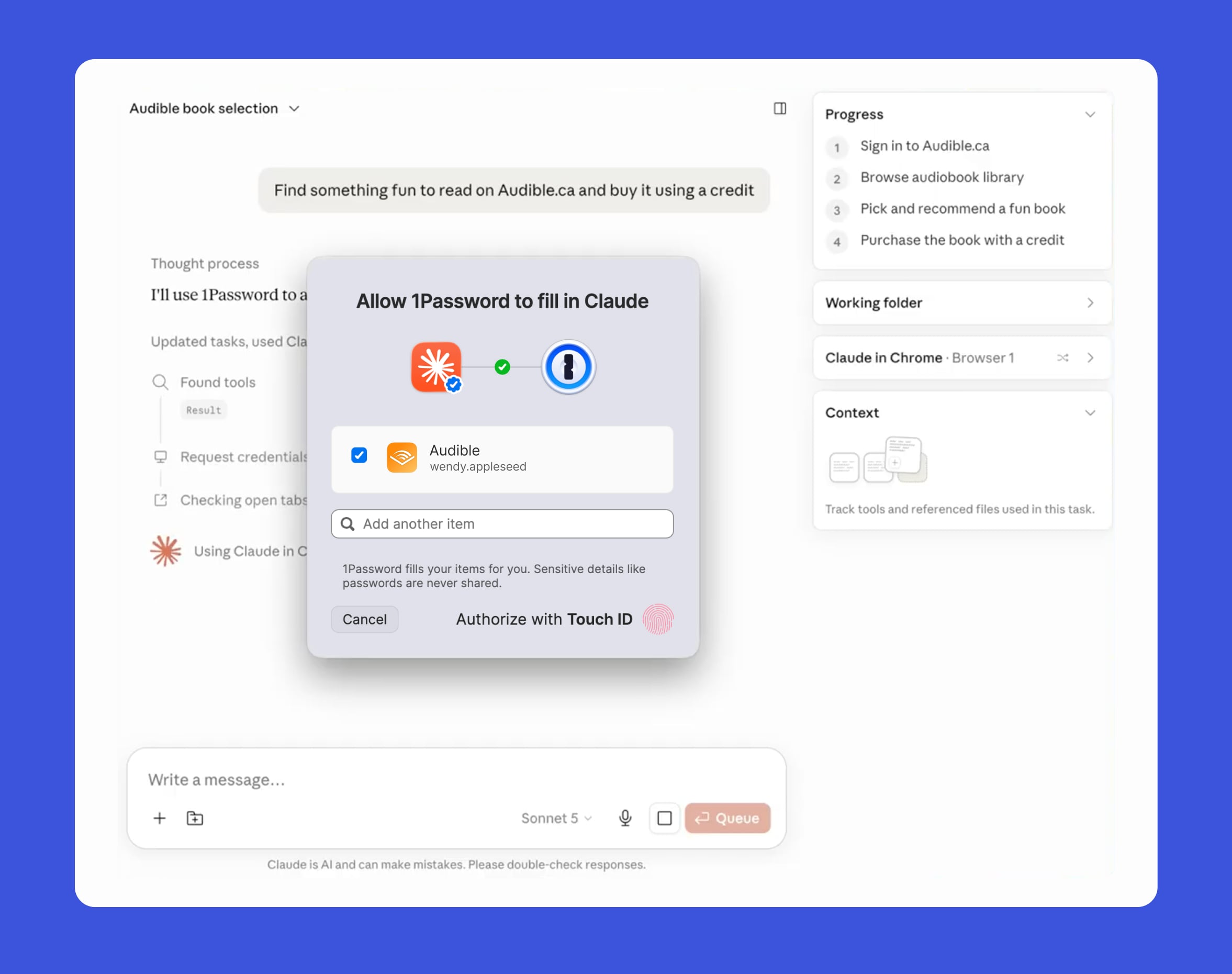
Popular password management app 1Password today added Claude support, which means AI service Claude can access credentials stored in 1Password for completing browser tasks.


With the integration, Claude can use 1Password logins and one-time codes without the actual password being exposed to Claude. Passwords never reach Claude's context, memory, or Anthropic's systems.

When Claude wants to sign in to a website, 1Password shows the user which credential Claude wants access to and why. After the user approves the request, 1Password adds the credential directly to the page. Access is limited to the current task and ends when the task has been completed. The 1Password team says that after a password is autofilled, the app checks to make sure secrets were not exposed on the page.


Credit cards and identities in 1Password are not supported at the current time, so Claude's access is limited to logins and one-time codes.

The 1Password browser extension is also being updated with Agentic Mode, which gives users control over browser-based AI agents. When an AI agent takes over, the 1Password extension locks down so passwords are not exposed. The password interface is hidden, and the agent can use logins and one-time codes only when the user gives approval. Agentic Mode works to protect passwords from AI agents even if the integration is not set up.

1Password for Claude is available for Mac, and 1Password business, family, and individual plan subscribers can use it. A Pro, Max, Team, or Enterprise Claude plan is required. 1Password has a help document with detailed information on how to set it up.

Claude can use 1Password logins across sites where Claude in Chrome can complete actions. The 1Password desktop app and browser extension are required, as are the Claude desktop app and the Claude in Chrome browser extension.
This article, "1Password for Claude Lets AI Log In Without Seeing Your Passwords" first appeared on MacRumors.com

Discuss this article in our forums

  •  

Have I Been Pwned: o site que lhe diz em segundos se os seus dados já foram roubados

Com quase 17,7 mil milhões de contas comprometidas indexadas e mais de mil fugas de dados catalogadas, o Have I Been Pwned é a referência mundial para saber se o seu endereço de e-mail ou password já caíram nas mãos erradas. É totalmente gratuito.

The post Have I Been Pwned: o site que lhe diz em segundos se os seus dados já foram roubados appeared first on Tek Notícias.

  •  

Microsoft broke some OLE automations with latest Windows update

Microsoft Office users may find that some of their applications are failing to open when called on by third-party applications. It’s an issue that has emerged after the latest round of Microsoft updates.

The problem affects Word, Excel, and other Office applications opened from third-party offerings including CCH Engagement, Workpaper Manager, Zotero, or dental office software such as Dentrix or Softdent.

The update issued on June 9 appears to have triggered problems with the OLE automation that these third-party applications use to interact with Office. Users have reported that files are failing to open, with no error message indicating what has gone wrong,

According to one Windows user forum, the issue is particularly frustrating because of this lack of error message. As one user put it, “‘Word won’t open from our workpaper system’ is functionally the same as ‘Word is broken.’ To an administrator, the difference determines whether the next hour is spent repairing Office, rolling back Windows, calling a line-of-business vendor, or opening a Microsoft support case.”

Microsoft has said that it is aware of the issue and is working towards a resolution.

Deleting mystery file

The company is also looking to fix a minor issue that has emerged from this latest round of updates: Users are finding that when items are deleted, the confirmation dialog box displays the internal Recycle Bin file name (for example, $Rxxxxx.ext) instead of the original file name. However, Microsoft stressed that in the Recycle Bin, the item still appears with its original name.

  •  

Scientists Use Math to Solve Viral Word Game ‘Wordle’ with 99% Success Rate

Wordle, a popular word-guessing game, challenges players to identify a five-letter secret word through iterative guesses and feedback on letter placement. The players must figure out the secret word within six guesses. After each guess, the letters will be color-coded based on different criteria. Optimizing the choice of guesses is critical for maximizing success within the limited attempts allowed. Image credit: Aladaileh et al., doi: 10.63562/2577-8439.1146.

Researchers at Binghamton University have applied a 70-year-old theory of information to the viral word game Wordle, revealing how a carefully chosen first guess can dramatically improve a player’s chances of solving the puzzle.

The post Scientists Use Math to Solve Viral Word Game ‘Wordle’ with 99% Success Rate appeared first on Sci.News: Breaking Science News.

  •  

7 atalhos de teclado para o PC que ajudam a poupar tempo e a tirar mais partido do Windows

Uma publicação no Threads juntou mais de 1.700 respostas com os atalhos de teclado favoritos da internet. Recolhemos os mais surpreendentes, e há boas hipóteses de ainda não conhecer alguns dos atalhos sugeridos.

The post 7 atalhos de teclado para o PC que ajudam a poupar tempo e a tirar mais partido do Windows appeared first on Tek Notícias.

  •  

After Decade-Long Hunt, Scientists Find East Asia’s Tallest Tree

The Heaven Sword tree. Image credit: Chia-Chun Hsu et al., doi: 10.3389/ffgc.2026.1746112.

Deep in the mountains of northern Taiwan, a towering Taiwania cryptomerioides -- a large coniferous tree in the cypress family Cupressaceae whose ancestors date back 100 million years -- has been confirmed as the tallest known tree in East Asia.

The post After Decade-Long Hunt, Scientists Find East Asia’s Tallest Tree appeared first on Sci.News: Breaking Science News.

  •  
❌