If you use WhatsApp on your iPhone, you might soon be able to tap on links and read them without leaving your conversation. The messaging platform is currently testing a built-in browser specifically for iOS devices. This upcoming change means you will not have to jump back and forth between your chats and Safari just […]
Meta a du mal à faire décoller ses IA, alors la firme a pensé autrement avec sa nouvelle application Muse. Plutôt que de proposer un chatbot, le groupe de Mark Zuckerberg mise sur une autre bataille : celle des agents capables d’agir à la place de l’utilisateur. Et les premiers chiffres montrent...
O WhatsApp está avaliando (na versão beta 26.37.10.15) a implementação do suporte ao acesso de até três contas simultâneas no mesmo dispositivo.
A opção de adicionar uma terceira conta é bem semelhante ao que já foi implementado pela Meta ao adicionar o suporte a uma segunda conta no mensageiro, exibindo a foto de perfil e o número de telefone para facilitar a identificação na hora de alternar entre os perfis.
Outro recurso que a Meta avalia implementar (na versão beta 26.37.10.16) é a possibilidade de sincronizar para todos os participantes da conversa determinadas informações, como o papel de parede (ou os temas oferecidos pelo próprio WhatsApp) importado a partir da biblioteca de fotos do aparelho, além da cor dos balões de conversa.
A definição dessa configuração para todos os participantes da conversa permite que todos os usuários visualizem as interações de um jeito semelhante, tanto para conversas individuais do WhatsApp quanto para conversas em grupo (os usuários são alertados caso qualquer alteração nesse sentido seja feita).
A sincronização desses elementos também conta com a criptografia de ponta a ponta oferecida em outros recursos do aplicativo.
No momento, ambos os recursos estão sendo testados pelo WhatsApp e estão indisponíveis inclusive para quem utiliza a versão beta do app via TestFlight.
A new WhatsApp Business MCP server lets developers use AI coding agents like Claude, Cursor, Codex, and ChatGPT to handle setup, messaging templates, testing, and troubleshooting.
Depois de ganhar o Liquid Glass, a versão do WhatsApp para iPad começará a receber outra novidade de design para parte dos seus usuários: uma nova barra lateral.
A reformulação da interface aproximará a versão de iPad daquilo que é visto no macOS, com a nova versão da barra lateral abrangendo conversas, atualizações, comunidades, chamadas e Meta AI, além da seção “Mais” (que engloba conversas favoritadas, trancadas e arquivadas, bem como os status do mensageiro da Meta).
WhatsApp is rolling out a redesigned navigation interface for iPad!
WhatsApp is bringing the same sidebar from the Mac app to iPad, making it easier for users to navigate the interface on a larger screen. The update is also compatible with Liquid Glass.https://t.co/vVfpctrXulpic.twitter.com/uUYQ8cPak5
O WhatsApp está lançando uma interface de navegação redesenhada para iPad!
O WhatsApp está trazendo a mesma barra lateral do aplicativo para Mac para o iPad, facilitando a navegação dos usuários na interface em uma tela maior. A atualização também é compatível com Liquid Glass.
A quem desejar que a conversa ocupe mais espaço da tela, será possível ocultar a barra lateral por meio de um botão localizado no canto superior direito da interface. Para exibi-la novamente, bastará tocar no botão da barra lateral na barra de guias superior, exibido quando a barra lateral é ocultada.
Por ora, a novidade está sendo testada com os usuários da versão beta do WhatsApp via atualização mais recente do TestFlight, além de alguns usuários da versão mais recente do aplicativo da App Store. É provável que não demore muito para que a funcionalidade chegue a todos os usuários.
Pré-visualização de miniaturas em conversas
Para os usuários de iOS, a Meta também implementou um recurso que já vinha sendo testado na versão de Android: a pré-visualização de mídias e figurinhas em uma miniatura exibida na própria seção de conversas.
Imagem: WABetaInfo
Até o momento, a única forma possível de pré-visualizar mídias e figurinhas no WhatsApp era segurando a conversa, caso contrário o aplicativo só fazia uma menção textual ao material enviado.
The popular messaging platform WhatsApp is changing how it handles automated helpers. In the past, people risked getting their accounts banned if they tried plugging outside tools into the service. This strict policy pushed many users toward competing chat applications. Now, the company is changing its approach by testing a native feature that lets anyone […]
Setting up a safe chat space for your kids is about to get much simpler on your Apple smartphone. The popular messaging app WhatsApp is rolling out a brand new parental controls section inside its main settings menu for the iPhone. While the company launched parent-managed accounts earlier this spring, many families never set them […]
Creating funny pictures to share with friends might soon become a lot easier. People use the ChatGPT app to generate custom images, but turning those images into messaging stickers takes too many steps. You have to save the picture, crop it, and use another tool to import it. A new report shows that OpenAI is […]
WhatsApp is rolling out a new design for message bubbles on iOS, reports WaBetaInfo. The platform's message bubbles are rounder than before with a softer shape – similar to iMessage – while shared media files appear without the original borders, giving them a cleaner look.
The message bubble update follows several Liquid Glass-based design changes that came to WhatsApp's chat interface on iPhone and iPad last month.
If you frequently use WhatsApp for voice and video calls, dealing with loud background noise is about to get much easier. A new software update is bringing system-level microphone controls directly into the active call screen. Instead of forcing you to swipe away from your conversation to find the right audio settings, the app now […]
WhatsApp has started rolling out its new username feature, reports WABetaInfo. Some users who reserved their username have started receiving a notification that their username is active, and that they can now use it to send and receive messages to other users without revealing their phone number.
When someone creates a username, WhatsApp will notify people who already have an active chat with that person. WhatsApp has no directory of usernames to browse, and no username discovery suggestions, so people will need to know a WhatsApp user's exact username to send a message.
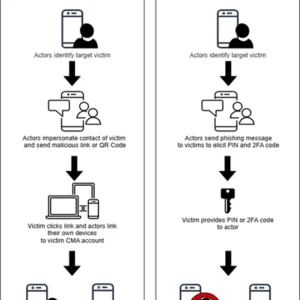
Federal authorities are offering a reward of up to $10 million for information leading to the identification or location of a Russian state cyber group that has compromised thousands of Signal and WhatsApp accounts belonging to investigative reporters and US government employees.
The operation has been active since at least March, when the FBI published an advisory warning of ongoing phishing campaigns targeting high-value targets by attackers associated with Russian intelligence services. Messages masquerading as automated support communications ask that users click a link or provide verification codes or account passcodes. In the event the user complies, they unknowingly link the attacker's device to their account or have their account completely taken over and are locked out.

 Login
Login



 WhatsApp is rolling out a new design for message bubbles on iOS, reports