Veteran Microsoft engineer Raymond Chen shared another fireside tale – one to strike fear into the hearts of engineers everywhere: the bug that can't be replicated in the debugger. The story begins near the end of the Word 97 release cycle, when a defect surfaced in the test labs but vanished the moment engineers reached for a debugger. It was maddening. A script could trigger the crash fairly reliably, yet the instant anyone tried to hunt it down, the bug ducked out of sight. Chen recalled: "The development team was very anxious, because a bug that appears only sporadically in the lab is going to occur regularly in the wild. But how do you debug a problem that resists debugging?" It is every developer's nightmare, even for those smug types who lean back in their chairs and tell testers "works alright here, mate." There is a special place reserved in the afterlife for these developers. With the bug refusing to cooperate, talk turned to an ICE (an In-Circuit Emulator, not the immigration agency), which could stand in for the CPU and allow breakpoints inside the emulated chip itself. "To most software developers," said Chen, "in-circuit emulators existed only in myth, and the possibility of acquiring one and using it was met with the excitement of a five-year-old boy who learns that he might get to ride on a fire truck." Eventually the team traced the problem to a specific manufacturer, and from there to a CPU erratum. The compiler in use at the time had been updated to dodge the problematic code sequence. However, by then the toolset had already been locked. Swapping in a new compiler risked introducing fresh, unknown bugs, so that was off the table. The solution? Scour the binaries to find instances of the code that might upset CPUs. One was found. "To avoid introducing any new problems as a side effect of the fix, the team opted to do a binary patch to the binary to insert a nop into the offending code sequence." Word 97 introduced plenty of headline features. There was the arrival of Clippit (aka Clippy) and Visual Basic for Applications (VBA). And then there was a binary patch produced by determined engineers, which received far less attention. But without it, Word 97 could have been distinctly wobbly. ®
Google has declared that Android apps distributed through Google Play will have to meet new memory performance thresholds, starting in early 2027. Google is cracking down on poorly optimized code that might otherwise squander what's now a precious commodity, as RAM prices skyrocket and consumers choose phones with leaner specs. "An ecosystem-wide memory crisis is imminent due to rising RAM costs," the Chocolate Factory explains in its technical documentation. "Inefficient memory use, such as a single app with a runaway memory leak that consumes most of the device memory, causes the device to stutter and kill other well-behaving apps in the background. Android has announced strict memory limits, and Play wants to ensure your app’s fall within this and minimize the chances that the device needs to terminate your app." On-device AI probably isn't helping. The new app quality requirements represent an expansion of the Android memory efficiency push announced in June, aimed at "[preventing] 'one bad actor' from destroying the multitasking experience and stability of the user’s entire device." Technical scrutiny is scheduled to take effect in two stages: In February 2027, bad behavior thresholds and code optimization thresholds will come into effect. And in April 2027, the device migration experience – onboarding – will need to support zero-tap credential restoration. The former covers memory usage (Anonymous Resident Set Size + Swap), bitmap memory usage, and DEX code optimization – DEX (Dalvik Executable) files represent a compressed version of an application's Java bytecode. The specific memory requirements depend on the amount of physical RAM available on the device. For a device with 8 GB, an app can use no more than 2.25 GB in the foreground, 1.5 GB for user-perceived services, and 1.5 GB in the background. Devices with more than 16 GB are mostly exempt. Bitmap memory usage is capped at 200 MB in user-perceived services and in background, and 400 MB cached, for all devices. The limits differ somewhat for games. And DEX code optimization is being required to ensure modest memory usage, rapid app launches, and better runtime performance. The second stage requirement, Zero-tap Sign-In, aims to make device migration easier and more secure. As Google's documentation states, "Manual sign-ins during device setup doesn't just create onboarding friction and decrease user retention, it actively exposes apps to critical security vulnerabilities like phishing and credential theft during setup." So as of April, Android devs are advised to use the Android Restore Credentials API to help move user credentials from one device to another. ®
Announcing upbeat financials and a new offering with AI posterchild Anthropic, Salesforce has begun to drip-feed plans for how it might get customers to spend more as they deploy AI. The CRM giant has been among the victims of the so-called SaaSpocalypse, which sees widespread business application software replaced or diminished by AI models which interact directly with business data. Flawed or not, the notion has tanked Salesforce’s share price by more than 20 percent this year, but its Q2 results, for the period ending July 31, caused some cheer, at least among shareholders. As well as trumpeting revenue of $11.3 billion, up 11 percent on a year ago and beating analysts' expectations, the CRM giant announced a new tie-in with AI model builder Anthropic. The two companies have teamed up to announce Claudeforce, which claims to bring Claude’s services together with Salesforce’s enterprise data, workflows, governance and business logic. It offers a Plugin with 37 prebuilt “sales skills” the companies say help sellers and agents automate sales pipelines for example. As well as using Claude for the UI, it can be embedded in Salesforce products AIforce, Headless 360, Data 360, Tableau, and Slack. Together with the financial results, the news caused a 12 percent jump in the company’s value. That’s all very well for investors, but customers will be asking whether it works and how much they pay for it. Both will depend on the implementation strategy, but Salesforce did offer some clues about its expectations while speaking to investment analysts. For a start, there are so many products which seem to overlap, customers may be forgiven for being a little confused. Co-CEO and founder Marc Benioff said products would use “not only Claudeforce, but a new version of Slack, as well as Coworker,” an AI powered assistant built in its Agentforce platform. That adds to the Headless 360, which allows customers to access all of their Salesforce data from Cursor, WhatsApp, ChatGPT, Claude, or a terminal. Slack is also being reworked as the UI for CRM and other applications through SlackBots, which can fetch and query data from a range of applications. Consumption-based How are users expected to pay for this menagerie of product types? Bundles is the answer. Robin Washington, Salesforce President and Chief Operating and Financial Officer, told investors, “bundles give our customers access to our innovation in real time.” Benioff said customers would have the option to pay by consumption, basic usage, or by outcome, such as a transaction outcome or a business outcome. “Customers want that kind of diversity in pricing, we have created a high level of flexibility, and that has really expanded our ability to sign very large transactions with our customers,” he said. Also underscoring this approach was the importance of consumption-based payment model Flex Credits in Salesforce's plans to get customers to adopt its various AI agent-led approaches to business processes. Miguel Milano, also President and Chief Operating Officer at Salesforce, told analysts: “When you look just at bookings — not just the cumulative annual recurring revenue — [they] grew triple-digit. We doubled year on year. Fifty percent of the bookings came from customers refilling the tank: they consume Flex Credits, they want more.” In October last year, Gartner warned users about the unplanned consumption of Flex Credits, alongside similar concepts in Microsoft and ServiceNow’s commercial portfolio. “These often require upfront usage commitments and can be credit-based, with rates that may change unilaterally by the vendor, exposing buyers to unexpected cost increases. While buyers may expect costs to decrease as usage scales, Gartner has seen no evidence of vendors lowering prices. Volume discounts must be negotiated upfront,” it said. The Register asked Salesforce to comment on Thursday Washington added that the company was “really comfortable with” the way it was working “through headless monetization.” “We ultimately think predictability and flexibility are what's important to customers. With our new platform, Agentforce, we are going to unlock the potential for knowledge workers in great ways. That's going to be pretty impressive. “That is an early stage for us relative to our installed base, or our opportunity to continue to upgrade our customers to those premium editions that give them instantaneous access to this innovation... We feel really comfortable with the monetization strategy that we have, and most importantly, the flexibility that we are giving our customers that allows us to capture that,” she said. Separately, Gartner has previously predicted that Salesforce’s all-you-can-eat model, the Agentic Enterprise License Agreement (AELA) announced last October, will not be available to all customers forever. Hannah Decker, Gartner director analyst for IT sourcing and procurement, told The Register in January it was critical that users understood the exit terms of AELAs before signing up for them. "Gartner believes that these are going to be converted into defined quantity contracts at the end of the agreement," she said. At the time, Salesforce denied that was the case. In a statement, Bill Patterson, Salesforce EVP, Corporate Strategy, said: "The claim that we are moving away from capped agreements is inaccurate. Renewals remain flexible, and because AI compute costs may actually shift over time, we focus on tailoring terms so each customer can get the maximum value from their usage.” ®
Microsoft is dusting off the rebrandogun again, and this time it's aimed at the Microsoft 365 Roadmap. The list of hopes and dreams will henceforth be called the AI at Work roadmap. The notification popped up in the Microsoft 365 admin center earlier this week with the words "The AI at Work Roadmap provides a single destination to discover upcoming innovations across Microsoft 365, Copilot, agents, and related AI-powered experiences." Information for Dynamics 365, Power Platform, and Dataverse will be added from September. In its announcement, Microsoft stated, "We’re making this change because of how our customers actually work." Other changes include when roadmap information appears. Instead of the twice-yearly release wave 1 and 2 model, Microsoft intends to publish new capabilities as soon as plans are committed. This means, in theory, administrators will have more notice of incoming features and functionality. The full transition will take time. Although the renaming has already happened, and other capabilities will be published to the AI at Work roadmap from September, existing roadmap content in public preview or with a General Availability date of June 1, 2026, or later, will also transition to the "AI at Work roadmap experience." This will take until November 15, 2026. Earlier this month, an enterprising Microsoft Most Valuable Professional (MVP) created the Microsoft Rebrand Registry. We look forward to the addition of the Microsoft 365 roadmap. All in all, it's an odd decision, and perhaps a slightly cynical way of shoving AI in administrators' faces. Microsoft 365 Copilot, the company's flagship AI technology, is available as a paid add-on, and adoption has hardly set the world alight, despite the investment poured into it. In June, a sueball was thrown at the company, with the lawsuit alleging "Microsoft had failed to convert a significant percentage of its commercial Microsoft 365 users to paid Copilot subscriptions." For its part, Microsoft told The Register that the claims in the complaint were "without merit." Regardless, renaming a roadmap with which administrators were familiar to something prefixed with AI smacks of marketing desperation on the part of Microsoft. Heaven forbid the company might have better things to do with its time than rename something that users were already happy with, and understood. ®
For years I ran a law practice, and the hardest part of client work was never the work. It was keeping track of it. Where that email went, what we agreed to on a phone call, which version of the document was current, who I owed a call back. Some of it lived in Mail, some in a folder somewhere, and too much of it lived only in my head.
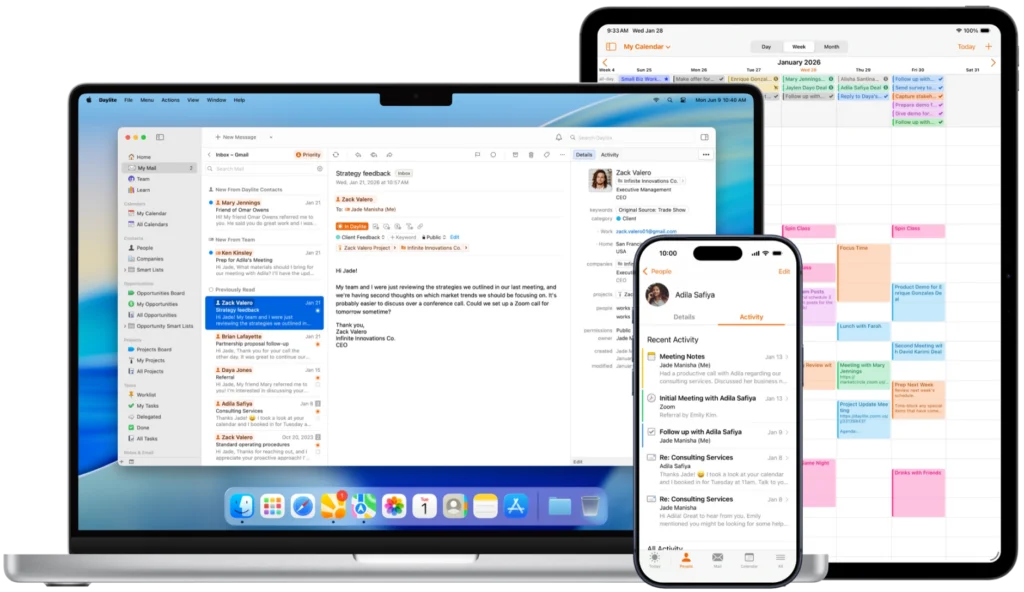
That’s the problem Daylite has been chipping away at for more than twenty years. It pulls your clients, projects, tasks, calendars, and communications into one place, so every email, meeting, note, and follow-up becomes part of an ongoing history of that relationship. Open up a client, and you can see what happened, what’s next, and who is waiting on you.
The newest piece of that is Mail in Daylite, which brings your email inside the app alongside everything else. A message stops being one more thing you have to file. It attaches itself to the person, the deal, and the project it belongs to.
I also like that Daylite is built only for Mac, iPhone, and iPad. It isn’t a web app wearing a Mac costume, and you can feel the difference in how it behaves.
If you run a service business and you’re tired of carrying the whole client history around in your head, take a look at Daylite. There’s a free trial.
In a conversation at Macstock 2026, Adam Christianson reflects on retiring the MacCast, joining Mac Geek Gab, and starting the Debut Film Podcast with his daughter. He also explains how his views on AI have evolved, how ChatGPT and Claude support his programming work, why human oversight remains essential, and what AI may mean for […]
From the Flip the Script event in San Francisco, Dmytro Melnyk, Chief Product Officer for MacPaw, discusses his role and the importance of the company’s careful approach to adding AI across products, from both the developer and customer viewpoints.. He explains why some users want frictionless AI while others resist it over privacy, cost, and complexity, and outlines Eney's goal of combining many Mac utility tasks into one assistant with a pay-as-you-go model.
At MacPaw’s Flip the Script event in San Francisco, Junior iOS Engineer Tymofii Bezverkhyi shares how his path from Ukraine’s Kyiv School of Economics to studying in Ireland, winning Apple’s Swift Student Challenge, and attending WWDC led to a role at MacPaw. Tim discusses his passion for Apple development, his work on MacPaw’s AI Eney, and why he appreciate’s the company’s responsibility and growth objectives.
At Flip The Script, Grant Belaire, Chief Marketing Officer for MacPaw, discusses how the company approaches AI, app discovery, and developer support through their trusted products like CleanMyMac, Setapp, Moonlock, and Clear. He explains why AI should be useful rather than forced, how Setapp balances customers and developers, and why long-term commitment matters in building successful app marketplaces.
Rivian’s rejection of CarPlay and physical buttons in favor of voice and AI control sees to question safety, convenience, data control, and long-term car software support. Chuck Joiner, David Ginsburg, Jeff Gamet, Guy Serle, Web Bixby, Eric Bolden, Marty Jencius, and Jim Rea question whether Rivian has other motives, and then dive into Tesla updates, AI voice recreation of Stan Lee, Spider-Man ticket promotions, Dashlane concerns, and Andy Ihnatko’s new site.
MacPaw's Maria Polishchuk, Head of Business Development and and Product Manager Pavlo Haidamak, discuss Setapp's new expansion beyond its traditional subscription model. They explain new individual app purchases, developer subscription options, AI Gateway integration, app review standards, and support for indie and vibe-coded apps. The discussion covers developer challenges such as discovery, monetization, security, and how Setapp aims to help with those factors as well as giving customers more software choices.
Imagine finding a very old family photograph that has faded over time. Parts of the image are missing, the faces are blurry, and years spent inside a cardboard album have erased many details. Restoring such an image traditionally would require painstaking manual work or specialized software trained on thousands of examples.
Many of the recent supply-chain attacks could have been caught earlier if defenders looked closely at the telemetry GitHub already provides, researchers said.
At their Black Hat USA 2026 presentation, researchers Yossi Weizman of Microsoft and Mor Weinberger of Echo argued the case, saying, “GitHub can tell you’re being hacked. You’re just not listening.”
The duo described an EDR-style detection approach built from GitHub’s own event stream rather than relying solely on conventional endpoint or network telemetry.
After studying recent supply-chain attacks, including Shai-Hulud, Trivy, and Megalodon, the researchers found that seemingly different incidents repeatedly used the same techniques, from forged commit identities and poisoned tags to workflow abuse, OpenID Connect (OIDC) theft, and attempts to erase evidence.
They said they turned those recurring techniques into behavioral detections, combining GitHub webhooks, API data, and Git repository inspection to build a historical view of activity.
Their new open-source tool, dubbed “GitHub Threat Detector,” reportedly includes 22 production detection rules and 12 beta rules, with compound detections designed to correlate individually weaker signals into high-confidence alerts.
Everything leaves evidence on GitHub
The central observation in Weizman and Weinberger’s research is that supply-chain attacks often repeat the same patterns even when the targeted projects are unrelated.
A compromised identity, for example, may not be obvious from the commit itself because Git metadata can be forged. An attacker can set the author name, email, timestamp, parent, and other metadata to make a malicious commit appear legitimate.
But GitHub separately records the authenticated user who pushed the commit.
When the commit author does not match the authenticated pusher, defenders have something worth investigating, they explained. Added to this, their analysis revealed that attackers sometimes reuse the same forged identities across multiple victims. Searching GitHub for the same author’s email can therefore help connect seemingly unrelated incidents into a broader campaign.
“Forged identities in the repo which appear in other repos as well-is a strong indication of compromise,” they said.
Another detection pitched on the same principle included tracking “Mass tag poisoning.” Mass tag poisoning involves force-moving numerous release tags onto a malicious commit so that workflows using a version such as @v1 execute attacker-controlled code. Researchers recommended adding tracking GitHub tag history through the GitHub API and comparing old and new commit references to catch this out.
OIDC offers another signal. Attackers can modify workflows to generate short-lived identities for cloud or package registries instead of stealing long-lived credentials. Watching for new or modified workflows that enable OIDC token issuance can help, the researchers said.
Correlating weak signals for stronger detection
GitHub Threat Detector follows an EDR-like pipeline: collect activity, enrich it with context, detect suspicious behavior, and then investigate or respond. The signals it ingests include live GitHub webhooks, API events, commits, tags, and Actions activity, while Git inspection provides additional context such as tag provenance.
Additionally, a PostgreSQL-backed activity store keeps the history needed to correlate events over time.
The tool took over 30 detection rules and tested them against 52 attack simulations, including reproduction of Trivy, TanStack, Megalodon, and Bitwarden CLI incidents. A separate “noise lab” helped researchers measure detection prevalence and recall, while tuning rules through allowlisting and severity adjustments.
The system, however, is not without drawbacks. Some of the trade-offs it carries include possibly disabled webhooks, rate-limited APIs, and Git inspection not being real-time.
If your iPhone or iPad is misbehaving and initial solutions are not working, a full reset may be necessary. Taking your device back to how it was out of the box can often help resolve issues like constant crashing, freezing or other serious problems.
It’s something of a nuclear option, though, so before you take this route we’d recommend restarting or force-restarting your iPhone or iPad, as that will leave your data and settings intact. Another option is to ensure that the version of iOS or iPadOS on your device is up to date, as the problem might be caused by an issue that has since been patched by Apple. We explain how to do this in our how to update iOS guide.
Of course, if you’re selling your iPhone (or passing it down to a family member or friend) it’s absolutely vital that you delete all the sensitive data stored on it. If not, an unscrupulous buyer could gain access to your social media profiles, financial information and even your personal photos and videos.
As with any activity that deletes data, we’d recommend that you back up your iPhone or iPad before you attempt resetting the device. After your device has been wiped you will be able to download your data from your backup.
How to wipe an iPhone or iPad
We’ll concentrate on iPhone for this tutorial, but the steps will be more or less the same for iPad. There are two ways to erase your iPhone or iPad, one is useful if you just want to erase everything and then recover the data from a backup, the other is useful if you are moving to a new device and selling or passing on the one you are erasing. There’s also a basic Reset option that might be all you need to do in order to fix a troublesome issue.
Foundry
To factory-reset an iPhone follow these steps (after backing up your device).
You may need to remove your device from Find My before you begin. You will also need to be connected to Wi-Fi or cellular for this process to work.
Go to Settings.
Tap on General.
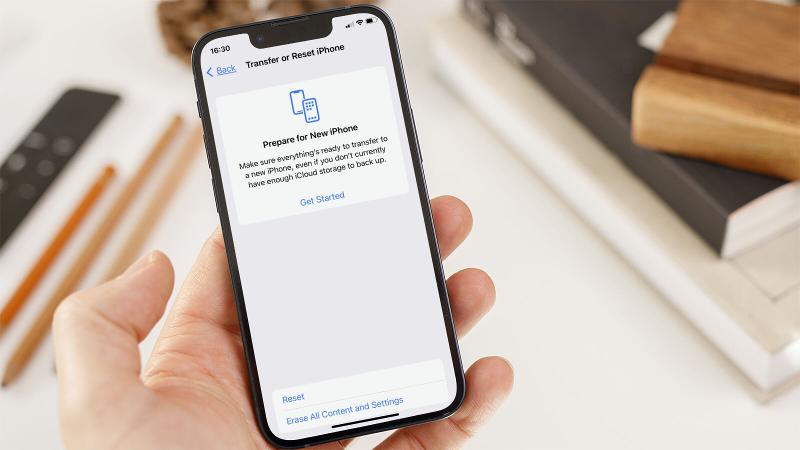
Choose Transfer or Reset iPhone.
You now have the options Prepare for New iPhone, Reset, and Erase All Content and Settings:
Choose Reset if you just want to reset your settings. There are also options to reset network settings, reset the keyboard dictionary, reset the home screen layout, and reset location and privacy. These options may be enough to fix a problem with your iPhone without wiping it.
Choose Prepare for New iPhone to backup and wipe your iPhone for sale, or so you can pass it on to someone else.
Choose Erase All Content and Settings to completely wipe your iPhone and reinstall the operating system and everything else.
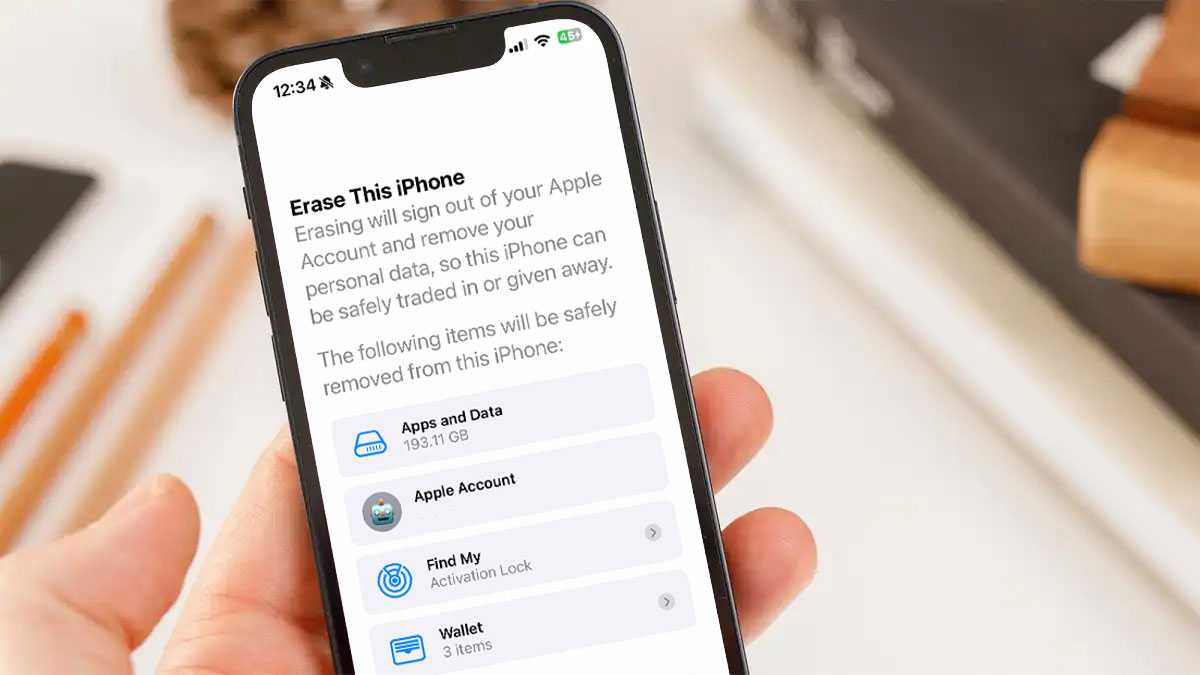
The iPhone will alert you to what will be deleted, including Apps and Data and your Apple ID. Find My will no longer be connected to the device, and all your Apple Wallet details will be removed. This is your cue to back up any of this data (if you don’t have a backup we run through how to do that here: How to back up an iPhone or iPad.) You will also find options for backing up this information if you follow the Prepare for New iPhone steps below.
If you are happy that you have a backup, or don’t need the data being referred to, either select Erase All Content and Settings or the Prepare for New iPhone option.
Tap Continue.
Enter the Passcode for the iPhone and the process will begin.
If you want help backing your data up to iCloud and want to make sure you cover all the important steps that you should make when selling your old device, you can make use of the Prepare for New iPhone instructions, which will walk you through the process.
How to reset an iPhone if you’ve forgotten the password or passcode
During the process for resetting you iPhone your passcode will be requested, you may also need to use the password associated with your Apple ID. This is a problem if you have forgotten it.
There is a workaround if you have forgotten your passcode but remember your Apple ID password:
On the Lock Screen, enter a passcode several times until you get a Security Lockout with a warning to try again later.
You’ll see Erase iPhone (or iPad) at the bottom of the screen. Tap on that.
Tap Erase iPhone/iPad and then tap it again to confirm.
You’ll be prompted to enter your Apple ID password to sign out of your Apple ID on this device. This will allow you to reset the device and turn off Activation Lock.
Tap Erase iPhone/iPad when prompted again to permanently delete all your apps and data and reset the device.
After a few minutes, your iPhone or iPad will restart and you’ll be at the setup screen, as if it was a new device you just took out of the box. For obvious security reasons, there’s no way to reset your iPhone after a lost passcode without erasing all your apps and data. It would provide an exploitable loop for bad actors to get around the passcode timeouts and such. But as long as you back up your iPhone regularly (either via iCloud or with a connection to your computer) it shouldn’t be too onerous to start over.
Resetting without a password used to require plugging into a computer via USB, entering iPhone recovery mode…it was a whole process. The good news is, Apple made this a lot easier as of iOS 15.2 (and iPadOS 15.2). So, if your device is running that version or later you can follow the steps below (otherwise click on the link above to reset via a computer). If you have forgotten your Apple ID password read this for help: How to reset Apple ID if you forgot the password.
How to restore an iPhone
If, having erased the content of the phone, you intend to keep using it, you can restore the content to your phone from your backup – assuming you have one, if not check out the section below. Here’s to recover your iPhone or iPad data:
From an iCloud backup
With the factory reset completed you’ll need to go through the setup of your iPhone again from the beginning:
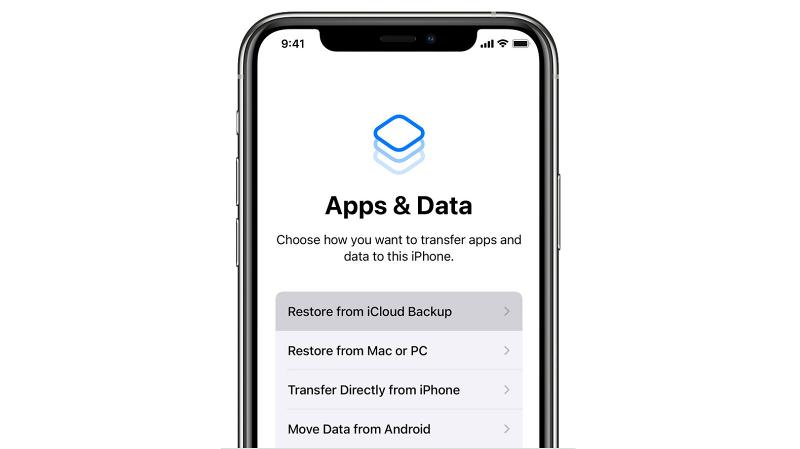
Follow the onscreen instructions until you reach the page with the headings ‘Apps & Data’.
Here you’ll see four different options from which you should select Restore from iCloud Backup.Sign into your iCloud account then select the backup you want to restore.
You may be prompted to sign into various apps that you’ve already purchased, but other than that the process should now be pretty much automatic.
Obviously, this could take a while if you have large backups or a slow internet connection, so don’t attempt this if you’re in a hurry. When the backup is completed your iPhone will reboot, and then it will start the larger job of downloading all of your apps.
From a Finder or iTunes backup
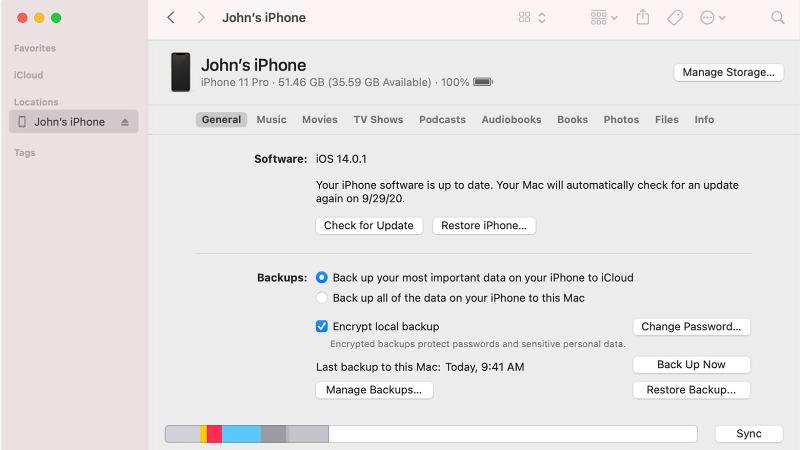
Depending on the version of macOS you’re running, you’ll either be able to use Finder (macOS Mojave and later) or iTunes (macOS Catalina or earlier) to restore a backup.
Connect your iPhone to the Mac or PC.
In the Finder window (or iTunes) you should see your device listed in the left column. Select it, then click on Restore Backup.
Choose the backup you want to use, then click Restore.
The process should now automatically install the backup on your device.
What to do if you didn’t back up your iPhone before you wiped it
If you didn’t backup your iPhone or iPad first, it’s likely that you won’t be able to retrieve data once you have deleted it.
The data on an iOS device is automatically encrypted, and wiping the device destroys the encryption key, making it more or less impossible to get anything back when it’s been fully erased and reset without access to a backup.
In an emergency you could try speaking to someone at an Apple Genius Bar, but it’s a long shot to say the least. (This applies to a full erase/reset, mind you – in other circumstances, such as data corruption, a malfunctioning device and so on, the experts may be able to help.) This also reinforces our frequent advice to back up regularly.
If you’re worried that your iPhone or iPad wasn’t backed up, don’t give up hope: there’s a chance there may be a backup of which you’re unaware.
To find out if you’re backing up to iCloud follow these steps:
Open Settings.
Tap on your name at the top of the screen.
Choose iCloud.
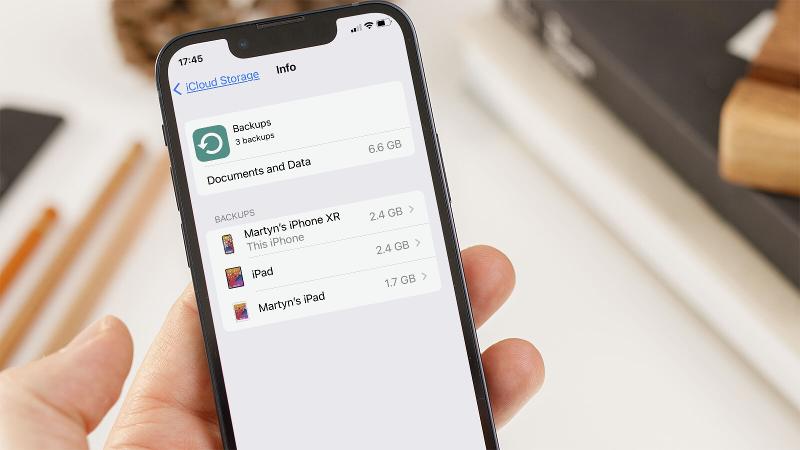
Now tap on Manage Storage or just Storage, depending on the version of iOS. Here you should see an entry called Backups with the amount of data it’s taking up displayed to the right of the name.
Tap this and you’ll see all of the various backups for your iOS/iPadOS devices.
Find the most recent backup you have and tap on it.
One of the backups should say that it is This iPhone or This iPad. Tap on that and you can see what is, and isn’t being backed up. You can basically turn things on and off so that they don’t take up your full free 5GB iCloud allocation, or you can pay a few dollars/pounds a month for more storage.
If you don’t see a backup from the device you were hoping to recover, but you do have backups of other devices (perhaps you have an iPad backup, but not an iPhone backup) you should be able to recover some of your data simply because once you link your iPhone to your iCloud account the shared data should be available on your iPhone.
If you weren’t backing you iPhone up to iCloud we suggest you do! Read How to back up an iPhone or iPad or follow the steps below.
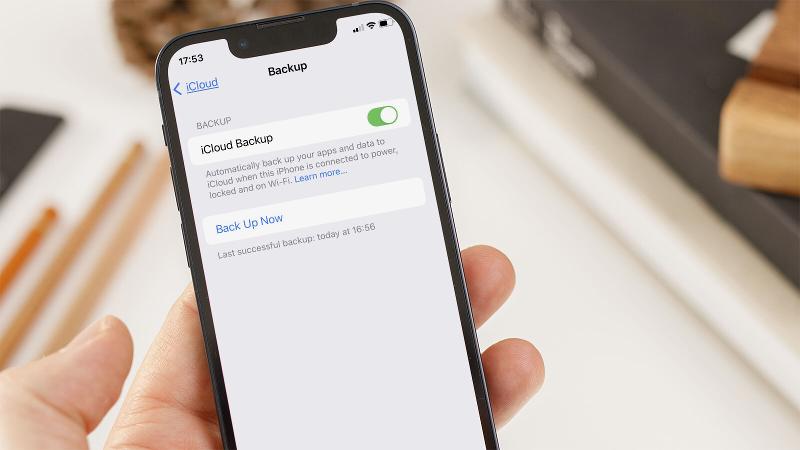
Open Settings.
Tap on iCloud.
Find iCloud Backup and tap on it.
Now switch the slider beside iCloud Backup to on (green).
Tap Back Up Now. It may take a while, so bear in mind that your iPhone needs to be plugged in for the whole time.
If the backup is going to take ages you can reduce the amount of data being backed up. For example, you may think that some of the apps don’t need to be backed up; after all, you will be able to download them again from the App Store as you already own them. But note that the data may include saved data for games, and other settings and preferences you would prefer not to lose.
There you have it. A quick guide on resetting your iPhone and then restoring it once more. Of course, if you’re moving on from that older device and fancy something newer, be sure to read our best iPhone deals roundup to see if you can save some money in the process.
CompartilharO GNOME Disks está sendo atualizado para GTK4 e libadwaita e o GNOME Disks com GTK4 e libadwaita muda completamente de visual. Veja as principais …

 Login
Login