A U.S.-Russian crew will return to Earth from the International Space Station early Sunday morning (July 26), and you can watch their homecoming live.
A Soyuz spacecraft carrying NASA astronaut Chris Williams and Sergey Kud-Sverchkov and Sergei Mikaev of the Russian space agency Roscosmos is scheduled to undock from the orbiting lab on Sunday at 3:02 a.m. EDT (0702 GMT).
The Soyuz, known as MS-28, will land on the steppe of Kazakhstan about 3.5 hours later, at 6:26 a.m. EDT (1026 GMT). You can watch these milestones here at Space.com, courtesy of NASA.
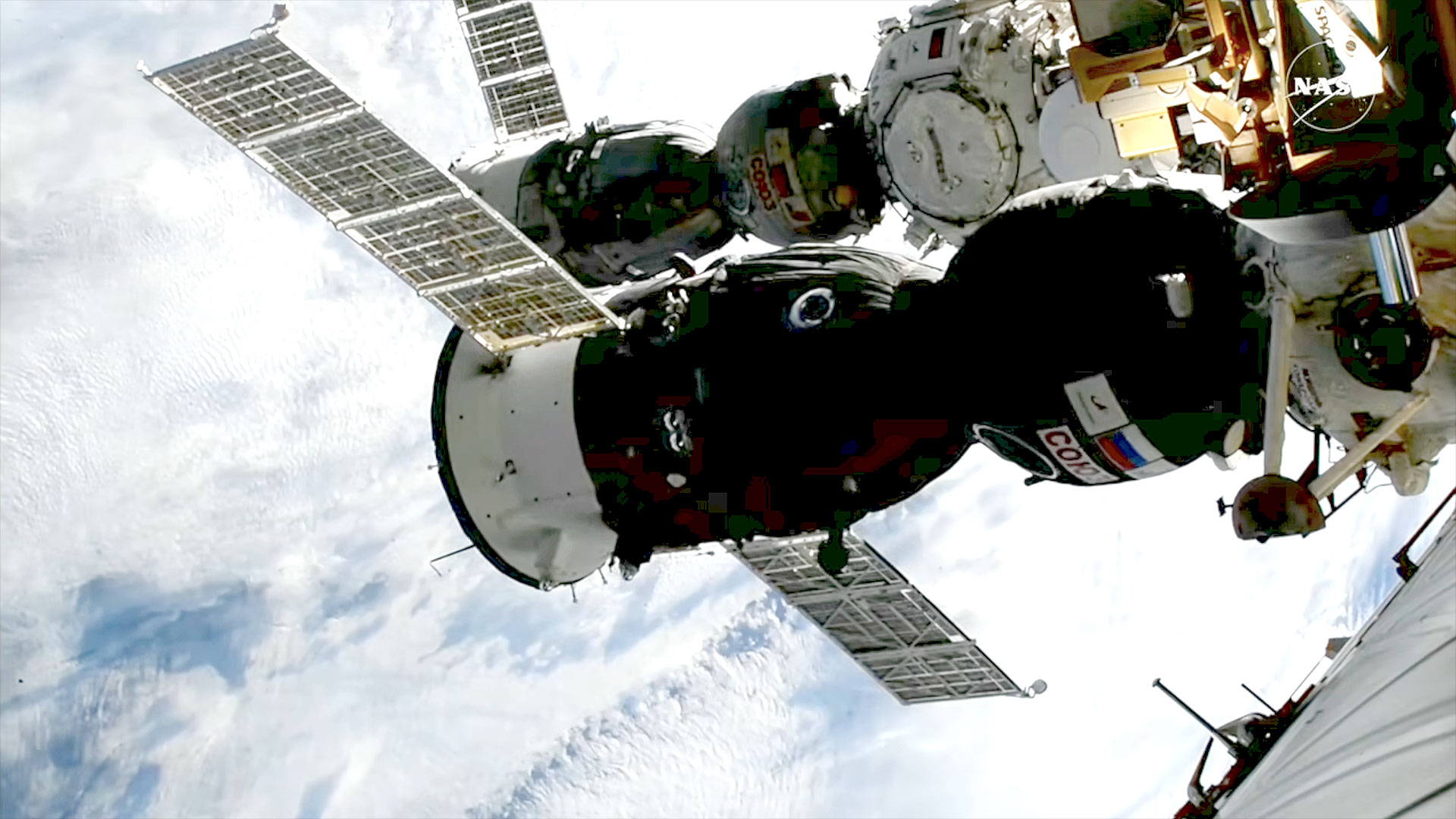
Russia's Soyuz MS-28 spacecraft is seen docked to the International Space Station shortly after its arrival on Nov. 27, 2026. (Image credit: NASA)
The coverage starts today (July 25) at 9:40 a.m. EDT (1340 GMT) ahead of a change-of-command ceremony aboard the International Space Station (ISS). Kud‑Sverchkov will hand over the reins of the orbiting lab to NASA astronaut Jessica Meir, part of the transition from ISS Expedition 74 to Expedition 75 (which officially begins when Soyuz MS‑28 undocks). You can watch that live via NASA.
NASA will resume its webcast tonight at 11:10 p.m. EDT (0310 GMT on July 26) to cover crew farewells and the closing of the hatches between the ISS and Soyuz MS-28, which is expected at 11:30 p.m. EDT (0330 GMT).
Undocking coverage begins Sunday at 2:30 a.m. EDT (0630 GMT). The stream will pick up again at 5:15 a.m. EDT (0915 GMT) for deorbit and landing activities. Touchdown will occur southeast of the Kazakh city of Dzhezkazgan, according to NASA.
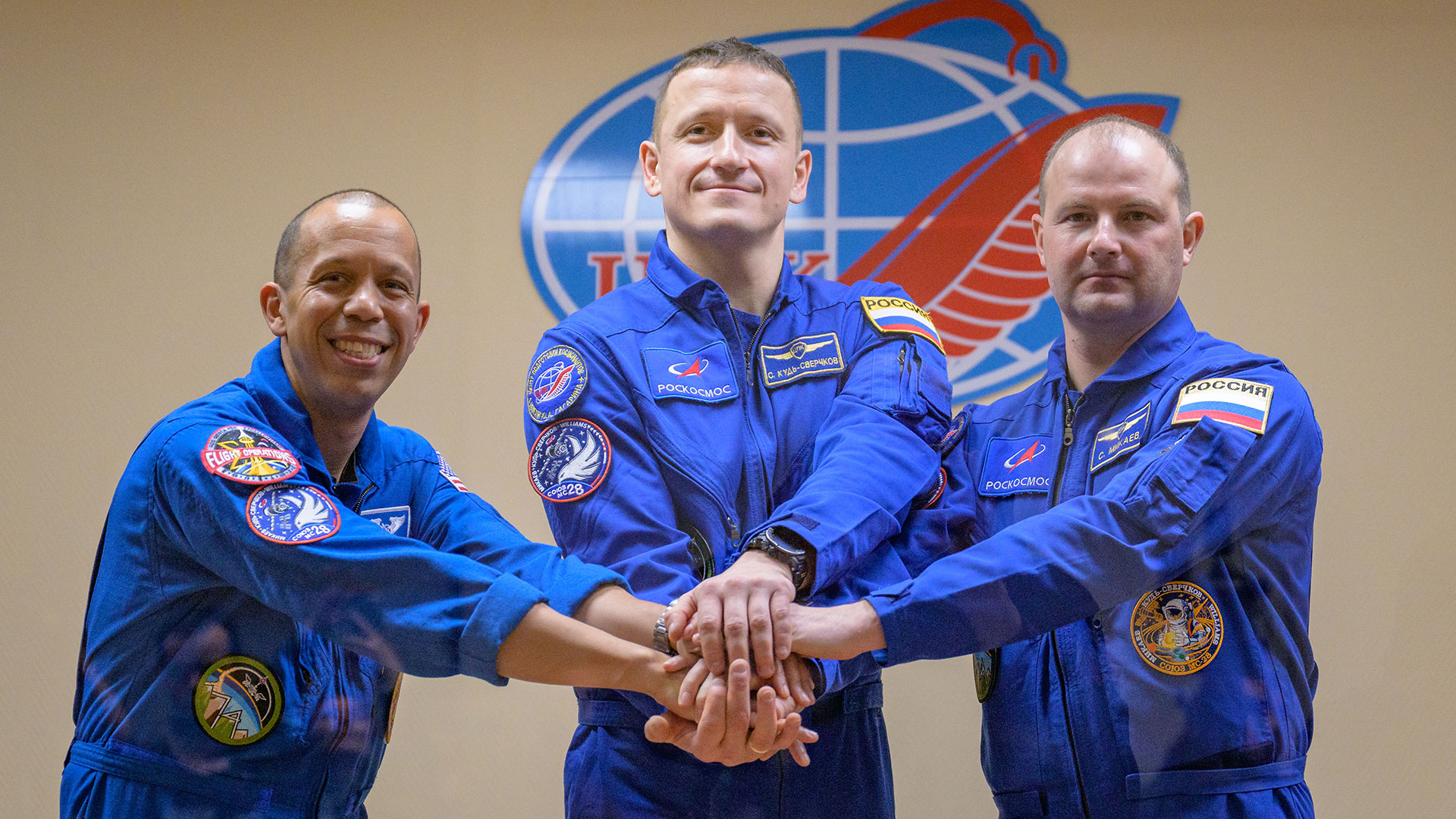
The Soyuz MS-28 crew pose on Nov. 26, 2025, a day before their launch. From left: Chris Williams of NASA and Roscosmos cosmonauts Sergey Kud-Sverchkov and Sergei Mikaev. (Image credit: NASA/Bill Ingalls)
Soyuz MS-28 launched to the ISS on Nov. 27, which was Thanksgiving Day. That liftoff kicked off the first space mission for Williams and Mikaev and the second for Kud‑Sverchkov.
When it's all said and done, the trio will have spent 241 days in space on their current flight. They will have orbited Earth 3,856 times and traveled a total of more than 102 million miles (164 million kilometers).
After touchdown, the three spaceflyers "will fly by helicopter to Karaganda, Kazakhstan, where recovery teams are based," NASA officials wrote in a media advisory. "Williams then will return to NASA's Johnson Space Center in Houston, while Kud‑Sverchkov and Mikaev head back to their training base in Star City, Russia."
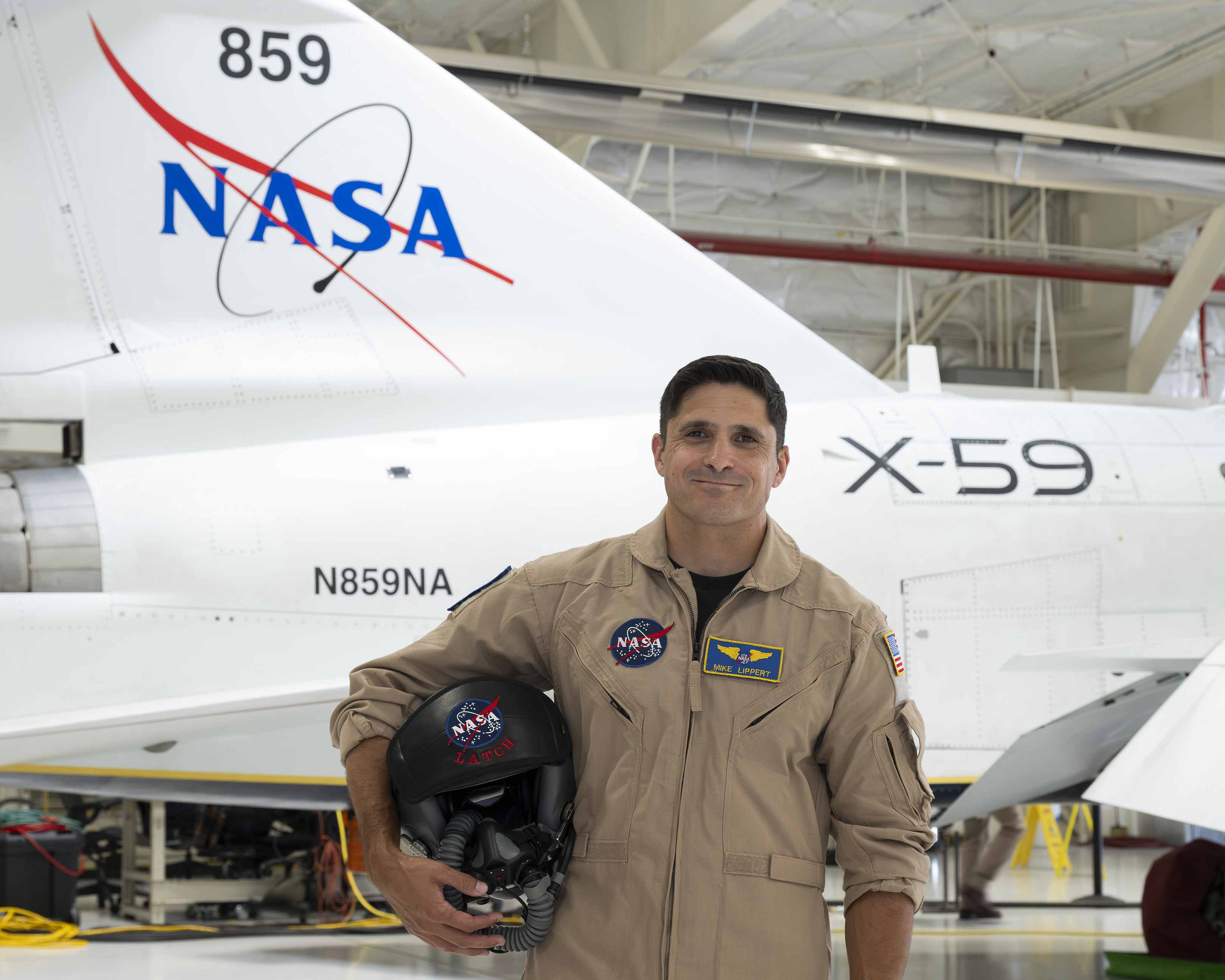
NASA’s X-59 test pilot Mike Lippert stands in front of the agency’s X-59 quiet supersonic research aircraft at NASA’s Armstrong Flight Research Center in Edwards, California, on Wednesday, June 24, 2026.
NASA/Carla Escamilla
NASA added a new X-59 test pilot to support the agency’s Quesst mission: Mike Lippert, a research test pilot based at NASA’s Armstrong Flight Research Center in Edwards, California.
“This fulfills a lifelong dream of conducting airborne research and experimental flight test for NASA in the high desert — contributing to humankind’s understanding of the science of flight and the nature of the world around us,” Lippert said.
Lippert will fly the X-59, along with the F-15 and F-18 support aircraft to monitor the quiet supersonic X-plane when it’s in the air. He joins Nils Larson and Jim “Clue” Less, who have been flying the X-59 since its first flight in October 2025.
A South Carolina native, Lippert served 20 years with the U.S. Marine Corps before retiring last year as a lieutenant colonel. Like his fellow test pilots, he boasts an impressive flight resume, including logging more than 2,600 hours of flight time in 60 different types of aircraft.
Lippert said he finds test pilot work especially rewarding.
“For me, the joy of taking part in experimental flight test and airborne research is the experience of discovery and learning something new every day,” he said. “It is incredibly rewarding to be part of a team solving complex problems and venturing into the unknown, together.”
Lippert spent the majority of his career flying the AV-8B Harrier operationally and serving as a test pilot in the F-35 program. He is also an aerospace engineer, earning a bachelor’s degree from the United States Naval Academy in Annapolis, Maryland, and a Master of Science in flight test engineering from the U.S. Air Force Test Pilot School at Edwards Air Force Base in California. Additionally, he earned a Master of Science in systems engineering from the Naval Postgraduate School in Monterey, California.
Lippert is currently pursuing a doctoral degree in aerospace engineering at the University of Alabama Graduate School in Tuscaloosa, where his research focuses on high-speed gas dynamics, including supersonic and hypersonic fluid mechanics — complementing his work on the Quesst mission.
Lippert is busy preparing for his role at NASA by flying training flights on support aircraft and spending time in the X-59 simulator. He is expected to begin flying the X-59 later this summer.
Having launched on July 16, 1969, and landed on the Moon on July 20, the Apollo 11 astronauts returned home and splashed down in the Pacific on July 24, 1969. In a historically momentous trip, Neil Armstrong and Buzz Aldrin had become the first people to step onto the Moon. (The third member of theirContinue reading "July 24, 1969: Apollo 11 returns home"
Earth’s orbit is getting crowded. About 16,000 satellites currently circle our planet, supporting everything from GPS navigation and weather forecasting to banking, emergency services and internet communications. Dozens more are launched every few weeks. Some estimates suggest the total number of satellites could exceed 100,000 within this decade, with more conservative estimates landing on up to 60,000 satellites byContinue reading "There are already 16,000 satellites in Earth’s orbit. How will we manage the next 100,000?"
A norte-americana Light apresentou o Light Flip, um telemóvel em formato de concha, inspirado nos antigos flip phones, sem aplicações de distração, ecrã tátil ou redes sociais. Já pode ser reservado por 299 dólares.
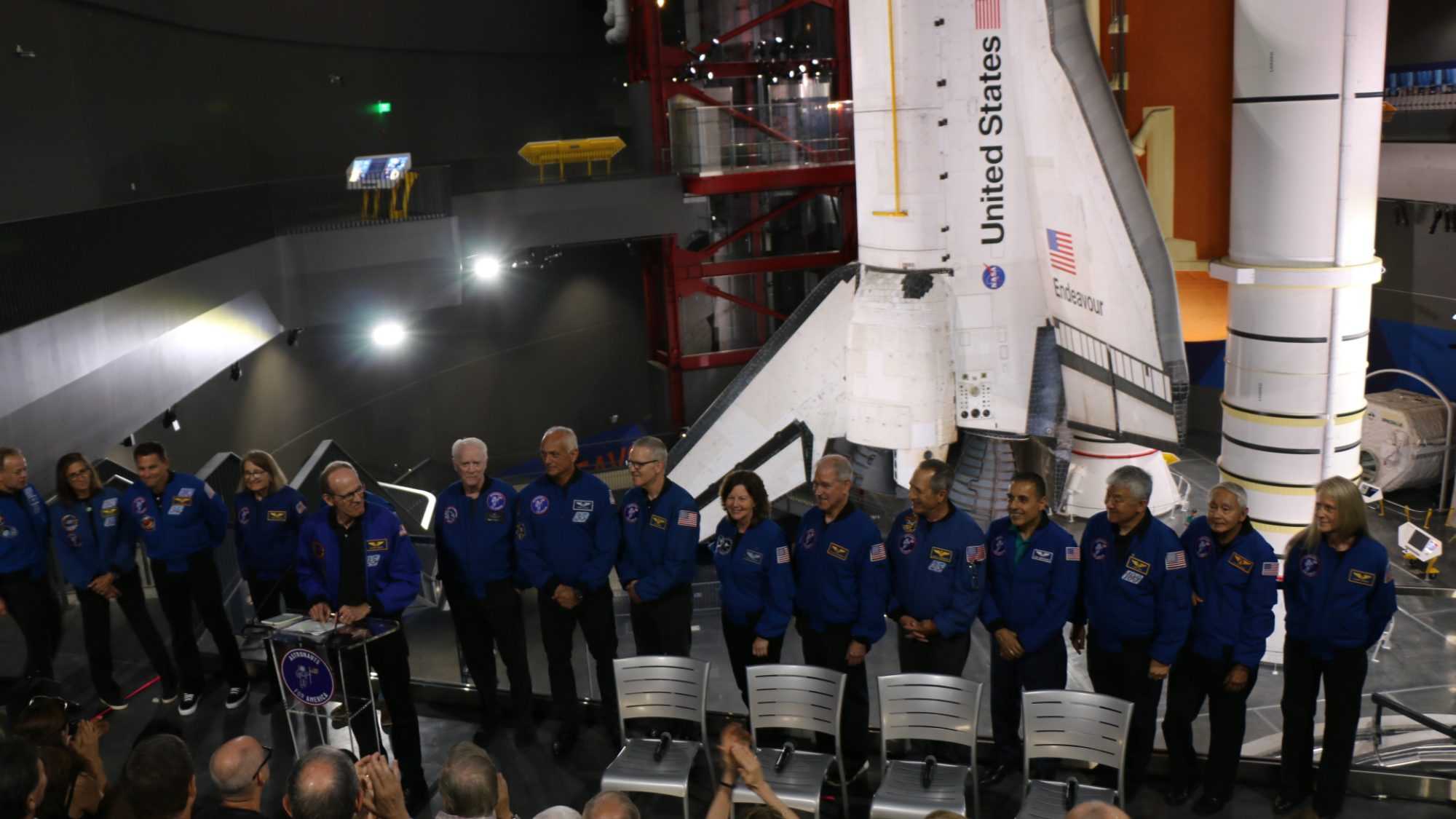
LOS ANGELES — Standing in the shadow of the space shuttle Endeavour, a group of retired NASA astronauts announced their plan to travel the country visiting colleges to try to inspire younger generations to get out and vote. This campaign comes as we lead up to the November midterm election.
This past year, a group of retired NASA astronauts teamed up for a single cause: to defend the U.S. constitution. They banded together as part of a non-profit, non-partisan activist organization called Astronauts for America. So far, they have been speaking out, using their astronaut expertise, platforms, cultural relevance and role model status to speak out in support of "science, evidence-based decision-making, public service and the rule of law," their website reads. Now, as the group announced at an event at the California Science Center's new air and space center — home to the shuttle Endeavour — they're hitting the road on a campaign tour of colleges called "Vote for Freedom."
"We have to do what we can to ensure that the country makes it through the challenges that we're dealing with here, and that is the message that we're going to be taking to colleges and universities," Apollo 9 astronaut Rusty Schweickart told Space.com. "And the agency that we have, the immediate agency, is to vote."
This tour will send astronauts from the group on a four-month jaunt across the country. Astronauts from the group's more than 100 members will visit state and community colleges, county fairs and even town halls, aiming to reach first-time voters and young people who might be new to voting.
"I'm really excited to look a bunch of younger Americans in the eye and make sure that they know that someone that they can trust said: ;Listen, you matter, because our country matters, and our country needs you,'" former NASA astronaut Cady Coleman told Space.com.
"It's with a uniquely American kind of freedom that we were able to go to the moon, and that same freedom launched the spaceship behind us 25 times into space. Now we see those freedoms under heavy threat," former NASA astronaut Steve Smith said during the event. "We're seeing chaos instead of community, violence instead of votes, lies instead of laws, and fear instead of fate. That's how democracy and freedom die."
"The mission is all that matters. Now, our country is the mission, and our message is simple: going to the polls is one small step for you, and one giant leap for our country," Smith added.
Former NASA astronaut Steve Smith speaks alongside other former astronauts in front of the space shuttle Endeavor at the California Science Center on July 20, 2026. (Image credit: Space.com/Chelsea Gohd)
This campaign leads up to the U.S. midterm elections this November. Midterm elections happen halfway through every four-year presidency. This election allows voters to decide what Congress looks like, and which political party controls Congress. This can ultimately have a major impact on what laws and decisions are passed moving forward, and whether Congress will reject or change actions by the president moving forward. And this group of astronauts is serious about the importance of getting people out to exercise their right to vote.
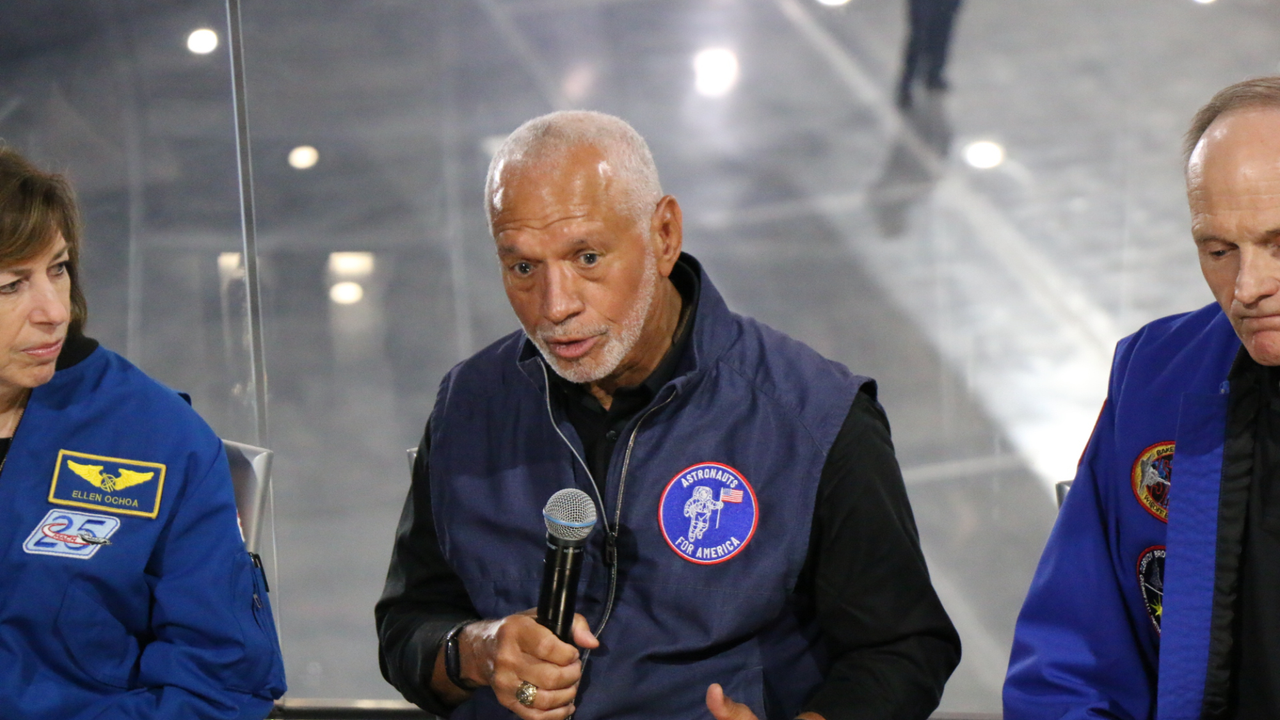
"I'm a child of the segregated South; I grew up in Columbia, South Carolina," former astronaut and NASA Administrator Charlie Bolden, who also serves as a steering committee member for Astronauts for America, said at the event. "I graduated in 1964. Anybody know what happened in 1964? The Voting Rights Act. So, as a person growing up in my hometown, it wasn't a guarantee that my mom and dad were going to be able to go out and vote. I look at what's going on today about people trying to restrict the ability of people to cast their ballot. That's not who we are. That's not America."
The group of astronauts recently spoke out about voting access after the U.S. Supreme Court ruled in favor of protecting the right to absentee voting, in response to attempts by the Trump administration to place restrictions on the current voting process. Especially leading up to the November midterms, each vote carries significant weight. And while this nonpartisan group isn't telling you who to vote for, they do think that everyone who can should vote.
"As astronauts, we signed an oath to our nation, and we are mission-oriented people. And our nation is now the mission," Coleman added. "We need to recognize that everyone's voice is important, and one of the voices that we don't hear very much is the young people. And we want them to understand that, even though sometimes change can seem daunting, their perspective is really important, and, you know, their voice is important."
On July 23, 1999, the Chandra X-Ray Observatory launched aboard the Space Shuttle Columbia; it would see first light a few weeks later, on Aug. 26. With resolution eight times greater than any previous scope, Chandra is the most powerful X-ray telescope ever built. The observatory is intended to help scientists understand the universe’s evolutionContinue reading "July 23, 1999: Chandra X-Ray Observatory launches"
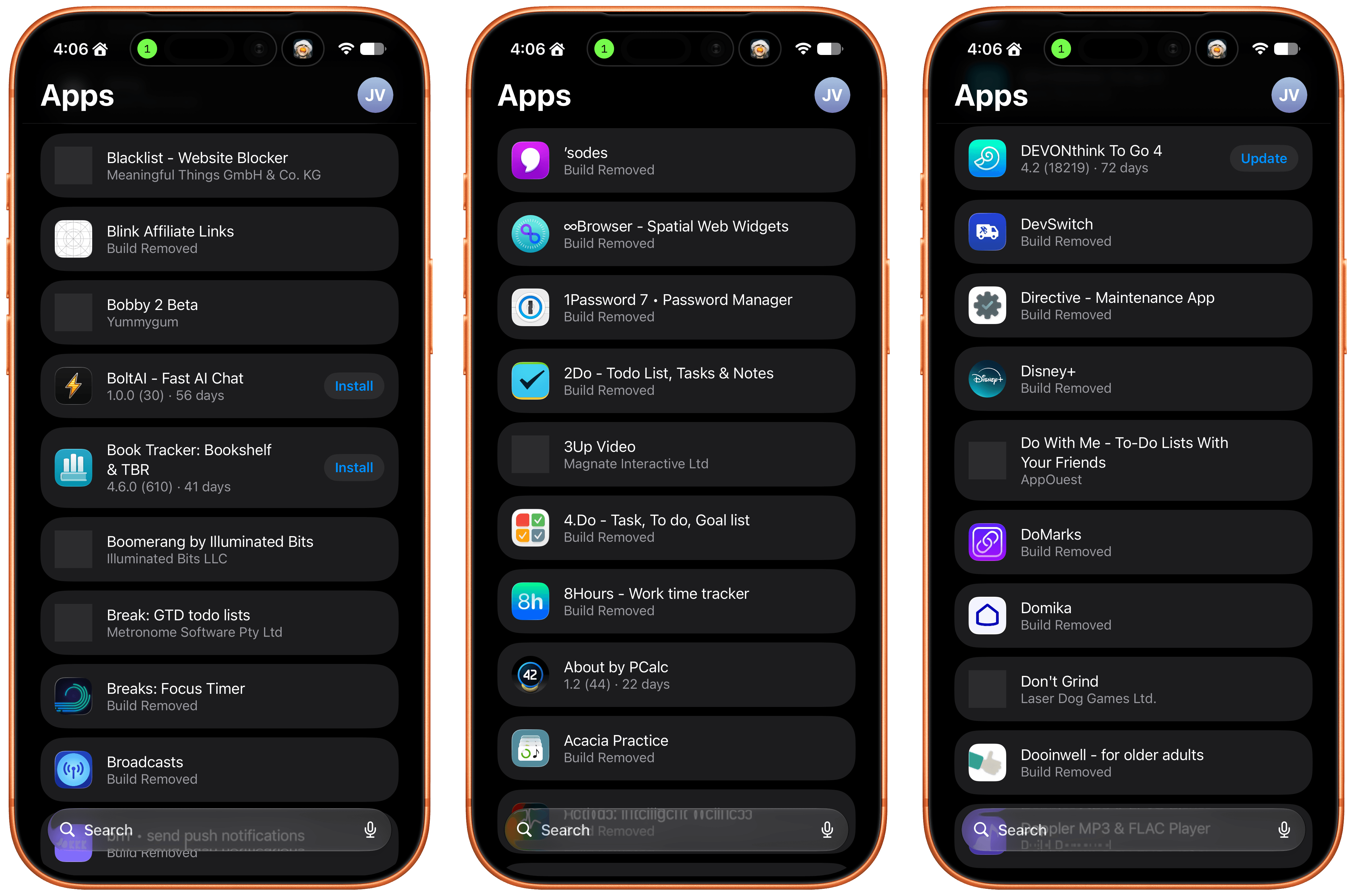
I test a lot of apps, so I have strong opinions about TestFlight. However I usually keep those opinions to myself because despite the fact that it’s critical to my work, TestFlight wasn’t built for app reviewers. Most people haven’t accumulated hundreds of active and inactive betas in the app like I have, and for them, TestFlight is probably fine. However, for me, TestFlight is a constant sourceof frustration.
So, you can imagine my excitement when I read a post by Zac Hall at 9to5Mac that a search field had been added to TestFlight. “Finally,” I thought to myself. I stopped what I was doing and updated the app immediately. After all, search was my number one request for TestFlight back in 2024.
An apostrophe gets you the top spot in Apple’s new alphabetical TestFlight list.
That 2024 wishlist was published in the wake of a bad stretch the app had beginning in 2023. At the time, TestFlight was plagued by laggy performance if you were on a lot of betas. To Apple’s credit, they fixed the performance issues, though the issues have begun to creep back into recent releases. Still, the past couple of years as a TestFlight user have been fine despite all the ways the app could be made better for users.
When the TestFlight update finished installing, I eagerly opened it on my Mac and then my iPhone. Sure enough, there was the search field at long last. Lists practically beg for a search field, and finally someone at Apple added one, and to whoever built that feature, a huge thanks from me and the MacStories team.
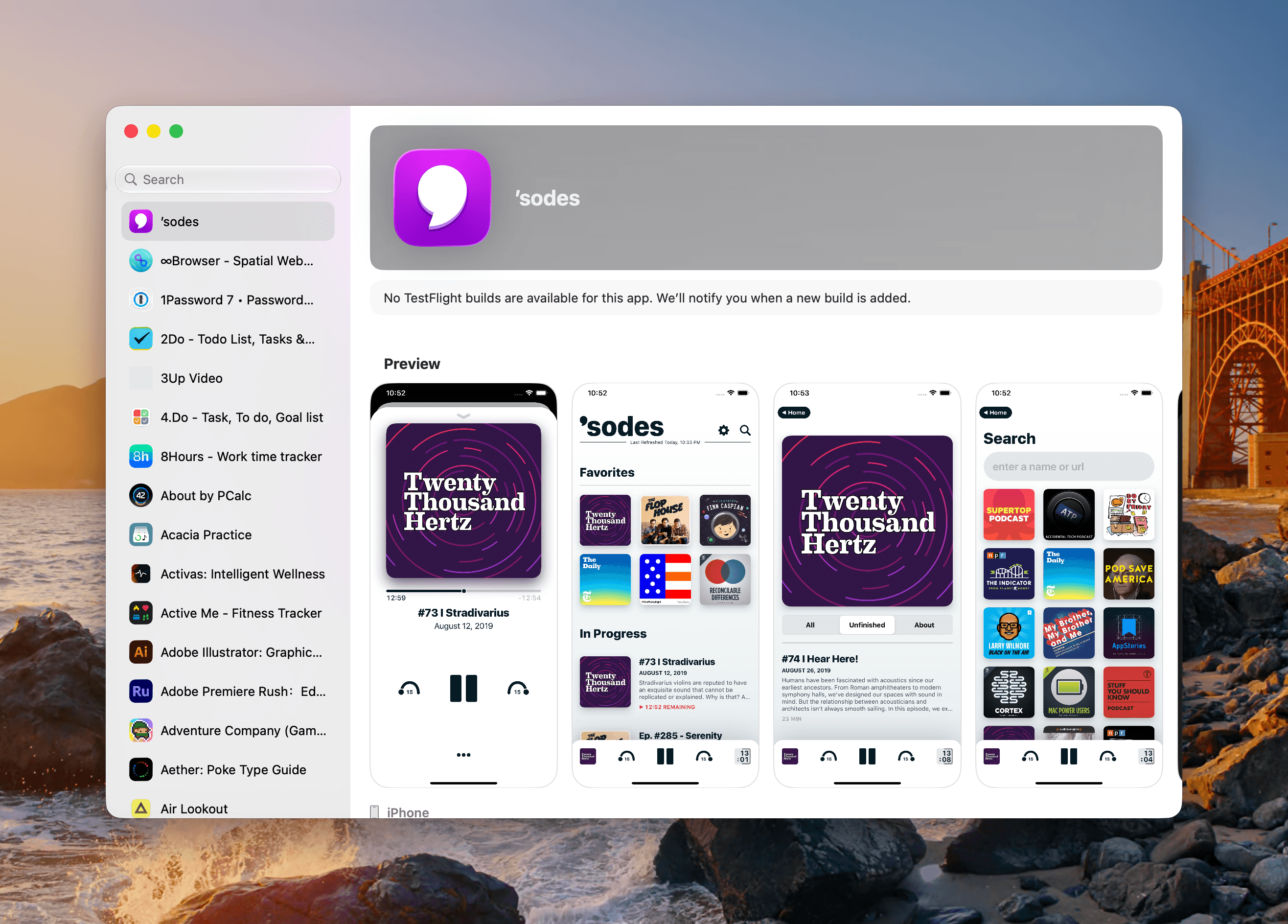
Unfortunately, this story comes with one very big “but.” Previously, TestFlight betas were listed in reverse chronological order, which I liked. The newer beta releases were at the top of the list and the older ones that were on the verge of being replaced by an App Store release were at the bottom, along with expired betas, a list that I never really understood the purpose of.
Well, those expired betas are now scattered among the active TestFlight betas in an alphabetical list and it seems that the expired beta list has been expanded to include every single beta I’ve ever been a part of. I did a rough count and for me that’s nearly 800 app listings. As you can imagine, the active betas in that list are few and far between. Search helps, but scrolling is no longer an option.
The live betas are few and far between when mixed with betas gone by.
I get that this is a very “me and a few of my friends” problem, and search does help, but it’s not enough. The active to inactive beta ratio is so bad that few iPhone screens include more than two or three active betas. So here’s my proposal:
Add a toggle in TestFlight’s settings that hides inactive betas.
That’s it, that would make all the difference in the world. I’d love to have the reverse chronological ordering back, a performance tune-up, and the other things I wished for back in 2024, but I’ll live with hiding all the noise from my beta list.
The Milky Way galaxy's stunning arc is visible on moonless nights. Many of those stars are at vast distances, some over 50,000 light-years away. In Psalm 19 King David reflected on this cosmic splendour, interpreting the night sky as a declaration of God's creation. I explore its significance to the biblical creation worldview.
Spotlight doesn’t currently appear able to search Time Machine backups reliably, at least not in Sequoia or Tahoe, although this may not be universal.
[…]
If I now step back through my backups to reach one that I know contains that file, I can restore it. But if I type anything into the search field, nothing is found. If I change the scope of the search to that backup, the window title changes but its contents remain blank, and there isn’t even a busy spinner to indicate a search is in progress.
[…]
As I can’t disable Spotlight indexing on that volume without macOS telling me that it’s required to be indexed by Spotlight, neither can I force that volume to be reindexed.
[…]
My conclusion is that using Spotlight to search Time Machine backups no longer works, and the instructions given by Apple are also broken.
That has been my experience, too. As I see it, there are four separate problems:
I want to be able to search all my backup snapshots, because I don’t know which one might contain the file I want to restore. Time Machine only lets you search one at a time.
Searching an individual snapshot doesn’t actually work.
Spotlight indexing is invasive, using lots of CPU time, and with spinning hard drives causes wear and tear and creates lots of noise. If search doesn’t work anyway, I’d like to turn it off, but macOS won’t let me.
If the problem is with the index, there’s no way to reset it without deleting your backup.
Unfortunately, all those saved versions in the version database fall outside the scope of Spotlight indexing, and Spotlight search can’t look inside any of the old versions saved in a volume’s version database. Surprisingly, the version browser doesn’t offer any search facilities either, as that’s presumably another feature intended for a future that never came.
[…]
One way around this is to save each document version as a separate file, allow Spotlight to extract their contents and add those to its indexes for that volume, then to search those files. This is quick and simple using my free utility Versatility.
Apple today announced that it has rebuilt the search infrastructure that powers key features like Spotlight, Photos, and Mail across all of its major next-generation software platforms.
Level up basic search into a retrieval-augmented system using SpotlightSearchTool and LanguageModelSession. Explore Core Spotlight integration, delegate-based hydration patterns, and how metadata quality impacts your search results. Learn how to use custom PipelineStages for tasks like sentiment analysis. Discover best practices for indexing and building flexible, context-rich search experiences in your app.
So from what I understand from the WWDC keynote, Spotlight is actually going to work?? When I search for simple files, it fails the VAST majority of the time!
Semantic search is different, in that its matches aren’t as crisp and Boolean. Rather than working like a simple index, it’s more like a thesaurus in effect.
[…]
Rather than compiling more exhaustive sets of keywords, semantic search can broaden the scope to cope better. And because we can interact through Siri, we can fine-tune our search results by specifying the cattle should be black and white, perhaps, and combining conventional search criteria such as location.
To get this to work effectively, there are some limitations. Because semantics are so contextual and variable, this involves apps and Core Spotlight. That’s a big benefit to user privacy, as Core Spotlight’s indexes are separated by user and stored locally, although in places like ~/Library/Metadata rather than volume-based Spotlight indexes in the existing hidden .Spotlight-V100 folders. And unlike global Spotlight indexing and search, it requires apps to have code to support both tasks, as it can’t just happen by magic.
While I’m sure we’ll all be impressed with many of the results of semantic search, hits that we never expected to find, it’s going to prove harder to assess those that it misses.
Personally, in my experience, I’ve noticed that the new Spotlight is much faster than the one in MacOS 26 Tahoe. It opens with less delay, and finds the right app or file instantly when Spotlight in Tahoe seems to have had a slight delay.
Already that has revealed the qualities of what would be offered as a Top Hit in its ranked search, with scores such as
mrScore: 0.2516, mrScoreText: 0.6878, kMDItemDisplayName: 1.0000, mrScoreFreshness: 0.50000000, mrScoreResultType: 0.0700, freshnessDate: (null), pommesL1=0.0000, L2=-4999.0283
While most of those are opaque, it’s notable that ‘freshness’ is included in ranking. In contrast, searches made in the Finder’s Find window are unranked, and don’t calculate any of those scores, nor take into account freshness.
That show of respect for its customers may change with iOS/macOS 27. Reports suggest that, at least in the first beta, Apple Intelligence is mandatory[…]
[…]
“So what’s the problem?”, you might ask. Apple’s AI takes up several gigabytes of storage and leaves less headroom for RAM.
Those are small inconveniences, however, compared to my biggest gripe with Siri AI: It’s completely ruined Spotlight.
[…]
The new Siri-first interface that presumes that if you’re searching for anything but an app or file, you must want Siri to feed you a few links of Apple Intelligence’s choosing.
Getting to a web search from a Spotlight query now requires multiple taps: Type your query, tap “Show Results” (careful: hitting enter will trigger Siri to craft a response, eliminating the possibility of seeing any actual Spotlight content), tap on “Show More” next to the list of Siri-surfaced web results, scroll down until you see Search Google (or whatever engine you have set as your default), then tap that.
Apple Intelligence used to be opt-in, but now it seems that you can’t even opt out. I had previously mentioned the removal of the switch in the context of hypocrisy, but it seems there are enough issues here for it to warrant its own post. Also, I had previously written that the switch was combined with Siri, meaning that you could turn off Apple Intelligence if you turned off Siri, too. I now doubt that’s the case.
Researchers identified the Chicxulub impactor as an exceptionally rare type of asteroid that wouldn't have triggered a mass extinction in the way scientists previously thought.
A white spot on iPad screen can appear as a bright patch that remains visible while browsing, watching videos or using apps. It may be small and easy to ignore at first, then become distracting whenever the screen shows a white, gray or lightly colored background.
The spot may come from a temporary software problem, but a fixed bright area is more commonly connected to the display hardware. Pressure inside the iPad, a damaged backlight layer, display separation or an impact can create uneven illumination that no setting can remove.
Before arranging a repair, a few simple checks can reveal whether the spot belongs to the image being displayed or to the physical screen itself.
What Causes a White Spot on iPad Screen?
A white spot on iPad screen is often described as a bright spot, pressure mark or backlight patch. On iPads with LCD displays, light passes through several internal layers before reaching the glass. When one of those layers becomes damaged, separated or compressed, light can concentrate in one area.
The mark may be more visible against pale backgrounds and almost disappear when the screen displays black or dark content. This is different from a dead pixel, which usually appears as a tiny fixed dot rather than a larger cloudy patch.
Pressure is one possible cause. Carrying an iPad in an overloaded bag, placing heavy objects on it or using a tight case can place stress on the display. A drop may also disturb the internal screen layers without cracking the front glass.
Battery swelling can create similar pressure from inside the device. If the screen is lifting from the frame, the iPad feels unusually warm or the body appears bent, stop using it and seek service. A swollen battery should not be pressed back into place or handled as an ordinary screen defect.
The problem can also appear after a display replacement involving a poorly fitted or lower-quality part. Apple notes that nongenuine displays may produce inconsistent brightness, color or touch behavior.
Image Credit:
Check Whether the Spot Is Really on the Display
Begin by opening several different apps. Look at the spot over a white webpage, a gray Settings screen, a dark photo and a full-screen video. A hardware-related mark normally stays in the same physical location regardless of what appears underneath it.
Rotate the iPad. If the content changes orientation but the bright patch remains in the same part of the glass, the display is the likely cause.
Taking a screenshot provides another useful test. A physical screen defect will not normally become part of the screenshot file.
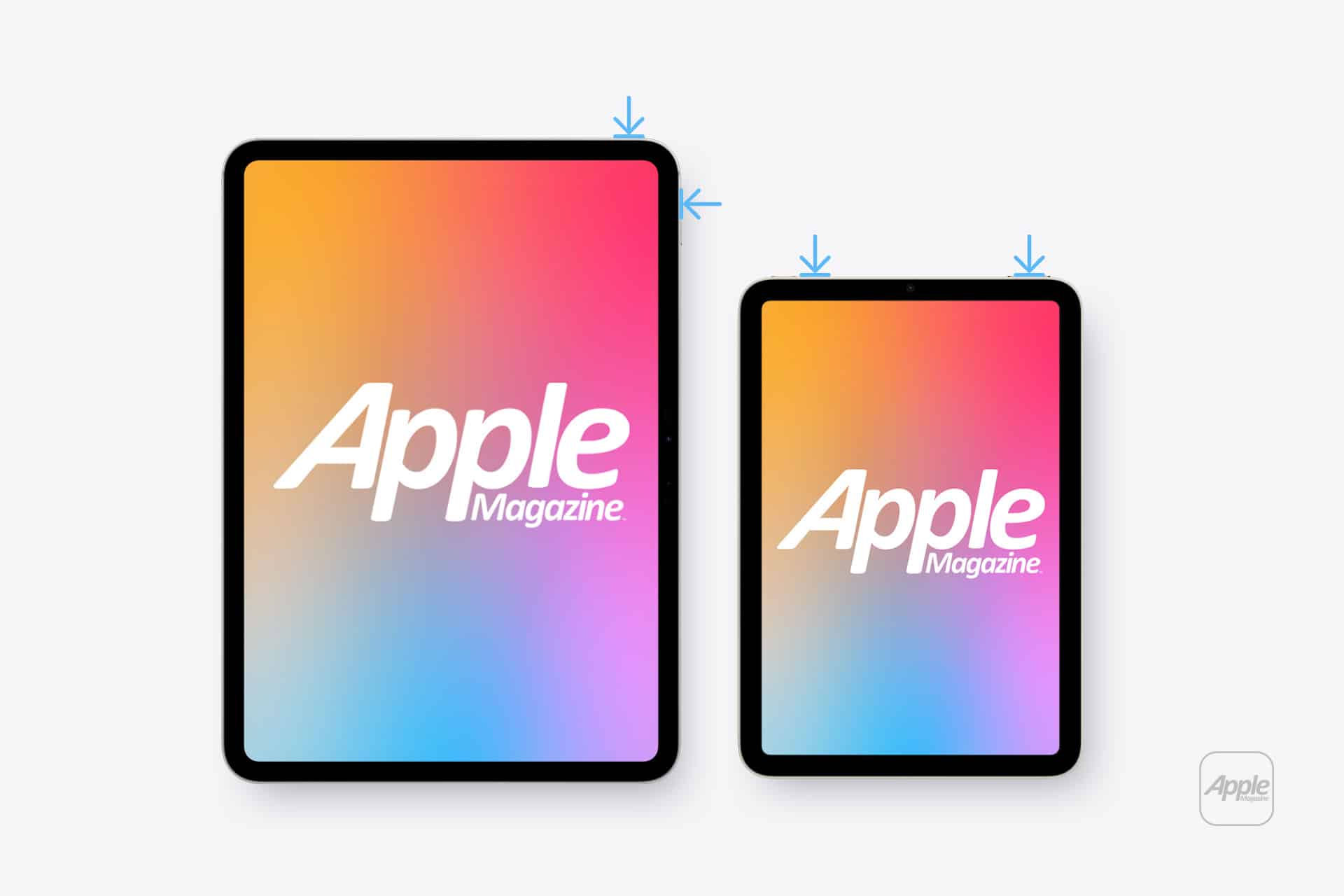
To take a screenshot on an iPad without a Home button:
Top button + either volume button
To take a screenshot on an iPad with a Home button:
Top button + Home button
Open the screenshot on another device or send it to a trusted computer. If the white spot does not appear there, the image generated by iPadOS is normal and the problem is probably inside the display assembly.
If the mark appears in the screenshot, it may belong to an app, image, accessibility setting or software effect rather than the panel.
Restart Before Assuming Hardware Failure
A restart is worth trying because it clears temporary display and system behavior without affecting personal files. It is unlikely to repair physical backlight damage, but it can eliminate a short-lived graphical problem.
To restart an iPad without a Home button:
Press and hold the top button and either volume button > Drag the power slider > Wait approximately 30 seconds > Hold the top button until the Apple logo appears
To restart an iPad with a Home button:
Press and hold the top button > Drag the power slider > Wait approximately 30 seconds > Hold the top button until the Apple logo appears
After restarting, return to the same pale background and check the area again. A spot that remains fixed is unlikely to be caused by a temporary iPadOS issue.
Image Credit: AppleMagazine
Brightness Can Make the Problem More Visible
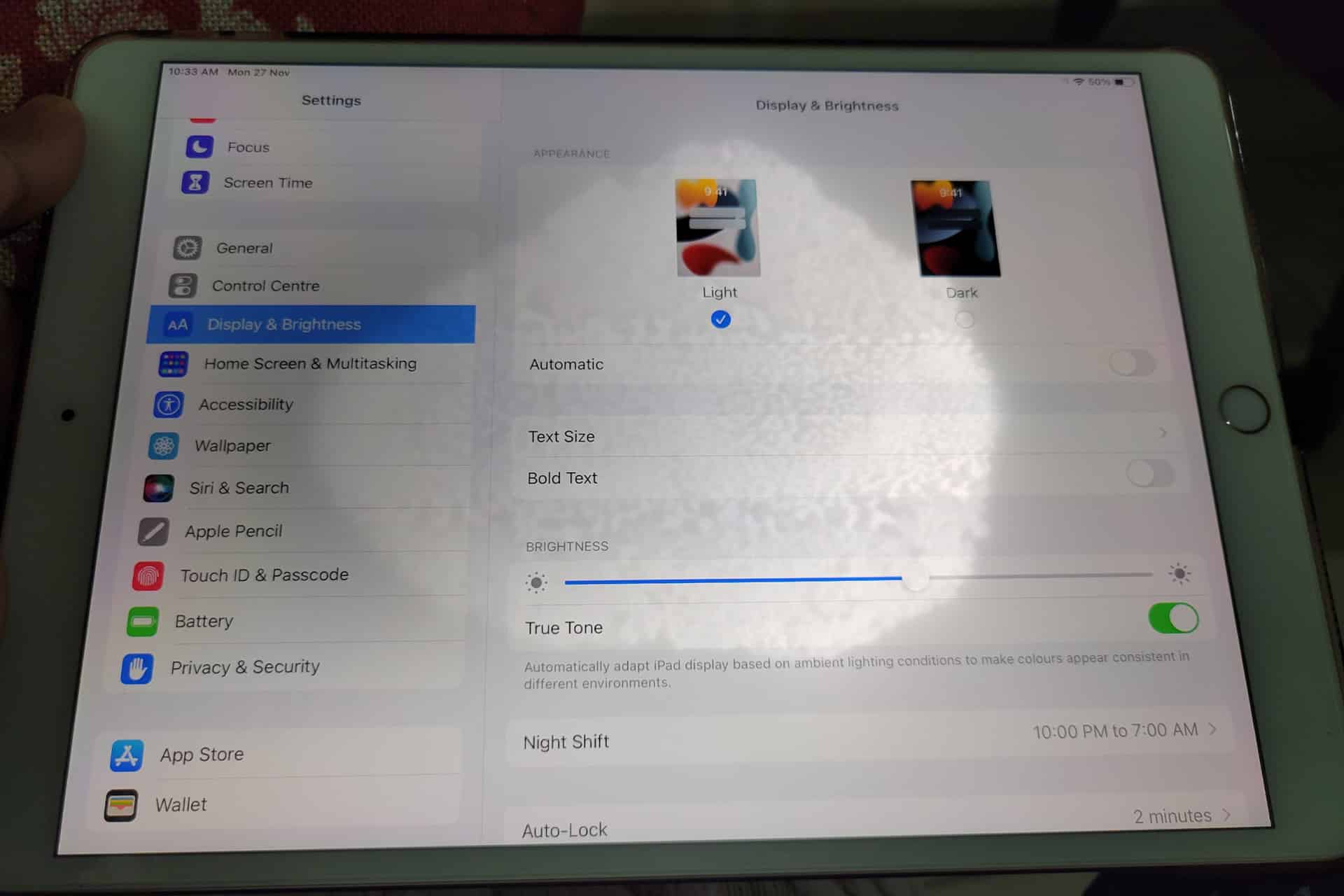
Lowering brightness may make a bright patch less distracting, but it does not repair the underlying display. The same applies to Dark Mode, Night Shift and Reduce White Point. These settings can change how noticeable the mark becomes without removing it.
To adjust screen brightness:
Settings > Display & Brightness > Brightness
Test the iPad at several brightness levels. A backlight-related spot may become easier to see as brightness increases. Photographing the screen against a plain background at medium and high brightness can also help document the defect before requesting service.
Avoid pressing or rubbing the affected area. Pressure may temporarily change the appearance, but it can damage the display further. Internet advice suggesting that users massage bright spots out of a panel should be ignored.
Check the Case and Screen Protector
Remove any rigid case that appears unusually tight or has been damaged. A poorly fitted case can place uneven pressure around the frame, particularly if the iPad has been dropped while inside it.
A screen protector normally cannot create a true illuminated patch beneath the display. It can, however, produce bubbles, trapped moisture or reflective marks that resemble a screen defect. Examine the iPad with the display turned off. If the mark is visible on the surface even when the screen is black, the protector or glass may be involved.
Do not remove a properly installed protector solely as an experiment unless the mark clearly appears close to its surface. A bright patch visible only while the display is illuminated usually comes from deeper inside the screen.
When the iPad Needs Repair
A persistent white spot generally requires display service when it remains after restarting and does not appear in screenshots. There is no iPadOS setting that can realign a damaged diffuser, remove internal pressure or repair separated display layers.
Back up the iPad before service so photos, documents and app data remain protected.
To create an iCloud backup:
Settings > your name > iCloud > iCloud Backup > Back Up Now
Apple can inspect the device and determine whether the defect qualifies for warranty coverage, AppleCare service or paid repair. Coverage depends on the device, purchase date, condition and whether the problem resulted from accidental damage.
To check coverage:
Settings > General > AppleCare & Warranty
Apple or an Apple Authorized Service Provider may replace the display assembly or the iPad, depending on the model and available service process. The final repair estimate normally requires inspection.
Image Credit: AppleMagazine
Do Not Ignore Physical Changes
A stable white spot that has not changed for months may remain only a visual annoyance. A spot that is expanding, accompanied by screen lifting or followed by unusual heat needs faster attention.
Stop using the device if the display separates from the enclosure, the iPad becomes visibly swollen or pressure marks spread across the panel. Do not puncture the device, force the display closed or continue charging it unattended.
For an ordinary fixed bright patch, the practical path is simpler: confirm it does not appear in screenshots, restart the iPad, remove any case applying pressure and arrange display service if the mark remains.
A white spot on iPad screen rarely affects the information stored on the device, but it can indicate physical damage that software cannot correct. A brief check can rule out the easy causes. After that, repair is usually more effective than repeatedly changing display settings and hoping the light disappears.
I have a Mac Studio M2 Max with 32 GB of RAM and a 1 TB SSD in front of me. While not the most powerful personal computer you can purchase today, it is among the most computationally capable ever made—a vastly capable machine. So why do I have to wait for typing to catch up with me and see a rainbow spinner on the regular?
I’ll tell you why: iCloud Drive and Spotlight. Apple lacks any transparency about how iCloud Drive works or fails. The same is true of Spotlight. These big black boxes churn away, performing a million billion operations a day, and we don’t know exactly what they do. That’s not me being conspiratorial: I honestly don’t care what’s happening under the hood—until it breaks. Without diagnostic tools, even someone like me, ostensibly an expert, can be completely at a loss and waste many hours.
I wrote “Cloudy with a Chance of Insanity: Unsticking iCloud Drive” for TidBITS back in October 2023 about a multi-month odyssey with Apple technical support in trying to dislodge unsyncable files.1 That problem has barely surfaced since—an 80K file will sometimes get stuck for a while—and I thought Apple might have really solved syncing, at least as exhibited on my Mac. I receive dramatically fewer emails about iCloud Drive than I used to, which is another data point.
But Mr. Edge Case here can always find a way to break something.2 I’ve been working on a large manuscript for my upcoming book, Flong Time, No See, a revised and expanded collection of researched articles I’ve written about printing and type history over the last several years.3 I pasted in text that was typically copied from Web pages, and wound up with over 250 footnotes.
While putting together the files for this book, Apple released its Creator Studio system, and shipped Pages 15. After having no problems, I dutifully switched over. This was months ago, and as I continued to work on this reasonably large file—weighing it at about 60,000 words now—everything seemed fine.
A few weeks ago, however, I started to experience system slowdowns. Pages was taking up 12 GB of system memory! System load went through the roof! CPU consumption was outlandish! All signs pointed to corespotlightd, a long-time enemy of performance. That daemon handles background indexing for Spotlight, and the slightest thing wrong in a file or directory, or perhaps due to mild corruption in its underlying files, turns it into a rampaging beast that eats processor cycles like I consume potato chips.4
There’s a well-known procedure for killing this beast, though another is spawned from its remains: stop the index, delete the index files, restart, and re-enable indexing. From the Terminal, use these commands. Make a backup before proceeding. Take extreme care with rm -rf, as a misstep in entering or copying can wipe out files!
 sudo mdutil -a -i off
 rm -rf ~/Library/Metadata/CoreSpotlight
You can use Restart from the Apple Menu while holding down the Option key (to avoid being asked), or you can take a shortcut from Terminal, assuming you have ensured all files are saved:
sudo reboot
After your Mac restarts, go back to the Terminal and re-enable indexing:
sudo mdutil -a -i on
For many (perhaps most) people, this solves the problem. For me, it just delayed it. With some isolation using System Settings: Spotlight: Search Privacy, I added specific folders, such as mail archives, since that seemed like it might be part of the problem.
Search Privacy lets you exclude volumes and directories from Spotlight indexing, which can remove unwanted results and sometimes (only sometimes!) reduce thrashing.
One piece of advice I found suggested that if I thought Pages was the problem, I should exclude the iCloud Drive path containing Pages files. Fine! I clicked the plus icon in Search Privacy, pressed Command-Shift-G to bring up the path dialog, entered ~/Library/Mobile Documents/com~apple~Pages/, and clicked Choose. This seemed to work for a while, then nothing availed.
Finally, after analyzing logs and caches, the culprit was clear. It was not that large a Pages file: every time I saved, Spotlight’s worker bee was performing excessive re-indexing that consumed gigabytes and one or more processor cores. Moving the file to a local directory (in my Documents folder) while editing eliminated the problem. It also freed up space, as the temporary Spotlight indexes and Time Machine snapshots had become absurdly large.
289 footnotes seem to be fine for Pages, but Spotlight and iCloud Drive find them hard to swallow.
What could Apple have done to help here? This is where I would hope machine learning, coupled with some interactive code- and system-expertise bots, could help:
Note that a system component is acting well outside known parameters.
Identify CPU usage that is tied to Apple-owned processes.
Provide a troubleshooting tool, even suggesting it in notifications.
Create human-readable logs that don’t require system administrator knowledge to interpret.
In the case I describe above, an Apple-created daemon was rampaging out of control due to a single identifiable file!—cascading into other problems. It should be solvable by Apple. The fact that we have more power under the hood by orders of magnitude in the past, coupled with neural cores in the CPU packages, just makes this even more embarrassing. Solve Siri, Apple, yes, but real transparency and troubleshooting in macOS would also make a big difference.
[Got a question for the column? You can email glenn@sixcolors.com or use/glennin our subscriber-only Discord community.]
I should have made an unsinkable/unsyncable pun in the title, but there is an esprit d’escalier moment for everything. ↩
An “edge case” is something that is often considered unlikely to occur with a product, whether software, hardware, or mechanical. Yet, no matter how much I’m just trying to get something done, I apparently trigger edge cases all the time. Software companies “love” me for this. ↩
Flong is a kind of paper-like mold that was extremely useful during the days of metal-based relief printing. Of course, you can pre-order a copy to get the full scoop! ↩
The 33 engines of the rocket’s booster stage had begun to ignite during Thursday’s launch attempt, but were then shut down. SpaceX will try again on another day.

 Login
Login