❌

Normal view

Windows 98 SE users get a Thunderbolt 4 driver, thanks to AI assistance

20 October 2026 at 12:30

Windows 98 SE devotees can now enjoy (experimental) support for USB4 and Thunderbolt 3/4. Developer and maker Yeo Kheng Meng, who also enjoys retrocomputing, recently released the vibe-coded xHCI98 v3.0.0.0, enabling the practical use of generic USB 3.x, USB4, and Thunderbolt 3/4 host controllers on systems running Windows 98 SE, ME, 2000, XP, Vista, and 7. An extensive blog post by the dev provides further reading about the driver, compatibility, its creation, and usage.

Demo video “shows many different USB devices being hotplugged to a modern 2020 ThinkPad P14s Gen 1 with only xHCI controller.”

Some of you will be wondering why a project to bring USB4 (Thunderbolt 3 and 4) to PCs running Windows 98 SE exists. Retro computing fan Meng explains on his GitHub that this project should appeal directly to users of PCs from the mid-2010s that have xHCI-only (USB 3.x) chipsets and no legacy EHCI controller. However, older OSes don’t have xHCI drivers, and that’s where xHCI98 steps in. “Without xHCI support, even keyboards, mice, and flash drives need the BIOS's legacy support, cannot be hotplugged, and devices such as Ethernet and audio do not work at all,” explains Meng, revealing his motivation. “This project fills that gap.”

Impressively, xHCI98 drives a lot more than USB storage. It replaces Windows’ own USB port and hub drivers to facilitate the connection and use of USB 1.1 and 2.0 and SuperSpeed (USB 3.x) devices and hubs, UAS (USB Attached SCSI) storage through a second driver (xhciuas.sys), and Thunderbolt 3 and USB4 docks and NVMe enclosures through a third driver (xhcicm.sys).

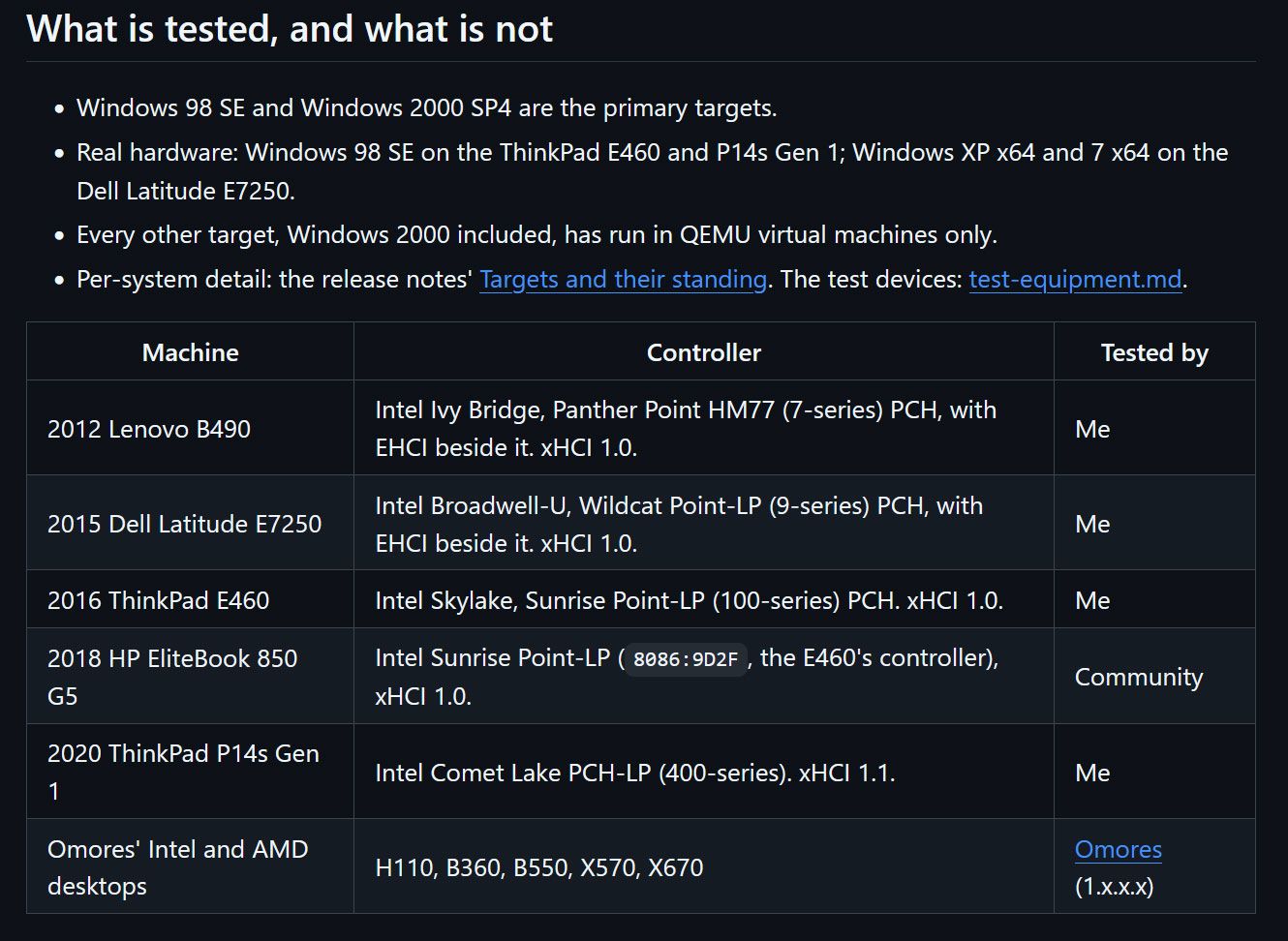
Meng has developed and tested xHCI98 mostly on Intel hardware, as that is what he owns. Candidly, he admits “this is a solo human's project with AI assistance, so bugs are not unexpected,” even if you do have the same hardware as the dev - a 2020 ThinkPad P14s Gen 1 (Comet Lake xHCI, no EHCI). It stands up pretty well during the plug/unplug video demo above, though the test rig used is not quite the USB cart of death.

Windows 98 users get Thunderbolt 4 driver

(Image credit: Yeo Kheng Meng)

As a solo developer, Meng isn't shy to admit he leaned heavily on AI assistance to prepare the xHCI98 release. His vibe coding adventure was supported by Claude Fable 5.1 for planning, Claude Opus 5.5 for coding, and Codex GPT 6 Astra as an adversarial reviewer.

In addition to a few bug warnings, there are some other things to know about using this driver with the various older versions of Windows it supports, standby and hibernation, and more. The dev helpfully sketches out a process for checking your hardware, outlines various install methods, discusses updating, and talks about tuning the driver for those who will be jumping in at the deep end with this project.

Electronics hobbyist converts $120 DDR5 SODIMM kit into ‘$1000’ desktop kit to fight RAM crisis

20 October 2026 at 12:10

What if you could buy a cheap used DDR5 SODIMM (laptop memory) kit and transform it into a super-fast DDR5 desktop kit? That’s what electronics hobbyist Blighted Agent recently did when they succeeded in converting a SK hynix 2x 16GB DDR5-5600 SODIMM kit they got from Facebook Marketplace for $120 into a 2x 16GB DDR5-7800 desktop kit, claimed to be worth around $1,000. They also had to buy some blank DDR5 desktop memory PCBs from AliExpress for around $16 each, and a set of heatsinks for around $18.

In the above video, our hero says they bought the donor laptop 2x 16GB DDR5-5600 sticks for just $120, which is a bargain. With extra bits and pieces from AliExpress (desktop DDR5 PCBs, etc.), the total bill of materials came to $175. Blighted Agent comments that the SODIMMs used what he believed to be SK hynix A-die modules, which are the same as the ICs used in expensive desktop DDR5 modules like the G.Skill Trident Royal line.

The process began with taking the memory ICs from the donor modules using a hot air station. Then they were cleaned and had 0.45mm leaded solder balls added, using a DDR5 stencil, reballing jig, and hot air. Next, the blank desktop DDR5 PCBs were prepared. A little solder was added to the plethora of BGA connectors to be ready for the memory chips to connect to.

The old DDR5 ICs and the new desktop modules could now be mated, using flux, the preheater, hot air, and watching and prodding carefully with a dental pick. Blighted Agent’s experience lets him know when the BGA chips have successfully mated with the PCB. You can eyeball when they pop precisely into place due to surface tension, and offer up a modicum of resistance to pick prodding.

Finally, the enthusiast added the SPD chip and BIOS chip from the SODIMMs to the new desktop DIMMs. These new desktop DIMMs were quickly tested in a PC before they were finished off with carefully applied thermal pads and the fancy-looking heatsinks.

Blighted Agent felt lucky that there were no issues with the newly created desktop modules. There’s a lot of intricate things that can go wrong during such a process. The initial boot verification showed them recognized in his Asus ROG Maximus Z790 Apex Encore motherboard as two “SK hynix 16,384MB 5600MHz” modules, which was correct. Some tuning resulted in rock-steady performance at DDR5-7800 CL38 and 1.40V. This was verified by stress testing for 90 minutes, which the enthusiast reckons was ample for a gaming PC. It is very likely a better result than using those mechanical SODIMM-to-DIMM converters you can buy, which can be problematic.

Blighted Agent seems to specialize in BGA soldering work, and has also successfully upgraded several graphics cards with double the VRAM. Though videos like this are edited to be brief, and they make the process look easy, the TechTuber admits there is a lot that can go wrong during this kind of rework. Moreover, with RAM modules, they lack the testing equipment to locate an issue with any particular IC on the PCB. So, if this module didn’t work, they might have ended up in a world of pain, not knowing which memory chip had an issue due to either an internal fault or a BGA soldering glitch.

Electronics hobbyist converts a $120 DDR5 SODIMM kit into a $1000 desktop kit
Blighted Agent on YouTube
Electronics hobbyist converts a $120 DDR5 SODIMM kit into a $1000 desktop kit
Blighted Agent on YouTube
Electronics hobbyist converts a $120 DDR5 SODIMM kit into a $1000 desktop kit
Blighted Agent on YouTube

Looking around at used DDR5 SODIMMs, it looks like Blighted Agent was very lucky to get a used working 32GB kit for $120. I just checked eBay U.S., and the best deal there was $320. Meanwhile, the best price for a new 32GB DDR5-6000 kit seems to be $449 at the time of writing.

We reported on Russian enthusiast VIK-on succeeding in a similar project earlier this year, but all their costing was in Rubles, and they went the extra mile in flashing custom firmware so the remade modules would be auto-detected with 6400 MT/s XMP support on most motherboards. In late 2026, DDR5 RAM continues to be too expensive.

Ukraine rescues wounded soldier using drone in daring 'world's first' UAV evacuation of a human

20 October 2026 at 11:00

The Ukrainian military is claiming a world’s first after using an unmanned drone to rescue an injured soldier on the eastern Kharkiv front. Ukraine’s United24 news shared a video of the historic first. It also explained that the wounded infantryman was stuck in a heavily mined area, guarded by Russian kamikaze drones.

🔴 HISTORIC FIRST: Ukrainian forces completed the first-ever aerial evacuation of an injured soldier from the frontline using a drone.Soldiers from the 92nd Assault Brigade and 30th Mechanized Brigade used a heavy Gurzuf Defence hexacopter to rescue the wounded infantryman from a heavily mined area.October 19, 2026

The above video starts with the Ukrainian drone locating the soldier, callsign ‘Kostya,’ in enemy territory. Various media reports suggest he was 11 miles (18km) behind enemy lines, at the mercy of Russian kamikaze drones, and perilously located in a minefield. Traditional land-based rescue was therefore not possible, but Kostya bravely agreed to be part of the first-ever human drone-lift rescue plan.

After being located, the injured infantryman clipped himself into a harness. He said, “That’s it, we can take off,” when he was fully buckled into the rudimentary-looking harness. UAV operator, callsign ‘Black’ from the 20th Mechanized Battalion, 30th Infantry Brigade, then appeared in the video and explained: “We were constantly in touch with him."

Ukrainian drone rescue key facts:

  • Drone used: Gurzuf Defense hexacopter
  • Drone capable of carrying 130kg (~287 pounds)
  • Drone’s known range: it has previously transported 90kg (~198 pounds) loads up to 25km (16 miles)
  • Infantryman weight: 80kg (~176 pounds)
  • Rescue distance: 8km (11 miles)
  • Hazards: enemy kamikaze drones, mines, gravity, many more

Wounded soldier rescued using hexacopter drone

(Image credit: United24 news video)

Being in constant touch with the operations HQ would have been reassuring. However, the surrounding presence of a fleet of Ukrainian support drones, both kamikaze devices and UAVs with anti-drone nets, was probably most comforting.

Eventually dropping back into safe(r) territory, after what must have been an arduous, nerve-wracking journey, control said, “Congratulations, you’re on the ground,” to Kostya, as he touched down in a field. Then the control room erupted into applause. They got their man back safely, and he is now being treated and is in recovery.

UAV operator ‘Black’ was delighted with the concerted efforts that brought back this wounded soldier. “A lot of people were involved, and everything worked out for us,” he said. Importantly, this may be the start of a whole new system of personnel evacuations for wounded and/or stranded soldiers using drone technology, indicated brigade leader ‘Napalm’ toward the end of the video.

French rioters ransack eSports team premises and are seen looting RAM sticks from PCs

19 October 2026 at 14:32

Leading French eSports club Team Vitality has confirmed that its Paris HQ has been smashed up, with trophies, computer equipment, and more looted over the weekend. Thankfully, no team members or staff have been hurt. The team’s V.Hive premises were attacked by criminal opportunistic looters under cover of the widespread protests in France over issues related to school funding, living costs, and government spending cuts. Other shops, public buildings, and property have been smashed, looted, and sometimes burned.

Aujourd'hui, les locaux de notre club ont été pillés en marge de la mobilisation du 17 octobre.Heureusement, aucun membre de notre staff ni aucun fan n’a été blessé. En revanche, nos vitrines ont été détruites, nos trophées et notre matériel informatique volés.En attendant d’évaluer la totalité des dégâts, V.Hive restera fermé.Plus d’informations seront communiquées par la suite.Prenez soin de vousOctober 17, 2026

Above, you can see the confirmation of the serious, unfortunate events seen over the weekend. “Our display windows were destroyed, and our trophies and computer equipment were stolen,” lamented the post [machine translation], while being thankful that no members, staff, or fans of Team Vitality were hurt. The bulletin ends with the news that the V.Hive will remain closed for now, until after damage has been assessed. More information is promised in due course.

There are a multitude of social media posts sharing images, videos, and pointing fingers at what they see as the cause of the protests, riots, and looting. Of course, fingers point in all directions, and unfortunately there are also reports of AI-generated rage-farming media, so keep a critical eye open should you dare to doom scroll.

Of course we’ve focused on the damage and looting of Team Vitality’s HQ due to the tech angle. The compendium of video clips shared by the news organization NEXTA provides evidence of the extent of the V.Hive attack. This 30-second clip appears to show rioters hammering at and kicking in the eSports HQ’s windows, taking items from the premises, and throwing gaming chairs onto bonfires in the street.

Los "estudiantes" franceses saquearon la arena de Esports de paris y se robaron el trofeo que team vitality gano en el torneo de counter strike Tambien se robaron las PC gamer y las destriparon ahi nomas en plena calle https://t.co/FjEkVPDuV6October 17, 2026

We also see accounts like ElBuni share clips of looters brandishing what appear to be eSports trophies from Team Vitality’s HQ (embedded above). The second clip shows looters with their hands inside gaming PCs opened up on the sidewalk. It looks like the hooded and gloved looter in the video is removing RAM sticks, an easily pocketable yet highly valuable PC component, as you will all know.

This morning, the French Prime Minister has called for local and partial curfews to contain the post-demonstration rioting. Meanwhile, there are concerns that there could be copycat behavior across Europe.

Claude Code AI agent caught a crypto miner hiding on a developer’s overheating Mac

19 October 2026 at 12:36

A developer using Claude Code to help build a temperature monitor app got a friendly warning from the coding agent. “Your Mac is running a crypto miner that I didn’t put there,” flagged the helpful agent. “I saw xmrig using about 1175% CPU, roughly 12 cores,” it informed its human master. Perhaps developer and Redditor UntilHEX should have sensed the crypto miner’s presence without AI help, as they admitted the malware’s presence “explains why my Mac has been running like s**t.”

Claude caught a cryptominer on my Mac whilst building me a temperature monitor app
 from r/claude

Ironically, the cryptomining malware’s nefarious CPU cycle hogging activity is what may have led to its discovery and demise. Pondering over a screenshot of the Claude Code window, we see that this malware was probably added to the Mac’s startup roster on August 29. It looks like UntilHEX was inspired to develop a Mac temperature monitor app after this infection to track and diagnose why the computer was running so hot.

Claude stepped in after the Redditor was concerned about a dump of the Mac’s raw temperature sensor readings. “They seemed far too high,” commented UntilHEX in the social media post. Indeed, the well-known coding agent pointed out that the CPU was peaking at a very toasty 112 degrees Celsius. It explained this was due to a sustained heavy load, specifically “xmrig using about 1175% CPU, roughly 12 cores.” We don’t know how many cores the Mac being used had, but maybe 12 were all of them.

Claude Code went on to describe how the crypto miner software had hidden itself on the Apple computer and ran at startup. It cautiously decided not to kill or remove anything from the Mac, but offered to clean up the CPU-hogging crypto miner, which was sucking all the power from the Apple Silicon computer. “Can I clean it up now?” Claude inquired. “I’d stop the startup item and the miner, and move the files into a quarantine folder.”

Later in the comments, UntilHEX informed the social media throng that Claude was indeed tasked with cleaning up the unwanted crypto miner software. “I only had to delete 1 file manually because Claude had an access issue, but it was very effective,” the Redditor said. After that, a Malwarebytes scan was run to check to see if the AI coding agent-driven clean had really been successful.

Anycubic's award-winning 3D printer hits all-time low pricing

18 October 2026 at 16:24

Anycubic's Kobra X Multicolor 3D Printer is at the lowest price it's ever been since reaching retail availability. Prime members who head over to the Anycubic store on Amazon can now snag this well-reviewed device for just $299.99 for a limited time. The 17% or $60 off its MSRP makes the Kobra X a bargain, as it was highly praised as a contender in the entry-level four-color printer category by our reviewer earlier this year. It even won a coveted Tom's Hardware Editor's Choice award.

Though it may appear to be a Bambu Lab A1 clone at first glance, we praised the Kobra X for its multimaterial system, the ACE Gen 2, which is built directly into the toolhead. This is a great timesaver for prints with lots of color changes, and we calculated that on a four-color print with 776 color swaps, the Kobra X was a shocking 10 hours faster than the rival A1, despite similar printing speeds.

Kobra X Multicolor 3D Printer: was $359 now $299
All-time low price

The Kobra X delivers fast, affordable multicolor printing without a complicated external AMS or premium price tag. It features a 260 x 260 x 260mm (10.23 x 10.23 x 10.23-inch) build volume, automatic + Z bed leveling, and a color touch screen.View Deal

The Anycubic Kobra X Multicolor 3D printer was launched earlier this year, with consumer shipments starting in late March / early April. We reviewed it in February and gave it a great score for its innovative ACE Gen 2 system, fast filament swaps, and reliable 49-point full-auto leveling and vibration compensation. It also "worked flawlessly" throughout the testing period. The only stain on its glowing report card was due to the spool holder guide making loading awkward.

This 600mm/s 3D printer expands up to 19 colors if combined with four ACE 2 Pro units. It also packs a 720P camera with real-time monitoring and instant error alerts, plus AI-driven anti-foreign object and spaghetti detection, and reasonably quiet operation at ≤48 dB.

Now at its lowest price to the public since launch, at just $299.99, this Bambu Lab A1 rival is a compelling choice for 260 x 260 x 260mm (10.23 x 10.23 x 10.23-inch) build volume projects in PLA/PETG/TPU/PVA/PLA-CF/PETG-CF/ASA materials.

❌