Since you’re probably not planning ot upgrade your MacBook Pro anytime soon, a Thunderbolt 5 dock is a great way to get some extra functionality and expansion out of your existing laptop. Like this one: The HyperDrive Next Thunderbolt 4 Dock with an SSD enclosure is now on sale for $300, 25 percent down from its usual $400.
The awesome part is that one single device can handle your monitors, storage, network, and all the accessories you need. The dock features two USB-A ports on the front of the device, as well as an audio jack and a Thunderbolt 5 downstream port. The back of the dock features an Ethernet port, two USB-A ports, and three more Thunderbolt 5 ports. That’s gonna make transferring files to your MacBook super fast.
It’s not just about ports either. The built-in M.2 slot is what sets this dock apart. Slot in an NVMe SSD, and your dock becomes fast, high-capacity storage that sits right on your desk. It also supports compatible PCIe-based M.2 modules like AI accelerators. Display support is amazing, as you get to run up to three 4K monitors at 60Hz, or push one screen to 8K at 144Hz for sharp detail and fluid motion. Whatever your workload needs, this one can deliver.
In our review, we like everything about this dock except the price-to-ports ratio, and this deal certainly helps. So, grab this amazing HyperDrive Next dock for $300 while this $100 off deal is still live.
Apple’s new iPhone Duo is both big and small, and it’s more susceptible to knocks and drops than a standard iPhone with its folding function maybe taking a while to get used to. It’s the first iPhone that needs a case built around moving parts—namely the hinge. A case for a foldable can be made from one or two shells, with the additional question of covering the hinge or leaving it bare. The phone goes on sale October 23, and cases are already arriving.
We’ve assessed these cases using a dummy iPhone Duo, comparing their design, materials, fit, and features. This gives us an initial impression, but we haven’t yet verified their performance on a working phone, including wireless charging, Touch ID access, and how they accommodate the hinge during everyday use. We’ll update our recommendations after testing with the iPhone Duo itself.
iPhone Duo test criteria
Until we get our hands on the actual iPhone Duo to test each case with, we’ve used an incredibly accurate test-surrogate iPhone Duo to fit in the cases we’ve tested ourselves. We look for eight key criteria in each case.
Our test surrogate Duo in the Benks ArmorGrid Air (Beyond Blue)
Simon Jary
Protection: We checked corner reinforcement, camera and screen-edge protection, hinge coverage, and how much of the handset each shell covers. We did not run our own drop tests, so protection assessments are based on construction and coverage, and we note manufacturer claims as claims. Some case makers specify the exact measurements of their raised screen and camera edges, other do not.
Materials and grip: We assess surface texture, grip, finish, and visible fingerprint marks during handling. Common case materials include TPU (thermoplastic polyurethane, a flexible, durable plastic) and aramid fiber (a lightweight, high-strength synthetic fiber, best known through the Kevlar brand). The material alone does not establish how well a case protects the phone; construction and coverage also matter. Long-term wear, discoloration, and adhesive durability cannot be established during these initial checks.
Hinge protection and operation: Cases take different approaches to the Duo’s hinge: some include a protective cover, while others leave it exposed. We opened and closed each case on the dummy handset, checking for stiffness, rattling, gaps, and smooth movement of any hinge cover. We also checked whether both shells stayed firmly attached during opening and closing. These checks provide an initial assessment of the case’s construction and movement. We will assess the effect on the actual phone’s hinge movement or opening angle will require further testing with a working iPhone Duo.
Fit and installation: We used the dummy iPhone Duo to assess how securely each section fits the handset, the alignment of cutouts, and the ease of installation. We also checked the positioning and accessibility of button covers and port openings. Final fit and tolerances, button response, Touch ID operation, and cable fit will need confirmation with a retail iPhone Duo.
Slimness: The Duo’s thin profile is part of its appeal but this must be weighed against the backplate’s coverage and reinforcement. We penalize cases that add bulk without a clear benefit, but not where the protective benefits are worthwhile.
Extra functions: Some iPhone Duo cases include a kickstand for easier viewing. We assessed adjustability and how much bulk the stand adds. ESR’s Flex Stand, for example, rotates 180° and forms a protective guard around the camera bar when not in use. Other stands, such as those on the Torras Ostand and UAG Mouve XTE, rotate 360° and fold flat against the case backplate. The Moft Dynamic Folio uses an origami-like folding stand. Stability with a working iPhone Duo, both folded and unfolded, will require further testing because its weight and balance may differ from those of the dummy handset.
Colors and style: We assessed the range of colors and the quality of the finishes provided. Most of the color and pattern will be seen on the case’s backplate, but it should also be noticed on the front frame and hinge protector where present.
Magnetic accessory compatibility: We checked how securely magnetic chargers, power banks, wallets, and other accessories attached, and whether the case’s camera surround, hinge protection, or kickstand obstructed their fit. Because we used a dummy handset for our initial testing, these checks assess attachment and clearance only. We will test charging performance—including speed, heat, and reliability—once we have a working iPhone Duo.
Price comparison from over 24,000 stores worldwide
There are two Apple-branded cases for the iPhone Duo. The basic version is called simply the Apple iPhone Duo Case. If you want everything to have an Apple logo on it, this is a solid choice you can’t go wrong with.
It’s a two-part design, with each side having its own thin cover and a protective frame around the edges. This leaves the phone’s hinge area “unobstructed” (which the pessimistic among us could also describe as “exposed”) so the device can fold and close completely flat without interference. Like most two-part cases without a hinge cover, it requires adhesive strips to ensure a secure fit, and so is not as easy to remove and reattach as magnetic cases such as Apple’s own Duo Folio case.
Made from polycarbonate with a matte coating, the case is available in two colors—Navy Blue and Sand—that match the Duo’s own Night Sky and Star White colors.
MagSafe: Yes
Hinge protected: No
Apple iPhone Duo Folio with Kickstand: Magnetic folio with a built-in stand
Price comparison from over 24,000 stores worldwide
The second Apple-branded iPhone Duo case is the Folio with Kickstand, a thin one-piece multi-function case that attaches magnetically, and both protects and offers stable viewing through a sturdy kickstand at the back. While it does protect the exterior display and the hinge, unlike the basic Apple Duo Case it doesn’t feature a protective frame for the phone’s edges. Somewhat remarkably, the MagSafe connection remains even when the stand cover is closed and will also work when it’s open. The Duo can wirelessly charge at up to 25W.
Again, the Navy Blue and Taupe case colors are suited to each of the two Duo appearances. It’s made with Apple’s leather-alternative TechWoven fabric, found on its standard iPhone cases. Unlike the basic Apple iPhone Duo Case, the Folio has a fabric hinge cover so that’s better protected. This neatly retracts when the Duo is unfolded open so doesn’t affect the outer screen when the device is unfolded.
MagSafe: Yes
Hinge protected: Yes
Benks ArmorGrid Air Grand Combo: Best lightweight case
Price comparison from over 24,000 stores worldwide
Benks makes some of our favorite standard iPhone cases, and its ArmorGrid Air Grand Combo for iPhone Duo matches the ArmorGrid case for iPhone 18 Pro and Pro Max. It’s a protection set that combines a front frame shielding the display perimeter and 1.3mm-thin back case made from super-tough Kevlar, and a screen protector for the front (not unfolded middle) screen. The whole package weighs a slight 23.5g.
There’s no hinge protection, which keeps the Duo’s folding mechanism unencumbered and reduces the possible points of failure but also leaves this area of the Duo bare.
The Kevlar back case features a diamond-pattern weave to create a structured, geometric texture that adds a little extra grip but nothing you really notice in hand. It’s available in either Beyond Blue or Obsidian Black. This can be paired with the $29 Benks ArmorPop Grip Stand for balanced, stability viewing angles.
MagSafe: Yes
Camera edge: 2mm
Screen edge: 1.5mm
Backplate: 1.3mm
Hinge protected: No
Drop protection: Yes, height not claimed
Weight: 23.5g
Benks
If you prefer to keep Apple’s original Duo coloring Benks also offers its clear Crystal Case for iPhone Duo with transparent polycarbonate front frame and back with corner airbag cushions, plus the front screen protector. Unlike the ArmorGrid Case, there is hinge protection that reduces the force of daily impacts and scratches. An anti-yellowing surface treatment helps resist discoloration from UV exposure.
MagSafe: Yes
Camera edge: 2mm
Screen edge: 1.5mm
Backplate: 1.3mm
Hinge protected: Yes
Drop protection: Yes, height not claimed
Weight: 23.5g
ESR Atelier Case with Flex Stand for iPhone Duo: Best soft-touch case
Price comparison from over 24,000 stores worldwide
ESR’s Atelier Case ($59.99) is made from a soft, smooth silicone material that wraps around front and back including the iPhone Duo’s hinge. ESR claims it can withstand drops of up to 3.6 feet, with a strong TPU frame. Its metal 180° Flex stand doubles as a camera lens protector when not in use, and can be placed in a variety of portrait and landscape positions (adjustable viewing from 15°–69°), whether the Duo is folded or unfolded. The same handy stand is available on ESR’s other Duo cases reviewed below.
MagSafe: Yes
Camera edge: 1.6mm
Screen edge: 2.3mm
Backplate: 2.3mm
Hinge protected: Yes
Drop protection: 3.6 feet
Weight: 59g
ESR
The Cyber Tough Case ($42.99) is ESR’s most protective case for iPhone Duo, offering what ESR claims is 16-foot drop, 4x military-grade protection. It features reinforced hinge coverage, zinc-alloy camera protection, and Air Guard corners. The textured sides add some grip to make dropping the Duo less likely in the first place. The Cyber Tough’s Flex Stand folds 180° and rotates 270° for stable hands-free. As with the Atelier Case, the Flex tucks back to form the camera lends protection when not in use as a stand. Also available on Amazon.
MagSafe: Yes
Camera edge: 1.8mm
Screen edge: 2.6mm
Backplate: 2.5mm
Hinge protected: Yes
Drop protection: 16 feet
Weight: 65g
ESR
Somewhere between the Atelier and Cyber Tough is ESR’s Classic Hybrid Case ($42.99), with a 1.5mm back and the same 180° Flex Stand and reinforced hinge protection. The Frosted cases show more of the original Duo colors. Also available on Amazon.
MagSafe: Yes
Camera edge: 0.8mm
Screen edge: 2.1mm
Backplate: 1.5mm
Hinge protected: Yes
Drop protection: 8 feet
Weight: 55g
Torras Ostand Q3 VegSkin Case for iPhone Duo: Best rotating stand case
Price comparison from over 24,000 stores worldwide
Made from a premium leather-like silicone material, the Ostand Q3 VegSkin Case offers a 3.35mm thick back protection that Torras claims 8-foot drop protection, plus 1.2mm bezels around the camera lenses and front screen.
The aluminum alloy Ostand can pivot 360° and folds flat back into the MagSafe back cover when not in use. It’s a great stand that we’ve previously enjoyed with the standard iPhone.
The VegSkin Case is available in three colors: Deep Blue, Amber Brown, and Pearl Grey. There’s a version without the leather-like appearance in Purple, Black, and Deep Blue.
MagSafe: Yes
Camera edge: 1.2mm
Screen edge: 1.2mm
Backplate: 3.35mm
Hinge protected: Yes
Drop protection: 8 feet
Weight: 46g
MOFT Dynamic Folio for iPhone Duo: Best case with a stand and grip
Price comparison from over 24,000 stores worldwide
MOFT stands out, quite literally, with its origami-inspired case/stand designs for iPhone and iPad. Its Dynamic Folio for iPhone Duo applies the same ingenious folding logic to protection, grip and viewing. The centrally positioned structure balances the Duo’s weight, supporting four portrait and landscape positions. As with most iPhone Duo cases the front frame has a removable adhesive to secure it, while the hinge and backplate are joined magnetically.
MagSafe: Yes
Camera edge: Yes, no size given
Screen edge: Yes, no size given
Backplate: 1.9mm
Hinge protected: Yes
Drop protection: Yes, height not claimed
Weight: 73g
Moft
The MOFT MOVAS Modular Case for iPhone Duo is a more traditional case even though it comes in three parts: front frame, hinge, and backplate. It still has a wow-factor over other cases as you can mod your design with an extra hinge/frame in a different color at the point of purchase. Shown above is the Misty Cove backplate with a Terracotta hinge/frame, but you could choose the same backplate with a Khaki Green front, or Navy Blue with either.
Nomad Traditional Leather Folio for iPhone Duo: Best leather wallet case
Price comparison from over 24,000 stores worldwide
The Nomad Traditional Leather Folio wraps the Duo in full-grain, premium vegetable-tanned Horween leather that gains its own patina over time.
The backplate is 2.7mm thick with full Folio thickness of 3.8mm. The hinge is protected, and there’s a 1.15mm lip protecting the screens. You can fit a couple of cards inside the front section of the case.
MagSafe: Yes
Camera edge: 0.5mm
Screen edge: 1.15mm
Backplate: 2.7mm
Hinge protected: Yes
Drop protection:Yes, height not claimed
Weight: 64g
If you don’t need the full folio coverage and desire as thin a Duo as possible but with some back protection, Nomad offers just the magnetic Leather Back (2.2mm thick), also in Horween leather at $59, which features microsuction pads to double-up on the magnetic application.
MagSafe: Yes
Camera edge: 0.5mm
Screen edge: n/a
Backplate: 2.2mm
Hinge protected: No
Drop protection: Drop protection: No—back and camera protection against everyday
Weight: 64g
Pitaka iPhone Duo Edge Case: Slim patterned aramid case
Price comparison from over 24,000 stores worldwide
Available in Pitaka’s distinctive California Dream, Black/Grey Twill, Midnight, and Sunset patterns, the Duo Edge Case has no hinge protection keeping it slim but does boast a two-part aramid fiber front frame and 1.3mm back cover with pre-installed anti-slip adhesive strips. Pitaka claims its Mammoth Resin reinforces structural integrity to enhance impact resistance.
The front cover is fitted with HD anti-reflective tempered glass to minimize glare and fingerprint smudges.
MagSafe: Yes
Camera edge: 0.5mm
Screen edge: 0.5mm
Backplate: 1.3mm
Hinge protected: No
Drop protection: 8 feet
Weight: 36g
Casetify Impact Case for iPhone Duo: Best for colorful designs
Price comparison from over 24,000 stores worldwide
Casetify is a case maker that rejoices in its range of colors and pattern designs, and it has a bunch for the iPhone Duo, including Gradient, Leopard, and Dottie shown above, among others such as Dark Cherry Jelly, Black Kingsnake, Gingham, and Jelly Bears.
You can match it with the company’s many accessories such as the Snappy Grip Stand, Ring Holder and Loop Grip.
MagSafe: Yes
Hinge protected: Yes
Zagg Crystal Palace Snap KS Case for iPhone Duo: Best clear case with a stand
Price comparison from over 24,000 stores worldwide
This sleek, clear iPhone Duo case features one of the most robust kickstands available, and it wisely keeps out of the way of magnetic wireless charging connection. It might look less protective because of its transparency, but Zagg claim the Crystal Palace offers 13 feet (4m) of drop protection for the case is reinforced with resilient Graphene without adding bulk. Textured edges provide a more secure grip to save the phone from jumping out as you pull it from your pocket.
MagSafe: Yes
Camera edge: 1.5mm
Screen edge: 2mm
Backplate: 3.5mm
Hinge protected: Yes
Drop protection: 13 feet
Weight: 69g
A Crystal Palace Snap Lite Case ($69.99) is thinner and lacks the kickstand, but still offers a claimed 10-foot (3m) drop protection.
MagSafe: Yes
Camera edge: 1.5mm
Screen edge: 2mm
Backplate: No size given
Drop protection: 10 feet
Weight: 33g
Mous Limitless Case for iPhone Duo: One-piece case with hinge coverage
Price comparison from over 24,000 stores worldwide
Mous’s tough one-piece Limitless case features an interlocking TPU and polycarbonate shell, impact-absorbing AiroShock TPE corners, and an aramid-fiber-reinforced front frame and backplate for extra rigidity. The one-part design aids the fit strength, with the TPU bridge flexing when open. One version of the case is locked across the hinge, offering all-round protection, while another is hinge-free.
It’s available in Mous’s signature Walnut plus Speckled designs as well as Black and a striped aramid fiber.
MagSafe: Yes
Camera edge: 0.5mm
Screen edge: 2mm
Backplate: 1.65mm
Hinge protected: Yes
Drop protection: Yes, height not claimed
Weight: 42g
OtterBox Defender Series Pro XT for iPhone Duo: Best for port coverage
Price comparison from over 24,000 stores worldwide
OtterBox is well known for its Defender Pro series of phone cases, and the iPhone Duo doesn’t miss out. Available in three colors—Black, Witherwill Blue, and Adomania Purple—it features grippy rubber edges to help you keep it in your hand, and a protected hinge. It’s the one iPhone Duo case we’ve seen with covers for the ports to help keep dust and other debris out.
MagSafe: Yes
Camera edge: Yes, no size given
Screen edge: Yes, no size given
Backplate: No size given
Hinge protected: Yes
Drop protection: Yes, height not claimed
Weight: 74.4g
OtterBox
If you want a lower-profile case, the OtterBox Lumen still offers protection but not on the scale of the Defender Pro. The hinge is open, as are the ports, with cutouts for all buttons bar the Camera Control. You can indulge your Tortoise shell desires as well as buy the Lumen in Black Mist and also a Clear case.
MagSafe: Yes
Camera edge: Yes, no size given
Screen edge: Yes, no size given
Backplate: No size given
Hinge protected: No
Drop protection: Yes, height not claimed
Weight: 58.26g
UAG Mouve XTE Case for iPhone Duo: Translucent case with a rotating stand
Price comparison from over 24,000 stores worldwide
UAG is famous for its hexagonal patterned phone cases, and the Mouve cases for the iPhone Duo feature the shape on its smooth 360° rotatable metal kickstand.
There are two models, the Mouve XTE ($84.95) with kickstand and standard Mouve ($64.95) without it. Both are two-part designs that feature translucent shells in either opaque Ice or darker Ash colors. Air-soft corners help cushion impact, and the soft-touch TPU backplate adds further protection.
MagSafe: Yes
Camera edge: 0.9mm
Screen edge: 2.2mm, 2.75 (XTE)
Hinge protected: No
Drop protection: 4 feet
Weight: 34g, 46g (XTE)
UNIQ Elix Q-Fold 360 Leather Case: Soft-touch case with adjustable rotating stand
Price comparison from over 24,000 stores worldwide
This case wraps the iPhone Duo in a soft silicone VeluxeSkin that will protect the Duo’s back. A dedicated magnetic hinge add further protection to the foldable section of the new iPhone. The Q-Fold Kickstand offers a smooth 360° rotation plus stable 180° multi-angle adjustment.
MagSafe: Yes
Hinge protected: Yes
UNIQ
The clear UNIQ Velix Q-Fold™ 360 Kickstand Case ($46.90) shows off the Duo’s original color but still offers protection via reinforced AirLite corners, and a dedicated magnetic cover protects the hinge. As with the UNIQ Elix silicone leather case the Q-Fold kickstand rotates and adjusts to your preferred viewing angle.
MagSafe: Yes
Hinge protected: Yes
UNIQ
While its backplate is slim at just 1.5mm the UNIQ Keva Edge Slimline Aramid Case ($89.90) makes up for its slim design with a super-tough aramid fiber material with a textured grip panel, plus the dedicated magnetic hinge protection, but lacks the stand found on the other UNIQ iPhone Duo cases.
MagSafe: Yes
Hinge protected: Yes
FAQ
Does the iPhone Duo need a case?
No phone needs a protective case until you drop or knock it. A case isn’t essential for the iPhone Duo, but it’s a sensible investment for a $1,999 foldable. Apple’s Ceramic Shield glass helps protect the displays, but the titanium edges and hinge remain vulnerable to accidental drops, scratches and dents. Unlike conventional iPhone cases, Duo designs must accommodate two halves and a slim cover-screen frame, often using adhesive to stay securely attached.
What to consider when choosing an iPhone Duo case?
Prioritize a precise fit, shock-absorbing corners and the level of coverage you think you need. Raised lips help protect the exterior display and camera, while a dedicated hinge guard covers the folding spine. Check that the case allows easy access to Touch ID and Camera Control without obstructing the inner display or folding mechanism. Since the Duo already weighs 8.9oz (254g), consider whether extra bulk from a kickstand or hinge protector is worthwhile. Choose a slim two-piece case for everyday protection or a hinge-cover design for additional coverage.
Will a case interfere with the iPhone Duo’s hinge or folding action?
A properly fitted iPhone Duo case shouldn’t interfere with folding, but poorly designed hinge covers can add bulk or restrict movement. Some two-piece cases leave the hinge exposed; others include a separate hinge cover, while dedicated covers provide an additional barrier against knocks and grit. However, hinge coverage doesn’t necessarily mean dust protection. Debris can collect between the case and phone, so remove the case periodically and gently clean both surfaces according to Apple’s care guidance. For cases secured with adhesive strips, follow the manufacturer’s removal and cleaning instructions, and check whether replacement strips are required before refitting.
Can I remove and reuse an iPhone Duo case?
That depends on how the case attaches. Some iPhone Duo cases use adhesive strips to secure the front frame or other components. Don’t assume those strips will retain their grip after removal: check whether the manufacturer allows reuse, supplies spare strips, or sells replacements.
A removable component isn’t necessarily reusable with the same adhesive. Before taking off an adhesive-mounted case for cleaning or swapping cases, follow its removal instructions and check what you’ll need to refit it securely.
Is a kickstand case necessary for the iPhone Duo?
If you regularly watch videos, make FaceTime calls or use your iPhone Duo for work, a kickstand case is a useful upgrade. It props up the larger inner display for hands-free viewing, video calls, recipes, and reading. Paired with a Bluetooth keyboard, it can also support light productivity. Some stands double as finger grips for safer handling. The main drawback is added thickness and weight, so look for a stable, well-integrated design that folds flat to the backplate or doubles as a camera bar.
Will MagSafe chargers, wallets, and power banks fit with these cases?
MagSafe uses magnets to align and attach compatible wireless chargers, power banks, wallets, and other accessories. The cases listed here are described as MagSafe compatible, but that doesn’t guarantee every accessory will fit.
Because the iPhone Duo is shorter than a conventional iPhone, larger magnetic wireless power banks and wallets may extend beyond its edges or overlap the camera bar. A case’s kickstand or hinge cover may also prevent an accessory from sitting flat or interfere with unfolding the phone.
Before buying, check the accessory’s dimensions and the case maker’s compatibility guidance. With the accessory attached, make sure it clears the cameras and allows the Duo to open fully. Some wallets and power banks may need to be removed before unfolding.
Our initial case assessments used a dummy handset, allowing us to assess physical clearance and attachment, but not wireless charging performance. We’ll add charging results and recommendations for specific accessories after testing them on a working iPhone Duo.
Would I do better getting AppleCare+ instead of a case?
A combination of slim case and AppleCare+ can offer a good balance between preserving the Duo’s design and protecting against costly accidents. A case helps prevent everyday scratches and knocks, while AppleCare+ covers eligible damage under the plan’s terms, subject to service fees. Theft and loss protection may also be available with a suitable plan. Check Apple’s current pricing and conditions before buying. For maximum peace of mind, use both: prevention for everyday mishaps and coverage for expensive repairs.
Not having to find the right cable or carry one around with you makes wireless charging a convenient way of charging your mobile devices—iPhone, Apple Watch, AirPods and many third-party gadgets.
There are multiple wireless charging standards and technologies. Here we will explain the major ones—Qi, MagSafe, Qi2 and the latest Qi2 25W (aka Qi2.2). Knowing which is which will help you to make your charging life more efficient. Here we look at Qi2 vs MagSafe and Qi2 25W vs Qi2 and Apple’s updated 2024 version of MagSafe. Which is best for your model of iPhone?
It’s a little more nuanced, but in general, iPhones 16, 17 and 18 (and the iPhone Duo) should now charge wirelessly at up to 25W with supporting certified Qi 2.2 chargers. Older iPhones are limited to the 15W maximum if they support certified Apple MagSafe or Qi2. Chargers that are merely “MagSafe Compatible” are usually limited to 7.5W wireless charging. Note that the iPhone Air is limited to 20W wireless, the 16e to 7.5W and 17e to 15W.
iPhone wireless charging speeds in brief:
iPhone 8-11 series and 16e: Qi 7.5W. 0-50% in around 90 minutes.
iPhone 12-15 series and 17e: MagSafe 15W and Qi2 15W. 0-50% in around 45 minutes.
iPhone Air: 20W Qi2. 0-50% in around 40 minutes.
iPhone 16 and 16 Pro: MagSafe 22W and Qi2.2 22W. 0-50% in around 35 minutes.
iPhone 16 Plus, 17, 17/18 Pro, 16/17/18 Pro Max, and iPhone Duo: MagSafe 25W and Qi2.2 25W. 0-50% in around 30 minutes.
Don’t worry too much about the difference between 22W and 25W—the charging time difference will be marginal given environmental conditions such as room temperature will also make an impact.
How does wireless charging work?
Wireless charging uses electromagnetic induction to power your devices. The charging pad and your phone both include copper wire coils. Plug the pad into a power source and the charger’s coil generates a magnetic field. When you place your phone onto the charging pad, the phone’s coil converts that magnetic field into an electric current, thus charging the phone.
Apple pioneered improved magnetic connection between charger and phone with MagSafe, and it’s mainly the tighter magnetic fit that drives faster and faster wireless charging.
What is Qi2?
Qi2—supported by the iPhone 12 and up—speeds up wireless charging from 7.5W to 15W and makes chargers cheaper as well as more efficient. It is very like MagSafe, which is unsurprising as Apple allowed the Wireless Power Consortium (WPC) to use MagSafe as the basis of Qi2.
In short, Qi2 brings the magnetic benefits of MagSafe, but also make third-party iPhone chargers faster and potentially cheaper. Manufacturers are more likely to create new products when the market is larger (iPhone and Android) and costs should come down, too.
Apple’s latest version of its iPhone MagSafe Charger can wirelessly charge the iPhone 16 series at 22-25W. Older iPhones can use this charger but at a 15W maximum as before. Qi2 took its time catching up, but it has now: keep reading.
We have tested Qi2 chargers vs chargers certified as MagSafe by Apple, and can confirm that 15W Qi2 charges supporting devices at an equivalent speed to 15W MagSafe, and much faster than merely MagSafe-compatible 7.5W chargers. More details of our wireless charging speed tests below.
Belkin first announced two Qi2 magnetic wireless charging devices in September 2023.
Samsung waited until its Galaxy S26 Ultra to jump on the fast magnetic wireless charging bandwagon with Qi2 25W, and Google was first out of the Android blocks with Qi2 25W compatibility with its Pixel 10 Pro XL. The lesser Google Pixel 10 Pro is pegged back at 15W Qi2. Google calls its version of Qi2 “PixelSnap”.
Wireless charging from Qi to Qi2.2
First, let’s look at the original Qi, which all iPhones post iPhone 8 support.
Foundry
What is Qi wireless charging?
Qi is a Chinese word that means “energy flow”. Pronounced “chee”, Qi is the basic and most popular wireless charging standard, launched in 2008 but not seen on an iPhone until 2017’s iPhone 8.
Note that plain Qi2 has little magnetic connection between phone and charger so is less efficient at transferring power as more is wasted depending on the placement of the phone on the charger. Better magnetic attachment and therefore faster charging arrived with MagSafe and Qi2.
Apple continues to support the Qi wireless charging standard with its most recent iPhones—and the iPhone 12 and later models are compatible with Qi2, more on which later. This means that iPhones from the iPhone 8 onwards can be placed on a Qi-compatible charger to start charging without a cable. (Of course, the Qi charging pad or stand itself has to be connected via a cable to a power charger.)
While wireless charging means less wear and tear to your devices, it is not as efficient as charging via a cable (wired charging) as some of the energy is lost between the charging pad and the device placed on it.
Qi users will know that you have to ensure your device is placed in exactly the right alignment for fast wireless charging to take place. Place the iPhone on the pad incorrectly and you end up either charging much more slowly or not at all. Many of us have dropped a phone on a Qi charger only to find out later that it wasn’t in the right place and so annoyingly never started charging—a problem largely solved by Apple’s MagSafe.
While Qi’s maximum wireless charge is 15W, Apple’s iPhone supports only 7.5W via Qi.
Which iPhones use Qi?
Qi charging is built into the iPhone 8, X, XR, XS, SE, 11, 12, 13, and 14 families. The iPhone 15/16/17/18 and Air/Duo work with Qi but are rated as Qi2; see later. The outlier is the curious iPhone 16e that goes all the way back to plain old Qi; the 17e is fine.
Foundry
What is MagSafe wireless charging?
Apple’s magnetic MagSafe iPhones contain a ring of magnets built around its Qi charging coil. As a result, you can magnetically clamp charging accessories onto the iPhone. In fact, you can magnetically attach non-charging accessories, such as wallets and mounts, too.
MagSafe—from 2020’s iPhone 12 on—makes missing the charging pad’s coils much less likely with its ring of magnets quickly finding the charging alignment sweet spot—on a compatible charger—so you will always connect and less energy is wasted.
Magnetic Power Profile (MPP) technology uses magnets to perfectly align the coils of the wireless charging transmitter and receiver before transferring power.
iPhones can work with wireless chargers that are either MagSafe certified by Apple (“made for MagSafe”) or are compatible with MagSafe—plus less sophisticated Qi chargers.
Certified MagSafe chargers can supply up to 25W to the iPhone, while merely MagSafe compatible chargers are limited to 7.5W, but compatible chargers are usually cheaper. That 25W charging speed is currently limited to the iPhone 16 and 17 ranges and Apple’s own MagSafe Charger. iPhones 12/13/14/15 max out at 15W using MagSafe. The iPhone Air won’t charge faster than 20W wirelessly. In fact, the iPhone 16 and 16 Pro are pegged back at 22W, while the larger 16 Plus and 16 Pro Max support the while 25W. The 16e is out of the picture at just 7.5W and the 17e makes it to 15W.
(Note that the iPhone 12 mini only charges at 12W with MagSafe.)
We have tested the best MagSafe chargers for iPhones and the best MagSafe power banks for iPhones. This reviews roundup now also includes 15W Qi2 and 25W Qi2.2 chargers as they arrive to market.
Wireless charging is great, but it’s not as fast as wired charging. For truly fast iPhone charging, use a cable connected to at least a 20W USB-C charger. For the iPhone 15 and later that means a USB-C to USB-C cable; for older iPhones you’ll need a USB-C to Lightning cable. A USB-A to Lightning cable won’t offer iPhone fast charging. Click here for more iPhone fast-charging tips.
Somewhat confusingly, MagSafe is also the name for Apple’s wired-charging standard for its MacBooks—connecting the charging cable to the MacBook’s MagSafe port via magnets, meaning it is not only easy to connect but, if accidentally disconnected, it pops out rather than dragging your laptop to the floor. This version of MagSafe is magnetic and safe and has a charging connection for MacBooks but is not wireless. We explain the difference between MagSafe on Mac and MagSafe on iPhones in our Complete guide to Apple MagSafe: What is MagSafe?
Which iPhones use MagSafe?
MagSafe wireless charging is built into the iPhone 12, 13, 14, 15, 16, 17, and 18 families, with the exception of the 16e. It’s also supported by the iPhone Air and iPhone Duo.
Foundry
What is Qi2 wireless charging?
Qi2 (“chee too”) is the latest version of the Qi “energy flow” wireless charging standard, and it’s supported by all iPhones from the iPhone 12.
Famed for its “Not Invented Here” strategy, Apple can be quite precious about adopting other technical standards. It has a long history of rejecting any idea that didn’t originate within Apple itself. However, thankfully Apple has cooperated with the creation of Qi2 to the extent that in effect it gave the Wireless Power Consortium (WPC) MagSafe to use as the basis for Qi2’s Magnetic Power Profile that defines how the new generation Qi works. Apple is a WPC “steering member” and chair of the board of directors.
So what is Qi2 and why is it so great?
Think of Qi2 as not just MagSafe for Android, but MagSafe benefits for all compatible wireless charging products.
Qi2 means chargers won’t have to be certified by Apple to support 15W charging. They should, however, meet the technical demands of the WPC. In short, a Qi2 charger will deliver twice as fast charging as “MagSafe-compatible” chargers.
As MagSafe certification costs manufacturers a fee to Apple, removing this should result in cheaper chargers that match Apple-certified chargers in terms of speed.
Which iPhones use Qi2?
Qi2 wireless charging works with all iPhones 12. and onwards, except the 16e.
Simon Jary / Foundry
What is Qi2 25W wireless charging?
Qi2 25W is the latest version of the Qi “energy flow” wireless charging standard. Its technical name is Qi2.2.
It started rolling out in wireless charging products from the mid-2025 and is now seen in many new wireless charging products.
So what is Qi2 25W and why is it so great?
Qi2 25W means chargers can support up to 25W wireless charging. They have to meet the technical demands of the WPC. In short, a Qi2 25W charger will deliver 10W more power than Qi2 and 3.3 times as fast charging as MagSafe-compatible chargers.
The use of a Magnetic Power Profile (MPP) provides better alignment but also reduces magnetic field leakage caused by misalignment. This minimizes the build-up of heat and ensures optimal charging efficiency. A ±0.5mm magnetic alignment precision improves charging efficiency by “up to 40%”, according to manufacturer Baseus.
Qi2 25W products also feature next-generation thermal regulation with stricter 40°C surface limits and enhanced coil layouts. This ensures that less energy is wasted and provides 15% better charging efficiency—even in motion or with slight misalignment.
Which iPhones use Qi2 25W?
Qi2 25W wireless charging will work with the iPhone 16 family and later (except the 16e and 17e). The iPhone Air supports Qi2 25W but only up to 20W, which is likely caused by the super-thin phone’s thermal management. The iPhone 16 and 16 Pro can make it to only 22W according to Apple. The iPhone Duo does support 25W Qi2.2.
For Qi2 25W to work at full 25W supporting iPhones must have installed at least iOS 26 or later.
Which is best MagSafe, Qi2 or Qi2 25W?
First, MagSafe, Qi2 and Qi2 25W are all better than plain Qi. Owing in large part to their magnetic connection, they are more efficient and definitely offer faster wireless charging than Qi.
For all extents and purposes, Qi2 looks pretty identical to MagSafe so iPhone 12/13/14/15 users can choose between MagSafe or Qi2 without fear. iPhone 16/17/18/Air/Duo owners, however, should look to MagSafe or Qi2 25W, as Apple’s own MagSafe Charger and soon Qi2 25W chargers can reach charging speeds of up to 25W when paired with the latest range of iPhones.
All should clamp chargers magnetically to the iPhone in the same way and allow for between 15W and 25W wireless charging.
Will Qi2 chargers work with MagSafe?
Although technically very similar, Apple is likely to still require MagSafe certification for non-Qi2 products to reach 15W wireless charging. Both the charger and the device must be certified for Qi2 for it to work at 15W, in the same way as MagSafe. However, it is likely that future MagSafe-certified products will also be certified for Qi2, and post iOS 17.2 all iPhones (except 16e) will work natively with Qi2 and Qi2.2 chargers.
For consumers it’s a win-win as Qi2 and Qi2 25W means faster wireless charging will be brought to more devices and people. For product marketers it may be a bit of a labelling nightmare until all the chargeable devices catch up with the technology: expect MagSafe Compatible (7.5W), MagSafe (15W or 25W), Qi2 15W (15W) and Qi2 25W or Qi2.2 (25W).
Is Qi2 as fast at wireless charging as MagSafe?
As the Wireless Power Consortium used Apple technology to build the Qi2 specification, it is true that Qi2 matches MagSafe for speed. Both can charge at up to 15W and use the largely same magnetic attachment tech. Note the 25W charging potential of the Apple MagSafe Charger and iPhone 16/17, plus the same charging speed from Qi2 25W.
The first Qi2 charger we tested and reviewed at Macworld was the Anker MagGo 3-in-1 Wireless Charging Station. We tested its Qi2 wireless charging speed by charging an iPhone 15 Pro all the way to a 100% full charge, and taking timings at 30%, 50% and 80%. We did the same using a Apple’s own MagSafe Charger and also via a straight wired USB-C connection.
The fastest way to charge an iPhone is via a wired connection: USB-C to Lightning for iPhones older than the iPhone 15, and USB-C to USB-C for the iPhone 15 and later. The average wired-charging time in our tests was 25 minutes to 50%, 55 minutes to 80% and 70 minutes to 100%.
Our wireless charging tests for officially Apple-certified MagSafe chargers (using Apple’s own Wireless Charger) and for Qi2 magnetic wireless charging (using the Anker MagGo) had remarkably similar timings. There was some variance either way but also small differences using the same charger so we are confident that using these two magentic wireless charging technologies came up with the same basic results on average: 45 minutes to 50%, 90 minutes to 80% and 115 minutes to 100%.
In summary, then, MagSafe and Qi2 charging at 15W results in the same times and so can be considered equal—except for the 25W MagSafe potential of the iPhone 16/17–and the same from Qi2 25W now it is released. And, again as expected, merely MagSafe-compatible chargers took twice as long as the 15W chargers: 45 minutes to 30%, and 90 minutes to 50%.
Our tests demonstate that Qi2 25W will charges an iPhone 16 Pro from 0–50% in just over 30 minutes—manufacturers often claim 25 minutes but that is under clinical conditions. In Macworld’s real-world tests 32-34 minutes is the average. In comparison, a Qi2 15W charger generally takes about 45 minutes to reach the same level—this would work out as the 25W option being around 45% faster than the 15W chargers. Wireless charging depends on many factors, such as device settings, usage during charging, and ambient temperature.
Don’t concern yourself greatly about the 22W limit of the iPhone 16 and 16 Pro. The 3% difference between that and 25W is marginal.
Why does phone charging speed slow down as the battery gets fuller?
Batteries charge slower the fuller they get, especially in the last 10–20% of charging. The fuller the battery is, the slower it absorbs energy.
To start with, a Lithium-Ion battery accepts whatever current it can, but as the battery gets closer to being full it accepts less current, and so the power being transferred tapers off.
Imagine you were filling up a glass with water. You can start with the faucet or tap at full blast, but as the glass gets fuller, you have to slow the flow down to avoid the water spilling over, until eventually just a trickle of water goes in as you try to get it right up to the brim.
If the battery didn’t charge this way and instead filled up at full blast till reaching 100%, it would get very hot and you’d risk damaging it to the point it might explode!
Slowing down the charge when the battery is getting closer to full also increases the number of charge cycles a battery can go through before it permanently loses capacity.
Taking advantage of this, if you need to charge quickly, stop at 80%, use the device for a while and then top back up to 80% before the charging speed starts to slow.
Google Home Speaker users have noticed that the device has consumed an enormous amount of data in the background.
The device was reportedly spotted consuming several terabytes of data in a single month without much use.
Google is reportedly aware of the problem and has started rolling out a fix.
Users on social media are waking up to a startling truth: their Google Home Speaker has been incredibly active in the background. There's no clear reason why, but the amount of data is staggering.
Posts on the Google Home subreddit draw attention to an unfathomable amount of data being consumed by the Home Speaker (via 9to5Google). The user states that they've "got one old Google Mini and three of the new Google speakers." What's more, these devices aren't used for more than 20 minutes a day. This is strange, considering the user reports one of their Google Home Speakers consumed over 140GB of data in a day.
Combined, the user states their three speakers consumed 6TB of data "in under a month." Another user with a Home Speaker reported the same, stating, "Something’s up with them. This just started in the past 2 weeks for mine." This issue appears to be confined to the Google Home Speaker, as a user with a Nest Audio couldn't find an unusual amount of data consumption.
The publication speculated on this, too, but one Redditor said their speaker downloaded 20GB in a single day. However, they added that "It kept downloading firmware and failing to install it." This makes it seem like the device got caught in the worst possible loop of downloading and failing.
Google reportedly informed the publication that this is an issue with the Home Speaker. It adds that "a fix is already rolling out" to address this problem. Android Central has reached out to Google for more information, and we will update this post when we hear back.
I'd be concerned if I woke up one day and saw huge spikes of data being consumed by a Home Speaker. For what reason is it doing this, you know? It's a concerning issue, especially for something always connected to the internet (hence the data consumption). What makes it worse is if you don't use it that often, but maybe sparingly for queries here and there. The good thing is that Google is aware. Let's hope it doesn't happen again.
The Google Home Speaker is the company's new beginning for AI in the home. Gemini is integrated throughout the product to assist users with daily queries and more. While the device has gotten off without a hitch (for the most part), the Home Speaker did struggle this summer. Users reported incredibly slow response times from Gemini.
A latency problem was the culprit. Users reported that on the first day, there were no issues; however, after the second, "...every single question (even 'hello') needs at least 30s of answer time." Many queries that users would have for Gemini would time out, as the AI couldn't respond within a meaningful time. What's more, Google's smart home devices beyond the Home Speaker struggled, too.
Google had to roll out a software update to solve this issue, which is strange. Shortly before these issues appeared, the company rolled out a Gemini update for its smart home devices to make it "snappier." That seemingly backfired and required more tuning to get it right.
The SolidSafe Air is the equal-slimmest semi-solid-state 5K Qi2 power bank you can buy—indeed, if you want the slimmest magnetic wireless power bank this is your first stop. And it impressed us in our iPhone recharging tests, being just 1% off the current champion.
Price When Reviewed
This value will show the geolocated pricing text for product undefined
Best Pricing Today
Best Prices Today: BMX SolidSafe Air 5K Solid-State Qi2 Power Bank
Price comparison from over 24,000 stores worldwide
I still own power banks that I struggle to grip in one hand. Such items lurk in the bottom of a cupboard awaiting only the end of days rather than a long train journey or city break vacation.
Batteries have been getting smaller for years, but recent advances have slimmed phone power banks to shirt-pocket size.
Solid-state electrolytes are replacing flammable liquid electrolytes with more stable, efficient materials that allow for smaller, more compact, and safer battery designs. While we haven’t tested any fully solid-state power banks, we have been seeing semi-solid-state cells where flammable liquid is reduced to a fraction of that found in standard lithium-ion batteries.
It’s not all about size—these batteries are safer and should last significantly longer with a greater number of cycles before the battery degrades.
BMX
Size matters: How thin is it compared to other Qi2 power banks?
But size does matter when you’re carrying the power bank in your pocket or backpack.
BMX, not the little trick bicycle ridden by kids and hipsters but a company called Better Mobile Xperience, has just released a new magnetic wireless power bank that it claims is the “world’s thinnest” 5,000mAh Qi2 power bank.
The SolidSafe Air 5K doesn’t stray far from the usual length and width of today’s magnetic wireless power banks (4.1 x 2.8 inches / 103 x 70mm), but when it comes to depth (or height, however you look at it) it is truly tiny at just 0.27 inches (6.8mm).
In comparison, the iPhone Air is only slightly thinner at 5.6mm, with a 3149mAh (12.4Wh) battery capacity.
While we haven’t tested every single wireless power bank model that exists, we pride ourselves in checking out all those from our most trusted power brands, including Anker, Ugreen, Belkin, EcoFlow, Baseus, Kuxiu, ESR, Zens, Statik and more.
The margin might be coming down in size, but the SolidSafe Air 5K does indeed live up to BMX’s claim, although the Baseus Picogo Air Magnetic Power Bank (AM71) matches it on slimness if not quite on performance (82% vs 89%).
The closest we have measured in terms of slimness are:
Clearly, the SolidSafe Air is the thinnest 5K magnetic wireless power bank that we have tested, alongside the non-solid-state Baseus AM71.
Simon Jary
Weight matters too
What about its weight? When it’s on your person or in the bag you are carrying, weight is as important as size; if not more. The SolidSafe Air weighs 4.1oz (116g); to compare, the iPhone Air weighs 165g.
Let’s compare that to our other slim power banks mentioned above.
The SolidSafe Air is therefore not the lightest power bank we’ve tested. That honor goes to the Baseus PicoGo Air.
However, we don’t think 0.4oz or 11g is going to be noticeable by anything other than a set of precision scales.
BMX
Design: Does the slim design affect battery life or charging speed?
The SolidSafe Air is so thin that the magnetic coil must be raised a little from the otherwise flat surface of the power bank.
Looking at the distance between the USB-C charging port and the sides makes me think it will be nearly impossible to get any thinner—but, fear not, someone will.
Gold, Black, and Silver were the first SolidSafe Air 5K portable chargers released.
BMX
It’s now available in a choice of five colors: Gold, Black, Silver, Burgundy, and Glacier. That covers all the equally thin iPhone Air and now iPhone 18 Pro models with the latest Glacier and Burgundy colors.
BMX has now added Burgundy and Glacier colors to match more iPhones, including the iPhone 18 Pro models.
BMX
The battery indicator is the standard set of four LEDs to let you know how much power is left in the power bank’s battery. One of the thinnest power banks we’ve reviewed is the PhoneSuit Elite Mag Slim 5K, and this boasts a digital percentage display, which is far more accurate, but such display on a 5K power bank is are, and to its credit, the SolidSafe Air’s LEDs are brighter than most.
The SolidSafe Air is reinforced with titanium to make it more durable against impact. That combined with the safer semi-solid electrolytes should make the power bank inherently safer than most power banks.
Semi-solid-state cell technology reducing flammable liquid content improves thermal stability and lowers fire risk compared to conventional lithium-ion batteries. It should also mean the SolidSafe Air can be charged, discharged and recharged many more times than a traditional lithium-ion power bank.
Performance also matters
The 5000mAh (milliamp hour) battery is rated at 18.5Wh (watt hours). This is the sweet spot for a power bank that is lightweight and slim but still has enough capacity to offer a decent iPhone recharge. Remember the iPhone Air’s battery capacity is 3149mAh (12.4Wh). The closer match is the iPhone 17 Pro Max’s 5088mAh (20Wh) battery. Find out your iPhone’s battery capacity in our long list.
We test power banks by running down an iPhone 16 Pro to 0% and seeing to what percentage the power bank can take the phone’s battery. In this test the BMX SolidSafe Air 5K achieved an impressive score of 89%, among the highest of all the magnetic wireless power banks we have had in the Macworld Labs.
Simon Jary
The SolidSafe Air employs the Qi2 magnetic charging technology, so can supply up to 15W of power wirelessly.
Some larger 10K power banks—such as the Kuxiu K1, Baseus PicoGo 25W 10K, Ugreen MagFlow and Sharge Icemag 3—use the newer Qi2.2 tech that can handle 25W for compatible iPhones (iPhone 16 and later). 25W should charge an iPhone (16 or later) from 0-50% in around half an hour, while 15W takes about 45 minutes. We are still waiting for a 5K power bank that is as fast as 25W.
Use the charging port with a cable (USB-C to USB-C for iPhone 15 and later, USB-C to Lightning for older iPhones) to gain a little faster 20W of power. A neat function is simultaneous wired (using a cable in the power bank’s charging port) and wireless charging. Via this method you get 10W wired plus 12W wireless for 22W power—not so far off the 25W that Qi2.2 would have supplied.
The power bank itself is charged at up to 15W, which is quite slow in comparison to others that have input speeds of between 18-30W. if charging overnight or not in a hurry, this shouldn’t matter. A full recharge of the power bank should take around 2 hours.
Price
The SolidSafe Air 5K Solid-State Qi2 Power Bank is available on the BMX website for $59.99, with Amazon sales starting at the end of March.
Should you buy the BMX SolidSafe Air 5K Solid-State Qi2 Power Bank
The titanium SolidSafe Air is wafer-thin and can slip into a shirt pocket without worrying the stitching. You can charge your iPhone (12 and later) wirelessly at 15W or 22W when using both wired and wireless outputs, which is fast. There are power banks that recharge themselves faster, and power banks with smarter battery displays, but the BMX SolidSafe Air is the slimmest semi-solid-state 5K Qi2 power bank you can buy—indeed, in our experience, it’s both one of the slimmest and lightest magnetic wireless power banks on the market.
LG has developed a video doorbell, a floodlight camera, outdoor and indoor cameras, a thermostat, and a temperature sensor, along with a smart lock that supports Ultra Wideband for hands-free door unlocking. Schneider Electric will offer a smart thermostat and temperature and humidity sensors. Device installation will also be available through a partnership between ADT and Apple Retail in the U.S. for an additional fee.
Source: Apple.
Standout features include:
the ability of the cameras to pick out faces, animals, vehicles, and packages,
iCloud+ support for HomeKit Secure Video,
the ability for the indoor cameras to tilt down when a household member returns home,
adaptive temperature on the thermostat that adjusts heating and cooling according to whether someone is home, and
the ability to shift heating and cooling use (U.S. only) to when available energy sources are cleaner.
Source: Apple.
Pricing for the devices is as follows:
LG Video Doorbell Wired: $249.95
LG Floodlight Cam: $399.95
LG Outdoor Cam Plug-In: $299.95
LG Indoor Cam Plug-In: $199.95
LG Smart Deadbolt Lock: $349.95
LG Smart Thermostat: $199.95
LG Temperature Sensor: $39.95
Schneider Home Smart Thermostat: $199.95
Schneider Home Room Sensor: $39.95
The cameras will be available in the U.S., Canada, and the UK, with other devices limited to the U.S. and Canada.
Amazon’s Big Deal Days for Prime members has begun, and we’ve collected some of our favorite deals offered. As usual, we’ve kept our picks simple, including only those that we’ve reviewed, use ourselves, or that are from brands we trust.
It’s worth noting that this sales event is focused on Prime members, so many of the deals require a Prime subscription. However, not all do.
The lights are great for the holidays, too. The Hue app lets you pick all sorts of festive presets that animate and color the lights to mimic candles, stars, and more. Festavia lights are also compatible with Apple’s Home app, giving you multiple ways to control and automate them, which I love. Both the 65-foot and 130-foot models are on sale.
Aqara G5 Pro camera.
The Aqara G5 Pro camera is on sale, too. It’s been over 18 months since I wrote about this sturdy and reliable outdoor HomeKit security camera, and it’s still one of our most popular hardware reviews on the site. There’s a reason for that, too. The G5 Pro serves as a hub for your other Aqara devices, and stays connected reliably with clear nighttime footage, support for HomeKit Secure Video, and an onboard spotlight. Mine has been installed outside my home ever since I reviewed it, and it’s never missed a beat. I use the Wi-Fi model, but the PoE version is on sale too.
Another interesting battery option is UGREEN’s 20,000mAh Qi 2 battery that delivers 25W of wireless power. I haven’t used this exact battery before, but I have a similar UGREEN model with a smaller capacity that I like a lot. This model also has a built-in USB-C cable and digital screen that shows how much charge is left.
UGREEN’s 100W Nexode Pro GaN charger
A good travel wall charger is a must, too. When I’m on the road with my MacBook Pro, I always bring UGREEN’s 100W Nexode Pro GaN charger. It has two USB-C ports and one USB-A port, and its prongs fold flat so it’s easy to pack. Combined with its small size, it’s a great choice for any trip.
Slate 7.
A portable Wi-Fi router is great for traveling with your family when you want to stream a movie at night or when you’re working away from home at a coffee shop. My favorite is the Slate 7 by GL.iNet, which I covered on MacStories last summer. It works well to extend an existing network or to connect to your iPhone to create an ad hoc wireless network.
Satechi USB-C 2.5Gbps Ethernet adapter.
Finally, I wanted to mention the Satechi USB-C 2.5Gbps Ethernet adapter, which I carry whenever I stay in a hotel room because even slow Ethernet is better than most hotel Wi-Fi. I’ve had this adapter for a couple of years and it’s been a lifesaver on the road more than once, including at WWDC this year where I found myself uploading 4K video to YouTube from the Mountain View public library.
AirPods Pro 3.
My favorite wireless earbuds and over-the-ear headphones are on sale too. AirPods Pro 3 are my go-to everyday headphones for walking around the neighborhood or working remotely. The active noise cancelation is top tier, and I love both transparency mode for hearing what’s happening around me and the fit.
Beats Studio Pro in Light Blue.
I’m also a fan of the Beats Studio Pro headphones for their versatility. They work wirelessly, with a 3.5mm headphone cable, or a USB-C cable, with both cables packed in the box. The sound and noise cancelation are excellent, too. Today’s sales price is one of the lowest I’ve seen, so it’s a great time to pick up a pair.
Alright, that’s all for now. We’ll have more finds during Big Deal Days on the MacStories Deals social media accounts on X.com, Mastodon, and Bluesky.
And for more recommendations beyond the sale, visit the MacStories Setups page, where Federico and I share the hardware and apps we use for work and play. We’ll have an update to that coming tomorrow.
I’m posting this in the hope of saving someone else the hours of errors, failed attempts, and sheer frustration I just went through trying to restore my iPhone from a Mac backup.
I’ve been storing my iPhone backups on an external SSD using a symbolic link from Apple’s default backup directory:
~/Library/Application Support/MobileSync/Backup
This setup worked perfectly for backing up, but restoring was another story.
If you're wondering why your favorite PC games don't look their best despite running on a monstrously powerful PC, it's probably down to an outdated monitor that can't keep up with the graphical luxuries of modern games.
Fortunately, Dell is offering two of its high-quality Alienware gaming monitors to satisfy your gaming standards with limited-time discounts. They include the Alienware 32 4K QD-OLED (AW3225QF) at $749.99 at Dell (was $999.99) and the Alienware 500Hz IPS (AW2524HF) at $449.99 at Dell (was $549.99).
"It’s hard to imagine anyone complaining about any aspect of the Alienware AW3225QF. It delivers a supremely colorful image with incredible contrast, accuracy and fidelity. Its gaming performance is as good as it gets. Once you see it, you’ll want it." ~ Christian Eberle, Contributing Editor, Tom's Hardware
"If you’re willing to sacrifice the G-Sync module, Alienware’s AW2524HF can save you a bit of money in the 500 Hz monitor category. It still delivers the same incredible motion resolution and low input lag of its more expensive stablemate and boasts excellent image quality as well." ~ Christian Eberle, Contributing Editor, Tom's Hardware
If you're the kind of gamer who wants to play at 4K for the most detailed graphics possible, the Alienware 32 4K QD-OLED (AW3225QF) that's now on sale for $749.99 at Dell is for you.
It can render images and videos with broad contrast and rich colors thanks to its OLED panel, and its Dolby Vision integration allows it to automatically optimize brightness and shadow details via HDR tone mapping when watching movies or streaming videos.
Plus, the Alienware AW3225QF supports a 240Hz refresh rate at full 4K resolution (as tested by our sister site Tom's Hardware), so it can achieve extremely detailed images and razor-sharp motion without compromising visual fidelity or inducing much input lag.
On top of that, it has a solid and attractively designed build, and its 1700R screen curve adds wrap-around immersion to games while keeping text and geometric layouts untouched to make them easier to read.
The Alienware 500Hz Gaming Monitor (AW2524HF) on display (Image credit: Tom's Hardware (Christian Eberle) | Dell)
However, if you're more interested in giving your games the smoothest performance rates possible for frame-perfect gameplay, then you're better off with the Alienware 500Hz (AW2524HF) that's now on sale for $449.99 at Dell.
This monitor features an overclockable refresh rate of 500Hz. This destroys any trace of standard motion blur and sample-and-hold limitations in a game to create perfect-motion resolution, as our friends at Tom's Hardware similarly found.
Add on top sub-millisecond response times, and you've got a gaming monitor that can ensure you suffer absolutely zero perceptible input lag while playing games. That way, you will be able to enjoy skill-based action games at their best and not have to worry about input lag costing you a match in esports competitions.
It's also no slouch in the visuals department, as the Alienware 500Hz Gaming Monitor (AW2524HF) offers excellent color saturation and contrast. Plus, it has solid build quality, so you won't have to worry about it falling to bits anytime soon.
How do I prevent Burn-in on the Alienware 32 4K QD-OLED Gaming Monitor (AW3225QF)?
The Alienware 32 4K QD-OLED Gaming Monitor (AW3225QF) uses Pixel Refresh and Panel Refresh features to clean up its pixels in order to prevent Image Burn-in (a nasty condition that permanently damages a screen's coloration).
Can the Alienware 500Hz Gaming Monitor (AW2524HF)'s screen flicker or revert to a lower refresh rate?
It can happen if your cable connection to the Alienware 500Hz Gaming Monitor (AW2524HF) is loose or if you're using cables that don't support DisplayPort 1.4 bandwitch. Also, forgetting to upgrade your computer's GPU drivers can also cause the Alienware 500Hz Gaming Monitor (AW2524HF)'s screen to flicker and revert to a lower refresh rates.
Join us on Reddit at r/WindowsCentral to share your insights and discuss our latest news, reviews, and more.
Google is updating older Nest speakers with firmware version 3.79.550760, which is being tested through the Home Preview Program.
The original Google Home, Home Mini, Nest Mini, and Nest Audio are eligible for the update.
Google expects to release the update more broadly over the next few weeks, but it hasn’t announced an exact date.
Some love is coming to a few of Google's older Nest speakers in the form of updates designed to make them more useful around the house — but don't expect a dramatic transformation from hardware that has been around for years.
The update, version 3.79.550760, is now in testing through Google's Home Preview Program. This includes the original Google Home from 2016, Home Mini, Nest Mini and Nest Audio. The Google Home Max isn’t included in this testing round.
The release comes as Google continues to refine its smart home experience, where voice commands and connected devices are supposed to work together without users having to fight their setup. It’s especially the case for older smart speakers, which still have utility for basic tasks as Google’s newer hardware and software evolve.
The original Home Mini was released in 2017, followed by the Nest Mini in 2019 and Nest Audio in 2020. These speakers can still handle everyday requests, but their age means they’re not necessarily getting the same attention as Google’s newer products. That said, better software can extend their usefulness.
For owners, the bigger question is whether these changes will just keep existing speakers ticking over or make them more reliable and convenient. Smart speakers are only as good as the assistants inside them, and Google’s software updates could help older Nest speakers remain useful, even as newer hardware and features arrive.
But software updates can only go so far. Older speakers can still manage basic smart home tasks and play audio; in other words, anyone expecting a major upgrade should temper their expectations.
Google’s latest moves prove it hasn’t totally forgotten about its older Nest lineup. That’s good news for those who would rather keep a perfectly functional speaker than replace it just to stay “current.”
Owners can join the preview
Owners who want to give it a try can go to the Google Home app, tap on their speaker, go to Settings > Device information > Preview program, and sign up if they are eligible. The firmware will install automatically overnight. Google expects to roll it out more widely over the next few weeks but hasn’t given a specific date.
There’s a separate October Google Home update too, improving Gemini for Home conversations, voice commands, weather responses and device controls in the app.
Elgato, the tech company that prides itself on high-quality accessories for streaming, content creation, and gaming, has launched its first wireless microphone called the Elgato Wave Go.
This extension of Elgato's 'Wave ecosystem' is a combined clip-on and handheld microphone system that allows its users to record audio any time, anywhere, on their terms, with studio-level quality, processing, and routing.
Here's everything you need to know about how the Elgato Wave Go works, which you can buy right now on Elgato's official store for $99.99.
The Elgato Wave Go has a convertible design that allows users to record audio in two ways while being connected to a phone via a USB-C receiver.
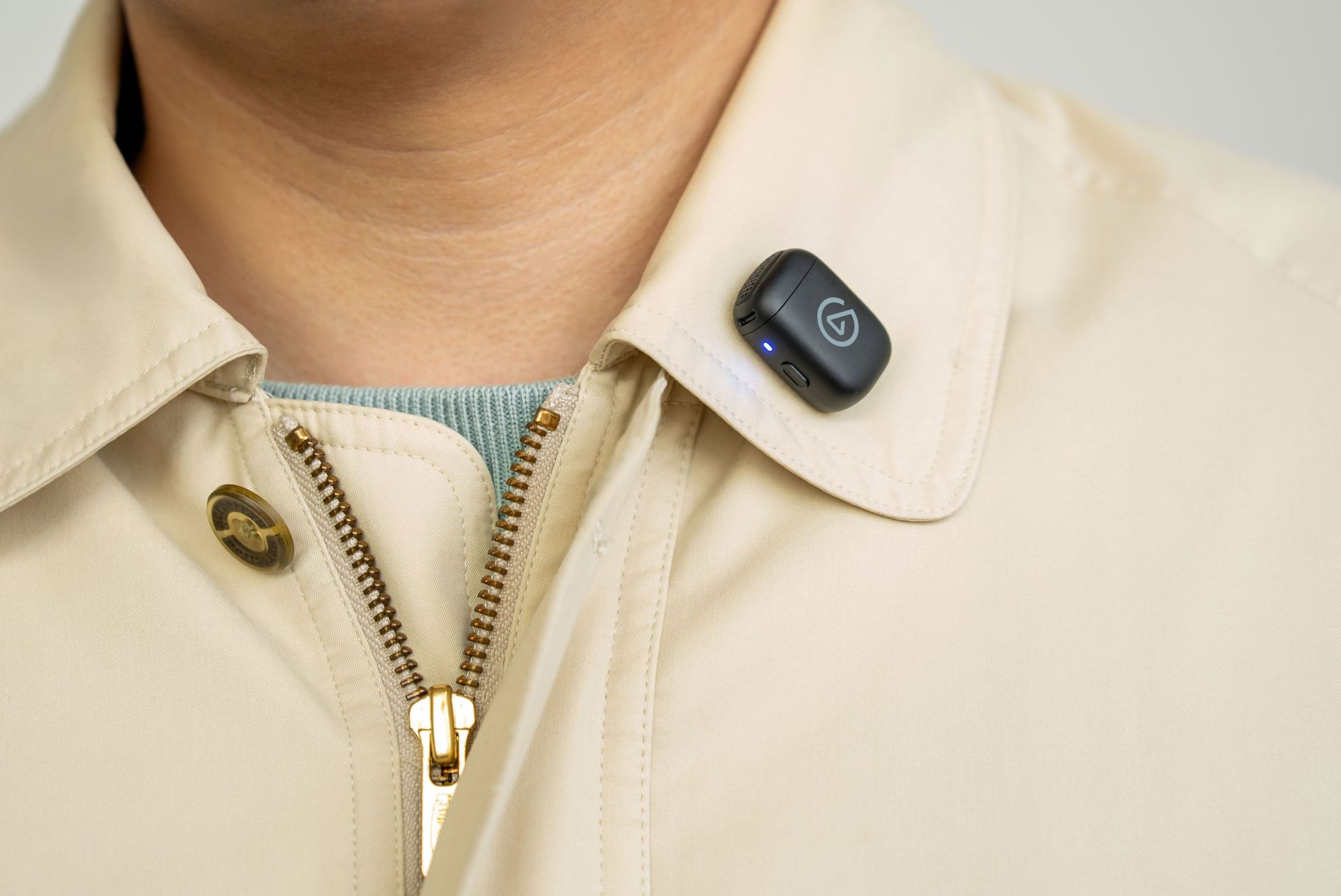
While in Clip-on Mode (which is a 7g transmitter the size of a coin), it can mount magnetically onto clothing with custom tuning that restores clarity and audio presence quality at chest distance.
In Handheld mode, Elgato Wave Go's transmitter fits inside a Smart Handle to become a full-sized interview mic with integrated controls, charging, and a sound profile that's been tuned for warmth and presence audio levels when used close up.
This microphone also features toggleable noise cancellation to block out annoying background noise, automatic EQ Shift and Auto Gain systems to apply different sound profiles and audio gain levels depending on its position and mode (without needing to mess around with its settings), and compatibility with the free Wave Go app on iOS and Android for users to customize these aforementioned features to their preference.
The Elgato Wave Go in Handheld mode. (Image credit: Elgato)
On top of that, the Elgato Wave Go will last you for a good long session, as its transmitter can run for up to 8 hours on a single charge or a full day while recording audio.
Its Smart Handle can be recharged alongside the transmitters when it's docked inside (even while recording), and it can store up to 5 full recharges so it can operate for at most 48 hours. The Elgato Wave Go can have all its components recharged while inside its carrying case, which can connect to USB-C chargers.
Its USB-C receiver also has pass-through charging, so you can recharge the Elgato Wave Go while connected to your phone.
The Elgato Wave Go in Clip-On mode. (Image credit: Elgato)
Lastly, the Elgato Wave Go can integrate with Elgato's free mixing software called Wave Link. When this mic is used in tandem with the app, users can route audio, apply effects, control its settings via Stream Deck, and unlock Voice Focus, which cleans up reverb and background noise while recording audio indoors.
If this lightweight, convertible microphone with expert sound quality, portability, and customization sounds appealing for your content creation needs, you can buy the Elgato Wave Go on Elgato.com for the MSRP of $99.99 (other retailers will sell it shortly after). The Elgato Wave Go will be available in 40 countries and regions.
Elgato is also offering a Sky Blue variant of the Elgato Wave Go for a limited time on its website. Plus, the microphone will have a second transmitter sold separately for an MSRP of $29.99 (or $14.99 when bought together with the Elgato Wave Go).
Let your voice be heard in your content with the Wave Go wireless microphone. It can be used in hand or clipped onto your shirt collar, convey and record your voice with pro-level quality, and last you over 48 hours before needing to recharge.View Deal
Join us on Reddit at r/WindowsCentral to share your insights and discuss our latest news, reviews, and more.
Pokémon turns 30 this year, which means those of you who remember playing Pokémon Red and Blue on a Game Boy are now old enough to have disposable income. Razer apparently understands the assignment.
Razer has announced three new Pokémon-themed gaming headsets featuring Charizard, Lucario, and Sylveon, expanding a collection that already proves Pokémon merchandise does not have to be confined to plushies, trading cards, and whatever extraordinarily expensive piece of cardboard you just lost an eBay auction for.
Technically, none of these headsets is new. Razer is giving existing models Pokémon makeovers rather than launching new hardware. Charizard and Lucario get versions of the Razer BlackShark V3 X HyperSpeed, while Sylveon adorns the wired Razer Kraken V4 X. They're being released as part of Pokémon's ongoing 30th anniversary celebrations.
That's fine by me. Sometimes I don't need a revolutionary new driver architecture. Sometimes I just want Charizard on my head.
Charizard wins the headset battle, obviously
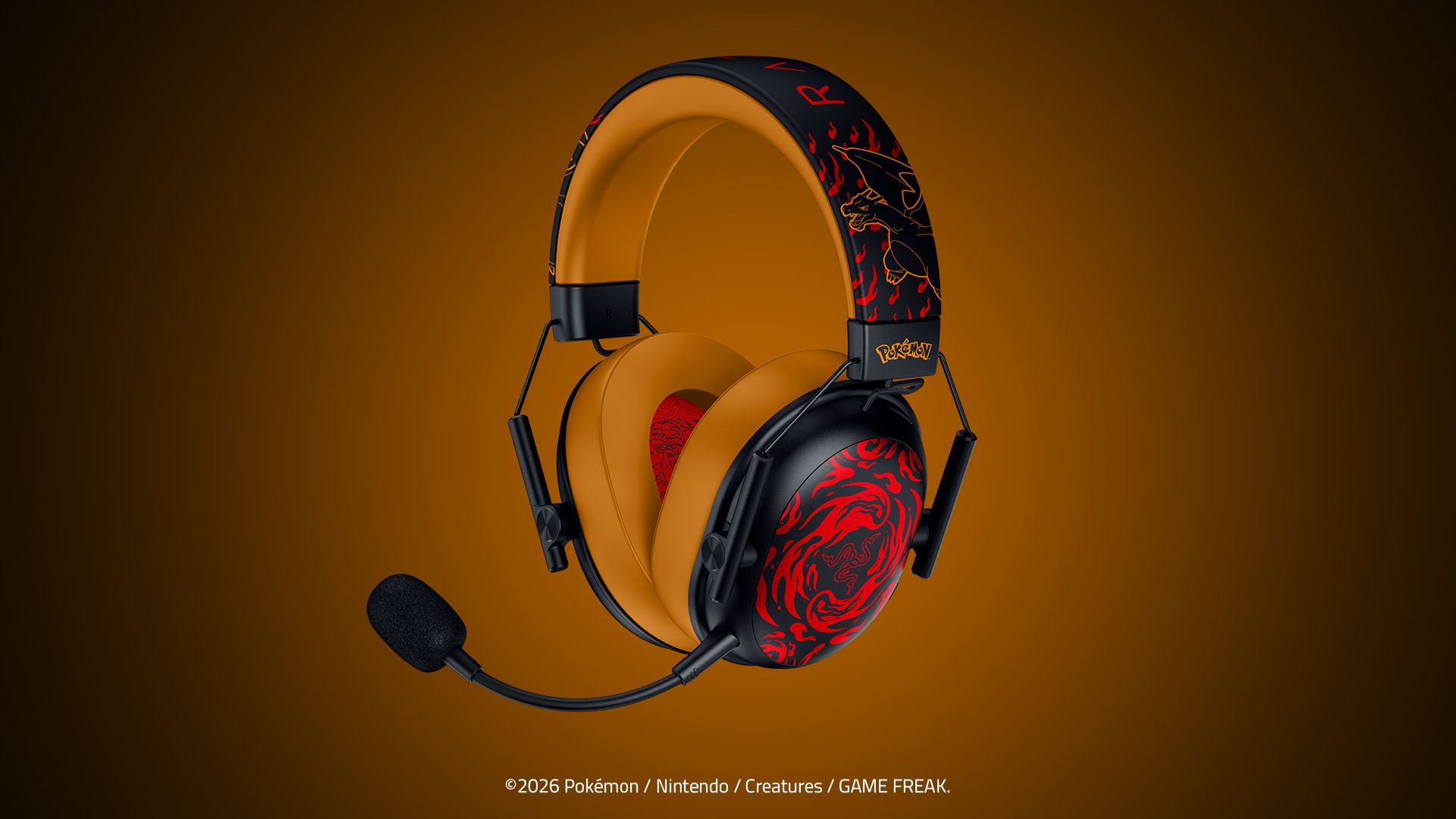
Razer BlackShark V3 X HyperSpeed Charizard Edition headset in black and orange, featuring flame graphics. (Image credit: Razer)
I've got the BlackShark V3 X HyperSpeed Charizard Edition here for photography, and Razer wisely resisted the temptation to simply make the entire thing bright orange.
Instead, there's a black exterior with fiery red Charizard artwork across the earcups and headband, contrasting against orange ear cushions and headband padding. The result looks unmistakably Pokémon without resembling something stolen from a ten-year-old's bedroom.
It also helps that Charizard remains one of the most immediately recognizable Pokémon ever created. The original Generation I Pokémon is officially Fire/Flying type, despite decades of childhood logic insisting that the giant fire-breathing dragon surely had to be Dragon type.
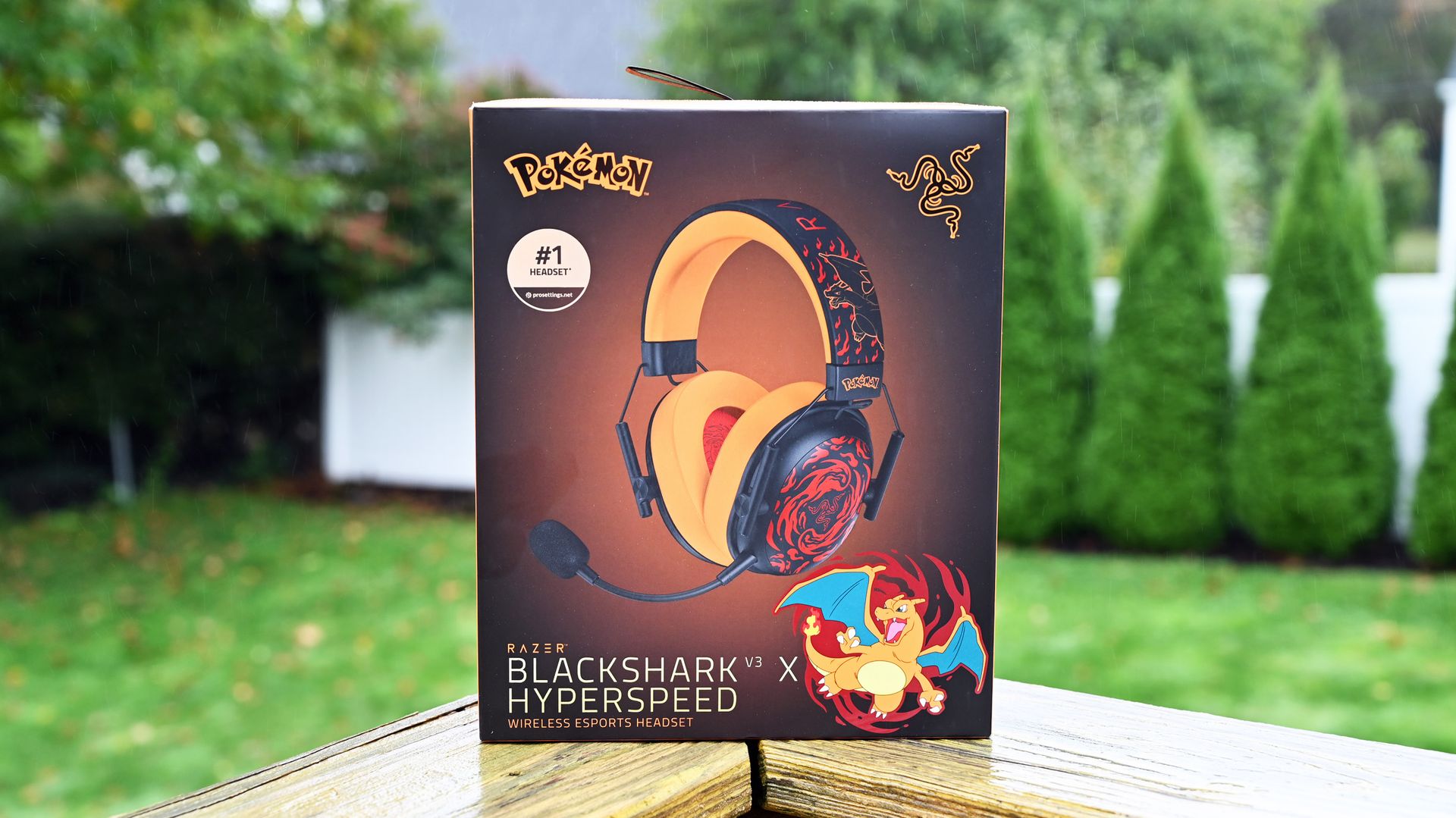
Razer BlackShark V3 X HyperSpeed Charizard Edition retail box. (Image credit: Daniel Rubino)
Underneath that paint job is the regular Razer BlackShark V3 X HyperSpeed, which starts at $99.99 without the Pokémon treatment. It uses Razer's second-generation TriForce 50mm drivers and 2.4GHz HyperSpeed wireless, with Bluetooth and USB connectivity also available. Razer lists the standard model at just 270g.
The Charizard tax, therefore, works out to $20, with this edition carrying a $119.99 MSRP in the United States. (And for some reason, it's at Target for $139.99, but you can pick it up today, at least!)
If you're still reading this, I'm sure you've paid more for considerably less sensible Pokémon-related things.
Daniel RubinoDaniel RubinoDaniel RubinoDaniel Rubino
It's worth emphasizing that the V3 X isn't the flagship BlackShark. That distinction belongs to the BlackShark V3 Pro, which Windows Central's Zachary Boddy reviewed last year. He called the V3 Pro "the closest to perfection I've ever seen a gaming headset reach," praising Razer for addressing seemingly every complaint about the previous generation.
Basically, the "X" versions of Razer products are more budget-friendly, as the V3 Pro is $249.99.
If Pokémon isn't enough to dictate your purchasing decision, we've also extensively tested the competition in our best Xbox headsets guide.
Pokémon
Razer
BlackShark V3 X Hyper Speed (Charizard edition)
The Razer BlackShark V3 X Hyper Speed – Charizard Edition unleashes Charizard’s fiery determination into an officially licensed Pokémon wireless gaming headset, perfect for staying locked in and ready to roast the competition on PC, console, and mobile.
Team Lucario has entered the chat
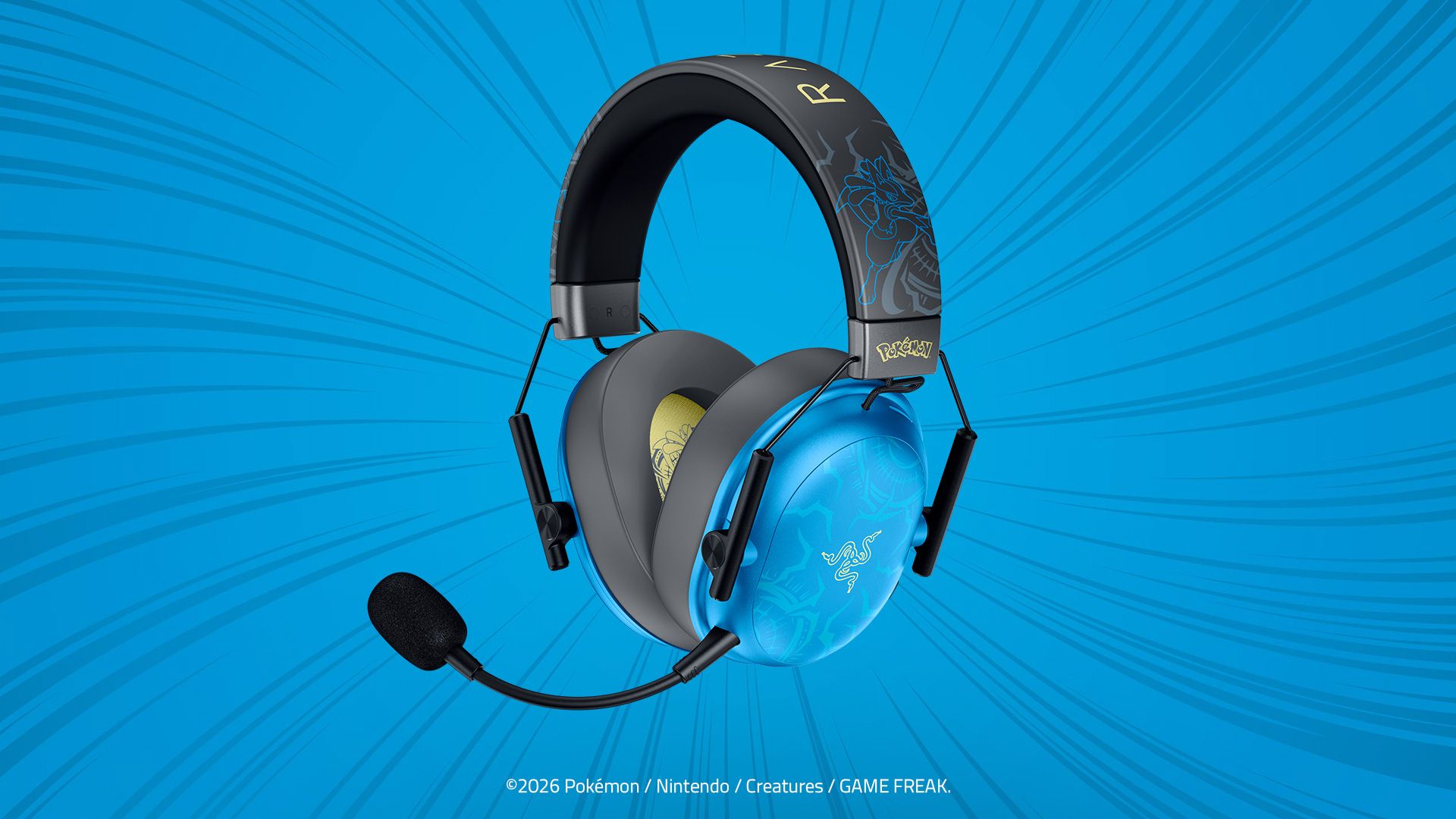
Razer BlackShark V3 X HyperSpeed Lucario Edition headset in blue and black, featuring aura designs on cyan earcups. (Image credit: Razer)
If Charizard is a little too "look at me, I'm on fire" for your tastes, Lucario gets exactly the same BlackShark V3 X HyperSpeed treatment for $119.99.
Razer describes the design as inspired by Lucario's "calm intensity," and the blue finish certainly makes it the more restrained of the pair. The actual Pokémon is Fighting/Steel type, which makes attaching it to a competitive gaming headset feel appropriately on-brand.
Same headset, same 50mm Gen-2 drivers, same HyperSpeed wireless. Your decision essentially comes down to which monster you'd rather have watching over your K/D ratio.
Lucario gets a slight head start in the US, too. It's available exclusively from Target from October 7, while Charizard launches October 13 through Razer.com and Target. Both are also headed to broader retail in Latin America, Europe, Australia, and New Zealand.
And then there's Sylveon
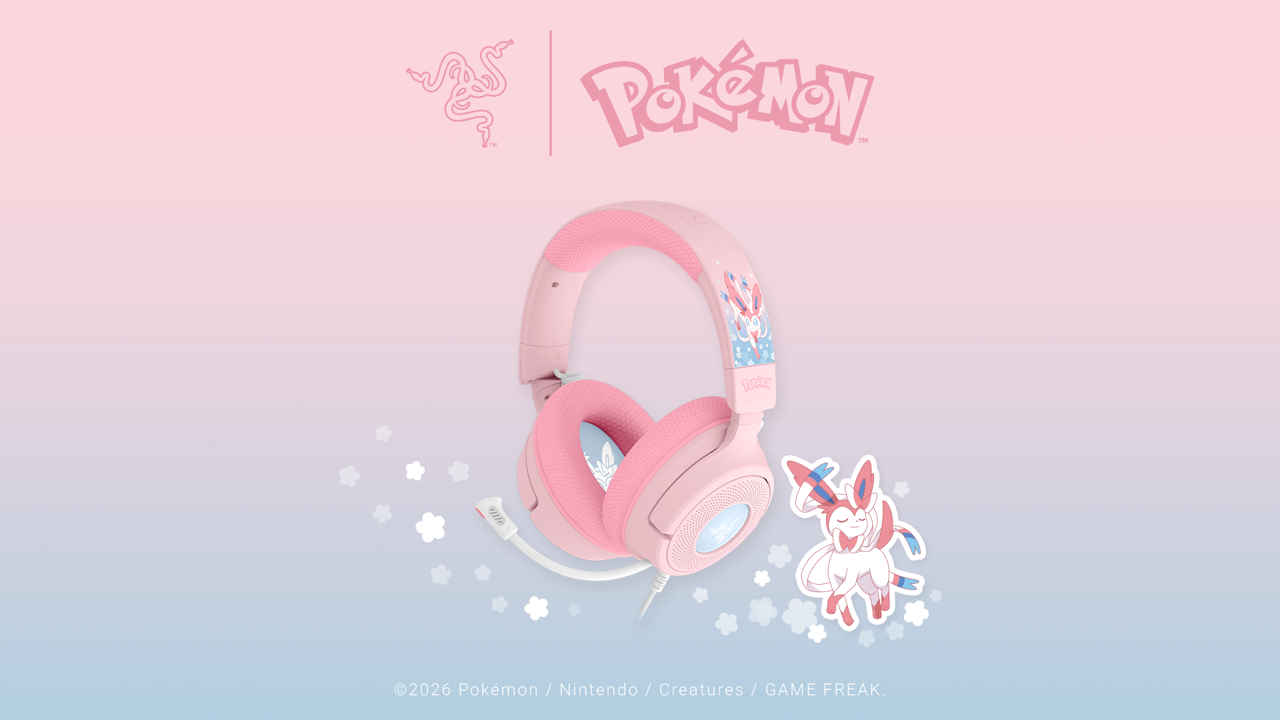
The new Pastel pink Razer Kraken V4 X Sylveon Edition wired headset. (Image credit: Razer)
Sylveon goes in an entirely different direction, and not just aesthetically.
The Razer Kraken V4 X Sylveon Edition is a wired headset with 40mm TriForce drivers, a retractable HyperClear cardioid microphone, and Chroma RGB lighting (sweet). It comes decked out in Sylveon's characteristic pink-and-blue color scheme.
It's wonderfully unapologetic.
Sylveon is a Fairy-type Pokémon and one of Eevee's evolutions, officially categorized as the "Intertwining Pokémon." Its ribbon-like feelers can apparently send out a soothing aura that erases hostility, which frankly sounds like technology every Call of Duty voice-chat lobby desperately needs.
The Sylveon Kraken V4 X costs $109.99 and launches October 13 exclusively through Target in the United States, with wider retail availability across Latin America, Europe, Australia, and New Zealand.
I choose you, Charizard
There's obviously no technical reason to replace a perfectly good headset purely because Razer printed a Pokémon on it. This is merchandising. Razer knows it, Pokémon knows it, I know it, and your wallet is about to find out.
But that's also rather missing the point.
The BlackShark V3 X HyperSpeed is already a lightweight wireless headset offering 2.4GHz, Bluetooth, and USB connectivity. For an extra $20, Pokémon fans can get essentially the same hardware dressed as Charizard or Lucario. Sylveon fans have a slightly cheaper, wired alternative with RGB.
And having actually seen the Charizard edition outside Razer's immaculate press renders, I'll say this: it's pretty damn cool.
CMF launched its first speakers: the CMF Speaker S and Speaker M in various colors in a classic milk carton design.
The Speaker S is designed for portability, while CMF empowered the Speaker M with more in-depth audio and clarity for rooms.
Users can take off the Speaker S and Speaker M's volume knobs and panels and 3D print their own designs.
The Speaker S is available for $59, while the Speaker M begins at $109.
CMF recently became its own company in India, divesting from Nothing. The company is now moving quickly with a new product launch that looks like a fresh carton of milk.
This morning (Oct. 12), CMF announced its first wave of speakers: the Speaker S and Speaker M. These speakers take inspiration from classic cartons of milk, but they're packed full of sound for any occasion. CMF says it went with a design that was "something unique" and fit its brand. The Speaker S looks like the milk cartons you'd get in school for lunch. It features a custom-tuned 45 mm driver in a short form factor.
CMF states it worked to enhance the lower frequencies on the Speaker S to achieve "deeper, more resonant bass." What's more, the Speaker S is aimed at portability since it's a bit smaller than the Speaker M. If you have two of the same model (Speaker S, in this case), CMF says users can turn them into "dedicated left and right channels" with Stereo Mode. Users can fill an area with more sound, as if they were using a standard sound system.
If you're sticking with one speaker, CMF's Wide Soundstage brings more audio depth to that solo device. Adaptive Tuning handles the speaker's EQ; however, users can create custom EQs using the Nothing X app.
Party Mode leans on Android's Auracast to sync multiple speakers. CMF states this will work with its speakers and devices from other companies.
(Image credit: CMF)
The CMF Speaker S features 18 hours of audio playback "at 50% volume with Ultra Bass on." A quick 10-minute charge reportedly delivers one hour of audio. Speaker S supports Tap to Pair, Bluetooth 6.0, and USB-C lossless audio.
The CMF Speaker S is available in white, dark grey, orange, and turquoise. Consumers can purchase the speaker for $59.
Speaker M
(Image credit: CMF)
The CMF Speaker M retains many of the same features as the Speaker S. Consumers will find Ultra Bass, offering "controlled low-end impact for playlists that need extra weight." This feature toggles on and off, letting users fine-tune their audio experience at a moment's notice. The Speaker M also provides Party Mode, Stereo Mode, Wide Soundstage, Adaptive Tuning, and Custom EQs.
However, the primary difference lies in its design. The Speaker M is taller, with a dedicated subwoofer and tweeter. CMF wanted to up the ante with the Speaker M's audio capabilities over the Speaker S. The post states the Speaker M pushes its clarity and bass for a "balanced" experience when broadcasting in larger rooms.
The Speaker M supports USB-C lossless audio, Tap to Pair, Bluetooth 6.0, Dual Device connection, and more. Its battery will support 18 hours of audio at 50% volume with Ultra Bass enabled, similar to the Speaker S.
Consumers can pick up the CMF Speaker M today (Oct. 12) in white, dark grey, orange, and turquoise for $109.
While the CMF Speaker S and Speaker M may look like completed products, the company says consumers can change their designs. CMF states users can take off the Speaker S and Speaker M's volume knobs and panels and switch them out. You can "mix and match," or you could 3D print your own designs.
CMF has provided users with the STL files required to begin 3D printing.
Samsung is reportedly developing its first Galaxy-branded over-ear headphones, which could launch as Galaxy Studio.
The leak comes from evowizz, who previously revealed Samsung's Galaxy Buds On before their official launch.
Samsung hasn't confirmed a launch date, although its rumored November Galaxy Glasses event could be a possibility.
Samsung could soon have a challenger to Apple's AirPods Max and Sony's flagship over-ear headphones, with the company reportedly working on a new pair called Galaxy Studio.
For years, brands like Sony, Apple, Bose, and Sennheiser have dominated the premium over-ear headphone market in the U.S. But it looks like another major brand could be joining the competition very soon. According to a new leak, Samsung is developing its own pair of over-ear headphones to complement the Galaxy Buds lineup, and they could be called Galaxy Studio.
As spotted by 9to5Google, leaker evowizz on X has shared that Samsung's upcoming over-ear headphones will carry the Galaxy Studio branding. Interestingly, this is the same leaker who first revealed details about Samsung's open-ear earbuds, which officially launched earlier this month as the Galaxy Buds On. And now, the leaker has shared the name of Samsung's next audio product as well.
There isn't much information about the Galaxy Studio headphones just yet. We don't know what they'll look like, what features they'll offer, or how Samsung plans to position them against premium headphones like the AirPods Max and Sony's WH-1000X series.
There's also no word on when Samsung plans to launch the Galaxy Studio. However, with the name now reportedly surfacing, there's a chance we could start hearing more about the headphones over the coming weeks.
Samsung still has a few major products left to unveil this year. The company is reportedly preparing to launch its first Galaxy Glasses powered by Android XR sometime in November, and it's possible Samsung could use the same event to introduce its new over-ear headphones as well.
Of course, that's just speculation for now, and Samsung hasn't officially confirmed the Galaxy Studio headphones. But it'll be interesting to see what the company comes up with, especially considering how competitive the premium headphone market already is. We'll update this article as more details about the Galaxy Studio emerge.
Google has started rolling out a new update for the Pixel Buds that brings several new features, and at the same time, the company has slashed $60 off the Pixel Buds Pro 2's price.
Last month, Google started rolling out a feature for Pixel Buds that lets users control their earbuds' settings just by asking Gemini. While you could already ask Gemini to do things like change the volume, the new integration goes much deeper, letting you adjust the EQ, enable or disable ANC, and change other Pixel Buds settings using your voice.
Alongside that, Google has now started rolling out another sizable update for the Pixel Buds Pro, Pixel Buds Pro 2, and Pixel Buds 2a. One of the biggest additions for the Pixel Buds Pro 2 is Dynamic Active Noise Cancellation.
Google previously explained that Dynamic ANC automatically adjusts the noise cancellation based on the seal of the earbuds in your ears. So, if the Pixel Buds move slightly and the seal changes, the earbuds can automatically compensate and adjust the ANC accordingly. That feature is now starting to become available on the Pixel Buds Pro 2.
The Google Pixel Buds Pro 2 are already priced at the lower end of the premium wireless earbuds market, and this Amazon deal shaves another 26% off the sticker price. That brings the Pixel Buds Pro 2 down under $170, which is a stunning price for earbuds that can hang with the best of the best.View Deal
✅ Recommended if: You use a Pixel phone, want strong ANC and Gemini integration, like Google's latest Pixel Buds features, or want premium wireless earbuds for under $200.
❌ Skip this deal if: You don't use Android, want the absolute best battery life, or don't care about Pixel-exclusive features and ecosystem integration.
Google has also added a new tap-to-mute and unmute gesture for calls. So, if you're in an online meeting or taking a phone call, you can simply tap the surface of your Pixel Buds to quickly mute or unmute your microphone.
The Pixel Buds can now automatically pause media playback when you fall asleep as well. This feature requires a paired Pixel Watch to detect when you've fallen asleep, after which your earbuds can pause playback, disable touch gestures, and silence notifications.
(Image credit: Andrew Myrick / Android Central)
Enhanced Live Translate is also starting to roll out. You can now leave your phone in your pocket and start translating using a gesture on the earbuds. Google says the Pixel Buds now work more seamlessly with the Google Translate app to make on-the-go translations easier.
To get these features, make sure you're running the latest version of the Pixel Buds app and look for firmware version release_6.144. You can also manually check for the update by heading to More Settings > Firmware > Check for updates.
And if you've been thinking about buying the Pixel Buds Pro 2, this might be a particularly good time. Thanks to the ongoing Amazon sale, the Pixel Buds Pro 2 are currently $60 off, dropping from their usual $230 price to just $170.
So, not only are you getting them for considerably less right now, but Google has also made the Pixel Buds Pro 2 noticeably more capable with the latest software update.
You waited months for Apple’s new iPhones to arrive, but it’s worth protecting that investment from day one. The iPhone 18 Pro and Pro Max are tougher than previous generations, but they can still be scratched, chipped or damaged in a drop. A good case also does more than protect your phone: it can improve grip, add a stand or wallet, support MagSafe accessories and give your iPhone a completely different look.
There are hundreds of iPhone cases to choose from, ranging from inexpensive silicone shells to rugged cases built for serious drop protection. Price isn’t always a reliable guide to quality, either: a cheap case can split, yellow or develop faulty buttons, while spending more doesn’t necessarily mean you’ll get the best case for your needs.
That’s why we test and compare as many iPhone 18 Pro and Pro Max cases as we can. We consider protection, materials, build quality, grip, raised screen and camera edges, MagSafe compatibility, weight, useful extras such as stands and card storage, and how the case feels in everyday use. Where manufacturers make specific drop-protection claims, we include those too so you can compare different levels of protection.
In this guide we’ve grouped our recommendations into clear, colorful, protective and leather or faux-leather cases, with options at a range of prices. Our recommendations balance protection with practicality rather than simply favoring the toughest or most expensive case, so whether you want something slim and unobtrusive, highly protective or simply more stylish, you should be able to find the right case here.
Many consumers damage their devices each year, with cracked, chipped or shattered screens the leading reason for iPhone repairs. A screen protector is an important first line of defense, but a case with a raised edge can much better protect the display from everyday knocks and drops, and tough sides and back will reduce the risk of damage from an accidental fall.
Ceramic Shield 2, introduced with the iPhone 17 generation, protects the front of the iPhone 18 Pro and offers three times better scratch resistance than the iPhone 16 Pro. The back uses Ceramic Shield, which Apple says offers four times better crack resistance than the back glass used on earlier models.
The 18 Pro and 18 Pro Max are the best-protected iPhones yet, but a case is still worth buying. It helps keep that pristine finish looking new and, when it’s time to trade up, a well-protected iPhone can retain far more resale value than the cost of the case itself.
Which type of iPhone case to choose
Apple gives you a handful of finishes; a case gives you thousands—an easy way to make an iPhone 18 look like yours. You can choose a clear case that shows off the iPhone’s original color but adds vital protection, or choose a case with more personality. Protection is key, and some cases will add higher levels of defense than others.
Material matters too: silicone for grip and everyday feel, leather or vegan-leather for a refined look, Graphene (elastic yet harder than diamond and up to 200x stronger than steel, according to case makers) or Kevlar (the material used to make bulletproof vests) for serious durability. Kevlar is a type of Aramid Fiber, a strong, heat-resistant synthetic material that gives the material incredible strength and stability. Beyond looks, think about how you use your phone. Want hands-free video? Look for a case with a built-in stand. Want to leave your wallet at home? Choose one with card storage. And if you charge wirelessly, check for MagSafe compatibility — most cases now offer it, and it’s worth confirming before you buy.
Best clear cases for iPhone 18
If you want to keep your iPhone 18 Pro or iPhone 18 Pro Max looking like Apple intended you could leave it unprotected without a case, or simply choose a clear case that shows off the iPhone’s color while protecting it from everyday knocks and drops.
Apple iPhone 18 Pro Clear Case – Premium clear case
This simple, rigid iPhone 18 protective case from Apple is thin and light. The point of clear cases is that they shouldn’t disguise the color of your iPhone that you chose when you purchased it. However, Apple’s Clear Case has a prominent white MagSafe ring that aligns with the charging coil beneath the iPhone’s Ceramic Shield back. It’s white whatever color of iPhone 18 Pro or Max that you own—it’s a shame Apple didn’t color-match this to each phone but that would have meant creating four different versions. To be fair, it’s less obtrusive than the Apple’s Clear Case for iPhone 17 Pro.
The Apple Clear Case is made from a blend of optically clear polycarbonate and other flexible materials, with a scratch-resistant coating on both the inside and outside. While it’s more protective than silicone cases and features a robust-looking 2mm camera lip, you can find tougher cases, which we have reviewed below.
Zagg Crystal Palace & Santa Cruz Cases – Quality family of clear cases
Zagg has a number of popular scratch-resistant clear case models, including the Crystal Palace Snap, available with and without a kickstand) and a simpler Lite option without MagSafe and lower but still impressive drop protection. Zagg’s ClearGuard tech reduces the yellowing that affects many clear cases surprisingly quickly.
The Crystal Palace Snap ($54.99 / £39.99 with kickstand, $49.99 / £34.99 without) has textured sides for better grip, MagSafe, and 13ft drop protection. The Crystal Palace Lite Snap ($39.99 / £24.99) has MagSafe, 10ft drop protection and no kickstand. The entry-level Crystal Palace Lite ($29.99/ £19.99) lacks MagSafe and kickstand but still offers 10ft drop protection.
Both use PC and TPU, but the construction is fundamentally different. The premium Crystal Palace Snap uses a single, solid piece of PC across the back and sides to create a harder, more scratch-resistant clear case, with TPU used strategically so that there are no seams between the back and sides. The Lite version uses significantly more TPU, relying on a PC back plate combined with flexible, TPU sides. That makes it lighter and less expensive, but more susceptible to yellowing over time than PC.
Adding metallic accents, the Graphene-fortified Zagg Santa Cruz ($59.99 / £44.99 with kickstand, $54.99 / £39.99 without) gives the clear case an elegant edge and vibrancy with 13ft drop protection, MagSafe and kickstand.
The Mous Clarity clear case shows off the device beneath with a UV anti-yellowing finish. In the corners, AiroShock protection is a defense against drop impacts. The scratch-resistant layer is molded into the panel itself, not merely sprayed on top.
You can buy as the clearest non-MagSafe ($64.99 / £54.99) or MagSafe compatible with logo ($69.99 / £59.99), in a Black frame or Stone. For extra customization, you can mix and match your case with different colors of metal kickstand, camera guard and metal buttons.
Best colorful cases for iPhone 18
Apple’s choice of iPhone 18 Pro colors is, shall we say, limited. Burgundy is nice but it’s no Cosmic Orange, and third-party case designers have had a lot more fun so you can personalize your new iPhone from a choice of thousands—from simple silicone cases to some pretty crazy designs.
Apple iPhone 18 Pro Silicone Case – Apple's soft touch case
If you’ve got any money left after shelling out for the latest iPhone, Apple will gladly take it for one of its own iPhone 18 cases. Its Silicone Case comes in six fetching colors. Apple’s silky, soft-touch silicone case for iPhone 18 Pro and 18 Pro Max feels great. On the inside, there’s a soft microfiber lining for softer device protection.
There’s no ugly MagSafe block as found on Apple’s Clear Case as the silicone case creates its own choice of colors. The Silicone colors for the iPhone 17 range were more vibrant—but we like the 18 Pro’s punchy Magenta pink, in case Burgundy is just too dark for your tastes.
Casely Cases for iPhone 18 Pro and 18 Pro Max – Hundreds of colorful designs
Casely makes several types of case for the iPhone 18 Pro series. The Classic case is lighter, slimmer and more flexible with a glossy finish (1mm raised screen and camera edges), while the Bold case is more protective (with 8-foot drop protection) and comes with a matte finish and 3mm raised edge. The Align cases offer an even more premium defense, with claimed 10ft drop protection na d a soft-touch grip, and
There are nearly 500 designs to choose from. Some I wouldn’t dare take out of my pocket but everybody’s different, right? There are psychedelic patterns, Beatles cases, plain/plaid/gingham/checkerboard/mirrored/marbled cases, impressionist cases and some just plain crazy styles.
Casely also offers Grippy, a silicone suction phone mount with MagSafe that securely fastens to flat, glossy surfaces such as mirrors and windows for hands-free photo and video shooting or browsing.
Casetify iPhone 18 Pro and 18 Pro Max Cases – Customizable cases for everyone
Fancy making your iPhone 18 Pro look like an old-school camera, or feature ripple or cloud effects, cartoons, Spiderman, drunk cats, polka dots, stars, and more?
Not only does Casetify have an enormous range of thousands of iPhone case designs, but it offers many with different levels of protection: the slim Impact Case (for everyday defense of up to 8.2-foot drop protection); Ultra Impact Case (heavy duty with extra corner cushioning, thicker bumpers, and more pronounced raised edges, for up to 11.5ft drops); and Bounce & Ultra Bounce Cases (even stronger shock-absorption tech, with up to 32.8-foot drop protection).
You can also choose to include an integrated camera ring that flips out as a stand when you need it and folds flat when you don’t.
Casetify
Maybe the most bizarre/fun case for the iPhone 18 Pro/Max is the Casetify Cloud Case, pictured above. Built with a premium soft-touch silicone, and offering 6.6ft. drop protection, this case features a Michelin-Man-like protective puffed bumper and body with an ergonomic grip. The raised bezel from the screen is a mighty 2.1mm with 2.4mm raised camera ring. Available in Cotton, White, Sky Blue, and Marshmellow Pink, it is sadly not MagSafe compatible as most of the other Casetify cases are.
Zagg Milan, Luxe and Sedona Cases for iPhone 18 Pro – Fashionable yet protective cases
Zagg embraces fashion with its Milan range of iPhone cases, from ethereal waves to polka dots with many varied styles to choose from—we are particularly taken by Ethereal Wave and Essence. The Milan case can be purchased with or without a kickstand but all are MagSafe compatible, with a textured grip and 13ft drop protection.
The Sedona series of cases feature more deep, muted tones than the sometimes wild Milan, but still with super-tough 16ft drop protection. It comes with a secure grip and kickstand option.
The Luxe Case features lesser but still effective 10ft drop protection and is made from 100% post-consumer recycled materials in a handful of diverse colorways.
Nomad Sport Case – Smooth and grippy at the same time
The minimalist Sport Case features both a satin-smooth backplate and grippy bumpers to make it less easy to accidentally drop but still easy to pull from a pocket. Interchangeable Stellar Orange buttons are included
With 2.2mm thick bumpers, its drop protection is 8 feet—so perfect for placing on the top of your head even if you are very tall.
ESR Classic Hybrid Case for iPhone 18 Pro – Affordable protection with great flexible stand
ESR’s Classic Hybrid Case for the iPhone 18 Pro series offers a clear or frosted TPU, PC and acrylic body that offers super-robust 16-foot drop protection plus an adjustable Flex stand that is an effective zinc-alloy camera-lens guard when not acting as the stable stand.
On top of the varied color options, stand and protective functions, it is attractively priced. The Clear version of the ESR Classic Hybrid Case is best if you want to stick to Apple’s original iPhone color, and the MagSafe logo is much less obtrusive than on Apple’s own Clear Case.
OtterBox Figura and Lumen iPhone 18 Pro Cases – Smooth, minimalist cases
A simple minimalist iPhone 18 Pro series case, the OtterBox Figura Case is the brand’s most affordable case while still offering a covered camera plateau and raised edges, plus MagSafe compatibility. It has a soft, smooth texture, and we like the plain but Apple-simple Crema color (first pictured above)—although there are a bunch to choose from.
The similar but lower-profile OtterBox Lumen Case (Black only, shown on right of the picture above) is the lightest at just 34g. As with the Figura case, drop protection is down to 1x but that should still save you from casual drops and knocks. The OtterBox Commuter (3x), Sole (5x), and Defender Pro (7x) also reviewed here offer higher levels of drop protection.
Torras Ostand cases – Punchy looks and great stand
Aside from its stellar array of fun color choices, what (ahem) stands out about the Torras Ostand range of iPhone 18 Pro and 18 Pro Max cases is its 360° precision Ostand that rotates all the way around for stable hands-free support. Turning it can get addictive like with a fidget spinner.
The cases themselves are well built and come in all sorts of hues. Hats off to the naming teams for color titles such as Dusk Purple, Violet Summit, Polar Slate, Amber Brown, Raspberry Mist, Moon Jellyfish, Blueish Mint, and more. The cases aren’t just fun to look at, they feel great in the hand, too.
You’ll need a while to inspect the whole range, which offers maybe too many models to choose from. These include the entry-level Ostand Q3 Spin (also available as a clear case), with claimed 8ft drop protection and raised screen and camera guards. The Ostand Q3 Air Pro is my favorite—it has an anti-slip side texture to improve hand grip, Air Pro Tech protection with a dual-layer airbag system (Air Duet) that absorbs impact in stages: the outer airbag intercepts impact, while the inner airbag disperses residual shock. It claims 16.4ft drop protection.
Torras
The Ostand Q3 VegSkin features a “refined leather-inspired” touch, the Ostand Gradient Air available in Dusk Haze, Alaska Aurora, or Arizona Glow, and the Ostand Q3 Air Football Limited (pictured above) has options that match national soccer jerseys, including USA, Argentina, England, Portugal, and Germany.
Mous Printed Collabs cases – Clear case with printed designs
You can order from Mous’s wide range of designs, printed on durable, rigid iPhone 18 Pro/Max cases with the company’s AiroShock tech, similar to the company’s Clarity clear cases but with less of the iPhone’s original color showing through—these designs are more fun. Choose from Stripes and Checks, Floral, Animal Prints, Polka Dots, Serpent, Fruits, and our favorite Deconstruct that acts as if you can see the circuitry inside your iPhone.
Burga iPhone 18 Pro and 18 Pro Max cases – Stylish fade-resistant designs
Another enormous range of designs is available from Burga, a favorite of my daughter. There are over 500 to choose from, so give your self time to scroll. There are also three different case types: Tough, Elite, and Elite Mirror. Tough is a classic glossy, lightweight hard shell case, while the Elite features higher end structural benefits—including CloudGuard shock absorption, microfibre lining, and improved side grips. The Elite Mirror a reflective surface and premium metallic camera bezels. Burga has another case type called the Puffy Elite that has a squishy texture made with a soft, bouncy, and touchable exterior, but there were no puffy cases for the 18-series at the time of writing.
Best protective cases for iPhone 18
As pretty as some iPhone cases are, your principal consideration should be protection. Most decent cases offer reasonable protection, but these protective cases have extra robust features while often adding as little bulk as possible by using the latest, strongest materials. Kevlar is the material used to make bulletproof vests—it’s also known as Aramid Fiber. Graphene is even stronger.
Other protective iPhone cases don’t worry so much about thinness, and bulk up to protect your iPhone from the worst disasters that can befall it. These might suit you if you work in riskier environments or are an active outdoors iPhone user.
You have to work to get the maximum protection for your iPhone. You construct the OtterBox Defender Pro cases for iPhone 18 Pro and 18 Pro Max from either two or three protective pieces. OtterBox claims it has been tested to 7x military-grade protection levels. The slimmer two-part Defender Pro XT case remains reasonably thin but lacks the grippier sides of the three-part non-XT model. Its back is clear, although some versions have a pattern on top.
Both feature shock-absorbing corners that don’t bulge out too much as on some ultra-protective cases. The final third layer on the Defender Pro provides grippy sides and back to help prevent phone drops in the first place.
These cases include a cover for the USB-C charging port to stop fluff and other debris entering and causing charging problems down the line.
With 5x military-grade protection, the OtterBox Sole Case is a one-part design with a high-ridge tread around the case edge that feels rugged and adds grip. There’s an Xtra Hot Pink version for adventurous pinkies, who will also appreciate its removable, colorful finger loop.
OtterBox
Also highly protective, the OtterBox Commuter Case, pictured above, comes with a new retractable finger grip that tucks away flat when you don’t need it and opens with a single finger when you do ($59.99) and without ($49.99). Military-grade protection is down from 7x to a still-impressive 3x as commuters are less at risk of wandering into combat zones on the way to the office. It’s a slimmer dual-layer design with an inner rubber cover to absorb impacts and a rigid outer shell for bangs and scrapes, and again the charging port is covered. Also available at Amazon.
Zagg Rainier and Teton Cases for iPhone 18 Pro – Extreme 22-foot drop protection
Zagg has two super-protective cases, each with 22ft drop protection. Both the Rainier and Teton cases are put together in a two-piece construction with reinforced frame and rugged case with impact-absorbing bumpers. Both feature a dual-orientation kickstand that lies flush with the case when folded in.
In terms of looks, the Teton has a plainer design and the Rainier is colored on the sides and edges. The difference is also pronounced at the vulnerable edges with the Ranier boasting a 2.75mm raised edge around the screen compared to the Teton’s shorter 2mm.
Zagg markets its Teton iPhone case as engineered for harsh environments and rough terrain, and it comes with a holster for outdoor carrying.
Rokform Rugged and Crystal – Nothing looks tougher
Available only in black (Rugged Case) and a black and barely clear (Crystal Case) Rokform’s cases for the iPhone 18 Pro and 18 Pro Max appear to have only one thing on their minds, and that’s super protection—but they’re actually more clever than that. For protection, few cases look as tough—the build pairs a shock-absorbing TPU inner shell with a rigid polycarbonate outer shell and reinforced corners that push impact away from the screen and camera for true 360-degree defense. The sides are textured for better grip. There’s undoubtedly added bulk but it still adds only 4.15mm thickness.
If you want to see a little of the iPhone’s own color, the Crystal Case has the same defensive highlights but a semi-clear design.
On the tough back of each case, the company’s RokLock twist-lock system attaches to a full range of bike, motorcycle and vehicle mounts.
Nomad’s most protective iPhone 18 case is the aptly named Rugged Case. It has a combination of durable polycarbonate frame with fortified corner bumpers to protect your iPhone 18 from all angles. Drop protection is an impressive 15 feet, in case you like taking your iPhone out while climbing ladders or leaning out of windows.
The backs feature eye-catching topographic maps based on Californian watersports spots famous for surfing and kiteboarding.
ESR Cyber Tough Magnetic Case – Solid colors, solid stand, solid design
ESR’s most robust case is the Cyber Tough for the iPhone 18 Pro series. Drop protection is upped to 26 feet with its triple-layer shockproof structure featuring a rigid PC back, flexible TPE bumper, and PORON foam to absorb and disperse impacts.
The adjustable Flex stand pulls out from the zinc-alloy camera-lens guard. Despite being so tough, the case is still available in a wide range of colors including a striking orange.
Mous offers a range of protective cases to its iPhone 18 Pro series range, with its flagship Limitless Case, plus slimmer Aramid Fiber Ultra Thin and Super Thin cases.
Limitless (from $69.99) is available in a range of colors and styles including the famous Mous Walnut finish, Black Leather, Speckled and of course Dark Cherry for the iPhone 18 Pro and Max. Other colors include Marine and Sky (different shades of blue) Stone, and Sage (green). The Limitless case is built from stiff, interlocking AiroShock impact-absorbing materials that reduce torsion or twisting during impact, adding structural rigidity. During purchase you can swap in a Camera Guard (sold separately) for full camera-bump coverage, or a Camera Kickstand for hands-free viewing. You can also upgrade to sandblasted and anodized, machined aluminum buttons to color match your case.
Mous offers a Super Thin Case (with 1.3mm sides and 2mm back, and slightly lower 1.2mm raised screen edge) plus the lightweight 30g Ultra Thin Aramid Case (0.7mm sides and 1.7mm back) made from a material more commonly found in ballistic protection.
We mentioned the Torras Ostand cases earlier, and all offer decent everyday protection and more, but the Ostand Rugged likes to think of itself as the best when it comes to top-line defense. It is built with a flexible TPU bumper, dual-layer TPU air cushions at the top and bottom, 1.4 mm raised bezel around the screen, and a rigid 3mm rubberized matte PC back panel for impact protection and more comfortable grip. The Island Blue and Sunrise White colorways make it stand out from other super-tough iPhone 18 cases.
Pitaka Cairn, Summa and Edge Cases – Aramid Fibre patterns
Pitaka is known for its tough woven aramid fiber cases with a pleasant silky-smooth texture. Distinctive colors include Sunset Moment, California Dream and Twilight and Midnight patterns, but there are also plainer and latticed patterns to choose from.
The Pitaka Cairn Case is the toughest, made from a combination of aramid fiber and shock-absorbing TPU. The four corners feature an arched design that creates space around the phone, acting like built-in air cushions. On impact, they should deform to absorb shock.
The sleek Pitaka Summa Case has a slightly slimmer profile but the robust same aramid fiber shell.
The super-thin Pitaka Edge Case leaves more of the sides exposed but still offers solid protection despite being only just over 1mm thick and weighing less than 20g. It uses what Pitaka calls Mammoth Resin fused with the aramid fiber to reinforce structural integrity.
Best leather and faux-leather cases for iPhone 18
Looking for a more luxurious look? There are many fine leather cases, more animal-friendly vegan leathers, and cases made from fully recycled materials such as Apple’s own TechWoven fabric made from 100 percent recycled polyester.
Nomad Leather Cases – Traditional, Modern, Clear, Back
Nomad has four different types of leather cases for the iPhone 18 Pro series.
The Traditional Leather Case is available in Camino or Horween leathers with a full wrap from sides to back. Adding further protection, the Modern Leather Case has a grippy TPU bumper and 8ft drop protection.
The interesting hybrid Clear Leather Case has has a clear polycarbonate body that’s UV-blocking to stop yellowing, but also a leather back that hides the MagSafe elements that spoil that Apple Clear Case. If you like your iPhone 18’s color and slimness more than most, the Mag Leather Back is an ultra-thin, precision-cut 2.2mm case-back that snaps on with micro-suction patches and an integrated magnet array. You lose any side protection but gain back the iPhone’s original thin frame.
Apple iPhone 18 Pro TechWoven Case – Apple's leather alternative
Apple has created its own custom technical woven fabric that’s made from 100% recycled polyester. It looks great as it features multiple colored yarns woven together—on a Jacquard loom—that creates a dimensional texture with a rich depth of color. There are six colors to choose from. As with its Silicone Case, Apple’s range is muted rather than vibrant. Look elsewhere for some fun, but TechWoven is certainly lovely to look at.
To give a better grip, the TechWoven Case’s sides are coated with a lightly textured thermoplastic polyurethane.
ESR iPhone 18 Pro Max Atelier Case – Vegan leather, zinc-alloy stand
ESR’s Atelier Case brings a mixture of a refined leather feel with robust protection, with drop protection up to 12 feet via its TPU frame, microfiber lining, and raised edges.
One of its standout features is the Flex Stand that pulls out from the protective camera guard and adjusts from 15° to 69° for easy viewing in either portrait or landscape orientation.
Troubadour Leather Cases – Actual leather with mod option
Previously sold under the Mujjo brand name, the Troubadour Leather Case for iPhone 18 Pro/Pro Max is crafted from full-grain, velour Danish calfskin, vegetable-tanned and processed with waterless DriTan technology. As there are no plastic coatings, the leather acquires a patina over time. Inside there’s a satin-soft Japanese microfiber lining.
Troubadour, which makes some of Macworld’s favorite MacBook bags, also sells a Modular Case model featuring a removable magnetic back panel that allows you to switch between two modes. With the magnetic panel removed, a leather bumper protects the sides and corners while leaving the back of the phone bare. MagSafe accessories, such as the $49 / £49 MagSafe 3 Card Leather Wallet Stand, sit snugly inside the cavity rather than stacking on the back, keeping the profile slim in hand and in your pocket.
Casebellé Vintage Luxe and Timeless Cases – Personalize your leather
Casebellé uses two leathers: Vintage Luxe is vachetta, vegetable-tanned in Tuscany; and Timeless Luxe is Italian nappa full-grain leather. Both are designed to age with a patina. A luxury microfiber lining protects against scratches and dust.
Burgundy is dyed through in the same wine dark red as the iPhone 18 Pro/Max, and deepens with age rather than wearing off the way a coated finish does. Sky Blue matches Apple’s Glacier. We’d have loved Apple to make a Racing Green iPhone just like one of the Casebellé cases.
This case stands out with its personalization options with custom embossing in gold, silver, or blind emboss (up to 4 characters).
FAQ
1.
What is Apple’s Ceramic Shield protection for iPhones?
Apple introduced Ceramic Shield with the iPhone 12 in 2020, developed jointly with glassmaker Corning, and it’s been standard on every iPhone since (excluding the budget SE line).
It’s made by fusing nano-ceramic crystals into glass, then dipping it in molten salt so potassium ions swap places with smaller sodium ions, creating a compressive surface layer that resists cracking. This gave the original iPhone 12 four times better drop performance than the iPhone 11.
Ceramic Shield 2 arrived with the iPhone 17 lineup in 2025, keeping the same crystal-infusion and ion-exchange process but with a refined composition that’s roughly three times more scratch-resistant than the first generation, while retaining similar drop protection. The Pro and Max models of the iPhone 17 and 18 also have Ceramic Shield 2 added to the back of the device.
2.
Why do you need an iPhone case?
Your iPhone is a precision device that lives in an unpredictable world—pockets, bags, countertops, pavement. A case is what stands between an accidental drop and a cracked screen or shattered back. It’s not a small risk either: plenty of new iPhone owners crack a screen within the first ten weeks of ownership (source). The IP68 rating means real dust and water resistance, but that’s a lab result—real life is messier. Add in the daily wear of being pulled in and out of a pocket, plus UV exposure over time, and the damage adds up quietly. A case won’t make your iPhone indestructible, but it absorbs the everyday hits so you don’t end up paying for a repair — or a replacement.
3.
Will the iPhone 18 Pro fit a case for the iPhone 17 Pro?
The iPhone 18 Pro series are virtually identical to the iPhone 17 Pro and Pro Max. Even my iPhone 16 Pro fits in an 18 Pro case, and it works just fine—it looks a bit weird at the back, but otherwise fits nicely. On the other hand, a 17 Pro or 18 Pro wouldn’t fit in a 16 Pro case because of the rear camera positioning. Rokform told Macworld that its iPhone 18 Pro case lineup is compatible with iPhone 18 Pro and iPhone 17 Pro models. However, its older iPhone 17 Pro case lineup is not compatible with iPhone 18 models due to camera plateau design differences. Cases designed with tight tolerances might therefore have a problem as the camera plateau on iPhone 18 Pro/Max is about 0.5mm taller than on iPhone 17 Pro/Max.
Leading case manufacturer OtterBox reports that its iPhone 18 Pro/Max cases are “also compatible with iPhone 17 Pro, so the cases can be used interchangeably between those two models”.
New cases are custom-built for each device to guarantee a perfect fit and protection, so buying a case built specifically for your iPhone model is the safest option. Check our roundup of the Best iPhone 17 Cases and Best iPhone 16 Cases for the older models.
4.
Do I need a screen protector if I use a case?
Yes, it’s still worth using a screen protector even if you have a case, as the two provide different but complementary protection. A case protects the back, corners, and edges of your iPhone, while a screen protector is designed to protect the display itself from scratches and cracks.
Tempered-glass screen protectors can help absorb direct impacts and protect against everyday scratches and abrasions. A case with a raised lip offers some protection if your iPhone lands face down, but it can’t prevent every object or surface from making direct contact with the screen.
5.
What type of iPhone case offers the best protection?
When it comes to maximum protection for your iPhone, the clear winners are rugged cases built with multi-layer materials and military-grade drop ratings. Rugged cases typically combine a hard polycarbonate outer shell with a shock-absorbing TPU (thermoplastic polyurethane) inner layer, reinforced corners, and raised edges around both the screen and camera to prevent direct surface contact on drops.
While silicone and leather cases offer decent everyday scratch protection, they simply can’t match the impact resistance of a purpose-built rugged case.
When choosing a protective case, look for:
Raised lip around the front (at least 1mm) to keep the screen safely off surfaces.
Raised camera edge (0.5mm minimum, some go up to 3.6mm).
MIL-STD-810G certification — a U.S. Department of Defense standard for durability.
Reinforced corners for impact absorption.
MagSafe compatibility if you wirelessly charge.
How we test iPhone cases
When we receive new cases, we test them for fit, button feel, grip, MagSafe strength and alignment, raised-edge camera and screen protection, bulk, weight, and day-to-day handling. Where we are unable to test a case ourselves, we assess it based on its specifications and our experience with other cases from the same manufacturer that have impressed us. We report manufacturers’ claimed drop-protection metrics. As we have listed iPhone cases only from trusted companies we feel safe in these claims but note that measurement is the maker’s own and not ours or Apple’s.
If you need a headset to use at work, Bose's QuietComfort Ultra Gen II and the Sony WH-1000XM6 are undoubtedly good choices. I prefer the Bose because of its comfort and sound quality, and it is the headset I use while traveling.
But I found out recently that there is a better choice: Jabra's Evolve3 85. It is positioned as a work headset, but it does so much more; I used it for the better part of three months now, and I'm convinced that it is better than what Bose and Sony have to offer. Coming in at $475, it is on the higher end of the scale, but it has meaningful advantages over its immediate rivals.
Let's start with the design. The Evolve3 85 is the lightest headset in its category at 220g, and I immediately noticed the difference. Bose and Sony's headsets are at least 30g heavier, and switching between the QC Ultra Gen II and the Evolve3 85, it's clear that Jabra nailed the comfort. The lightweight design ensures you get a fit that doesn't lead to any fatigue even with all-day use.
The ear cushions have a breathable design, and that extends to the headband as well. Build quality is great, and while it is light, you never get a feeling that it is flimsy — it's built to last. Another positive is the case; the headset folds flat and fits snugly into the bundled case, which is significantly smaller than what you get with Bose and Sony. This is a big deal in and of itself, as the Evolve3 85 doesn't take up anywhere as much room in your bag.
I also like the connectivity on offer. The Evolve3 85 uses Bluetooth 5.3, and I didn't see any issues pairing the headset with my Pixel 11 Pro XL, Find X9 Ultra, X9 Pro, Galaxy Z Fold 8 Ultra, iPhone 17 Pro, or the iPad Pro M4. It has Fast Pair, so it's about as easy to connect it to an Android device. There's also USB-C and 3.5mm connectivity if you want to plug the headset in, and my favorite inclusion is a USB-C receiver that lets me use the headset with my Windows machine.
I don't like using Bluetooth with Windows; my Gigabyte motherboard has a Bluetooth modem that's built clearly as an afterthought, because it is flaky at the best of times. As such, the convenience of being able to use a receiver to connect the headset with Windows is just great, and I like that Jabra went with USB-C. You also get USB-C and 3.5mm cables in the box, and I like the attention to detail that the brand lavished when it comes to connectivity.
Connectivity is a big part of what makes a work-related headset stand out, and the Evolve3 85 excels in this area. Oh, and you can easily change the battery itself, should you need to down the line. I like tech that's built to last, and given that batteries tend to degrade over time, they're usually the biggest point of failure in a headset, so it's good to see Jabra addressing the issue.
There are other niceties as well; Jabra's ClearVoice does a good job tuning out ambient noises when you're talking, and it holds up astonishingly well. I use NVIDIA Broadcast to do the same, but ClearVoice is a good enough alternative. On that note, it has dedicated ANC as well, and it does an effective job blocking sounds in your surroundings if you're in a meeting or outdoors. The headset pairs with whichever digital assistant you use on your phone, and there are physical controls.
Sound quality is pretty good, too. Honestly, given how much Jabra positioned this as a work headset, I didn't think it would sound as good as its rivals, but the 32mm drivers do a great job. You get a detailed sound with plenty of bass, clean mids, and a tight treble. It's obviously built for meetings, but the headset is just as effective at extended music listening sessions. In fact, the only problem is that you don't get AptX codecs — it is limited to SBC and AAC.
Another thing Jabra does well is charging tech; the Evolve3 85 includes wireless charging, and I didn't realize just how convenient this is until I used the headset — I now want all of my Bluetooth headsets to have this as standard. There's fast charging too, with a 5-minute charge delivering five hours of power. The headset lasts well over 23 hours of meetings, with regular music listening at 60 hours — double that of Bose and Sony. Basically, you'll only need to charge it once a week even if you use it all day.
You get six mics in total, and they use MEMS solid-state tech, delivering better fidelity and low distortion. I attended dozens of meetings with the Evolve3 85 over Google Meet, Zoom, and Microsoft Teams, and the headset did a brilliant job.
While the Evolve3 85 is targeted as a work headset, it is just as great to listen to music or podcasts, and the lightweight design combined with all the extra features gives it a unique advantage you just don't see in this category.
Jabra
Evolve3 85
With a highly comfortable design, great sound quality, and unique features designed for meetings, the Evolve3 85 is the best work headset around.
Vor einigen Wochen deuteten Hinweise im Code des Release Candidate von macOS 26.7 auf die bevorstehende Markteinführung von zwei Spielecontrollern hin. (Darin fanden sich auch Hinweise auf eine Reihe von Airpods mit Kamera, doch das ist eine andere Geschichte.) Ein neuer Bericht liefert nun weitere Details zu den Markteinführungsplänen für diese Produkte.
In der neuesten Ausgabe seines „Power On“-Newsletters bestätigt der Bloomberg-Reporter Mark Gurman, dass Apple tatsächlich „seit etwas mehr als einem Jahr“ an diesem iPhone-Gaming-Zubehör arbeitet und bestrebt ist, in einen Markt einzusteigen, den das Unternehmen als lukrativ ansieht. Er nennt hierfür keine Quellen, sondern sagt lediglich: „Das ist, was ich weiß.“ Doch Gurmans Quellen sind in der Regel zuverlässig, wie man an der Genauigkeit seiner kurz vor dem Launch-Event in der vergangenen Woche veröffentlichten Informationen zum „iPhone Duo“ erkennen kann.
Der „interessante Teil“ von Gurmans neuem Bericht (seine Worte, nicht unsere) ist, dass die Spielecontroller derzeit entwickelt werden und – sofern sie auf den Markt kommen – wahrscheinlich unter der Marke „Beats“ statt unter der von Apple erscheinen werden.
„Das Unternehmen nutzt Beats zunehmend als Möglichkeit, mit neuen Produktkategorien zu experimentieren und vom Markt für Zubehör von Drittanbietern zu profitieren, ohne bestimmte Produkttypen unter der eher im Premiumsegment angesiedelten Marke Apple zu führen“, erklärt er.
Das, so argumentiert er, sei ein kluger Schachzug bei der Entwicklung von Gaming-Produkten. Ein Game-Controller für das iPhone müsste relativ erschwinglich sein, um ein breites Publikum zu erreichen. Doch wie wir beim „Staunen und Strahlen“-Event letzte Woche gesehen haben, platziert Apple Geräte unter seiner eigenen Marke eher im Premiumsegment.
Ein Blick auf den Beats-Bereich der Apple-Website verdeutlicht diesen Ansatz. Die günstigsten kabellosen Ohrhörer der Marke Apple, die Sie kaufen können, sind die Airpods 5 für 149 Euro, während das günstigste Beats-Pendant die Beats Solo Buds für 90 Euro sind. Ebenso kosten die Airpods Max 2 579 Euro, während die in ihren Funktionen vergleichbaren Beats Studio Pro für 400 Euro erhältlich sind.
Die Entscheidung für die Marke „Beats“ sei auch aus kultureller und Lifestyle-Perspektive sinnvoll, behauptet Gurman. „Beats“ sei eine jüngere und insgesamt angesagtere Marke. Apple hingegen „versteht Gaming anscheinend nicht wirklich“. Beats hat außerdem eine lange Geschichte der Android-Unterstützung und würde so den „Apple-Muff“ vermeiden, der Apple-Geräten außerhalb der Apple-Fanbase häufig nachgesagt wird.
Wir möchten betonen, dass Gurman lediglich behauptet, Apple arbeite derzeit und habe bereits in der Vergangenheit an Controllern für das iPhone gearbeitet, und es gibt keine Garantie dafür, dass diese Produkte jemals auf den Markt kommen werden. Sollte dies jedoch der Fall sein, ist er zuversichtlich, dass sie ein „b“ statt eines angebissenen Apfels tragen werden.
Viele Hersteller, auch Apple, legen ihrem Smartphone kein Netzteil mehr bei. Deshalb ist es wichtig, dass Sie das richtige kaufen. Kompakte GaN-Modelle beispielsweise eignen sich dabei nicht nur für Handys, sondern können je nach Leistungsbedarf auch Tablets, Smartwatches und kleinere Notebooks versorgen.
Das Anker Nano USB-C-Ladegerät mit 45 Watt und Smart Display ist bei Amazon aktuell für nur 27,98 Euro erhältlich. Gegenüber der unverbindlichen Preisempfehlung von 39,99 Euro sparen Sie 30 Prozent. Damit liegt das Netzteil auf seinem bisherigen Tiefstpreis. Ähnlich günstig (nur einen Cent teurer), war es zuletzt Mitte August, in der Zwischenseit stieg der Preis auf 34 Euro bis UVP an.
Der Angebotspreis gilt für alle vier Farben: Schwarz, Weiß, Blau und Orange.
Was das Anker Nano USB-C-Ladegerät mit 45 Watt zu bieten hat
Das Ladegerät stellt über seinen einzelnen USB-C-Anschluss bis zu 45 Watt bereit. Ein intelligentes dreistufiges System soll die abgegebene Leistung in Echtzeit an das verbundene Gerät anpassen. Laut Anker lässt sich ein iPhone 17 Pro damit innerhalb von 20 Minuten von 0 auf 50 Prozent laden. Dieser Wert basiert allerdings auf internen Labortests, sodass die tatsächliche Ladezeit unter anderem von Gerät, Temperatur und Nutzung abhängen kann.
Eine Besonderheit ist die automatische Erkennung aktueller Apple‑Geräte. Das Ladegerät erkennt nach Angaben des Herstellers die iPhone-17-, iPhone-16- und iPhone-15-Serie sowie verschiedene iPad-Pro-Modelle. Unterstützt werden das iPad Pro 11 Zoll aus den Jahren 2020–2024, das iPad Pro 12,9 Zoll aus den Jahren 2020-2022 sowie das iPad Pro 13 Zoll von 2024.
Andere Geräte wie Samsung-Smartphones, Macbooks, Apple Watches oder Airpods können Sie grundsätzlich ebenfalls laden. Die intelligente Erkennung und die angepasste Anzeige stehen jedoch nur bei den ausdrücklich kompatiblen Modellen zur Verfügung.
Auf dem integrierten Display können Sie unter anderem die aktuelle Ladeleistung, die Temperatur und den Ladestatus ablesen. Ergänzend zeigt das Netzteil kleine Animationen an. Das Display können Sie passend zur Ausrichtung des Ladegeräts drehen. Dazu muss die entsprechende Bedienfläche laut Anker zwei Sekunden lang gedrückt werden.
Für das Laden über Nacht besitzt das Netzteil einen TÜV-zertifizierten Schonmodus, den Anker als Care Mode bezeichnet. Er wird durch doppeltes Antippen aktiviert und soll die Wärmeentwicklung reduzieren. Anker spricht davon, dass das Ladegerät bis zu 20 Grad Celsius und der Akku des angeschlossenen Geräts bis zu 5 Grad Celsius kühler bleiben können.
Warum sich das Angebot lohnt
Mit 27,99 Euro erreicht das smarte Anker Nano erneut seinen bisherigen Tiefstpreis. Interessant ist das Modell vor allem für Nutzer aktueller iPhones und iPads, die ein kompaktes Ladegerät mit Leistungsanzeige und zusätzlichem Schonmodus suchen. Auch die Auswahl aus vier Farben ist ungewöhnlich, da Netzteile häufig nur in Schwarz oder Weiß angeboten werden.
Bei Amazon kommt das Modell auf 4,7 von 5 Sternen bei über2.000 Bewertungen. Mehr als 1.000 Modelle wurden im vergangenen Monat gekauft, zudem wird das Ladegerät als “Amazons Tipp” geführt. Nutzer loben vor allem die Verarbeitung, das kompakte Gehäuse, die Ladegeschwindigkeit und das gut ablesbare Display. Auch die auf Apple-Geräte zugeschnittenen Funktionen werden positiv bewertet.
Beim Preis gehen die Meinungen dagegen auseinander, was angesichts der regulären UVP von knapp 40 Euro nachvollziehbar ist.
Weniger geeignet ist das Modell für Nutzer, die mehrere Geräte gleichzeitig laden möchten, da nur ein USB-C-Anschluss vorhanden ist. Auch Besitzer älterer Geräte mit Lightning-Anschluss profitieren möglicherweise nicht von der automatischen Erkennung und der Displayanzeige. Hinzu kommt, dass kein Kabel mitgeliefert wird – dies müssen Sie also zusätzlich kaufen.

 Login
Login