❌

Reading view

How to turn your smartphone into a mobile video editing suite

With so many smartphone apps in the modern age locked (or partially locked) behind paywalls, it’s important to grab the free ones when they become available—and on rare occasions, it’s the biggest software companies on the planet offering apps free of charge. Adobe Premiere for iOS launched back in September 2025, and a year later, we got Adobe Premiere for Android too. You don’t need an Adobe account or a subscription to use these apps (unlike the desktop equivalents)—the only paid components are credits for AI image and video generation, if you want to use those tools.

With these apps available, there’s really no excuse for sharing sub-standard video. You get a wealth of editing features right on your mobile screen, all optimized to suit the smaller display and the more limited capabilities of a phone versus a full computer.

We’re going to concentrate on the Android app here, as it’s the one most recently launched, but the features are the same on the iPhone too. You can even use Premiere across multiple Android and iOS devices.

The video editing timeline
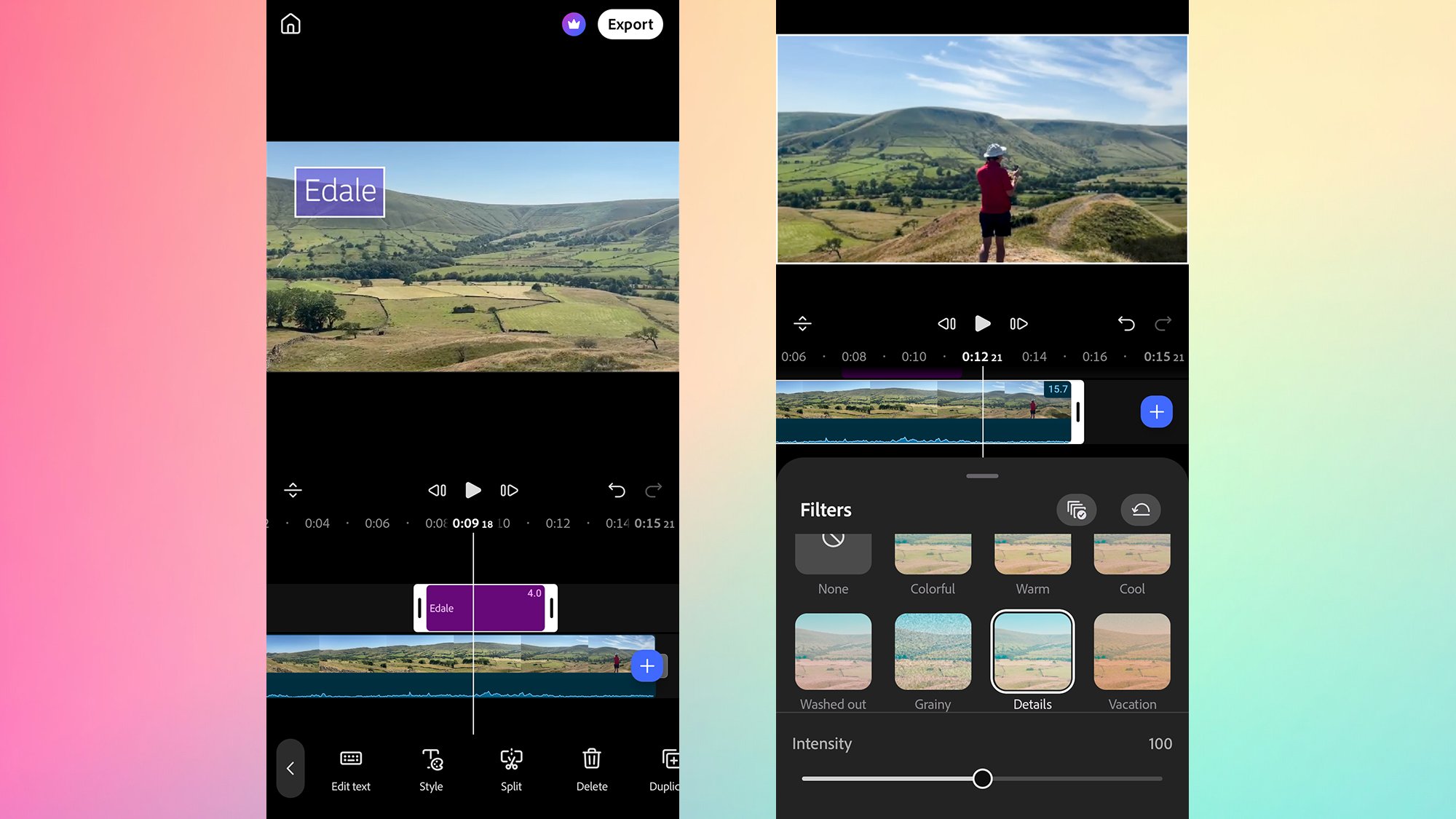
A screenshot of smartphone video editing options/filters.
A wealth of edits and filters can be applied from the timeline. David Nield

It’s easy enough to get started with Premiere: From the main screen, tap the + (plus) button to choose a saved video clip or image to use as the starting point for a new project, or select New blank project. Either will take you to the timeline view, and you can then use the + (plus) button on the timeline to load in more content.

The layout is going to be familiar if you’ve used a video editor before. Photos and videos make up the main timeline, and if you select them, you get handles around them—use these handles to shorten or lengthen the clips. Select a video on the timeline, then tap Split to cut it in two at the current playhead position (that’s wherever the long vertical white line is in the timeline).

Your video project is previewed above the timeline, and you can use the playback controls to go backward and forward through it. The other options you’ll see on the toolbar include Audio (for dropping in a voiceover or some stock music), Text (for titles and overlays), and Generate (for producing generative AI content). You can also select Files to load local files (such as audio snippets) from your phone.

Select anything on the timeline to get more options for it. For a video clip, these will include Retime (for changing the speed of a clip or freezing it), Filters (for adjusting the look of a clip), Effects (tweaks like glows or shakes), and tools to mirror, flip, or duplicate whatever you’ve got selected. To change transitions, tap on the borders between scenes.

Then there are the generative AI tools, which you can get to by tapping on the Generate button underneath the timeline. This part of the app requires an Adobe account—the account itself is free, but you’ll be restricted in terms of your AI usage before you have to start paying for credits.

Working with templates
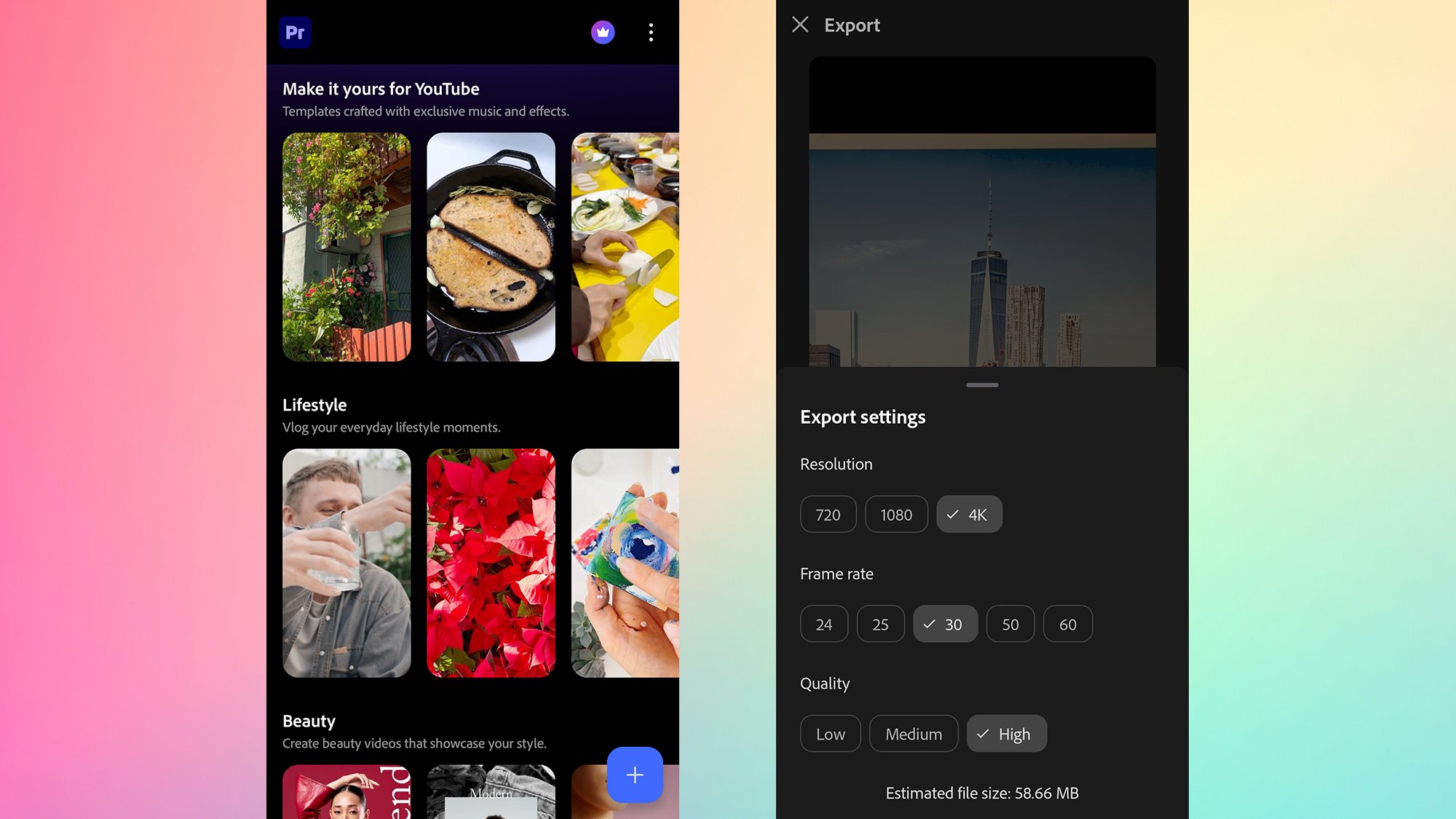
A screenshot of smartphone video editing options/templates.
Templates and export options are easy to access. David Nield

If you want a quicker, easier way to make content, there are plenty of ready-made templates to use. You’ll see these on the front screen, under headings like Lifestyle and Beauty. Tap on a template to view it, then choose Use this template to start making it your own.

Making it your own means picking images and videos from your phone’s library to add to the template you just viewed. As you make your selections, you’ll see the template slots fill up underneath (you don’t have to use all of them)—when you’re done, choose Next to see the finished product.

This will have the same transitions, timings, titles, and audio as your template, and if you’re happy with that, then tap Export to send the video somewhere else. There are some basic editing tools here as well: Select one of the images or videos you’ve dropped in, and you can trim them or replace them with the buttons at the bottom.

To customize the clip even more, choose Full editor to return to the fully featured interface we looked at above, complete with filters, effects, and everything else. Note that once you’ve converted your template-based video to work with the full timeline interface, you can’t go back into template mode with the same project.

It’s an app that works well for quick video creations and more detailed projects you want to do on your phone, and you’ll also get numerous settings (resolution, frame rate, quality) when it’s time to export your work. If you do sign up for an Adobe account and pay for the Creative Cloud suite, you can easily sync your projects with Premiere on the desktop.

The post How to turn your smartphone into a mobile video editing suite appeared first on Popular Science.

  •  

Gemini agora permite publicar miniaplicativos direto no Google Sites

O Google anunciou uma nova integração que permite transformar aplicativos criados pelo Gemini em sites disponíveis na internet. Com a novidade, divulgada na segunda-feira (19), os usuários podem exportar projetos interativos diretamente para o Google Sites, sem precisar copiar códigos ou reconstruir as ferramentas.

O recurso funciona com os miniaplicativos desenvolvidos no Canvas, ambiente do Gemini que permite criar programas utilizando comandos de texto, mesmo sem conhecimentos de programação.

Entre as possibilidades estão calculadoras, questionários e painéis interativos. Depois de criar uma dessas ferramentas, o usuário pode enviá-la ao Google Sites e disponibilizá-la para outras pessoas por meio de um endereço na internet.

A integração elimina etapas que anteriormente exigiam copiar o código do projeto e inseri-lo manualmente em outro serviço.

Como publicar um aplicativo do Gemini no Google Sites?

O processo começa no próprio Gemini, onde o usuário pode solicitar a criação de um aplicativo por meio do Canvas.

Por exemplo, é possível pedir à inteligência artificial (IA) para desenvolver uma calculadora de despesas, um questionário para estudantes ou um painel para acompanhar resultados de uma equipe.

Com o projeto pronto, basta seguir estas etapas:

  1. Acesse o Gemini e abra o aplicativo criado no Canvas;

  2. Clique na opção Exportar e selecione Google Sites;

  3. Aguarde a abertura do projeto em um novo rascunho privado no Google Sites;

  4. Faça os ajustes necessários e selecione Publicar para disponibilizar a página.

O aplicativo mantém suas funcionalidades interativas após a exportação. No Google Sites, também é possível acrescentar textos, imagens e outros elementos antes de publicar o projeto.

A publicação não acontece automaticamente. O Google cria inicialmente um rascunho privado, permitindo que o responsável revise o conteúdo e defina quem poderá acessar a página.

Em um exemplo apresentado pela empresa, um painel de desempenho desenvolvido no Gemini foi transferido para o Google Sites com gráficos, indicadores e informações interativas.

A novidade também pode ser utilizada por professores que desejam compartilhar questionários com estudantes ou por equipes que precisam disponibilizar ferramentas internas.

Google Gemini

Quem pode usar a novidade?

Segundo o Google, a integração já está disponível nas versões web, Android e iOS do Gemini.

O recurso contempla três categorias de usuários:

  • Pessoas com contas pessoais do Google e acesso ao Gemini;

  • Clientes do Google Workspace;

  • Assinantes do Google Workspace Individual.

A empresa não anunciou a necessidade de uma assinatura paga específica para utilizar a exportação. Dessa forma, usuários de contas pessoais elegíveis também podem acessar a ferramenta.

Entretanto, é necessário ter permissão para criar e editar páginas no Google Sites.

Em contas corporativas e educacionais, os administradores podem restringir esse acesso. Os aplicativos exportados continuam sujeitos às políticas de segurança e compartilhamento já estabelecidas para o Google Sites e o Google Drive.

A novidade amplia as possibilidades do Canvas, lançado em março de 2025. Inicialmente voltado à edição de documentos e códigos, o ambiente passou a permitir a criação de aplicativos interativos utilizando linguagem natural.

Com a integração ao Google Sites, esses projetos podem ser disponibilizados em páginas independentes da conversa original do Gemini, facilitando o acesso por pessoas que não participaram de sua criação.

Veja também: Por que o Google está cortando acesso dos assinantes básicos aos seus modelos de IA?

{{WHATSAPP_CHANNEL}}

  •  

AWS Largely Sold Out Of Capacity Into 2028, Jassy Says

Amazon Web Services capacity is mostly booked up through at least next year, Amazon CEO Andy Jassy said on an Andreessen Horowitz podcast released on Friday.

“‘26 is obviously at this point sold out. [2027] is largely sold out. We always leave a certain amount for on demand and our inference ...

  •  

Instacart Is Exploring a Sale

Instacart is in talks to sell itself in a transaction that would cap the grocery delivery app’s 14-year run as a standalone company.

Currently valued at $12 billion, Instacart has been working with an investment bank to weigh its options and held at least preliminary conversations with DoorDash and Uber, according to people familiar with the matter, though talks with Uber are not ongoing, according to a person close to Uber. The potential buyer would acquire one of Silicon Valley’s best known consumer companies, which became a lifeline for many Americans during the Covid-19 lockdown.

  •  

Promoções na App Store: Control Ultimate Edition, LEGO Bricktales, iFlipClock Pro: Desk Clock e mais!

Fechando a semana neste dia de lançamento do iPhone Duo, economize com a nossa seleção de promoções na App Store!

Control Ultimate Edition, lançado nesse ano para iOS, entrega uma experiência interessante ao levar um dos jogos de destaque da nova geração para dispositivos móveis.

Na pele de Jesse Faden, você explorará a enigmática “Antiga Casa”, uma sede governamental repleta de fenômenos sobrenaturais, ambientes mutáveis e segredos intrigantes — em uma mistura de mistério, ficção científica e elementos paranormais.

O destaque fica pela jogabilidade dinâmica. Os combates combinam armas de fogo com poderes telecinéticos (incluindo lançar objetos e erguer escudos) na busca do domínio do campo de batalha.

Confira um vídeo:

Aproveite a oferta e boa diversão!


Abaixo outros jogos/apps que, juntos, somam mais de R$140 em descontos:

Jogos

Jogo da franquia LEGO.

Puzzles.

Jogo de estratégia.

Quebra-cabeça.

Aplicativos

Relógio de mesa.

Criação musical.


Aproveite as ofertas e tenha um excelente final de semana! Lembrando que elas são sempre por tempo limitado, então é bom correr. 🏎️

  •  
❌