The PLOS One editors have issued an expression of concern for a 2024 case study concerning the digital economy, innovation factor allocation and industrial structure transformation in China’s Yangtze River Delta city cluster. The notice, published on October 21, 2026, states that the article was identified as one of a series of submissions for which the journal has concerns about the integrity or reliability of the peer-review process. Readers are advised to interpret the original study with this issue in mind.
The notice does not report a new scientific finding, identify an error in the paper or evaluate the study’s scientific validity. According to the editors, PLOS did not assess the article’s integrity or scientific validity when following up on the matter. The expression of concern therefore records a concern about the circumstances surrounding peer review rather than announcing that the study’s data, methods or conclusions have been disproved. The editors also state that they have no concerns regarding the authors’ conduct during the peer-review process.
The affected article was published in PLOS One in 2024 under the title “Digital economy, innovation factor allocation and industrial structure transformation—A case study of the Yangtze River Delta city cluster in China.” The supplied notice does not provide the study’s findings, population details, analytical methods, model estimates, uncertainty measures or specific mechanisms linking the subjects named in the title. As a result, the notice does not support conclusions about the relationship between digital-economy development, innovation factors and industrial structure in the region, nor does it establish whether any reported association or causal effect is reliable.
For the wider research record, the immediate effect is that the 2024 article is accompanied by an editorial notice questioning the integrity or reliability of its peer-review process. The notice does not provide details about the submissions or explain the specific basis for the journal’s concerns. It also does not announce a correction, replacement analysis or revised conclusion. The central status of the paper’s scientific validity remains unevaluated in the supplied material, while the issue is sufficiently significant for PLOS One to advise readers to consider it when interpreting the study.
Subject of Research: A PLOS One expression of concern concerning peer-review reliability in a Yangtze River Delta regional-economy case study.
Article Title: Expression of Concern: Digital economy, innovation factor allocation and industrial structure transformation—A case study of the Yangtze River Delta city cluster in China
Article References: The PLOS One Editors (2026). Expression of Concern: Digital economy, innovation factor allocation and industrial structure transformation—A case study of the Yangtze River Delta city cluster in China. PLOS One, 21(10), e0360867. https://doi.org/10.1371/journal.pone.0360867
Keywords: PLOS One, expression of concern, peer review, research integrity, digital economy, innovation factors, industrial structure, Yangtze River Delta, China, Expression, Concern, Digital
iPhone Preview brings everyday PDF tasks into one built-in app, from rearranging pages to preparing a smaller attachment. Introduced with iOS 26, it remains available in iOS 27, whose user guide provides the instructions used here.
Apple’s Preview app can open PDFs directly, reorganize their pages, rotate or crop individual sheets, delete unwanted pages, insert new ones, complete forms, add signatures, protect documents with passwords and export smaller copies for sharing.
It can also scan paper documents directly into a PDF and combine multiple pages into one file.
That makes Preview surprisingly capable for common workflows such as signing a contract, cleaning up a scanned document, reducing an attachment before emailing it or rearranging pages in a report.
Start with the task your document requires. Rearranging pages, adding a signature and preparing an attachment are different from rewriting an existing paragraph or meeting a publisher’s production requirements. Preview’s documented tools cover many routine changes, while more specialized work may require a separate editor.
Image Credit: AppleMagazine
iPhone Preview Lets You Reorder, Delete and Crop PDF Pages
Page management is particularly useful for scanned documents. A report may contain a sideways sheet, an attachment in the wrong position or an empty page that needs removing before the file is shared.
Open a document in Preview and tap the page count to reveal its thumbnail view.
From there, a page can be moved simply by touching and holding its thumbnail and dragging it above or below another page.
That makes fixing a scanned contract or report straightforward when pages were captured in the wrong order.
To reorganize a document:
Preview > open PDF > tap page count > touch and hold a page thumbnail > drag it into position
The same thumbnail menu can delete a page entirely.
Touch and hold the unwanted thumbnail, then choose Delete Page.
Preview can also insert material into an existing document. The thumbnail menu offers options to add a blank page, import a PDF or image from Files, or scan additional paper pages with the iPhone camera.
That means a form missing one attachment can be repaired without recreating the complete PDF.
Rotation is equally direct.
Open the relevant page, tap the More button and choose Rotate Left or Rotate Right.
Cropping works on a page-by-page basis:
Preview > open PDF > select page > Crop > adjust the blue handles > Crop
This is particularly useful for scanned pages with oversized borders, desk surfaces or other material around the document.
Apple also provides Undo through the More menu, making these edits less intimidating when working on an original file. For documents that cannot easily be replaced, creating a duplicate first remains the safer approach.
Image Credit: AppleMagazine
Fill Forms, Add Signatures and Lock the Finished PDF
Preview also consolidates several document tasks that iPhone users may already recognize from Markup.
Fillable PDF forms can be completed directly inside the app. Text fields, checkboxes and other supported form elements can be selected and edited without converting the file into another format.
Signatures use Apple’s familiar Markup system.
Open the document’s signature controls and choose Add Signature. When using Markup, tap the Add (+) button first, then select Add Signature. Choose a saved signature or draw a new one with your finger; rotating the iPhone gives you more room.
A saved signature can then be positioned and resized on the document.
For recurring paperwork, that makes Preview useful for forms that arrive through Mail or Files and need to be returned quickly.
Preview > open PDF > Actions menu beside filename > Lock
Enter the same password in the Password and Verify fields, then confirm the change.
Apple automatically enables the password requirement when the file is locked.
This protection prevents someone without the password from opening the PDF normally and helps protect completed work from unauthorized access.
There is an important practical step before doing this: duplicate the document if you want to preserve an unprotected copy.
Preview > Actions menu > Duplicate
A password-protected PDF is only useful if the password itself can be recovered later. Losing it can make the document inaccessible, so the credential should be stored somewhere secure.
Preview Can Compress a PDF Before You Send It
Large PDFs are another problem Preview addresses without requiring a separate compression website.
Open the document, tap the Actions menu beside its filename and choose Export.
When PDF is selected as the output format, iOS 27 offers several options that can reduce file size.
Optimize Images for Screen lowers image resolution for documents intended primarily for display rather than high-quality printing.
Save Images as JPEG can reduce the size of embedded images further by using JPEG compression.
Two other export options serve different purposes. Create Linearized PDF optimizes a document for faster web loading, while Embed Text applies optical character recognition, or OCR, to make image-based content searchable.
Choose those options for loading behavior or searchability, rather than assuming they will produce the smallest attachment. For file-size reduction, the image optimization settings are the relevant controls.
The practical workflow for a smaller email attachment is:
Preview > open PDF > Actions menu > Export > PDF > Optimize Images for Screen > Save
Adding Save Images as JPEG can shrink image-heavy files further when maximum image fidelity is unnecessary.
These image-reduction options can sacrifice detail. Lowering resolution or using JPEG compression may affect small text, fine lines and photographs, so compare the exported copy with the original before sending it.
A document containing mostly text may shrink only modestly. A scan filled with high-resolution photographs can show a much larger reduction.
Preview also exports files into formats including HEIC, JPEG, PNG and TIFF when a PDF needs to become an image instead.
When exporting a PDF to an image format, resolution can be selected manually, giving users additional control over the balance between detail and file size.
Image Credit: AppleMagazine
Where Preview Still Falls Short of Adobe Acrobat
Reopen the exported file before sending it. Check the page order, orientation, completed fields and signature placement. Zoom in on small text and diagrams, especially if you reduced image resolution. The useful result is a document that remains readable and complete, not simply the smallest file you can create.
Keep the original under a different filename so you can produce another version if needed. A copy prepared for email may not be the best version for printing or archiving. Names such as “Application — Original” and “Application — Email Copy” help distinguish the files when they appear together in Recents.
If the task involves changing existing document text or satisfying a specific submission requirement, confirm that your chosen tool supports it before proceeding. For routine page organization, form completion and sharing, a checked Preview export may be all you need.
I’m obsessed with sleep data, but I don’t love wearing a smartwatch to bed. Can the Hatch Sleep Clock give me the best of both worlds at an affordable price?
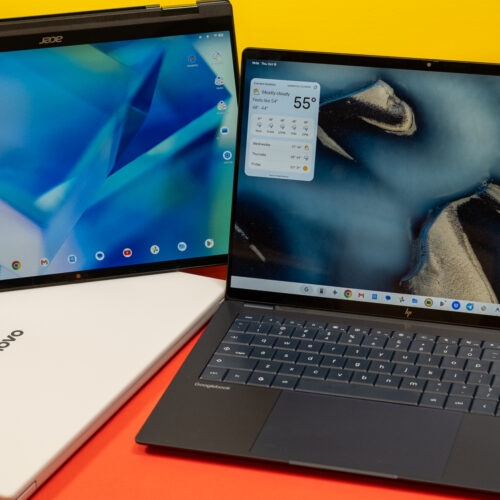
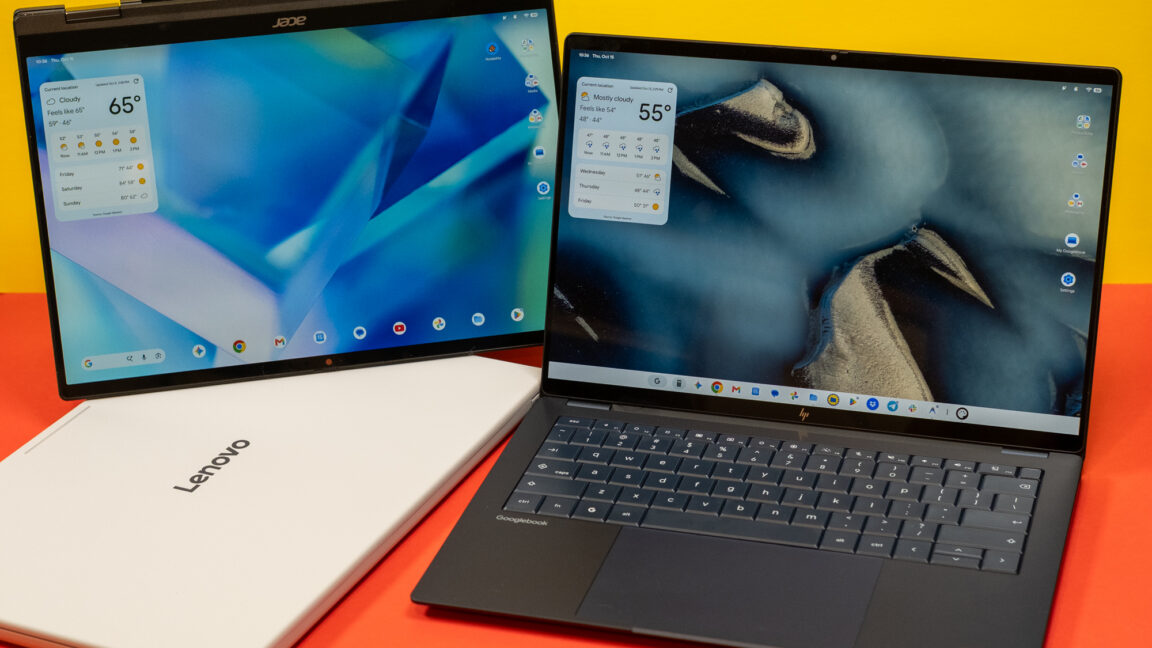
Android was designed for phones, but that hasn't stopped Google from trying to adapt the OS and its apps to larger machines over the years. Googlebooks are just the latest attempt after tablets, Chromebooks, and foldables induced little change in how people interact with Android software. These new Android-powered laptops are designed to pick up where the web-focused ChromeOS left off, offering premium hardware and native support for Android apps.
Google sees Googlebooks as an alternative to Windows and macOS, but these platforms are entrenched with decades of software and UI conventions that keep users locked in. Googlebooks have to offer something very special to steal users away from either of the dominant operating systems.
For devoted Android phone users, there are some cool things in Googlebook OS, but the Android roots of these machines are impossible to miss. Sometimes it feels like using a Chromebook, and sometimes it feels like using a giant phone. It almost never feels like using a premium laptop, and that's the problem.
Though allegedly focused on benefiting users (through better safety and compliance), App Store review in its current form mostly frustrates the people it claims to protect.
[…]
Those are all scammy apps that got through. Apple’s review capacity isn’t infinite. Every hour a reviewer spends poring over a bug-fix update to an app that’s been in the store for years is an hour not spent catching the fake LastPass app.
[…]
And the review process is fundamentally flawed anyway: It works best with developers who are trying to do the right thing. Plenty of apps pull their content, features, and behavior from servers their developers control. Feature flags, remote configuration, and web views mean an app can behave differently the day after approval than it did the day of vetting. A determined bad actor can get past App Review. An honest developer just waits in a slow, nebulous line.
[…]
At WWDC 2020, the company announced that bug fixes for apps already in the App Store would no longer be held up over guideline violations (except for legal issues); developers could address those problems in a subsequent update instead. That’s a good policy! Based on developer complaints I’ve seen, Apple hasn’t honored that agreement.
2024’s M4 Mac mini was a revelation. It packed Apple silicon power into a shockingly compact space, breathing new life into Apple’s all-time utility Mac and (eventually) making it into a go-to device for home AI and even back-end podcast transcription.
Two years later, the Mac mini gets its first update since it became such a popular purchase. It’s a bit surprising: while the high-end model has updated to the familiar M5 Pro chip found in the MacBook Pro, the lower-end model has skipped right over the M5 and become the first Mac to be released using the next-generation 2-nanometer M6 chip.
It has also, unfortunately, seen a price increase. The Mac mini famously debuted in 2005 at $499 ($855 in today’s dollars), and the M4 model was introduced at $599 in 2024 dollars. Unfortunately, after a midstream price increase and the release of this new version, the starting price has been boosted to $899, a 50% increase over that relatively recent base price.
I get it. Memory and processors are skyrocketing in price due to the AI gold rush, on top of inflation. But the fact remains that at $599, the Mac mini was about as close to an impulse buy as a Mac desktop could get. At $899, it’s crossed an invisible threshold. I can understand it, but I don’t have to like it.
Previously, on Mac mini…
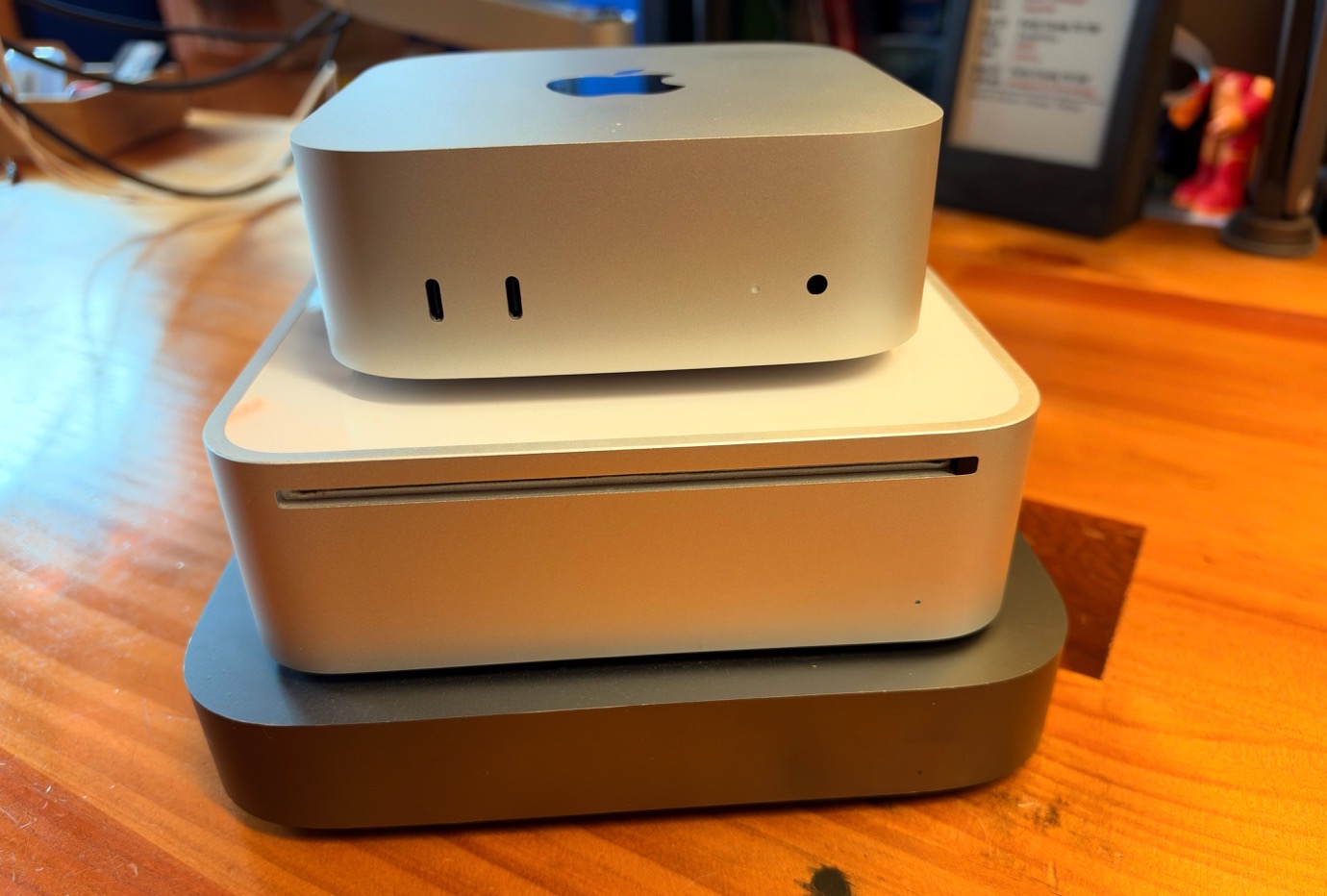
The current Mac mini design is far smaller than either of the model’s two previous designs.
On the outside, this Mac mini is identical to the previous model. It’s still a 5-inch square that’s only two inches high and weighs only 1.5 pounds, a shock of a size if you’re used to the Mac mini’s pre-2024 silhouette. It’s got two USB-C ports on the front and three Thunderbolt ports on the back. (It’s Thunderbolt 4 if you’ve got the M6 model, Thunderbolt 5 for the M5 Pro.)
We’ll get to the chip momentarily, but Apple has made internal upgrades on some other Mac mini parts. Wi-Fi and Ethernet were left untouched in the 2024 Mac mini update, but not this year—the M6/M5 Pro models support Wi-Fi 7 and Bluetooth 6. Both models also come standard with 2.5Gb Ethernet, with 10Gb Ethernet as a configure-to-order option.
And now, the star of the show
The Mac mini vaulted right over the base M5 processor entirely, preventing me from making more references to that classic “Star Trek” episode where a computer tries to take Captain Kirk’s job because some A.I. genius has conned people in positions of authority into thinking that’s a good idea. (Thank goodness I have no more need to reference such outdated, irrelevant themes.)
As a result, the release of this Mac mini also marks the debut of the M6, an entirely new generation of Apple silicon that will undoubtedly populate numerous Macs and iPads over the next year. That makes it worth peeking into the details of how the M6 is structured and how it performs, even if you’re not currently in the market for a new tiny Mac.
Since the beginning, Apple’s M-series processors have included two different sets of CPU cores designed with different characteristics. The performance cores were designed to run at high speed and rip through tasks, albeit at the cost of greater power usage. (Apple would tell you that even its performance cores are also optimized to use power intelligently whenever possible, of course.) The company’s efficiency cores, on the other hand, were designed to perform lower priority low-level tasks—and computers have a lot of those!—while excelling at energy savings.
While power efficiency isn’t as important for a Mac plugged into an outlet, it’s vitally important to laptops, which make up the bulk of Apple’s Mac sales. And of course, power efficiency can also reduce thermal issues that require venting, and reduce the amount of electricity you’re paying for.
Last year, though, Apple introduced a new core type, the “super core,” with the M5. What differentiates a super core from a performance core? It comes down to the different ways computer programs do work. Software splits up tasks into individual components, or threads, and passes those to the system to send to the processor. Some software is very good at breaking up work into tiny individual components, which is good, because those tasks can be distributed across many CPU cores, where work can proceed in parallel. But some tasks aren’t broken up so readily—whether it’s because the software hasn’t been optimized, or because the task itself really is just a single big chunk that must be processed at once.
According to Apple, super cores are focused on chewing through those single-threaded tasks at maximum performance. This differentiates them from performance cores, which Apple says are tuned to perform better at complex, multi-threaded jobs. Meanwhile, those efficiency cores are percolating quietly in the background, taking care of lesser tasks that don’t require the muscle that the other two core types deliver.
In the M6, for the first time, Apple has decided to apply all three different core types to a single design: It’s got six efficiency cores, four performance cores, and two super cores. Something for every kind of task, ideally, leading to the most optimal mix of power and efficiency.
In addition, the M6 has 12 GPU cores, which pick up the neural accelerators Apple added in the M5 generation (and therefore never before seen in the Mac mini), to assist in AI jobs that run on the chip’s graphics hardware. There’s also a new dual 16-core Neural Engine, so Apple’s doubling its own home-made neural processors, all in the goal of making the M6 more impressive as a processor for AI jobs.
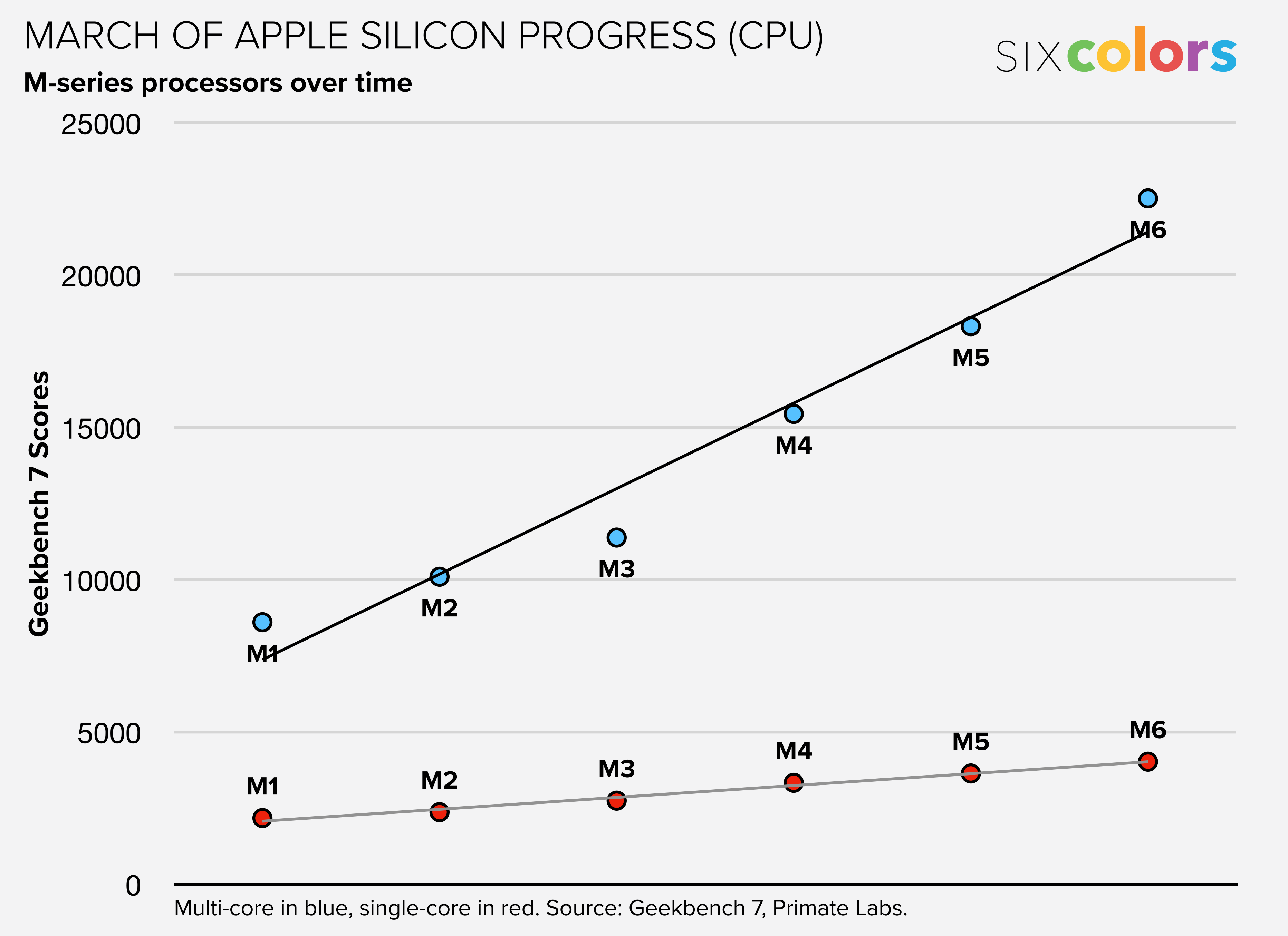
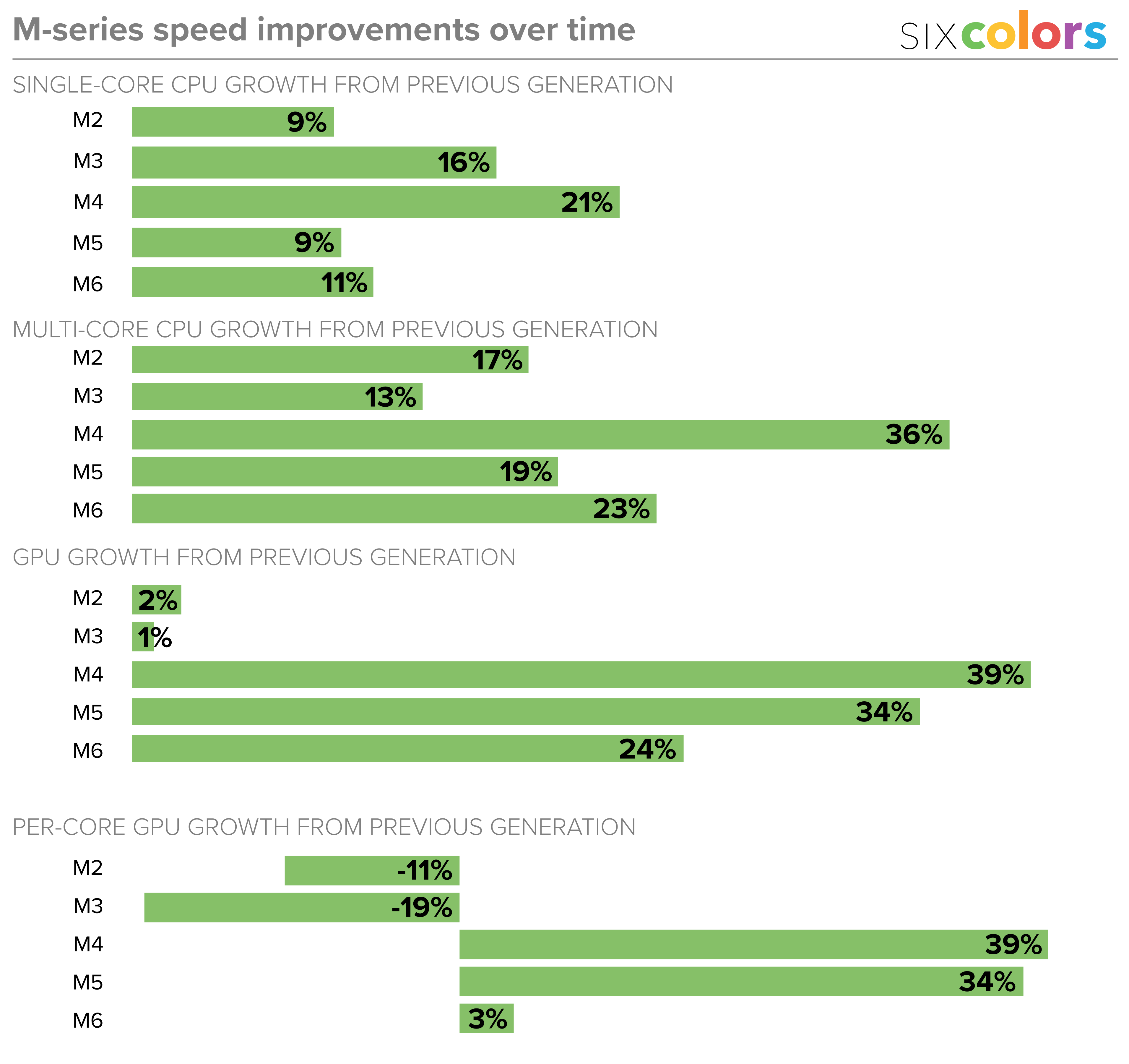
With these changes, the M6 ran 11% faster than the M5 in single-core CPU performance, according to my tests. That’s slightly below average for an M-series generational update, though of course if you’re specifically upgrading from any previous Mac mini, you’ll see much greater performance boosts.
In multi-core testing, the M6 performed 23% faster than the M5 generation, very slightly above average for an Apple silicon generation change.
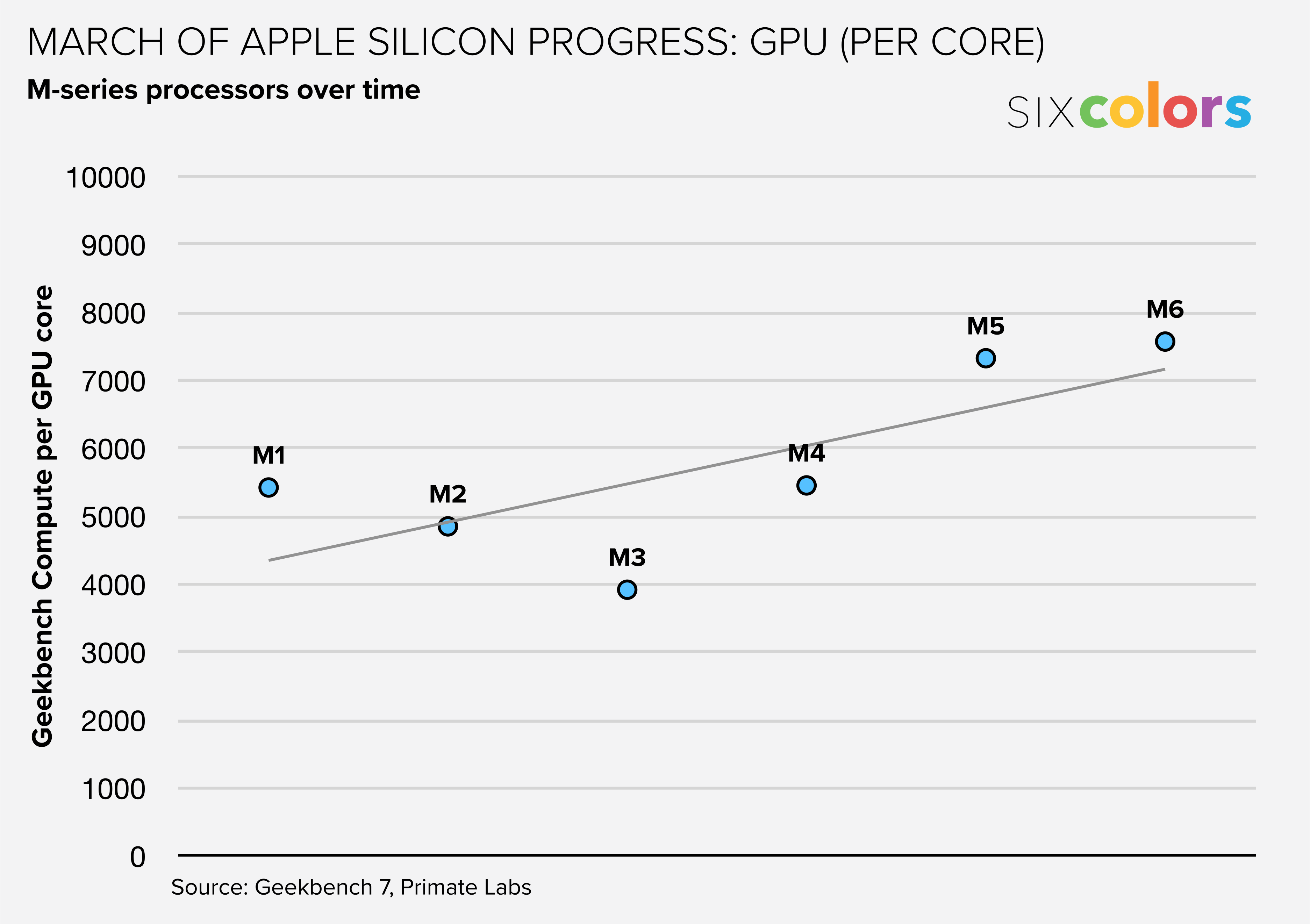
And when it comes to GPU scores, they’re up 24% from the M5 generation—again, a very slightly above average per-generation improvement. Of course, this improvement is largely built on the back of Apple’s choice to include 12 GPU cores in the M6, up from 10 in the M5. If you divide the scores per GPU core, it suggests that Apple (quite understandably) took this generation off from massively improving its GPU core design, given the major steps forward it took in the previous two generations.
This is now part of the Apple silicon playbook. If you see Apple add GPU cores in a processor generation, it’s most likely doing so because the actual GPU cores aren’t particularly improved, so to make the chip faster, it piles in more. Increasing the GPU count by 20 percent will generally improve your GPU performance by… 20 percent. The strategy allows Apple to crow about improved GPU performance even in a year where its attention is turned elsewhere.
What’s harder to tease out in any sort of benchmark test is how the chip will perform day to day, with a varied workload. Maxing out one CPU core or all the CPU cores provides a clean answer; Apple’s three-core-type design likely works more subtly in practice. My guess is that the mix of CPU core types will result in a better balance of power and efficiency, which is essentially Apple’s holy grail when it comes to processor design. Apple wants its chips to be able to rip through a task when you need it to, but run effortlessly (and in a low-power state) the rest of the time. That’s much more difficult to measure, however.
The Apple silicon Mac era has now lasted so long that we can begin to see patterns and judge how individual generations fit into the story. The M6 processor appears to be an average improvement, so close to dead-on average that it feels like it was made specifically to meet an internal metric for improved CPU and GPU performance.
These results are colored, at least a bit, by Bloomberg’s report that Apple has decided not to ship high-end M6 processors at all, and jump directly to a new M7 generation that is better suited to “meet growing demand for on-device AI capabilities and more graphics-intensive software.” There’s nothing wrong with the M6 at all, but if Apple’s next generation chip design includes some major AI and graphics performance leaps, I can see why the company might want to prioritize that release rather than rolling out an entire chip line-up based on an adequate but uninspiring creep forward in performance.
Small is beautiful
Different footprints over the years.
Back to the Mac mini. Since Dan Moren reviewed the last two releases of this product, I haven’t gotten a chance to spend much time with it, or to write about it in detail.
Let me be clear: I love it.
I’ve been using Mac minis since the very beginning. I’ve had a Mac mini in my home as a server for most of its existence as a product.
But thanks to Apple silicon, it has gotten a new lease on life—and a new design. The fact that the Mac mini became a hot product in the last year just warms my heart. It’s always been Apple’s most versatile Mac, capable of performing whatever Mac jobs you want to throw at it. The smaller size just makes it that much more delightful. It’s a shame about the price, but you could say that about most tech prices these days.
Still, what a computer! Even the performance of the base M6 model is more than enough for most computing tasks that regular people will ever need. If you invested in an external display a few years ago, most likely that display is still going strong—and attaching a new Mac mini to it will just refresh everything. If you want a Mac to live in a closet and serve files and web pages and run AI agents or whatever, it’ll be great for that too.
The Mac mini has come into its own at last, and I’m glad for that. Perhaps in the next few years, prices will settle down and Apple will allow it to cross back over into territory where it’s more of an impulse buy, a “why wouldn’t you upgrade?” sort of proposition. Right now, make no mistake, it’s still a great option if there’s a tiny space for it in your life—but you’ll need to actually do the work to calculate the value it will provide you before making that decision.
Se você rolou pelos feeds das principais redes sociais na manhã de hoje, percebeu que já começaram a pintar os primeiros reviews do iPhone Duo, cujo lançamento ocorrerá nesta sexta-feira (23/10).
Horas antes de o embargo cair, contudo, uma série de vídeos de unboxing e hands-on começaram a pipocar internet afora, nos dando uma chance de conferir o mais novo smartphone da Apple um pouco mais de perto.
Um dos veículos a divulgar vídeos do iPhone Duo foi o canal do YouTube Kingmi Mobile, que publicou não só um, mas dois vídeos de unboxing — um para o modelo na cor branco-estrela (star white) e outro para a versão na cor céu noturno (night sky):
Em um terceiro vídeo, o canal mostra elementos como o vinco e a câmera interna sob a tela do iPhone Duo com mais detalhes:
O dobrável também aparece em outros vídeos publicados em redes sociais como o X:
Como dito, o embargo estabelecido pela Apple para a publicação de vídeos a respeito do iPhone Duo caiu às 9h da manhã, e as primeiras impressões acerca do dobrável já estão pipocando na internet.
Entre os criadores de conteúdo que puderam colocar as mãos no dobrável antecipadamente, estão os YouTubers Marques “MKBHD” Brownlee e Matti Haapoja, bem como a jornalista Joanna Stern (ex-Wall Street Journal) e o site The Verge:
Como era de se esperar em se tratando de um smartphone de primeira geração, as opiniões sobre o aparelho até agora têm sido um tanto mistas, embora elas tendam a pender para um lado mais favorável — o que indica que a Apple acertou na execução, ainda que haja espaço para melhorias.
Um dos aspectos mais elogiados do iPhone Duo até agora é, sem dúvida, a sua tela interna com o acabamento nano-texture, que torna a utilização do aparelho em ambientes externos muito mais confortável se comparado a outros dobráveis no mercado, os quais costumam vir com displays mais reflexivos. Essa vantagem, porém, tem como custo um pouco menos de definição na imagem, mas nada que atrapalhe a experiência.
Esse acabamento também ajuda a esconder o vinco, que ainda é perceptível a olho nu, mas raramente atrapalha o usuário ao realizar uma tarefa — inclusive ao digitar, já que o iOS divide o teclado em dois para afastar as teclas do vinco caso o usuário resolva escrever algo com o dobrável entreaberto.
A área maior da tela interna também abre espaço para outro recurso muito elogiado do iPhone Duo: o modo de tela dividida (Split View), que expande consideravelmente as possibilidades em matéria de multitarefa. A impossibilidade de abrir um terceiro app lado a lado, no entanto, tem sido citada como um ponto negativo do software.
O formato de passaporte do aparelho também contribui para essa experiência, além de facilitar o consumo de mídias como vídeos e filmes. Ele, no entanto, pode tornar difícil alcançar certos elementos da interface na tela externa com apenas uma mão, além de favorecer o uso com a mão direita no modo fechado.
Em termos de câmera, as opiniões têm sido bastante mornas — algo que era esperado, considerando o espaço limitado para as lentes. Sem controles profissionais, a câmera principal do iPhone Duo lembra bastante a única lente do iPhone 17e, que, apesar de não ser um smartphone topo-de-linha, já é capaz de capturar imagens muito competentes.
Talvez a área mais controversa do iPhone Duo seja o seu software, mas não por culpa da Apple, que parece ter feito um ótimo trabalho para tornar tudo suave e extremamente intuitivo, sendo a já clássica animação de abertura/fechamento do aparelho um símbolo disso. Apps de terceiros, no entanto, ainda sofrem com os vários formatos de tela do aparelho, o que tem resultado, na maioria dos casos, em bordas pretas e imagens esticadas — problemas que provavelmente serão consertados com o tempo, via atualizações de software.
Outro aspecto do iPhone Duo que virou alvo de muita especulação nos últimos meses foi a sua dobradiça, que parece já ter assumido o seu posto como uma das mais robustas do mercado. Stern, por exemplo, colocou o aparelho para abrir e fechar mais de 32.000 vezes com a ajuda de um robô; mesmo assim, ela não conseguiu notar uma diferença significativa na resistência da dobradiça.
Em pré-venda desde a última sexta-feira (16/10), o iPhone Duo já aparece com prazos de entrega extremamente elásticos em vários países, incluindo o Brasil, como comentamos aqui.
Vendido por US$2.000 nos Estados Unidos, o dobrável sai pela bagatela de R$22.000 no mercado nacional — isso em sua versão de entrada, com 256GB de capacidade.
iPhone Duo
Cores: branco-estrela ou céu noturno Armazenamento: 256GB, 512GB, 1TB ou 2TB
NOTA DE TRANSPARÊNCIA: O MacMagazine recebe uma pequena comissão sobre vendas concluídas por meio de links deste post, mas você, como consumidor, não paga nada a mais pelos produtos/serviços ao usar os nossos links de afiliado.

 Login
Login