Apple says Siri Recap can listen for conversations on Apple Watch, process the audio, and create a short high-level summary without keeping an audio recording for replay. The feature is opt-in, and users can control it by time, location, or a manual switch. Apple’s Audio Intelligence support document says raw audio is not recorded or […]
If your iPhone is one of the 15 models on Apple’s Apple Intelligence device list, the cheapest way in costs nothing: iOS 27 arrives free on Monday, September 14. If it is not, the least expensive route Apple sells is the $699 iPhone 17e, and the same model was listed at $599 before September 9. […]
Apple has published no timeline for Siri AI in Hindi, and no timeline for Apple Intelligence in Hindi either. Hindi is not among the 16 languages Apple lists, and the one dated expansion Apple has announced covers French, Japanese, Korean, Portuguese and Spanish in October. That is the honest answer to a question a very […]
If you are planning to skip Monday and wait for iOS 27.1, understand what you are waiting for: Apple has not published an iOS 27.1, has not dated one, and has not published a single word about how iOS 27 itself will roll out beyond the date. iOS 27 arrives Monday, September 14 as a […]
The iPhone 15 Pro and iPhone 15 Pro Max are the oldest iPhones on Apple’s Apple Intelligence list, so on Monday, September 14 they get the full iOS 27 feature set as most people understand it: Siri AI in beta, Image Playground, the new Photos editing tools and Call Context. What they do not get […]
Apple Intelligence is the iOS 27 gate everybody knows about, and it is not the only one. Once you read the footnotes on Apple’s pages, iOS 27 splits the iPhone line into three tiers, then adds separate requirements for a home hub, particular AirPods, an Apple Watch Series 12 and, in one case, a specific […]
Durante a WWDC26, em junho, a Apple informou que alguns recursos de inteligência artificial baseados em servidor teriam limites diários — e, às vésperas do lançamento do iOS 27 e demais sistemas, a empresa tratou de confirmar isso.
A partir dos lançamentos de software de 2027, os usuários poderão experimentar a próxima geração da Apple Intelligence, com acesso aprimorado a recursos que dependem de modelos baseados em servidor.
Alguns recursos da Apple Intelligence dependem de modelos potentes baseados em servidor e têm limites de uso para garantir uma experiência confiável e de alta qualidade para todos.
Conforme detalhado pela empresa, esses recursos incluem:
Siri AI;
Ferramentas Inteligentes de edição de fotos, incluindo Limpar, Estender e Reenquadramento Espacial;
Image Playground;
Modelos AFM 3 Cloud e AFM 3 Cloud Pro em Atalhos;
Apps de desenvolvedores que usam os Modelos de Base da Apple no Private Cloud Compute.
Os limites não serão necessariamente iguais para todos os recursos; fatores como a complexidade da solicitação e a demanda do sistema influenciarão a definição de cada um. Caso o limite seja atingido, o recurso ficará indisponível por um período, sendo o acesso restabelecido posteriormente.
De acordo com os termos de uso específicos da Apple Intelligence, usos considerados excessivos, abusivos, automatizados, fraudulentos, ilegais ou desarrazoados também podem sofrer restrições, limitação de velocidade ou suspensão.
A Apple não explicou como a cobrança será feita nem como o acesso expandido variará entre os planos do iCloud+. Em relação aos resumos de vídeo do app Casa (Home), o artigo de suporte indica que o plano de 2TB cobrirá até uma câmera, enquanto o plano de 6TB abrangerá até duas câmeras e o plano de 12TB, até cinco câmeras.
Apple’s AirPods 5 bring Active Noise Cancellation to both models, improve water resistance to IP57, and add more AirPods Pro features, while the higher-end version offers longer battery life, wireless charging, and stem-based volume control at a lower price.
Em beta desde junho, os sistemas 27 reúnem uma série de novos recursos para a Apple Intelligence, além da nova Siri AI — vale lembrar, essas funcionalidades podem não ser compatíveis com todos os dispositivos em que os sistemas 27 estão disponíveis.
Em matéria de iPhone, um diferencial relevante para as gerações mais antigas é a implementação de um novo scheduler de CPU 1Central processing unit, ou unidade central de processamento. para gerenciar melhor as demandas de cargas de trabalho em iPhones a partir do 11, algo já visto anteriormente nos modelos mais recentes — além, claro, de melhorias mais amplas, como na velocidade de envio de arquivos no AirDrop.
No caso do macOS, o maior destaque — além da otimização de desempenho — é o fim do suporte aos Macs com processadores Intel.
NOTA DE TRANSPARÊNCIA: O MacMagazine recebe uma pequena comissão sobre vendas concluídas por meio de links deste post, mas você, como consumidor, não paga nada mais pelos produtos/serviços usando os nossos links de afiliado.
Notas de rodapé
1
Central processing unit, ou unidade central de processamento.
Rumors suggest that Apple is currently working on an upgraded version of its main smart speaker. According to recent reports, the tech company has started internal testing for a brand new full-sized HomePod that features built-in support for the newly announced Siri AI platform. While this sounds like a great update for smart home fans, […]
Apple on Monday released the eighth developer betas of macOS 27, iOS 27, iPadOS 27, tvOS 27, and watchOS 27, continuing the final stretch of testing before the software is expected to ship to the public in September.
The new builds arrive one week after the seventh developer betas, which went out on August 24. At this point in the cycle, Apple is typically focused on bug fixes, performance, and stability rather than large new user-facing features. Release candidates are widely expected after Apple’s September hardware event.
Apple also issued matching eighth betas for tvOS 27 and visionOS 27.
macOS 27 continues under the Golden Gate name. It is the first macOS release limited to Apple silicon Macs.
How to install
Registered developers can install the updates over the air:
• iPhone and iPad: Settings → General → Software Update → Beta Updates, then choose the iOS 27 or iPadOS 27 Developer Beta.
• Mac: System Settings → General → Software Update.
• Apple Watch: Use the Watch app on a paired iPhone. The watch should be on the charger, on Wi-Fi, and at least 50 percent charged.
Full restore images are also available from the Apple Developer site. Public beta testers usually receive corresponding public builds shortly after the developer drop.
What these releases are building toward
The “27” operating systems were first shown at WWDC 2026 on June 8, with developer beta 1 following the same day. Public betas began in mid-July. The official fall releases are expected alongside new iPhones and other hardware.
Headline features across the platforms include:
Siri AI. Apple’s rebuilt assistant is the centerpiece. It is designed as a more conversational chatbot with general world knowledge, personal context from apps such as Messages and Mail, and on-screen awareness. iOS 27 also adds a standalone Siri app for conversation history, systemwide Write with Siri, and Visual Intelligence relocated into the Camera app with a Siri mode. On Apple Watch, Siri AI requires a paired iPhone that supports Apple Intelligence (iPhone 15 Pro and later).
Apple Intelligence elsewhere. New AI features land in Photos, Safari, Shortcuts, Wallet, and Passwords. On the Mac, Spotlight and Shortcuts pick up deeper Siri AI integration, including natural-language shortcut creation.
Liquid Glass refinements. After last year’s more aggressive glass look, Apple has improved legibility and added a transparency slider so users can dial the effect from glassy to more opaque. macOS 27 also revisits window chrome, including traffic-light controls and more consistent corner radii.
Performance. Apple has emphasized faster app launches, quicker keyboard appearance, snappier AirDrop, better Wi-Fi/cellular handoff, and improvements that are noticeable even on older supported iPhones. watchOS 27 includes battery optimizations, an updated Find My experience with Precision Finding, Workout Buddy improvements that work without a nearby iPhone, and a Dynamic app grid with Siri suggestions.
Some capabilities remain limited by region or regulation. Earlier in the cycle, Siri AI features were reported as blocked for EU developers under Digital Markets Act rules, and certain Apple Intelligence features have been unavailable in China while Apple works through local requirements.
What to expect next
Ninth-week betas this late in the summer are often the last regular developer drops before release candidates. Those RCs frequently appear after Apple’s September event, when the company also tends to reveal any remaining watch faces, health features, or hardware-tied software that was held back from earlier betas.
The finished versions of iOS 27, iPadOS 27, macOS 27 Golden Gate, watchOS 27, tvOS 27, and visionOS 27 are still expected for the public this fall.
MacDailyNews Note: As always, beta software can be unstable. A backup is strongly recommended before installing.
Please help support MacDailyNews — and enjoy subscriber-only articles, comments, chat, and more — by subscribing to our Substack: macdailynews.substack.com. Thank you!
Apple’s next generation of Apple Intelligence and Siri are truly helpful AI that’s centered around you and your needs. Integrated into your apps, grounded in your context, and private at every step; coming later this year.
Apple’s long-awaited overhaul of its voice assistant, now branded Siri AI, is set to arrive this fall alongside iOS 27, iPadOS 27, macOS updates, and related system software. The upgraded assistant promises deeper personal context awareness, on-screen understanding, more natural conversations, and the ability to take actions across apps. But there’s a clear hardware cutoff: only devices that already support Apple Intelligence will receive the full experience at launch.
iPhone Models That Make the Cut
Siri AI requires an A17 Pro chip or newer (with sufficient RAM for on-device processing). Supported iPhones include:
• iPhone 17 Pro and Pro Max
• iPhone Air
• iPhone 17 and 17e
• iPhone 16 Pro and Pro Max
• iPhone 16, 16 Plus, and 16e
• iPhone 15 Pro and Pro Max
Older models, including the standard iPhone 15 and anything earlier, will get the broader iOS 27 update (interface changes, security fixes, and non-AI features), but miss out on the new Siri capabilities.
A subset of these devices — primarily the iPhone 17 Pro, Pro Max, and iPhone Air — will also unlock Apple’s most powerful on-device AI model. That unlocks extras such as more expressive customizable voices, improved speech recognition, and higher-accuracy dictation.
iPads, Macs, Watches, and Vision Pro
Compatibility extends across the rest of the ecosystem with similar requirements:iPad: iPad Pro (M1 chip and later), iPad Air (M1 and later), and iPad mini with the A17 Pro chip.
• Mac: All models with Apple silicon (M1 and later), including the MacBook Neo with its A18 Pro chip.
• Apple Watch (must be paired with a nearby supported iPhone): Series 9 and later, Ultra 2 and later, and SE (3rd generation).
• Apple Vision Pro: All models.
The highest-tier on-device model is further restricted on tablets and computers to those with newer chips (M4 or later on iPad, M3 or later on Mac) plus at least 12 GB of unified memory.
Timeline and Limitations
Developer betas began around the June 2026 WWDC announcements, with a public beta expected in the following months and a stable consumer release targeted for fall 2026 (September timeframe). Siri AI will initially roll out in English (with Spanish support also noted in some documentation), and regional restrictions apply: it will not launch at the outset on iOS or iPadOS in the European Union due to regulatory considerations around the Digital Markets Act, though macOS and visionOS users in the EU will be able to access it. Availability in China is also delayed pending regulatory clearance.
Those without supported hardware will keep the classic Siri experience for now while still receiving the rest of the 2026 software updates. Apple continues to emphasize on-device processing and Private Cloud Compute for privacy, so the hardware bar reflects the computational demands of the more capable models.
MacDailyNews Note: More info about Apple Intelligence and Siri here.
Please help support MacDailyNews — and enjoy subscriber-only articles, comments, chat, and more — by subscribing to our Substack: macdailynews.substack.com. Thank you!
Imagine slipping in a pair of AirPods that don’t just play your music or take your calls, they help you see the world. Not by recording it, but by understanding it. According to the latest rumors from reliable sources, Apple may be ready to deliver exactly that sooner than many expected.
Reports indicate Apple has been internally testing two versions of camera-equipped AirPods. One carries the codename B798, which has been on the radar for some time. The other, B790, appears newer and is advancing more quickly. References to the B790 model have already shown up in iOS 27 beta code, a strong signal that development is well underway, Bloomberg News‘ Mark Gurman reports.
This timeline points to a possible launch as early as this year. Apple often pairs new AirPods with its September iPhone event. Last year’s AirPods Pro 3 debuted alongside the iPhone 17 on September 9. A similar window this fall, potentially with the iPhone 18, would fit the pattern. And, given how little of 2026 remains, “soon” is a realistic possibility.
Rumors also suggest these advanced models could arrive under a name like AirPods Pro Ultra, positioning them as a premium, AI-focused offering above the standard lineup. Importantly, Apple is expected to continue selling conventional AirPods for those who simply want excellent audio.
What the Cameras Are Actually For
Forget the idea of Google Glass-style recording or constant content capture. The cameras in these AirPods are not designed to take photos or videos. Instead, they would analyze the wearer’s surroundings to power an onboard AI assistant—think an enhanced, more context-aware Siri. This approach aims to create a true wearable AI companion rather than a surveillance or creator tool.
Privacy remains a key consideration. A small LED indicator would light up when the cameras are active, similar to the approach used in smart glasses, giving nearby people a clear visual cue. This design choice reflects broader industry caution: Apple has reportedly considered delaying its own smart glasses amid backlash over privacy issues and misuse of devices like Meta’s Ray-Ban glasses.
Why This Matters
If these rumors hold, camera-equipped AirPods would mark a significant step in Apple’s wearable strategy. They would extend the company’s AI ambitions beyond phones and computers into everyday, always-on, wearable accessories that can interpret the environment in real time. For users, that could mean more natural, hands-free assistance — whether identifying objects, providing contextual help, or enhancing accessibility features — without the bulk or social friction of glasses.
Of course, these remain unconfirmed reports based on internal testing and code references. Apple has not officially announced any such product. Still, the combination of dual prototypes, software breadcrumbs, and an accelerating development path for the newer model makes this one of the more concrete AirPods rumors in recent memory.
As we head toward the traditional September reveal window, the prospect of AirPods that can “see” enough to assist—without turning every wearer into a walking camera—feels both futuristic and characteristically Apple: ambitious, privacy-conscious, and focused on making technology disappear into daily life. Whether they arrive this fall or a bit later, the era of AI-powered earbuds appears to be approaching fast.
MacDailyNews Take: We prefer the name “AirPods AI, but given the friction AI poses in some circle, “AirPods Ultra” may be the better marketing choice. Regardless, we’ll be first in line for these!
Please help support MacDailyNews — and enjoy subscriber-only articles, comments, chat, and more — by subscribing to our Substack: macdailynews.substack.com. Thank you!
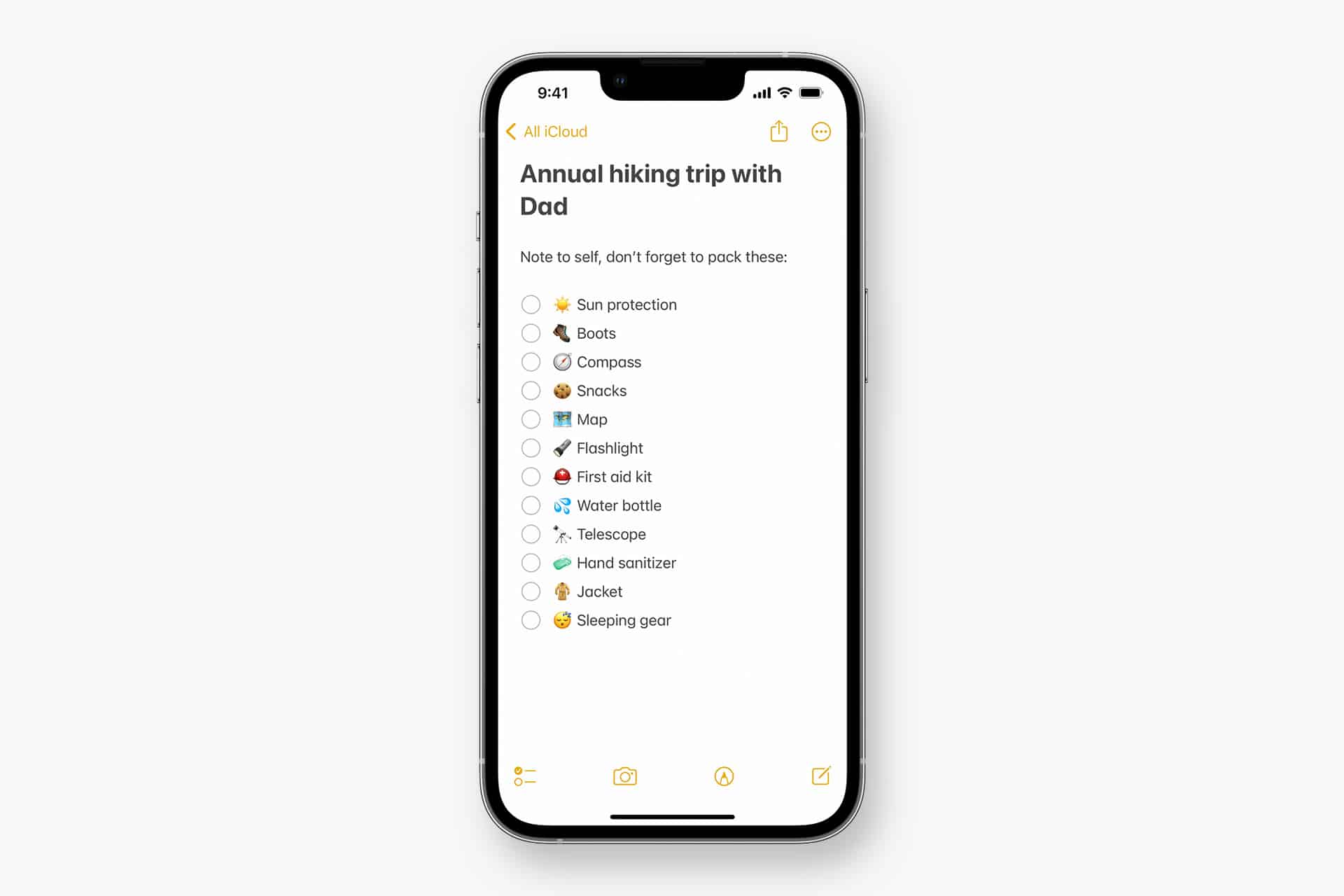
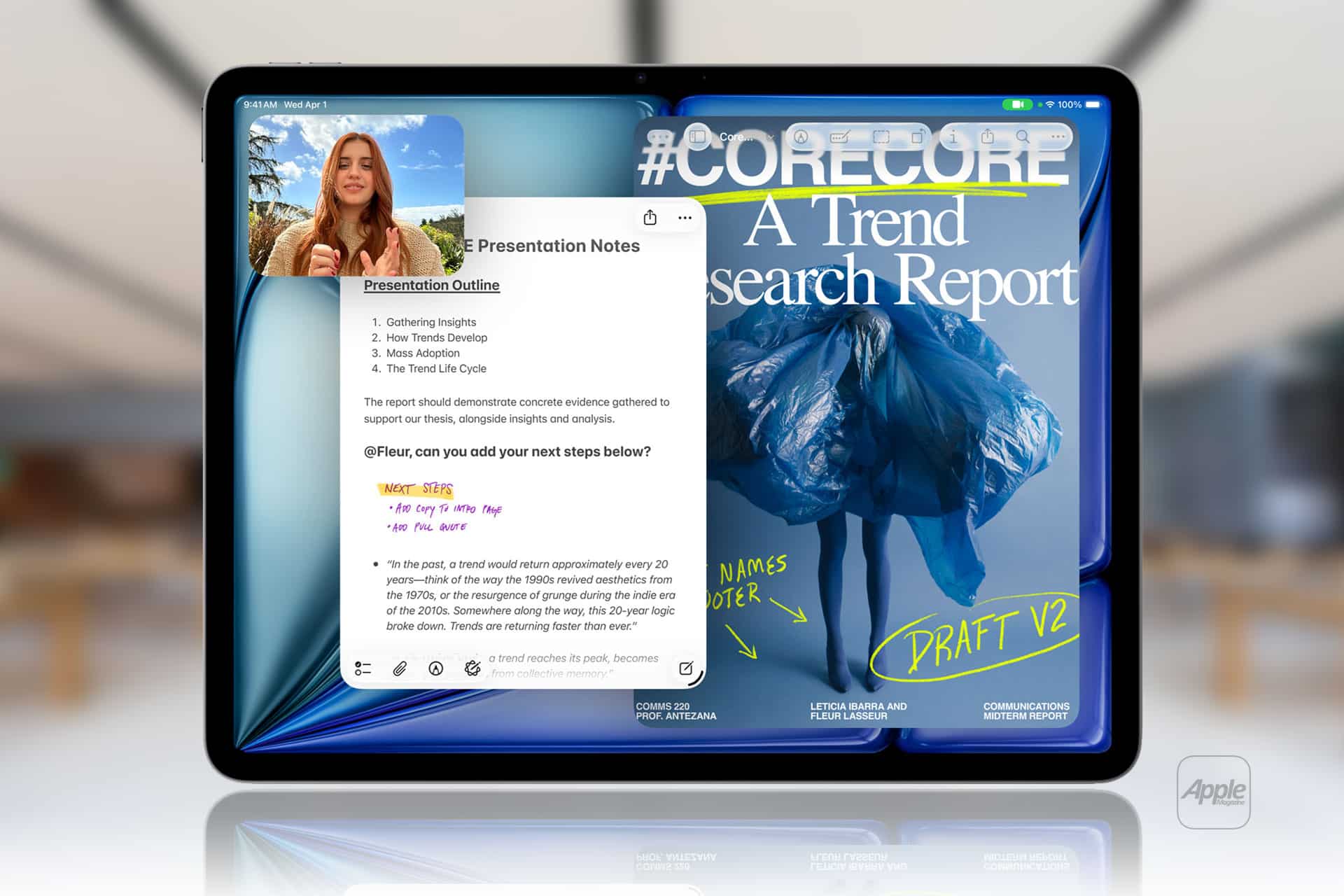
Apple Notes in iOS 27 receives a focused collection of upgrades designed to make long documents easier to navigate and information simpler to move between apps.
Section links allow users to jump directly to headings inside a note. Divider lines create clearer visual boundaries, while expanded Markdown support improves workflows involving websites, writing tools and plain-text editors.
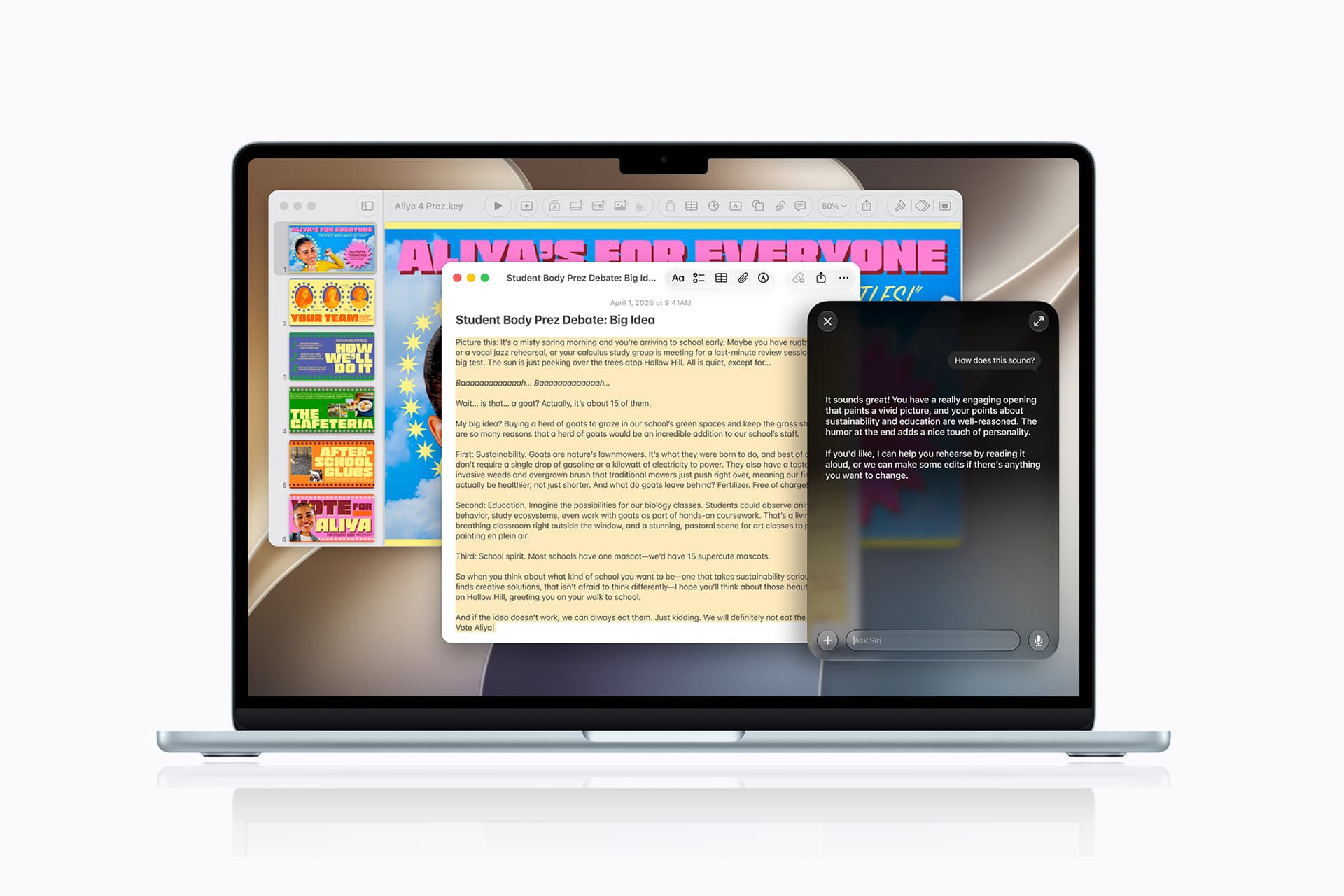
Siri AI introduces the most ambitious addition by creating notes, adding information to existing documents and transferring answers from a Siri conversation without requiring manual copying.
Image Playground also becomes more capable inside Notes, gaining additional visual styles and photorealistic image generation through Apple’s new cloud-based model.
Not every feature requires Apple Intelligence. Divider lines, section links, Markdown tools and the updated interface work on every iPhone compatible with iOS 27. Siri AI and advanced Image Playground capabilities need newer hardware and may have additional language or regional restrictions.
Image Credit: Apple Inc.
Apple Notes iOS 27 Adds Section Links
Section links solve one of the largest problems affecting long notes: reaching information located several screens below the beginning.
A user can now select text, choose Add Link and connect it to any heading or subheading inside the current note. Tapping that linked text immediately moves the reader to the selected section.
The feature can turn the opening of a document into a manual table of contents. A project note might contain links to its schedule, budget, participants, research and outstanding tasks without requiring separate documents.
To create a section link:
Select text > Add Link > Link to Section > Choose a heading
Notes displays the headings and subheadings already present in the document. Regular body paragraphs do not appear as destinations, so the note must use Apple’s title or heading formats before links can be created.
To format a destination:
Select the section title > Formatting > Heading or Subheading
The visible link text does not need to match the destination heading. A phrase such as “View the current budget” can link to a section titled “Financial Information.”
Section links differ from the existing ability to connect separate notes. Apple Notes already allows users to create internal links leading from one document to another. The new control moves within the same document instead.
That distinction is useful for meeting records, research files, travel plans and study material that become too long for ordinary scrolling but do not need to be divided into several notes.
Links should continue working when the document is shared through iCloud because they point to structural elements inside the note rather than fixed screen positions.
Renaming or deleting a destination heading may affect its link. Users maintaining complex documents should test their navigation after reorganizing major sections.
Divider Lines Improve Visual Structure
Apple Notes in iOS 27 adds horizontal divider lines as a native formatting element.
The line creates a visible separation across the document without requiring users to type repeated hyphens, underscores or other characters.
To add one:
Place the cursor > Open the edit menu > Insert Divider Line
The divider is inserted at the cursor position and moves with the surrounding content as the note changes.
A horizontal line can separate meeting notes by date, distinguish reference material from personal comments or divide a recipe into ingredients, preparation and serving information.
It also provides structure without making every section a heading. Headings define the hierarchy used by section links, while dividers create a visual break that does not become another navigation destination.
Typing a row of hyphens previously produced an inconsistent substitute. The characters could wrap on a narrow screen, change length after editing or become difficult to select. The native element maintains its appearance as the document moves among iPhone, iPad and Mac.
Divider lines should be used selectively. Adding one between every short paragraph can make the note look more fragmented rather than organized.
The strongest layout combines headings for major subjects, subheadings for smaller divisions and divider lines where one type of content clearly ends before another begins.
Markdown Moves More Easily Into Apple Notes
Apple Notes gained the ability to import and export Markdown files with iOS 26. The iOS 27 upgrade removes additional steps from copying content between Notes and Markdown-based tools.
Markdown uses plain-text characters to represent formatting. A hash symbol can identify a heading, pairs of asterisks can create bold text and square brackets can define a link.
The format is widely used by writers, developers, documentation systems and publishing platforms because it remains readable without requiring a proprietary editor.
When Markdown-formatted text is pasted into Apple Notes in iOS 27, the app automatically converts the syntax into rich text. Headings become formatted headings, links become clickable and emphasis appears as bold or italic text.
A pasted line such as Project Schedule appears as a formatted heading rather than displaying the two hash symbols.
Moving content in the opposite direction is also easier. Apple has added a Copy as Markdown command that converts selected rich text into Markdown syntax before placing it on the clipboard.
To use it:
Select the text > Open the edit menu > Copy as Markdown
The result can be pasted into a content-management system, code editor, Markdown document or another writing application while preserving supported formatting.
Copy as Markdown does not transform Apple Notes into a complete Markdown editor. Users continue writing through the familiar rich-text interface rather than viewing raw syntax throughout the document.
Complex attachments may not translate perfectly. Scanned documents, drawings, audio recordings, embedded files and some tables do not have universal Markdown equivalents.
Basic elements such as headings, links, emphasis and lists provide the most dependable transfer. Users preparing an important publication should review the pasted result before assuming every element survived the conversion.
Image Credit: AppleMagazine
Siri AI Can Create and Update Notes
Siri AI gives Apple Notes in iOS 27 a more direct connection with information generated or located through the assistant.
A user can ask Siri a question, refine the answer through conversation and save the result into a new note. The transfer happens without selecting the response, copying it and leaving Siri to open Notes manually.
A request could take the following form:
“Create a note called Kyoto Trip and add this itinerary.”
Siri can also target an existing document when the user identifies it clearly:
“Add these restaurant suggestions to my Kyoto Trip note.”
The integration extends beyond saving complete answers. Siri AI can reorganize poorly formatted information, convert text into a clearer structure and place the revised version inside Notes.
Someone collecting an unorganized group of tasks could ask Siri to separate them by priority before saving the result. A block of research could be converted into headings and shorter paragraphs.
Siri’s personal-context capabilities can help locate an existing note when the precise title is forgotten. The assistant is designed to search information across apps and understand requests using details connected to the user.
These actions remain subject to permissions. Siri should not silently place information into a document without recognizing the requested destination and action.
Users should review AI-generated material before treating it as authoritative. Reformatting supplied text carries less factual risk than asking Siri to generate research, dates, quotations or instructions from general knowledge.
Siri AI Requires Newer iPhone Hardware
The main Apple Notes iOS 27 update runs on iPhone 11 and later, as well as the second-generation iPhone SE and newer models.
Siri AI has a narrower hardware requirement. Apple lists iPhone 15 Pro, iPhone 15 Pro Max and every iPhone 16 or later model as compatible with the new Apple Intelligence architecture.
An iPhone 15, iPhone 15 Plus, iPhone 14 or iPhone 11 can receive section links, dividers, Markdown support and the redesigned Notes interface. Those devices cannot use the Siri AI note-writing actions.
This separation means two iPhones running the same operating system can display different Notes capabilities.
Siri AI is scheduled to reach users as a beta later in 2026, beginning in English. Apple plans to expand language availability, but individual capabilities may not arrive simultaneously in every supported language.
The assistant will not initially be available on iPhone or iPad in the European Union. Apple has also said its new Apple Intelligence features will remain unavailable in China while the company works through regulatory requirements.
Ordinary Siri controls may continue to perform basic actions on unsupported devices, such as creating a simple dictated note. They should not be confused with the new ability to hold a conversation, reorganize information and add the result to a chosen document.
Image Playground Expands Inside Notes
Image Playground remains integrated with Apple Notes in iOS 27 and receives a substantially more capable generation model.
The upgraded system can produce higher-quality images in a wider range of visual styles, including photorealistic results. Earlier Image Playground versions concentrated on illustration, animation and sketch-like appearances.
Users can describe an image and insert the generated result into the current note. A travel plan might receive a destination image, while a creative project could use generated concept art beside written ideas.
Photorealistic generation runs through Private Cloud Compute rather than entirely on the iPhone. Apple says requests processed through this architecture are not stored or made accessible to the company.
Generated images automatically include a hidden SynthID watermark identifying them as AI-created. The watermark does not appear as a visible label across the picture, but it provides a technical signal that compatible systems can detect.
Image generation may have daily usage limits because it depends on powerful server models. Apple says most iCloud+ plans will provide increased access, although the exact allowance can depend on the subscription and service conditions available at release.
The complete Image Playground experience may not appear in every early iOS 27 beta. Apple can activate or adjust cloud-dependent features separately while testing the operating system.
New Icons Clarify Shared Notes and Folders
Apple Notes adopts the wider iOS 27 design changes through refreshed buttons, menus and Liquid Glass interface elements.
The Notes app icon has been updated while preserving the familiar yellow-and-white paper design. The change keeps the app recognizable without leaving it visually disconnected from the new system icons.
Shared material receives clearer identification. The shared folder displayed near the top of the folder list now uses a blue icon, separating it more clearly from private iCloud and local folders.
Individual shared notes and folders also receive revised symbols. These indicators make it easier to understand whether another person can view or edit material before sensitive information is added.
The distinction matters because a collaborative note can look almost identical to a private document once it is open. A clearer icon in the list provides another warning before the user begins editing.
Liquid Glass changes the appearance of controls and menus but does not alter the underlying note format. Existing notes, scans, checklists, attachments and locked documents remain available after the update.
People using accessibility settings such as increased contrast, reduced transparency or reduced motion may see a modified version of the visual design.
Existing Notes Features Remain Available
The iOS 27 changes build on a much larger set of capabilities introduced during earlier releases.
Apple Notes can already scan documents, attach PDFs, record audio, generate transcripts, solve mathematical expressions, create checklists and collaborate through iCloud.
Users can link one note to another, place notes inside folders, apply tags and create Smart Folders that collect documents according to selected rules.
Locked notes can use a device passcode or separate password, while Face ID provides faster access on supported iPhones.
The app can also identify handwriting, search text inside scanned documents and recognize information contained in images.
None of those existing tools has been replaced by Siri AI or Markdown. The new version concentrates on moving through large notes and transferring information with less manual work.
Section links are particularly effective when combined with audio transcripts or lengthy scanned research. A user can create headings above important material and place navigation links at the beginning of the document.
Markdown support addresses another gap by making Notes more practical as the first stage of a publishing workflow rather than a closed destination for text.
Image Credit: Apple Inc.
What to Check Before Installing the iOS 27 Beta
Apple Notes in iOS 27 is available for testing through prerelease software, with the complete operating-system release scheduled for the fall.
Beta software can contain synchronization failures, interface problems and changes that Apple has not finished documenting. Notes is especially sensitive because its content may synchronize immediately across every device using the same Apple Account.
Before installing a beta on a primary iPhone, users should confirm that important notes have finished syncing and that another copy of critical information exists outside the beta device.
A Mac, iPad or iCloud.com can be used to verify whether recent documents have reached the server. Exporting especially important notes as PDFs or Markdown files provides an additional copy that does not depend on the Notes database.
Collaborative notes require more caution. People using older operating systems may not see every new formatting element exactly as intended, particularly while iOS 27 remains in testing.
The public release should resolve many compatibility issues, but Siri AI will follow its own beta schedule and regional limitations. Installing iOS 27 alone will not guarantee that every intelligent Notes action appears immediately.
Apple can still modify menu locations, visual elements and cloud-based features before the final version arrives. The safest time to reorganize a large Notes library around section links will be after every frequently used Apple device can install its corresponding fall update.
Apple is looking closely at how much its upcoming artificial intelligence tools will cost to run. During his final earnings call before stepping down, CEO Tim Cook addressed investor concerns about the massive expenses tied to the new Siri AI features. While the basic digital assistant will be available to everyone at no charge, it […]
Apple’s all-new Siri AI. An even more capable AI assistant with expanded intelligence to be more helpful every day.
According to Gene Munster, an X poll indicated that only about 17% of U.S. iPhone users engage with Siri on a daily basis, a notably low figure given that the average iPhone is interacted with more than 100 times per day. At present, Siri is primarily used for low-stakes tasks and is not widely trusted as a full assistant.
Munster anticipates that this will begin to change over the next year. A new version — Siri AI — will become available in the U.S. late this year through an iOS 27 update. In beta testing conducted over the past 20 days, the feature was observed to be slow; however, this drawback was more than offset by an AI assistant that simply works effectively.
Ultimately, Munster believes that increased use of Siri (which is central to Apple’s personalized AI) will form the foundation of the value proposition for Apple devices.
We ran a simple one-question poll on X asking, “How often do you use Siri?” The poll drew 1,750 votes. The raw results showed daily Siri use at a low 17%, with 39% reporting they never use it. As a daily Siri user, these numbers caught my attention, underscoring the degree of brand damage the feature has endured over the past decade.
The comments were more telling than the poll. Across 64 replies, the message was clear and expected: Siri survives as a basic utility or shortcut, not an assistant…
My takeaway: Siri today is, on average, not trusted. It works for a narrow set of commands where the cost of failure is low.
The question is, once Siri gets overhauled, will the 83% of users who question its utility give it another try? I believe the answer is yes.
MacDailyNews Take: We fully agree with Gene.
Siri AI no longer just marketing. The rebuilt architecture works in real life — helping with souvenirs for the kids, prepping for your day, or analyzing your breakfast — while staying firmly within responsible boundaries.
The old Siri is gone. The new Siri AI has arrived in a very promising way – and it’s still just in beta. Our little birdies — who’ve been telling for months that the new Siri not only works, but is actually pretty great — knew what they were talking about! – MacDailyNews, June 20, 2026
Please help support MacDailyNews — and enjoy subscriber-only articles, comments, chat, and more — by subscribing to our Substack: macdailynews.substack.com. Thank you!
Apple, long viewed as a laggard in the smart home market, is preparing a significant expansion into the category with a slate of new devices and software centered on an upgraded Siri AI assistant, according to Bloomberg News’ Mark Gurman.
The company plans to begin this wave soon with a dedicated smart home hub built around the new Siri AI capabilities, people familiar with the matter told Bloomberg. Apple is also readying a new Apple TV 4K set-top box and a refreshed HomePod mini, the sources said, speaking on condition of anonymity because the plans remain private.
The updated Apple TV and HomePod mini are expected to launch this fall, while the long-awaited smart home hub featuring a screen is targeted for release between the end of the year and early next year, Gurman reports.
The moves mark a notable acceleration in Apple’s home strategy after years of more limited offerings. The new hardware is designed to work with enhanced Siri AI features that promise improved conversational abilities and deeper integration across the Apple ecosystem.
MacDailyNews Take: We wish Apple would release some indoor and outdoor cameras, but, as we need them now, we’re going to have to go with some other company instead.
Please help support MacDailyNews — and enjoy subscriber-only articles, comments, chat, and more — by subscribing to our Substack: macdailynews.substack.com. Thank you!

 Login
Login