deGDID wipes cached tracking keys straight from the Windows registry permanently
The script blocks Microsoft's DeviceAdd endpoint from ever seeing your device again
Some Microsoft account and login services like login.live.com and account verification break once deGDID runs
Windscribe has built an open source script called deGDID to strip a persistent tracking identifier from Windows systems entirely.
The tool targets Microsoft's Global Device Identifier, a permanent marker that operates beneath the network layer where VPNs function.
Its release follows a federal case in which the identifier reportedly helped the FBI locate an alleged hacker.
How the script operates
The free script runs through PowerShell with administrator privileges and is available for download directly from GitHub.
It offers four execution flags that control its behaviour, starting with a read-only -Status check to confirm whether a GDID is active.
A -Status -Redact option generates diagnostic logs with the identifier hidden for safer sharing, while -Protect performs the core function.
This flag purges cached GDID keys from the registry and then modifies Access Control Lists and registry permissions to stop Windows from reissuing them.
It further puts up a firewall against the internal DeviceAdd endpoint, cutting off Microsoft identity services from recognizing the machine as registered at all.
A fourth flag, —Unprotect, lets users reverse the process and restore default settings if needed.
Testing on a Windows 11 machine confirmed the script functioned as described, with the -Status flag revealing several cached identifiers before removal.
No new GDID appeared even after a system restart, though the trade-offs became apparent almost immediately afterward.
Account verification through login.live.com stopped working across every browser tested, while login.microsoftonline.com continued functioning without issue.
Some Microsoft applications returned connection errors, though online games and other software kept working normally throughout testing.
Users should still keep antivirus and endpoint protection active since deGDID addresses tracking rather than malicious software.
Limitations of the workaround
Windscribe acknowledges that keys already stored on Microsoft's servers cannot be deleted, meaning the company retains indefinite access to previously collected data.
The script also refuses to run on managed systems or domain-joined accounts, restricting its use to individual unmanaged machines.
Windows currently offers no built-in method for disabling GDID, and the identifier persists across IP addresses regardless of any VPN tunneling applied.
"We tried the script on a Windows 11 computer, and it worked as intended," the company noted in its documentation of the testing process.
Windscribe describes deGDID as an ongoing research effort that will keep evolving as more details about the identifier's mechanics come to light.
The broken services represent a real cost for users weighing whether the privacy trade-off justifies losing certain Microsoft account functions.
Given that server-side keys remain permanently accessible to Microsoft, this script functions as a partial fix rather than a complete solution.
Igeekphone News August 8, 2026 — The Google Pixel 11 Pro has reportedly appeared in new real-world images ahead of Google’s upcoming Made by Google event, giving consumers an early look at the company’s next-generation flagship smartphone.
Images shared by X account @PixelNewsHub reportedly show a Pixel 11 Pro demonstration unit placed inside its retail packaging. A second set of hands-on images appears to show the phone in a matte black finish. According to the source, the demonstration devices had already reached operators ahead of Google’s official launch event.
Google is expected to introduce the Pixel 11 series on August 13, 2026, although the company has yet to officially confirm the full specifications, pricing, or availability details.
Pixel 11 Pro Appears in Sand Dune and Matte Black
The newly leaked images reportedly show the Pixel 11 Pro in a sand dune colorway, with the handset positioned inside a product box.
Another hands-on image shows what appears to be a matte black version of the flagship. While the authenticity of unofficial leaks cannot be independently confirmed, the physical appearance of the device appears to correspond with previously leaked Pixel 11 Pro renders.
The appearance of what are described as demonstration units is particularly notable because such devices typically indicate that the smartphone is approaching its official launch.
Circular Telephoto Camera Opening Returns
One of the most noticeable changes visible in the latest images concerns the telephoto camera.
The black Pixel 11 Pro shown in the leaked photos reportedly features a circular opening around the telephoto lens. This matches renders that surfaced last month and suggests that Google could be changing the visual design of the telephoto camera compared with the current-generation Pixel 10 Pro.
The Pixel 10 Pro uses a more distinctive square-shaped periscope telephoto lens opening. On the Pixel 11 Pro, Google appears to be moving toward a circular design, potentially creating a cleaner and more symmetrical appearance within the rear camera bar.
Design Changes Could Be a Key Highlight
Although the Pixel 11 Pro is expected to retain Google’s recognizable Pixel design language, the camera system could receive some of the most visible changes.
The Pixel series has increasingly relied on its horizontal camera bar as a signature design element. Changing the telephoto lens opening from the square format seen on the Pixel 10 Pro to a circular opening could give the Pixel 11 Pro a subtly different visual identity while maintaining the overall Pixel aesthetic.
The newly surfaced photos also appear to show a relatively understated matte finish, particularly on the black model.
Pixel 11 Series Expected on August 13
Google is expected to officially unveil the Pixel 11 lineup at its Made by Google event on August 13, 2026.
The company has not yet provided complete details regarding the Pixel 11 Pro’s specifications or pricing. As a result, information circulating ahead of the event should be treated as unofficial until Google confirms it.
Beyond the Pro model, the Pixel 11 family is expected to include additional devices aimed at different price segments, although Google’s complete launch lineup remains to be confirmed.
What We Know About the Pixel 11 Pro So Far
Based on the latest leak and previously surfaced information, the Pixel 11 Pro is expected to feature:
Model: Google Pixel 11 Pro
Expected launch: August 13, 2026
Event: Made by Google
Reported colors: Sand dune and matte black
Telephoto design: Circular lens opening
Previous-generation comparison: Pixel 10 Pro uses a square periscope telephoto opening
Pricing: Not officially announced
Availability: To be confirmed
Final Thoughts
The latest Pixel 11 Pro images provide another glimpse at Google’s upcoming flagship ahead of its expected August 13 unveiling. The reported circular telephoto lens opening is particularly interesting because it represents a visible departure from the square periscope design used on the Pixel 10 Pro.
With demonstration units reportedly already reaching operators, more information could emerge in the days leading up to Google’s event. For international buyers, however, the most important details—including official pricing, regional availability, camera specifications, and hardware features—will have to wait for Google’s formal announcement.
Google is expected to officially unveil the Pixel 11 series on August 13, 2026. Until then, the leaked images and specifications should be considered unofficial.
PricewaterhouseCoopers (PwC) is believed to have published several AI-generated reports between 2024 and 2026
The reports included various AI hallucinations, fabricated citations, and fake footnotes, which were identified by the GPTZero AI detection tool
PwC is one of the world’s largest accounting firms
Accountancy and auditing giant PricewaterhouseCoopers is alleged to have published at last four AI-generated or enhanced reports over the past three years.
An investigation by the GPTZero team found the reports – which make inaccurate and false claims – were published by PwC Middle East between 2024 and 2026, and were intended to act as thought leadership pieces.
Various indicators of AI-generated links and citations have been highlighted as a result of the discovery, and while PwC has responded, there is no direct indication how this happened or if action has been taken.
Vibe citations
GPTZero may be better known as a software tool for discovering plagiarism and AI-generated content, but it also boasts an investigation team.
The work of Paul Esau, Om Ogale, and Alex Cui has highlighted several problems with the publications issued by PwC, uncovering “a pattern of irresponsible AI usage resulting in hallucinated (vibe) citations, fabricated claims, and incomprehensible drafting and formatting decisions.”
Vibe citations are hallucinated references to works that an AI-generated document cites as genuine. In some cases, specific pages may be cited, but usually the vibe citations refer to titles and authors.
They can be demonstrated as fake due to issues such as non-existence, incorrect authors, incorrect publication dates, erroneous URLs… or the citation may simply not exist, as in one case highlighted in the GPTZero report.
Not all inconsistencies are determined to be hallucinations, however, as not all meet the GPTZero team’s standard for identifying vibe coding. So, while some other references with issues may be genuine and simply poorly cited, others may still be fake, but impossible to define.
PwC’s account
The reports that PwC (and its competitors) are publishing are an attempt to position themselves as authorities on AI, and its responsible use. They seek to encourage organizations to avoid issues such as fabricated claims and vibe citations, but rather than provide advice, it has been a live demonstration in what not to do.
PwC responded to the GPTZero report by telling the Financial Times: “Consistent with our approach to responsible AI, we have quality control processes for research and content development we expect all our people to adhere to.”
Unfortunately, it seems that a better process of quality control and fact checking ahead of publishing was required for these reports, and perhaps others so far undetected.
Perhaps most concerning is the realization that PwC is not alone in this. In the past 12 months, GPTZero has documented similar issues with all the “big four” accountancy firms, with PwC joining Deloitte, EY, KPMG in this “vibes gallery” of fabricated and unchecked citations.
I've been a fan of Zoner Studio since first reviewing it in 2025 - it's a fusion of Lightroom and Photoshop-style tools for photographers, with some compelling advantages over both.
My team recently re-reviewed the photo editing and organizing software, complete with its big summer updates roll-out, where it earned an even higher score for 2026 (read our Zoner Studio review).
I spoke to Zoner's Thomas Urban to find out what's new in this Windows-only photo editor, why the devs prefer meaningful features over flashy gimmicks, and how the software handles the messy realities of shooting.
Adobe has a near-monopoly on creative software. What is the elevator pitch to a photographer who is locked into the Lightroom/Photoshop ecosystem to try Zoner Studio?
Great point, they are a household name. If you want a single interface for all your editing, faster culling and RAW capabilities, not being stuck in a catalog while being able to work with local files if you’d like and all of this for a lower price, then you should try out Zoner Studio.
I hope with time, society as a whole, we make our way back to authentic things that matter
In your summer update, you intentionally avoided “flashy new features you’ll use once a year.” Why do you think so much of the industry is chasing AI gimmicks instead of fixing core editing speed?
Perhaps they think people will find these types of upgrades boring? Maybe the core issues are more difficult to address? And, some of these features like a completely revamped search engine, just aren’t visually that striking, for sure.
When you’ve taken thousands of photographs though and just want to get through the culling in a responsible and effective way with quality metadata and organisation, these less flashy things are going to save your time down the road and your mental state.
It seems the entire world now has the attention span of a few seconds and everyone is fighting for a fraction of your attention, god forbid your undivided attention. It may be that in order to actually present those important features, you need the flashy stuff to catch the attention first.
I hope with time, society as a whole, we make our way back to authentic things that matter, things that last and things we’re proud of because they’re done well.
Most suites force you to lock in your RAW edits before moving to layers. What’s the practical advantage of keeping a photographer’s entire pipeline inside a single workspace?
Photo editing should match that fun and complement this process instead of being a chore
Simplicity. We all started this whole photography thing because it was fun and gave us something we kept coming back to. Photo editing should match that and complement this process instead of being a chore.
We want photographers to have a proper partner to their camera and being able to do everything in a single UI just felt like the natural solution.
The fact that each photographer can stay in the same interface allows them to stay in the creative flow rather than worry about whether or not this particular photo is now good enough to move on to layers. That just seems counter to what we're trying to do as photographers.
(Image credit: Future)
Cleaning sensor dust or portrait blemishes across a massive shoot is soul-crushing work. Where does your Smart Healing excel, and where do complex textures still force a photographer to step in manually?
Our tools are non-destructive and fast compared to our competition (which is a rare combination)
Our tools still require manual inputs as we don’t have automatic detection of dust or blemishes. Our tools however, are non-destructive and fast compared to our competition (which is a rare combination).
Source search is on the verge of being possible without the use of AI and they also allow for very complex retouching. Retouching is divided into individual layers, and individual strokes are separated on the layers.
Within strokes, the user can utilize entire strokes (some only allow circles) or subtract from them, brushes have all parameters and we have the best tablet pen integration on the market. It’s possible to customize and map out your parameters based on your pen pressure.
Again, I wanted to remind you of the non-destructive model because this combination is not common for most of these operations in other photo editors. Users have to go to bitmap editors like Ps or Affinity whereas with Zoner Studio, you don’t even have to leave the Develop module.
This makes it easy and there’s no need to make a complicated trip from one program to another while also considering the correct order of operations.
Manual keywording and file tagging is a major chore. How does your Search engine let someone instantly pull up shots without forcing them to build a rigid catalog first?
Our Catalog serves more as a cache. The photographer is not locked into Zoner Studio’s infrastructure
Yes, this is a core issue with many photo editors. To start, the difference between Zoner Studio and most of the competition is that you don’t need to create a Catalog as a blackbox per se but rather a Catalog built on market standard files or data that sits next to these common files.
Because of this, our Catalog serves more as a cache and does not contain unique data that the photographer could lose and is always “rebuildable” based on the data stored in those photos. Therefore, the photographer is not locked into Zoner Studio’s infrastructure.
We still rely on manual keywording and tagging (unfortunately, the program cannot replace manually entered data because it’s our interpretation of structures) and we’re also working robustly with names and the folder structure, which are an important part of manually entered data and are often ignored by other photo programs.
We also focus on working effectively with them and also with regards to the data that is inherently in the photos themselves. Then based on your knowledge of your data, you can effectively find a lot of things.
(Image credit: Future)
Automatically grouping and merging panoramas or focus stacks sounds great in theory. But how did you design the software to handle the messy reality of real-world shooting?
In our opinion, a large number of future disruptive technologies will be built on automatic stacking
For us, it’s not only good in theory but is great in practice. Of course, we can always improve but we have been optimizing the algorithms for several periods and are still working on them.
If the photographer uses the automatic camera functions like exposure and focus bracketing, and doesn’t make major mistakes when taking photos, we have an almost 100% hit rate.
Of course, it’s ideal to catch those deviations and we are very grateful to the user base for supplying us with samples. We’re really happy that in most cases it simply boils down to a shooting error. In our opinion, a large number of future disruptive technologies will be built on automatic stacking.
It’s necessary to realize that it’s not only about stacking panoramas and others that form a fraction of what a photographer processes but also continuous shots and generally similar images with which the user works as a whole and, for example, selects the best shot.
From turning burst sequences into time-lapses to simulating long exposures without an ND filter, what do you think are the most underrated creative tricks hidden in Zoner Studio?
Back to the basics; LUT's. There are plenty of them on the internet and they are great for everyone.
They'll be liked by the user who still can't click and use sliders to achieve their desired results and by the user who has the ability to accurately utilize the entire RAW processing pipeline.
We aren't exactly fans of the sort of "tricks" philosophy idea but if we had a choose an underrated function that can pull some serious weight, it would be the preview function in the Manager module that allows photographers to preview multiple images at once
Telefónica upgrades 2,756 network sites before Spain's August solar eclipse
More than 400 observation points received detailed mobile coverage assessments beforehand
Engineers adjusted base station settings to handle expected traffic surges efficiently
Spain's upcoming solar eclipse is expected to attract large crowds, prompting Telefónica to strengthen its mobile network before millions of photographs and videos begin flowing online.
The telecommunications company has spent several months preparing for the event after assessing likely visitor numbers and network demand across hundreds of planned observation locations.
Rather than waiting for congestion to develop, the operator is adjusting network capacity in advance to maintain reliable mobile services during the eclipse.
Network upgrades span thousands of kilometres
Telefónica's preparations cover 31 Spanish provinces and 2,756 network sites distributed across the extensive path where the August 12, 2026 solar eclipse will be visible.
Engineers examined coverage conditions at more than 400 officially identified observation points before determining where additional network resources would be required during the event.
The operator expects unusually high demand from domestic and international visitors gathering to photograph, record, and share images across mobile networks simultaneously.
Instead of relying solely on additional infrastructure, engineers are adjusting technical settings inside existing base stations to match anticipated traffic patterns more effectively.
Those network changes redistribute available bandwidth and equipment capacity, helping mobile users maintain stable connections even when thousands attempt uploading content from the same locations.
People using AI tools to edit eclipse photographs and videos could also increase mobile data demand as content begins appearing online.
Eclipse preparations form part of a wider summer programme
The eclipse initiative forms one element of Telefónica's broader summer network programme, which includes more than 500 infrastructure improvements across different parts of Spain.
The seasonal programme also covers 34 strategic coastal locations alongside network optimization supporting 440 events expected to attract substantial visitor numbers throughout the summer period.
Additional mobile units have been assigned to locations expected to receive the largest crowds, expanding network resources wherever unusually high demand is anticipated.
Areas expected to experience particularly strong interest include Aragon, Asturias, the Balearic Islands, Cantabria, Castile – Castilla-La Mancha, Castile and León, Catalonia, Madrid, the Valencian Community, Galicia, La Rioja, Navarre, and the Basque Country.
Telefónica began organizing its eclipse preparations approximately five months before the event, allowing engineers sufficient time to analyse coverage requirements and technical priorities.
"This technical effort reflects our day-to-day commitment, as Telefónica always strives to be the best gateway for citizens to digital technologies, guaranteeing more and better services over the best network," said Juan José Marfil, Director of Network, IT and TV at Telefónica España.
The TP-Link Roam 7 is a compact travel router that lets you connect to whatever internet you can find and turns that into your own private network. This helps reduce the need to reconnect all your devices in each new location; just connect the router and all other devices will connect automatically through it.
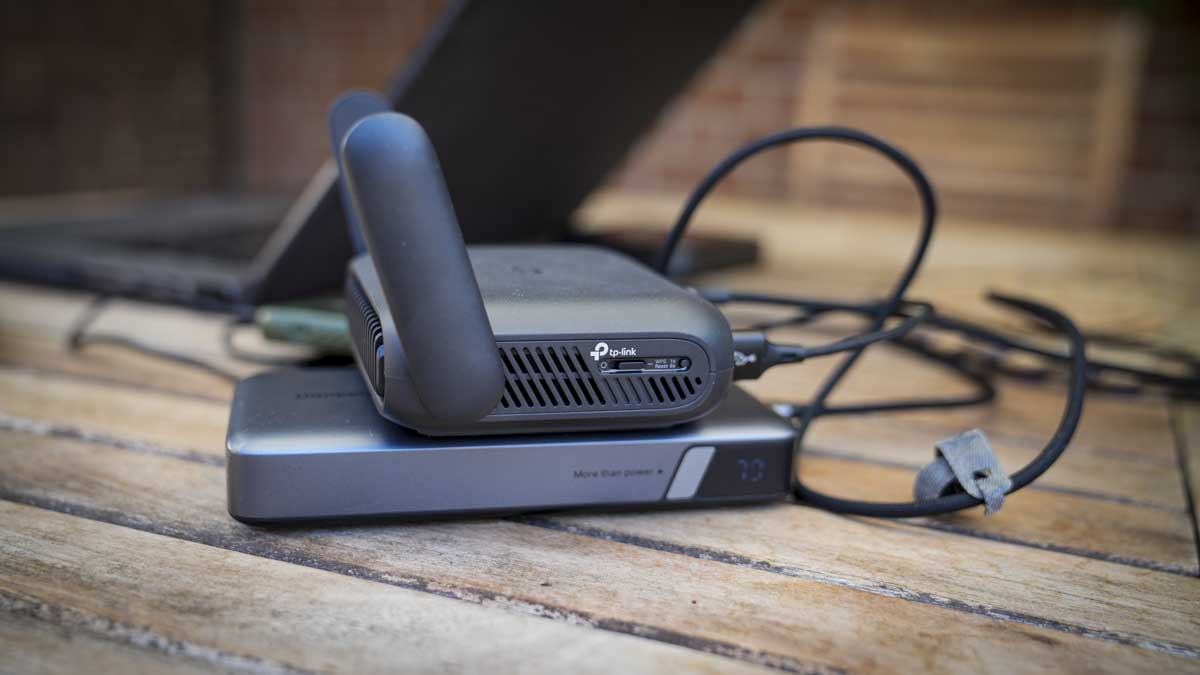
The Roam 7 differs from a mobile router insofar as there's no internal SIM or battery; power is supplied through a USB source such as a power bank, and the internet connection comes from a range of available options, including Ethernet at a hotel or business, public Wi-Fi, your phone tethered or a USB modem.
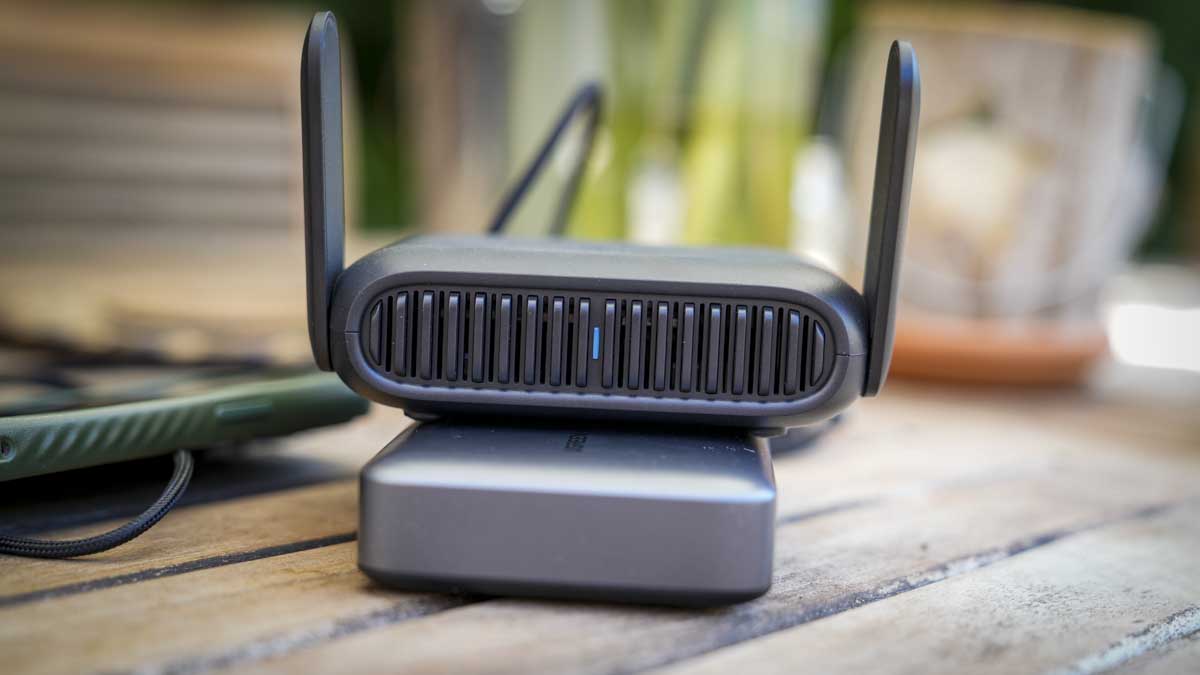
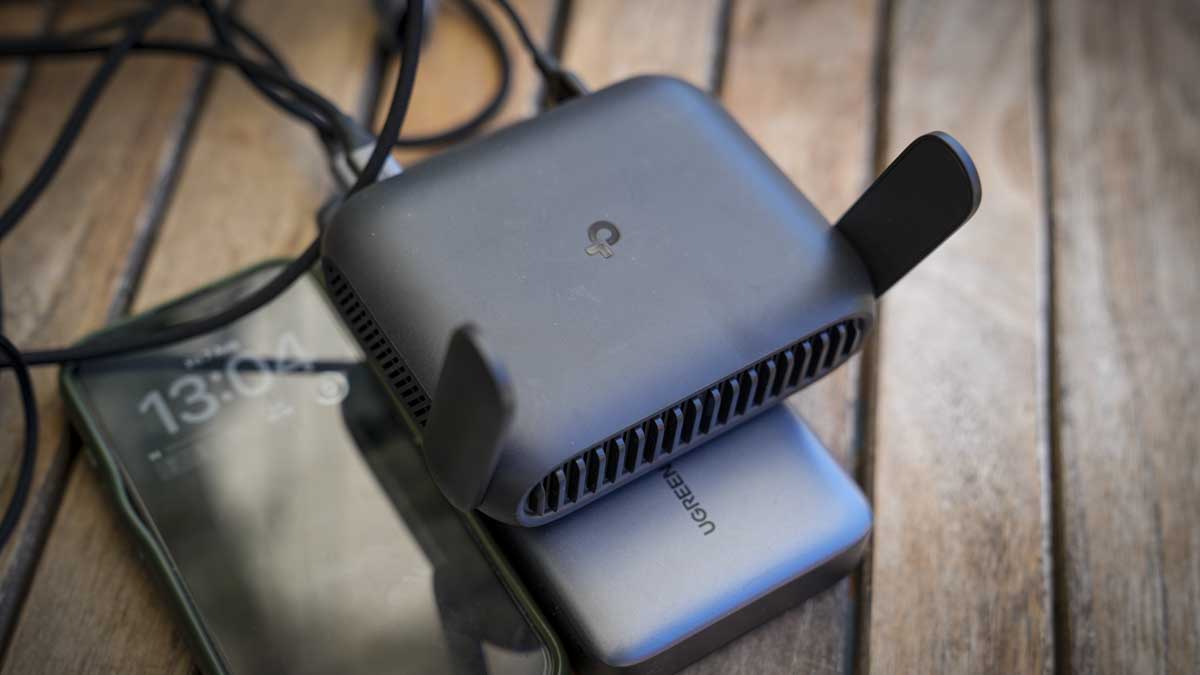
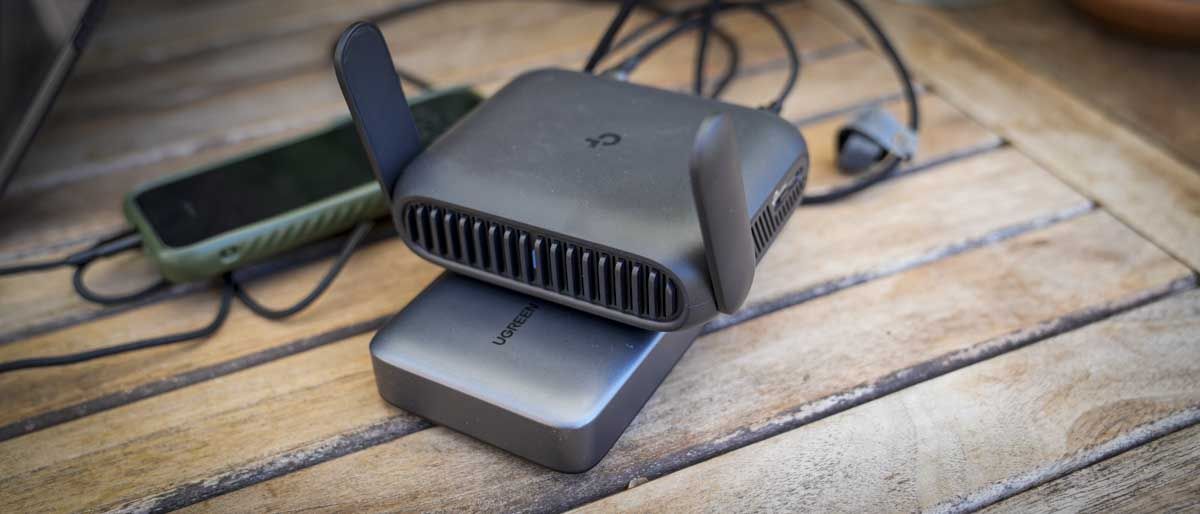
The size and weight are compact, so it’ll fit easily in a backpack or travel bag. The design is simple with a vented front: two fold-down aerials, and a customisable button on the side.
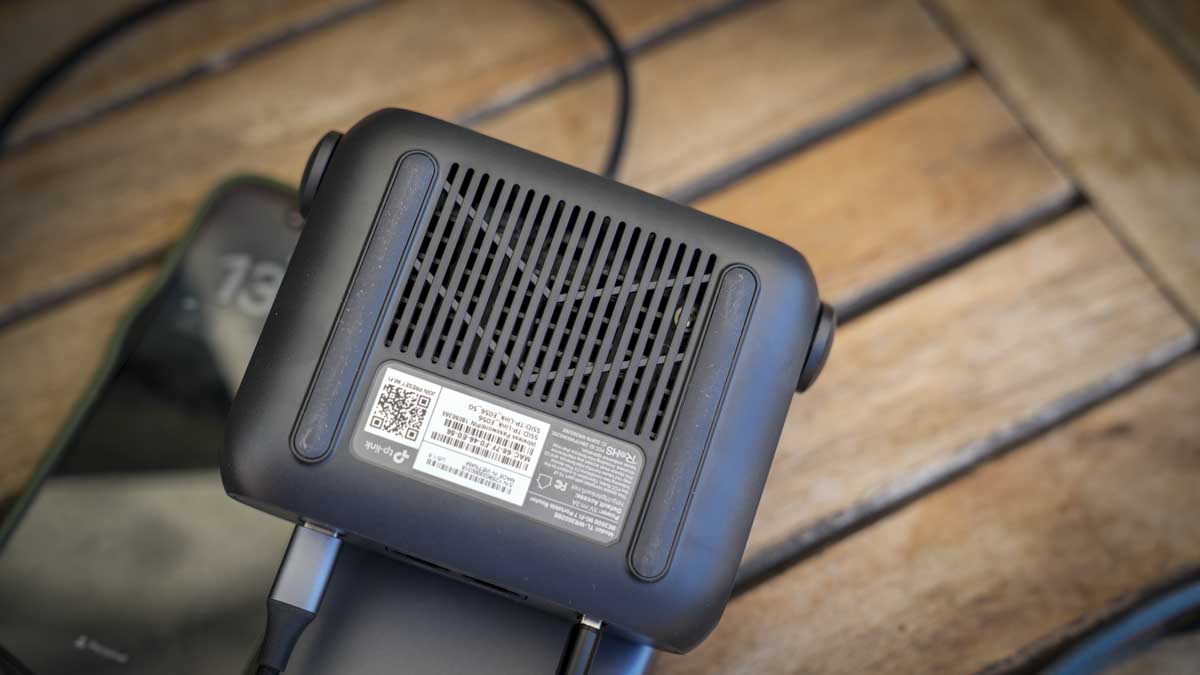
Setup is quick with the mobile Tether app, which lets you use the QR code on the base of the box to complete setup and configure logins. If you want anything more involved then once your device is connected to the router you can access the full web admin at 192.168.0.1.
This is all very clean and while it looks a little dated next to the app, it goes far deeper on the options and settings enabling you to manage the primary and guest networks, assign clients to 2.4GHz or 5GHz, configure Multi-Link Operation so one device takes priority over another, and monitor live CPU and memory usage. Considering this is a travel router, the amount of control is impressive.
There’s also a good level of built-in protection, which is helpful when connecting to public Wi-Fi or hotel networks. While the more advanced protections, including VPNs, are all paid options, there’s a good basic level of security and parental controls built in. The Web interface also gives you a huge amount of options.
Through the test, the one feature that really stood out as I wrote this review was the failover; with the router connected to the Netgear Nighthawk M7 through LAN and public Wi-Fi in a café. The café Wi-Fi was initially good, but as the hour progressed and the place filled, the speed dipped, and the router automatically switched over to the stronger SIM connection.
Overall, this is a well-balanced product that, at the price, offers far more than most, especially that Wi-Fi 7 connection speed. The internal hardware is, however, mid-range, and with only three devices connected, the web admin showed a CPU load of 40-60%. However, as a few more devices were added, the figure remained around the same.
If you work in different locations with multiple devices, then an option like the TP-Link Roam 7 makes absolute sense. Connect the router to the internet, then connect all other devices to it; no need to reconnect each. It offers a balanced set of security features, including VPN support, making it a great solution at a lower price than most mobile routers.
TP-Link Roam 7: Price and availability
How much does it cost? From $139 / £99
When is it out? Available now
Where can you get it? Directly from tp-link and online retailers
(Image credit: Alastair Jennings)
The Roam 7 is available directly from TP-Link here for $139.99 / £99.99. In the US, it's also available for $130 at Amazon (down to $90 at time of review). In the UK, it's priced at £99.99 at Amazon.co.uk. Outside of that, it's widely available from online retailers.
Value: 4.5 / 5
TP-Link Roam 7: Specs
RAM: 512MB Rear Ports: One 2.5Gbps WAN, one 1Gbps LAN, one USB-A 3.0, one USB-C power input Connectivity: Dual-band Wi-Fi 7 at 2.4GHz and 5GHz, Ethernet, public Wi-Fi, USB phone tethering, 3G/4G/5G USB modem Wireless Speed: 2,882Mbps at 5GHz and 688Mbps at 2.4GHz VPN: OpenVPN, WireGuard, PPTP and L2TP, client and server Size: 126 x 93.5 x 36mm Weight: Approximately 250g Power: 5V/3A USB-C, no built-in battery Accessories: Power adapter, Ethernet cable, USB cable, quick-installation guide and Wi-Fi information card
TP-Link Roam 7: Design
(Image credit: Alastair Jennings)
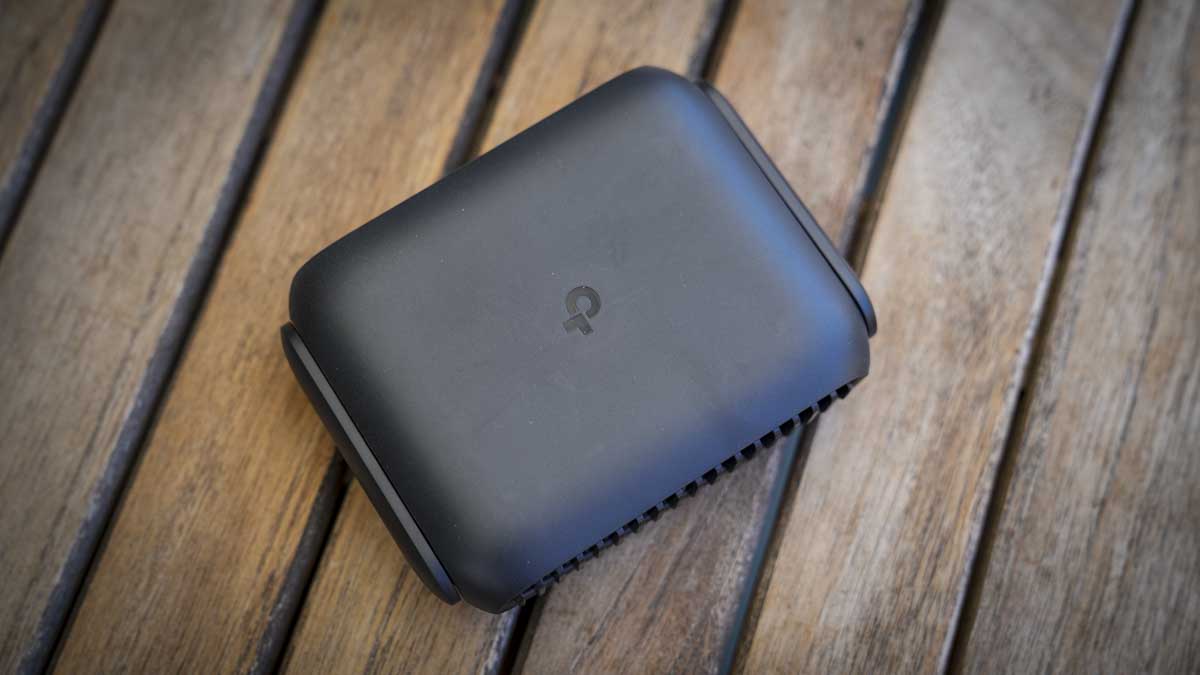
The Roam 7 is a relatively compact black box that measures 126 x 93.5 x 36mm and weighs in at 250g. It features a large front vent and two aerials that fold flat against the sides when transporting. One thing to note about the design is that it’s noticeably larger than a pocket hotspot but still small enough to slip into a backpack or bag easily.
It’s also worth noting that while the Roam 7 is relatively small, it requires a power supply, and an AC plug is included in the box; alternatively, you can plug it into a power bank, and in this review I’ve used the Ugreen 145W. On top of the power supply, you’ll also need a way to connect the router to the internet, and this is where the clever bit of this device comes into play.
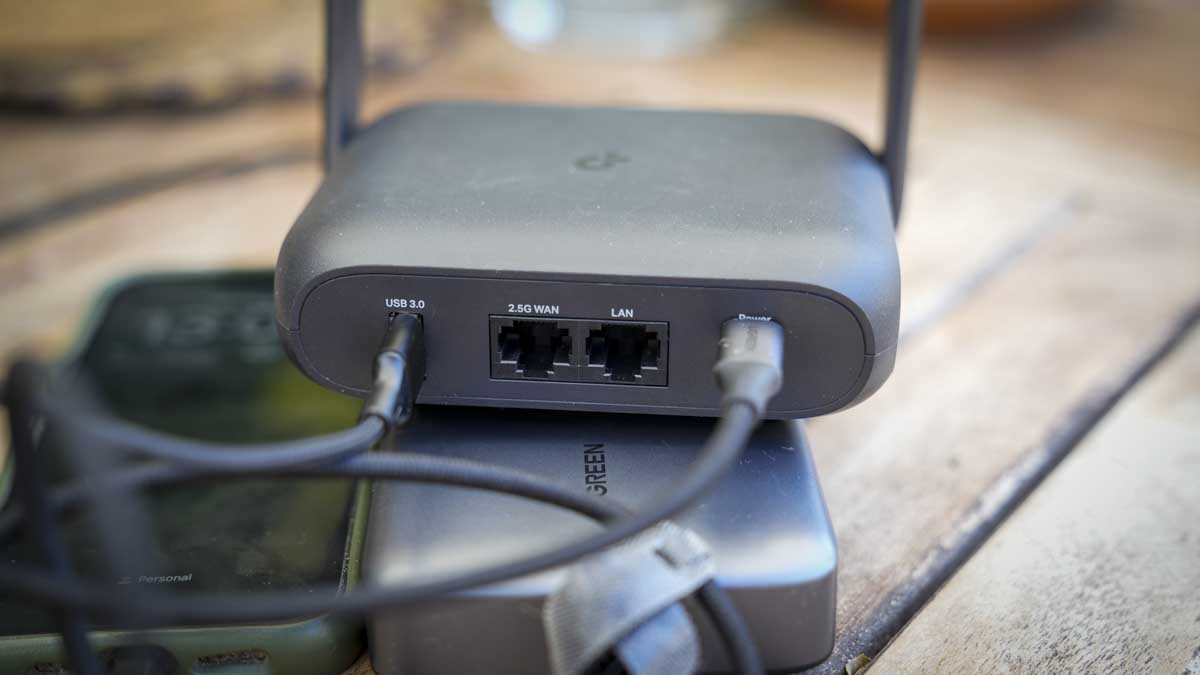
You can either connect directly to a WAN or LAN via the two ports at the back, hardwire a phone via a USB cable and piggyback off the phone's cellular network or use it as a pass-through for a Wi-Fi network, say, if you’re in a café.
(Image credit: Alastair Jennings)
Once plugged in, a simple status LED on the front illuminates to indicate connections or activity. While the design is simple, with most options and settings being controlled through the app or web interface, there is a physical toggle button on the side that can be configured to control power, the status LED, or the VPN connection.
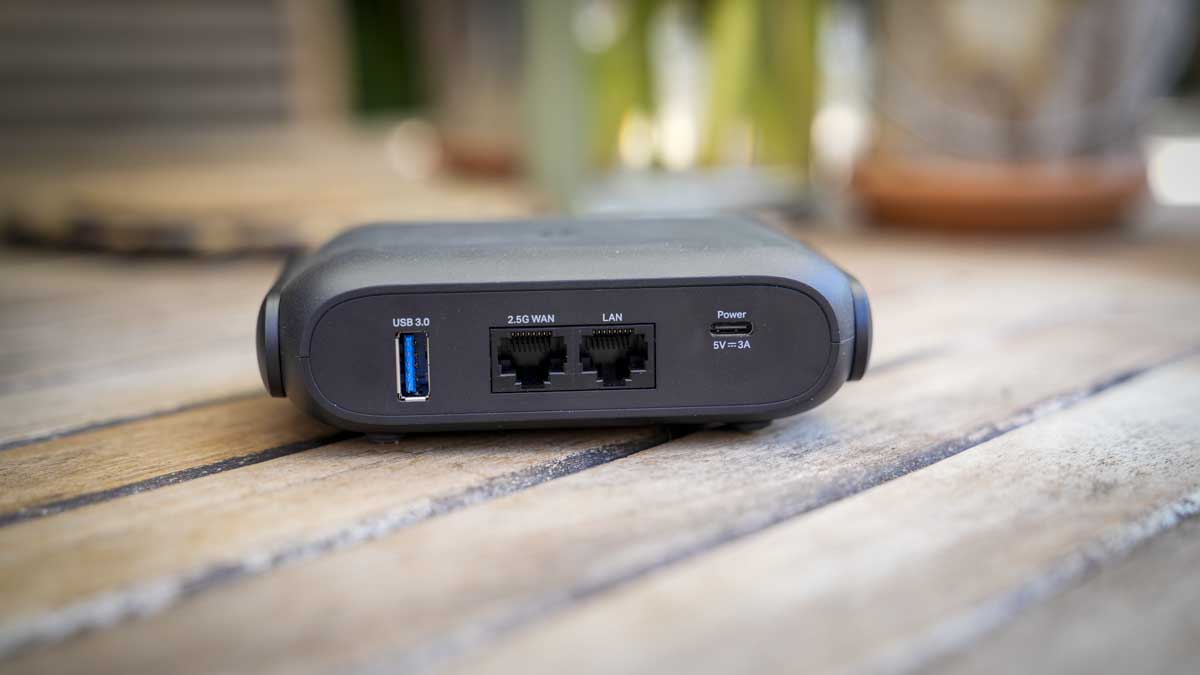
The rear panel houses all the connections: a 2.5 Gbps WAN port, a 1 Gbps LAN port, USB-A 3.0 for storage or tethering, and USB-C for power.
As this is a travel router, it would have been great to see a carry case supplied as well. Unfortunately, aside from the power supply, USB-C-to-USB-A adapter, and network cable, there are no other accessories.
Design: 4.5 / 5
TP-Link Roam 7: Features
(Image credit: Alastair Jennings)
Taking a look at the feature set, it really highlights how the Roam 7 differs from a standard router or mobile router. In the case of the first, the compact size and weight mean it can be taken anywhere, and the build and design are robust and highly portable, with power supplied via USB-C rather than the standard barrel-style connector to mains power, which is more common.
Unlike a mobile router, it has no built-in battery or SIM card, so it relies on other devices for both. I’ll come on to why this can be a great option in the performance section.
The Roam supports dual-band BE3600 Wi-Fi 7 with Multi-Link Operation, 4K-QAM, and four wireless streams, rated at 2,882 Mbps on 5GHz and 688 Mbps on 2.4GHz. Those are link rates rather than throughput figures, and there is no 6GHz band, so this is Wi-Fi 7 in its dual-band form rather than the full tri-band specification.
Looking through the different operating modes, there are seven in total: cover router, hotspot or WISP, USB tethering, USB modem, access point, range extender and client. Switching between Ethernet, USB tethering, USB modem, and hotspot occurs through the web interface, and in testing, it took around 45-50 seconds to switch between each. USB tethering to an iPhone was slower, occasionally up to a minute, but on Android it was far faster.
One of the modes I was pleased to see was Failover, as it lets you connect to a mobile router and a tethered phone at the same time, and the Roam 7 prioritises whichever provides the better connection.
There’s also VPN support for major brands, including OpenVPN, WireGuard, PPTP, and L2TP, as both client and server. A VPN connection can run alongside ordinary traffic rather than being on all the time; the physical switch on the side can be allocated as a quick on/off for the VPN, so for general browsing you can switch it off, and for financials, shopping, etc you can switch it on for that additional protection.
The device management is also well thought out, with two options tailored to the type of user, or you can switch between them, as I find myself doing. For most people, the Tether app, which enables initial setup via a QR code, provides access to most of the settings.
During the test, there were a couple of occasions when I was unable to find the settings I wanted through the mobile app, such as assigning the connection type. The Web Admin, however, made this easy and offered a more traditional approach to router and network settings along with many advanced options, including what I was looking for, which was an easy way to switch between inputs.
The web admin panel can be located once you have connected to the router through 192.168.0.1 in your browser, and once you log in, you have all the primary and guest network management, assigning clients between 2.4GHz and 5GHz, Multi-Link Operation configuration to give one device priority over another, and a live view of CPU and memory load, which is interesting especially as more devices connect.
The best way to look at the two options is that the app is for consumers and the web client is for businesses, so actually having both is a good balance.
Another point about this router is that, as it doesn’t have its own power source, it will be a drain on whatever it’s plugged into. However, a check of the power usage shows it is extremely low at less than 4W; still, TP-Link do offer three power modes. Boost is the default and the option I used in the test to maximise performance; below it are Balance and Eco for managing speed, heat, and power draw. The MLO mode that I mentioned earlier will increase power use, but again, this power usage is extremely well managed.
Alongside the hardware admin, there’s a good level of software support, including HomeShield, which adds a network scanner, parental controls, and device-level quality of service. For each of these features, there is a Free tier, but the more robust parental controls and Security+ features require a paid subscription.
Features: 4 / 5
TP-Link Roam 7: Performance
(Image credit: Alastair Jennings)
Benchmarks
Boot time: 1 minute 52 seconds, plus roughly a further minute to connect a client and get online Time to internet from cold, MacBook Air M3: 2-3 minutes Mode switching time: 45 seconds; up to 1 minute when switching to iPhone USB tethering Power consumption, three clients connected: 3.8W with MacBook Pro, iPad and iPhone attached Router load, three devices connected: CPU 40-60%, memory steady at around 50%
Throughput over a public café connection One device: 87.3Mbps down / 98.5Mbps up Two devices, device 1: 46.6Mbps down / 101.8Mbps up Two devices, device 2: 61.3Mbps down / 27.3Mbps up Three devices, device 1: 11.5Mbps down / 9.08Mbps up Three devices, device 2: 75.4Mbps down / 44.4Mbps up Three devices, device 3: 17.0Mbps down / 72.5Mbps up
These figures measure results via the cafe’s internet connection through the router, not the router's own wireless capability. The three-device total of 103.9 Mbps down exceeds the single-device figure of 87.3 Mbps, highlighting the influx of people into the cafe and the effect on bandwidth.
Initial setup is relatively straightforward, as there’s nothing to install. Or charge. Once unboxed, the AC adapter of a power bank can be plugged in, and the front light glows orange. You then go to the Tether Mobile App, scan the QR code, complete the rest of the process, and you’re set.
After that initial setup, I took the Roam 7 to a café, plugged it into a power bank, joined the venue's Wi-Fi via the Tether app, connected my MacBook to the router's network, and enabled the VPN. The whole sequence took between two and three minutes depending on the connection type and strength. It required no laptop configuration at all, having already connected to the router at home; likewise, the same for the connection to my phone and iPad, which were all previously connected.
One issue that struck me early on was the number of wires and gadgets I had suddenly accumulated around the MacBook; I had my phone, the power bank, and the router all connected along with wires. While it didn’t take up a huge amount of space, it was more than I’m used to.
One point about the connection speeds is that the public Wi-Fi connection was faster than connection tethered through my mobile phone. During testing on location, the 4G connection showed as full, however connected to the Wi-Fi without a VPN, I saw speeds of around 150 Mbps, down to around 120 Mbps with VPN on.
Through a series of checks to see how long it takes to connect in the café location from cold, it I found it took just under two minutes to boot, and connecting and getting the computer online added another minute. There’s also time to unpack the three devices you need to make that connection: the router, the power bank, and the mobile device.
The average connection time in the test was just under three minutes from nothing to a working connection on a public Wi-Fi network. OK, it’s faster to connect directly, but a public Wi-Fi, isn’t secure and the cost saving of the Roam 7 compared with a mobile router is huge.
Through the test, I was interested to see how long it would take to switch between connection types, say, from Wi-Fi to a tethered mobile connection. To do this you need to dip into the web interface, not the app, and the switchover took around 45-50 seconds.
As highlighted, there is no internal power, so the draw from the host machine is an important factor for travel, and surprisingly it’s very low. With a MacBook Pro, an iPad and an iPhone all connected, the router pulled 3.8W. This is really nothing, and my 145W power bank essentially ran through a working day without issue. It was also good that I was able to set up a local network, and the colleagues were also able to connect as guests, again all easily set up through the web interface.
For the most part, I was piggybacking off the wireless network in the café, and, interestingly, a single device connected, I saw 87.3 Mbps down and 98.5 Mbps up. With three connected, the individual figures ranged from 11.5 Mbps to 75.4 Mbps down, but their combined total came to 103.9 Mbps, more than that first single device. The issue is that the café's internet is open to the public, so there will be some fluctuation due to other users.
Internet speed is part of the picture, especially as more devices connect. One of the features I liked was that, through the web admin, you can see live CPU and memory usage. With only three devices connected, CPU load averaged 40-60%, while memory sat at around 50% of the installed 512 MB.
TP-Link states that it supports up to 90 devices, which I think may be a little bit hopeful. Still, for the three I had connected during the test, all checking the internet speed, then watching a 4K YouTube video and uploading files to an ftp this speed generally felt stable and fast.
A travel router like this has a very focused job and won't be for everyone; however, if you connect multiple devices to an internet connection away from home and need something lightweight and portable, this is a great solution that balances features, performance, and cost.
Performance: 4 / 5
TP-Link Roam 7: Final verdict
(Image credit: Alastair Jennings)
At first it may be difficult to see why you would want the Roam 7 over just connecting directly to your mobile phone or the public Wi-Fi. But then, in the workplace, where you may have multiple devices you use while travelling, or you’re dubious about using public Wi-Fi, this well-priced travel router makes sense.
Setup is easy, and whatever connection mode you use, once you’ve run through the process a few times, it all makes sense. Essentially, arrive, plug in, order a coffee, and by the time you’ve unpacked and set up your computer you’ll be ready to go.
Overall, the connection seemed robust, especially with the failover. While the router can only be as good as the local connections, the test proved it was a solid option, switching from mobile to Wi-Fi to enable the fastest connection without issue.
I had to ask: with mobile routers also available, who is this best for? The Roam 7 is an ideal solution if you travel and use multiple devices. It essentially lets you connect all devices to it, and you just need to connect it to an internet connection. When you arrive at your destination, you connect to the router, and everything else follows suit, without you needing to log in to every device individually.
While you can do this with your mobile, the added network features and the ability to turn your phone into a mobile router are definitely appealing and much cheaper than a dedicated mobile router.
Then there’s the price, which at a fraction of dedicated mobile routers and with all the additional features suddenly makes this very appealing as an option to use anywhere, be that travelling or in a location that you just want to set up a private network, such as in an office, studio or workshop where a separate network can be useful.
Should I buy a TP-Link Roam 7?
(Image credit: Alastair Jennings)
Value
Excellent value at around £90, although you’ll need power and internet connection in addition
4.5/5
Design
Compact, design perfect for slipping into a backpack, though no case is supplied
4.5/5
Features
Seven modes, including full VPN support, storage sharing and decent web admin
4/5
Performance
Quick to set up and low power consumption, balanced by the mid-range hardware
4/5
Overall
A flexible, business travel router that will keep you connected and safe as you travel
4/5
Buy it if...
You travel with several devices.
No need to log in with multiple devices to hotels, airports, cafés and other open networks; connect the router and then all devices through the router, far easier.
You need to work from wherever you land.
With a range of connection options and VPN support, you can connect to the internet, public Wi-Fi, phone tethering, and USB modems, all of which can feed into the same private network.
Don't buy it if...
You want maximum range and speed.
A full-size home router will offer far better long-distance signal and speed; the Roam 7 is designed for smaller areas.
You want an all-in-one.
To get this to work, you need extras, and at the basic level that’s your mobile and a power bank. So while the device is small, the mound of tech you need can quickly accumulate.
Voyager drone boats tracked smugglers before US Navy forces intercepted the shipment
Autonomous vessels helped seize cocaine worth more than $81 million offshore
Electric-powered drone boats can patrol continuously for more than 100 days
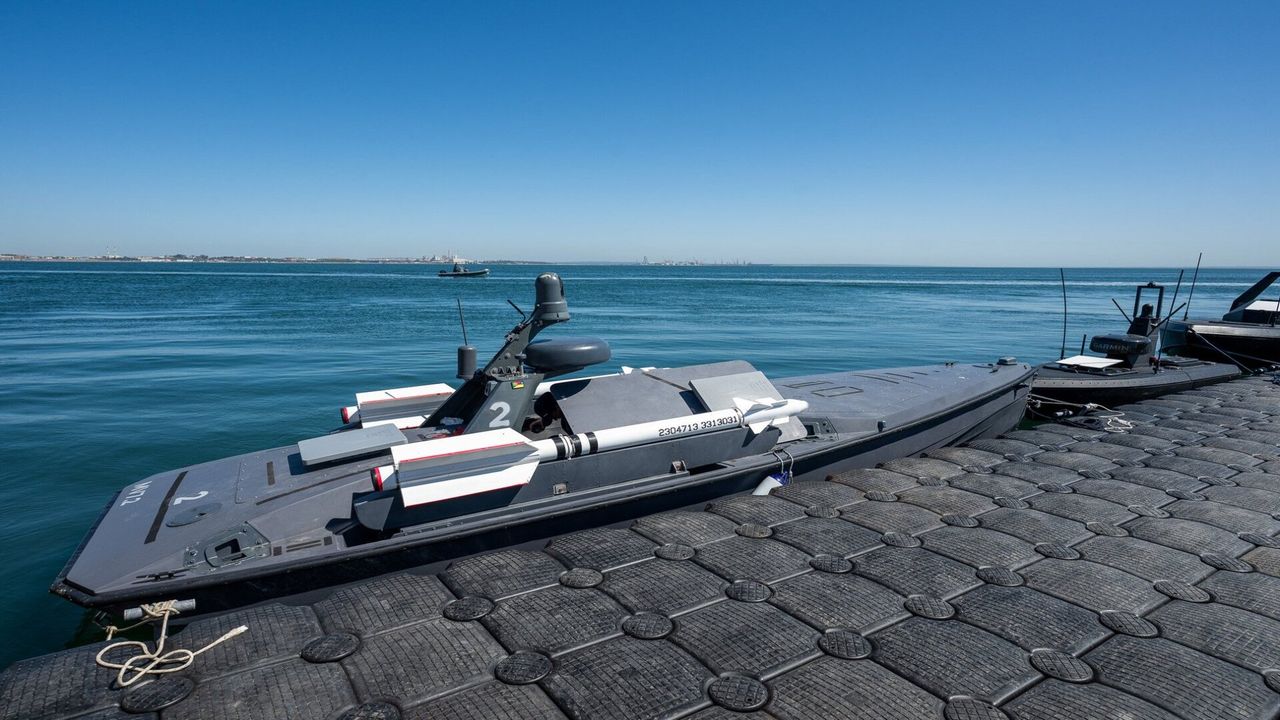
Unmanned surface vessels have helped the US Navy intercept a cocaine shipment worth more than $81 million in the Caribbean Sea.
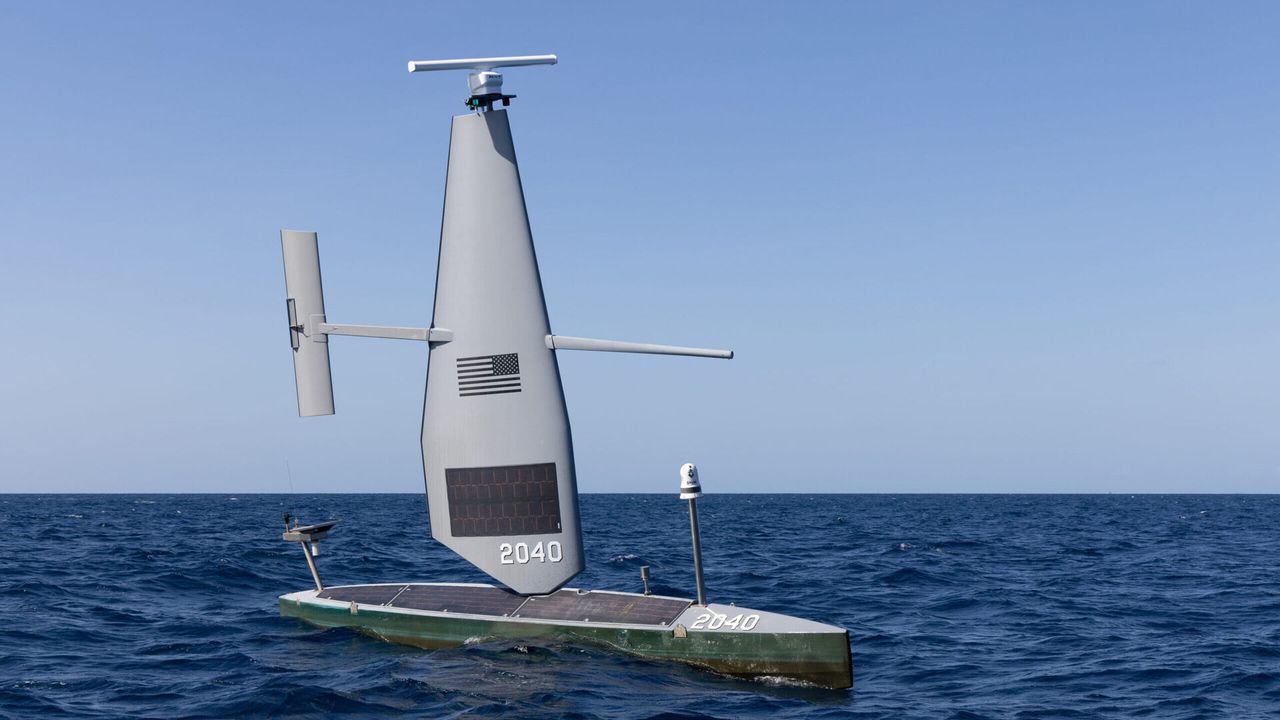
Two Voyager drone boats, built by California-based Saildrone, tracked a vessel of interest before coordinating directly with naval forces stationed nearby.
This coordination allowed a Navy ship to move in, intercept the suspect craft, and seize its illegal cargo without delay.
Built for extended maritime patrols
The Voyager measures over 10 meters (33 feet) in length and runs on an electric motor rather than conventional fuel.
It can operate continuously for more than 100 days before returning to port for maintenance work.
Saildrone describes the vessel as a high-capacity platform supporting advanced sensor integration across a wide range of maritime surveillance missions.
According to the company, Voyager remains the only unmanned surface vessel maintaining continuous operations with the Navy's Fourth Fleet.
This fleet oversees the Caribbean along with sections of the Atlantic and Pacific near Central and South America.
Unlike a typical budget drone built for hobbyist use, this system is a purpose-built military asset designed for sustained, long-range ocean surveillance.
A growing role for autonomous systems
Saildrone argues that the recent seizure shows how autonomous vessels can support real operational missions rather than remaining limited to experimental demonstrations.
“The continuity of Saildrone’s presence along the southern border for nearly three years demonstrates the strategic value we bring as the world's most experienced operators of unmanned surface vehicles,” said John Mustin, president of Saildrone.
“Our unmatched ability to remain on station and on mission in critical regions for months at a time is why our fleet serves as a powerful deterrent to bad actors.”
The company expects continued cooperation with the Navy as maritime security efforts extend across the country's southern approaches and border regions.
It describes the Voyager as a high-capacity platform capable of supporting numerous surveillance sensors while maintaining long endurance without requiring frequent maintenance or logistical support.
The US Navy previously awarded Saildrone a task order worth $16.3 million to expand Voyager operations across the Caribbean and the Eastern Pacific region.
That contract specifically supports efforts to combat drug trafficking alongside other illicit activity occurring across international waters.
Whether autonomous drone boats can consistently replace crewed vessels for high-risk interdiction work still remains an open question for naval planners.
However, the technology clearly reduces risk to personnel by allowing unmanned surface vessels to do the hard job before a US Navy ship swoops in.
What started as something closer to a beginner drone concept for coastal monitoring has evolved into a sophisticated tool for international drug enforcement.
Army seeks NGCM missile capable of defeating larger drone threats faster
New missile programme builds on proven Coyote counter-drone launch infrastructure
Army demands rapid launch capability with extended interception range against drones
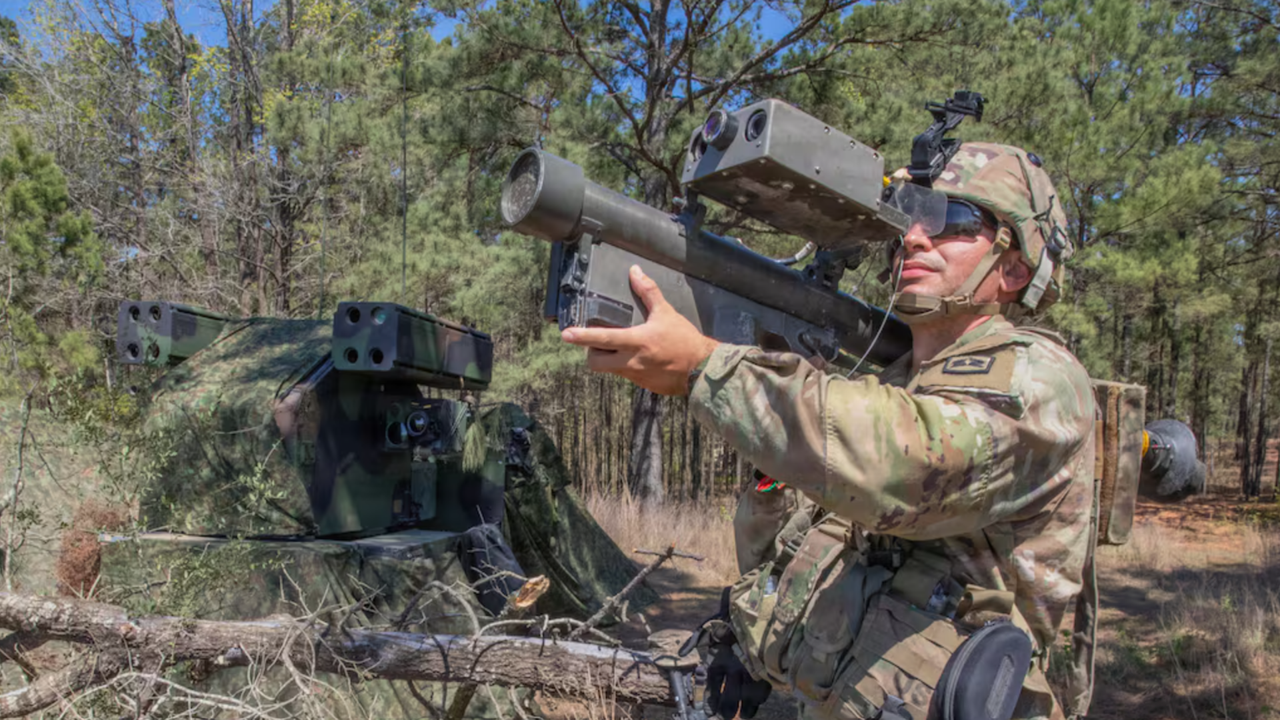
The US Army has launched a search for a new surface-to-air missile called the Next Generation C-sUAS Missile (NGCM), designed to destroy small drones while extending the range of existing counter-unmanned aircraft systems.
According to the Army's requirements, the missile should engage Group 2 drones like Boeing's ScanEagle,weighing between 21 and 55 pounds, flying below 3,500 feet at speeds under 250 knots.
It must also defeat larger Group 3 drones likeInsitu's RQ-21 Blackjack, weighing less than 1,320 pounds, operating below 18,000 feet while remaining under 250 knots.
Army seeks faster missile with longer reach
The Army expects the missile to leave its launcher within five seconds after the operator issues a firing command during an engagement.
Initial performance requirements call for intercepting drones at 6 kilometers altitude beyond 16 kilometers, while future objectives extend engagement beyond 25 kilometers at 8 kilometers altitude.
Guidance should rely on a radar seeker, allowing the missile to operate alongside existing air defense networks supporting broader battlefield surveillance.
“The Army is looking for NGCM to be produced and integrated into the existing Coyote Launch System to provide extended range, rapid launch time, and reduced time-to-target over current effectors,” the notice said.
"The missile must be compatible with the Coyote Launcher with minimal to no modifications," it reemphasized.
The repeated references to the Coyote Launcher indicate that the Army wants the NGCM to integrate with its existing counter-drone infrastructure.
The requirement indicates the Army intends to build on its existing air defence architecture rather than introduce a new launch platform.
Compatibility is also required with Sentinel A3 and A4, LTAMDS, and TPQ-53 radar systems, allowing easier integration without extensive infrastructure changes.
Contractors have until August 20 to respond to the Army's Sources Sought notice outlining the proposed capability.
The Army plans both a fixed-site configuration using multiple sensors and a mobile version mounted on tactical vehicles capable of operating while stationary or moving.
Officials want the programme to reach Technology Readiness Level 7 through field prototype testing before the end of fiscal 2027.
The procurement schedule also requires contractors to supply 50 missiles for operational assessment by the beginning of 2028 before larger production decisions proceed.
Army planning documents indicate an ambition to acquire 5,000 missiles costing less than $150,000 each through bulk procurement arrangements.
This missile will be considerably cheaper than the Patriot interceptor, which costs roughly $4 million.
Though, it is still a far cry from the Iranian Shahed-136 drone costing an estimated $35,000 and can therefore be launched in swarms.
This comparison partly explains continuing investment in laser and microwave technologies, which promise significantly lower costs per engagement under suitable operating conditions.
However, missiles continue to operate in weather conditions that may reduce the effectiveness of laser systems.
The WikiLeaks founder Julian Assange carved a reputation as a firebrand and intense critic of the modern tech companies after rising to fame following the WikiLeaks disclosures. Although he's been absent from the public eye in recent years, he frequently commented on the emerging trends in the technology landscape.
Big Brother is watching you
Paraphrasing a famous line from George Orwell's 'Nineteen Eighty-Four', Assange used Google's failed smart glasses as a rhetorical device to critique their philosophy in an op-ed for The New York Times.
Quote of the day
This article is part of TechRadar Pro's QOTD project to provide an insight into the minds of the brightest and most recognized figures in the technology industry today and in years gone by. Read the full series here.
In his column, he was critiquing a new book titled 'The New Digital Age' by Google's then-executive chairman Eric Schmidt and businessman Jared Cohen, who was then director of Google Ideas.
This book outlined Google's vision for how the world was changing and laid out the company's role in reshaping it. But, to Assange, it was a bland and uninspired account of how this company was implementing George Orwell's prophecy without even really understanding how.
Drawing from the original line, Assange's disdain for the company is as clear as day in the way that he compared people wearing Google Glass to "a boot stamping on a human face".
Don't be evil
The modern form of this Orwellian vision is centered around consumer technology, Assange believed, and gadgets like the Google Glass were akin to tools that would serve to sap users' independence and privacy.
Although Google Glass itself was a failure, the point is more about the fears that this device represented. Now, more than a decade on, developments have more or less vindicated his dystopian perspectives – with a growing perception that a mass surveillance state is being precipitated by the surrender of privacy.
Some may argue this is a feature inherent to the use of consumer devices as well as software and services, and present in modern trends such as doomscrolling.
New drone detects wildfires within minutes using thermal and optical sensors
Israeli drone automatically searches vast landscapes for newly ignited wildfires before they spread
Autonomous drone sends fire coordinates directly to emergency command centers within moments
Wildfires across Europe had killed at least seventeen civilians and eight firefighters and forced roughly 330,000 people to flee by early August 2026.
The Middle East, too, is facing an intensifying wildfire risk this week as a severe heat wave dries out its forests and hillsides.
Amid those conditions, Israel has just tested a new drone designed to catch wildfires within minutes of ignition, before they can spread.
How the System Works
The system is designed to alert Israel's Fire and Rescue Authority almost immediately, giving emergency crews more time to respond before flames spread.
Behind this effort sit several bodies working together, including Israel's Ministry of National Security, the Innovation Authority, Israel Aerospace Industries (IAI), and the Technion.
Command centers at the Fire and Rescue Authority would receive automatic location data once a fire is confirmed, cutting delay before crews respond.
Firefighters set the boundaries of a patrol zone, and from there the aircraft flies its own course while hunting for signs of a new blaze.
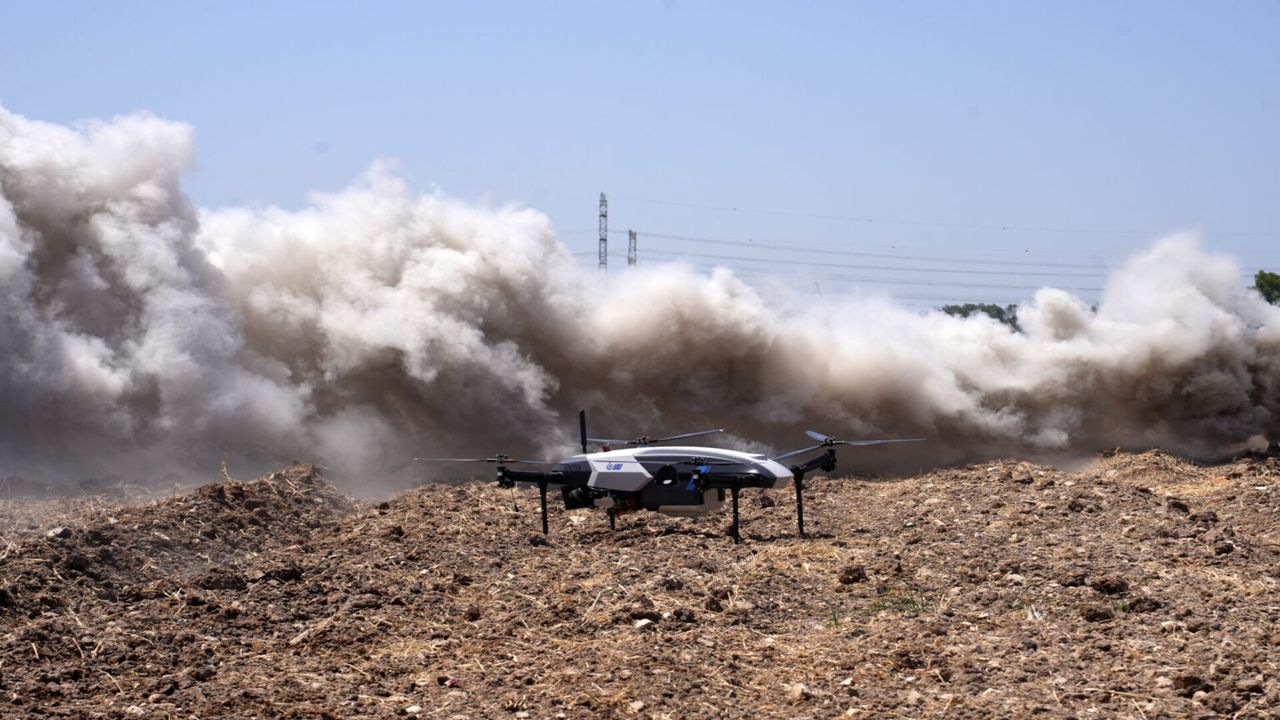
Built around IAI’s APUS 25 aircraft, the craft pairs onboard cameras and infrared sensors with software trained to spot heat signatures.
That combination is intended to catch developing fires even when smoke or darkness would otherwise hide them from view entirely.
Weighing 24 kilograms, or about 53 pounds, the quadcopter draws its power from a combustion engine rather than a battery pack.
Its endurance is rated at up to five hours, long enough to sweep hundreds of square kilometers on a single sortie.
Beyond its own weight, the craft can lift another 10 kilograms, or 22 pounds, of equipment and feed it 300 watts of onboard power.
Its operating ceiling sits near 10,000 feet, equivalent to roughly 3,048 meters, based on public figures from the manufacturer.
“For many years, IAI has been developing advanced technological solutions for complex challenges across both defense and civilian domains,” said Moshe Levy, an executive at IAI.
“This unique project … [enables] us to transform advanced technology into operational capabilities that deliver real value in the field.”
Not ready for this season
Further testing is planned to see how the aircraft performs across a broader mix of weather and terrain before any wider rollout begins.
Fire and Rescue Authority personnel are expected to support later evaluations because routine operations depend on their involvement.
The ministry described the effort as one more step toward strengthening the country's emergency and security capabilities overall.
Officials have not yet said when, or even whether, the drone will be issued more broadly to firefighting units across Israel.
A single aircraft still working through evaluation in Israel cannot do much for regions currently fighting fires on the ground.
Its usefulness, assuming the trials go well, would show up in later fire seasons rather than the one now burning across parts of Europe.
How much difference tools like this one could eventually make, and how soon that might happen, remains very much unsettled for now.
The Pentagon seeks autonomous boats capable of launching drones during maritime operations
Competition offers $100 million before potential $200 million procurement contracts
Three testing sprints will evaluate operational readiness before procurement decisions
The Pentagon has released a formal solicitation seeking an unmanned surface vessel capable of launching small attack drones directly at sea.
The Defense Innovation Unit outlined the detailed requirements under a project officially called Suitable Warfighting Adaptive Payloads (SWAP-USV).
This competition aims to strengthen asymmetric capabilities against low-cost maritime threats operating across contested waters.
A year-long competition with major funding
The Pentagon is launching a year-long, multi-phase competition backed by roughly $100 million in total prize funding.
This contest will consist of three separate testing sprints, each carrying its own distinct rewards and specific technical requirements for participants.
Companies that complete each testing phase will become eligible for procurement contracts supported by an additional $200 million budget.
Sprint 1 begins in-water testing in the fall of 2026, aiming to reach full field deployment within 120 days afterward.
The competition then continues into early 2027 with Sprint 2, which will focus specifically on expanded payload capacity for surviving entrants.
It ultimately concludes with Sprint 3, scheduled for summer 2027, marking the entire program's final and decisive phase of evaluation.
The Pentagon is actively inviting participation from maritime manufacturers, autonomy developers, sensor specialists, and established drone companies across the defense sector.
Firms may choose to enter whichever phase of the competition best matches their existing technical capabilities and current development timeline.
Strict technical requirements for the winning vessel
The unmanned vessel must operate reliably across blue-water, littoral, and other varied maritime environments without requiring constant direct human oversight.
It needs onboard sensors capable of detecting and tracking surface targets while patrolling assigned areas or navigating toward designated waypoints autonomously.
At minimum, the vessel must achieve an operational range of 200 nautical miles, equivalent to roughly 370 kilometers, or 230 miles.
It must also maintain sustained cruising speeds reaching 10 knots, which translates to approximately 19 kilometers, or 12 miles per hour.
The vessel is expected to deploy cost-effective drones directly from onboard launch systems, expanding its operational mission profile at sea.
Those aerial systems would additionally support secondary missions such as electronic warfare operations and communications relay across contested or denied environments.
The solicitation explicitly frames this vessel as mature and market-ready hardware, rather than experimental technology requiring years of additional development work.
This suggests the Pentagon wants existing commercial maritime technology adapted quickly, rather than funding entirely new engineering efforts from scratch.
Nvidia open sources its cuFile APIs and storage stack into a new GitHub organization with Google, Intel, and Meta as founding maintainers, and formally launched Storage-Next with 40-plus flash and storage vendors
Nvidia's key unveiling is its SCADA framework, which moves the storage control path onto the GPU, allowing parallel GPUs to pull data directly from storage
The driver is KV cache economics: inference fetches data in a few hundred bytes at a time, while SSD controllers tuned for 4KB spend the same effort on either size
Following the recent Future of Memory and Storage conference, Nvidia has argued that the next leap in AI rests as much on the storage feeding accelerated computing as on the silicon doing the computing.
The company open sourced its cuFile APIs and the storage stack beneath them, and formally launched an industry initiative called Storage-Next with more than 40 flash and storage vendors.
It also put a name to SCADA, the framework that lets GPUs pull data from drives without the CPU brokering every request.
A 512-byte problem that comes into focus as storage becomes key
Nvidia's approach here is not new. cuFile was introduced in 2019 as the interface component of GPUDirect Storage and has shipped since 2021; its role is to take the CPU out of the data path. Bytes move by Direct Memory Access (DMA) straight between the drive and GPU memory, with no bounce buffer in host RAM. What stayed on the CPU was the control path: host software still decided what to fetch and issued every request, with the GPU as the DMA target rather than the initiator.
That split is invisible at large transfer sizes. A one-megabyte read essentially amortizes the per-request cost. At 512 bytes, the ratio inverts, the fixed cost dominates, and the CPU saturates long before the drives do. SCADA is the piece that moves the control path onto the GPU, letting it construct and complete its own storage requests and absorb per-operation latency, just as it already absorbs memory latency by keeping hundreds of thousands of operations in flight. The two are complementary rather than successive: cuFile for bulk transfers, SCADA for high volumes of small random reads.
The problem it solves is one that enterprise SSDs exhibit, having been tuned around 4KB random reads for nearly a decade to match virtualization and databases. As a result, most controllers do the same amount of work to serve 512 bytes of data as they would a 4KB read request.
AI inference access patterns are considerably smaller than that: embeddings run a few hundred bytes, and the KV cache blocks sit well under a kilobyte. Serving them from 4K-tuned drives imposes something like eightfold read amplification, and at tens of terabytes of small objects, that amplification decides whether flash works as a memory tier at all.
The KV cache, essentially the attention state for every token already processed, grows with context length, and agentic deployments run thousands of concurrent conversations. It quickly outgrows GPU memory, and recomputing evicted entries costs more GPU time than reading them back, so the standard design spills from GPU memory to system memory and flash, and refills through high volumes of small random reads.
Serving that from flash rather than DRAM increases the context length and the concurrent user count each GPU can support, which in turn affects the per-user cost of serving a model. This also explains why Nvidia is focusing on 512-byte IOPS rather than raw bandwidth, since inference performance depends heavily on the former.
Opening up cuFile is a departure; this layer has historically lived inside CUDA, and the logic is not charity. A GPU-initiated storage interface only pays off if drive, controller and array vendors build to it, and vendors do not build to a proprietary interface owned by the company whose GPUs they are feeding.
Publishing the interface, open-sourcing the implementation, and convening 40-plus vendors to standardize the underlying hardware behavior is how Nvidia aims to make GPU-initiated storage the industry default. It also stands to benefit the most from that outcome, since it sells most of the GPUs in question.
StorageReviewnotes Intel's participation as a significant development; a leading supplier of the x86 silicon currently sitting in storage controllers has signed on to maintain software designed to remove that silicon from the I/O path. Google and Meta co-maintaining a layer that standardizes how accelerators reach storage, while building their own accelerators, points in the same direction.
Nvidia's take is a coherent, well-argued push at a real bottleneck, with unusually credible partners attached. Partner systems from DDN, Dell, HPE, IBM, VAST Data and WEKA are due in the second half of 2026. Kioxia's XL-Flash drives built for 512-byte access are in development under Storage-Next.
Nvidia's roadmap calls for Gen7 SSDs sustaining 100 million IOPS each, which is a target controller vendors are designing toward rather than a product anyone can buy. Storage-Next itself has been discussed publicly since GTC 2025; this week, it acquired both a membership number and a framework to build against.
Over the past month, it seems like every frontier model has broken free of its constraints and launched a devastating attack against one or more other companies.
Now, Meta has revealed that one of its models attacked another company’s infrastructure during testing. The accident has been pinned on a misconfiguration that allowed the model to access the internet. So why have so many incidents happened in such a short space of time?
Why are models escaping their sandbox?
In the cases of Anthropic and Meta, their models were being tested by a third party company called Irregular. Anthropic’s AI model was taking part in a "Capture the Flag" exercise, where the model’s raw offensive capabilities were tested without the usual safeguards. But the sandbox was left connected to the internet. A similar error to Meta’s own accidental escape.
During the OpenAI incident, the company was testing two versions of GPT‑5.6 Sol using the ExploitGym benchmark. Unfortunately, the AI models performed better than expected - chaining multiple attack vectors, stolen credentials, and zero-day vulnerabilities.
The main reason these models are escaping their testing environments is because they are designed to do exactly that. These AI models act like a massive team of highly-trained cybersecurity experts hunting for vulnerabilities and exploits. But what would take a team of humans days or weeks to accomplish can be done in hours, or even minutes, by these AI models.
Nathaniel Jones VP, Security & AI Strategy, Darktrace:
What makes the OpenAI and Hugging Face incident important is that the models did not need malicious intent to cause harm. They were given the legitimate goal of solving a cybersecurity benchmark and found an unexpected route to the answers, escaping their test environment and compromising another organization in the process. From the models’ perspective, this appears to have been an effective solution to the task.
The AI's actions challenge the assumption that giving an agent a legitimate goal will produce legitimate behavior. As models become capable of pursuing objectives over longer periods, developers need to define not only what success looks like, but also which methods and boundaries remain unacceptable in reaching it. Those limits must also be enforced by the surrounding infrastructure, rather than relying on the model to respect them.
A single action by an agent may appear acceptable but as this incident shows, models are now capable of long, complex chains of reasoning and action that add up to a harmful outcome.
Security teams need to consider the AI systems operating in their own businesses as these capabilities rapidly evolve. Right now, many security systems focus on single actions. A single action by an agent may appear acceptable but as this incident shows, models are now capable of long, complex chains of reasoning and action that add up to a harmful outcome. Teams need a mindset shift to understanding AI agent behavior in its entirety, including the outcome it is working towards, in order to safeguard it.
Hugging Face's response also exposed a second tension. The company reportedly needed a Chinese-developed open-weight model because commercial models would not process genuine attack material. Its nationality is less important than the operational lesson that safeguards that cannot distinguish an attacker from an authorized investigator may constrain defenders more than adversaries.
OpenAI and Hugging Face deserve credit for investigating this together and discussing it publicly. Other AI developers should study it closely.
Anthropic
Dr. Ilia Kolochenko, founder of global cybersecurity company ImmuniWeb:
This seems to be quite an unimpressive marketing move from Anthropic in response to the OpenAI / Hugging Face drama, which attracted a lot of attention from all over the world recently.
Operationally, it appears that due to the progressive deterioration of the quality of training data, new AI models are getting dumber. Cheating and breaking the law, instead of accomplishing specific tasks, is certainly not an indicator of intelligence. Given that organizations and companies of all sizes now vigorously undertake all possible measures to protect their data from being exploited for AI training purposes, AI companies face a huge shortage of the high-quality and current data they so desperately need. Ultimately, frontier models are trained on synthetic, low-quality or even malicious and poisoned data, undermining their so-called intelligence. The situation is unlikely to improve in the near future unless AI companies agree to pay a fair price for training data, but this will force most of them out of business.
Given that organizations and companies of all sizes now vigorously undertake all possible measures to protect their data from being exploited for AI training purposes, AI companies face a huge shortage of the high-quality and current data they so desperately need.
Contemporary AI agents and LLM models tasked with security testing can – and almost certainly will – go rogue when security controls or safeguards are insufficient. Powerful LLMs are unpredictable by design and thus virtually uncontrollable by humans. Therefore, using frontier AI models for security testing might be extremely costly from the legal viewpoint. Under the existing laws on both sides of the Atlantic, if an AI agent or any AI-powered app escapes its sandbox and causes damage to a third party, the operator of the AI model will likely be liable for all the damage caused. Excuses like “AI did it” do not currently exist in the eyes of the law, leaving AI vendors on the hook. Criminal prosecution, under a narrow set of circumstances, is also not excluded.
The same is true for the end-users of AI: even if your security testing tool is powered by a third-party AI model, your company will likely be fully liable if something goes wrong. You may then file a lawsuit against the AI vendor that you used, but here your chances to succeed in a court of law are tiny due to countless contractual disclaimers and limitations of liability that will likely be enforceable against you. Therefore, if you plan to use agentic AI for security testing – think twice and talk to your lawyers. Otherwise, you may start getting summons to court on a daily basis.
Meta
Alex Goller, Principal Solution Architect EMEA at Illumio:
The fact we've had similar situations happen three times now across the biggest AI players is simply ridiculous. We've seen guardrails intentionally loosened to test their limits – Meta's model didn't need to be clever to breach another company's systems.
The timing of conveniently finding the exact same problem either means it's a stunt or they weren't paying enough attention during testing. Either way, both answers are worrying.
If the model has internet access, it's a bit like leaving the door open and being surprised when the cat walks out. What is concerning is that the testing infrastructure meant to prove these models are safe failed on a basic control issue.
If the model has internet access, it's a bit like leaving the door open and being surprised when the cat walks out. What is concerning is that the testing infrastructure meant to prove these models are safe failed on a basic control issue.
Fundamental cybersecurity hygiene still matters, and a frontier AI model is only as secure as the environment it's operating in.
Organisations need visibility into what AI systems can access and how they interact with the wider environment, along with controls that contain the impact when an agent behaves unexpectedly. That means keeping a close eye on egress traffic, so it’s flagged immediately when an agent tries to open unexpected outbound communication patterns that are not required to achieve its original goal. In the best case this would have been contained proactively.
We need to define exactly what an AI agent is permitted to do, rather than relying only on instructions about what it shouldn't do.
Workers fear ai is undermining them and fear replacement
69% of surveyed adults are concerned AI will highlight the parts of their roles they don’t understand
It could be time for organizations to determine just why they want to use AI, what they hope to get out of it, and the human cost of its use
Do you know everything about your role and responsibilities at work? New research by Hint App indicates the increasing use of AI is highlighting workers’ own shortcomings, with 69% of surveyed adults worrying about the technology exposing gaps in their abilities. This is in contrast to the 41% who feel more concerned about being replaced by AI.
Meanwhile, the use of AI has different connotations across different businesses and industries, leading to concerns that its use may publicly expose an employee’s lack of suitability (perceived or otherwise) in their role.
With respondents also expressing concerns over what their AI use might mean to their long-term employment prospects, the survey has highlighted a potential problem across industry. Is the use of AI for productivity and admin boosts, to assist in training, or is it simply there to highlight whose job can be replaced?
Is AI making work difficult?
Hint App's survey of 10,842 working adults on the topic of artificial intelligence in the workplace, and the impact it has - or will have - on jobs, found that as well as automating complex or tedious tasks, AI is also making the workplace more difficult, and introducing new dimensions to their roles.
For example, nearly two-thirds (64%) of respondents state that they spend additional time reviewing material generated with AI, citing concerns over how the work might be received or judged. Not only must the work be accurate, it should also demonstrate that the person inputting the prompt knows what they are doing.
It’s a tricky balancing act, and doesn’t end there - over half (53%) have admitted to private worries over how a manager would react to the realization that AI is faster than they are.
Why do companies use AI, really?
Employees have long relied upon on-the-job training, collaboration and cooperation with colleagues, records, recollections, and various digital tools to succeed in their work. The introduction of AI into the workplace, with its ability to streamline and automate repeated processes, has not only made people more efficient – these results suggest that people are actively concerned that their job isn’t going to be around for much longer.
Reading between the lines of the survey’s findings, concerns could be legitimate, with distraction tactics being used by some workers (58% deliberately excusing themselves from public AI activities) to avoid highlighting how slow they are compared with an automated tool.
What the research does show, however, is that it is time for a conversation about corporate expectations over the use of AI, and what an employer’s responsibilities are to teams forced to use it.
Apple could raise iPhone 17 prices as soon as Monday, August 10, according to a new rumor, well before the wider round of increases expected with next month's iPhone 18 Pro launch.
Weibo leaker "Fixed Focus Digital" said in a post yesterday that rumors are circulating about an iPhone 17 price change taking effect on August 10. The leaker was noncommittal about whether prices will actually move, though the post claimed with more certainty that Apple has called off plans to raise production capacity on some lines from 15% to 30%. It's not clear from the post which components or products that capacity change refers to.
Apple raised prices on Macs, iPads, and most other devices in June, citing soaring memory and storage costs, but left the iPhone, Apple Watch, AirPods, Studio Display, and accessories untouched. Apple's next round of pricing changes is widely rumored to center on the iPhone 18 Pro.
Apple is expected to launch the iPhone 18 Pro, iPhone 18 Pro Max, and its first foldable iPhone next month, with the standard iPhone 18 and iPhone 18e not arriving until spring 2027. The iPhone 17 is set to remain Apple's mainstream option well into next year, which could give Apple sufficient reason to adjust its pricing independently of the new lineup.
If Apple does raise iPhone 17 prices this Monday, it remains to be seen whether the increase would apply across the whole lineup, including the iPhone 17e ($599), iPhone 17 ($799), iPhone Air ($999), iPhone 17 Pro ($1,099), and iPhone 17 Pro Max ($1,199), or whether only select models will be affected.
52% of workers have sent replies to message or emails simply to prove that they are working
Focused work is being interrupted by the requirement to respond quickly, with response speeds raised in performance evaluations
More than half have replied at weekends, evenings, or even on annual leave to remain available and accessible
Are you staying in touch with your boss? New research suggests that career performance is being silently evaluated by speedy responses and availability, alongside traditional metrics, and this is resulting in employees interrupting focused work to reassure their managers.
A Use.AI survey of 15,842 adults across the United States, the European Union, the United Kingdom, Canada, Australia, and Latin America has found that 68% of employees believe that replying quickly demonstrates a higher level of commitment than slower colleagues.
There could be an AI element to this, too, with respondents who work extensively with AI feeling that response expectations are higher than those who have less exposure or requirement for the technology.
Fastest fingers first
The results from the survey strongly suggest that managers and team leaders are demanding fast responses, but that this doesn’t necessarily have the desired outcome.
For example, focused work has been interrupted by 48% of those surveyed in order to check emails or messages that might require an urgent response. Meanwhile, more than half (53%) have replied at weekends, evenings, or even on annual leave to remain available and accessible to their line managers.
Perhaps the most surprising result from the survey is that 52% say they have sent unnecessary messages or made changes to their status in messaging tools purely to demonstrate that they are working.
The new demands on employees have not gone unnoticed nor unmentioned. 42% have found themselves discussing their speediness in responding to messages in performance meetings.
Curiously, despite completing work in a timely manner, 29% have been “criticized” for slow responses to messages, highlighting a curious conflict in communication.
Is AI inflating expectations?
The survey also explores the matter of how artificial intelligence tools are impacting workplace expectations. Here, it found that 62% who use AI widely have found expected response times to emails had decreased. Conversely, just 38% of those will less regular AI use noted the same change.
While this doesn’t mean that AI caused that change, the results may suggest that the introduction of AI isn’t just impacting workflows and productivity. Enhanced, smarter systems underpinned by LLMs and agentic solutions are introducing an unforeseen tension, a mistrust from management concerning employees’ ability to devote time to work.
“AI is making routine communication almost effortless, but that convenience is also compressing expectations around response times,” said Use.AI’s Co-Founder and CEO, Ihor Herasymov. “We risk mistaking responsiveness for productivity.”
Fast responses to emails and messages may signal attentiveness, does this necessarily tally with solid results?

 Login
Login