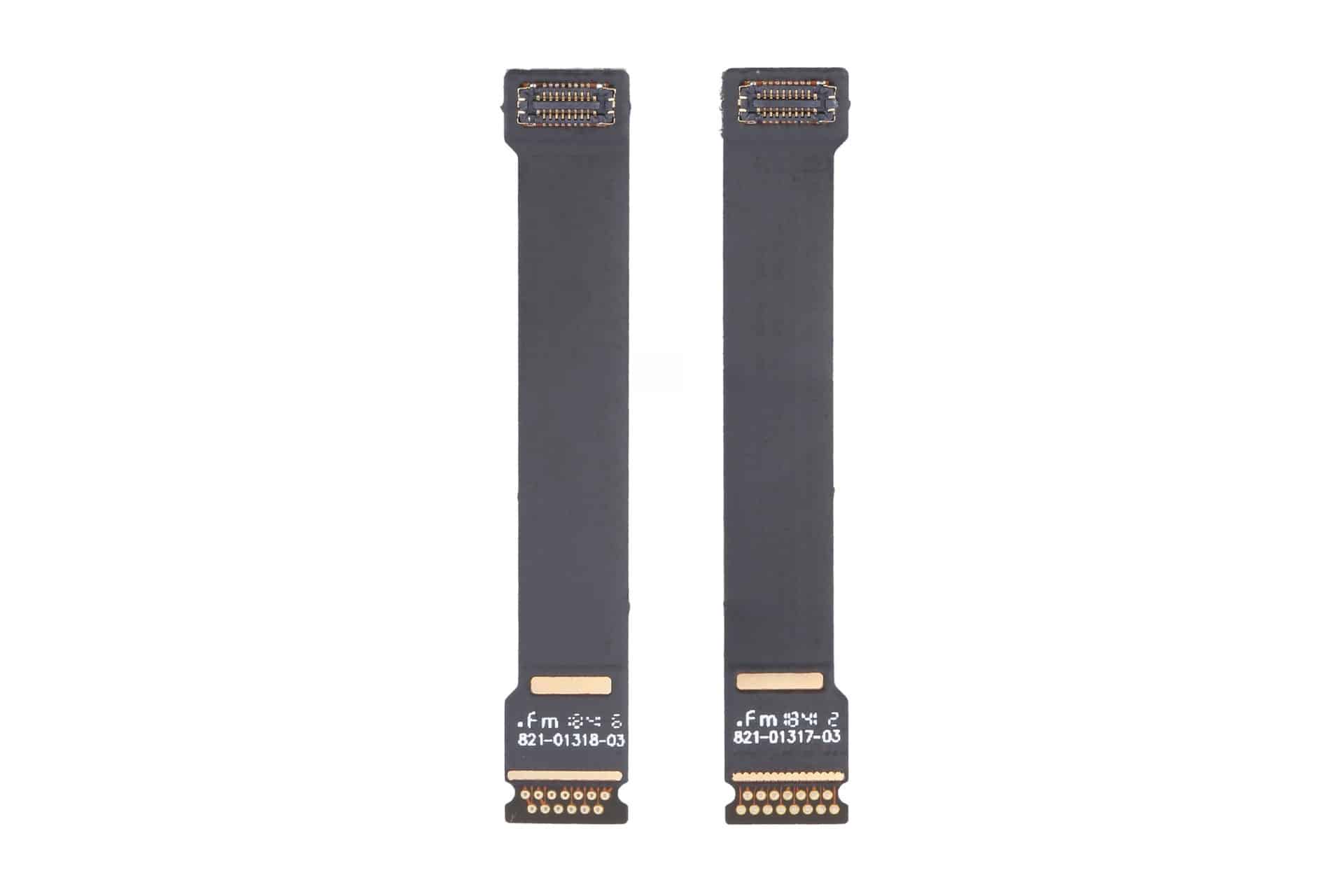
It’s been a longtime feature of the annual Defcon hacker conference that attendees come away not only with knowledge of new software vulnerabilities and hacking techniques but also an elaborately designed conference badge—often electronic masterpieces embedded with intricate puzzles, complex crypto challenges, hidden Easter eggs, and even the mechanical gear trains of a watch.
Each year’s badge creator endeavors to top previous designs and blow the minds of hard-to-impress hackers. But this year’s badges take a different tack. Instead of the badge designs being the star, it’s what is inside the hardware that will really stand out.
This year, Defcon asked legendary hardware hacker Andrew “bunnie” Huang to create the badges—revealed here for the first time—and they include an innovative open source chip that Huang designed and that aims to do no less than advance the state of security, transparency, and trustworthiness in computing.
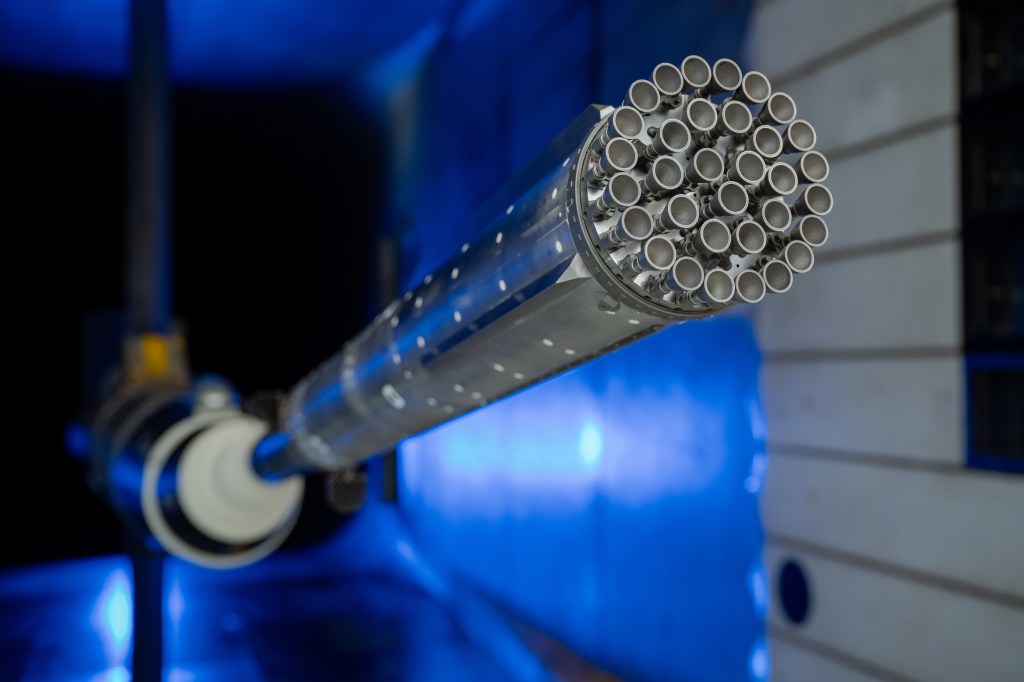
NASA, SpaceX Advance Wind Tunnel Tests for Starship Rocket
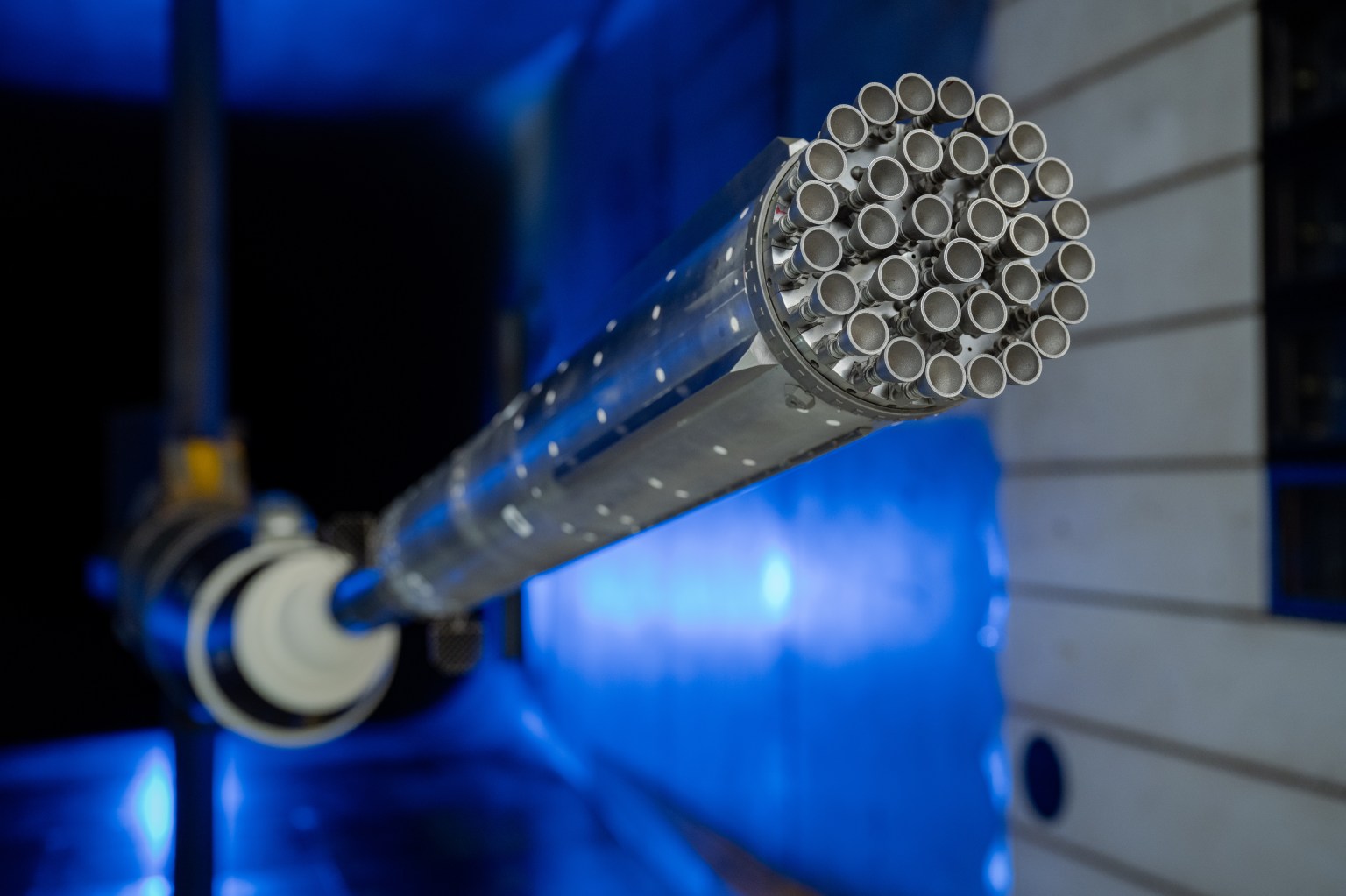
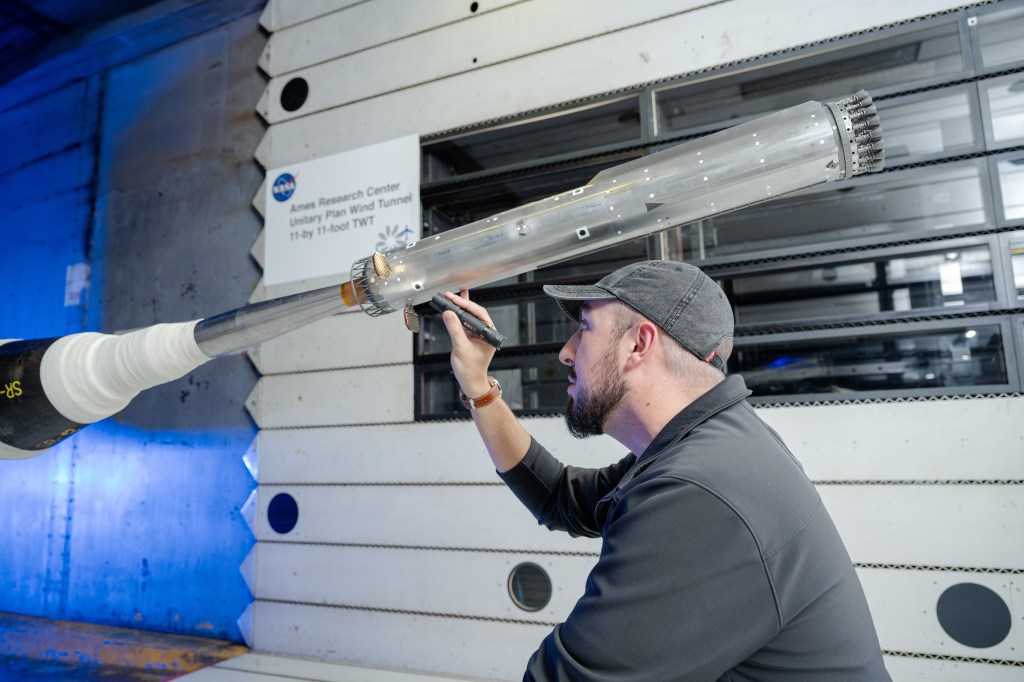
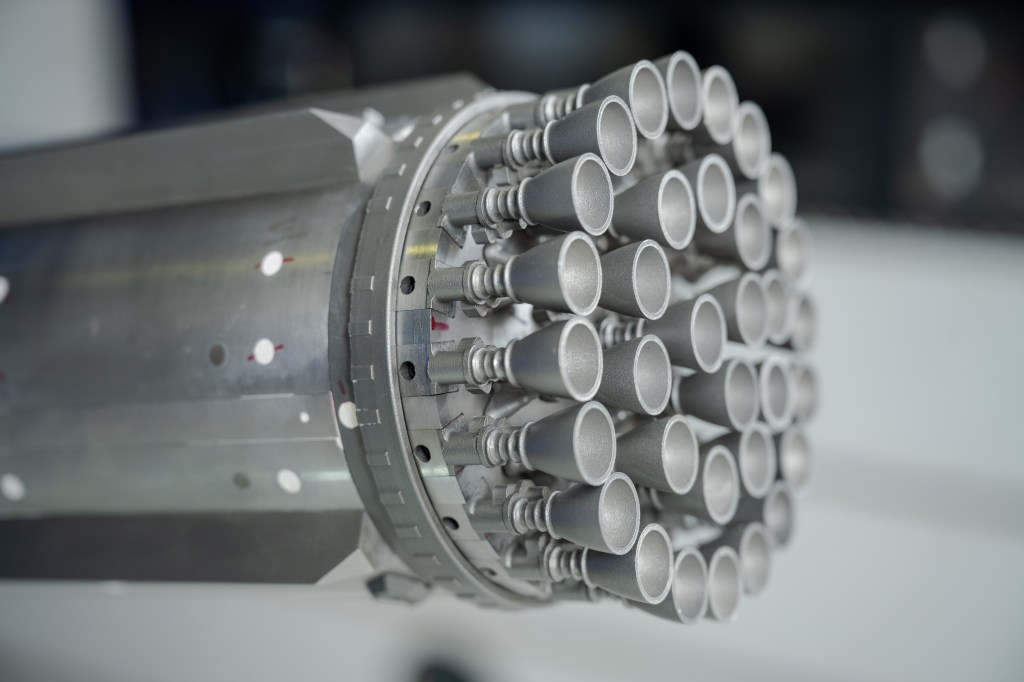
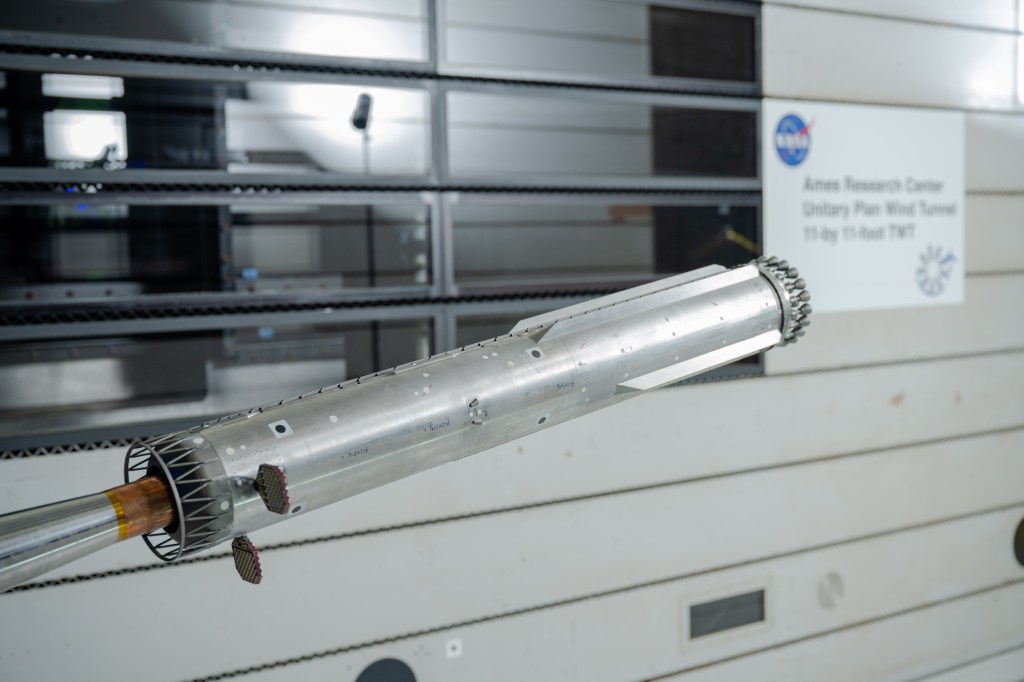
Engineers at NASA Ames conduct transonic and supersonic wind testing on a 1.2% scale model of the Super Heavy Version 3 rocket that will launch the Starship human landing system.
Credits: NASA
NASA and its industry partners are preparing for next year’s Artemis III demonstration mission by completing new wind tunnel tests on SpaceX’s Super Heavy Version 3 rocket booster. The tests, conducted at NASA’s Ames Research Center in California’s Silicon Valley, focused on better understanding the extreme aerodynamic forces the rocket can experience during re-entry. The recent test series builds on previous testing completed at NASA Ames in 2024.
NASA is working with SpaceX to develop the company’s Starship Human Landing System (HLS) to safely carry astronauts from lunar orbit to the Moon’s surface and back. The upgraded Super Heavy rocket booster is part of SpaceX’s Starship launch system. Version 3 of Starship and Super Heavy is expected to be the basis for the Starship HLS for Artemis III in 2027 and a later crewed lunar landing in 2028.
Engineers at NASA Ames conduct transonic and supersonic wind testing on a 1.2% scale model of the Super Heavy Version 3 rocket that will launch the Starship human landing system.
NASA
Engineers at NASA Ames conduct transonic and supersonic wind testing on a 1.2% scale model of the Super Heavy Version 3 rocket that will launch the Starship human landing system.
NASA
Engineers at NASA Ames conduct transonic and supersonic wind testing on a 1.2% scale model of the Super Heavy Version 3 rocket that will launch the Starship human landing system.
NASA
Engineers at NASA Ames conduct transonic and supersonic wind testing on a 1.2% scale model of the Super Heavy Version 3 rocket that will launch the Starship human landing system.
NASA
Although Starship HLS is a lunar lander designed and built by SpaceX, NASA collaborates with commercial companies to provide access to specialized testing facilities, like the wind tunnels at NASA Ames, and technical expertise, such as the team that set up the wind tunnel testing and helped analyze the results.
“NASA has a lot of experience with unsteady aerodynamics,” said Manish Mehta, discipline lead engineer for the HLS Plume and Aero Environments team, NASA’s Marshall Space Flight Center in Huntsville, Alabama. “We used the agency’s broad experience base of conducting wind tunnel tests for the space shuttle, the SLS (Space Launch System) rocket, and Orion spacecraft to efficiently set up and analyze the wind tunnel testing for the Super Heavy Version 3. In fact, similar testing at the Ames Unitary Plan Wind Tunnel resulted in adding strakes to SLS for Artemis II, so what we learned for Artemis II is helping us get to Artemis III and beyond.”
Testing
SpaceX’s Starship consists of a 33-engine first-stage Super Heavy rocket, or booster, and the second-stage Starship. Version 3 of Super Heavy incorporates many new and upgraded systems, including:
New propulsion systems and new Raptor 3 rocket engines
No engine section skirt, individual engine shrouds, or integrated large-scale base heat shield
Three gridfins on the Super Heavy booster instead of four, with each fin now 50% larger
An integrated hot stage replacing the previous single-use protective interstage
With significant changes to Super Heavy, NASA and SpaceX engineers wanted more information about the steady and unsteady aerodynamic forces the rocket will experience during atmospheric re-entry as it returns to the launch site for refurbishment and re-use.
“When a rocket, or an airplane, flies through air at high speed, it’s subjected to steady aerodynamic forces and moments, and unsteady aerodynamic forces and moments,” explained Jayanta Panda, unsteady aerodynamics subject matter expert at NASA Ames and part of the Human Landing System Plume and Aero Environments team. “An example of a steady aerodynamic force would be when air smoothly flows over the surface of the rocket as it ascends. An unsteady aerodynamic force would be air ‘buffeting,’ or hitting, certain areas the rocket at less predictable times and potentially causing vibrations.”
Wind tunnels
NASA and SpaceX used a 1.2% scale model of the Super Heavy Version 3 in the transonic wind tunnel and the supersonic wind tunnel at NASA Ames for testing. The transonic tunnel blasts scale models of rockets or aircraft with air at speeds ranging from Mach 0.2 to Mach 1.4 (Mach 1 is the speed of sound, or about 761 miles per hour). The smaller supersonic tunnel fires winds at higher speeds, from Mach 1.55 to Mach 2.5. The wind tunnel tests on Super Heavy Version 3, conducted in late 2025, used both tunnels to measure steady and unsteady air flows on the surfaces of Super Heavy.
“Resulting wind tunnel data on steady forces and moments helps predict how the rocket will react to forces in the atmosphere during re-entry so the flight software can effectively guide the rocket during flight,” Mehta said. “The unsteady pressure data helps engineers understand the environment around the rocket as it re-enters Earth’s atmosphere. Engineers use that information as one input into software that analyzes loads on the rocket.”
Through the Artemis program, NASA is returning humans to the Moon for scientific discovery, economic opportunity, to establish an enduring human presence on the lunar surface, and build the foundation for the first crewed missions to Mars – for the benefit of all.
The Company posted quarterly revenue of $109.4 billion, up 16 percent year over year.
[…]
“Today, Apple is proud to report our strongest June quarter ever, with double-digit revenue growth across iPhone, Mac and Services, and in every geographic segment,” said Tim Cook, Apple’s CEO.
You can’t argue with the strong iPhone and Mac sales figures, and Apple specifically called out the MacBook Pro and the MacBook Neo, which Cook said “has been especially popular” and suggested that the company is still struggling to make them fast enough.
It’s admirable (and sensible) that Cook isn’t pointing fingers at anyone but customers who want Apple products, but the key phrase in his statement is “the supply chain just has less flexibility in it than normal.” This is an acknowledgement that while in the past, Apple might have been able to boost chip production from its partners, today the chip industry is maxed out thanks to the wild building of chips for AI applications.
[…]
As an aside, Cook also alluded to reports that Apple has tried to get the U.S. government to authorize purchase of RAM from some forbidden Chinese chipmakers, which has aroused political ire.
Se colocou uma música menos conseguida num post antigo do Instagram ou se o áudio foi removido por direitos de autor, já não precisa de apagar a publicação. Saiba como trocar a banda sonora mantendo os gostos e os comentários.
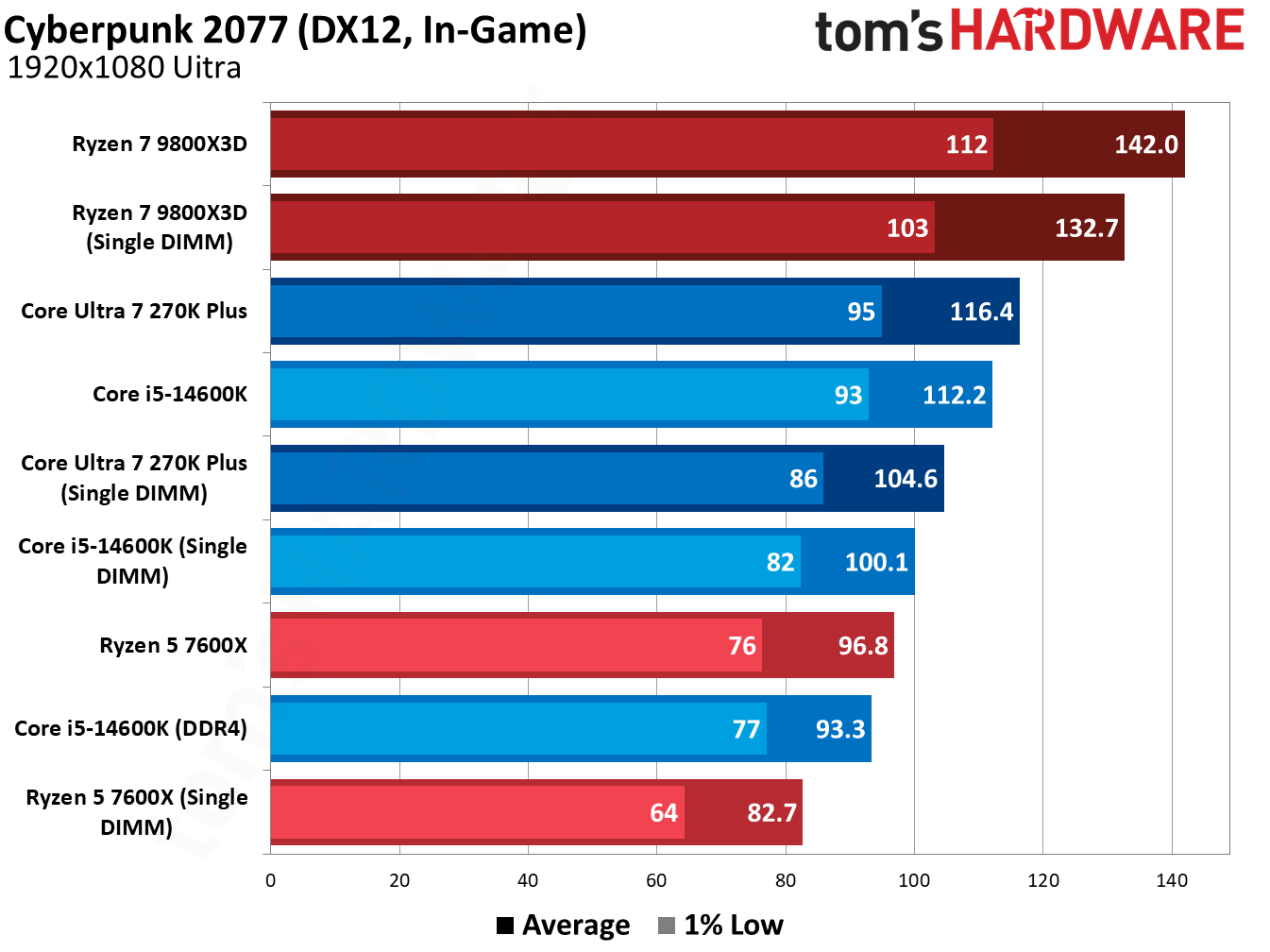
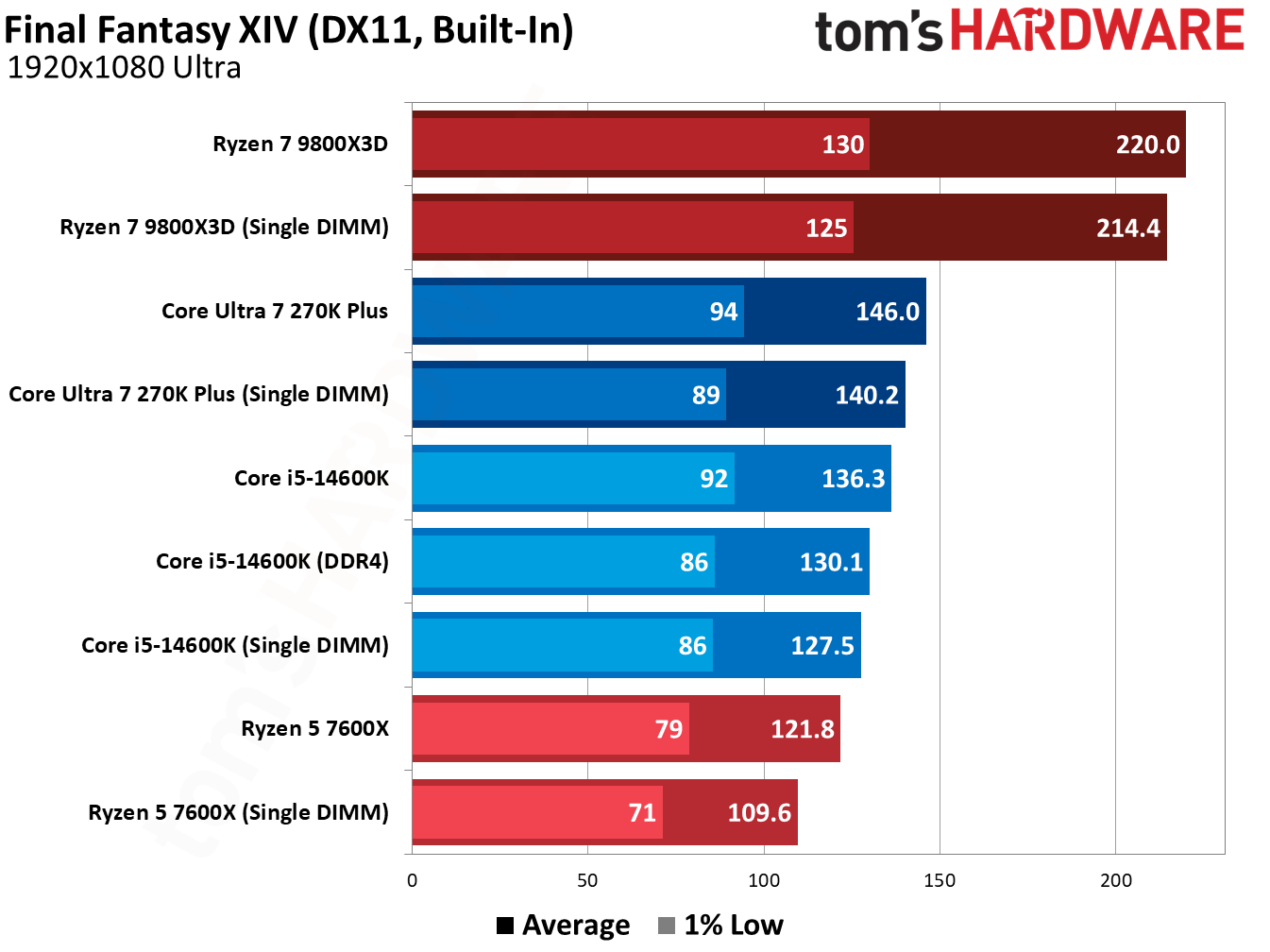
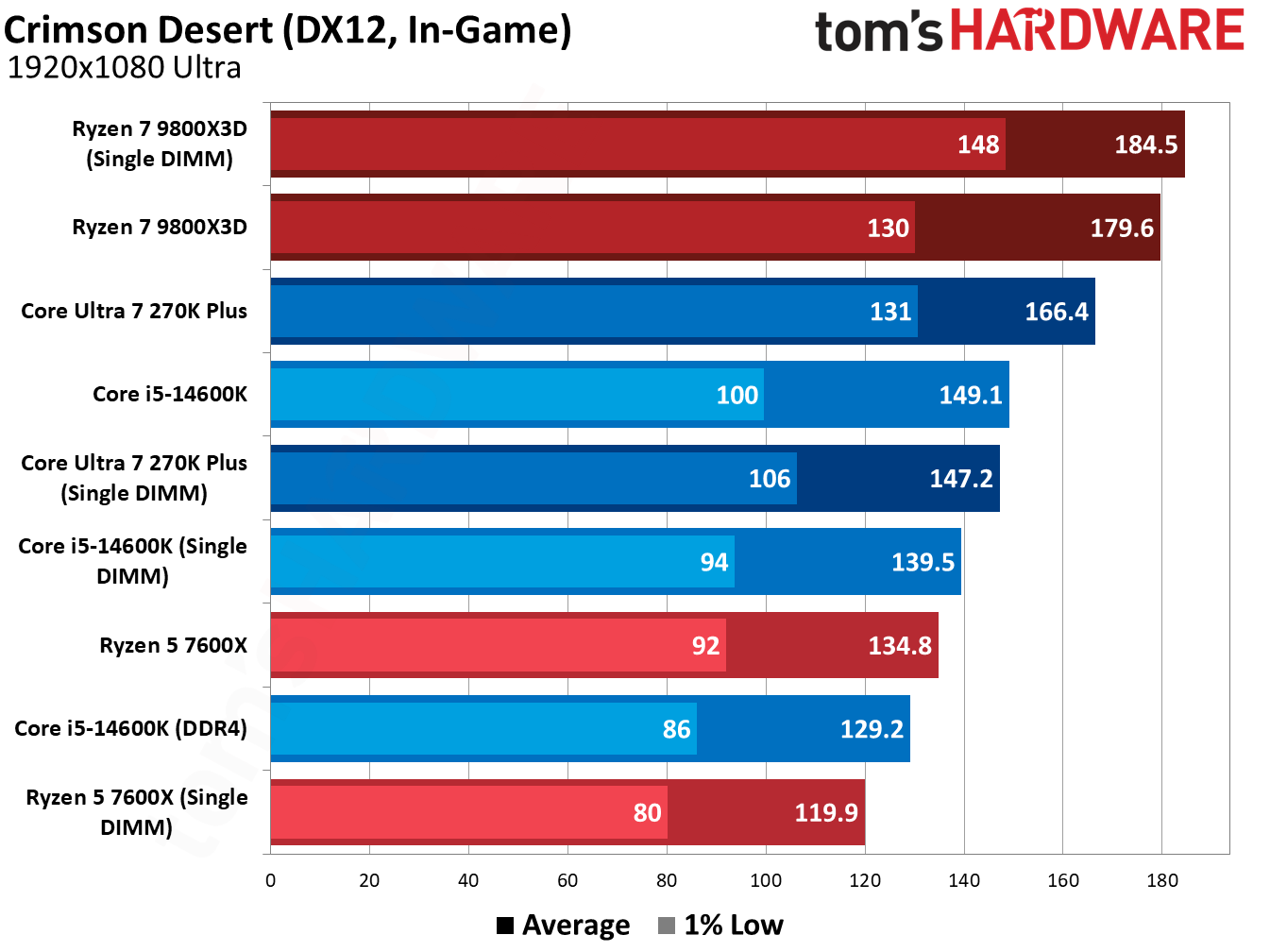
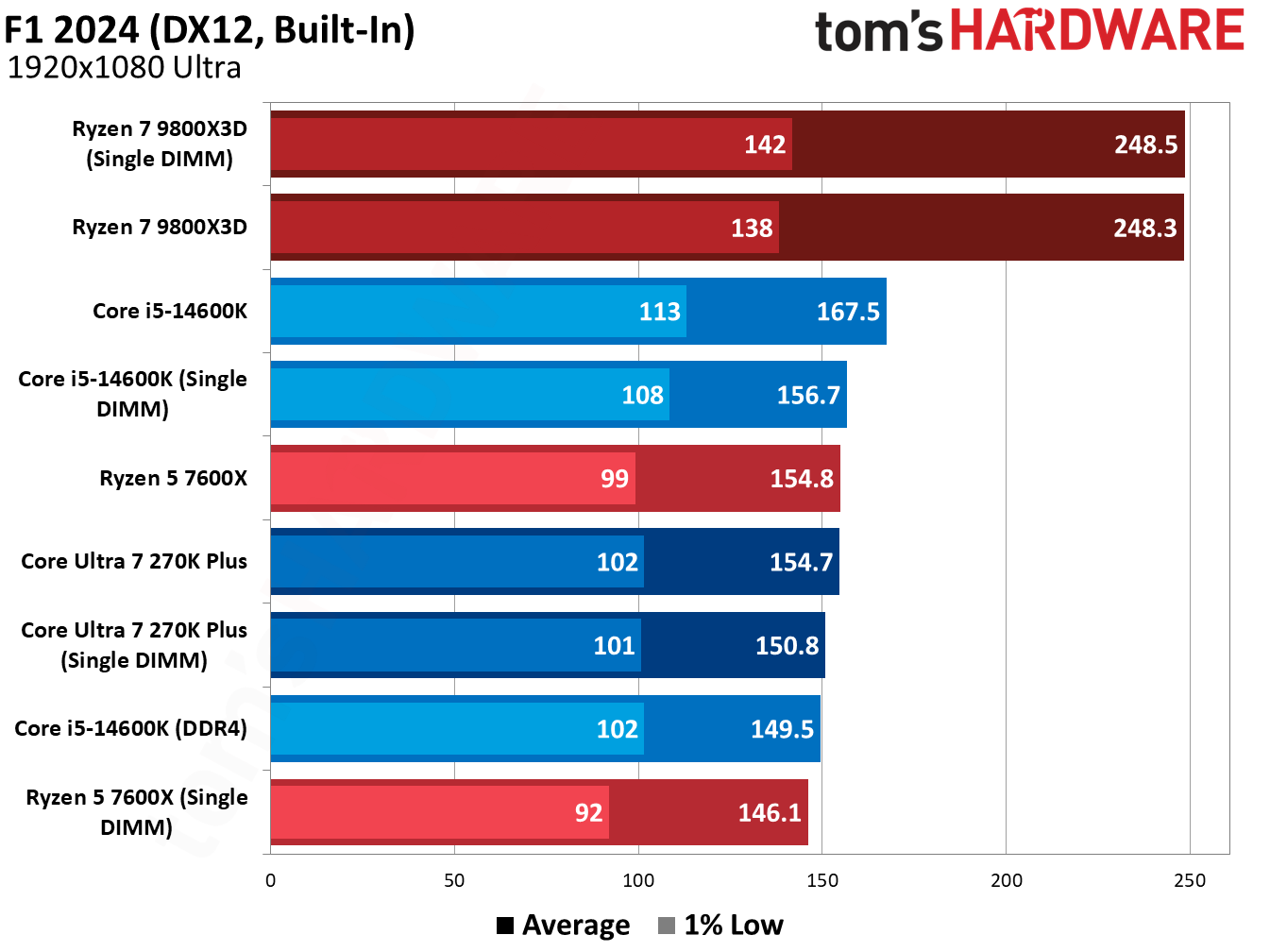
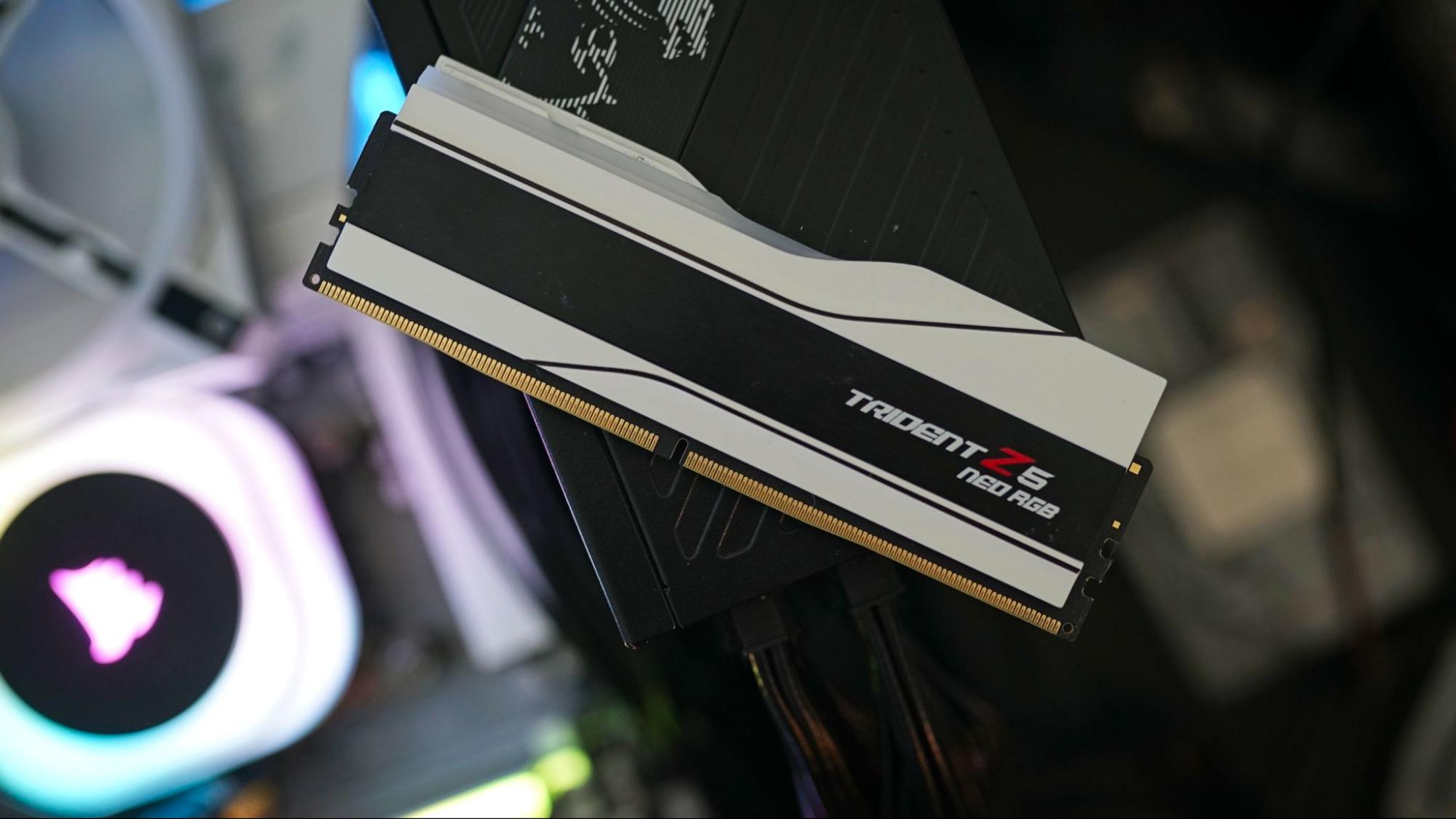
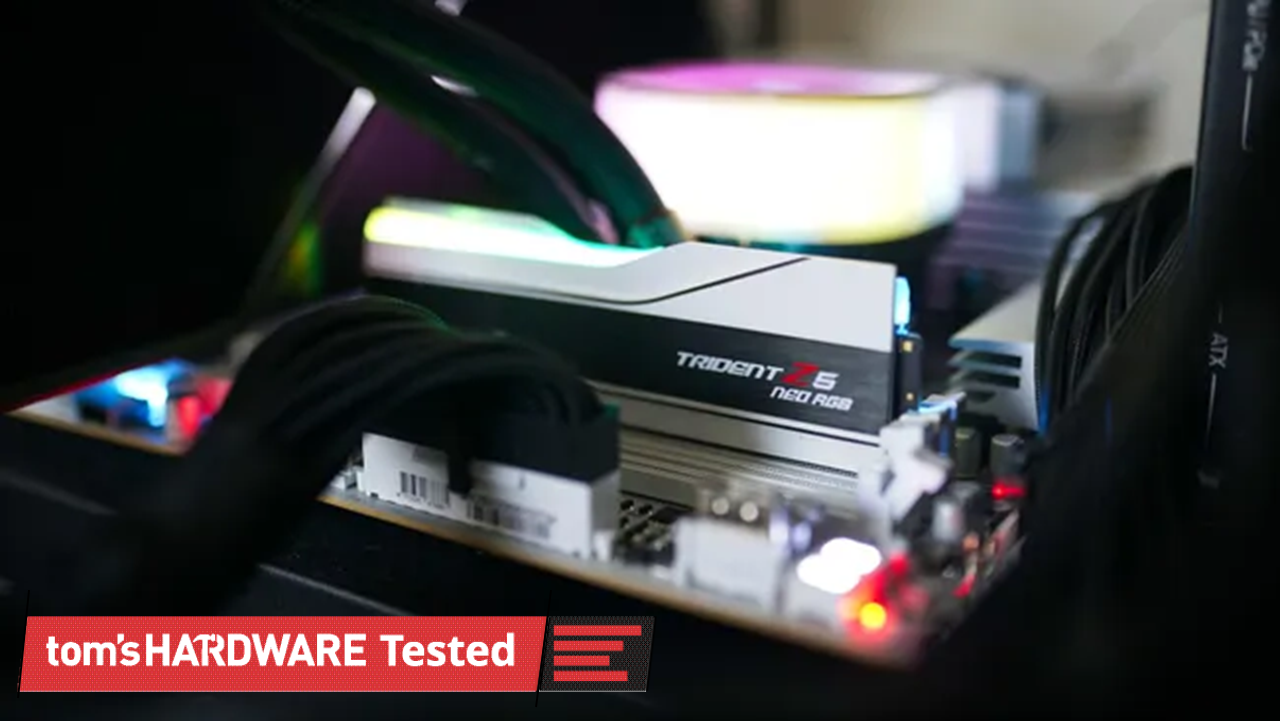
There’s been a shift toward using a single DIMM of DDR5 to skirt the worst of the RAM pricing crisis. AMD has suggested to us previously, at least, that it’s an option PC builders are exploring, and it’s a wrinkle that’s shown up in dozens of prebuilts; one that we’ve been careful to avoid when recommending products, particularly during peak shopping events. But just how much gaming performance are you giving up with a single DIMM when using one of the best CPUs for gaming?
The conventional wisdom is that you’re giving up quite a bit of performance, resting on the ideas of previous DDR generations, where going down a single stick will cut your bandwidth in half. The same is true with DDR5, but things are a bit messier, which we’ll dig into later.
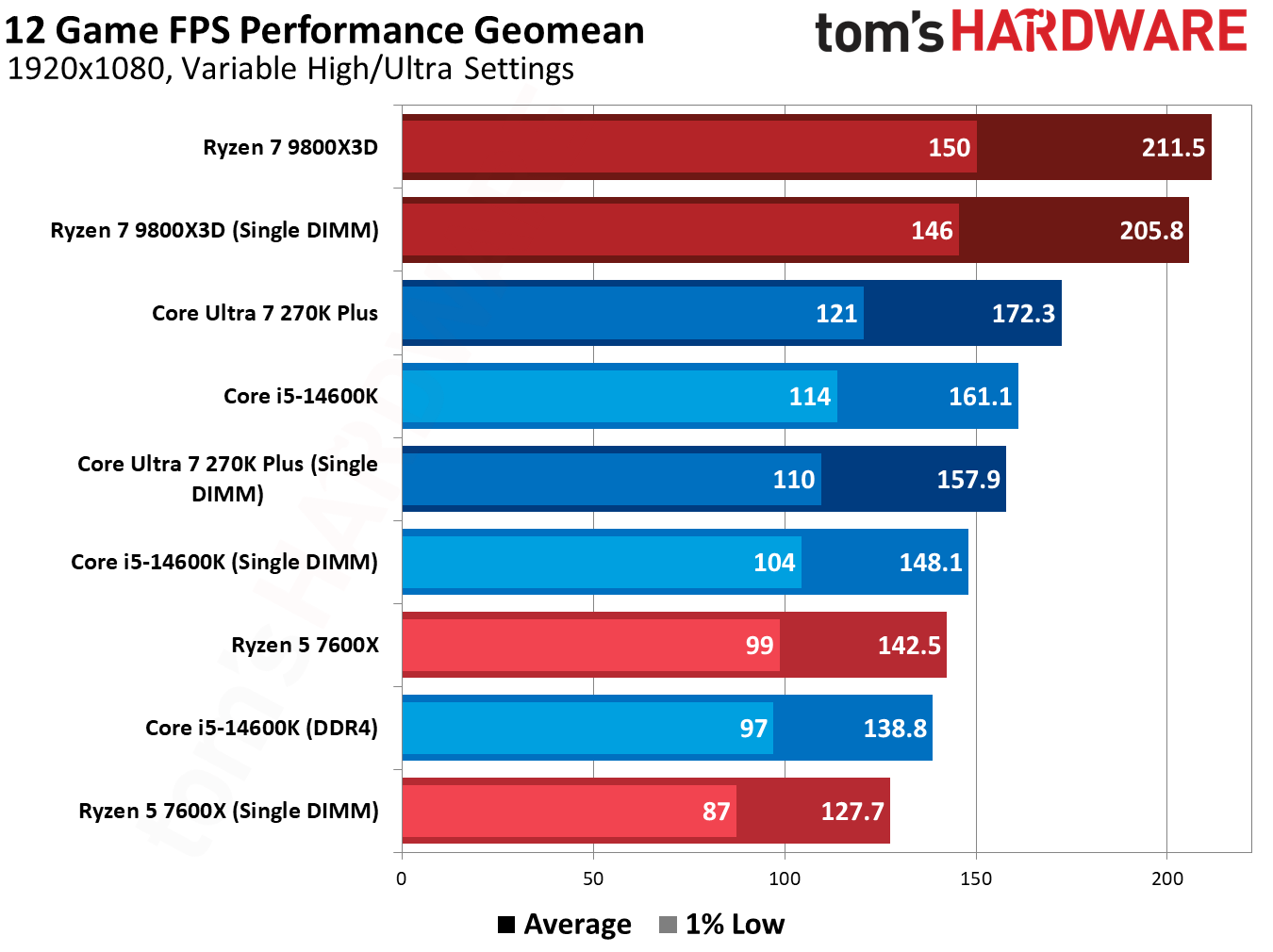
At a high level, using a single DDR5 DIMM doesn’t compromise gaming performance by nearly as much as you might expect. We saw drops of around 8% to 10% across Intel and AMD CPUs, and less than a 5% difference with AMD’s Ryzen 7 9800X3D.
A proper dual-channel configuration is still the way to go for optimal performance. However, our testing shows that even a single DDR5 DIMM offers superior performance to dual-channel DDR4 on CPUs that support both memory generations.
Using a single DIMM isn’t ideal, and it brings up compatibility issues if you plan on adding another DIMM down the line (another area we’ll touch more on in-depth later). But as a stopgap measure amid surging DRAM prices, a single DIMM of DDR5 holds up surprisingly well in gaming scenarios, and it represents a nice on-ramp into a DDR5 platform while prices are out of control.
Testing single-DIMM DDR5 in games
The geomean below speaks for itself. Moving down to a single DIMM drops some performance, but it’s not nearly as stark as I expected. There are some important notes about how we tested before dissecting the results, however.
As usual, we tested at 1080p with a mixture of High and Ultra settings, using Nvidia’s RTX 5090 Founder’s Edition to minimize the influence of the GPU. That’s even more important here, as we’re not evaluating CPUs but the memory that feeds the CPU. We're looking at a separate GPU and CPU here, as well; dual-channel memory is vital if you're using an iGPU.
We also wanted to create a realistic testing scenario. Assuming you’re going for a 2x16GB configuration, that means starting with a single 16GB DIMM, not a 32GB one. That’s what we did here. Our single-DIMM configurations run with just 16GB of memory, while dual-DIMM configurations run with 32GB. Capacity isn’t a major limitation for our testing here, though it will pose performance issues if you’re running several applications alongside your game.
(Image credit: Tom's Hardware)
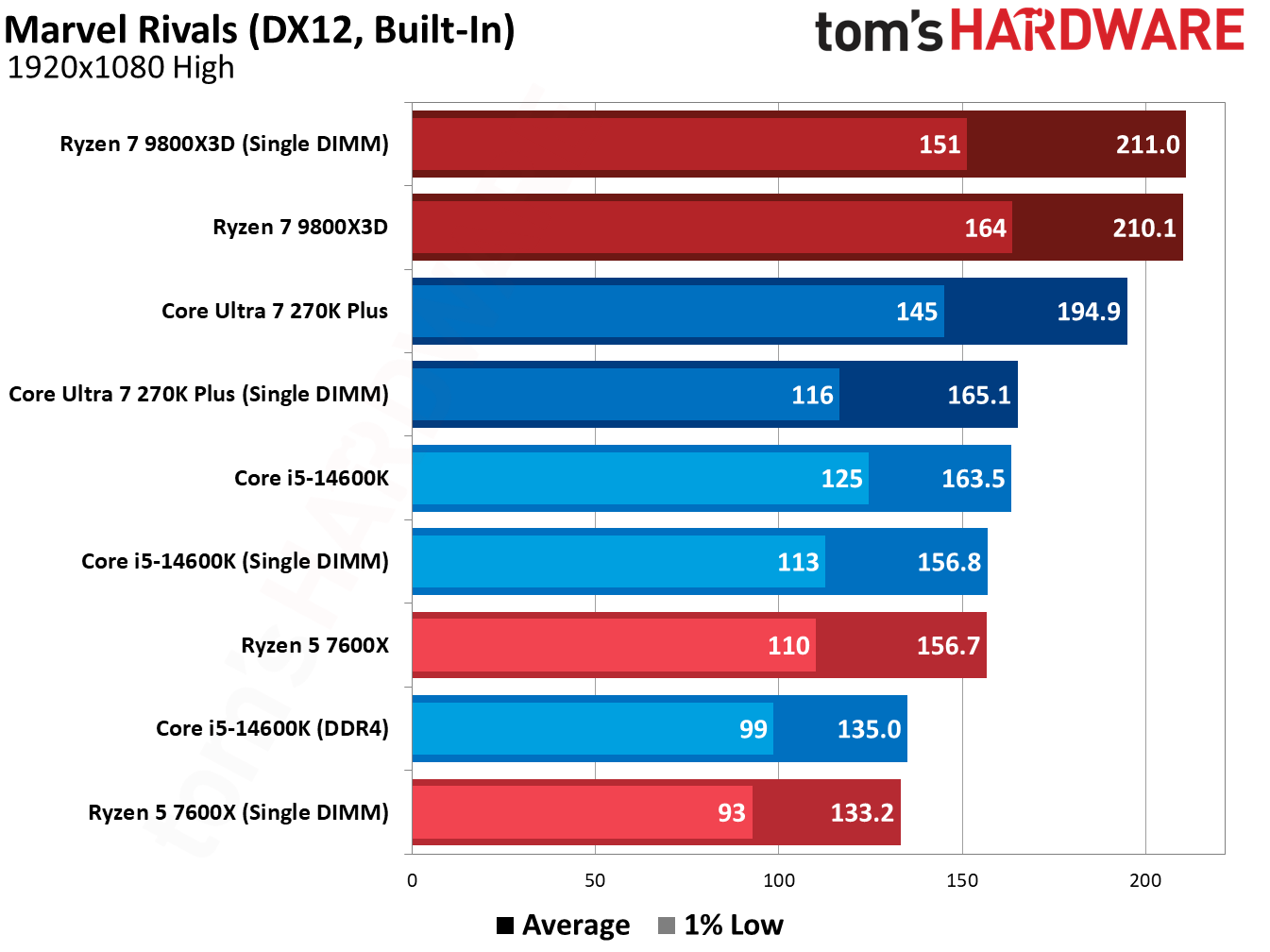
The Ryzen 5 7600X was our biggest loser, dropping 10.9% of its average performance across our 13-game geomean with a single 16GB DIMM. The Core Ultra 7 270K Plus, meanwhile, dropped 8.7% of its average performance, while the Core i5-14600K similarly dropped 8.3% of its performance. The 1% lows are especially notable here, scaling with average performance rather than falling off a cliff.
Unsurprisingly, the Ryzen 7 9800X3D fared the best, dropping just 2.8% of its performance on average. As you’ll see through our individual game tests, the Ryzen 7 9800X3D shows identical performance with two DIMMs and a single DIMM in multiple games. The large and speedy L3 minimizes the impact of using a single DIMM, giving AMD’s 3D V-Cache CPUs another notch in their belt (as if they needed another).
Tom's HardwareTom's HardwareTom's Hardware
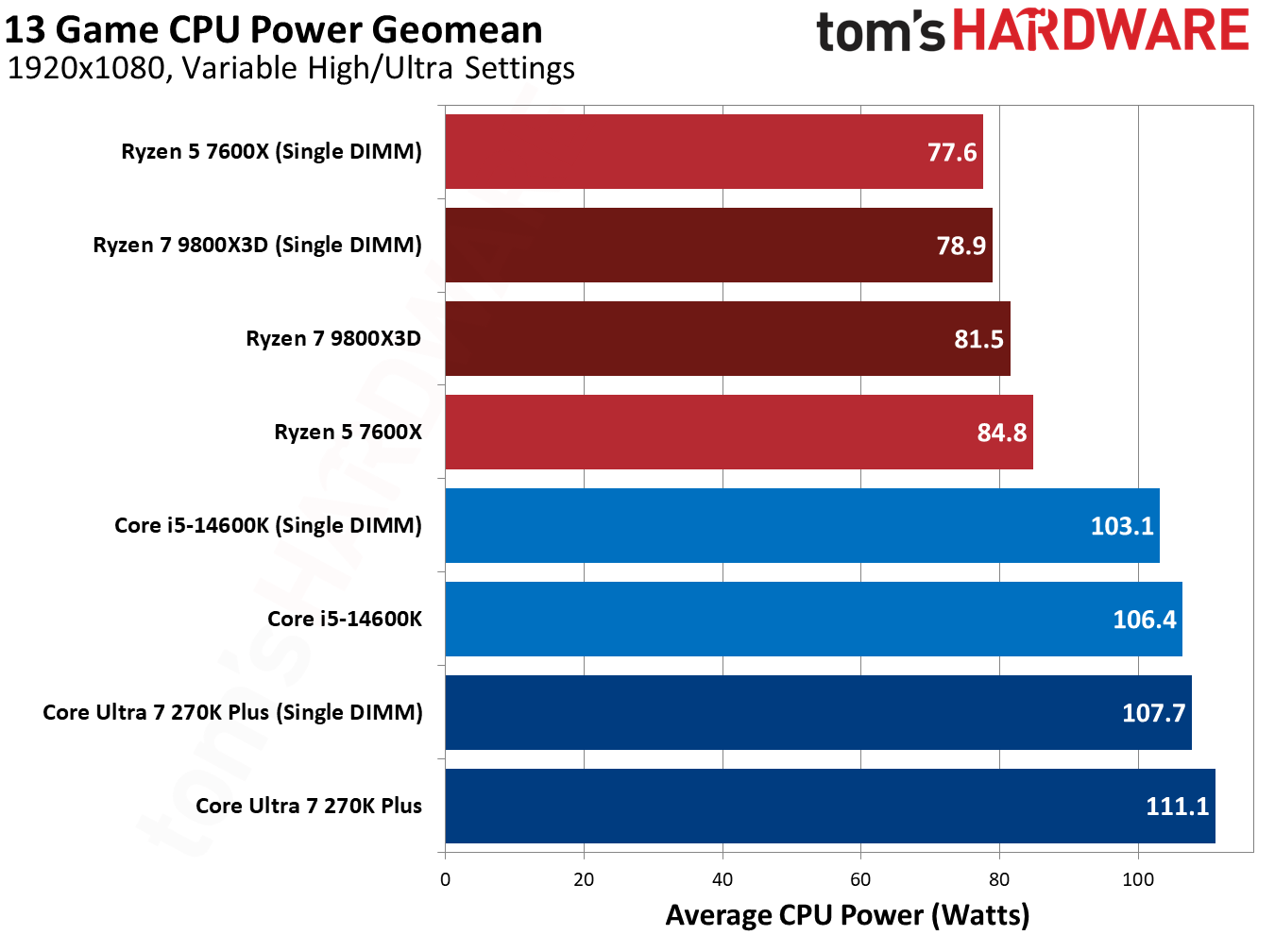
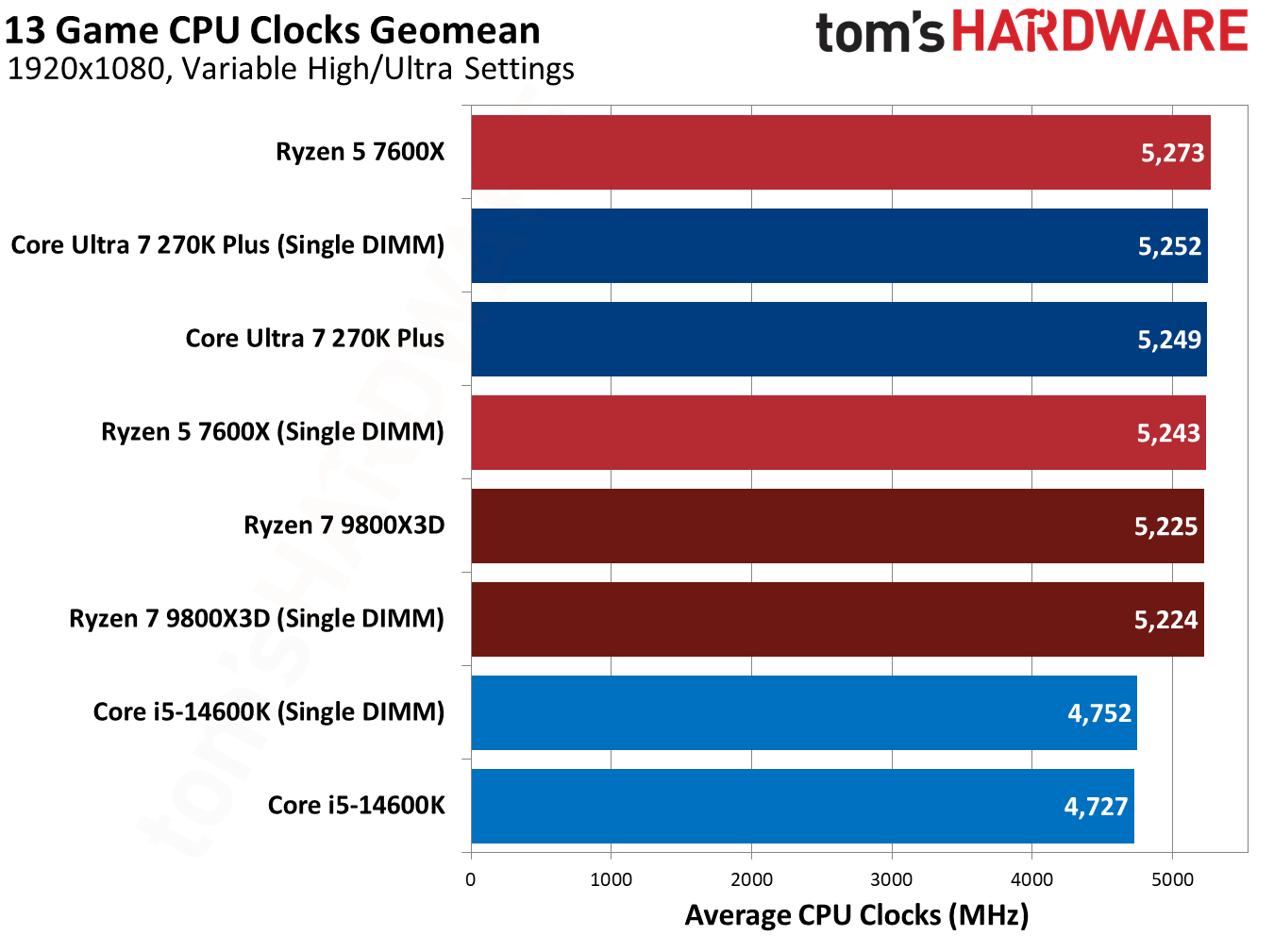
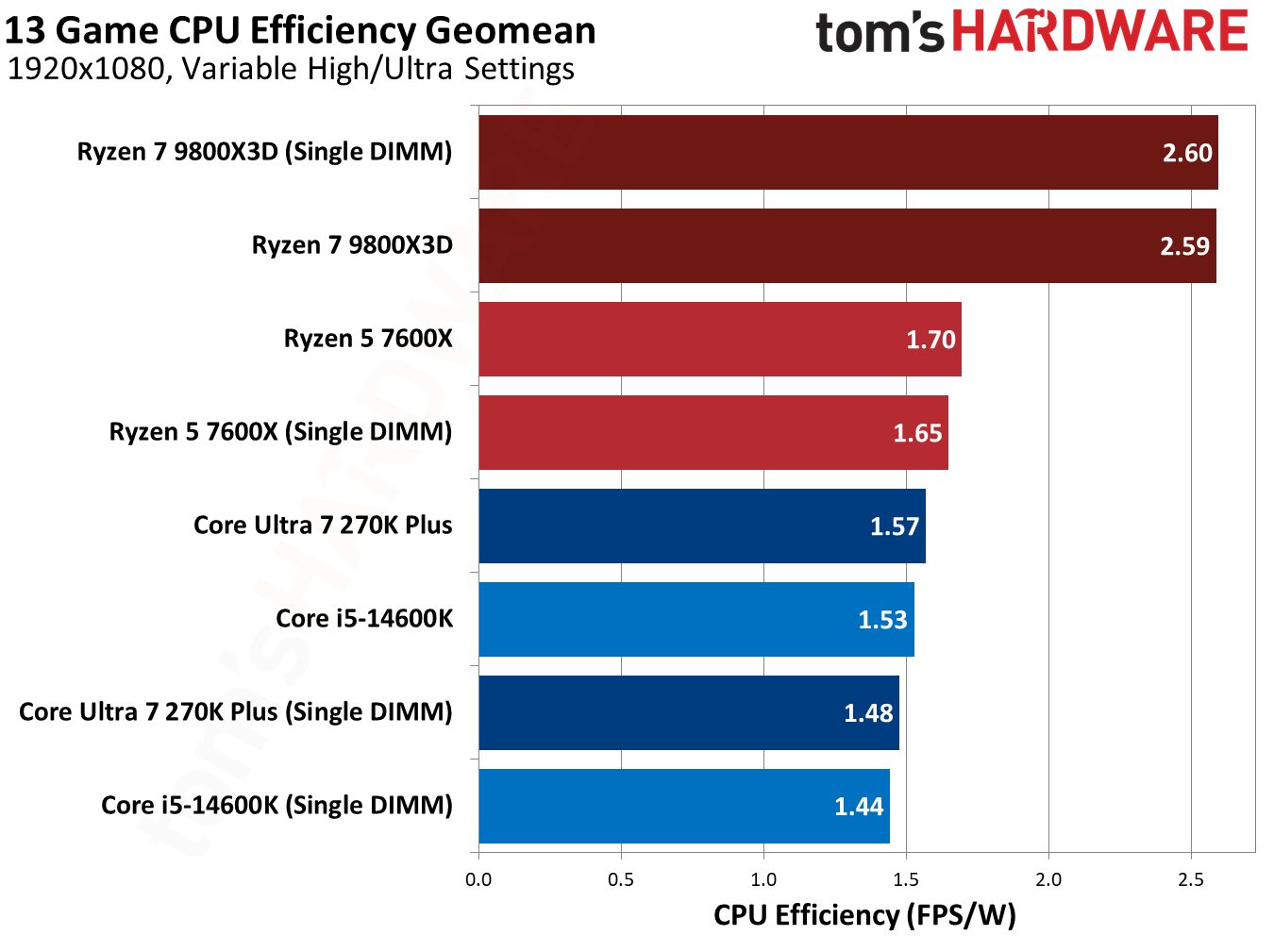
Our other geomeans don’t say much. A single-DIMM configuration consumes a few watts less, leading to slightly lower efficiency when balanced against the lowered performance.
(Image credit: Tom's Hardware)
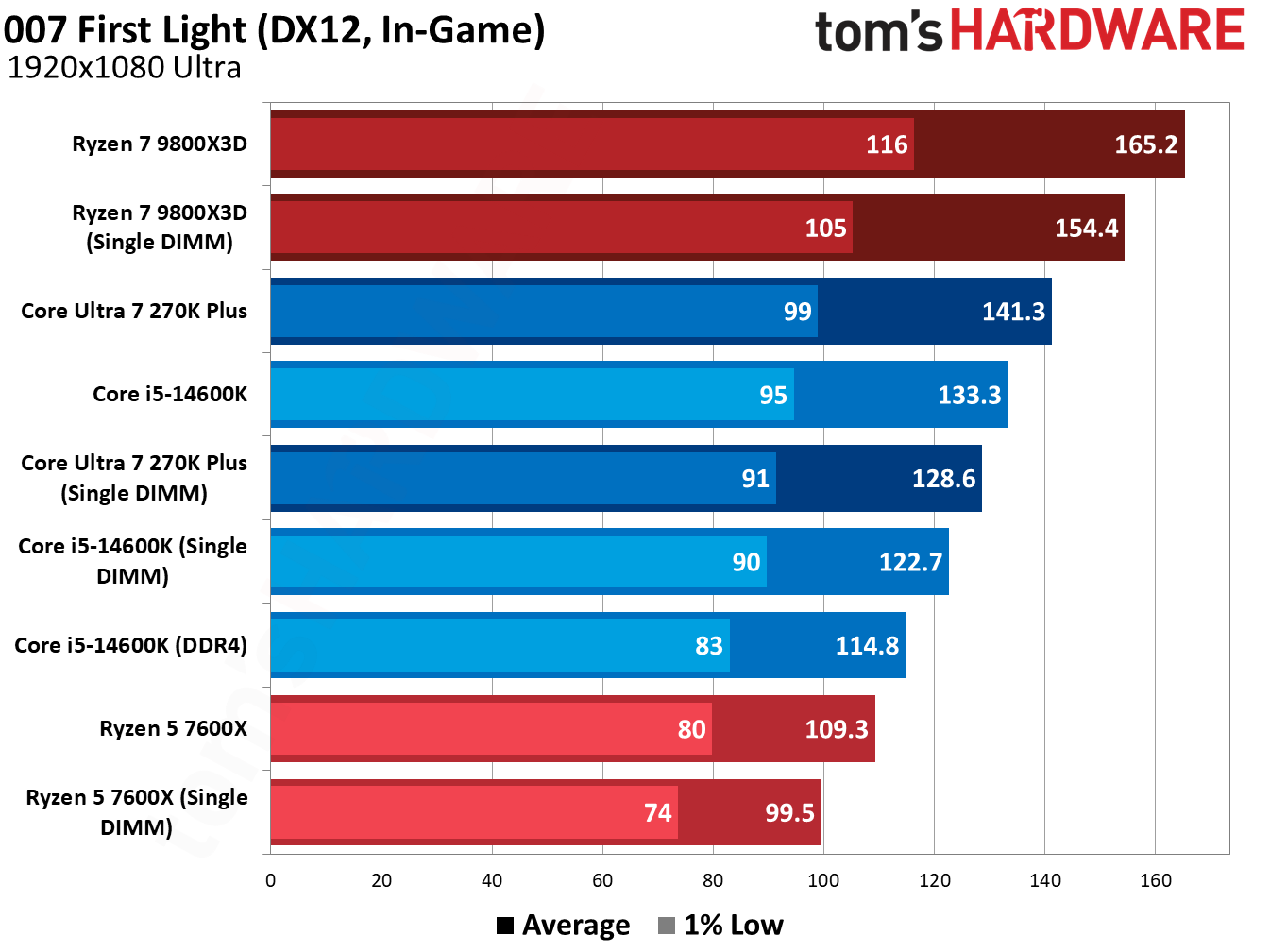
007 First Light, the newest game in our test suite, shows good scaling across our test pool, so it’s a good place to start. The Core Ultra 7 270K Plus dropped 8.9% of its performance with a single DIMM, while the 9800X3D dropped 6.5%. The 14600K is worth highlighting here. A single DIMM lost us 7.9%, but that’s still better than dual-channel DDR4, and by a decent 6.8% margin.
(Image credit: Tom's Hardware)
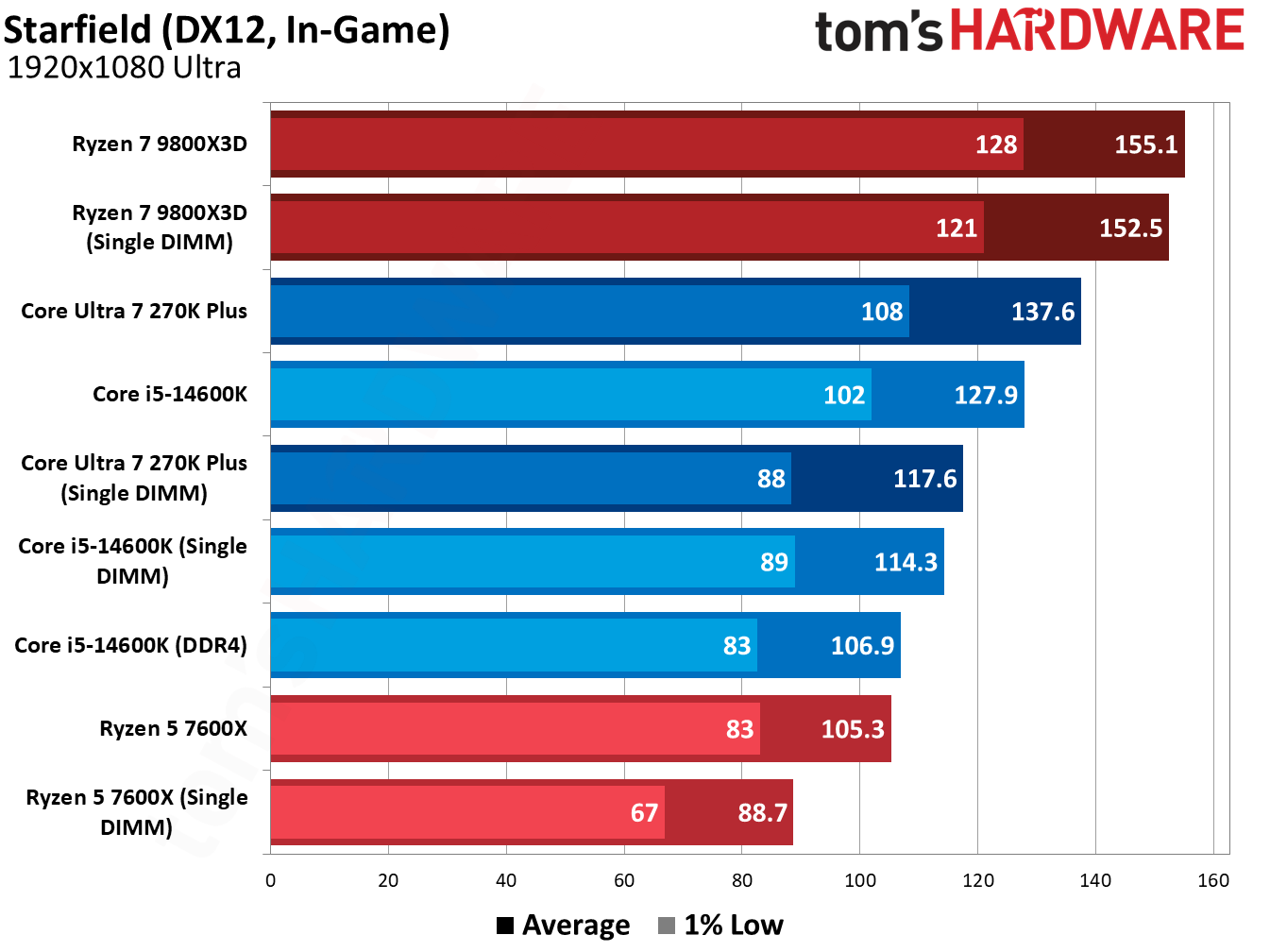
This trend is fairly consistent, too. Starfield is punishing for single-DIMM configurations, with the 14600K losing 10.6% of its average performance. Even then, a single DDR5 DIMM is 6.9% faster than dual-channel DDR4. Intel platforms can scale up to high data rates, and we use 7,200 MT/s for Intel chips. With slower speeds, the performance will equalize. Still, I’d strongly consider a single DDR5 DIMM if you’ve been eyeing an LGA 1700 platform with DDR4, assuming you’re primarily focused on gaming.
Starfield shows the benefits of 3D V-Cache in this single-DIMM configuration clearly. While the performance losses with other CPUs are brutal in this title, the 9800X3D dropped just a few frames, a 1.6% decrease in average performance.
(Image credit: Tom's Hardware)
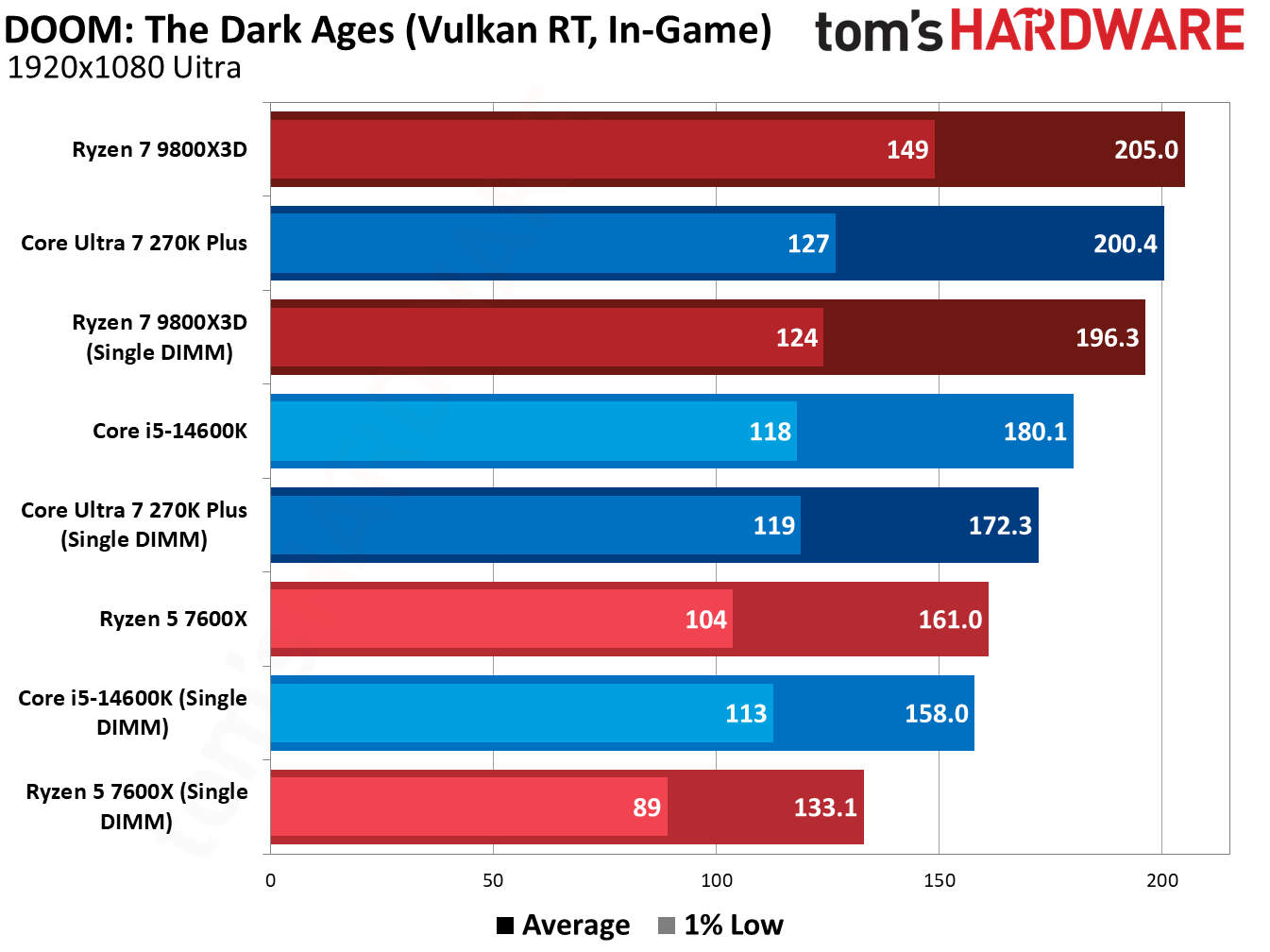
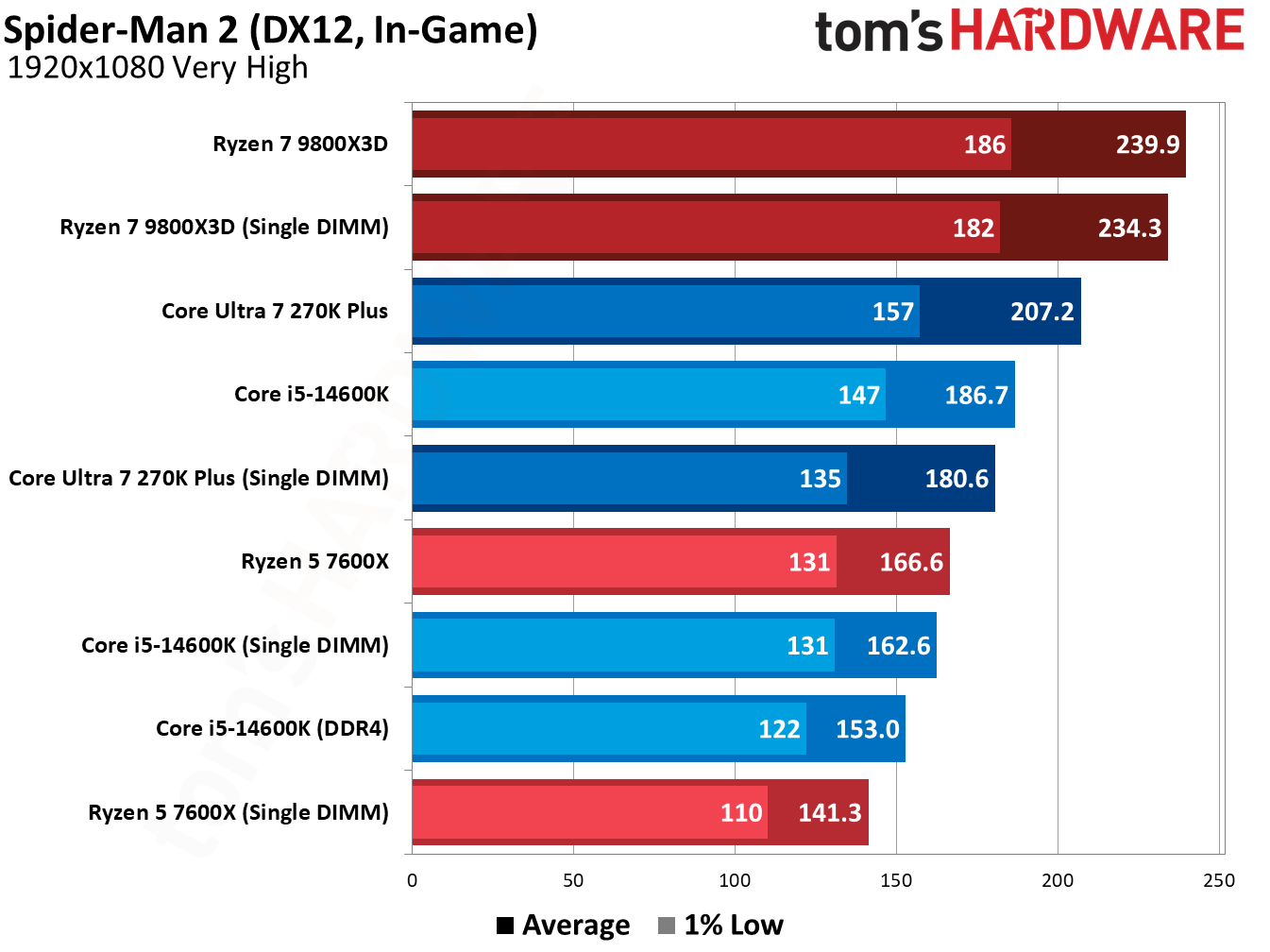
Doom: The Dark Ages is similarly harsh on single-DIMM configurations. The Ryzen 5 7600X dropped 17.3% of its average performance, and the 270K Plus fell by 14%. The 9800X3D holds up well, however, with just a 4.2% average performance loss. Marvel’s Spider-Man 2 (in the gallery below) shows a similar dynamic.
(Image credit: Tom's Hardware)
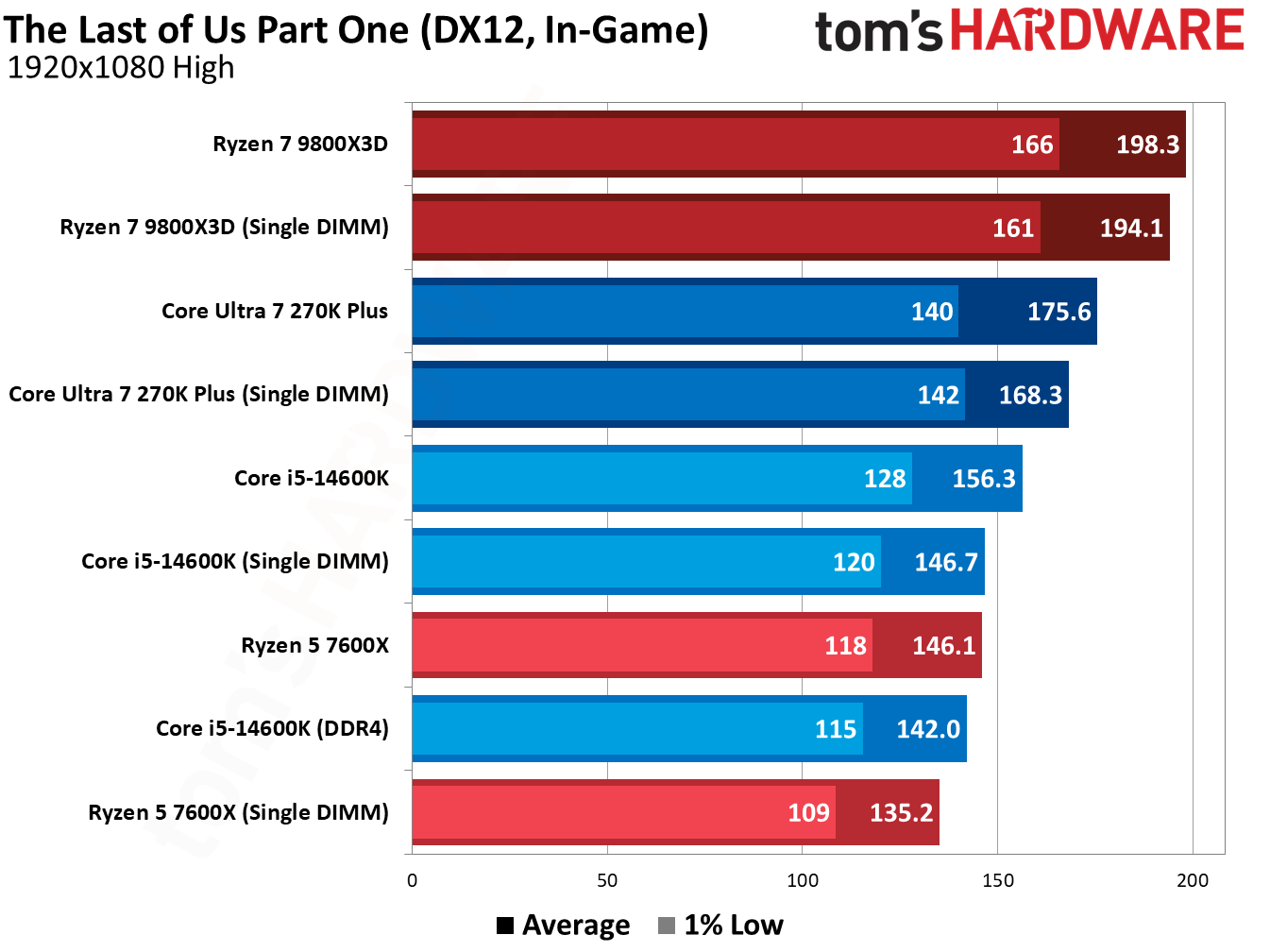
However, the addition of 3D V-Cache mainly helps in these games where we see bigger losses with other CPUs. There are several games in our suite where the performance loss between a single DIMM and dual-channel configuration was minor, particularly in GPU-heavy titles. The Last of Us Part One shows that in action.
(Image credit: Tom's Hardware)
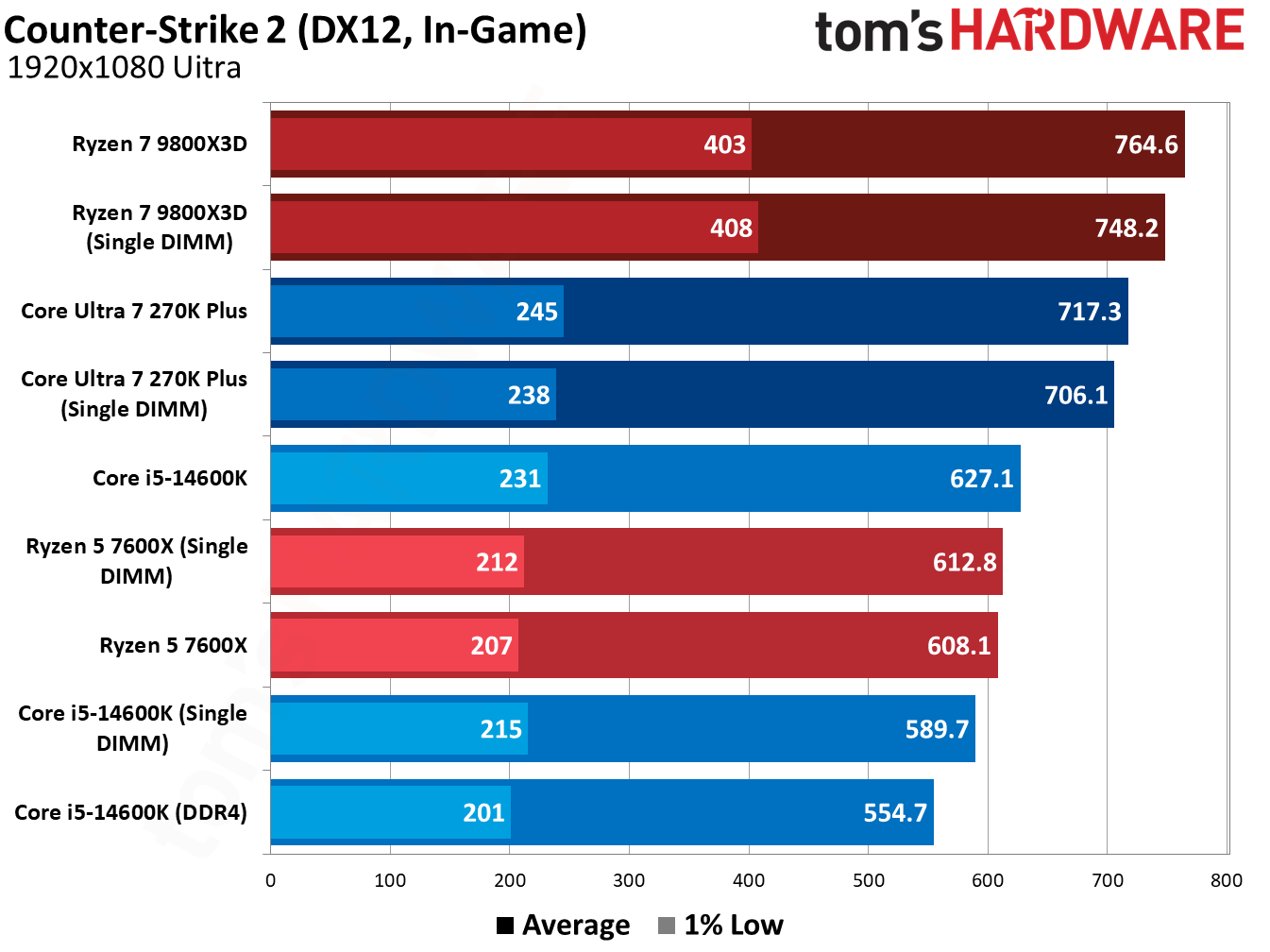
Similarly, the performance loss is minor in Counter-Strike 2, just a handful of frames even north of 600 FPS. Even the Core i5-14600K, which was hit the hardest by far, dropped just 5.9% of its average performance (and it’s still faster than a dual-channel DDR4 configuration).
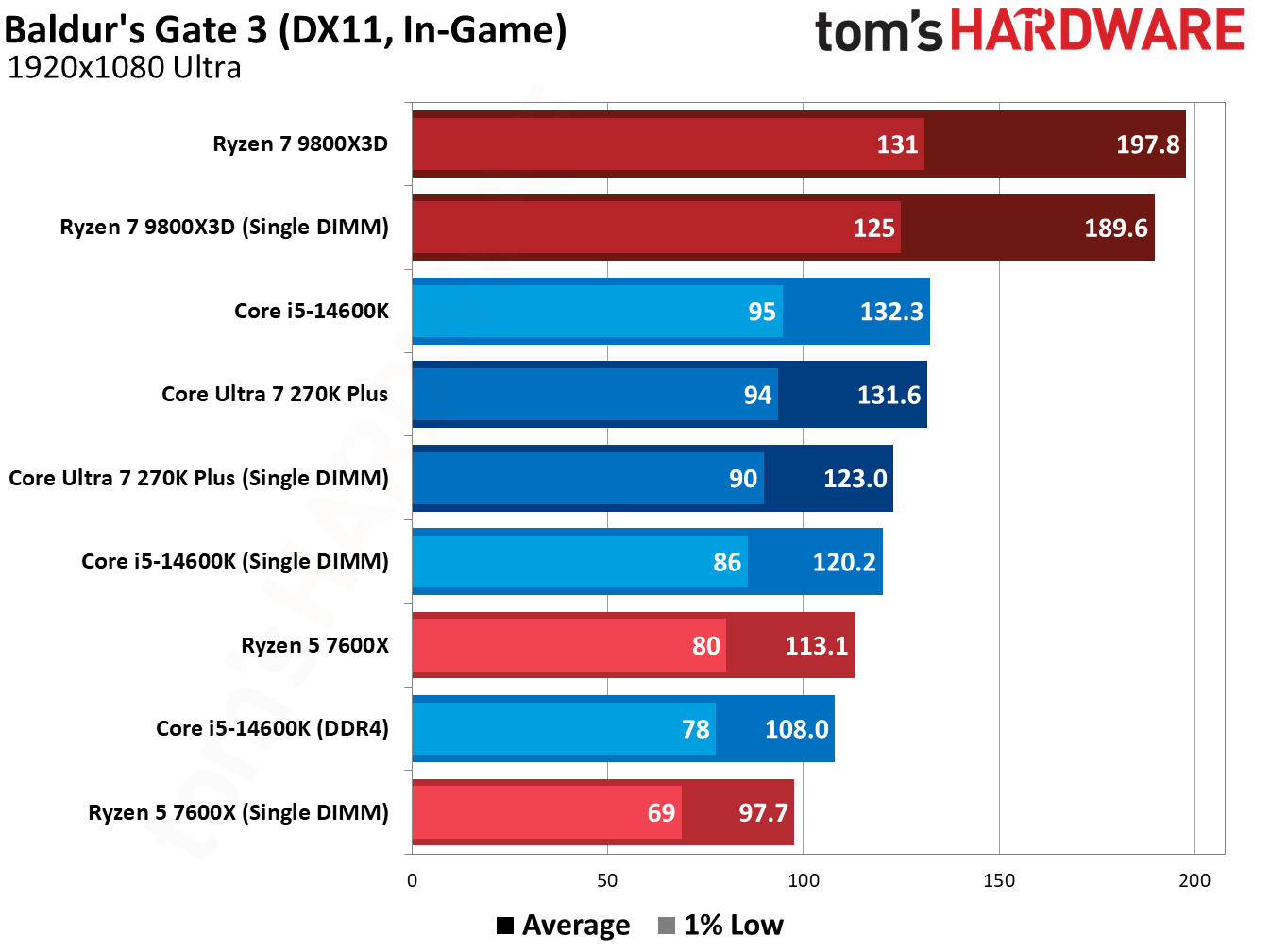
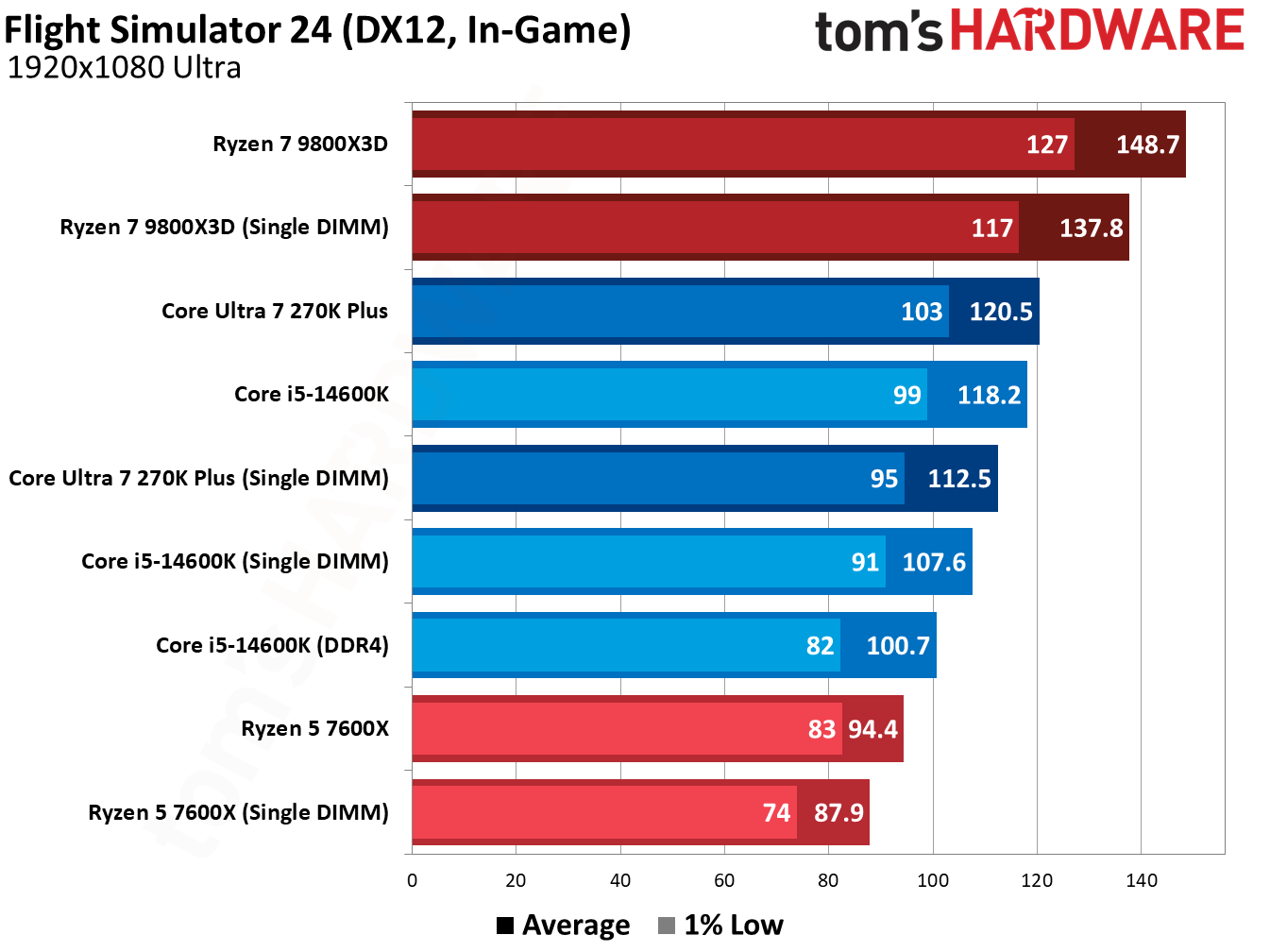
You can browse the results of the other games we tested in the gallery above, though they tell much the same story as the titles we highlighted. The two biggest learnings from this testing are that a single, fast DDR5 DIMM often outpaces dual-channel DDR4, and that AMD’s 3D V-Cache can smooth over the rough edges of using a single DIMM, particularly in those memory-sensitive titles.
How we tested
We tested on our normal test bed that we use for CPU reviews, with the only difference being dropping one of our DIMMs. As usual, we enabled XMP/EXPO for testing, both on single- and dual-DIMM configurations, opting for higher speeds on Intel platforms. AMD’s sweet spot is around 6,000 MT/s.
The data rate is noteworthy for the DDR4 comparison, in particular. With slower DDR5, we expect the delta between dual-channel DDR4 and single-DIMM DDR5 to decrease.
In addition to enabling XMP/EXPO, we disable Virtualization-Based Security (VBS), enable Resizeable BAR, and disable any automatic overclocking features that aren’t covered by warranty, including AMD’s Precision Boost Overdrive and Intel’s Extreme performance profile.
DDR5 has much higher data rates compared to DDR4 (2x or more), and that’s the result of significantly more complexity on DDR5 DIMMs compared to DDR4. Notably for this testing are the two 32-bit subchannels of DDR5, as well as enlarged prefetch and bank groups. You are getting half the total bandwidth with a single DDR5 DIMM, absolutely, but it’s a little more nuanced than simply running your memory in a single-channel configuration.
DDR4 uses a single 72-bit channel, and 64 of those bits transfer data (the additional 8 are for ECC). With DDR5, you get two 40-bit subchannels, 32 of which are used for data transfer. Critically, these subchannels have their own Command/Address (CA) interface, allowing them to operate independently of each other.
In addition, DDR5 doubles the prefetch size to 16N, doubles the number of banks and bank groups, and increases burst length from 8 bytes to 16 bytes. The math here is straightforward enough. With DDR4, you can transfer 64 bits of data over the interface at a burst of 8 bytes, giving you 64 bytes of data and aligning with cache line sizes. Each of the subchannels in DDR5 can transfer 64 bytes of data, as well, with a 32-bit width and burst length of 16 bytes.
It’s pseudo-dual-channel memory on a single DIMM. There are two independent memory operations that can happen each cycle, both of which transfer 64 bytes of data. That is a big reason why even a single DDR5 DIMM (particularly one with a higher data rate) can outpace even a proper dual-channel DDR4 configuration.
The common wisdom about using a single DIMM comes mainly from previous DDR generations, where you can only get that single 64-byte transfer each cycle, necessitating a second DIMM to have two independent operations.
Let me be clear: two DDR5 DIMMs are still better. Instead of two operations per cycle, you can perform four. The main difference is that, for modern CPUs and games, just those two operations give you the vast majority of your performance, and you don’t run into a massive performance bottleneck as you do with just a single operation via DDR4. After all, there are still a lot of DDR4 systems out there.
On the issue of compatibility
The elephant in the room with upgrading to a DDR5 platform with a single DIMM is compatibility. If you get a single DDR5 DIMM now, you should plan to add another in the future. Unfortunately, there aren’t a lot of easy answers when it comes to combining two DIMMs that aren’t in a kit together. It should work, but mixing and matching can lead to stability issues and/or lowered performance.
Generally, combining two DIMMs of the same spec should work. For instance, if you bought this Patriot Viper Venom DDR5-6000 CL30 DIMM to start your new build, and then bought a second one later, it should work. “Should” carries a lot of weight on its shoulders, however. Maybe Patriot sources DRAM from multiple places, or your second DIMM’s timings don’t completely align with your first. That could cause stability or performance issues.
There have been some attempts to get past this hurdle, such as the ROG Certified program with select Asus motherboards, but it’s impossible to know for sure if two separate DIMMs will work together or not without testing. The best you can do is to make sure you buy the same brand of memory, with the same spec, if you add a second DIMM. Make sure to keep your receipt handy in the event you need to return it, as well.
Once you have your second DIMM, make sure to test it first at stock JEDEC speeds/timings (no XMP/EXPO). Run games or applications you normally run, and then use a utility like MemTest64 to check for stability. I’d recommend keeping your PC running in this state for a few days to see if any BSODs, application crashes, or poor performance issues pop up. After that’s done, repeat the process with XMP/EXPO enabled, assuming you’re using matching DIMMs (incompatible XMP/EXPO profiles won’t work together).
Assuming DRAM prices continue at an elevated rate before you upgrade, you may want to consider investing in a dual-channel kit down the line and selling your single DIMM. Even kits can run into compatibility issues, though the likelihood is far, far lower.
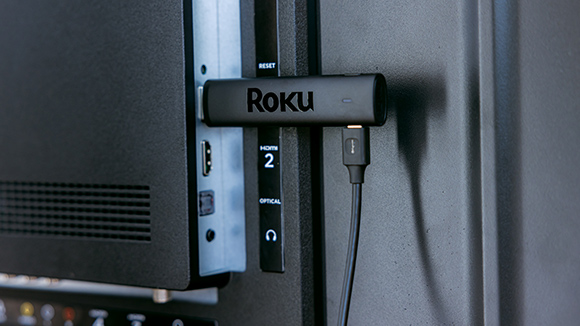
Roku is raising the prices for its streaming sticks and boxes by up to 60 percent.
Roku has updated its website with the new prices. Currently, it is still selling its streaming players at their old MSRPs but lists those prices as sale prices. The new prices are:
Roku Streaming Stick: $40 (formerly $30)
Roku Streaming Stick Plus: $60 (formerly $40)
Roku Streaming Stick 4K: $80 (formerly $50)
Roku Ultra: $150 (formerly $100)
Roku Streambar SE: $150 (formerly $100)
Roku is even upping the price for a bundle that includes a Streaming Stick Plus and a one-month subscription to Fox One. As recently as July 20, Roku listed the bundle at $60 with a sale price of $25, according to the Internet Archive’s Wayback Machine. Now, the bundle carries an $80 MSRP and $45 sale price.
Roku is raising the prices for its streaming sticks and boxes by up to 60 percent.
Roku has updated its website with the new prices. Currently, it is still selling its streaming players at their old MSRPs but lists those prices as sale prices. The new prices are:
Roku Streaming Stick: $40 (formerly $30)
Roku Streaming Stick Plus: $60 (formerly $40)
Roku Streaming Stick 4K: $80 (formerly $50)
Roku Ultra: $150 (formerly $100)
Roku Streambar SE: $150 (formerly $100)
Roku is even upping the price for a bundle that includes a Streaming Stick Plus and a one-month subscription to Fox One. As recently as July 20, Roku listed the bundle at $60 with a sale price of $25, according to the Internet Archive’s Wayback Machine. Now, the bundle carries an $80 MSRP and $45 sale price.
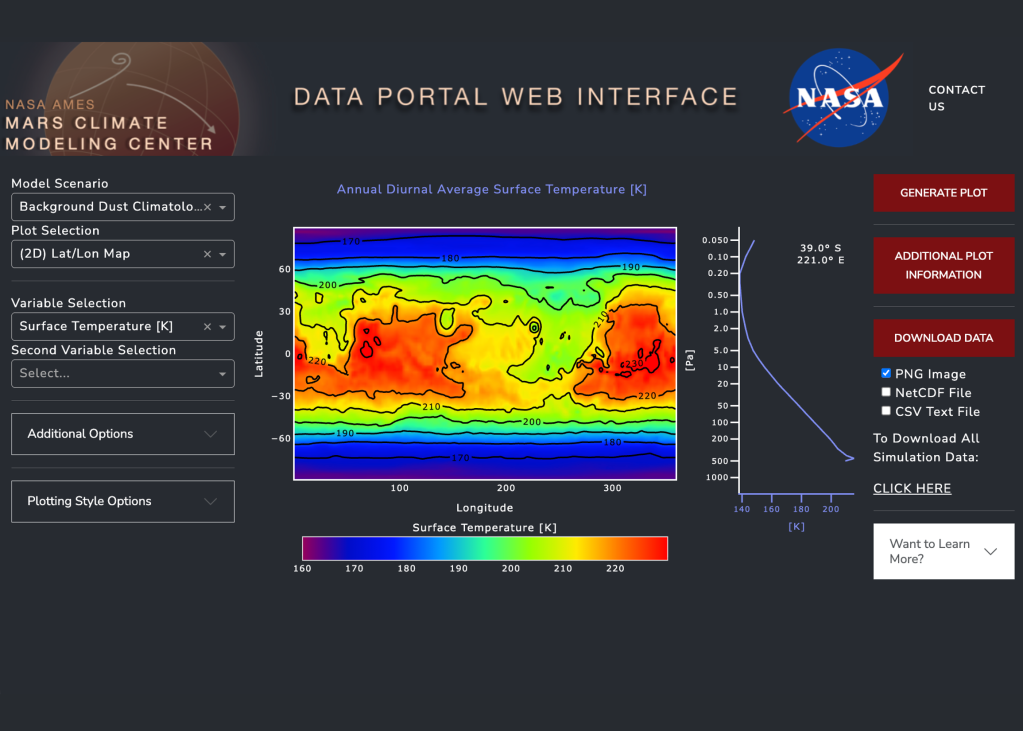
The Mars Climate Modeling Center (MCMC) presents the webserver, a website for interactive plotting and downloading Mars Global Climate Model (MGCM) output.
The model visualization tool offers the most accessible introduction to Mars Global Climate Model (MGCM) data. It is an online dashboard that allows users to interactively plot, explore, and download model output stored on the NAS Data Portal (see the MGCM Output tab for more information).
GCM analysis tools
MGCM Webserver
You can explore, plot, and download the MGCM output through our user-friendly web interface.
La missione Juno della NASA, sotto la guida dello scienziato Scott Bolton del Southwest Research Institute, ha rivelato la struttura interna di Io, la luna di Giove caratterizzata dalla più intensa attività vulcanica dell'intero Sistema Solare. Sottoposta a spaventose forze di marea gravitazionali da parte di Giove, Europa e Ganimede, la roccia di Io subisce un continuo attrito che genera un enorme calore interno. Le rilevazioni dello strumento JIRAM mostrano la presenza di un esteso strato magmatico sottocostale e bacini di lava (paterae) i cui strati superficiali sprofondano ciclicamente nel magma fuso, confermando l'esistenza di un pianeta la cui crosta è in perenne e violenta trasformazione.
NASA Announces New Spacecraft Technology Demonstration Mission at Moon
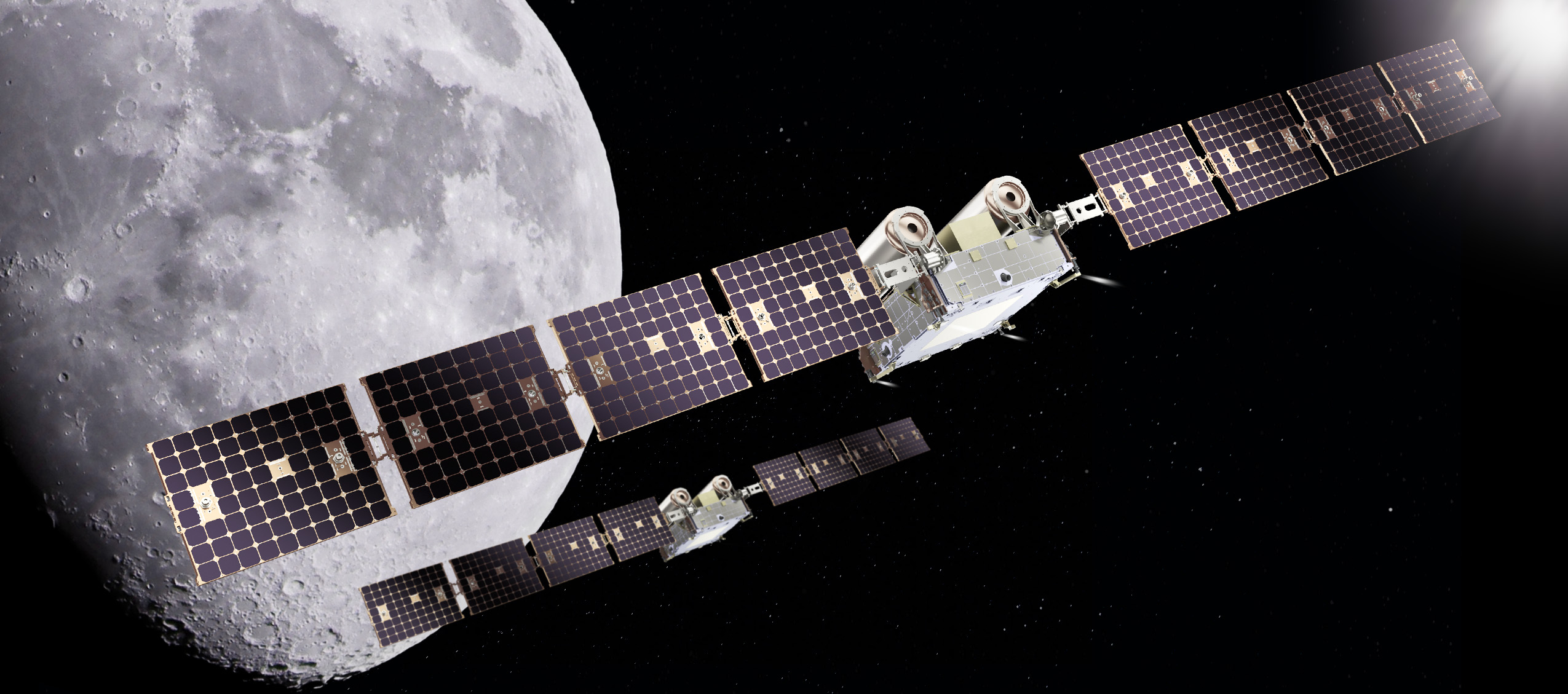
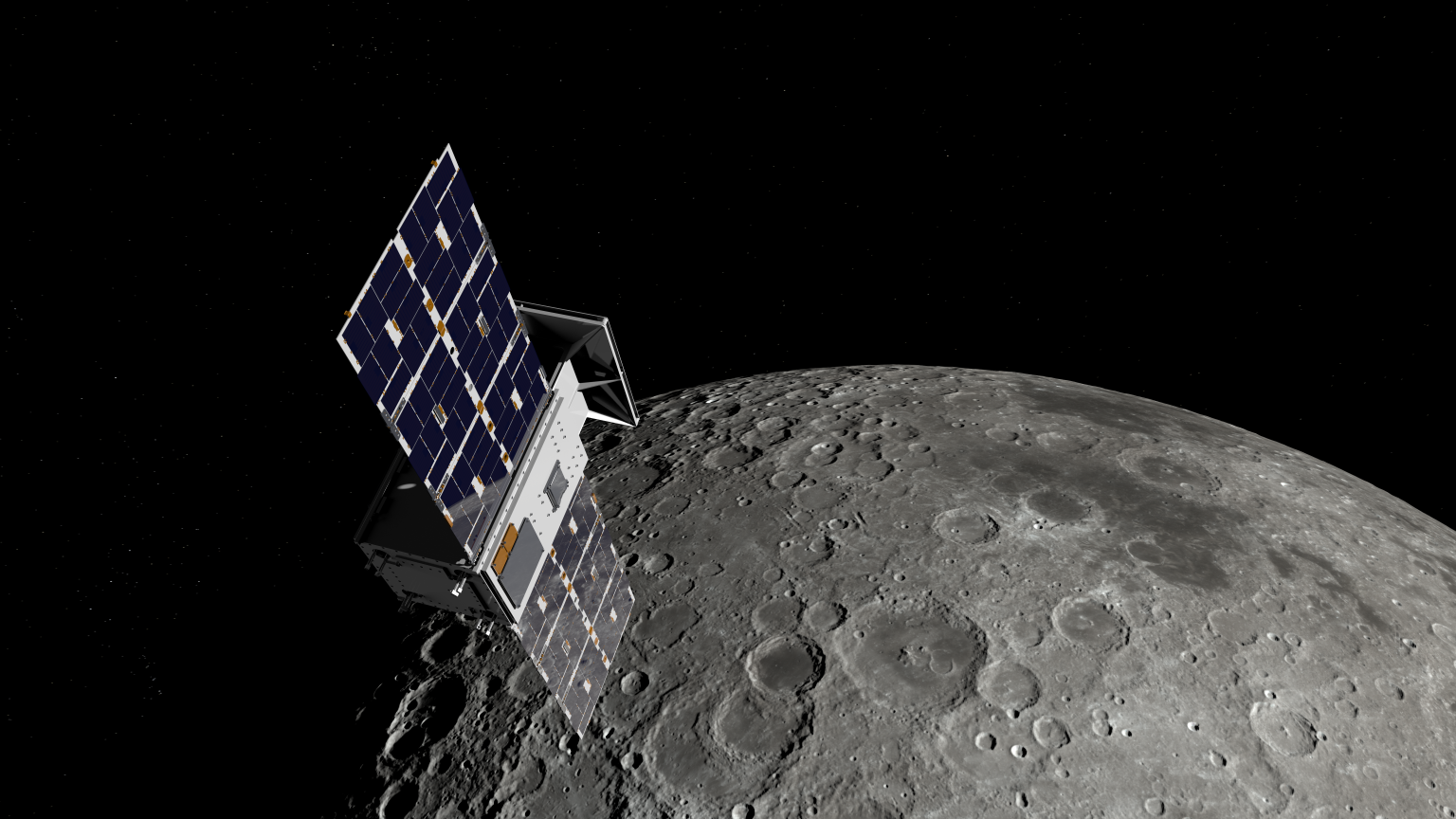
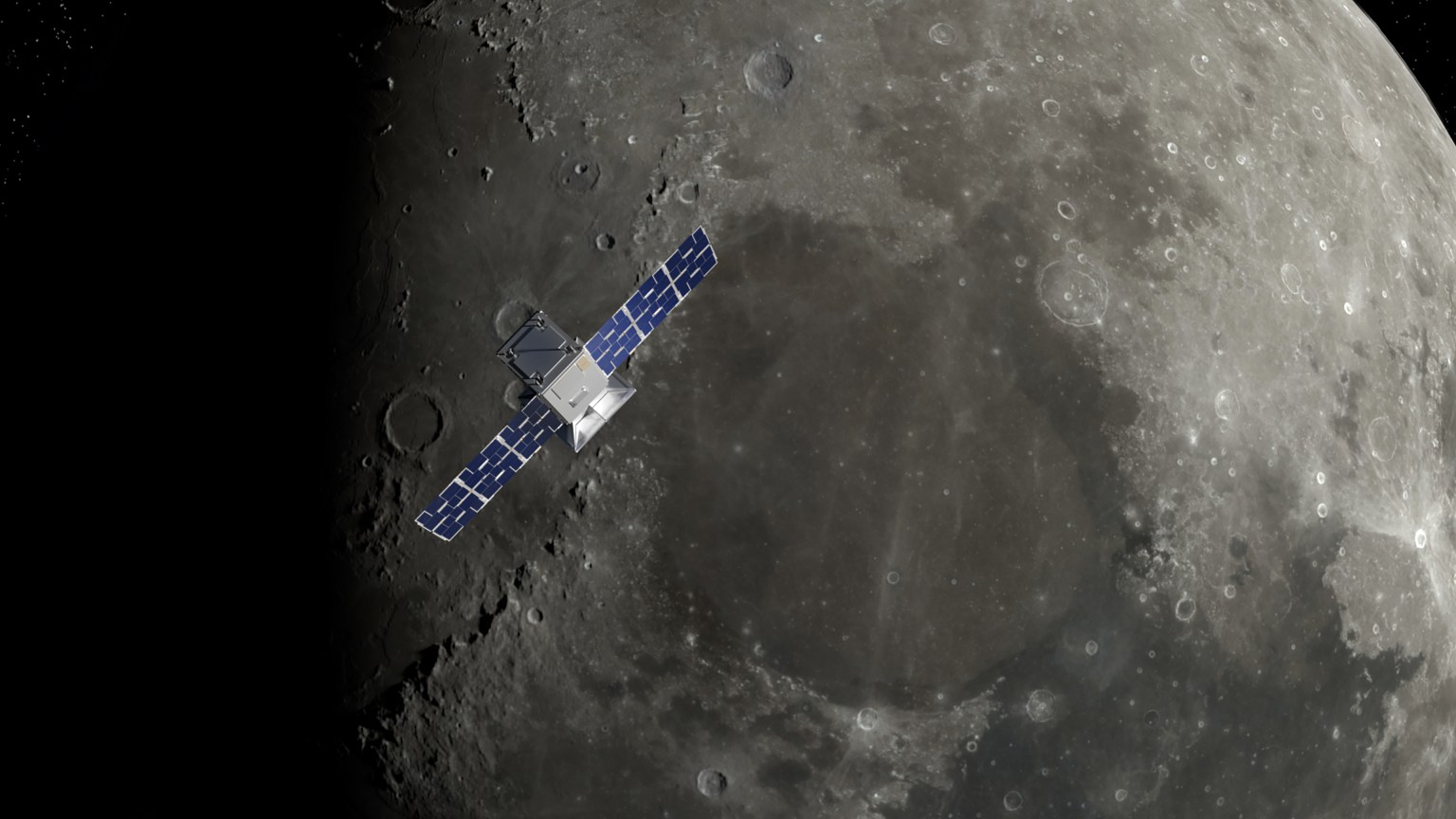
An artist’s rendering of NASA’s CAPSTONE 02 spacecraft in lunar orbit. The mission features two identical small spacecraft that will further mature technologies to support Artemis, Moon Base, and deep space exploration.
Terran Orbital
NASA is working with industry to advance the next phase of cislunar infrastructure for the agency’s Artemis program and Moon Base, including orbital assets and demonstrations. Under a contract awarded to Advanced Space, the agency’s CAPSTONE 02 mission will demonstrate rendezvous and proximity operations, autonomous navigation, and cislunar communication capabilities while continuing to characterize the radiation environment at the Moon.
The CAPSTONE 02 mission, targeted for launch in 2027, will use two small spacecraft in lunar orbit to facilitate these demonstrations to support future NASA lunar and deep space missions.
NASA’s original CAPSTONE demonstration, short for Cislunar Autonomous Positioning System Technology Operations and Navigation Experiment, became the first U.S. commercial mission to the Moon and the first spacecraft to operate in a near rectilinear halo orbit around the Moon. This is a nearly stable orbit, thanks to the interactive pull of gravity from both the Earth and the Moon.
The mission successfully validated communications, networking, and autonomous navigation capabilities while gathering operational experience in cislunar space. The second CAPSTONE mission expands upon these accomplishments by transitioning from orbit validation to demonstrations that will inform future lunar exploration and infrastructure development.
Achieving our most ambitious space exploration goals requires iterative, risk-tolerant demonstrations in partnership with industry. Technology development through flight testing is how we convert hard problems into the lasting capabilities needed for a permanent presence at the Moon.
Christopher Baker
Lead of the In‑Space Infrastructure portfolio within the Research and Technology Mission Directorate at NASA Headquarters in Washington, DC.
NASA’s CAPSTONE 02 mission will demonstrate advanced relative navigation technologies for rendezvous and proximity operations in cislunar space. These techniques are more sophisticated than those used in low Earth orbit and are designed to support NASA astronauts as they dock with Moon landers in cislunar orbit, enabling safe crew transfers to and from the lunar surface.
The demonstration will fly two identical spacecraft of approximately 400 kilograms (882 pounds) from Terran Orbital Systems, Inc. Mission operators will conduct a series of rendezvous and proximity operations and loitering – or formation flying – techniques in lunar orbit with each spacecraft to better understand the trajectories of the spacecraft under the simultaneous influence of Earth and Moon gravities, otherwise known as three-body orbits.
The CAPSTONE 02 mission will use ground tracking measurements, optical sensors, and celestial bodies to help one spacecraft locate and rendezvous with another. The mission will apply navigation strategies similar to those planned for Orion’s approach to a lunar lander in deep space, helping NASA build confidence in these techniques for future exploration.
Each CAPSTONE 02 spacecraft will have the ability to switch between ‘chaser’ and ‘target’ roles, testing a broad range of operational scenarios under a variety of environmental conditions in cislunar space. Transporting crew to the lunar surface from cislunar orbit depends on knowing how well navigation systems will perform during these operations. Since these conditions can’t be fully recreated on Earth, they must be tested in space.
The CAPSTONE 02 mission also will serve as an operational testbed, enabling testing of three NASA-developed navigation software suites. Each software application will collect data during CAPSTONE 02’s low energy transfer trajectory, which will take it from the Earth to beyond the Moon before settling into a lunar orbit. The spacecraft will carry an optical imaging payload from Lawrence Livermore National Laboratory to support the navigation demonstration as well as capture imagery of the Moon. In addition, the mission will further mature the Cislunar Autonomous Positioning System navigation software that was first demonstrated on CAPSTONE as a method of determining spacecraft position relative to other spacecraft without relying on Earth-based tracking.
The suite of technologies on CAPSTONE 02 are designed to automate routine navigation tasks, reduce reliance on traditional space-to-ground data, and enable new mission concepts that may be derived from increased inter-satellite coordination. Additionally, the CAPSTONE 02 spacecraft are designed for cost-effective, rapid deployment, demonstrating a scalable and repeatable mission model.
“This mission represents an important step in the maturation of cislunar capabilities,” said Sean Fuller, Moon Base CAPSTONE manager. “By expanding on the lessons learned from CAPSTONE to demonstrate increasingly sophisticated operational concepts, CAPSTONE 02 lays the foundation for lunar infrastructure and commercial services that support Artemis, Moon Base, and future missions to deep space.”
The CAPSTONE 02 mission is funded by NASA’s Human Spaceflight Mission Directorate with support from the Research and Technology Mission Directorate. The mission is managed by Small Spacecraft & Distributed Systems, based at NASA’s Ames Research Center in California’s Silicon Valley, within the Research and Technology Mission Directorate. NASA used a Small Business Innovation Research Phase III contract to fund the mission.
To learn more about NASA’s CAPSTONE mission, visit:
Preparations for Next Moonwalk Simulations Underway (and Underwater)
An artist’s rendering of NASA’s CAPSTONE 02 spacecraft in lunar orbit. The mission features two identical small spacecraft that will further mature technologies to support Artemis, Moon Base, and deep space exploration.
Terran Orbital
NASA is working with industry to advance the next phase of cislunar infrastructure for the agency’s Artemis program and Moon Base, including orbital assets and demonstrations. Under a contract awarded to Advanced Space, the agency’s CAPSTONE 02 mission will demonstrate rendezvous and proximity operations, autonomous navigation, and cislunar communication capabilities while continuing to characterize the radiation environment at the Moon.
The CAPSTONE 02 mission, targeted for launch in 2027, will use two small spacecraft in lunar orbit to facilitate these demonstrations to support future NASA lunar and deep space missions.
NASA’s original CAPSTONE demonstration, short for Cislunar Autonomous Positioning System Technology Operations and Navigation Experiment, became the first U.S. commercial mission to the Moon and the first spacecraft to operate in a near rectilinear halo orbit around the Moon. This is a nearly stable orbit, thanks to the interactive pull of gravity from both the Earth and the Moon.
The mission successfully validated communications, networking, and autonomous navigation capabilities while gathering operational experience in cislunar space. The second CAPSTONE mission expands upon these accomplishments by transitioning from orbit validation to demonstrations that will inform future lunar exploration and infrastructure development.
Achieving our most ambitious space exploration goals requires iterative, risk-tolerant demonstrations in partnership with industry. Technology development through flight testing is how we convert hard problems into the lasting capabilities needed for a permanent presence at the Moon.
Christopher Baker
Lead of the In‑Space Infrastructure portfolio within the Research and Technology Mission Directorate at NASA Headquarters in Washington, DC.
NASA’s CAPSTONE 02 mission will demonstrate advanced relative navigation technologies for rendezvous and proximity operations in cislunar space. These techniques are more sophisticated than those used in low Earth orbit and are designed to support NASA astronauts as they dock with Moon landers in cislunar orbit, enabling safe crew transfers to and from the lunar surface.
The demonstration will fly two identical spacecraft of approximately 400 kilograms (882 pounds) from Terran Orbital Systems, Inc. Mission operators will conduct a series of rendezvous and proximity operations and loitering – or formation flying – techniques in lunar orbit with each spacecraft to better understand the trajectories of the spacecraft under the simultaneous influence of Earth and Moon gravities, otherwise known as three-body orbits.
The CAPSTONE 02 mission will use ground tracking measurements, optical sensors, and celestial bodies to help one spacecraft locate and rendezvous with another. The mission will apply navigation strategies similar to those planned for Orion’s approach to a lunar lander in deep space, helping NASA build confidence in these techniques for future exploration.
Each CAPSTONE 02 spacecraft will have the ability to switch between ‘chaser’ and ‘target’ roles, testing a broad range of operational scenarios under a variety of environmental conditions in cislunar space. Transporting crew to the lunar surface from cislunar orbit depends on knowing how well navigation systems will perform during these operations. Since these conditions can’t be fully recreated on Earth, they must be tested in space.
The CAPSTONE 02 mission also will serve as an operational testbed, enabling testing of three NASA-developed navigation software suites. Each software application will collect data during CAPSTONE 02’s low energy transfer trajectory, which will take it from the Earth to beyond the Moon before settling into a lunar orbit. The spacecraft will carry an optical imaging payload from Lawrence Livermore National Laboratory to support the navigation demonstration as well as capture imagery of the Moon. In addition, the mission will further mature the Cislunar Autonomous Positioning System navigation software that was first demonstrated on CAPSTONE as a method of determining spacecraft position relative to other spacecraft without relying on Earth-based tracking.
The suite of technologies on CAPSTONE 02 are designed to automate routine navigation tasks, reduce reliance on traditional space-to-ground data, and enable new mission concepts that may be derived from increased inter-satellite coordination. Additionally, the CAPSTONE 02 spacecraft are designed for cost-effective, rapid deployment, demonstrating a scalable and repeatable mission model.
“This mission represents an important step in the maturation of cislunar capabilities,” said Sean Fuller, Moon Base CAPSTONE manager. “By expanding on the lessons learned from CAPSTONE to demonstrate increasingly sophisticated operational concepts, CAPSTONE 02 lays the foundation for lunar infrastructure and commercial services that support Artemis, Moon Base, and future missions to deep space.”
The CAPSTONE 02 mission is funded by NASA’s Human Spaceflight Mission Directorate with support from the Research and Technology Mission Directorate. The mission is managed by Small Spacecraft & Distributed Systems, based at NASA’s Ames Research Center in California’s Silicon Valley, within the Research and Technology Mission Directorate. NASA used a Small Business Innovation Research Phase III contract to fund the mission.
To learn more about NASA’s CAPSTONE mission, visit:
MacBook Air Flexgate is an unofficial name increasingly used for screen problems that appear when the laptop lid reaches a particular angle. The display may flicker, lose its backlight, show colored lines or turn completely black even though the computer continues running.
The term can be misleading. The original Flexgate controversy involved certain 13-inch MacBook Pro models from 2016, not MacBook Air. Apple later created a display backlight service program for eligible MacBook Pro units after determining that a small percentage could develop uneven lighting or lose the backlight entirely.
No equivalent MacBook Air repair program currently appears among Apple active service programs. Individual Air models can still experience failures involving display cables, connectors, backlight components or the LCD panel, but that does not establish one confirmed defect affecting every generation.
Owners therefore need to identify the symptom before assuming the screen has the same problem associated with the earlier MacBook Pro.
MacBook Air Flexgate Is Not the Original Flexgate
MacBook Air Flexgate usually refers to damage or wear affecting the thin cables carrying display information and power between the computer body and the screen.
These cables must flex every time the lid opens or closes. When a cable, connector or bonded section begins failing, the problem may initially appear only at certain screen angles. Moving the lid can restore the image temporarily, followed by another blackout when the display opens farther.
The original MacBook Pro issue became associated with a short backlight cable integrated into the display assembly. Repeated movement could place stress on the cable, producing a stage-light effect along the bottom of the screen before the backlight eventually stopped working.
MacBook Air designs also use compact display connections routed through the hinge area, but the internal construction differs across generations. A cable-related Air failure should not automatically be treated as evidence that Apple reused the exact defective MacBook Pro component.
The distinction matters during repair. A technician may use “Flexgate” as convenient shorthand, while the written diagnosis may identify a damaged display cable, backlight circuit, panel connection or complete display assembly.
Customers should ask which component has failed and how the conclusion was reached rather than accepting the nickname as the diagnosis.
Image Source: Google
Which MacBook Air Models Are Mentioned Most
Reports of angle-dependent MacBook Air display failures most commonly involve Retina models introduced from 2018 onward.
The 2018 and 2019 Intel MacBook Air share a thin Retina design with display connections running through the hinge area. The early 2020 Intel version and late 2020 M1 MacBook Air use closely related chassis designs, making symptoms across these machines look similar even when the failed component is not identical.
Owners describe displays that work when opened slightly but flicker, develop lines or turn black when moved toward a normal viewing position. Some units recover after the lid is partly closed, strongly suggesting a physical connection affected by movement.
The M1 MacBook Air receives particular attention because it sold in large numbers and remained available for several years. A greater number of public complaints does not necessarily mean it has a higher failure rate, but many of these computers are now old enough for wear, accidental pressure and repeated hinge movement to become relevant.
The redesigned M2 MacBook Air introduced in 2022 uses a different enclosure and display assembly. M3 and later versions continue that flatter design. Individual screen and cable failures can occur, but there is no established evidence of a single Flexgate defect covering those generations.
Older wedge-shaped MacBook Air models released before the 2018 Retina redesign can also develop display cable problems. They are not normally included in the Flexgate discussion because their screen architecture predates the MacBook Pro controversy and their failures follow different repair patterns.
The exact model can be checked through:
Apple menu > About This Mac
The model year and screen size are more useful than the date the Mac was purchased. Retailers may sell an earlier generation long after its original release.
How to Recognize a Display Cable Failure
A strong Flexgate-style symptom is a display that changes immediately when the lid moves.
The screen may operate normally below a particular angle, then flicker or disappear as it opens farther. Returning the lid to the previous position restores the picture without restarting the Mac.
Uneven illumination along the bottom edge can point toward a backlight connection. Several bright or dark patches resembling stage lights are especially associated with cable or backlight distribution problems.
A completely dark screen may still contain a faint image. Shining a flashlight toward the display in a dark room can sometimes reveal the desktop beneath the failed backlight. This test should be performed gently without pressing against the panel.
Colored vertical lines, black bands or duplicated images can involve the display data connection, but they may also indicate panel damage. Lines that remain unchanged at every lid angle are less characteristic of a flex-related failure.
Cracks do not always appear on the outer glass. Pressure from a webcam cover, keyboard protector, plug, pen or other object left between the keyboard and display can damage the internal LCD while leaving the surface relatively smooth.
Liquid exposure may create lines, discoloration or intermittent operation around the hinge and display connectors. In those cases, repeatedly opening the lid can spread contamination or worsen damaged connections.
An external monitor provides one of the most useful tests. When the external image remains normal while the built-in screen fails, the graphics processor is probably still generating the picture correctly. Attention then moves toward the internal display assembly, cable or connector.
A screenshot can provide another distinction. Capture the screen while the fault is visible, then inspect the file on another device or external monitor. When the screenshot looks normal, the problem is likely occurring after macOS generates the image.
What Owners Should Do Before Paying for Repair
Back up the Mac as soon as an intermittent display problem begins. A screen that works at one angle today may become completely unusable after another cable movement.
Avoid repeatedly opening and closing the lid to demonstrate the fault. Each movement can place further stress on an already damaged connection.
Record a short video showing the display at different angles. Intermittent failures can disappear when a Mac reaches a repair counter, and clear documentation helps the technician reproduce the condition.
Apple Diagnostics may identify some hardware problems, although a clean result does not rule out a damaged display cable. Testing in macOS Recovery or during startup can help exclude an ordinary application problem.
Apple and authorized providers commonly replace the complete display assembly when the cable is integrated with the screen. That approach can make an out-of-warranty repair expensive even when the visible fault involves a small cable.
Independent repair specialists may offer component-level cable work for certain models. The quality and durability of those repairs vary considerably, and newer Air displays can require specialized equipment, adhesives and calibration.
Before authorizing work, request a written estimate identifying the model, suspected component, warranty on the repair and whether the replacement display is new, used, refurbished or genuine.
AppleCare+ may reduce the cost when coverage remains active, particularly if the screen shows accidental damage. Standard warranty coverage depends on the diagnosis and whether Apple determines that impact, liquid or external pressure caused the failure.
The current Apple service-program list should also be checked before paying. A MacBook Air display program could be introduced or changed later, while consumer-protection laws may provide additional rights in some countries even after the limited warranty ends.
Owners using the Mac with an external monitor can often continue working while evaluating repair options. FileVault credentials, backups and any essential recovery codes should be confirmed before service because a technician may need to erase, reset or retain the computer during inspection.
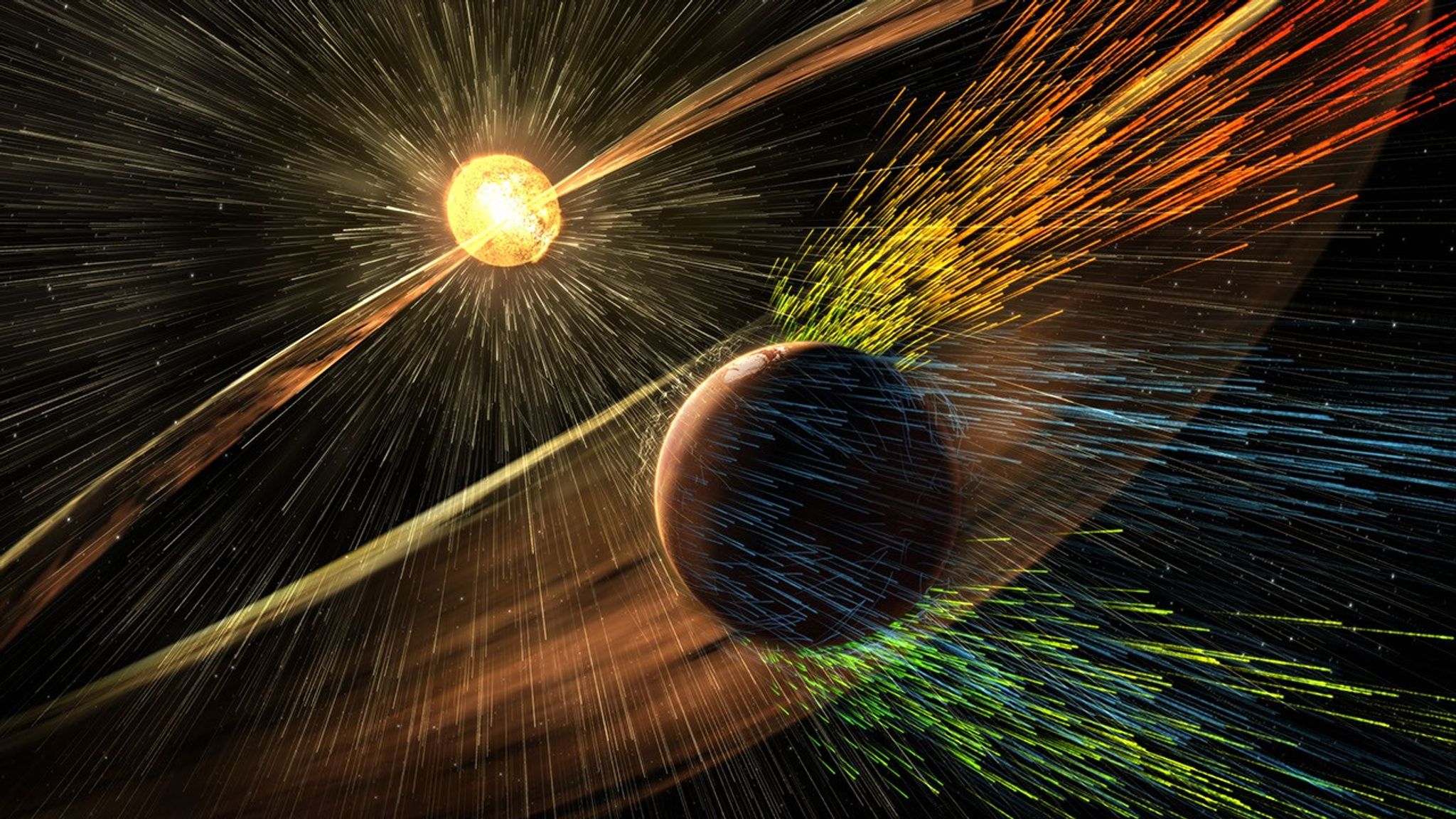
This illustration depicts charged particles from a solar storm stripping away charged particles of Mars’ atmosphere, one of the processes of Martian atmosphere loss studied by NASA’s MAVEN mission.
NASA/GSFC
NASA MAVEN (Mars Atmosphere and Volatile Evolution) mission scientists have uncovered a key puzzle piece in understanding certain types of auroras on Mars, finding that they form in a similar way to Earth-based auroras.
Results published Thursday in Nature Communications show the same mechanism that circulates and catapults charged particles into Earth’s atmosphere is happening at Mars on much smaller scales because of differences in the two planets’ magnetic fields.
The MAVEN spacecraft, in orbit around Mars, experienced a loss of signal with ground stations on Earth on Dec. 6, 2025. On June 3, NASA declared the mission had concluded after finding the spacecraft to be unrecoverable. However, data from the mission is still being used to inform NASA science and future missions to Mars.
When the Sun’s magnetic field lines get close to Earth’s magnetosphere, the large magnetic bubble protecting the planet, they can reconnect and inject energy and mass throughout Earth’s magnetosphere and magnetotail, ultimately firing electrons back into the atmosphere to generate Earth’s auroras. This process, called the Dungey cycle, drives electrical currents, accelerates charged particles that create auroras, and controls the circulation of plasma in Earth’s magnetosphere and ionosphere.
This new study shows that a miniature version of the Dungey cycle is happening over Mars’ strong crustal magnetic fields, which gives scientists a better look into the physics of Martian auroras.
“We knew that magnetic reconnection was happening at Mars but did not expect it to be like the Dungey cycle,” said Shaosui Xu, lead author of the study and associate research physicist at the Space Sciences Laboratory at the University of California, Berkeley.
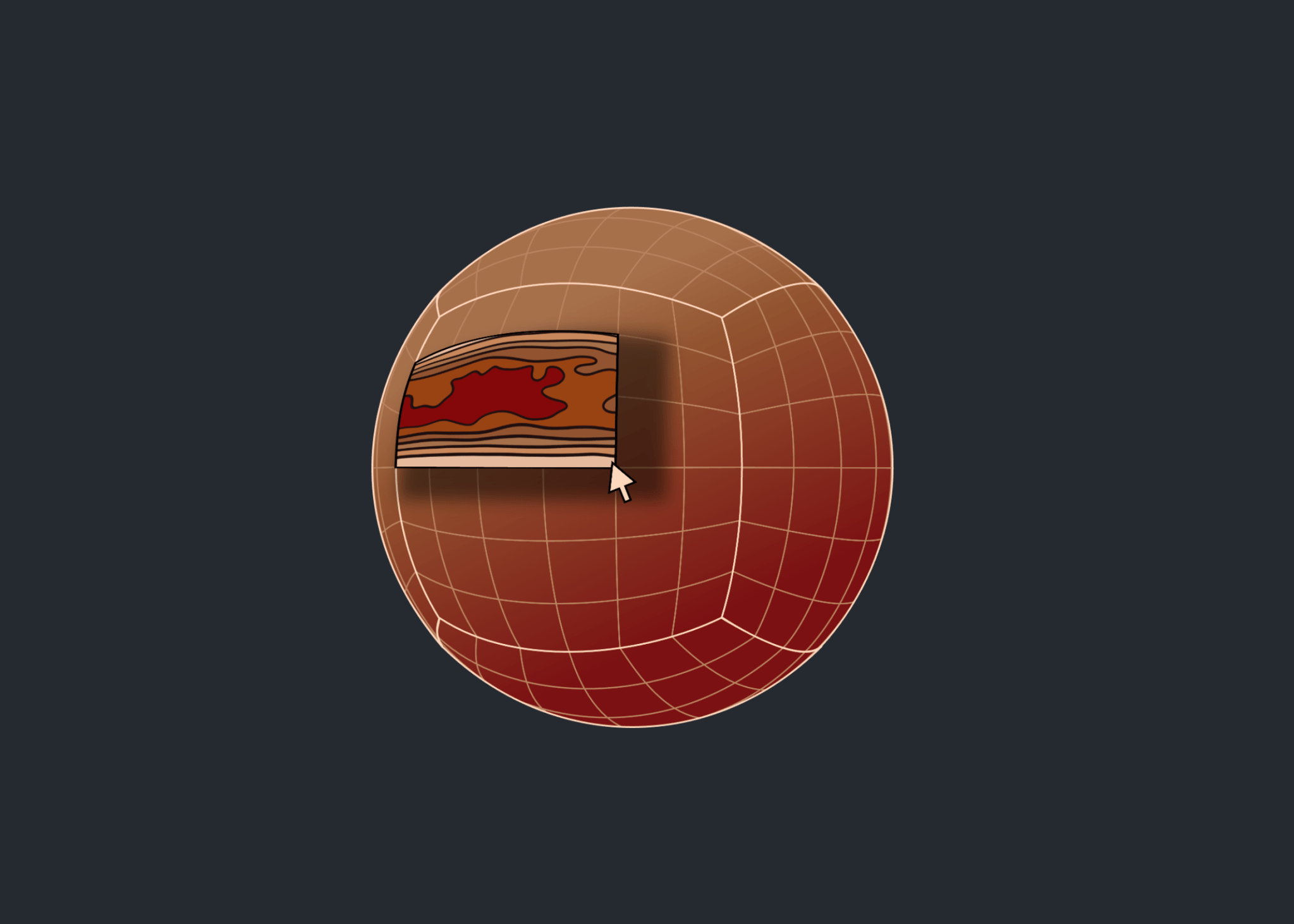
Mars does not have a global magnetic field like Earth. Earth’s magnetic field is created by our planet’s churning core, while Mars has numerous miniature magnetospheres that arise from intensely magnetized crust scattered around the planet. These regions were formed around 4 billion years ago when lava cooled in the presence of Mars’ ancient global magnetic field, which has since disappeared due to intense solar wind stripping the planet’s atmosphere.
The MAVEN mission has observed highly localized auroras over these crustal fields, similar to Earth’s auroras at the poles, but it wasn’t until now that scientists could fully understand the physics of how they form. The study used several instruments aboard the MAVEN spacecraft to build up a picture of the Dungey-like behavior: the Magnetometer and Solar Wind Electron Analyzer instruments, which were used to determine the magnetic configuration and derive electrical currents, and the STATIC (Suprathermal and Thermal Ion Composition) instrument, which was used to measure plasma flows in the ionosphere.
“We really pushed the limit of STATIC to get the data we needed,” said Xu. “It was the final piece to the puzzle in understanding these localized auroras.”
The realization that a Dungey-like cycle was happening within these crustal magnetic fields answered the question of how the electrons were being energized to create the auroras. It also shows that a Dungey-like mechanism can happen on both large and small scales, giving more insight into where in the solar system this process could be taking place.
“This is a remarkable result that changes how we think of Martian auroras and is another important step toward understanding why Mars and Earth have evolved so differently despite being governed by the same underlying physics.” said Shannon Curry, MAVEN’s principal investigator and a research scientist at the Laboratory for Atmospheric and Space Physics at the University of Colorado Boulder. “I am incredibly proud of our team’s work on this discovery and excited to uncover new insights into the Red Planet and its evolution.”
By finding out more about this process, scientists also are gaining a better understanding of how the solar environment interacts with the Red Planet as a whole, which is essential for future robotic and crewed missions.
“I remember in graduate school discussing with my advisor how the cycling of crustal magnetic fields could work at Mars,” said Xu. “It’s incredible to be part of the team that found the answer to that question.”
The MAVEN mission is part of NASA’s Mars Exploration Program portfolio. The mission’s principal investigator is based at the Laboratory for Atmospheric and Space Physics at the University of Colorado Boulder, which also is responsible for managing science operations and public outreach and communications. NASA’s Goddard Space Flight Center in Greenbelt, Maryland, manages the MAVEN mission. Lockheed Martin Space built the spacecraft and is responsible for mission operations. NASA’s Jet Propulsion Laboratory in Southern California provides navigation and Deep Space Network support.
For more information on NASA’s MAVEN mission, visit:
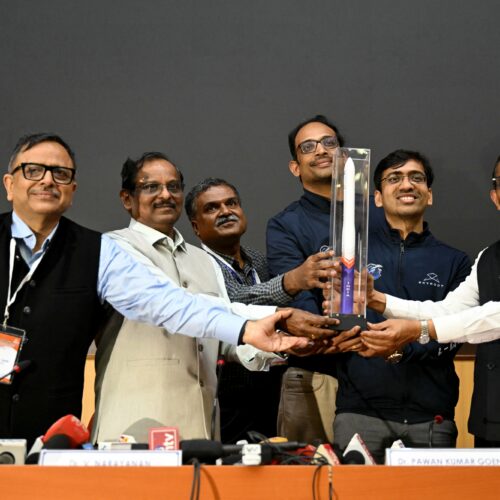
Indian space officials celebrated the debut flight of Skyroot Aerospace's Vikram-1 rocket, India's first fully commercial satellite launcher, as a "grand success" Saturday after an on-target climb into a 280-mile-high orbit following liftoff from an island spaceport in the Bay of Bengal.
The Vikram-1 lifted off from India's primary spaceport on Sriharikota Island at 1:35 am EDT (06:35 UTC) Saturday, around midday at the launch base along India's southeast coast. The launch was delayed more than a half-hour to resolve a last-minute technical problem. The countdown resumed, culminating in the command to ignite Vikram-1's solid-fueled first stage booster to propel the rocket off the launch pad.
Vikram-1 is modest in size compared to India's larger workhorse rockets. Skyroot's rocket stands about 72 feet (22 meters) tall, with the capability to place payloads of up to 770 pounds (350 kilograms) into low-Earth orbit. This makes Vikram-1 somewhat larger than the Electron launch vehicle developed by Rocket Lab, the world's most successful dedicated small satellite launcher.

 Login
Login