Meta is testing an app that uses AI to automate bedtime stories for children. The future is here, folks — and boy, is it depressing.
The app, first caught by 9to5Mac, is called “StoryKit.” (It’s not yet available in the US; Meta confirmed to TechCrunch that it’s currently testing StoryKit in pilot countries.) Per a webpage for the app, parents pick a character either by creating one or taking a “photo of their favorite toy or person to bring them to life,” then describe a setting or world for the story to take place in. They can also ask the story to include a specific lesson or moral, which the app says will allow it to “weave in values like kindness, courage, or empathy without it feeling like a lecture.”
The resulting story can be read aloud by a human — or, of course, an AI voice can narrate instead. According to Meta, this is a lifeline for exhausted parents.
“Tired after a long day but want to give your kids a special bedtime story?” reads the app’s webpage. “StoryKit uses Al to help you create personalized bedtime stories in seconds. No more guilt about screen time. Just beautiful, unique stories made with love.”
Let’s be real: this app is amazingly sad. There are a lot of busy and exhausted parents, but outsourcing the emotional and creative labor of bedtime stories to machines is a wildly bleak proposition. Meta claims that this app will help parents feel less guilty about their kids’ screen time, but is having an AI voice read an AI-generated bedtime story to your kids that much different from plopping them in front of an iPad?
There are also countless human-written children’s books out there to choose from, if parents don’t enjoy coming up with stories with their kids on the spot. If you’re feeling guilty about screens, perhaps the answer is paper-bound books, not robots.
All in all: kids’ bedtime stories — bonding moments between parents and their children, in which parents can foster creativity and impart what they believe to be important lessons — aren’t exactly spaces begging for tech disruption. In fact, this is an area where we probably need less tech, not more.
Remember when Meta was planning to charge a $20 monthly subscription fee for the smart glasses feature that lets people hear each other more clearly - even though that feature runs locally on your glasses and doesn't require the cloud? Meta has paused those plans, spokesperson Tyler Yee confirms to The Verge.
The company is not giving up on the idea of a subscription fee for certain features - that's still moving forward. Yee confirms that "some premium features will be subscription-based over time."
But Conversation Focus, the accessibility feature, "will remain available for free through our Early Access Program for early testers while w …
Meta's smart glasses have been a PR headache for the company. Public backlash has been swift, and fierce; people are concerned about the erosion of privacy and expansion of surveillance. Some especially bad actors are using the glasses to film themselves "pranking" random strangers. Women have become unsuspecting social media content for men filming themselves hitting on them without their knowledge. When your product is being referred to as "pervert glasses," you have a problem on your hands.
On Thursday, Business Insider reported that Meta was taking the fairly extraordinary step of banning some content filmed with Meta glasses from the c …
Meta introduced a standalone app for sellers on its Facebook Marketplace platform, adding AI tools and sales management features to enable merchants to manage listings, reach buyers, and grow their business.
Sellers, the dedicated app, brings together listing management, buyer communications, inventory tracking and sales insights, while syncing with existing Marketplace accounts so users can carry over listings, messages and sales history.
The new app includes AI-powered listing creation, allowing sellers to upload photos and have Meta AI generate details including titles, descriptions, suggested pricing and categories. It also provides a unified inbox for buyer conversations and analytics covering views, clicks, messages and completed sales.
Meta said its original platform Marketplace, which launched a decade ago integrated directly in Facebook, now handles 430 million item listings each month globally. The existing Marketplace platform will remain available through Facebook, with a web version being tested for Seller app users. Android testing is also underway.
Seller is available through the App Store for US users aged 18 and over.
The launch comes as Meta seeks to expand Marketplace’s capabilities and compete more directly with established e-commerce platforms including eBay. The company has previously focused on improving commerce and community features across its platform, including the release of a dedicated Facebook groups app called Forum in May.
Meta today announced Facebook Verified, a free badge designed to confirm that a Facebook profile belongs to a real person rather than an AI-generated fake.
The feature uses a selfie-based verification process: users record a short video selfie, which Meta checks against their existing profile photos to confirm a match. Meta says the process is free and typically takes just a few minutes to complete, though accounts must meet the company's trust and safety standards to qualify.
Facebook Verified is limited to users 18 and older who are in good standing with Meta's Community Standards around fraud, scams, and deceptive practices, and who show no evidence of inauthentic behavior. The badge is not available for Pages or ProMode accounts, positioning it squarely as a personal-profile feature rather than one aimed at creators or businesses.
Once verified, the badge will appear on Marketplace, Dating, Groups, and Profile, with Meta planning to extend it to Feed posts over time. There is no subscription fee for the feature, and the badge carries across the platform once a user has completed the one-time verification process.
The launch is separate from Meta Verified, the company's existing paid subscription that bundles a verified badge with extras like impersonation protection and direct account support. Facebook Verified is free and narrower in scope, aimed specifically at signaling humanity rather than offering premium account features.
Facebook Verified is rolling out in phases, starting in select markets, with Meta planning to expand availability globally over time.
Apple has released the second public beta versions of iOS 27, iPadOS 27, and MacOS 27 Golden Gate, to users who are eligible. If you’re interested in installing those betas on your device, you can read instructions for iPhone and iPad here, or for Mac here. MacOS 27, iOS 27, and iPadOS 27 have an ... Read More
With the launch of the MacOS 27 Golden Gate public beta program, now even more users can experience MacOS 27 as it’s actively being worked on by Apple. MacOS 27 Golden Gate has a heavy focus on performance improvements, but there’s also refinements other than the Liquid Glass interface look, improvements to Spotlight and Mail ... Read More
The Release Candidate builds of MacOS Tahoe 26.6, iOS 26.6, and iPadOS 26.6, are now available for those engaged in beta testing for current generation versions of Apple system software. There are also RC builds for MacOS Sequoia 15.7.8 and MacOS Sonoma 14.8.8, though it’s hard to imagine many people aside from some devs are ... Read More
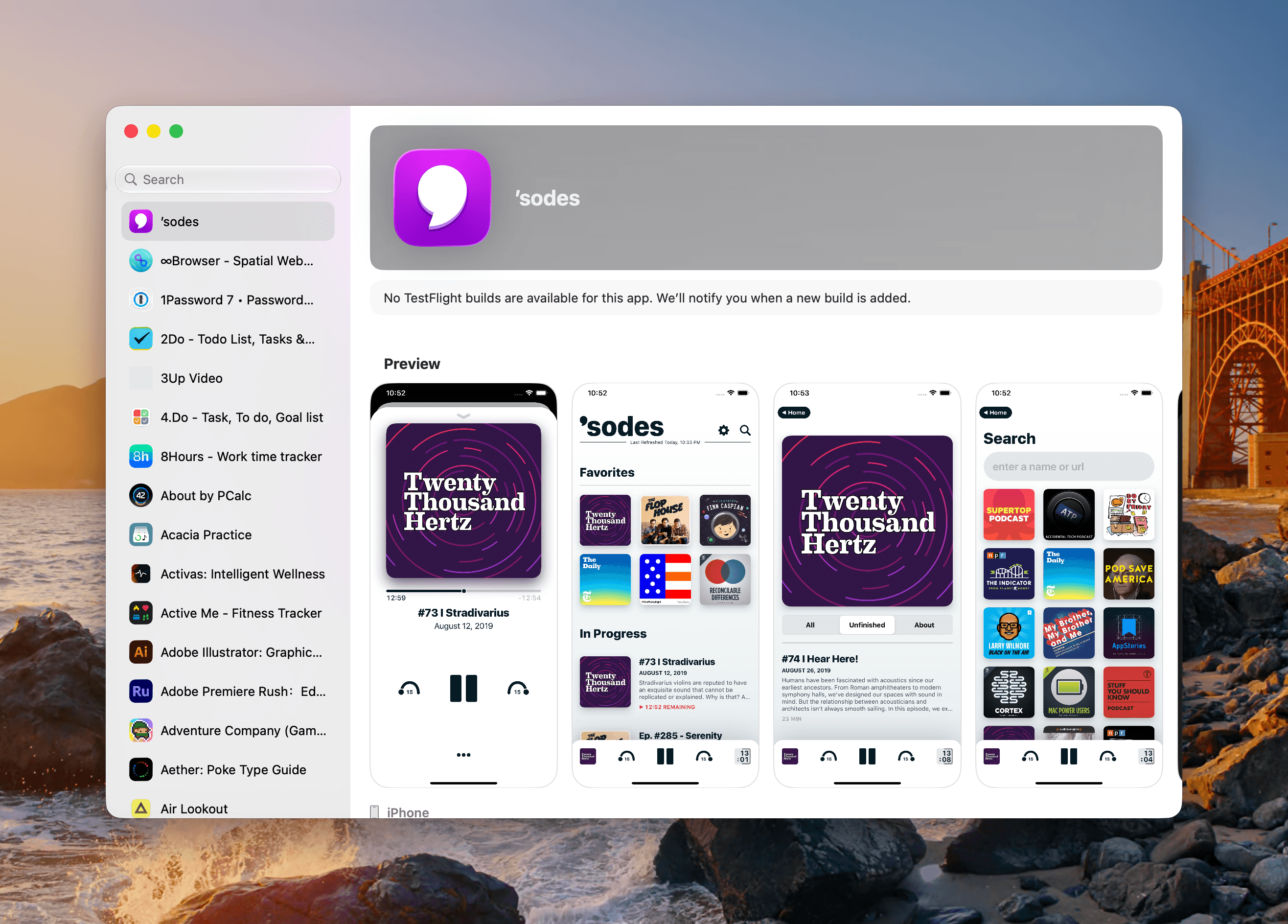
I test a lot of apps, so I have strong opinions about TestFlight. However I usually keep those opinions to myself because despite the fact that it’s critical to my work, TestFlight wasn’t built for app reviewers. Most people haven’t accumulated hundreds of active and inactive betas in the app like I have, and for them, TestFlight is probably fine. However, for me, TestFlight is a constant sourceof frustration.
So, you can imagine my excitement when I read a post by Zac Hall at 9to5Mac that a search field had been added to TestFlight. “Finally,” I thought to myself. I stopped what I was doing and updated the app immediately. After all, search was my number one request for TestFlight back in 2024.
An apostrophe gets you the top spot in Apple’s new alphabetical TestFlight list.
That 2024 wishlist was published in the wake of a bad stretch the app had beginning in 2023. At the time, TestFlight was plagued by laggy performance if you were on a lot of betas. To Apple’s credit, they fixed the performance issues, though the issues have begun to creep back into recent releases. Still, the past couple of years as a TestFlight user have been fine despite all the ways the app could be made better for users.
When the TestFlight update finished installing, I eagerly opened it on my Mac and then my iPhone. Sure enough, there was the search field at long last. Lists practically beg for a search field, and finally someone at Apple added one, and to whoever built that feature, a huge thanks from me and the MacStories team.
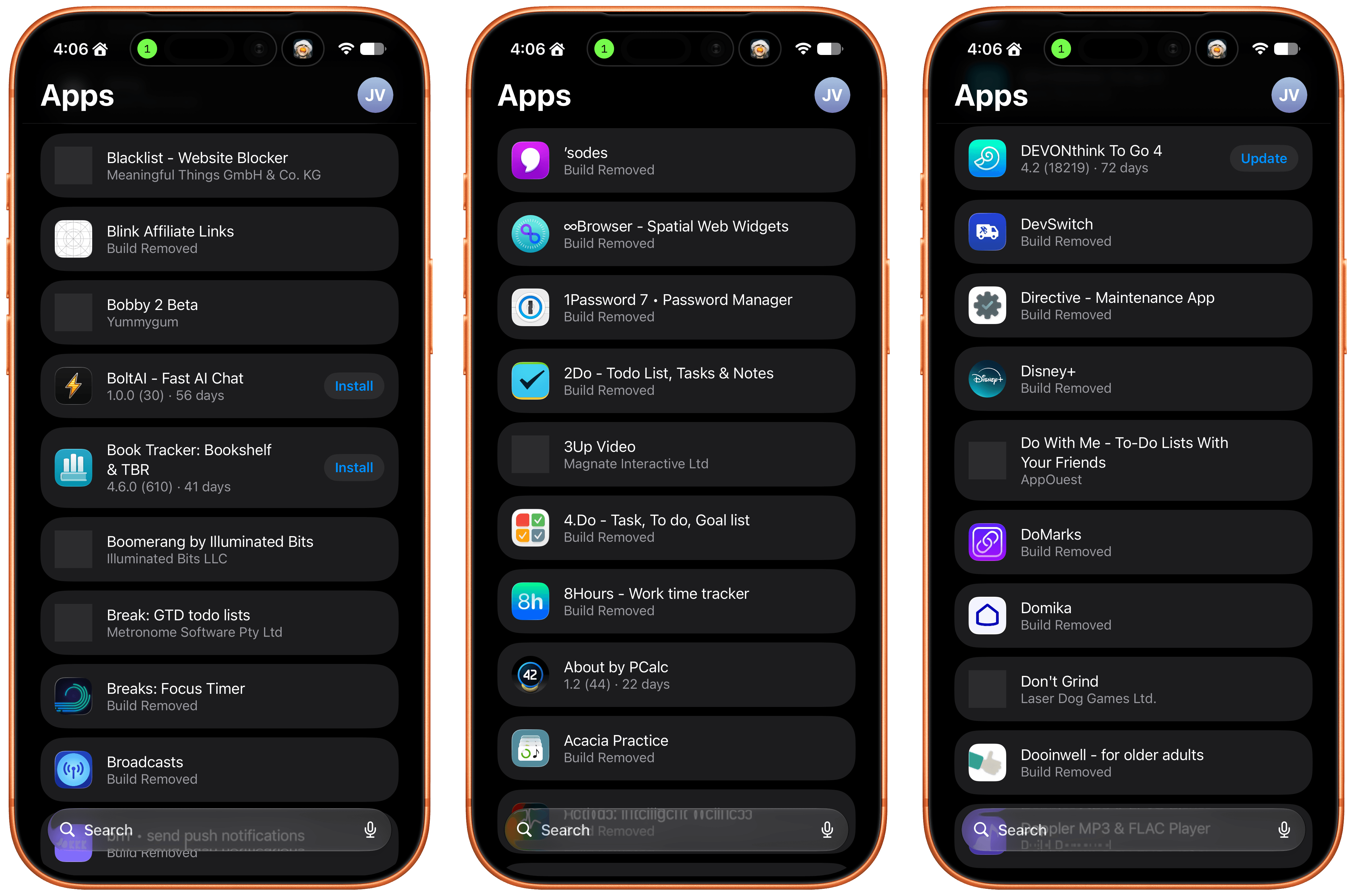
Unfortunately, this story comes with one very big “but.” Previously, TestFlight betas were listed in reverse chronological order, which I liked. The newer beta releases were at the top of the list and the older ones that were on the verge of being replaced by an App Store release were at the bottom, along with expired betas, a list that I never really understood the purpose of.
Well, those expired betas are now scattered among the active TestFlight betas in an alphabetical list and it seems that the expired beta list has been expanded to include every single beta I’ve ever been a part of. I did a rough count and for me that’s nearly 800 app listings. As you can imagine, the active betas in that list are few and far between. Search helps, but scrolling is no longer an option.
The live betas are few and far between when mixed with betas gone by.
I get that this is a very “me and a few of my friends” problem, and search does help, but it’s not enough. The active to inactive beta ratio is so bad that few iPhone screens include more than two or three active betas. So here’s my proposal:
Add a toggle in TestFlight’s settings that hides inactive betas.
That’s it, that would make all the difference in the world. I’d love to have the reverse chronological ordering back, a performance tune-up, and the other things I wished for back in 2024, but I’ll live with hiding all the noise from my beta list.
iOS 27 beta 4 for iPhone, and iPadOS 27 beta 4 for iPad, have been released for users engaged in the OS 27 developer beta system software testing programs. A concurrent public beta testing program is also now ongoing, though those betas are typically delayed a day or few behind dev betas, but otherwise match ... Read More
For Mac users who are currently running MacOS 27 Golden Gate beta, Apple has released the 4th beta version of MacOS 27 developer beta. The latest beta build is available to download now through Software Update, as an IPSW file, or as the full installer. MacOS 27 Golden Gate has a heavy focus on performance ... Read More
Meta’s Ray-Ban smart glasses are quickly earning a far less flattering nickname: “pervert glasses.”
A new investigation has exposed how highly personal videos captured by users — including people undressing or using the bathroom — are being sent to contractors in Kenya for AI training, often without the subjects’ knowledge. The revelations have sparked widespread outrage online, with many accusing the devices of turning everyday wearers into unwitting voyeurs and reigniting deep concerns about privacy in the age of always-on AI surveillance.
Automated systems designed to blur faces often failed, the contractors claimed, effectively giving them a front row seat of somebody’s most intimate moments.
“I don’t think they know, because if they knew they wouldn’t be recording,” one contractor said.
Many have quickly embraced a term for the devices that’s presumably sending Meta CEO Mark Zuckerberg into paroxysms of fury: “pervert glasses.”
“Glad people are settling on the term ‘pervert glasses,’” another agreed. “Bonus points if you also say it while posting a picture of Mark Zuckerberg or call them Mark Zuckerberg’s pervert glasses.”
“Not a fan of Mark Zuckerberg’s pervert glasses,” wrote yet another. “I would prefer technology to make it more difficult to skeez, creep or perv on the world. I would like tech to protect me from creeps, not smooth the runway for them.”
The threat of simple smart glasses being used for surveillance isn’t some dystopian vision of a far future. Researchers have already shown that Meta’s smart glasses can be used to instantly reveal the identities of strangers in public — tech that Meta has reportedly been working on itself.
All told, smart glasses are a product category rife with uncomfortable connotations, especially when worn in the presence of others who may not know they may be recorded.
MacDailyNews Take: Unless their goal was to trash their reputation as quickly as possible, we bet Ray-Ban is rethinking its poor decision to tie up with an outfit like Meta.
Please help support MacDailyNews — and enjoy subscriber-only articles, comments, chat, and more — by subscribing to our Substack: macdailynews.substack.com. Thank you!
Apple today released the first public beta of macOS Golden Gate, expanding the macOS 27 beta test to non-developers. You can sign up to test the update on Apple’s beta website, and then download it by going to System Settings > General > Software Update and toggling on the macOS 27 beta.
The fact that there are more design changes in macOS than any of Apple’s other 27 updates speaks volumes about how broken many of the Tahoe design decisions were. Apple describes the design as “even more refined,” because in Apple marketing-speak, broken features are never remedied or fixed—past features are just improved. The truth is, Apple has rolled back numerous missteps and made changes to others to mitigate the issues they caused.
The Golden Gate developer beta has proven stable in my everyday use on an M5 MacBook Air and M5 Max MacBook Pro, which is notable since dev betas often have side effects like tanking battery life or causing hardware to run hotter than normal.
[…]
Would I still prefer to go back to the flatter design of macOS Sequoia? Yes, unequivocally. But at least Liquid Glass is more tolerable and less distracting now.
Nowhere is the Snow Leopard of it all more apparent than in the hundreds of little changes made to improve the day-to-day use of your Mac. I’m not going to catalog them all here, but I’ve used Golden Gate on two different Macs at this point, and based on my experiences so far, the changes are meaningful.
Apple released the iOS 27 public beta today, and if you’ve been curious about the new software, now’s the time to try it out. iOS 27 brings Siri AI, performance improvements, and lots of new Apple Intelligence features.
[…]
Everything feels snappier than it did in iOS 26. Animations are quicker, apps launch faster, and AirDrop transfers complete faster. You’ll see improvements when taking photos, opening the keyboard, using the App Library, and swapping Home Screen pages. Your iMessages between devices sync more accurately, messages won’t fail to send and will be automatically retried, and your iPhone can transition more smoothly between Wi-Fi and cellular.
In general, the iOS 27 incarnation of Liquid Glass is far easier on the eyes, dialing down the transparency in favor of legibility. Apple’s also imposed some distinction between user interface elements and content. For example, in list views like in Messages and Mail there are now much clearer “toolbar” areas at the top when you start scrolling, even if they still have some degree of translucency. App icons have also gotten a face lift; they’re sharper, and feel more vibrant.
[…]
That’s because one of the odd things about looking at iOS 27 is that there’s just a ton of small stuff—those “quality of life” improvements that chip away at little frustrations and annoyances.
The social media company Meta and the video streaming service YouTube harmed a young user with design features that were addictive and led to her mental health distress, a jury found on Wednesday, a landmark decision that could open social media companies to more lawsuits over users’ well-being.
[…]
Citing features like infinite scroll and algorithmic recommendations, K.G.M. sued Meta, which owns Instagram and Facebook, and Google’s YouTube, claiming they led to anxiety and depression.
For its part, the Wall Street Journal editorial board is standing up for beleaguered social media companies in an editorial today criticizing everything about these verdicts, including this specific means of liability, which it calls a “dodge” around Section 230.
[…]
Product design, though, is a different question. It would be a mistake, I think, to read Section 230 as a blanket allowance for any way platforms wish to use or display users’ posts. (Update: In part, that is because it is a free speech question.) From my entirely layman perspective, it has never struck me as entirely reasonable that the recommendations systems of these platforms should have no duty or expectation of care.
To me, a non-lawyer, much of the actual text of the ruling (PDF) explaining why this lawsuit was not immediately turfed on Section 230 grounds seems pretty reasonable. For example, the judge says “[u]nder the default settings, Meta enables approximately forty types of notifications” for the Instagram app, which the government alleges “is designed to overwhelm young users and compel them repeatedly to reopen Instagram”. We can argue whether this is a meaningful thing for a government to police or if it is just another example of Meta resorting to tacky growth-hacking techniques instead of trusting their product is sufficiently compelling on its own. (Most days when I open Instagram in my browser, it puts a red badge over the notifications tab and suggests I have one new follower. I do not; I never have. It lies to me every time, presumably because it knows most people, including me, will usually click on that, thereby increasing a number on a dashboard somewhere.)
couple weeks back, Jonathan Haidt published another entry in his ongoing campaign to convince the world that social media is inherently ruining kids’ lives. This one was a victory lap titled “Seven Lines of Evidence Against Social Media,” treating recent developments — including the social media addiction verdicts against Meta that most people are misunderstanding — as vindication of his thesis.
Indeed, the research repeatedly suggests that for the very small number of kids who are facing mental health problems and overrelying on social media in response, the answer is a targeted intervention to help those individuals — not a broad “ban kids from social media” program.
Now that the public beta for iOS 27 is available, even more iPhone and iPad users are going to be interested in experiencing the new operating systems while they’re under active development. And there’s good reason for this, iOS 27 and iPadOS 27 are both shaping up to be notable improvements to the operating systems, ... Read More
Apple has released the first public beta of iOS 27, giving eager iPhone users an early look at the year’s most significant software update. Launched on July 13, 2026, the beta introduces a vastly improved Siri powered by Apple Intelligence, along with speed enhancements, refined visuals, and thoughtful updates to everyday features.
How to Install the iOS 27 Public Beta
Joining the beta is straightforward and free through Apple’s Beta Software Program — no developer account required.
Back up your iPhone first (via iCloud or a computer), as betas can bring bugs, battery drain, or app issues.
Visit beta.apple.com, sign in with your Apple ID, and enroll.
On your iPhone, go to Settings > General > Software Update > Beta Updates.
Select iOS 27 Public Beta.
Return to the Software Update screen and tap Update Now when available.
Apple recommends testing on a secondary device. iOS 27 supports iPhone 11 and newer models (including SE 2nd generation and later). Full Apple Intelligence features, including advanced Siri AI, require iPhone 15 Pro or newer.
Siri AI Steals the Spotlight
The biggest highlight is the complete overhaul of Siri, now rebuilt as Siri AI on the next-generation Apple Intelligence foundation. It supports natural, ongoing conversations, understands on-screen content, searches your personal data across apps like Mail, Messages, Notes, and Calendar, and performs actions within apps.
• Responses appear in the Dynamic Island; pull down for full conversation view.
• A new standalone Siri app stores conversation history (synced privately via iCloud).
• Camera integration adds a Visual Intelligence mode for tasks like turning barcodes into Wallet passes or importing events from flyers.
• New voice controls let you adjust pace and expressivity.
Siri AI starts with select English variants and is unavailable in the EU at launch. Some advanced features need the latest flagship iPhones.
Apple Intelligence Expands Across Apps
Beyond Siri, Apple Intelligence brings smarter tools to several core apps:
• Safari: Auto-organizes tabs by topic, groups bookmarks and Reading List items, offers “Notify Me” for stock alerts or page changes, and can generate custom extensions from natural language prompts.
• Photos: New Clean Up for complex objects, Extend to generate content beyond frame edges, and Spatial Reframing to adjust perspective post-capture.
• Passwords: Automatically updates weak or compromised passwords with Live Activity progress.
• Shortcuts: Build automations from plain-language descriptions.
• Additional perks include Call Context in Phone, photorealistic image generation in Image Playground, and natural-language Calendar editing.
Liquid Glass Gets More Customizable
iOS 27 refines last year’s Liquid Glass design for better clarity and flexibility. Controls better diffuse backgrounds, with improved contrast for readability. The standout new feature is a customization slider in Settings > Appearance that adjusts tint and translucency system-wide, from ultra-clear to fully opaque.
Performance Upgrades for All iPhones
Apple promises noticeable speed gains even on older devices:
• Apps launch up to 30% faster.
• AirDrop transfers up to 80% faster.
• New Photos captures appear up to 70% faster.
Optimizations to the CPU scheduler benefit iPhone 11 and newer. Expect smoother unlocking, navigation, scrolling, and better network switching. Search in Spotlight, Photos, and Mail has also been rebuilt.
Redesigned Screen Time and Enhanced Child Safety
Parents get a major upgrade with a clearer dashboard, one-tap controls, category-based Time Allowances, and flexible Schedules (school days, evenings, weekends). New Ask to Browse extends permissions to websites, while Communication Safety now flags gore and violence in addition to nudity. Full features require all Family Sharing devices on iOS 27.
Other Notable Features
• Messages: Background media sending and consolidated Tapback notifications.
• Photos: Full-resolution Shared Albums, cross-platform support, keywords, star ratings, and custom slideshows.
• Save any video frame as a photo.
• Independent alarm volume control.
• Extra-large widgets that fill entire Home Screen pages.
• AirPods custom equalizer.
• Direct GymKit connections and improved FaceTime/Home features on supported hardware.
MacDailyNews Take: The public beta will evolve through the summer, with the final release expected this fall alongside new iPhones. Users can report issues via the Feedback Assistant app.
Currently, iOS 27 public beta feels like a polished, user-focused OS that meaningfully advances AI capabilities while making the iPhone faster and more enjoyable for everyone. Early testers should proceed with caution, but will in most cases likely be impressed by the refinements already in place. Again, use a secondary device for testing iOS 27 public beta.
Please help support MacDailyNews — and enjoy subscriber-only articles, comments, chat, and more — by subscribing to our Substack: macdailynews.substack.com. Thank you!
Apple has opened the public beta program for MacOS 27 Golden Gate to all curious Mac users. While betas are typically best reserved for advanced users due to being buggier and less stable than final builds, the public beta program offers an opportunity for users to experience beta development and upcoming features, ahead of the ... Read More

 Login
Login