 Login
Login
Why the SpaceX IPO Will Affect Your 401(k), Like It or Not
Elon Musk’s rocket company, on the cusp of the largest initial public offering ever, will soon end up in index funds after rule changes by Nasdaq and other index providers.


Os planos da Smart Runner ajustam-se automaticamente ao longo do tempo, tendo em conta a evolução dos utilizadores, e, através da integração com o Apple Watch, é possível acompanhar métricas em tempo real durante os treinos.
The post Smart Runner é uma app para quem gosta de correr e tem planos de treino personalizados appeared first on Tek Notícias.
Google has released new tools that allow developers to run agentic AI workflows locally using Gemma 4 12B, a 12-billion-parameter model from Google DeepMind.
In a blog post, the company said the model, combined with the Google AI Edge stack, can be used to build and test applications on everyday machines. The model-runtime combination supports capabilities such as autonomous data processing, visual insight generation, webpage creation, and tool use.
The release includes Google AI Edge Gallery for macOS, where developers can use Gemma 4 12B to generate and run scripts for tasks such as data analysis. Google also said its Eloquent voice dictation and editing app now runs fully on-device on macOS, with support for local transcription and voice-driven text editing.
Google has also expanded LiteRT-LM, its lightweight command-line tool for running language models locally, with a new serve command. The company said this allows the CLI to act as a local LLM server and lets developers connect Gemma 4 12B to standard tools, SDKs, and frameworks through a local endpoint.
“Your data stays on your device while maintaining reliable responsiveness, utility, and cost efficiency,” the company said in the blog post.
The announcement comes as enterprises are looking beyond large, general-purpose models for some AI workloads. Gartner predicted that by 2027, organizations will use small, task-specific AI models at least three times more than general-purpose large language models, citing demand for more contextualized and cost-effective AI systems.
But running agents on employee devices brings a number of problems. Companies must work within the limits of endpoint hardware, which can restrict the size of models that run effectively and the number of model instances that can operate at one time.
“While the AI can now fit on a laptop, enterprise IT infrastructure is largely unprepared to manage it,” said Rishi Padhi, principal analyst at Gartner. “Even highly optimized models like the Gemma 4 12B require around 16GB of unified memory or VRAM to run alongside standard applications. Many standard-issue enterprise laptops lack the memory bandwidth and NPUs/GPUs required for fluid, multi-turn agentic execution.”
Anand Joshi, AI analyst at TechInsights, said local deployment also changes the nature of the workloads. On a PC, search may mean finding information across internal folders and files. In a data center, the same function could involve searching the internet or querying a large database such as SQL.
“The framework for local deployment of agentic AI is different from that of a data center,” Joshi said. “The models are smaller; you can run only one instance of a large model at a time. You are limited by memory, CPU, and so on.”
Security and governance are also likely to become bigger concerns as AI agents move closer to enterprise endpoints. Agentic AI is designed to take actions, creating new security risks when local models are given access to employee files or allowed to interact directly with applications and scripts.
“Sandboxing these agents without breaking their utility is still a major operational challenge,” Padhi added. “And all this while enterprises need to audit AI usage for compliance and security. When inference happens entirely offline, capturing logs, tracking model drift, and ensuring employees are using the approved, compliant ways for a model becomes incredibly difficult.”
Running AI agents locally could reduce some cloud inference costs, but the savings may be offset in the near term by higher spending on endpoint hardware and management.
“First and foremost, it is an OpEx-to-CapEx shift, as it shifts that financial burden by forcing accelerated hardware refresh cycles for premium PCs or edge devices,” Padhi said. “It would require buying expensive, high-memory laptops for employees at a time when memflation in the hardware industry is already driving up end-user average selling prices for laptops.”
Many enterprises refreshed PCs in 2025 to support Windows 11, but at that point, most AI inference still ran in the cloud, and the case for on-device AI remained unclear, Padhi said.
Enterprises may therefore move cautiously, buying AI-capable PCs only where local inference has a clear business case.
Over time, however, on-device AI could make enterprise AI spending more predictable by reducing exposure to variable cloud inference bills. The tradeoff is that companies may face a higher baseline cost for equipping and managing employees’ devices.
For enterprises, local AI is unlikely to replace cloud-based AI outright. Analysts said local AI is more likely to be used for workloads that benefit from endpoint processing, especially when applications must operate offline or when privacy and response times are critical.
“For local agentic AI to proliferate, the use cases on edge will have to complement data center/cloud use cases,” Joshi said. “I don’t expect local agentic AI to replace cloud AI, but it has potential to take a slice away from the cloud, and models like Gemma are significant steps towards enabling that.”
The market, Joshi added, is still determining where local AI fits best. “I estimate that use cases that require privacy or have strict latency needs will move to local node first, with further migration of others in the next 2-3 years,” he said.
Padhi said model placement will depend on the privacy requirements of a workload, the computing power it needs, and where the relevant data resides. Tasks such as code generation or analysis of local files could increasingly run on employee devices, while enterprise-wide RAG systems and more complex AI workflows are likely to remain cloud-based.
The article originally appeared on InfoWorld.

Com mais de 10 milhões de jogadores em todo o mundo, Airport Simulator: Plane City é um simulador de gestão de aeroportos do estúdio francês Playrion que mistura estratégia, personalização e a calma hipnótica de ver aviões a descolar e a aterrar.
The post Airport Simulator: Plane City coloca-o no comando dos maiores aeroportos do mundo appeared first on Tek Notícias.
 Common beans use a leaf receptor to turn caterpillar spit into a wasp-attracting scent.
For decades, scientists have understood that plants can release volatile organic compounds—essentially airborne chemical signals—to attract the natural enemies of the things that eat them, like caterpillars. What we didn’t know was exactly how a plant translates the physical act of being eaten into a specific, predator-summoning distress signal.
“[One] thing we didn’t know is how the plant detects the caterpillar in the first place,” says Adam Steinbrenner, a biologist at the University of Washington. Now, after years of experimenting with common bean plants in the lab and in the agricultural fields of Oaxaca, Mexico, Steinbrenner’s team pinpointed a single immune receptor that orchestrates its anti-caterpillar defense system.
When an herbivorous insect like a caterpillar feeds on a plant, it introduces its saliva straight into the plant's damaged tissues. This saliva contains biological clues called HAMPs: herbivore-associated molecular patterns. One of the HAMPs molecules is a peptide called inceptin, and there’s an 11-amino acid fragment of inceptin named In11, as well. Both of them turn out to be a fragment of the ATP synthase found in chloroplasts—basically a piece of one of the plant’s own proteins. As the caterpillar ingests the leaf, its gut enzymes chop up the plant's cellular engines and their pieces, including In11, are regurgitated back onto the leaf’s surface, albeit at extremely small concentrations.


© mikroman6
One of the best parts about using Android is the good old-fashioned geeky fun that comes with finding new ways to improve your digital environment — and improve your day-to-day efficiency.
That capability manifests itself in all sorts of interesting freedoms that (cough, cough) other mobile platforms don’t trust their users enough to allow — from added on-screen elements to custom air gestures, advanced multitasking additions, and all sorts of other shape-shifting enhancements that can completely change the way you interact with your device.
Perhaps the most classic example of advanced Android customization, though, is a splendid little somethin’ called the home screen launcher — a fancy way of saying the system that controls how your home screen and app drawer look and work. Your phone has a built-in process that handles that by default, but here in the land o’ Googley matters, you can always replace that with something completely different and make your device adapt to the way you like to work instead of the other way around.
We’ve got no shortage of interesting Android launcher options, too, ranging from versatile blank slates for complete customization to carefully crafted frameworks for ergonomic efficiency and even throwbacks to mobile operating systems past.
The real beauty of this ecosystem, though, is how much power it gives to Android developers — and subsequently to us, as Android-appreciating animals who embrace these creations! — to experiment and try out all sorts of new concepts. Sometimes, an Android launcher approach speaks to you for its practicality. Other times, it’s just a refreshingly interesting take on how you can get around your phone and get stuff done.
Today, I’ve got a perfect example to share with you. It’s a whole new approach to the Android home screen that’s both unlike anything else I’ve ever seen in this arena and delightfully familiar, in a retro-tech sense.
Lemme show ya what it’s all about.
[Get fresh Googley goodness in your inbox with my free Android Intelligence newsletter — three new things to try every Friday.]
My friend and fellow enlightened Android phone owner, allow me to introduce you to a creative little concoction called Key Launcher.
Key Launcher has only been out and available on the Play Store for a matter of weeks now, but it’s impressively polished — and, even more important, impressively original while also having some fantastic geek-tech throwback vibes.
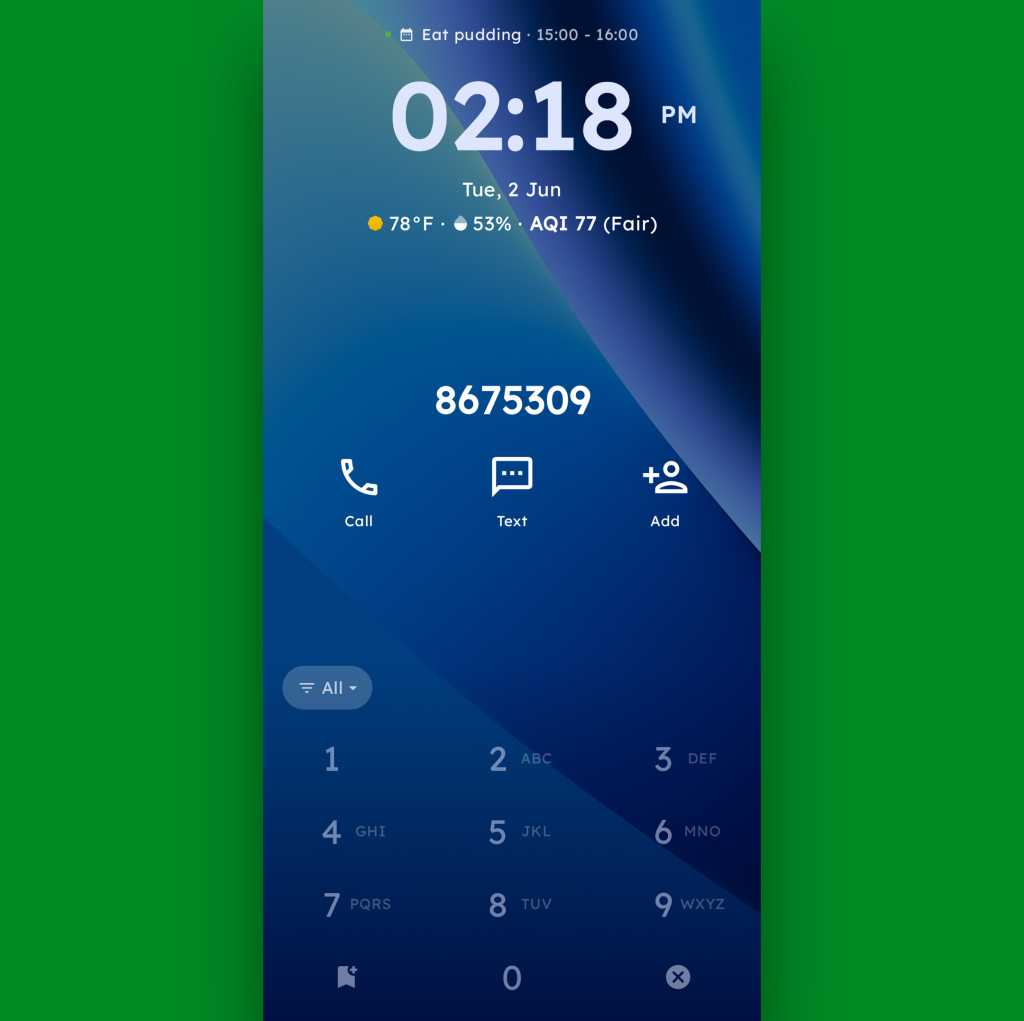
To that end, the core distinctive element of Key Launcher is the T9-style dialpad that sits front and center on the lower third of its primary panel. It is quite literally the same set of letter-packin’ numbers and characters you’d see on an old-school phone — or in the dialer of your favorite Android phone app.
JR Raphael, Foundry
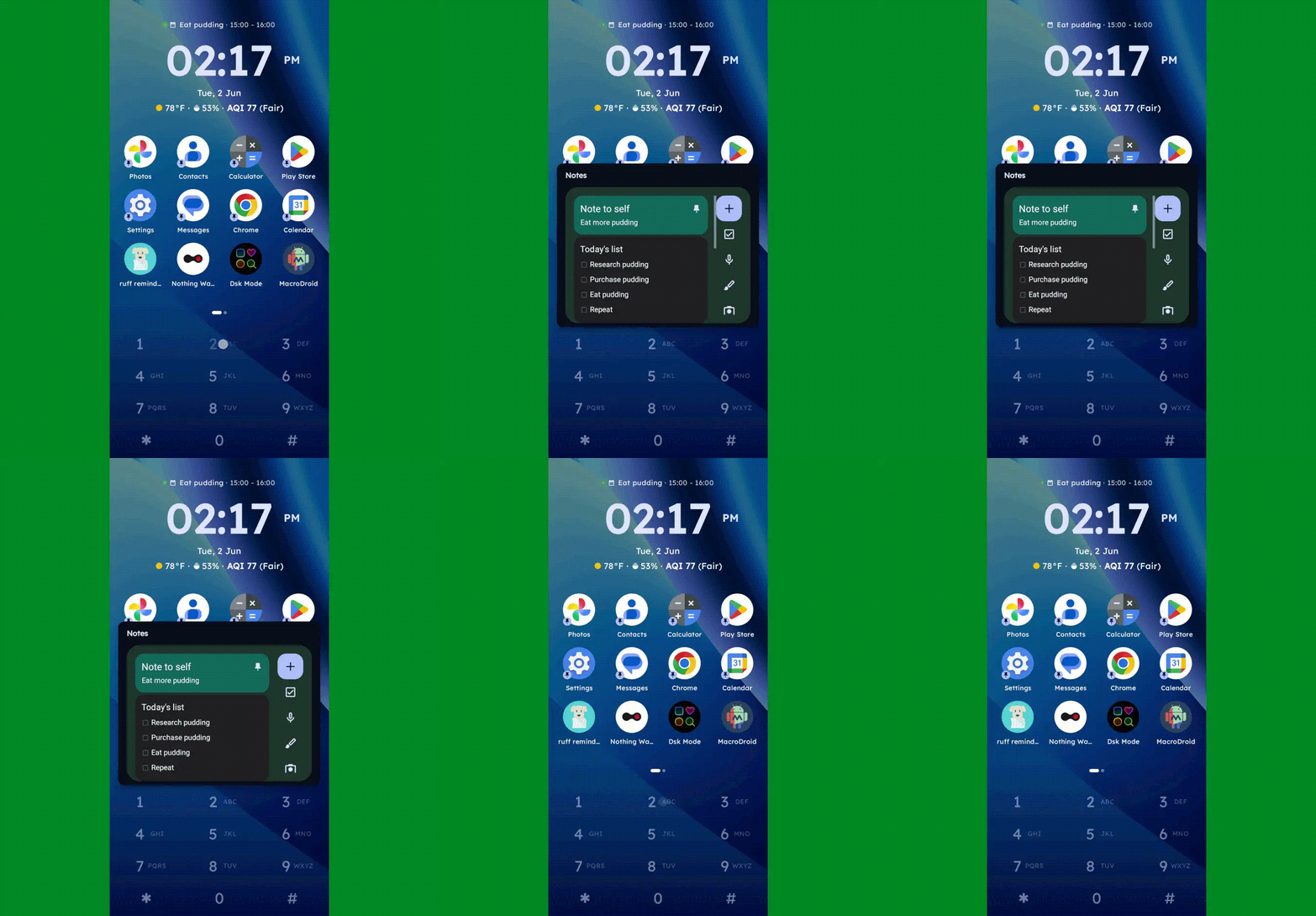
And in this context, it serves some pretty interesting purposes:
JR Raphael, Foundry
JR Raphael, Foundry
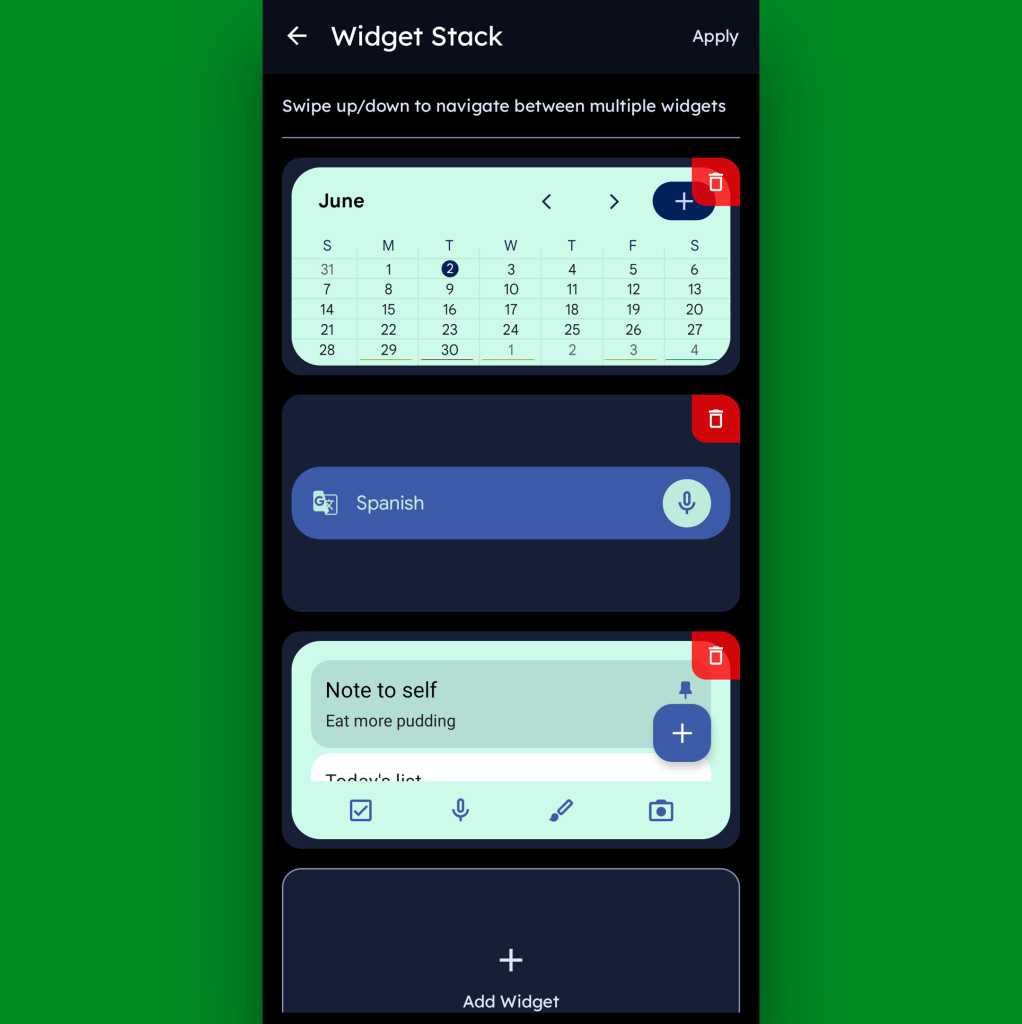
Function-packed as all of that may be, that dialpad is still just one piece of the Key Launcher puzzle. Above it sits a grid of app shortcuts that includes both your own pinned favorites and a dynamic selection of recently opened items. And above that is a handy built-in widget that shows a rotating array of upcoming calendar events from your agenda along with the local time and weather — and, in an especially neat twist, can also be customized to act as an interactive stack that lets you flip through your own set of standard Android widgets right then and there as well.
JR Raphael, Foundry
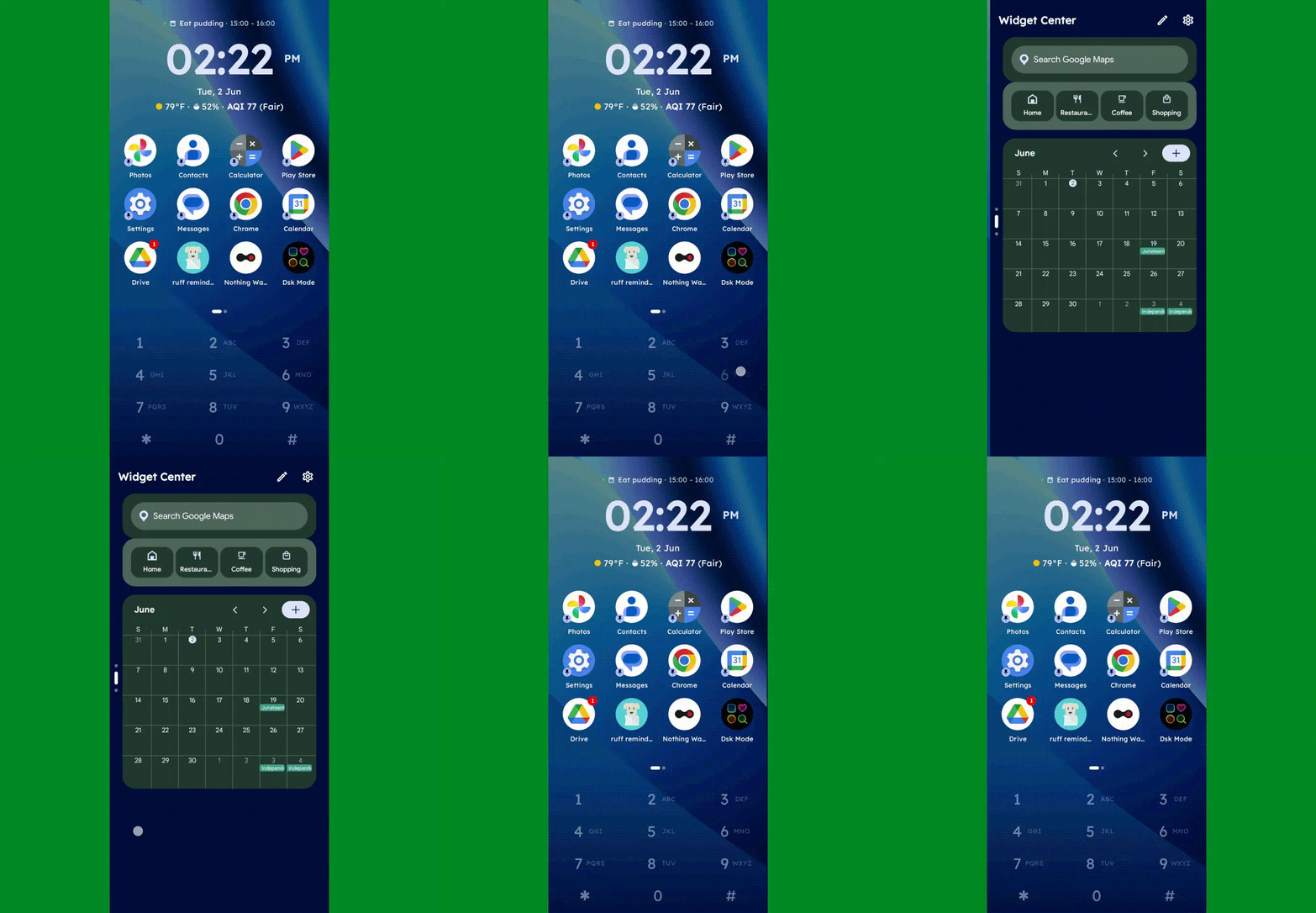
Speaking of widgets, if you swipe toward the left on Key Launcher’s dialpad, you’ll reveal the launcher’s built-in “Widget Center” panel — which is an entire screen dedicated to holding however many widgets you want, in any configuration you like, for easy ongoing access.
JR Raphael, Foundry
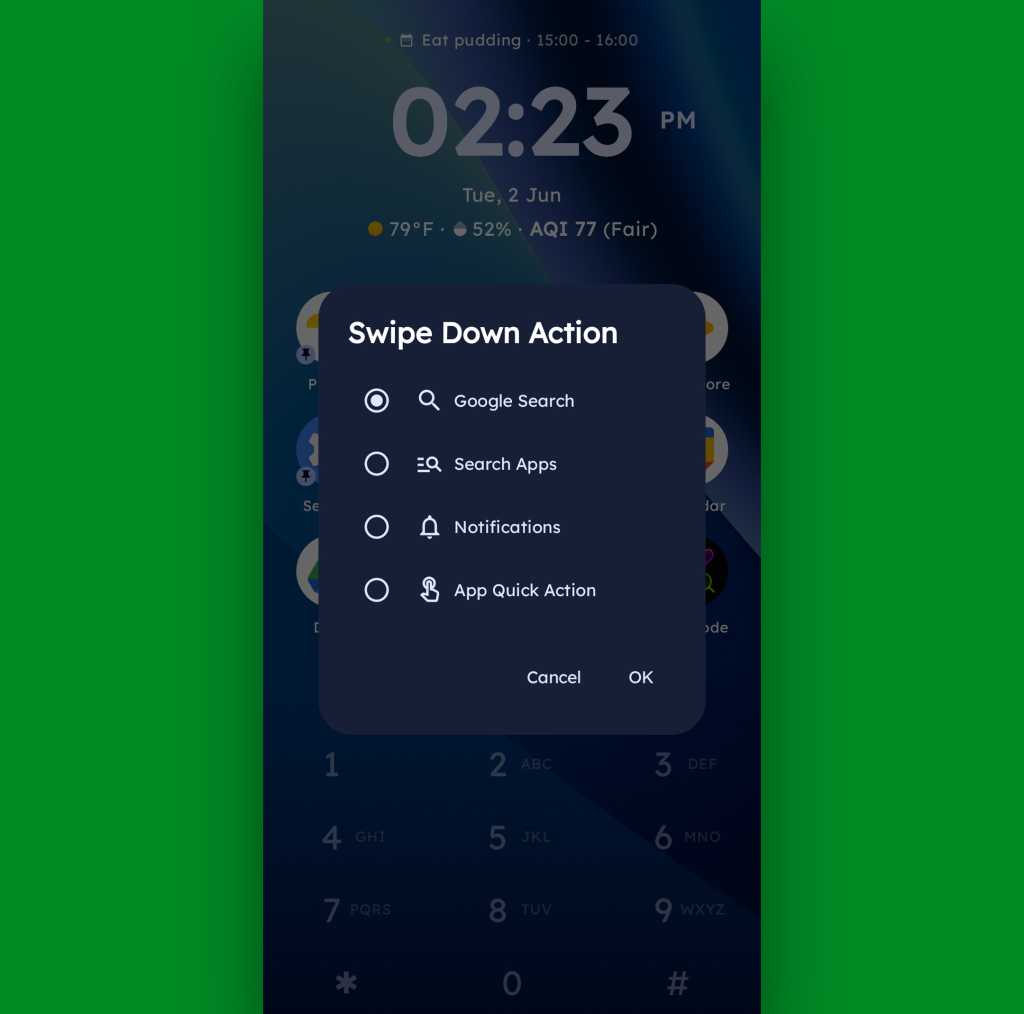
A swipe in the other direction will take you to an enlarged view of your active notifications, meanwhile, while a swipe downward can be set to launch either a quick search (of Google or whatever provider you prefer), a search of your apps, or a direct Android app shortcut within any app on your device.
JR Raphael, Foundry
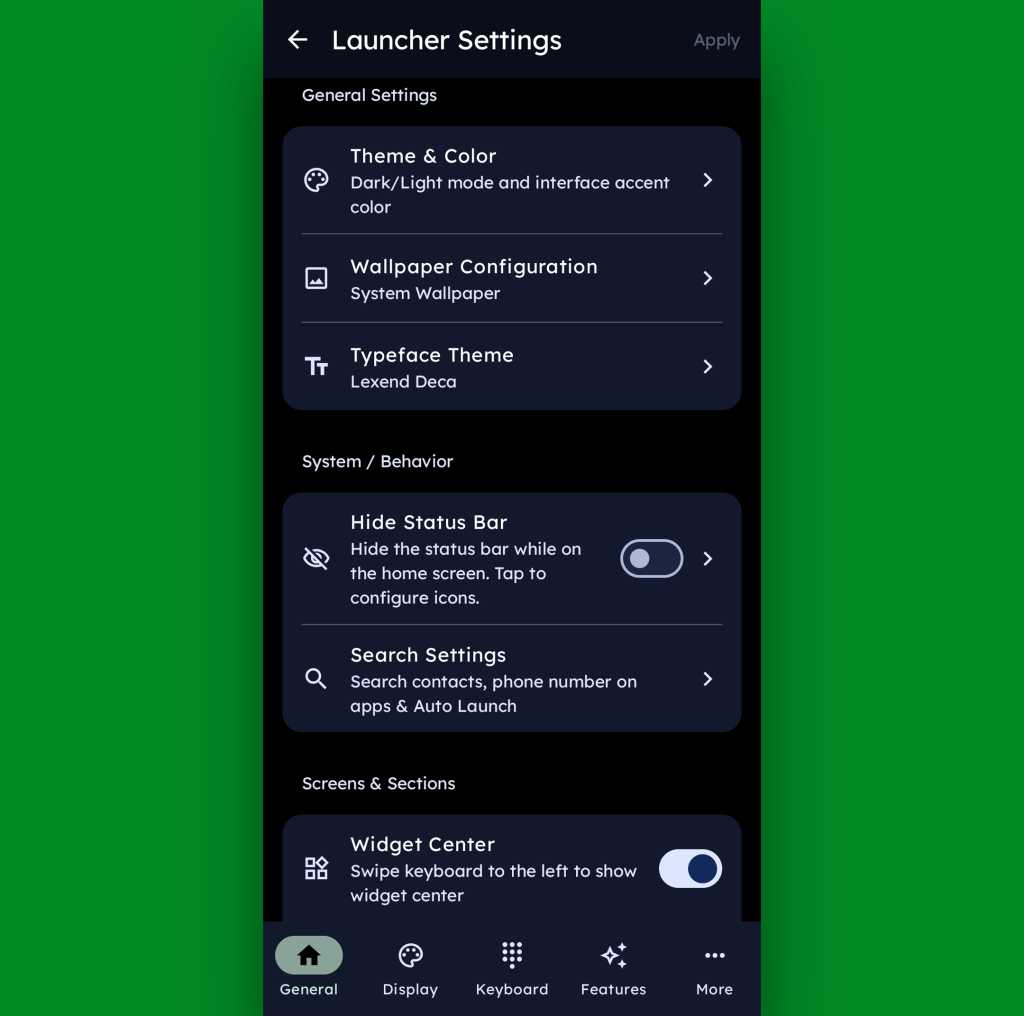
And if all of that seems like a lot of productivity-boosting possibilities, just wait ’til you get into this thing’s settings. Key Launcher is overflowing with options to customize and control practically every facet of its operation, ranging from basic visuals to the specifics of how the dialpad works and even a toggle for optimizing the interface for left- or right-handed use.
JR Raphael, Foundry
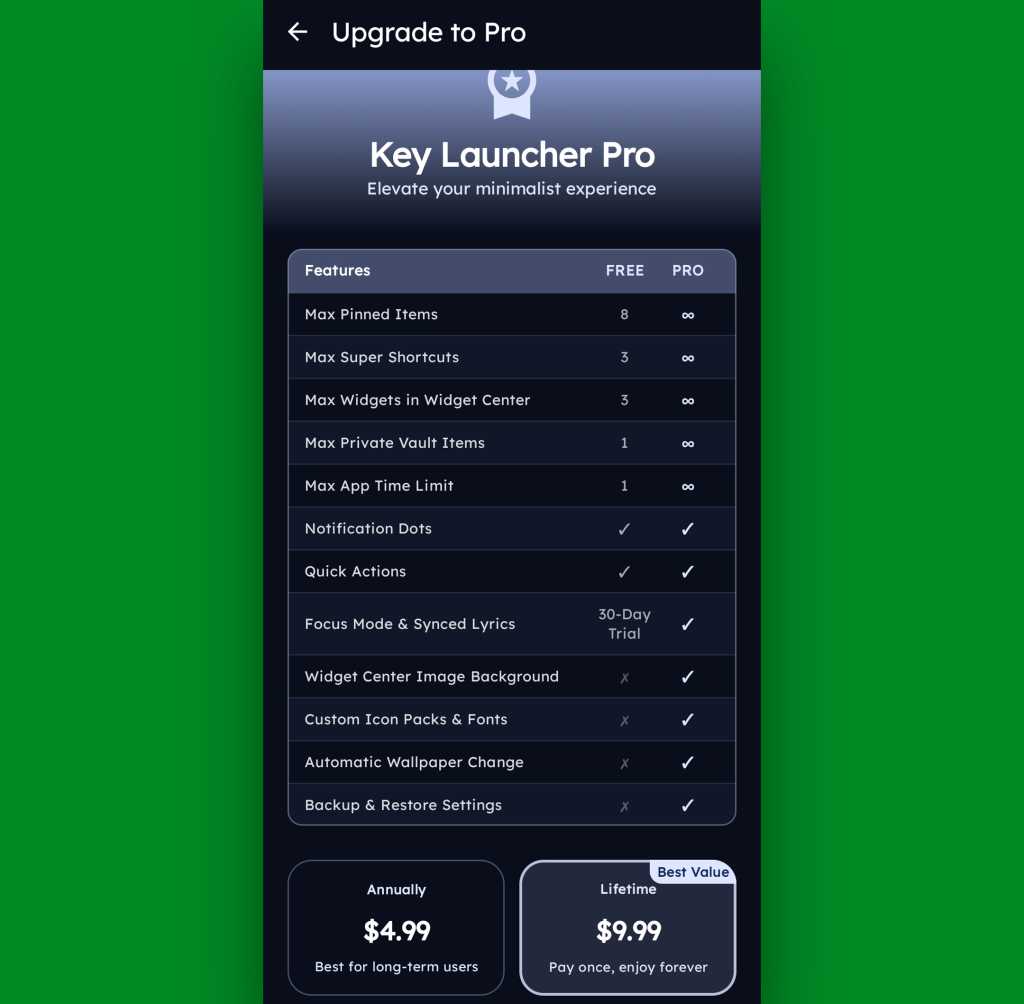
Key Launcher is free on its base level with an optional Pro upgrade that unlocks certain limitations and more advanced features. That path is available for five bucks a year or $10 as a single lifetime purchase, and you get a month-long trial the first time you install the app so you can check it out in its full form.
JR Raphael, Foundry
Even if you just stick to the free version, though, this thing has an awful lot to offer — and it really is unlike anything else out there, with so many clever and potentially useful touches.
It’s that kind of creativity and constant discovery that keeps Android so interesting and advantageous, even after all this time — and that’s true whether you end up sticking with Key Launcher for the long haul or just giving it a go for a few hours and appreciating the deliciously original thinking it offers.
Keep the geeky goodies coming with my free Android Intelligence newsletter — three new things to try every Friday, straight from me to you.

Para dar mais animação à coleção de aplicações que tem no smartphone ou tablet, a equipa do TEK Notícias reuniu uma nova seleção de propostas das lojas digitais da Google e Apple, todas com opções gratuitas
The post Contar calorias, jogar, ouvir em vinil e organizar a cabeça entre as novas apps para experimentar no seu smartphone appeared first on Tek Notícias.
No papel de um duplo de cinema que passou despercebido durante toda a sua carreira, em Ponchorado os jogadores terão de sobreviver dentro de um filme western inacabado e enfrentar uma série de inimigos.
The post Ponchorado mistura ação e aventuras no faroeste num universo inspirado nos desenhos animados dos anos 30 appeared first on Tek Notícias.
Em vez de abrir o bloco de notas e adicionar tarefas ou marcar um lembrete na agenda, basta dizer à Blurto o que tem em mente. A partir daí, a app trata de organizar a informação: de ideias e tarefas a listas e eventos.
The post Perdido entre ideias, notas e tarefas? Blurto ajuda a organizar tudo o que tem em mente appeared first on Tek Notícias.
Criada por um programador independente depois da sua primeira WWDC em 2019, a Vinyls reproduz a música da sua biblioteca com animações de disco em rotação, estalinhos característicos e até um arranhão se tocar na agulha.
The post Vinyls: o gira-discos virtual que transforma o iPhone numa mesa de mistura analógica com toda a nostalgia do vinil appeared first on Tek Notícias.
GPS is commonly treated as a way to find a route or track a delivery. In critical infrastructure, its quieter function is often more consequential: it distributes precise time that helps far-flung systems agree on when something happened. That shared time base supports cellular and broadband networks, parts of the electric grid, and regulated timekeeping […]
The post If GPS Went Dark, What Would Fail First? appeared first on Curiosmos.

Apple publishes its App Store fraud prevention report every year,. And when it does, the company presses the point that its curated system brings much value to developers and customers, including highly effective protection against fraud. It says it prevented more than $2.2 billion in potentially fraudulent transactions in 2025 alone.
The company said it has prevented $11.2 billion in such fraud in the last six years. That’s a lot of value for the 15% or lower commission that all but the biggest-selling developers are required to pay on their store sales.
Don’t believe the hype, as most developers are not generating the $1 million a year required before the 30% payment kicks in.
You might reflect that if there is an Apple Tax, it’s a progressive tax in which those with the broadest shoulders help support the wider developer community, which is probably why some tech billionaires don’t like it.
But I’m not here to write about taxation; I’m here to highlight the value the App Store brings. Apple diligently works to protect customers and developers against the ever-growing threat of cybercrime at a scale few other companies could hope to match. That matters in an environment dominated by ever more sophisticated attacks, including scenarios in which a developer submits a benign app for review and then modifies it once the app is online to commit financial fraud.
It’s not just fraud Apple protects App Store customers from. It also attempts to protect privacy. Look, we know that tech firms now exist for whom privacy is a roadblock to profit; they want to take all your information for free to sell it for money, or worse. Apple stands against this and has done so for years, which is why it is under steady attack by entities that want privacy destroyed to boost their bottom line. Nation states and nation-state-adjacent attacks don’t help in the battle for your private digital life, throwing huge resources at undermining personal protections.
Apple’s report gives you a solid glimpse at the anti-privacy environment. App Store rejected 443,000 app submissions for privacy violations; it also rejected 22,000 apps for holding undocumented anti-privacy features.
The upshot is that while Apple’s protections aren’t 100% perfect, they’re still industry leading. Where incidents do take place, they are resolved swiftly, and the bait-and-switch approach (in which an app pretends to be benign but carries malware) remains the biggest threat. That’s why customers should always verify they trust a developer before downloading apps.
The thing is, all of these threats are evolving, and Apple is equipped to evolve in parallel with them. In part, that’s because it has scale, in part because it has that huge 2.2-billion-device ecosystem, in part because the company entered the app store race with deep understanding of how online transactions were evolving in the first place. It didn’t run iTunes for years only to learn nothing.
Coming up over the hill we can see new-breed quantum-based threats. Along with artificial intelligence, that combination will likely spawn a mass attack of AI-generated, malware-infested apps being built and submitted at a record pace.
We will also likely see increased attacks made against developers in order to extract their Developer ID to help in the submission of such apps. And we will see increasingly sophisticated algorithmic hacks to attack security, identity, and even app ownership. Protecting against those consequential evolutions will be neither easy nor cheap. Doing so will require near state-level protection, a degree of security no small entity can meet. We have no idea if smaller app stores can even visualize such protection — and the EU doesn’t know, either.
In time, hopefully, new businesses will emerge offering quantum-safe security to protect online purchases. But for now, we’ll mostly need to look to large entities such as Apple, or payment services providers, to make the grade.
Will Apple put protection at scale in place to protect against these incoming threats against its App Store? It seems likely, given it is already investing in OS-level mitigations to protect encryption on its services, including around encrypted communications.
It is also in Apple’s interest to future-proof protection around payment services, ergo also the App Store. At the same time, as Apple’s latest fraud report confirms, the threat landscape remains highly volatile. Time will show that the store’s degree of protection is well worth the cost of Apple’s progressive App Store tax.
You can follow me on social media! Join me on BlueSky, LinkedIn, and Mastodon.

