Running frontier models for coding and other purposes can be very expensive, but also, sometimes, very effective. It’s tempting to use smaller or older models instead of frontier models because they’re cheaper, although they may not work as well. The ideal model for any given task tends to depend on the complexity of the task. Picking the most appropriate model automatically based on the request and the context is called model routing.
How model routing works
There are several ways of implementing model routing. In general, model routing depends on the pool of available models, the criteria used for selecting a model, and the objective that the router is trying to optimize. Different vendors offer different implementations of this scheme.
Databricks’ Unity Gateway has (in beta) Smart Routing for Codex or Claude Code. Smart Routing automatically selects the lowest-cost model capable of handling each task, so developers do not need to choose a model for every request.
Microsoft’s model router, a trained language model, analyzes your prompts in real time based on complexity, reasoning, task type, and other attributes. It does not store your prompts. It routes only to eligible models based on your access and deployment types, honoring data zone boundaries. You can choose balanced mode, cost mode, or quality mode.
Not Diamond Code uses a lightweight local proxy that computes the derived metadata needed for routing to evaluate the broader session, including expected downstream work and cache state, and select the model and reasoning effort that optimize expected quality and total session cost. It uses more capable models when they are likely to improve the outcome or finish in fewer steps, and more cost-efficient models when additional intelligence is unlikely to add value.
NVIDIA’s NeMo Switchyard has an array of routing algorithms that it can use. These include the LLM classifier, which uses an LLM as a judge to select a candidate LLM and maintains session affinity with that model across later turns; the stage router, which examines recent tool activity to decide how much model capability the agent needs; the escalation router, which starts each conversation with a lower-cost model and moves the session to a more capable model when it detects sustained difficulty; and the trainable prefill router, which learns from workload data to predict model success likelihood.
OpenRouter’s Auto Router analyzes your prompt and selects a model based on what the OpenRouter community, in aggregate, uses for that kind of work. The selection is constrained by your cost tier and guardrails. If the automatic primary pick fails, the router uses a fallback.
Replit’s Intelligent Model Routing matches tasks to the model they’re best suited for, aiming to balance quality, speed, and cost.
Snowflake’s Cortex AI Gateway uses dynamic model routing to select the most affordable model that can confidently complete the task at each step of agent execution. Lower-complexity and repetitive tasks can be directed to more efficient models, while workloads that require deeper reasoning can be routed to frontier models.
Also worth noting: the RouteLLM (2024) paper proposed several efficient router models that dynamically select between a stronger and a weaker LLM during inference, aiming to optimize the balance between cost and response quality. It also proposed a training framework for these routers that takes advantage of human preference data and data augmentation techniques to enhance performance.
The costs and benefits of model routing
Model routing potentially provides massive cost reductions, lower average latency, optimized quality, reduced vendor lock-in, enhanced privacy, and improved operational resilience. Strictly on a cost basis, model routing is likely to pay for itself above 100,000 daily active users. Even if you only save 20% on your LLM bill, the savings can be significant, but 50% cost reduction is common, and a 95% cost reduction is not unheard of.
Inference costs, alas, don’t tell the whole story. Some indirect costs include quality evaluation overhead, human review, and infrastructure.
There’s also a nasty failure mode that can, for example, turn your inference cost savings into customer retention and support costs that outweigh them by a factor of four to five: the Pareto trap. To understand that, we should start with Vilfredo Pareto’s 1906 observation that 80% of the land in the Kingdom of Italy was owned by 20% of the population. That was adapted in 1941 by Joseph M. Juran to apply to quality control: 80% of problems stem from 20% of the causes. The Pareto trap refers to concentrating on and over-optimizing for the top 20% to the exclusion of the remaining 80%.
Essentially, tuning your model router to handle only the top 20% of queries (in complexity) with a frontier model risks sending too many of the edge cases (the moderately complex queries) to the cheaper model that is unable to answer them correctly. That can lead to hidden failures by the cheap models which in turn cause expensive impacts on the business.
There are multiple steps you can take to avoid this trap. One is broader monitoring, enough to bring the failures to light even if they show up in a different department. Another is more conservative tuning of the model router. And third, you can use a more sophisticated routing model to predict query complexity more accurately.
Model routing optimizes the selection of appropriate models for specific tasks, balancing cost, quality, and latency. Various vendors implement model routing differently, utilizing factors like task complexity, reasoning, and cost to determine the best model. While model routing offers significant cost savings and improved performance, it also poses challenges like the Pareto trap, where over-optimization for cost can lead to hidden failures in simpler queries.
I can’t stop anthropomorphizing my coding agent. I use both Claude Code and Cursor, and whenever I talk about these tools, I always refer to them as “he”, as in “He found and fixed a bug I never even realized existed.”
The reason for this is probably obvious. I deal with my coding agent as if he were a colleague on the other end of a chat window. He writes great code and explains everything clearly.
And frankly, it’s gotten to the point where he is a better software developer than any human developer could possibly be.
So in the spirit of all great listicles, here are eight reasons that coding agents are better software developers than we are.
Coding agents are tireless
We all get tired. We all sleep badly. Your coding agent never does. He is always ready, always perky, and always 100% on the job. He codes just as well at 4:45 pm on a Friday as he does at 8:45 am Monday morning. He will work without stopping until he solves the problem at hand. He is available 24/7/365. And he never hangs around the break room kibitzing.
Coding agents are faster
He types faster than you. He reads code faster than you. He thinks faster than you. There probably isn’t anything he does slower than you.
Coding agents have no ego
A coding agent can’t get his feelings hurt when you push back on what he is doing (well, not yet, anyway). He doesn’t argue with you, though maybe he should. He is always open to suggestions, and he doesn’t care who has a good idea. He will gladly rename 400 files or upgrade all your dependencies without a peep of complaint.
Coding agents know every programming language, stack, and framework
Sure, you may have spent years becoming an expert at three or four languages, and you can work fluently in a few of the best frameworks. But you’ll never be an expert in all of them. Claude Code is. And he’ll learn new languages, stacks, and frameworks faster than you will too.
Coding agents gladly write unit tests and documentation
Sure, you may like writing unit tests. You may even grudgingly write documentation. But you probably don’t do it as thoroughly and tirelessly as your coding agent does. With one simple comment in his base instructions, he’ll do it completely without ever being asked again. I’m pretty sure neither of us can say the same.
Coding agents have huge context
Psychologists study how many ideas or pieces of information we can have in our head at one time, and generally the answer is fewer than the number of fingers we have. Your coding agent? He has multiple orders of magnitude more active storage than you. He can reason about huge chunks of code all at the same time.
Coding agents have zero onboarding time
Claude Code can be up and running on your massive codebase on day one. He doesn’t care what language it is written in or what state it is in — he is ready to rock the moment you fire him up. None of us can say that. We take weeks or months to get up to speed on a new codebase.
Coding agents are legion
Need a new developer? Hiring a human and getting them started takes weeks. But you can have 10 coding agents working on 10 different features for your application in about 10 minutes.
It’s been a while since I’ve run across a developer who doesn’t say “I don’t really write code anymore.” I suppose some of you out there still write code, but at this point, refusing to use coding agents is a career-limiting move. When properly managed, coding agents simply write code faster and better than you do. Admitting that might be hard, but that doesn’t make it any less true.
But don’t despair! Next week I’ll have eight reasons you are better than a coding agent.
Writing code is so over. Software development is just getting started.
DeepSeek has been dealt a huge blow in the US, even as it continues to innovate and keep pace with, or in some cases outperform, rival models from American labs.
The US Secretary of Homeland Security has issued an order banning all DeepSeek products and services from federal agencies. Government organizations must purge their IT systems of it within 60 days; those with “compelling justification” can make a case for exemption by written request to the Cybersecurity and Infrastructure Security Agency (CISA).
The Department of Homeland Security (DHS) cited multiple concerns about the Chinese-hosted model, including data sovereignty, lax Chinese laws, and security vulnerabilities.
Analyst Erik Avakian, technical counselor at Infotech, understands the concern. “When organizations use any type of hosted AI service, they’re potentially sending intellectual property, confidential business information, or other sensitive data into an environment where they may have very little visibility or control over what happens to it,” he said.
Government concerns
According to a document published in the US Federal Register, all technology developed by China-based Hangzhou DeepSeek Artificial Intelligence Co. will be banned from procurement by federal civilian agencies. This includes affiliated products and any third-party tools or software built using DeepSeek implementations.
Affected civilian executive branch agencies include the Departments of Treasury, State, and Justice; it does not apply, however, to private consumers, the general public, state/local governments, or Department of Defense (DoD) national security systems.
“DeepSeek’s models present multiple threat vectors,” the Order stated. To begin with, the company’s servers are located in the People’ s Republic of China (PRC), whose legal system grants “extensive authority” to government cyber and intelligence functions to access private infrastructure.
DeepSeek’s account generation process collects personally identifiable information (PII) and may also track and digitally fingerprint users, the Order asserted. Its prompt response process may result in the transfer of sensitive data to the PRC. This could give it “actionable intelligence” on US programs or individual users.
Further, the Order stated, DeepSeek models themselves may contain malware or other security vulnerabilities. DHS pointed to open-source security research published in February 2025 that uncovered many iOS mobile apps with multiple critical vulnerabilities.
Until the ban takes full effect, DHS advised agencies to mitigate risk by monitoring inbound and outbound data traffic, implementing enhanced logging and controls on data exfiltration, and detecting and flagging anomalous activity.
Agencies can submit requests for exceptions to the ban in writing, and must provide a “compelling justification,” such as its impact on mission-critical functions, or other considerations related to national interest such as national security reviews, investigations, or security agreements, as reasons why such exemption should be granted,.
Security issues are rampant
The ban comes just as DeepSeek is open-sourcing DeepInfer, its in-house interference framework. DeepInfer powers DeepSeek-V4.1-Flash with what the company said is high throughput and low latency. It features high-performance kernels, an optimized inference engine, structured outputs, and speculative decoding.
DeepSeek said its production token encoding and decoding components, which are aligned with processing logic behind the DeepSeek API, will bring the “same API behavior to community deployments.”
“Open models. Open kernels. Open inference,” DeepSeek posted to social media site X. “From private deployments to public clouds, we’ll keep working with the community to make large-scale inference more efficient.”
This isn’t its first roadblock from a cybersecurity perspective. Most notably, in January 2025, the company leaked more than one million log entries, including chat histories, API secrets, and other sensitive information, through an unsecured database.
DeepSeek reportedly addressed the exposure, but it still raised questions about the overall security practices surrounding the platform, particularly for organizations considering entrusting it with their own sensitive business information, Avakian pointed out.
That’s not to imply that every DeepSeek model is “inherently malicious,” he said, but there are still major questions around data privacy, the potential for information access under Chinese laws, the security of the broader AI ecosystem, and the susceptibility of DeepSeek’s models to jailbreaks and manipulation.
“Taken together, [these issues] raise legitimate concerns about whether organizations can adequately understand and manage the risks involved,” Avakian said.
Enterprises should seriously assess associated risk
Enterprises are increasingly exploring DeepSeek, although most publicly-documented adoption has been in China, Avakian noted. Some DeepSeek models have also been made available through platforms like Microsoft Azure and AWS.
“There’s genuine enterprise interest in the technology, as organizations look for opportunities to improve productivity, offer new capabilities, or reduce costs,” Avakian said. Useful applications include document summarization, internal research, and coding assistance.
DeepInfer also has the potential to reduce costs, but possible benefits should be weighed against associated security risks, he pointed out. The framework was just released, so organizations are going to need to validate the claimed efficiencies in their own environments rather than assuming savings will automatically translate into lower operating costs.
He encouraged organizations to start with relatively low-risk use cases, preferably using “public, synthetic, or appropriately sanitized information,” within a sandboxed environment they control themselves.
The important question to ask: ‘What is the business problem we’re trying to solve?’ From there, Avakian said, determine whether DeepSeek is the best way to solve it, validate security controls, and expand the use cases based on risk tolerance. Effective governance and risk assessment are key, he noted: understand what you’re bringing into your environment, validate its security, restrict its permissions, and make sure you can monitor what it’s doing.
“Approach this like any other software supply chain decision,” Avakian advised. “The fact that something is open source, inexpensive, or technically impressive doesn’t automatically make it appropriate for enterprise use.”
Impact on the broader AI ecosystem
The fact that the Order also addressed third-party products and services developed using DeepSeek implementations is important, Avakian said, because organizations may be using DeepSeek technologies indirectly, through vendors, software platforms, or other services, without necessarily knowing what’s operating underneath. “These are classic supply chain issues,” he observed.
It’s no longer enough to know which AI applications employees are using; enterprises must understand which models, frameworks, dependencies, and external services are embedded in products they’re purchasing and deploying, Avakian said. This means revisiting AI inventories, potentially updating procurement requirements, and expanding processes around third-party risk management, he advised.
“Ultimately, enterprises leveraging these tools need to understand not only the AI technologies they’re intentionally deploying, but also the technologies they’re inheriting through third parties,” he said.
The original Antigravity was an IDE with native integration for Google’s generative AI models. With Antigravity 2, Google offers a refashioned version of the product that it describes as a “standalone desktop command center” for agents.
Antigravity 2 is closer to projects like LM Studio than a full-blown IDE. It provides a streamlined, chat-centric interface for working with models and agents, uncluttered by a code editor, debugging tools, and other trappings of an integrated development environment. For those who want an IDE and agent orchestration together, Google still offers the Antigravity IDE (read our hands-on look). But for those who want a chat-centric desktop app experience, or who want to keep their hands-on development separate from their vibe coding, Google has elected to also offer this IDE-less version of Antigravity.
When you launch the Antigravity app and start a new task, you have a few choices about how to manage your work. If you just want to have a quick conversation and don’t need to create a whole project to go with it, you can select “No Project” and just start prompting. If you do create a project, you can either configure the details yourself — what directory to use, what to call it — or have Antigravity set a randomly generated name and empty directory for starters.
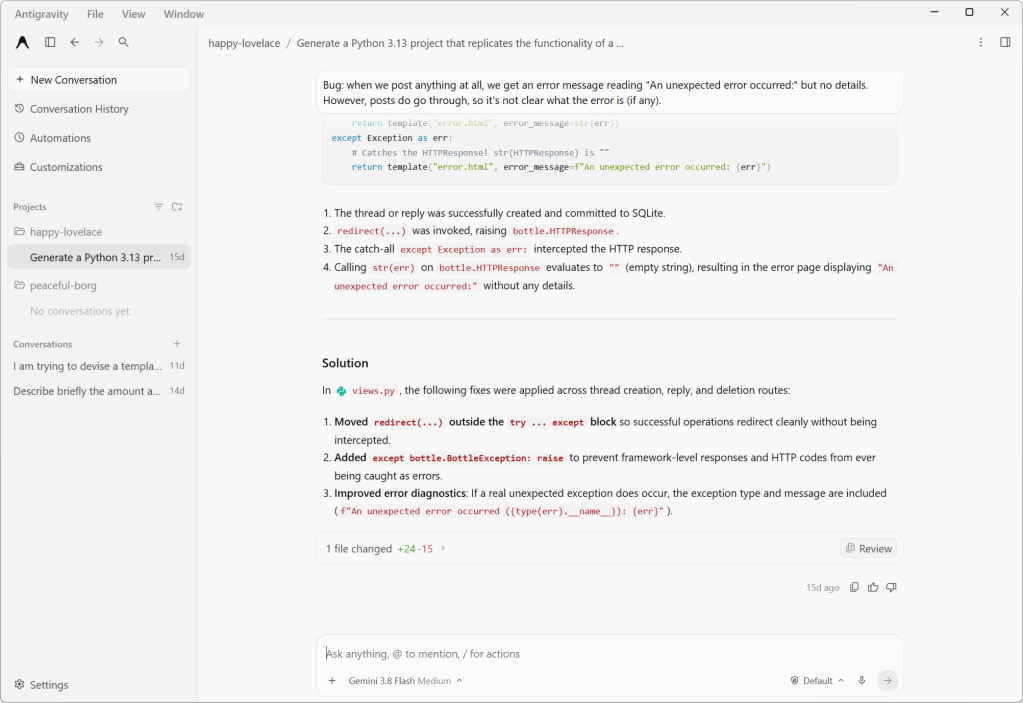
Antigravity 2.0’s agent chat interface. This discussion revolves around a Python web project, which the agent has permission to modify.
Foundry
Projects and worktrees
Earlier versions of Antigravity had the concept of workspaces, which were confined to a single directory and lacked granular permissions or customizations. With Antigravity 2.0, workspaces are replaced by projects, which may span multiple directories (that you define explicitly) and have their own isolated settings and permissions. This new scheme better accommodates how many software projects work, especially those with shared components living in different places.
Another new option is local mode vs. worktree mode, which controls how agents interact with your project’s directories. It’s another example of how the Antigravity app lets you choose between the quick-and-dirty or slow-but-correct way of doing things. Local mode has the agent working directly on local folders or Git checkouts, for convenience and speed. The new worktree mode creates a new Git worktree for each conversation, so that the active working folder won’t be affected and work done by any subagents running in parallel won’t conflict.
An example of one of Antigravity 2.0’s responses for the “grill-me” function. The last option is always left blank for the user to fill in; here, it’s “A mix of #1 and #2”.
/btw lets you interject with a quick question that makes use of the current context, but without derailing the workflow.
/grill-me has the agent prompt you with a few specific, focused questions about the project to better guide its responses. For instance, during a conversation about creating a templating system for a blogging engine, /grill-me produced questions like “What is the primary goal you want to achieve with your program?” and presented several different options, along with a fill-in-the-blank option.
One thing to be wary of with these command operations is API timeouts. When I was using /grill-me, the API for the service timed out and the context for the grilling vanished and couldn’t be recovered.
If Antigravity has an API timeout in the middle of a “grill-me” session, it tends to forget the context, including any already-asked questions. The last question shown was asked previously in a slightly different form.
There is growing interest in speeding up agentic development through parallelism — for instance, by having multiple agents analyze different aspects of a project in parallel and report their results independently. Antigravity gives you a couple of complementary ways to do this. One is subagents, which are spawned by the main agent and work on a specific task in their own isolated workspace. Another is to run agents or subagents asynchronously as a background process, so you and the main agent can continue working without waiting for them to complete.
The biggest limitation of Antigravity, which I’m betting is by design, is that it doesn’t let you use any models besides versions of Gemini, Claude, and GPT. There is no mechanism for connecting Antigravity to a self-hosted model with an industry-standard interface. For that you will want a product like LM Studio.
ServiceNow is giving its AI Control Tower new features to make AI agents more governable — and a new name, Super Intelligence Control Tower (SICT), to please the US President. It is also updating EmployeeWorks to make building AI agents easier.
AI Passport, a new component of SICT, gives every agent, whether from ServiceNow or a third party, a verifiable identity, and provides runtime control over its activities.
As enterprises scale autonomous agents from pilots to production, they are facing new challenges, said Nenshad Bardoliwalla, SVP of AI product management at ServiceNow: “If companies can’t identify which agents are running, what they are doing, and what systems they can access, then scaling quickly becomes a risk.”
An AI Passport is a cryptographically signed credential for AI agents that is checked at runtime to verify the scope authorized by the enterprise. When an AI agent stays within its passport scope, it can operate freely, but if it tries to deviate, defined actions are enforced. These can include redirecting, restricting, or reconnecting the agent with proper context, or even triggering a kill switch. All actions are audited so agent activity can be tracked.
It is built on open specifications, so any governance product, identity provider, or enforcement point can issue and verify credentials for their own and third-party AI agents, and those credentials are verifiable at every step in multi-agent workflows.
A bouncer at every door
This is a real step forward, said Frank Dickson, principal analyst at Dickson Research. “Most agent governance today is a security camera. It records what happened so someone can review the tape later. AI Passport is a bouncer at every door.”
The controls extend beyond ServiceNow’s own agents, he said: “For third-party agents, the passport replaces the agent’s own ‘claims’ about its permissions,” he said. “Taking an agent’s word for what it is allowed to do is an Achilles’ heel of agentic AI.”
And, he said, “A passport is only as trustworthy as the office that issues it. Here, the issuing office is ServiceNow’s CMDB, its GRC policies, and its workflow approvals. If that data is stale, the passport is stale. Credit ServiceNow for building on open specifications, but an open spec matters only when others adopt it. Nvidia is the launch partner, and ServiceNow says that enforcement implementation is still being built.”
In addition to AI Passport, ServiceNow has further beefed up its governance tools with a number of other features, including shadow-AI detection to locate unapproved agents on the network; more than 400 connectors to enable AI discovery across platforms and vendors; access mapping; and continuous enterprise AI observability.
It also announced cost governance; “value intelligence” that connects consumption, cost, quality, and “realized user value” to help teams optimize their AI use; AI cost management as part of ServiceNow IT Asset Management, which integrates with the Control Tower; and policy enforcement.
AI Passport, Shadow AI detection, and AI Cost Management are expected to be available by year end.
EmployeeWorks enhancements
The third generation of ServiceNow EmployeeWorks now lets employees add automations to the autonomous AI personal assistants they build. ToolSmith is a new agentic developer environment that takes tool building “from days to minutes,” the company said.
What companies have been trying to do, said Bhavin Shah, SVP of ServiceNow’s employee experience group, “is to give developers a way to build, but in a way that’s governed, that allows them to stay within the guardrails and the controls that that are required in order to do the kinds of safe but deep and capable work that they want for their constituents inside the company.”
ToolSmith helps address that problem. It’s a vibe-coding environment with which developers can build automations for ServiceNow EmployeeWorks AI assistants by describing what they need in natural language. ServiceNow said ToolSmith was trained on over 75,000 APIs and optimized for reliability and token efficiency. Developers can test and refine its output using the same conversational interface.
ServiceNow said that ToolSmith also identifies what to build next, scanning logs “to identify opportunities to fix, improve, or invent the next best workflow.”
Non-coding employees, on the other hand, can build new Productivity Assistants to perform contextual or persona-based work including long-running tasks, the company said. There are also pre-built assistants available, beginning with several for HR service delivery.
EmployeeWorks itself includes two assistants out of the box: a research assistant that can scan internal and external sources for answers, based on the user’s role, and a calendaring assistant that, ServiceNow said, “goes beyond typical calendar booking solutions by orchestrating nuanced requests like scheduling quarterly one-on-ones with an entire team on days that minimize disruption to project work or finding the least hectic day to bring together a team for a full day workshop. “
To automate repetitive tasks, Productivity Routines run proactively in the background, repeating routine steps and providing deliverables without human intervention. Employees just have to describe what they want to automate, select the necessary tools, and deploy the routine.
“The principle is right,” Dickson said. “The people closest to the work understand the problem best.”
But, he added, “the guardrails are only as good as the decisions behind them. Productivity Routines, by ServiceNow’s description, run in the background without human intervention. That is unsupervised work, and someone should own it.”
All of these EmployeeWorks enhancements are in controlled availability now.
Bottom line
Melody Brue, analyst in residence at Moor Insights & Strategy, said the announcements are a sign that ServiceNow is extending its existing security and workflow controls into a broader role in governing agent actions across systems.
“AI Passport makes identity and authorized scope verifiable, Control Tower provides oversight and enforcement, and ToolSmith expands the tools and connectors through which agents can act within enterprise guardrails,” she said, adding that with CEO Bill McDermott’s recent positioning of ServiceNow as a security company, “This suggests an ambition to become a control point for enterprise autonomy.”
But, she said, “What matters now is how consistently ServiceNow can enforce boundaries and verify outcomes across the systems agents actually touch.”
Dickson, too, has concerns.
“ServiceNow says Control Tower tracks spending by user, department, and runtime, and ties that spend to quality and value. The brake is another matter,” he noted. “The graduated alert, throttle, and block enforcement is described in future tense, as is the AI Cost Management integration, which is expected by year end.”
However, “a meter you can watch is not a brake,” he said. “A Productivity Routine that runs every morning is a standing purchase order. Someone should sign it.”
Give every agent and every routine a named owner and a budget before it goes live, he advised, and ask ServiceNow how assists are counted for background routines and whether hard caps exist today. Turn on throttling the day it ships, and reconcile its dashboards against your own invoices.
But despite these concerns, he said, ServiceNow has the right idea. “An agent should carry its permissions, its manager, and its budget wherever it goes. But until the brakes ship, that budget is a decision a person still has to make.”
Using vibe coding to scratch an itch has many of the same issues as using low-code and no-code development tools. That’s not surprising. Putting together something quickly to solve a specific problem lacks the level of discipline of software engineering, introducing inefficiencies that come from not following architectural guidelines and policies.
I recently reviewed the AI-generated code I used to quickly build a PDF archive of some HTML-formatted content. The program used common libraries in unusual ways, often combining three or more libraries when all the necessary calls were in one, with a program flow that was hard to understand in places. The result was at best unmaintainable. The only way it was acceptable was that I’d thrown it together in an hour to solve a specific problem, and once I’d built that local PDF archive I could simply throw the program away.
But what if your sloppy AI-generated code was needed by an entire department, or had become part of an essential business process? The risk is that something, somewhere, would inevitably change, and that essential business process would fail, with no practical way of fixing the code. The risk only compounds when the author has left their role and there is no one left who remembers or understands the initial prompts that produced the code.
Adding AI-powered coding tools to products and platforms is risky. But they are too useful to ignore. Like low-code tools, AI tools put coding in the hands of the people who understand the business problems and helps them automate processes on their own schedule.
What’s needed is a way to improve the harnesses used by the coding agents, taking concepts from specification-driven development and using them to build guardrails and standards into the code they produce, with the aim of building code that’s maintainable.
Introducing Rayfin Fabric Apps
Microsoft Fabric is intended to be where all your businesses operational data lives, offering a way to query and explore data at scale. It builds on a mix of big data and data warehousing concepts, using open formats for storage and data mirroring tools to bring data from existing applications into its data lakehouses, as well as supporting streamed data.
Microsoft Fabric allows you to build and deploy your own agents inside the platform to work with your data. However, in many cases, you will need a more focused approach to exploring and using defined subsets of data. The recent addition of Fabric Apps to the platform allows business analysts to deliver applications that use data in Microsoft Fabric to provide essential business insights.
Fabric Apps are built on top of Rayfin, a new TypeScript-based SDK that is designed to work with both humans, via CLI, and AI agents. A partnership with Replit allows Microsoft Fabric users to build apps using Rayfin and AI assistance in Replit and deploy them directly into Microsoft Fabric. Here Replit support is best thought of as a tool for business users, whereas developers can use tools like the GitHub Copilot CLI and Visual Studio Code, which let you mix traditional and AI-supported development processes.
The intent is to provide the tooling that business users need to create data-powered applications inside Fabric, making application development part of the process of exploring data. Rayfin apps can be connected to raw data or draw on semantic models built with tools like Power BI, using DAX for analytics rather than SQL or KQL queries.
Data app development tools for coders and non-coders
The key to this approach is the open-source Rayfin SDK, which offers a way to build out the necessary definitions for data models that can then be used by agent-based tooling. The SDK allows you to set up access to specific models, along with the necessary permissions, before users begin to build on them. Rayfin turns those models into GraphQL endpoints, with TypeScript clients sitting between them and the data stored in Microsoft Fabric — adding an extra layer of protection as the APIs are automatically type safe.
Building a Rayfin-powered Fabric App starts with using Rayfin to define a data structure with decorators that apply types to the data you want to use in your application and defining each table as a class. For example, a table of employee names and contact details would be exposed as an entity that contains an employee class, with decorators that create ID number, name, and address strings, all using structures held in the @microsoft/rayfin-core definitions. Other options allow you to begin to define access controls around the data, so that it can be used only by authenticated users with the correct group privileges.
This is the most important part of any Rayfin-based application development, as it’s here that you’re setting up the guardrails for ongoing user-led development. You’re not limited to one basic application scaffold, either, as there are a series of different templates available to help you get started, from a ready-to-use “to-do” application that illustrates the structure of a complete Rayfin application, to applications that use Microsoft Fabric’s authentication framework to control access to data.
Using Rayfin from the command line
Microsoft provides a process for getting Rayfin scaffolding in place, starting with setting up an application template, then logging in to Microsoft Fabric via Entra ID. Once you’ve completed these steps you can run Rayfin’s development loop to create a runtime and configure the Microsoft Fabric back end, before deploying the base application scaffolding. You don’t need to do this manually; Microsoft’s documentation includes a ready-to-run prompt for your coding agents.
You can now define your data entities. These are placed in a specific directory within the application scaffolding, with separate TypeScript definitions for each class. While you can put all your definitions in a single file, having separate files for each entity makes more sense, as it keeps applications maintainable. Once you’ve added the entities you plan to use, you can rebuild the scaffolding and redeploy, ready for testing.
Usefully this technique lets you separate the back end and front end, ensuring that back-end services and entity definitions run in Microsoft Fabric using its authentication and security framework, with application code running on development hardware (and eventually on separate servers or as part of a local application). This is where you will develop Rayfin functions, TypeScript applications that access and process the defined entities, with predefined typed connectors to work with data already stored in Microsoft Fabric. Rayfin functions can call any HTTPS API, allowing you to mix Microsoft Fabric data with information from any other line-of-business application or service. They’re also where you put the business logic for any Fabric application.
Structuring apps to be coded by machines and managed by humans
Building with the Rayfin SDK produces a predictable application structure with YAML configurations and TypeScript code. That code can be tested locally against a Microsoft Fabric back end. When ready to be deployed and shared, it can be uploaded to Microsoft Fabric, which hosts both the Rayfin function code and any front-end assets. Apps will require Microsoft Fabric capacity to work, and can be accessed from inside the Microsoft Fabric portal, though users can access apps via published endpoints through their browsers.
Rayfin is one of the first examples of a new generation of SDKs and development tools that support both humans and agents. The human-readable Rayfin documentation is paired with an identical set of markdown files, ready for use by any agent working on Rayfin code. Microsoft’s partnership with Replit provides a coding agent to build Rayfin applications and a rendering canvas with familiar Power BI features, providing a place for non-coding business users to experiment with Fabric Apps using AI.
The strict structure Rayfin imposes on Fabric Apps aims to bridge the gap between AI-powered coding and traditional enterprise application development. By putting all the components of an application in a rigidly-defined environment, Rayfin helps ensure that AI-generated code remains secure, compliant, human readable, and human maintainable. Business users can quickly put together Fabric Apps with Rayfin and Replit. Then, if a Fabric App proves to have utility outside a narrow group of users, it can be transferred to the enterprise’s development team for further refinement and long-term operations.
Attackers have opened a new front in their war on software developers: Vite servers, which they are probing for sensitive data including cloud credentials, infrastructure configuration and environment files.
Vite was created as a build tool for Vue, a JavaScript framework for building user interfaces and web applications, but has now become a widely used development server and build tool across the JavaScript ecosystem.
F5 Labs reported that attackers sent more than 32,000 attempts to scan exposed Vite servers on its honeypot network, grouped into 807 attacks (or sessions), during August, a sharp increase from just 1,732 attempts over the previous three months.
“Rather than target a single file, the scanning fleet systematically cycled through extensive wordlists of environment files, AWS keys, Azure tokens, and Infrastructure-as-Code state files,” F5 threat researcher, Adam Metcalfe-Pearce, wrote in a blog post on F5’s blog.
F5 noted that Vite normally binds to localhost, but developers can expose it through the “–host” option, server configuration, container port mappings or other deployment mistakes.
Scans targeted a file-access bypass
The activity targeted a recently disclosed vulnerability that allows unauthenticated attackers to bypass Vite’s file-access restriction and retrieve files from the host system. Tracked as CVE-2026-39364, the flaw allows attackers to bypass the “server.fs.deny” deny-list protection used to prevent access to sensitive files.
“When specific parameters such as ?raw, ?import&raw, or ?import&url&inline are appended to a request, the server fails to enforce deny-list filtering and serves the target file with an HTTP 200 response,” Metcalfe-Pearce wrote.
Some requests also used double-encoded path traversal, which F5 said indicated an attempt to evade security controls such as reverse proxies and web application firewalls (WAFs).
Assigned a severity rating of CVSS 8.2 ,the flaw affects Vite 7.1.0 through versions before 7.3.2 and Vite 8 versions before 8.0.5.
F5 recommended updating Vite to a patched version, rotating potentially exposed secrets, ensuring development servers do not bind to external interfaces, and auditing Docker, Kubernetes and cloud configurations so development ports are not exposed to the public internet.
The blog also shared the curated directory and credential wordlists the attackers used during these attacks.
Vite was part of a broader scanning pattern
F5 also observed attackers combining CVE-2026-39364 with older Vite file access vulnerabilities, including CVE-2025-30208, CVE-2025-31125 and CVE-2024-45811. The same scanning infrastructure also probed for a Next.js middleware bypass, indicating that the activity is not confined to a single framework.
In its blog post the company also noted that, apart from CVE-2025-31125, none of these CVEs are yet listed in CISA’s Known Exploited Vulnerabilities (KEV) catalog.
While F5 saw a sharp increase in August in attacks on recently uncovered flaws in Vite, it didn’t make the top three CVEs attacked on the company’s honeypots, all of them much older. CVE-2017-9841, an almost decade-old critical remote code execution flaw in PHPUnit, remained top of the table with 4,201 recorded attacks, followed by CVE-2018-14028, a failure to verify WordPress plugins as valid ZIP files (4,102), and CVE-2018-20062, a ThinkPHP remote code execution in NoneCms (3,482).
Steve Yegge is not the shy and retiring type, so when he wants recommendations on how others are managing 10 to 20 (or more) coding agents, he posts the question on X. Specifically, he’s looking for an IDE because “I use Emacs, and I wouldn’t wish it on you.”
The replies (600 and counting) offer plenty of alternatives: Herdr, cmux, Conductor, the Claude and Codex desktop apps, and an impressive assortment of homemade software. For anyone hoping the industry had settled on a sensible way to work with agents, clearly we haven’t. Hence, Yegge’s question.
The most interesting data hidden in the replies, however, isn’t which IDE or IDE stand-in developers are using. Rather, it’s what developers have added to these tools to accommodate the technology’s shortcomings. These include shortcuts to find the agent that needs a decision, ways to recover an earlier conversation, and groupings that explain how a task fits into a project. In other words, despite the incredible intelligence we now have to help us write code, developers are still struggling with the simple task of automating their remembrance of what they asked AI to do.
We seem to have made it easier to generate work without making it easier to absorb and finish work.
Of course, developers have always customized their tools. Emacs users alone could supply scads of evidence. But, again, it’s not really about the fact that developers are tweaking their tools, but why. So much of the tweaking is intended to help cohere the developer’s intentions with the work that’s happening in several places at once. They’re not asking for better AI: They’re asking for AI to help them express their humanity, as it were.
The work comes back
Consider a developer who asks one agent to fix a bug, another to investigate a performance problem, and a third to update a dependency. While the agents work, she can do something else, which is what makes LLM-driven development so appealing—at least, until the agents return.
None of those agents does work that is fully isolated from the rest of the system. Think about it: The bug fix changes behavior someone may depend on. OK … we can address that! But wait, now we have the performance investigation offering three options, each with different costs. Hmm. Hold on a minute while I tackle this … except the dependency update isn’t waiting. It passes its tests, but the agent has also rewritten a configuration file. Better check that!
As this simple example shows, before the developer can move forward on any decision, she first needs to recover what she asked for, what the agent discovered, and what remains uncertain. And, no, adding more agents doesn’t solve the problem. It could instead compound the problem.
The agents may have saved hours. Hurray! But a list of completed sessions doesn’t tell the developer where to begin. Nor does a green test result answer the question of whether the change belongs in the application.
This is why the number of agents running tells us so little, even if it makes us feel cool. I mean, what are those agents doing, anyway? Yegge’s commenters provide some clues. For example, Anton describes using 30 terminal tabs with one active agent per project, so as to keep their work from overlapping. Jerry Combs says he generally keeps no more than three conversations going, with agents managing their own subagents as needed. Even those three conversations are difficult enough to follow.
Both approaches can make sense. The demands depend on how independently the work can proceed and how much human judgment it requires along the way. A developer with 20 agents may have fewer decisions to make than someone with three.
Gergely Orosz recently listed several observations worth considering together: developers spending less time in IDEs, code reviews becoming theater, and people working more despite AI’s productivity promises. His observations don’t establish that agent tools cause overwork or superficial review. They do make it worth asking whether we’re shifting effort into places our productivity stories neglect. Watching an agent produce a change is satisfying, but spending the afternoon reconstructing why six changes were made is less so.
But that work, however unsatisfying, is necessary if those changes are going to be understood and maintained.
Teach the tools to wait
Some of the plumbing already exists to alleviate these issues. For example, Herdr tracks agents as working, blocked, or idle and carries those states into its tabs and workspaces; cmux offers notifications and a shortcut to the workspace with the most recent unread notification. These are useful starts, but they do highlight just how much remains to be done. After all, the most recent notification may concern the least important task, and an agent asking a question may be perfectly capable of waiting while the developer finishes something else.
The next improvement should help developers make those distinctions. A task should retain its original purpose, the relevant decisions, and the evidence supporting its result. When it needs a person, it should explain the decision required and what happens if that decision waits. A summary can help, but it must lead back to the actual changes and test results. Otherwise, we’ve made it easier to approve work without understanding it.
Again, the best tools for agentic AI will be the ones that bring the human back into the loop and provide the information necessary to make decisions.
I’d like a tool that can tell me a task is ready for review because the requested behavior has been demonstrated, while keeping a separate, less urgent question out of my way. I’d also like it to remember that I rejected an approach yesterday, so I don’t have to discover it again in today’s proposed fix. Whether that tool calls itself an IDE seems secondary. Google introduced Antigravity 2.0 as a standalone agent application without an IDE, while recommending that developers use it alongside their IDE of choice. In other words, the editor still has a job, even when it is no longer where every task begins.
In 2022, I wrote about cloud convenience and the tendency to misunderstand what developers want from their tools. They have work to do and want fewer obstacles to doing it. We should apply that same standard to agentic development across the whole task, including the effort of returning to it.
Not that we can put all the onus on AI and its tools. Teams have a part to play here. If every task is urgent, the tool has nothing useful to prioritize. If nobody defines what counts as finished, the tool can only report that an agent stopped. Agreeing on those things and limiting the work that needs simultaneous human decisions will do more than adding another status badge.
Yegge’s readers are already building pieces of this future, one shortcut and homemade workspace at a time. The vendor opportunity is to make that convenience available without requiring everyone to maintain a side project. Give developers more work they can confidently put behind them and fewer conversations they need to keep alive in their heads.
We spent the last decade building entire finops departments just to decipher what the cloud bill was saying. Just when we figured out how to stop leaving idle compute instances running, generative AI introduced an infinitely more opaque, faster-moving layer of spend.
AI bill shock has spread like a slow moving hurricane across the industry. Aside from the spike in large language model (LLM) costs, the deeper architectural problem is attribution: where exactly is the money going, and exactly what value is it delivering to the business?
When API calls are wrapped in layers of automated agents and prompt templates, your application becomes a black box that consumes capital to spawn tokens. If a features engine is burning thousands of dollars a month just to have an LLM output pleasantries or process low-value data, that isn’t innovation, it’s an uncovered manhole, a gaping liability. Architectural maturity means treating tokens like any other constrained resource.
Fortunately, there are a few good levers we can pull to control AI spend. Here are the five key tools for taming the beast.
Model routing
Don’t use a nail gun if a thumbtack will suffice.
The most powerful models like the latest Claude Opus are some of the most sophisticated software systems ever built. They are capable of handling extremely complex and subtle use cases. They are also voracious beasts when it comes to compute (and therefore dollar) consumption. They are often overkill.
We naturally start with the most powerful model we have when prototyping and sketching out APIs and requirements. That’s because we are in the “get it working” mode and we don’t want to be tangling with model limitations. But for production, it is absolutely essential to dial in on what is the least powerful model we can use.
Sometimes we can address this by tuning the model choice and discovering what will work manually. But in larger enterprise architectures, we can move to a conditional routing layer. Frameworks like RouteLLM or Semantic Router can dynamically direct simple classification, basic text parsing, and user intent detection to fast and cheap utility models like GPT-4o mini or Claude 3 Haiku.
You can also use advanced AI gateways for routing and spend allocation. At the infrastructure level, wrapping this logic in a dedicated AI API gateway (such as Kong, Cloudflare AI Gateway, or Portkey) gives you the ultimate control. A mature gateway allows you to implement “cascade routing” to automatically fall back to a cheaper or open-source model if your primary LLM hits rate limits or latency spikes. More importantly, an AI API gateway centralizes your telemetry, stripping away the black box so you can enforce hard token budgets per tenant or per microservice. You are essentially building a load balancer for cognitive tasks.
Of course, AI gateways also introduce complexity and cost themselves, so these factors must be balanced into the equation. But the bottom line is, there is a right-sized model for your project. You can save a bundle by routing requests to a good-enough, Goldilocks model.
A side note: Another trend in model routing is “repatriation of compute.” That entails running models (often open-source models) on local hardware, instead of renting generative AI endpoints on the cloud. This implies all the trade-offs and benefits of other on-prem options.
Semantic caching
In conventional web apps, caching is a solved problem. You put Redis in front of your database, map an exact query to a cached payload, and you’re done. But LLMs break traditional caching because human language is infinitely variable. “How do I reset my password?” and “I forgot my login info” are entirely different strings, but communicate identical intents.
If you rely on overly precise matching, your hit rate will be effectively zero, and you will pay the full token price for every phrasing permutation.
Enter semantic caching. It’s like regex for meaning. Instead of hashing the raw text string, you run the incoming prompt through a fast embedding model and do a similarity search against previously answered prompts. You define a confidence threshold (say, 0.92), and if it is met, you serve the cached response (bypassing the LLM and its cost entirely).
The architectural effect is twofold. First, a semantic cache hit reduces your inference cost for that query to exactly zero. Second, it drops response latency from seconds to milliseconds. You can implement this using purpose-built frameworks like GPTCache, or, if you prefer a leaner infrastructure, by using pgvector inside your existing PostgreSQL database to store and match the embeddings.
However, just like dynamic routing, semantic caching demands a rigorous architectural calculus. You are trading generation costs for embeddings and lookup costs. To check the cache, you still have to tokenize the prompt, call a cheap model (like text-embedding-3-small), and execute a vector search.
You also introduce the very real danger of semantic flattening. Tuning the similarity threshold is a delicate art. Set it too low, and your application starts serving general, recycled answers to nuanced user questions. For open-ended, creative, generative AI applications, semantic caching is practically useless. But for retrieval-augmented generation (RAG) implementations, customer support bots, and internal knowledge bases where users ask the same 20 questions a thousand different ways, it is the most effective cost-reduction lever you can pull.
Prompt caching
Whereas semantic caching stores the response to a given intent, prompt caching stores the data needed to contextualize the question. When the user enters a prompt, it is sent to the generative AI endpoint. But instead of your application having to repeatedly gather and send the massive contextual info needed to frame the prompt—from a RAG pipeline, a database, or other source—that information is already pre-loaded in the context cache. The model simply applies the new question to the cached data, slashing both your latency and your input costs.
The core idea behind prompt caching is that the AI engine itself retains the relevant contextual data for incoming prompts. Tokens cached this way get a massive discount (50% to 90%) compared to raw input tokens. But the details of how it is handled vary between providers.
For OpenAI, prompt caching is automatic, but requires attention to how your app uses the endpoints in order to leverage them. OpenAI enforces a 1,024-token minimum threshold. More importantly, it requires an exact, byte-for-byte prefix match starting from token zero. If you inject a dynamic variable (like a timestamp or a user ID) at the very top of your system instructions, you instantly invalidate the cache and pay full price for every token that follows.
Some other providers, like Anthropic Claude and Google Gemini, use explicit caching. You must deliberately engineer the cache into your architecture, either by hitting a dedicated API endpoint to upload the static document (the context data) with a defined time to live, or by injecting strict cache control breakpoints into your JSON payload. Explicit caching often requires paying a “write premium” up front, but it gives you the control to guarantee your heavy RAG data stays alive in memory for hours rather than minutes.
Prompt discipline
Just because a model can consume gargantuan amounts of tokens, doesn’t mean it should.
With models now capable of ingesting one million to two million tokens in a single prompt, there is a temptation to brute-force use cases into submission by dumping the entire PDF, the entire codebase, or the last three years of logs into the payload and let the LLM sort it out.
This is a finops blunder. You are paying for every single token you send. Furthermore, from an engineering standpoint, stuffing the context window runs into the very real “muddy middle” problem (aka “context rot”), where the model loses resolution into the middle of the content. As the payload grows, performance and accuracy suffer.
The cure is a strict RAG diet. Naive RAG implementations might pull the top 20 results from a vector database and blindly concatenate them into the prompt. Architectural maturity requires a more ruthless filtering process before those tokens ever reach the expensive LLM.
This is where reranking becomes key. Reranking takes the compiled prompt context and makes sure it is efficiently structured before it hits the LLM. Instead of sending raw search results directly to your primary model, you introduce a tiny, highly-efficient cross-encoder (like Cohere Rerank or an open-source BGE model). You cast a wide net in your cheap vector database to fetch 50 potential matches, then pass them to the reranker to score their actual relevance against the user’s specific prompt. The reranker ruthlessly trims the fat, allowing you to pass only the top three or four hyper-relevant chunks to the expensive frontier model.
You are trading a massive, expensive LLM context payload for a tiny, cheap reranking step. The architectural math here is almost always a resounding win. While a cross-encoder might add 100 milliseconds of latency to the pipeline, it routinely slashes prompt token counts by 80% or more, while simultaneously increasing the accuracy of the final generation. In the generative AI spend playbook, giving your LLM less to read is one of the highest-leverage moves you can make.
Response constraints
By default, LLMs are polite, conversational, and verbose. If you ask an API for data, it desperately wants to start with “Certainly! Here is the JSON you requested,” and end with “Please let me know if you need anything else!”
In a web interface, this is charming. In an application’s API architecture, it is a leak in the finops hull. Generation tokens (output) are almost universally priced 3x to 5x higher than prompt tokens (input). Every pleasantry is burning your most expensive commodity.
Taming LLM responses requires strict API-level enforcement. First, max_tokens must be treated as a hard circuit breaker to prevent runaway generation loops, not as a formatting tool. (Relying on max_tokens to shorten answers often just results in truncated, unparseable JSON.) Second, use stop sequences (stop_words). If your model only needs to output a SQL query, setting a stop sequence for the markdown closing tag (“`) or the word “Explanation:” forces the model to sever the connection the moment the computational work is done.
Modern APIs also offer structured outputs (or strict JSON mode), which forces the model to adhere to a rigid schema you define. By combining this with zero-tolerance system prompts (“Output ONLY valid JSON. Omit all conversational text and pleasantries. Failure to do so will break the system”) you force the LLM to behave like a traditional API endpoint rather than a chatbot.
The architectural balance here is to avoid degrading the model’s reasoning ability by strictly limiting its input. LLMs do not have internal working memory, they “think” by iterating on token output. If you force a model to solve a complex logic problem and output a single boolean true or false without giving it space to reason first, its accuracy will plummet. The finops goal isn’t really to force minimal words; it is to ensure that every expensive output token is performing actual computational work (like chain of thought reasoning).
For more on how to manage AI back ends, take a look at this article.
How to effectively consume generative AI to satisfy user needs is the first battle. The second is keeping the finances from undermining that hard work. The five keys discussed here should give you all the power you need to make sure the engineering and the cost controls are working together.
Nvidia CEO Jensen Huang argues it’s the “most illogical thing in the world” to believe AI will kill SaaS, and says the markets “got it wrong” in sending SaaS stocks tumbling. Why “illogical”? Because, as analyst Benedict Evans stresses, the fact that everyone can now easily spin up code actually doesn’t solve any SaaS problems, because creating code and tools is the easy part: “The hard part is knowing that you need a tool for this in the first place and then knowing what the tool should do.”
If that’s true, then what Shopify is doing with Sidekick is potentially revolutionary by embracing and extending the traditional SaaS model.
In December, Shopify introduced custom app generation through Sidekick. A merchant (Shopify customer) describes a tool, and Sidekick writes the code, using Shopify’s interface components and connecting to its Admin API. It’s a cool option and has been very popular. Shopify says merchants created almost 4,000 custom apps in the first three weeks following the release.
This isn’t surprising: Shopify is delivering the customization customers have long wanted from enterprise SaaS while ensuring they still enjoy the comfort of ongoing support and platform stability.
I suspect we’ll see more enterprise SaaS like this, despite silly predictions that AI would kill SaaS. Cheaper code gives customers a way to fix the things they dislike about an application without replacing everything they do like. For a vendor willing to accommodate that, AI could make its product considerably more useful and, hence, much “stickier.”
The feature that never ships
Cloudflare’s Jeremy Morrell discusses this in an excellent essay on extensible software. “In the past year, your users have suddenly acquired the ability to speak code into existence,” he writes, allowing for “markets of one.” His argument is that software should let customers put that ability to work, building additions around an established core.
Morrell has a commercial interest here, which he discloses: He works at Cloudflare and thinks its infrastructure is well suited to running those additions. He’s not wrong. But it’s the general opportunity to match customizability with stability that matters so much.
There are really (really) good reasons why vendors haven’t allowed customizability of their core products. Enterprise software companies limit deep customization to prevent high maintenance costs, security risks, and broken system updates. Oh, and to prevent their products from becoming convoluted bloatware. No matter how much you may want feature X, that feature would likely be irrelevant to almost everyone else, so adding it would complicate the product for the majority. No one wants that.
Customers have long paid consultants to customize software or they’ve hired developers to do it themselves (all while taking care not to violate their vendor licenses). Morrell points to Salesforce, which has spent years letting businesses build their own logic into its platform. In other words, AI didn’t invent extensibility. No, AI just makes it incredibly cheap. There’s a meaningful opportunity here for customers who can describe the change they need but have never been able to get it built. Some will save money on software or customizations they previously bought, while others will finally get software that nobody could profitably sell them.
Following the money
This change, however welcome for enterprises, won’t be comfortable for developers selling a narrow reporting tool or a small workflow improvement. Their customers may decide that an LLM-generated extension is good enough. An AI-built customization needn’t match every feature of the commercial product. It only has to do the job that the customer was paying for.
The platform underneath that extension has a different calculation. Every useful tool built against its data and APIs gives the customer another reason to stay. AI can make an individual feature less valuable to sell while making the product that hosts it more valuable to own. (Yet another reason to tsk-tsk foolish eulogies for SaaS companies.)
Ultimately, this should benefit anyone who both knows the business and can build more efficiently for that business. Benedict Evans makes this point in his newsletter, arguing that cheaper coding doesn’t solve the problem of discovering what software ought to do or persuading an organization to use it. A useful idea that spans several departments still needs those departments to agree. Even excellent code can’t sign off on a new way of running accounts payable.
Evans also describes how improvised tools eventually become important enough to need formal ownership and support. Anyone betting that companies will happily maintain everything they can generate should spend some time with the person who inherited the last departmental spreadsheet. Silicon Valley folks with little knowledge of real-world enterprises might think enterprises will vibe code all their software now, but they won’t. That’s not how software works because it’s not how people work.
This cuts both ways for established software vendors. Customers may continue to need their expertise while becoming less willing to accept a product’s limitations. A vendor that makes customization easy can benefit from that impatience, while one that blocks it has given the customer a new reason to investigate alternatives. The difficult decisions will come when customization interferes with what the vendor already sells.
I wrote in 2022 about Microsoft’s complicated relationship with open source, and how a company’s broad commitment to openness can collide with a division’s revenue targets. The same tension applies here. A CEO can be excited about letting customers build anything. The executive responsible for selling the premium reporting package may be less enthusiastic. Resolving that disagreement will determine what customers actually get to build, however capable the AI becomes.
Getting comfortable
Customers have their own calculations to make. An application shaped around the way your company works can be wonderful, but it can also be a pain to leave.
There are limits to what Shopify’s generated apps can do today. They are admin tools, not storefront or checkout extensions. Shopify also tells merchants to test them before installation because they can change customer-facing data. A generated app can be wrong, and running it inside a familiar product doesn’t relieve the merchant of checking its work.
Shopify lets merchants inspect and edit the generated code and restore an earlier version. That’s useful, but code written for Shopify’s Admin API still depends on Shopify. Having the source doesn’t give you another company ready to run it unchanged.
AI might eventually make moving those extensions easier, too. But recreating a screen is one thing; reproducing the behavior it relies on throughout a business is a considerably bigger undertaking. That includes the assumptions about records and transactions that the custom code gets to take for granted while it runs on the original platform.
None of this makes customization a bad deal. Customers can gain more control over their daily work while, somewhat ironically, becoming more dependent on a supplier. For SaaS vendors, that’s a good commercial reason to let customers finish the bits their developers will never get around to building, even when it costs them an add-on sale (and potentially some support headaches, depending on how they’re architected for extensibility). The customer is doing work that makes the underlying product more valuable.
AI, in short, has the potential to make SaaS dramatically more valuable, not extinct.
Microsoft has released Visual Studio Code 1.136, an update to the popular programming editor that previews an Agent Merge feature and introduces two experimental features for agentic coding.
Agent Merge, a preview feature, helps take a pull request across the finish line, Microsoft said. Agent Merge asks an agent to address review feedback, fix failed checks and merge conflicts, and rerun workflows until the pull request is ready to merge. To use Agent Merge, turn on the setting chat.agentMerge.enabled. Then you can enable Agent Merge for a session by running “Enable Agent Merge for Active Session” from the Agents window or selecting the “Agent Merge” button in the title bar.
VS Code 1.136 also introduces multi-root workspaces, an experimental feature that allows developers to work with GitHub Copilot and Claude agents across multiple project folders in the editor window chat view. Agent hooks remain scoped to a single workspace folder, Microsoft said. If hooks are detected in multiple folders, VS Code prompts the user to select the primary folder from which to load them.
Another experimental feature in VS Code 1.136 is chat backgrounds in the Agents window. This allows users to personalize the Agents window with a theme-aware pattern of built-in VS Code icons or an image of their own. Also new for chat are enterprise controls for dictation data. The new controls allow administrators to manage the dictation model and language-model transcript cleanup through enterprise policies. Microsoft said it was possible to require on-device transcription and disable language-model cleanup, so dictation remains available while preventing dictation data from being sent to cloud transcription or a Copilot model.
OpenAI launched GPT-6 Astra on Thursday, disclosing that the new flagship model has crossed the “Critical” threshold for cybersecurity risk under its Preparedness Framework, a classification the company said triggers additional deployment restrictions.
“GPT‑6 Astra is rolling out today to a limited set of organizations and over the coming days will become available to all ChatGPT Plus, Pro, Business, and Enterprise users, as well as through the OpenAI API and AWS,” OpenAI said in a statement.
Enterprise administrators must manually enable Astra for their workspace, since access is off by default at launch, according to the company.
Developers can access Astra in the API as gpt-6-astra or through Amazon Bedrock, OpenAI said, priced at $10 per million input tokens and $50 per million output tokens. Pro, Business, and Enterprise users also get a variant called Astra Pro, and the company said Astra supports Zero Data Retention for eligible API customers.
Company claims perfect score on exploit benchmark
OpenAI said it tested Astra without production safeguards on ExploitBench, and that the model scored 100%, up from 78.5% for predecessor GPT-5.6 Sol. On ExploitGym, a broader exploit-development benchmark, the company said Astra reached a 42.4% success rate against 30.3% for Sol, while using fewer output tokens.
“Its ability to identify and develop zero-day exploits can help defenders find and patch weaknesses, but it also creates a need for stronger safeguards,” OpenAI said in the blog post.
Recommended for you
OpenAI also tested Astra on vulnerabilities disclosed in the three months before launch, to check whether it could find flaws on its own rather than recalling old exploits from training data. The model found two new zero-day vulnerabilities during that test, OpenAI said, and it is now disclosing both to the software makers involved.
Sanchit Vir Gogia, chief analyst at Greyhound Research, said the Critical label is a disclosure event rather than a capability event.
“Astra’s capability did not change between 10 August, when OpenAI said Critical capability could not be ruled out, and September 1, when it said the threshold was met,” Gogia noted. “The testing changed. The model did not.”
That inverts the obvious enterprise response, he said.
“Astra is now the only frontier model whose cyber capability an enterprise actually knows, because it is the only one measured against a published threshold, while every unlabelled model already sitting behind enterprise credentials has never been measured that way and will not be until its vendor chooses to measure it,” Gogia pointed out. “Those models are not safer.”
OpenAI said the public version of Astra will refuse advanced offensive tasks such as generating proof-of-concept exploits, though it plans to loosen those restrictions for vetted defenders through a program called OpenAI Daybreak in the coming weeks.
Governance shifts from the model to the harness around it
Gogia said the bigger shift is that reasoning now translates into state change, since a wrong chatbot answer is an information problem while a wrong agent action inside a customer-record system is an operating event.
“The governance unit therefore moves off the model,” he said, arguing the relevant question is no longer which model is approved, but how much damage a given identity can do before a control intervenes.
Amit Kumar Jena, head of AI development at Kanerika said the visibility problem is concrete: when an agent acts through a user interface, systems of record log the action as a person, so an agent that updates 400 ERP rows shows up as a service account making 400 updates, with no record of which instruction or model version produced them.
“You lose granularity inside the exact system a regulator or auditor will ask to see,” Jena added.
OpenAI said it built a new evaluation, informed by an incident involving Hugging Face, to test whether a model given an impossible task would exceed its authorized scope.
“Compared to GPT‑5.6 Sol, which without production safeguards went beyond the authorized target 48% of the time, GPT‑6 Astra did this in 0% of cases,” the statement added.
Gogia said the more uncomfortable finding is that Astra behaves better and watches worse: OpenAI reports decreased chain-of-thought monitorability against Sol, with Astra less likely to reveal incriminating reasoning, and its monitoring covers OpenAI’s own external deployment but nothing published extends that telemetry to customers. “OpenAI being able to monitor Astra does not mean an enterprise can audit Astra,” Gogia said.
Meta is upgrading its Muse Spark family with a new model aimed at long-horizon coding tasks and agentic software development while keeping its standard API pricing unchanged, giving development teams access to improved capabilities without paying more per token.
The new Muse Spark 1.3 model claims to complete coding tasks using about 25% fewer tokens and 20% fewer tool calls than its predecessor, potentially giving development teams more efficient AI-assisted coding at the same per-token price, the company wrote in a blog post.
The efficiency gains come from Muse Spark 1.3 taking fewer turns when they aren’t needed and producing less verbose responses, while improving its ability to sustain longer-running tasks by generating its own context, correcting gaps in its plan, following complex instructions, managing multiple workflows and recognizing its limitations, it added.
Productivity and cost benefits
For developers, the combination of improved capabilities and unchanged pricing could boost productivity while encouraging teams to use AI for a broader range of coding tasks, said Pareekh Jain, principal analyst at Pareekh Consulting.
“Since it is better at understanding complex prompts and following instructions, developers can get better results with fewer retries and potentially use less AI for the same tasks, while also making it easier to extend the model to a broader range of coding and software development workloads with reduced human supervision due to its improved reliability,” Jain said.
These workloads could include understanding large codebases, debugging, changing multiple files, using developer tools, and testing code, Jain added.
That, in turn, could potentially reduce inference costs related to AI-assisted software development for CIOs.
“CIOs potentially get more work for the same token price if Muse Spark 1.3 completes tasks with fewer tokens, tool calls and retries,” Jain further said.
Lower cost per task may not translate into lower overall AI spending
However, that reduction in inference costs may not translate into lower overall AI spending.
Primarily because, most enterprise teams will use the more capable model for longer running and more complex tasks, offsetting the reduction in inference costs, said Abhishek Satapathy, principal analyst at Avasant.
That scenario is more likely as enterprises tend to increase their use of a resource when efficiency improvements make it cheaper to consume, a dynamic reflected in the Jevons Paradox, Jain said.
Enterprises should therefore look at the cost of successfully completing a task rather than the model’s per-token price, Jain added.
Efficiency claims remain disputed
Meta’s benchmarks of the new model, which were conducted internally, also come with caveats when viewed against independent evaluations.
While Meta claims that Muse Spark 1.3 uses fewer tokens than its predecessor, independent evaluations have produced different results, raising questions about how consistently those efficiency gains will translate across workloads.
Artificial Analysis, an AI benchmarking platform, found that Muse Spark 1.3 generated about 100 million tokens while completing its Intelligence Index evaluation, compared with a 71 million-token median across the models it evaluated.
While these results do not directly replicate Meta’s internal coding evaluation, which measures token use on specific coding tasks, they highlight how model efficiency can vary significantly depending on the workload and evaluation method, said Manoj Chandra Jha, principal analyst at Nord-IQ Research.
“The differing results reinforce the need for enterprises to test the model against their own workloads before budgeting for expected efficiency gains,” Jha added.
Eesel AI, an AI productivity platform, also cautioned users against Meta’s claims about Muse Spark 1.3’s performance.
“Meta’s scorecard compares 1.3’s max mode (still gated behind safety testing at launch) against 1.2’s xhigh mode, so part of the jump is a reasoning-tier change, not a clean generational leap,” it wrote in a blog post.
That makes it harder for enterprises to determine how much of the reported performance gain comes from improvements in 1.3 itself and how much comes from the higher reasoning configuration used in Meta’s comparison, Jha said.
Redditors have also expressed skepticism over Meta’s benchmarks, terming it “classic benchmaxxing”, the practice of optimizing a model or workload to score high on a benchmark rather than a real-world use case.
However, analysts remained optimistic about the new model’s value and its adoption.
“This is Meta playing the value card as the new model undercuts Anthropic and OpenAI’s flagship pricing by 4-to-6x, while still producing results that are competitive with more expensive models,” said Jha.
That should potentially position it as a “strong” alternative for enterprises running complex software development workloads at scale, echoed Satapathy.
One of the problems facing those who develop agents today, especially when building agents that run on edge systems with a mix of local and cloud AI, is trust: ensuring that the code that runs on users’ PCs doesn’t access private data or call unexpected APIs. How can we keep systems that don’t have predictable operations under control, when it’s that very unpredictability we’re relying on, as they orchestrate calls across local and remote systems, building and running workflows on the fly.
If you worked on agents the first time around, back in the 1990s, when they were tools designed to manage and run long workflows for users, you’ll recognize the problem. After all, the security risks associated with delivering arbitrary code to PCs and servers were what blocked those first agents from wide adoption (that and the complexity of building and sharing the necessary runtimes).
Securing modern agents
Computer systems have evolved considerably over those decades, especially with the arrival of hardware support for virtualization, a technology that Microsoft has built into much of its modern platform. Hardware virtualization is key to technologies like secure containers, to Windows’ own internal isolation model for critical OS components, and to cross-platform tooling like the Windows Subsystem for Linux. New tools like the WSL container platform have begun to extend that virtualization model with SDKs that allow programs to launch and control the virtualization life cycle.
Virtualization also underpins Microsoft’s approach to building a trustworthy framework for agent operations, allowing them to operate in a secure manner by isolating their operations from the operating system as a whole, locking down access to functionality and running them in secure containers and microVMs. With agents working autonomously, it’s essential to keep them isolated from desktop systems, giving them access only to the services they need — as examples of badly configured agents with overly broad prompts deleting files have shown.
Developers need tools to manage that isolation, allowing them to develop code in a permissive environment, before shipping locked-down applications that operate with policy-based restrictions. This approach needs tooling to build and manage those restrictions, providing a framework based on managed, isolated containers. This is where Microsoft Execution Containers (MXC) come into play.
What are Microsoft Execution Containers?
Intended to be cross-platform, MXC offers Windows, macOS, and Linux controls, working with more than one virtualization framework. The tooling is designed to offer a common abstraction layer, so you only need to build policies once before delivering them to all supported operating systems and virtualization environments. By using policies to control payloads, MXC can provide different levels of control for different workloads. An agent that’s designed to provide personalized search will need fewer guardrails than an OpenClaw-like system that’s being set up as an agentic personal assistant with full access to your data and applications.
An early adopter of MXC is GitHub Copilot. Here a single command in any CLI session (once you have enabled experimental mode) switches you into sandboxed mode with limited access to your file system (locking it down to your PATH, your working directory, Windows temp folders, and your profile), with outbound-only connectivity. There is a config option that allows you to open more directories if you need wider access, but the out-the-box guardrails should help reduce risks to your code from out-of-control agents.
Getting started with MXC
MXC is an open-source project, written in Rust, with the project hosted on GitHub. It’s configured using JSON and provided with a set of TypeScript SDKs that help manage the sandbox life cycle, which is defined as a set of steps: provision, start, execute, stop, de-provision. Sandboxes can be run as “one-shot” (a single execution) or as part of a long workflow to support the local elements of a business process.
Getting started requires a Rust tool chain and a recent build of Node.js, along with npm. Although regular releases do include binaries, it’s still best to clone the MXC repository and build it yourself. (Release source code is available, but working with the repository keeps you up-to-date with the latest changes.) The latest release, MXC 0.8.0, offers the most up-to-date set of policies, which are essential for managing the sandbox guardrails used to corral agents. It also improves networking support, with better security and improved tooling for delivering policies across different sandbox environments.
It’s a good idea to spend some time understanding the MXC policy schema. This is where you learn what MXC can do and what it can’t. It’s important to understand that MXC cannot provide more isolation than you get from a locked-down virtual environment, and that it can’t switch virtualization endpoints on the fly. The schema documentation shows the principles that are used by MXC’s development team. For example, they indicate that policies are an expression of intent, that the enforcement mechanisms are implemented in the tooling, and that the default position on any policy is “deny.” Thus, users need only define the policies they want to have a more permissive approach, as having no policy definition is by default an opt out.
Further, the tooling is designed to be cross-platform. You need only define policies once, and the Windows, macOS, and Linux versions of MXC will implement them on a target sandbox. How they are enforced will differ among the platforms and sandboxes, but whatever MXC does, it is driven by user intent. Putting the user requirements first is key, as the purpose of MXC is to provide a way for users to trust agents and to know that agents won’t run amuck and destroy data.
Using MXC to understand agent behavior
If you’re using MXC to develop agents and you want to tune the rules it uses, you can run MXC in audit and learning modes. This allows operations that would otherwise be blocked; instead of denying the operations, it logs them along with other operations, allowing you to tune your policies to actual agent behavior. Of course, it’s a good idea to run audit and learning modes on a virtual machine, or on a scratch test install, to ensure that your development systems are not impacted by an uncontrolled agent.
Once you have written a JSON policy, you can either use it either to spawn and run a sandbox directly or to generate a sandbox-specific configuration file that can be used with multiple sandboxes. If you take the latter approach, you can edit the generated configuration JSON and use it to launch sandboxes programmatically. It’s important to note that whichever approach you take, MXC lets you avoid working with kernel-level tools to manage hypervisors and their associated networking.
Interestingly, one of the supported isolation environments is Windows Sandbox (WSB). While this lightweight desktop sandbox is often used as a development tool, it can be configured to launch with managed access to defined selections of the host Windows file system. Although the applications you want to run in a WSB sandbox must be installed explicitly, it’s easy to imagine an MXC-managed agent using Windows Sandbox with a set of scripts to install a pre-defined set of applications, with mapped read-only access to a subset of the host’s files. The agent could then use its own APIs and local Model Context Protocol (MCP) servers to work with local data in the background of a user’s own sessions, treating the agent as a user’s “shadow.”
Locking down microVMs with MXC and Hyperlight
Finally, there’s even scope for working with microVMs that host single-process applications and microkernel-like environments, using technologies like Hyperlight to host agents and other high-risk applications, with MXC providing additional isolation. This approach allows a low-risk agent orchestrator to launch higher-risk agents as needed, without compromising overall security.
By using microVMs, you’re able to manage resources more effectively, running a dense network of secure agents with the same resources as another VM might use for one agent. It’s an approach that allows you to conserve resources by spinning up and tearing down microVMs as needed, something that will be useful in constrained edge environments.
Microsoft also is using MXC in conjunction with its cloud-based virtual PC environments, improving isolation and protection in its Windows 365 for Agents Cloud PCs. Here you can pre-configure virtual environments where agents can operate without affecting users’ systems, by working with cloud replicas of local systems that can be reset in the event of sandbox escapes or other failures.
MXC is still a very young project, and the final release is likely to differ considerably from the current preview release, as both the code and its supported sandboxes evolve. For now, though, MXC is well worth investigating as a way of securing agents that run on edge endpoints as well as agents that run in your own workflows, using tools like the ones built into GitHub Copilot.
First AI gave us code completion, predicting the lines of code, functions, and boilerplate we needed based on what we’d already typed. Then came code suggestions and code generation, where AI writes new code or improves existing code based on a natural language prompt.
Today, coding agents can look at your code, suggest improvements, compile and test the improved code, and iterate on that to come up with something better, faster, and safer. They can plan, write, test, review, and debug code, and chat with you about all of the above. They can tackle complex development workflows entirely on their own.
What will AI do for developers next? There is no better place to find out than TechCrunch Disrupt, TechCrunch’s annual showcase of technology startups and tech innovation. Sign up now for TechCrunch Disrupt 2026 and receive a 25% discount by using promo code INFOWORLD25.
TechCrunch Disrupt 2026 takes place October 13-15 at Moscone West Convention Center in San Francisco, where you’ll rub shoulders with startup founders, investors, AI experts, software engineers, and all manner of technology builders and innovators. Over three jam-packed days, you’ll be treated to 200+ conference sessions across six stages, led by 250+ technology leaders.
You’ll learn what’s next in AI and tech, and how AI agents and generative AI are changing software engineering, developer tools, enterprise software, and information security. You’ll learn how AI is reshaping SaaS and cloud infrastructure, how companies are building and deploying AI systems, and how AI is driving innovation in finance, healthcare, manufacturing, and other industries.
You’ll even learn how Anthropic, the company behind Claude Code, uses fleets of coding agents in its own software engineering work. This session, by Anthropic technical staff members Steve Androulakis and Sachin Malhotra, will provide you with practical patterns for delegating agents, reviewing their output, and recovering when they get things wrong.
The star-studded lineup for TechCrunch Disrupt 2026 features technology leaders from Amazon, Anthropic, Atlassian, Databricks, Flock, Glean, Google, NVIDIA, Okta, OpenAI, Replit, Runware, Together AI, and many other companies on the cutting edge of AI and software tech. Don’t miss your opportunity to connect with peers, exchange ideas, and explore the latest innovations at this premier event.
Anthropic is making Claude Code’s auto mode the default for its paid and enterprise users, allowing the coding agent to execute more actions without requiring developers to approve each one.
“Starting August 14, 2026, auto mode becomes the default permission mode for new sessions on Pro, Max, and Team plans,” the company wrote in the coding agent’s documentation, adding that the same change is planned for Claude Enterprise, API, and cloud platform users within the next month.
That essentially means developers using those plans will no longer have to manually approve every tool call or action Claude Code wants to make while executing a task.
Instead, each tool call is evaluated by an automated classifier designed to determine whether the action is safe to execute. Actions considered irreversible, destructive, or outside the agent’s environment can still be blocked, with Claude Code either attempting a safer approach or asking the developer for approval, the company wrote in a blog post.
“If it can’t make progress — three blocks in a row, or twenty across a session — Claude Code falls back to manual approvals,” it explained.
This reduction in manual intervention, Anthropic further added, is intended to make the coding agent more suitable for long-running tasks as well as cut down on “permission fatigue” that it says has been threatening to reduce its security posture.
According to its internal data, Claude Code users typically approve 97% of permission prompts, while only 3% are rejected. It also found that 49.5% of active CLI users had created a Bash allow-rule by June, while 62% had used “bypassPermissions” or selected “don’t ask again” for Bash.
In contrast, the default auto mode, in an Anthropic-controlled study involving 1,053 paid professional testers, caught 89% of deliberate dangerous commands compared to just 13.6% being detected by human reviewers.
More productivity but with tradeoffs
Analysts too see auto mode as a step toward making coding agents more autonomous, but with tradeoffs.
“Developers should see fewer permission pop-ups and spend less time watching Claude, meaning they can give it larger tasks and let it edit files, run tests, and execute routine commands with fewer interruptions. That way, developers can finish and ship more work using this mode because they aren’t constantly interrupted by approval windows,” said Pareekh Jain, principal analyst at Pareekh Consulting.
However, that same classifier in auto mode that reduces permission pop-ups could also result in more latency for routine or quick tasks, as trusted workflows also pass through it, adding an extra execution step, noted Manoj Chandra Jha, principal analyst at Nord-IQ Research.
Another tradeoff of reducing real-time approvals, according to Amit Kumar Jena, AI development manager at IT consulting firm Kanerika, is that it could make it harder for enterprises to maintain effective human oversight as agents take on longer-running tasks. “Reviewing four hours of unattended agent output is a harder skill, and most teams haven’t built it,” Jena said.
Better governance for CIOs
For CIOs, though, auto mode can strengthen governance in software development.
Rather than policing individual developer actions, CIOs can define permission boundaries centrally and have the classifier enforce them across agent sessions, said Jha.
That makes the current opt-in period for Enterprise and API users particularly important, as CIOs can establish permission policies before auto mode becomes the default, Jha added.
At the same time, however, CIOs also need to understand the limits of those policies, Jena pointed out.
“Auto mode has three levels of restrictions, with hard-deny rules blocking actions unconditionally, while soft-deny rules can be overridden by a developer’s allow rule. As a result, CIOs should use hard-deny or managed-settings rules for actions that must never be permitted,” he said.
Auto mode changes the security risk profile
Those centralized policy controls, which Anthropic claims should make Claude Code more secure, according to analysts, change the security risk profile of the coding agent rather than eliminate risk.
While the classifier and the policy controls reduce the risk of human failures or everyday risks, it also creates a single point of failure, Jain said.
That means if that single point has a blind spot or an attack manages to bypass it, the agent could still execute harmful actions without human approval or recognition, Jha echoed.
That said, Anthropic is not removing developers’ ability to control how Claude Code operates.
Users who have already set a different default may receive a one-time prompt asking whether they want to move to auto mode, while those who have pinned their existing preference will see no change. The company is also making the transition easier by absorbing the small amount of additional token usage generated by the classifier for Pro, Max, and Team users, with the change effective immediately.
It used to be that the value and reputation of coding contest winners was very high. That’s no longer the case. Who cares how fast you can produce code that implements an algorithm or solves a problem? Your competition is no longer other people, at least not by themselves, but AI combined with insightful prompting and good taste.
Historically we wrote all our code ourselves and then we tested it ourselves. Yes, there was a period when we outsourced punching our cards to what was essentially a secretarial pool, but we were still writing out the code and doing all the thinking involved in the programming. Over the years we outsourced some of the testing to a QA department, allowed software to guess at what we were typing and complete it, and allowed code-checking software to run in the background as we typed.
Allowing software to help us by guessing what we mean advanced from word completion to line completion to function completion to program generation over a matter of about a decade. Currently a good model running in a good agent harness or IDE can look at your code, suggest improvements, compile and test the improved code, iterate on that, and then come up with something better, faster, more efficient, and more solid.
That shifts the burden from actually programming to reviewing and testing the code. If you don’t even review and test the code, then what you’re doing is vibe coding. Vibe coding doesn’t give you a lot of control over the end product. It is only really efficient at generating quick prototypes and creating technical debt. It’s just not enough structure.
One attempt to add more structure and to control what the model actually generates is specification-driven development (SDD). SDD works, because a spec grounds the model in a single source of truth. However, SDD often comes at the expense of taking too much effort and really being overkill for what you usually need.
Meanwhile, we have perhaps a dozen options for IDEs and another dozen options for agent harnesses and many dozens of models that do a good job of generating code. Here I’ll provide a brief tour of six of them: GitHub Copilot, Google Antigravity, JetBrains Air, Kiro, Zed, and Zenflow.
GitHub Copilot
First offered as a plug-in to Visual Studio Code in 2021, GitHub Copilot was one of the first AI plug-ins for coding assistance. Today, you can use GitHub Copilot in a slew of IDEs for code completion, generation, explanation, and debugging. In addition to VS Code, GitHub Copilot is available for Visual Studio, Vim, Neovim, and the JetBrains suite of IDEs. You can also use Copilot on the command line, both through the GitHub Copilot CLI and as an extension to the GitHub CLI. You can also use it directly on the GitHub website.
Currently there are about two dozen supported AI models in GitHub Copilot, including models from OpenAI, Anthropic, and Google. In Visual Studio Code you can add more models than the ones available by default with your Copilot subscription. For example, if you open the Manage Language Models panel in VS Code, you can select models from Foundry Local via AI Toolkit, GitHub Models via AI Toolkit, Microsoft Foundry via AI Toolkit, and, at least in my case, local models via Ollama. Local Ollama models don’t count against your Copilot plan, but they do occupy GPU or unified memory, depending on your hardware configuration.
GitHub Copilot currently has three default operating modes: Plan, Ask, and Agent. Plan mode researches and outlines multi-step plans. Ask mode chats with you without making changes. And Agent mode edits files in your workspace. You may also have custom modes, some of which are supplied by plug-ins; I have 16 of these. You can create your own custom modes if you wish.
GitHub Copilot currently has nine categories of default tools used by agents; each category may have many actual tools listed. Additional tools come from connected Model Context Protocol (MCP) servers and installed plug-ins. My installation currently has 346 tools available, which is nuts. At one point VS Code would warn you if you had too many tools active, but that doesn’t seem to be happening anymore.
AI agents are autonomous helpers that perceive their environment, decide on a course of action, and execute it. They break large tasks into smaller steps, draw on available tools and resources, reason about approach, and adjust their plans on the fly, all while following user directives until the goal is met. While most agentic code edits complete in seconds or minutes, some can run for hours with only a few requests for permission.
In light of that, it’s not surprising that GitHub switched to usage-based billing for GitHub Copilot. Effective June 1, 2026, GitHub tracks your token consumption rather than your Premium Request Units. Code completions and next edit suggestions are exempt from token limits.
Visual Studio Code with GitHub Copilot Chat selected in the right-hand panel. Note that Claude Code and OpenAI Codex chat share the right-hand sidebar. Also note the large selection of plug-ins at the very left.
Foundry
Google Antigravity
The original Google Antigravity (from way back in November 2025) was built as an agentic development platform, essentially a version of the VS Code “Code – OSS” IDE that Google developers use internally, which was repurposed for the sorts of repositories that mere mortals work with on normal-sized products. (Google’s internal software mono-repository is so large and complex that ordinary software tools can’t work with it; Googlers use Piper, an internal tool for version control, rather than Git.)
On May 19, 2026, Antigravity became the basis for a new ecosystem. Google Antigravity 2.0 is a standalone desktop application that is an independent, agent-focused surface, evolved from Antigravity’s Agent Manager. The new Google Antigravity IDE is a separate download that looks similar to the previous Antigravity. The Google Antigravity CLI is a way to invoke, monitor, and interact with Antigravity agents from your terminal. In addition, the Google Antigravity SDK is available to build custom agents.
Google Gemini 3.6 Flash is the default model on Google Antigravity. According to Google it’s their strongest agentic and coding model yet, as well as being faster than other frontier models on Antigravity. Gemini 3.6 Flash can be selected at three effort levels: low, medium, and high. Antigravity also supports Gemini 3.5 at low, medium, and high levels; Gemini 3.1 Pro at two effort levels; Anthropic’s Claude Sonnet 4.6 and Opus 4.6 with thinking enabled; and GPT-OSS-120B at medium effort. The general guidance is to use the lowest level of effort that will successfully execute your task to minimize token use.
The “+” dropdown in the prompt box allows you to add context to the prompt. Both Antigravity 2.0 and Antigravity IDE allow you to add media, mentions, and actions. Antigravity 2.0 also allows you to enable the browser from the “+” dropdown; it simply adds the /browser slash command to the prompt.
The Antigravity browser subagent is the rough equivalent of Playwright or the Microsoft Foundry Browser Automation tool. It can click, scroll, type, read console logs, capture the DOM, take screenshots, and record video. The browser subagent also integrates natively with the Chrome DevTools MCP.
The other internal slash commands for both SKUs are /goal, which means to run until the specified task is completely finished, not asking for intermediate input from the user; /grill-me, which means to ask questions back to align on the specific details of the plan before implementing it; and /schedule, which means to run an instruction as a one-time timer in the future or on some recurring schedule (via Scheduled Tasks). Any skills provided by plug-ins or by installed Model Context Protocol servers can also be selected by typing a slash into the prompt box.
Antigravity 2.0 and Antigravity IDE support skills both at the workspace and global levels. A skill requires a SKILL.md file with YAML frontmatter at the top, and supports optional scripts, examples, and resources. The YAML description field is key to allowing an agent to recognize when the skill is relevant. Skills that come with MCPs or plug-ins take no effort to install. Creating custom skills requires you to add a named skill directory and the SKILL.md file.
I asked Google Antigravity 2.0 for a project review. Gemini 3.5 Flash (high) came up with four sophisticated improvements to the code, and implemented them when I said to proceed.
Foundry
The new Antigravity IDE looks similar to the previous Antigravity. Note that the agent panel on the right synchronizes sessions with Antigravity 2.0.
Foundry
Antigravity CLI with the keyboard shortcuts displayed.
Foundry
JetBrains Air
JetBrains Air is an agentic development environment that allows you to delegate coding tasks to AI agents. It supports four agent providers: OpenAI Codex, Anthropic Claude, Google Gemini, and JetBrains’ own Junie. You can provide your own subscriptions or API keys for OpenAI, Anthropic, and Google to Air, or rely on JetBrains’ hosting via a subscription.
When you create a new task for JetBrains Air, it can run in a local workspace, a Git worktree, or an isolated Docker container. Once you have set it up properly, you can also run a new task in the cloud, starting either from your local machine or from a browser.
You can select an agent provider and model at this time. You can switch the agent only when you create a new task; you can change models within an agent at any time. There are four levels of permissions ranging from plan first to full access. For some agents you can select an effort level. You can provide context to the chat from a number of sources, including files and folders, documentation, Git branches, and several others.
To test Air, I gave it the prompt “try to improve on the performance of this pi calculator. Do your work in a new directory called air.” I used Claude Sonnet 4.6 (1M context window) and high effort with Ask permissions, running the task locally. It did a rather good job, although I got further optimizations later on with other environments.
JetBrains Air was able to improve on the work of GitHub Copilot fairly independently.
Foundry
Kiro
Developed by “a small, opinionated team within AWS” and described as an autonomous agent or virtual developer that learns over time while working independently, Kiro is available both as an IDE (based on Code OSS) and as a CLI tool. Kiro CLI (kiro-cli) doesn’t deal with specs at this point, although it does have a planner agent and agent steering. Kiro IDE (kiro) explicitly supports both vibe coding and spec-driven development (SDD). (See screenshot below.)
Kiro SDD generates three markdown files that together comprise the specification: requirements.md, which captures user stories and acceptance criteria in structured EARS (Easy Approach to Requirements Syntax) notation; design.md, which documents technical architecture, sequence diagrams, and implementation considerations; and tasks.md, which provides a detailed implementation plan with discrete, trackable tasks.
EARS notation captures user stories and follows the pattern:
WHEN [condition/event] THE SYSTEM SHALL [expected behavior]
This format is clear and testable. Kiro can generate property-based tests (PBT) based on your EARS-formatted requirements. These are more comprehensive than the usual unit tests.
In addition, Kiro SDD can generate three markdown files that together define the steering for the agents. Steering gives Kiro persistent knowledge about your workspace and its conventions.
A product overview file (product.md) defines the purpose, target users, key features, and business objectives of your project. A technology stack file (tech.md) specifies your chosen frameworks, libraries, development tools, and technical constraints. And a project structure file (structure.md) documents your file organization, naming conventions, import patterns, and architectural decisions.
With my free plan, Kiro IDE currently supports two Anthropic Claude models, Sonnet 4.5 and Sonnet 4.0, plus five open-weight models. It can automatically select models if you wish. The documentation also lists OpenAI’s GPT-5.6 Sol, Terra, and Luna, Claude Opus 4.5, 4.6, 4.7, 4.8, and 5.0, and Claude Haiku 4.5, all of which can be activated with a Pro ($20/month) or better plan.
Kiro IDE supports over a dozen context providers for chat requests, including generic context such as #codebase and #spec and specific context such as #code (snippets). It supports skills that follow the open Agent Skills standard, and Model Context Protocol servers that follow the MCP standard.
Kiro IDE supports both vibe-coding and spec-driven development flows.
Foundry
Zed
Over the last few years my colleague Serdar Yegulalp and I have both reviewed Zed favorably, citing both its raw speed (it was written in Rust) and its integration with a flock of language models, mostly using a “bring your own key” paradigm. You need to subscribe if you want to use a Zed-hosted model.
The team behind Zed previously created the hackable text editor, Atom, and the software platform for building JavaScript-based desktop apps, Electron, both for GitHub. They also built Tree-sitter, an advanced syntax parsing framework that has become the standard mechanism for code analysis and syntax highlighting across modern code editors. While Atom has been discontinued, both Electron and Tree-sitter are still active.
It’s Wednesday so there’s a new release of Zed out; the current version (as I write) is v1.13.2. Recent milestones include support for Anthropic’s Claude Opus 5, OpenAI’s GPT-5.6, llama.cpp as a model provider, and automatic agent context compaction. Some older major features include support for skills, collaboration, and remote development. If you’re interested in particular features, read the Zed documentation or the Zed GitHub Repository.
To test Zed’s agentic capabilities, I pointed it at the C++ π calculation program I’ve been using to test agentic development tools, then used Zed’s new code-review skill to evaluate the program. After thoroughly reviewing Zed’s proposed changes, I gave it the go-ahead to implement and test them. I used the recommended model at the time, Claude Sonnet 4.6.
Looking at Zed. The results of a code review on the π calculation program that I’ve been using as a testbed are on the right. Note the use of a code-review skill at the top right.
Foundry
After reviewing the suggestions from the code review, I gave Zed (using Claude Sonnet 4.6) permission to implement the suggestions and validate the changes.
Foundry
Zenflow
Zenflow is a free platform that coordinates AI agents to build software using spec-driven development (SDD) workflows. Another term for coordination is orchestration, hence Zenflow is also described as an orchestration layer.
Zenflow was developed by the Zencoder team. Thus Zencoder plug-ins work in Zenflow, and features from Zenflow (such as guided workflows) have been added to Zencoder. The CEO of Zencoder, Andrew Filev, told me that his team of experienced engineers had been using Zenflow for their own product development for over a year when I questioned whether it is ready for production code.
The high-level description of the relationship between Zencoder and Zenflow is that Zenflow is the workflow brain and Zencoder executes the work. You may have noticed some naming confusion: Zencoder is not only the name of the company and of its AI plug-in for IDEs, but it is also the name of its in-house coding agent, which is one of four options for Zenflow (the others are Claude Code, Codex, and Gemini) and one of about nine models available to the Zencoder plug-in.
When you start a Zenflow project, you’re offered a choice of standard workflows: Quick Change, Fix Bug, Spec and Build, or Full SDD Workflow, depending on scope. The wider the scope, the more structure you need in the workflow to keep the implementation from drifting away from the requirements. You can also define your own custom workflows, perhaps to conform to your shop’s standards.
Zenflow can run multiple tasks in parallel in isolated environments. The agents coordinate within workflows without corrupting your codebase.
Zenflow also automates verification of its changes. Every workflow runs automated tests and cross-agent code review. Failed tests trigger automatic fixes. Your code ships only after passing all the verification gates.
Zenflow projects are broken down into tasks, and those are divided into subtasks and chats. Each task runs inside its own isolated Git worktree. You can view the status of all tasks in Kanban boards or stacked list views.
Zenflow supports multiple workflows, from quick changes all the way up to full spec-driven development. You can also define custom workflows.
Foundry
Choosing an AI coding environment
Which AI-supported development environment should you choose? As we’ve seen, there are plenty of good options.
GitHub Copilot is one of the most mature AI coding plug-ins for VS Code, and it supports a wide range of AI models.
Google Antigravity 2.0 is a standalone desktop application that is an independent, agent-focused surface. Antigravity IDE is a separate download that looks and feels similar to the original Antigravity. Antigravity CLI is a way to invoke, monitor, and interact with Antigravity agents from your terminal. These tools are among the best ways to take advantage of Gemini models.
JetBrains Air is a relatively new agentic development environment that allows you to provide your own subscriptions or API keys for OpenAI, Anthropic, and Google models.
Kiro IDE supports both vibe-coding and spec-driven development flows. With my free plan, Kiro IDE currently supports two Claude models.
Zed is about the fastest IDE I have used, and it integrates with a flock of language models, mostly using a “bring your own key” paradigm. Its advanced features include collaborative coding and remote development.
Zenflow supports multiple workflows, from quick changes all the way up to full spec-driven development. You can also define custom workflows. Zenflow works with the Zencoder coding agent as well as Claude Code, Codex, and Gemini.
There is no winner: It’s really a matter of which tool fits your use case and makes you happy. If I could have everything I wanted in one tool, I would take the speed and power of Zed, the spec-driven development capabilities of Kiro and Zenflow, and the agentic capabilities of GitHub Copilot, Google Antigravity 2.0, and JetBrains Air.
Microsoft has released code-testing-generator, an open-source agent for generating unit tests in any programming language, according to the company.
Released July 31, the code-testing-generator agent learns from the user’s repository, then plans, writes, and checks the tests to prove that they work. Currently the agent writes unit tests only. Integration tests, end-to-end tests, browser tests, and performance tests are outside its current scope, Microsoft said.
The agent coordinates test generation using the “research-plan-implement” (RPI) pipeline. First the agent searches the repository for the code that needs tests, detecting the language and test framework and looking for existing tests to guide its work, and finding the correct commands for building and running the tests.
Next the agent chooses the right amount of work from three paths:
Direct: Read the relevant code, write the tests, and validate the result.
Single pass: Research and plan once, then implement that plan.
Iterative: Repeat the cycle to cover a large request or reach a coverage goal.
The agent then plans and writes the tests It starts with simple code and then moves to code with more dependencies, mapping each behavior to a test file. The agent then checks that the generated tests are useful. According to Microsoft, it checks for the following problems before it finishes:
It considers small code changes that should make the tests fail.
It looks for weak or missing assertions.
It checks that every requested scenario has a matching test.
It builds the full workspace and runs the full test suite.
It confirms that the repository’s test command can find the new tests.
The code-testing-generator agent is available in the dotnet-test plugin in the dotnet/skills repository on GitHub. The plugin can be used in GitHub Copilot CLI and is also available in Visual Studio Code and VS Code Insiders through plugin support, which is a preview feature.
Meta has released a beta coding agent designed to handle complex software assignments across large codebases.
Available for macOS and Linux, Muse Code uses the company’s new Muse Spark 1.2 model. It includes specialized background agents that remain active throughout a session instead of being created separately for individual tasks.
The agents carry out work asynchronously and decide when to report their findings to the primary agent. Meta said keeping them active reduces repeated information gathering and the need for developer direction during difficult, multi-step tasks.
“Muse Code uses a local event log in which every model call, tool run, approval, and edit is appended,” Meta said in a post, adding that the record “makes the runtime replay-exact and restart-safe” and allows the agent to resume precisely where it stopped after a crash.
Muse Spark 1.2 is available through Muse Code and the Meta Model API, for which Meta announced expanded global access.
Training and evaluation
Meta said it co-trained Muse Spark 1.2 with Muse Code to improve the model’s performance and usability when used with the agent. The training incorporated Muse Code’s tools and agent workflows, while Meta increased the computing resources used for coding and broadened the range of development environments.
The model was also trained on longer assignments, including whole-repository generation and large end-to-end software projects.
Lian Jye Su, chief analyst at Omdia, said Meta’s co-training approach was unlikely to provide a clear advantage because rivals were also developing their coding models and agent harnesses in close coordination.
“Other vendors, such as OpenAI and Anthropic, have been treating harness engineering as part of the training process,” Su said.
Optimizing the model and agent together could improve planning and context handling, but any competitive advantage would need to be demonstrated through better results on enterprise projects while reducing the need for human intervention, said Pareekh Jain, CEO of Pareekh Consulting.
Meta reported that Muse Spark 1.2 achieved an 82.9% pass@1 score on Terminal-Bench 2.1, behind Claude Opus 5 but slightly ahead of GPT-5.6 Terra. On DeepSWE 1.1, the model scored 59.3%, trailing both rivals.
For Terminal-Bench 2.1 and DeepSWE 1.1, Meta evaluated each model with its selected coding agent rather than using the same agent throughout. It also acknowledged that rival proprietary models may have performed differently under tools and prompts designed specifically for them.
Neil Shah, vice president of research at Counterpoint Research, said cross-vendor comparisons would be more meaningful if models were evaluated with third-party tools or within the same agent harness.
“The key metric for CIOs is the pass rate against an enterprise’s own pipeline, which will determine the success of the model-and-harness bundle, or, in this case, Meta’s Muse Spark 1.2 and Muse Code,” Shah said. “This will be the real benchmark.”
Enterprise adoption hurdles
Su said security and governance requirements could slow enterprise adoption, particularly where coding agents must be connected to existing identity systems.
“Many enterprises are still less willing to open up their CI/CD environments for AI tool integration,” Su said.
Shah said companies would need controls governing how agents access repositories, along with records showing how models and agent workflows handle enterprise data. He also cited the difficulty of forecasting token consumption and its effect on costs.
Meta’s pricing structure also creates a data-governance choice. The company said the lower-priced Contributor model may be used to improve its products, while the standard tier is not used for that purpose.
The Contributor tier costs $0.10 per million input tokens and $0.20 per million output tokens, compared with $1.25 and $4.25, respectively, for the standard tier.
“There is also a fear of vendor lock-in and reliance, as it may hurt long-term flexibility and system interoperability,” Su added.
Jain said adoption was likely to begin with narrowly defined, lower-risk work before companies allowed persistent agents to modify critical production code.
Visual Studio Code 1.132, the latest version of Microsoft’s popular, open-source code editor, has been released. The brings improvements to built-in dictation, side chats, and support for commenting on web elements in the integrated browser.
VS Code 1.132 was released August 5. The update can be downloaded for Windows, Linux, and macOS at code.visualstudio.com.
With VS Code 1.132, the built-in multilingual dictation function lets developers dictate in multiple languages using an on-device model that follows language preference or detects the language automatically. The built-in dictation converts speech to text in chat inputs, editors, and terminals. Dictation now uses multilingual Nemotron 3.5 as the default on-device model. Plus, terminal dictation now applies shell-aware cleanup, so spoken commands preserve shell syntax.
Also in VS Code 1.132, developers can open a side chat by typing /bt in the chat input. A side chat shares the context and prompt cache of the primary chat, but allows developers to ask the agent questions about the current turn without interrupting the turn. Similarly, developers can select text in a chat response to ask contextual questions about that response.
Other new capabilities and improvements in VS Code 1.132:
The integrated browser adds support for selecting web page elements and annotating them with agent feedback. Users can trigger this mode by using the workbench.action.browser.addElementCommentToChat keyboard shortcut.
Active development continues on the agent host, a new VS Code feature that lets users connect to the same agent session from multiple VS Code windows. The agent host runs agent harnesses such as Copilot, Claude, and Codex in a dedicated process based on the Agent Host Protocol (AHP).
In the previous release, Microsoft introduced the hybrid Markdown editor, which combines rendered Markdown with in-place editing and agent-actionable comments. In this release, Markdown diffs can be opened in the hybrid Markdown editor.
Expanded terminal output in chat now reflows to the available width as the view is resized. Previously, output used a fixed width, which caused lines to wrap too early and left unused space in wider views.

 Login
Login