❌

Reading view

The Googlebook work test: Can an Android laptop get the job done?

In a weird way, I’ve been thinking about the idea of a Googlebook for well over a decade now — despite the fact that such a product has only officially existed for a matter of months.

I’m relatively unusual in the world of tech journalism, y’see, in that I’ve been both writing about Android and ChromeOS since the platforms’ earliest days and actively using devices from both ends of those ecosystems in my own day-to-day life that entire time. Most tech writers tend to be iPhone owners and Chromebook skeptics who see this part of the digital world from an outside view — once a year or so, when significant new devices come along for assessment — without having the perspective of someone who’s truly immersed in it day in and day out.

That distinction is always painfully apparent when you read a review that waxes on endlessly with out-of-touch iPhone comparisons and comments about the limiting nature of Google’s ChromeOS concept — positions that simply aren’t accurate for those of us who live in these ecosystems and embrace the philosophies they offer.

This won’t be one of those reviews, and I perhaps more than anyone have been champing at the bit to get my hands on one of Google’s new Android-ChromeOS-combining Googlebooks since the vaguest concept of these devices first appeared on the horizon earlier this year.

So keep that in mind when I tell you, coming from the perspective of someone who very much wanted to love this: Using a Googlebook is an extraordinarily strange experience — especially when you’re treating it like a regular laptop, as it’s being positioned by Google, and relying on it to get real work done.

But amidst all the oddness, there are some true high points along with plenty of intriguing, if unfinished-feeling, potential.

Here’s what it’s been like trying to actually work on a Googlebook — specifically, the Lenovo Googlebook, which sells for $1,149 (and was provided to me as a short-term loaner from Lenovo for the purposes of this article).

The Googlebook groundwork

First things first, let’s back up a minute and set the stage for what we’re even talking about here.

The Googlebook is a new type of laptop created by Google and built by a variety of third-party device-making partners — Acer, Asus, Dell, HP, and Lenovo, to start.

It’s meant to represent an evolution of sorts from the Chromebook, the initially simple laptop Google launched in 2012 and slowly morphed from a barebones web portal into an “everything OS” — a system that runs web apps, Android apps, Linux apps, and even sometimes Windows apps, for businesses that have specific needs that can’t be addressed in any other way.

But while ChromeOS and Android grew closer and more connected over time, Googlebook OS — the awkwardly clunky name of the operating system at the heart of every Googlebook — sets all of that aside to aim for a fresh start. The software here sports Android at its core alongside a variety of optimizations designed to bring in bits of ChromeOS-like elements and make everything seem more suited to a laptop setting.

With that in mind, starting to use a Googlebook is both immediately familiar and vexingly confusing. The interface feels a lot like Android, which is nice, but it also doesn’t quite feel in line with how you expect to work on a desktop computer. It’s a jarring sort of mashup, and it’s tough to wrap your head around to get comfortable working.

That’s true for relatively small touches like having the clock in the upper-left corner of the screen instead of in the lower-right corner, where’d you expect it on most non-Apple-made computers. It’s a little thing, but it keeps throwing me whenever I try to glance at the time during the day. That approach is similar to Android, yes, but it just doesn’t feel right in this environment or with what pretty much all of us who’d be considering this kind of device have been trained for ages to expect with a desktop computer experience.
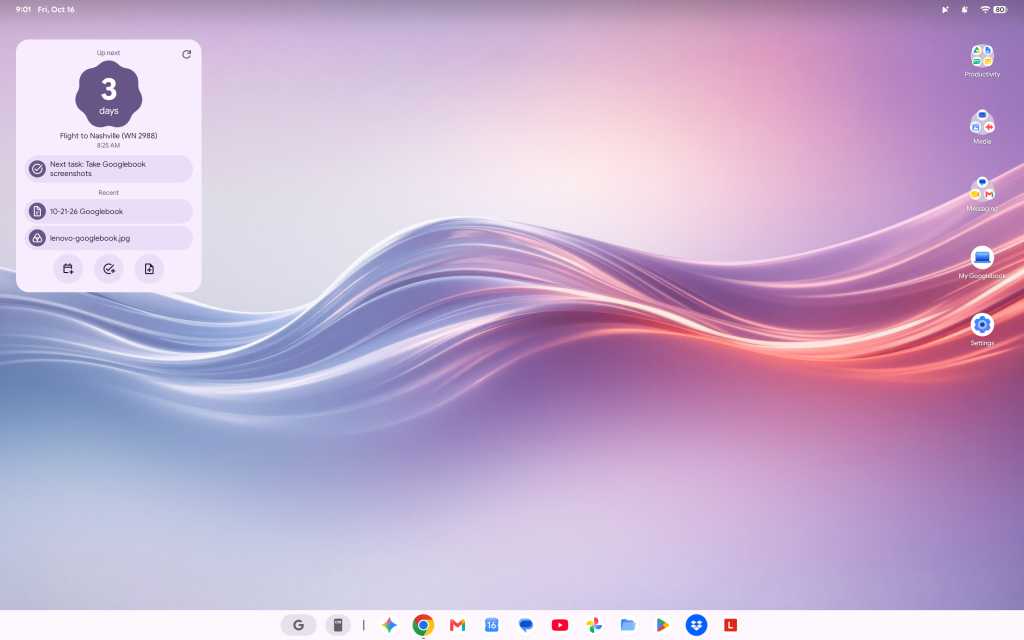
screenshot of mostly empty googlebook desktop

The Googlebook’s desktop is similar to Android — but that doesn’t immediately feel natural in a desktop computing environment.

JR Raphael / Foundry

It’s true, too, for keyboard shortcuts, which don’t work the same as they did on ChromeOS — even just basic, common things like opening items on the taskbar. (Googlebook OS does have an impressive array of customizable keyboard shortcuts, if you find ’em, but there’s a ton of new combinations and muscle memory to be learned.)

The confusion is probably most prominent, though, on the app front, where Google is really leaning hard into the Play Store and the idea of Android apps being the primary way to get stuff done, despite the fact that Android apps often aren’t ideal — or even available, in some instances — in a productivity-oriented, desktop computing scenario.
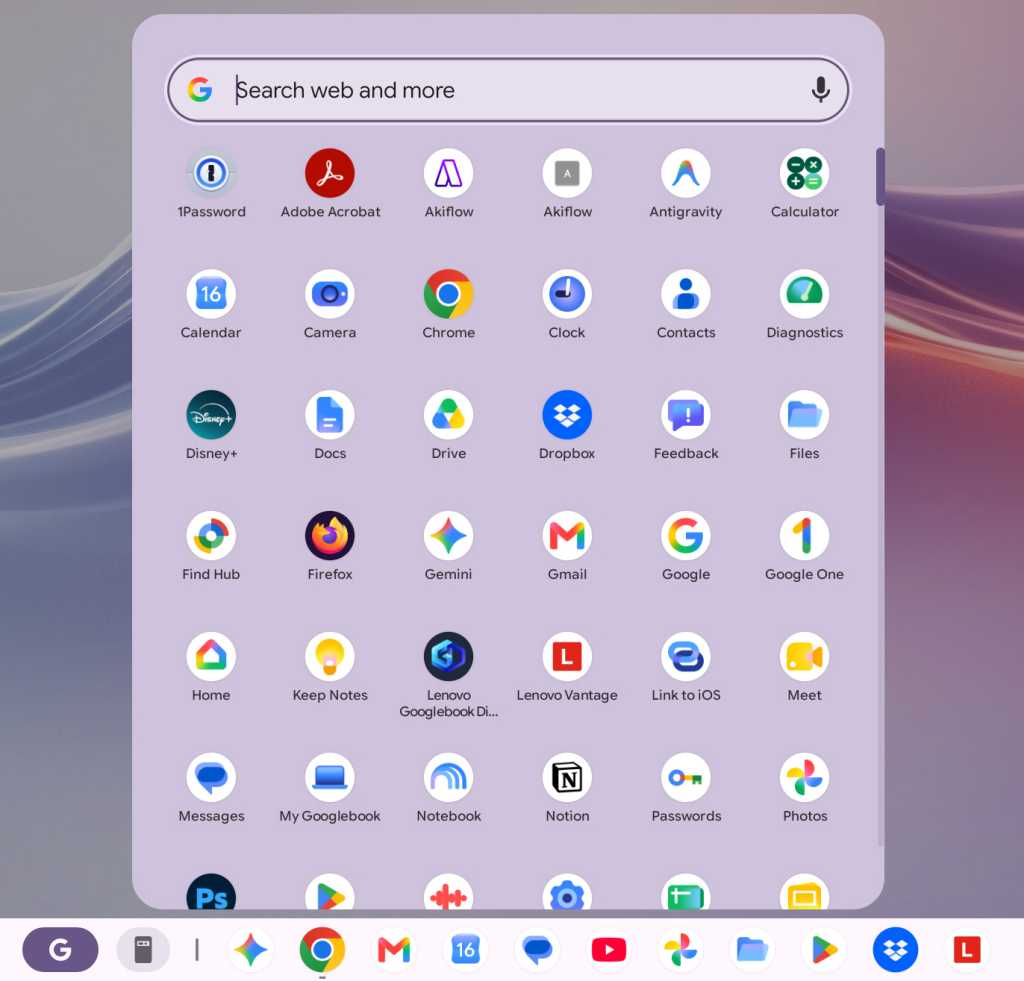
screenshot of googlebook apps list

The Googlebook app experience revolves primarily around the Play Store — which can be a pro or a con, depending on the moment.

JR Raphael / Foundry

At least one of Google’s own apps addresses this elegantly. Installing Google Calendar from the Play Store basically just gives you an app-like shell around the Calendar website, and you can use the Android app’s widget alongside that, if you want. (The downside is that you can’t use the equivalent Android app in full even if you want to, as there’s no straightforward path to install it — and, strangely, the same web-widget combo is not available with other Google apps, like Gmail or Drive, which give you only the web version and no option to use any associated Android widgets.)
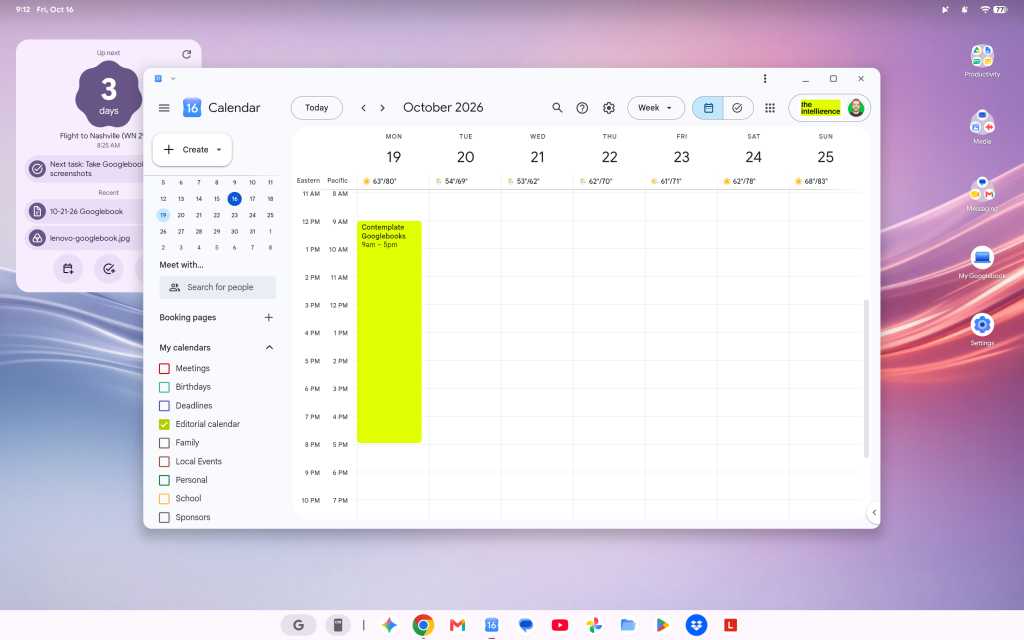
screenshot of google calendar app on a googlebook

The Google Calendar app on a Googlebook is basically just the Calendar website, though you can still use the Android app’s widget alongside that.

JR Raphael / Foundry

And since the version of Chrome on a Googlebook looks and feels like the full desktop version of the browser — like what you’d expect on a Chromebook or any other desktop computer — relying on this unusual mix of web and Android interfaces for productivity is mostly OK. Mostly.

Working in Docs, with as few as five or six tabs open, I continue encountering an occasional issue where the tab just blanks out for a second or two and then comes back — which, suffice it to say, isn’t exactly optimal for working.

The email app I use, Superhuman, appears to be completely incompatible here. The web version (which is powered by a Chrome extension) errors out anytime I open it, and the Android app is clearly not meant for large-screen, keyboard-and-mouse use and presents an incredibly awkward experience as a result.

The productivity tool Notion, meanwhile, came up for me as one of the Googlebook’s suggested tools that’s optimized for desktop use, so I followed that direction and installed the Notion Android app — only to find that the app is much more awkward and limited on a laptop than the regular Notion web experience, where all the functions are available and the keyboard shortcuts work as expected. So I decided to try to install the Notion web app for easy ongoing access to that, and I encountered a mysterious error.

width="787" height="378" sizes="auto, (max-width: 787px) 100vw, 787px">

Trying to install certain common web apps results in a frustrating error.

JR Raphael / Foundry

D’oh.

Then there’s something like Slack, which you can install from the Play Store but with an accurate warning that it’s “better on the website.” So, OK: You go to the website, try to sign in and install the web app version of it from there, and…there’s that blasted “cannot be installed” error again. (Google says it rolled out an update last week that allows any web page to be installed as a web app, but as of this writing — even with that update present on my device — the same error-encountering pattern persists.)

Other apps appear to work fine but then behave in odd and unexpected ways. I tried to install the Android version of Vivaldi, for instance, and it installs and opens without issue — but then returns an error anytime I try to actually open a website within it. That definitely doesn’t happen on a Chromebook, nor do the other aforementioned issues.

There’s just a lot of weird stuff like that, where it feels like a typical Google not-quite-fully-baked product. To be fair, that may be at least in part because of third-party app developers not yet supporting what needs to be supported for full optimization in this new environment — but either way, that’s the experience you get on a Googlebook right now, and it’s an all-too-familiar chicken-and-egg challenge that there’s no telling how long might take to see resolved.

On a somewhat related note: While the ability to install Linux apps is technically present on a Googlebook, it isn’t at all a user-friendly experience. Linux app installation is available only in a limited manner within the confines of a command-line terminal, and any such programs consequently don’t integrate into the launcher or the main Googlebook interface. That means there’s no real way to use them as a part of the standard Googlebook experience — which is a shame, as having those more traditional desktop apps available on ChromeOS went a long way in filling in pertinent function gaps for a lot of people and businesses. (Google says better Linux app support is vaguely “on the roadmap.”)

The various layers Google created to make Windows apps available for businesses in ChromeOS aren’t present in this environment, either. The official line, as relayed to me by a Google spokesperson, is that “Googlebook takes a fundamentally different architectural path than previous platforms” and they “aren’t attempting to patch together legacy PC software layers or rely on Windows emulation to make a laptop functional”:

Instead, Googlebook OS is built directly on the Android tech stack with the desktop foundations of ChromeOS, pairing the world’s largest native app ecosystem with an uncompromised, full desktop Chrome browser.

This makes it easier than ever for developers to build a true desktop-class app experience.

That’s all noble enough in theory — but as a prospective Googlebook owner right now, what good does any of that do when most developers haven’t yet built those “true desktop-class app experiences” for this environment? Or when you’re a business user whose company has the very same sort of “legacy” software requirements that led Google to work so hard on Windows app support for Chromebooks and maintain that option in that arena?

Pros, cons, and more Googlebook confusion

Let’s break from the strange stuff for a minute to focus on some positives — because, again, there is something undeniably cool about experiencing Android in a laptop form and seeing all the ways a Googlebook works hand in hand with an Android phone to make life easier.

First and foremost, Googlebooks stray from the longstanding minimalist Chromebook standard to give you a fully customizable desktop — with the ability to create any arrangement of shortcuts and widgets, just like you can on an Android home screen. That is absolutely a welcome progression from the more limiting ChromeOS approach and something I’d long hoped to see in that domain, and having those familiar forms of interactive info right in front of you while working is an incredibly helpful addition.
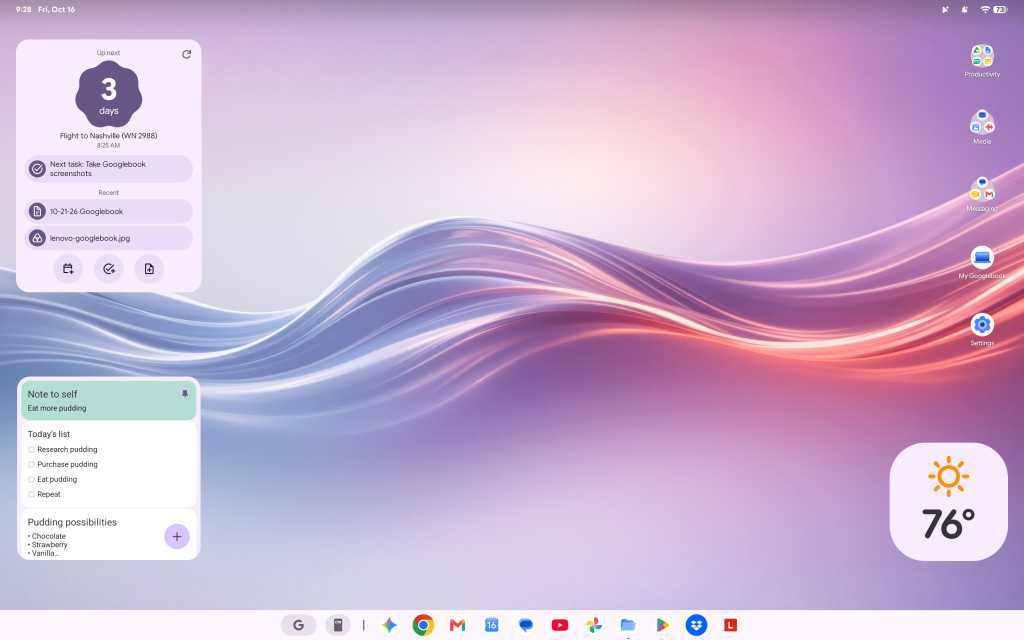
screenshot of googlebook desktop with widgets

Having a fully customizable desktop, with regular Android widgets available, is a significant leap forward for the Googlebook.

JR Raphael / Foundry

Being able to easily access the files on your phone without any extra hoop-jumping is also a nifty touch, for the moments when such a need arises. Once your Googlebook is paired with your Android phone, you simply open the Files app on the laptop, and you can see and interact with any files on your phone right then and there. (That said, the Files app is otherwise much more barebones and limited than its ChromeOS equivalent, unfortunately — so you can’t, for instance, drag and drop directly from the phone to any specific folder on your local or Google Drive storage.)
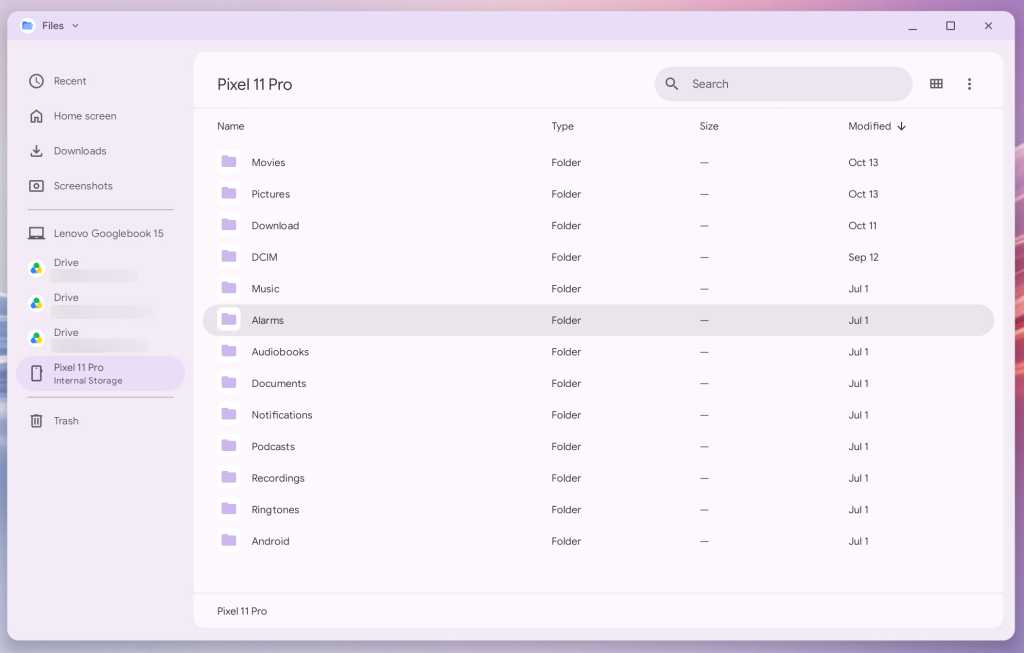
screenshot of files app showing files on a pixel 11 pro phone

The Googlebook makes accessing files on your Android phone delightfully easy.

JR Raphael / Foundry

As far as hardware is concerned, Lenovo did a bang-up job with its inaugural Googlebook device. This is one seriously nice laptop — a pleasure to hold, with an almost silky-feeling smooth texture on the top and a thoughtfully ridged bottom for extra grippiness when you carry it. The system has a beautiful (and big!) 15.3″ display, an excellent keyboard and trackpad, and surprisingly great speakers. Those boxes are all checked off.
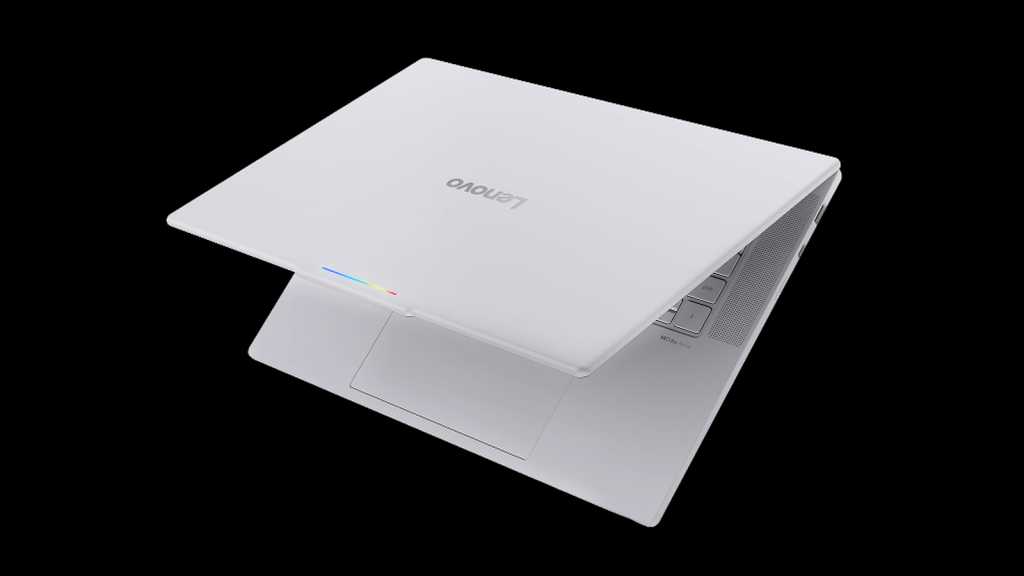
photo of lenovo googlebook with lid partially open

The Lenovo Googlebook is a sleek and premium laptop with all the right elements in place, as far as hardware is concerned.

Lenovo

But it’s the experience inside the hardware that means the most, here in particular — so, back to that:

Native app installation aside, one key selling point of the Googlebook is how it’s able to stream apps from a connected Android phone — letting you run an app from your phone on the computer, in other words, without having the app installed locally on the Googlebook itself.

It’s a slightly confusing concept to wrap your head around, especially since you can also install most of the same apps from your phone directly onto the Googlebook if you want (and, given that this is a native Android device, installing and running Android apps on it is absolutely smoother and snappier than what you typically experience on a Chromebook). Because of that — just like with the equivalent streaming option that had been available on ChromeOS in recent years — it seems like something that’s bound to be more befuddling than beneficial for most people, most of the time.

width="652" height="1024" sizes="auto, (max-width: 652px) 100vw, 652px">

Android app streaming presents some perplexing overlap by allowing you to remotely run many of the same apps you could also install directly on the Googlebook.

JR Raphael / Foundry

That being said, I have had a couple of situations come up where it seemed like the feature might be handy. First, I needed to get a two-factor authentication code out of Authy, which is available only as a mobile app. A perfect use-case, right?

Well, not exactly: The Googlebook wouldn’t let me stream the Authy app from my phone and instead gave me an error: “Can’t cast content. This content is restricted.” So then I thought maybe I’d just install Authy directly onto the Googlebook instead, but alas: The app “isn’t available on Google Play on this device.” Bah.

Another time, I tried to open Google Wallet from my phone to get some info off my insurance card, which I have stored in that service. That worked, at first — but then the app kept hanging on a loading screen anytime I tried to open anything.

The one scenario where the app streaming has been helpful is with notifications: Anytime you get a new notification on your connected Android phone, it shows up as a pop-up in the upper-right corner of the Googlebook display. The same actions that’d be present on the notification on your phone, such as marking something as read or replying in-line, are also present on the computer, and you can click on the notification to open the associated app in full on your laptop — just like you would on your phone, only everything happens within a window on the Googlebook.

That’s a clever little sleeper feature and arguably the best part of the app streaming capability, even if you don’t necessarily think about the fact that you’re using app streaming when it happens.

Another key selling point is the addition of AI-oriented features into the Googlebook operating system. This includes a Magic Pointer feature that lets you wiggle your cursor to summon Gemini and ask it about any specific area of text or visual on your screen — which is fine but not something I find myself actually using often. Its most useful-seeming promise is being able to act on information, like creating a calendar event based on a specific area of an email or text message on your screen, but its accuracy in getting the details right in such scenarios has been pretty hit and miss in my experience.

Then there’s the integrated Rambler system for conversational voice-to-text conversion (as seen on Google’s recent Pixel phones). It works well, but by design it isn’t a direct dictation tool; instead, it adjusts and rewrites your rambling speech (hence the name) to make it better, in its view. That makes a lot of sense when you’re spouting off a quick text message while walking or driving, but unless you don’t mind losing your own specific style, intentions, and voice with longer computer-crafted communications, it doesn’t seem like something you’d be using much in a business capacity — though it can certainly be handy to have available on occasion.

As is often the case with Google products and AI features in particular, some of the smaller, less headline-making touches on the Googlebook are much more interesting than the flashy marquee features.

All in all, it’s a perplexing picture.

The Googlebook productivity puzzle

More than anything, the question that keeps coming to my mind — again, as someone who fully embraces Android and frequently works on a Chromebook — is simply: Who is this meant to serve? And, in its current state, for whom will it be a meaningful upgrade and enticement over other existing options?

I keep thinking how this exact setup would make for an absolutely brilliant souped-up Android tablet interface, with the right kind of hardware around it. You’d have the familiar Android-like environment, optimized for a larger screen, and the ability to pair that with a more desktop-like experience in the core Google apps — including Chrome, for a less limiting active web experience when you connect a keyboard (or flip around a convertible device to have one present).

As the Googlebook stands now, though, I just don’t know that it’s a great replacement yet for a Chromebook — or any other laptop — particularly when it comes to getting actual work done. At best, it feels like a fairly linear progression with some awkward adjustments and asterisks. At worst, it’s gonna be a real challenge for some people to use in the way they need a laptop to work. And I’m just not sure what’s being added, from a practical perspective, that makes it all worthwhile.

What we can say is that Google has a history of launching products that are still rough around with the edges, and sometimes, those products evolve over time — sometimes quite quickly! — and end up becoming incredible. Heck, think how much ChromeOS changed from its earliest form to the way it is today.

At the same time, Google also has a pesky habit of pivoting, giving up, and failing to follow through on once-heavily-hyped products. A fair amount of the Googlebook’s early shortcomings come down to convincing third-party developers to buy into the platform and invest the resources in making their apps work well on it, too — which is the exact same chicken-and-egg challenge that’s kept promising Google concepts from blossoming before.

For now, the Googlebook is an awkward start with plenty of potential. Where it goes next is anyone’s guess — and something that, to some degree, may depend on how many people are willing to take the leap with it early and wait for it to evolve.

  •  

Apple is gaining as the industry shrinks

It’s all relative, but if you want to scope out the likely shape of the tech device industry in five years’ time, you have to think of the likely shape of the replacement cycle, and right now it seems to be shifting toward Apple. 

That’s going to become more important to tech purchasing as the years roll by and is also likely why you’ll see other manufacturers become even more competitive as they try to stop the tide. It is open to question if they will be able to do so, given that even five years ago Apple still seemed far less dominant, which is no longer the case.

Shrink when you’re winning

If you look at the devices that are being sold, you’ll see one key thing: In the face of memory and component cost-driven price hikes, sales of PCs and smartphones are falling fast. Apple isn’t immune to this macroeconomic trend, so it is also seeing decline, but the relative rate of this decline is less steep, meaning the company is growing its market share even as the industry shrinks.

Gartner says the Mac share of the PC market rose to 10.5% in Q3, up from 8.8% a year earlier, even as Mac sales fell 7.1%. The figures vary by analyst (IDC has Mac share at 9.5%, Omdia at 11.7%), but all three show a gain. 

In smartphones we’re seeing something similar, with Counterpoint Research giving Apple a new record 22% of global smartphone sales in Q3. While it’s true that Apple is achieving lower unit sales in both categories, its decline is far beneath the industry average.

When everyone’s prices rise

Apple has had to raise prices across all its devices but has been able to lean into the sheer scale of its market to help dilute the impact. Lacking Apple’s scale, smaller vendors have been unable to follow suit. This has led to PC and smartphone manufacturers raising prices on their devices to such an extent that Apple now seems to be a good value option. 

Counterpoint Research Director Tarun Pathak caught the mood: “Apple is still gaining new users across categories, and it will become increasingly difficult for competitors to make an Apple user switch to their operating system,” he said.

Shoppers who can still afford to buy can’t help but see that while Apple’s products cost more, everybody else has raised prices to similar levels. It means Apple is being judged differently. When everything costs roughly the same, the value it offers looks different. 

That thousand-dollar smartphone you always wanted but couldn’t justify purchasing seems more viable now that the brand you opted for instead just raised prices to the same level.

Today’s buyers, tomorrow’s upgraders

Now think about what this means 3-5 years from now. It means a growing chunk of PC or smartphone owners will be looking to upgrade their Mac or iPhone. 

So far at least, people tend to stick with Apple once they arrive there. Consumer Intelligence Research Partners puts iPhone loyalty at 87% among recent purchasers, a three-year high, which suggests that this year’s buyers are likely to stick with it once they need to upgrade. Satisfaction points the same way: Apple ties Samsung for the top spot in the American Customer Satisfaction Index’s 2026 personal computer satisfaction ranking, with a score of 81, even as industry-wide satisfaction fell 4%. 

The longer the PC and smartphone market decline continues, the greater the impact of this trend will become. If Apple manages to keep declining at a slower rate in comparison to other ecosystems, its relative market share will continue to grow. 

That share is likely to sustain itself into subsequent purchasing cycles. Apple also benefits from the first generation of M1 Mac owners, who are only now reaching the point when an upgrade seems necessary. (Don’t forget that between 2020 and 2022, the success of Apple silicon drove Apple’s PC market share from 6.6% in 2020 to 10.8% in 2022, setting a new trend line.)

Why IT should pay attention

That’s more than a curious observation for Apple fans. It’s also something that should matter more to enterprise tech, as it suggests that the need for investment in device management and Apple hardware is going to accelerate through the downturn. It hints that support for these platforms will become a business necessity; that if your teams continue refusing to support Apple platforms and aren’t prepared to change that, then you may soon be searching for different IT teams.

Now please subscribe to my daily, human-curated Apple-related news headline feed at The Core, or follow me on BlueSky, LinkedIn, or Mastodon.

  •  

Apple’s big AI week ends with Mac + Muse AI supercomputers

Welcome to the week Apple showed us how serious it really is about artificial intelligence on Macs, with the company making more moves to deliver the tech in the most cost effective, responsible way. While it’s true that today is iPhone Duo pre-order day, that’s arguably not the big news. 

It is not the big news because Apple this week made huge steps in AI. Not only have its researchers come up with a nifty tool to turn Macs into distributed inferencing data centers, not only does the company now have a plan for Apple Intelligence in China, but it has also worked with Meta to make it possible to run on-premises instances of Muse Spark Open on a couple of Mac Studios. Its machine learning team also introduced a new version of MLX that enables AI researchers and developers to run large language models (LLMs) locally on Mac Studio with Apple silicon. 

What’s new to MLX from Apple?

In case you’d missed it, MLX leverages the unified memory architecture of Apple silicon, which is invaluable if you want to build new inference and fine-tuning methods. Over the past year, the ML team has worked on “several key innovations” to make it easier and more efficient to “run state-of-the-art LLMs locally on recent Apple silicon.”

These improvements include:

  • Software support for the Neural Accelerators in the GPU of the M5 family of chips
  • Low-latency communication across several Macs using Remote Direct Memory Access (RDMA) over Thunderbolt
  • Efficient implementations of recent popular architectures such as mixture of experts (MoE)

The release leans heavily into what Apple’s teams have been doing with Muse, and once again demonstrates how the very architecture of Apple silicon supports AI inferencing. That’s no surprise to anybody at this point: not only have I been banging on that drum regularly, but almost anyone who is anyone in AI development and research already works on a Mac.

LLM inference with MLX on Mac Studio

A new white paper from Apple’s machine learning team shares what it has been doing with MLX, along with significant statistics concerning how well its systems support Muse Spark Open, Meta’s new open-weight frontier model. 

“On a cluster of four Mac Studios, Muse Spark Open generates over 36 tokens per second, well above average human reading speed,” they said. 

That’s impressive. It means for the cost of four Mac Studios, a business can run a full-strength, frontier-class model with almost a trillion parameters, on-premises, securing company data while extracting whatever benefits there are to be extracted from the use of it.

Mac Meta matters

Apple and Meta collaborated on making it possible to run Muse Spark Open AI models on Macs. It’s a shrewd move for both companies, given the growing desire to run powerful AI models locally rather than in the cloud. As a result of this work, it’s possible to use Muse Spark Open on two or four Mac Studios to engage in all kinds of agentic tasks. 

Commenting on this on X, new Apple CEO John Ternus wrote: “Amazing to run a model of Muse Spark Open’s caliber and scale this efficiently, right from your desk. Mac Studio keeps pushing the boundaries of on-device AI!” 

Meta’s AI chief Alexandr Wang pointed out that this is in part made possible by Apple’s Unified Memory architecture, which can provide sufficient memory to run these models.

Your Macs. Your supercomputer

“Apple’s unified memory architecture lets the M5 Ultra’s integrated GPU use up to 512 GB per Mac Studio, so two machines can hold an entire model,” Meta explained. “And the chip’s 1.2 TB/s of memory bandwidth is fast enough to read the small slice each token needs. The result is two Mac Studios behave like one supercomputer with a terabyte of unified memory.”

Meta says it tested the system using agentic workflows running entirely on-device, including applying bug fixes and new features to an open-source Mastodon client and driving DaVinci Resolve to review footage and transact tasks. The use of DaVinci Resolve makes this commentator curious, given that Apple is expected to introduce new pro Macs this month. The idea that you may be able to run tasks like this on other Macs will surely be something Apple’s developers are thinking about.

One more thing

Step by step, Apple is defining the playground for AI. In doing so it is attempting, as Greg Joswiak, Apple’s senior VP of worldwide marketing, told TIME, not to make AI for “the lunatic fringe,” but to create an ecosystem for artificial intelligence that will actually help people — a strategic approach that, if it comes together, will help maintain Apple’s position at the intersection of computing and the liberal arts.

(Read my Mac Studio review here.)

Now please subscribe to my daily, human-curated Apple-related news headline feed at The Core, or follow me on BlueSky, LinkedIn, or Mastodon.

  •  

Microsoft Surface Laptop Ultra: NVIDIA RTX Spark means business

NVIDIA officially entered the Windows PC race this week, and its arrival brings a formidable new competitor to the premium AI PC market. With its RTX Spark platform, NVIDIA is bringing its Grace Arm CPU architecture, Blackwell GPU technology and extensive software ecosystem together in a new generation of Windows laptops. Microsoft’s Surface Laptop Ultra is among the first systems to showcase this collaboration, leveraging NVIDIA’s tech and putting it squarely in competition with Intel, AMD, Qualcomm and even Apple for high-performance local AI and creation-optimized laptops.

For Microsoft, the partnership expands the capabilities of Windows on Arm considerably, particularly for local AI development, content creation and other demanding professional workloads. Starting at $2,599.99, Surface Laptop Ultra is clearly a premium offering, but its combination of processing horsepower, large, unified memory capacity, and premium industrial design gives it an interesting position in the market.

My personal testing suggests NVIDIA and Microsoft have delivered a compelling platform with strong AI throughput, graphics performance and competitive CPU compute. Just as importantly, the Surface Laptop Ultra offers a glimpse of how AI development and local AI agent workflows could become more practical on a portable Windows PC.

NVIDIA RTX Spark brings Grace Blackwell to Windows on Arm

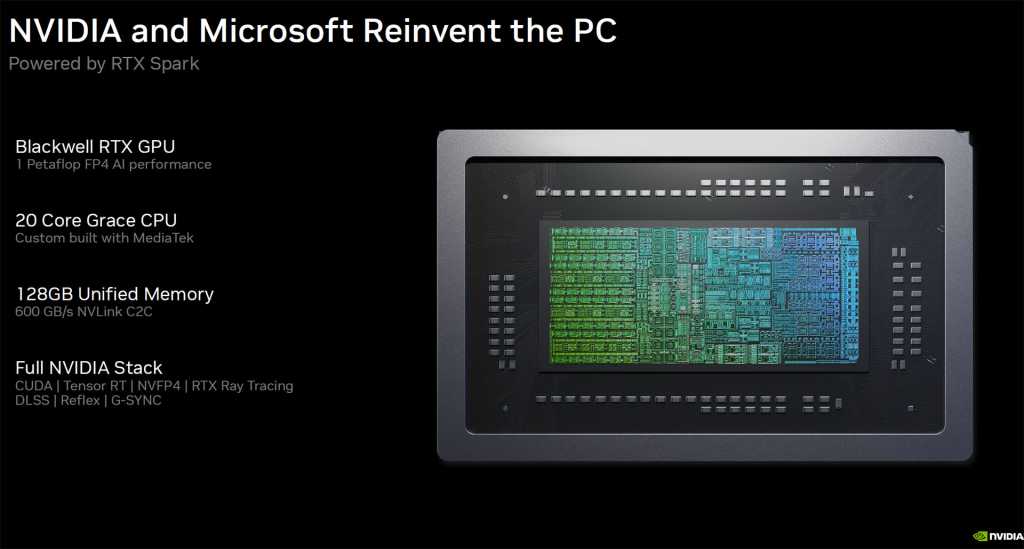
At the heart of Surface Laptop Ultra is NVIDIA’s RTX Spark N1X SoC, combining up to 20 Grace Arm CPU cores with a Blackwell GPU featuring up to 6,144 CUDA cores. Configurations support up to 128GB of unified memory, shared between CPU and GPU. The Surface Laptop Ultra model I tested has this full-fat configuration with an eye-watering $5,899.99 price tag (thanks, memory crunch), though there are lower-cost base configs as noted previously, offering an 18-core CPU with a 5,120-core GPU and 24GB of unified memory.

Microsoft Surface Laptop Ultra: NVIDIA RTX Spark means business

NVIDIA and Microsoft

Regardless, this architecture is particularly powerful for running on-device AI. Rather than being constrained by the dedicated graphics memory found in conventional laptops with discrete GPUs, RTX Spark can make a much larger pool of memory available to GPU-accelerated applications. This allows larger language models, longer context windows and demanding inference workloads to run locally. It’s similar in design to AMD’s Ryzen AI Max series, aka Strix Halo, in that regard, but with a more potent GPU engine on board.

NVIDIA’s CUDA ecosystem is another important advantage. Developers can leverage familiar tools including TensorRT, PyTorch and llama.cpp, with a base software foundation that also extends into NVIDIA-powered workstations and data center infrastructure.

For organizations building AI applications, this offers a solid development path. Models and workflows can be prototyped locally before moving to larger systems, reducing cloud compute and token expense while allowing sensitive data to remain on-device. (See: Around the corner: Agentic AI PCs that cut token costs.)

Microsoft has also optimized Windows 11 for RTX Spark, with improvements to workload scheduling, power management, memory allocation and application compatibility. These platform-level investments were essential to making NVIDIA’s Arm architecture practical for everyday Windows computing, and I was able to put some of them to the test in the few days I’ve had the machine on hand.

Surface Laptop Ultra: Premium design meets practical function

Microsoft has given RTX Spark an appropriately premium home with this machine. The Surface Laptop Ultra features a 15-inch PixelSense Ultra mini-LED touch display with up to 2,000 nits of claimed peak HDR brightness, a 120Hz refresh rate and excellent potential for creative work requiring high accuracy and wide gamut coverage.

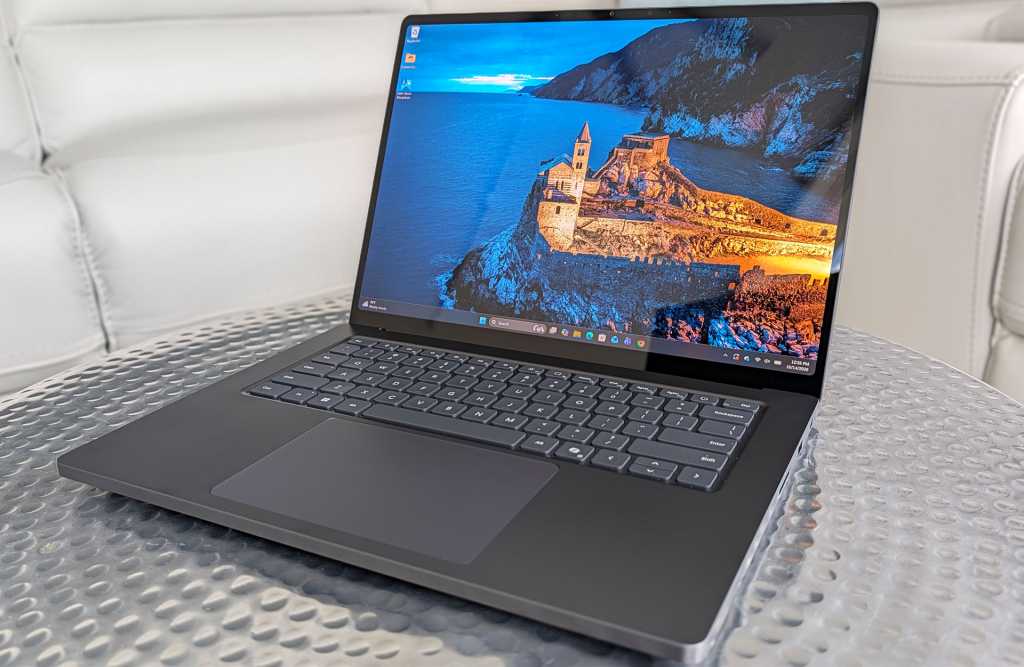
Microsoft Surface Laptop Ultra

Dave Altavilla

The machine’s aluminum chassis is less than 18 mm thick, and it weighs in at under 4.5 pounds. It’s not an ultraportable per se, but considering the horsepower on board, Microsoft has struck a reasonable balance between portability and performance.

The design is refreshingly understated, with clean lines and rigid aluminum construction. My initial hands-on impressions have been particularly positive, thanks to the keyboard’s tactile response, smooth and responsive haptic touchpad, and bright, high-contrast display.

The larger touchpad should be especially welcome for users navigating complex applications, while the touchscreen adds flexibility for reviewing documents, annotating designs, and interacting directly with creative content.

Connectivity options are also very good, relative to other premium laptops. Microsoft includes three USB-C ports, HDMI, USB-A, an SD card reader and a headphone jack. One USB-C connection features Microsoft’s new magnetic charging mechanism, combining the convenience and safety of a breakaway power connector with the versatility of a standard USB-C port.

Microsoft has also designed the cooling system with large fans and significant thermal capacity, while making the machine’s internal SSD removable and offering good internal serviceability in general. These are practical considerations for professional users and IT departments concerned with reliability, maintenance and long-term ownership.

Battery life and sustained performance under prolonged workloads are important aspects Microsoft focused on for the overall experience, particularly for a machine designed to deliver workstation-class capabilities away from a desk. More on this shortly.

Local AI agents: Moving from inference to action

RTX Spark also supports locally running autonomous AI agents, including one that I tested out called Hermes, which can execute multi-step workflows, access files and interact with applications. Its potential impact spans software development, research, document analysis, business automation and many other disciplines. Hermes provides the agent framework, while supported models leverage RTX Spark’s CUDA-accelerated inference and unified memory.

For businesses, local agents can keep sensitive data on-device and reduce cloud inference costs, provided they’re configured appropriately. However, granting agents access to files, code execution and corporate systems introduces security risks. Microsoft’s Execution Containers and NVIDIA’s OpenShell aim to provide isolation and access controls, though their effectiveness depends on proper enterprise policy implementation.

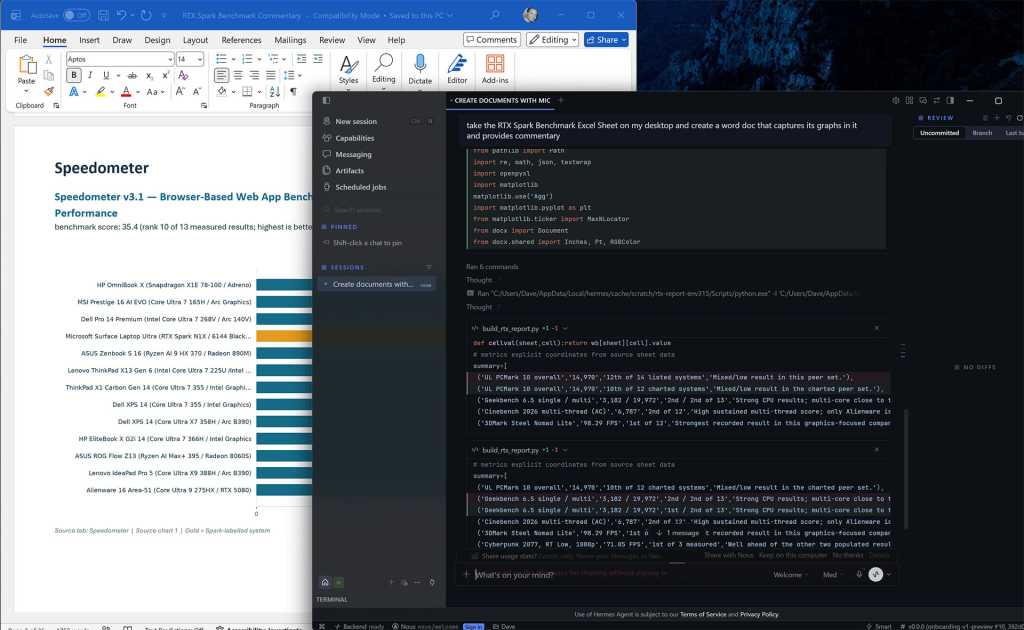
Hermes running Qwen3.8-27B locally on Surface Laptop Ultra, generating a benchmark report.

Hermes running Qwen3.8-27B locally on Surface Laptop Ultra, generating a benchmark report.

Dave Altavilla

To test this capability, I ran Hermes with the Qwen3.8-27B language model locally on the Surface Laptop Ultra. I asked it to extract benchmark charts from an Excel spreadsheet and create a formatted Word report with performance commentary. Hermes autonomously generated and executed Python scripts, processed the spreadsheet and assembled the document in approximately five minutes. Color me impressed.

That’s a respectable turnaround for a task requiring several manual steps. My results demonstrate how local AI agents can streamline reporting and analysis without cloud-hosted model inference. Human review remains essential, but this was a promising demonstration of practical, real-world agentic AI on a Windows laptop.

AI performance: Strong results as expected

My team’s preliminary AI benchmarks highlight the advantages of NVIDIA’s RTX Spark architecture. However, we’re still digging deeper into AI-enabled use cases and performance.

In UL Procyon’s AI Text Generation benchmark using Phi 3.5, a family of lightweight, open-source small language models (SLMs) released by Microsoft, the Surface Laptop Ultra scored 2,703, compared with 2,027 for Lenovo’s Intel Core Ultra X9 388H-powered IdeaPad Pro 5, an advantage of approximately 33%.

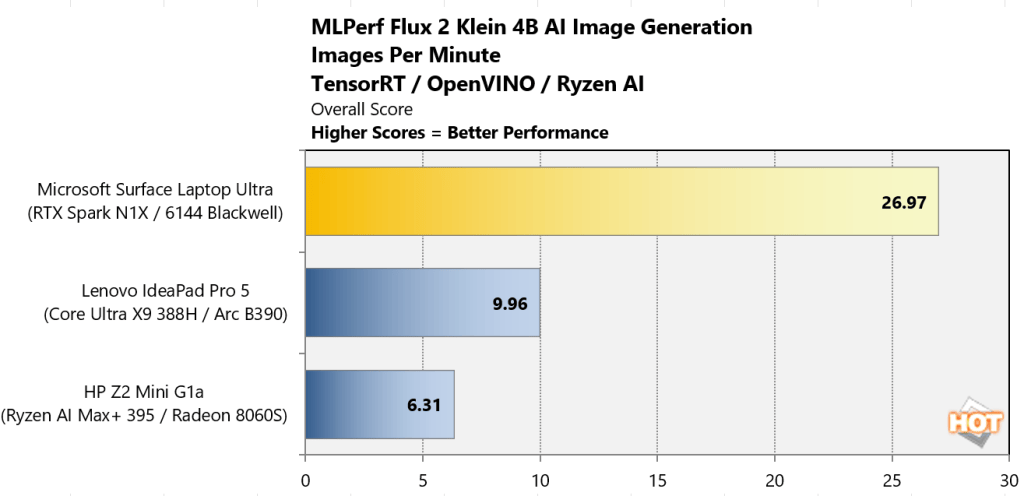
Surface Laptop Ultra benchmark: MLPerf Flux 2 Klein 4B AI image generation

Dave Altavilla

The difference was even more substantial in MLPerf’s Flux 2 Klein 4B image generation workload, where the Surface Laptop Ultra delivered 26.97 images per minute versus 9.96 for the Lenovo machine, or roughly 2.7 times the throughput.

These results demonstrate the platform’s potential for accelerating local inference, image generation, agentic workflows and other AI workloads. Actual application performance will depend on model selection, software optimization and available system memory, though NVIDIA does provide a nice memory partitioning tool in the NVIDIA App for Windows.

Content creation, gaming and battery life: Blackwell’s versatility

RTX Spark’s Blackwell GPU delivers impressive graphics performance, extending the Surface Laptop Ultra’s capabilities beyond AI development and everyday creation or productivity tasks.

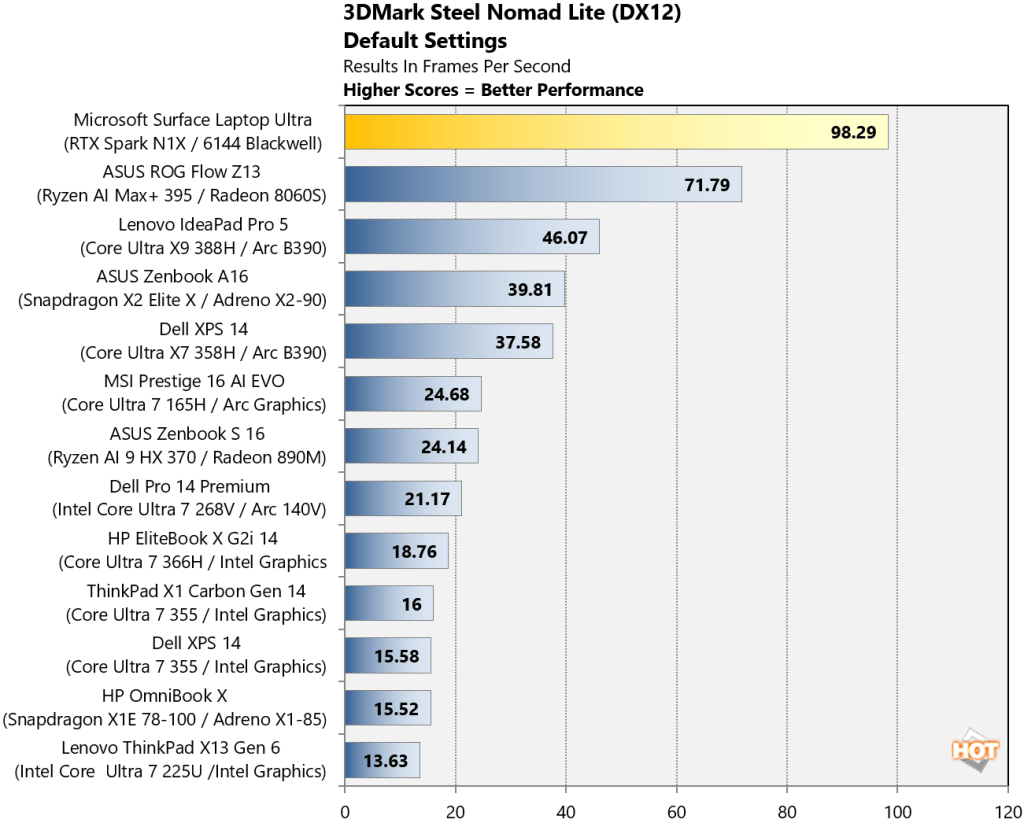
Surface Laptop Ultra benchmark: 3DMark Steel Nomad Lite

Dave Altavilla

In 3DMark Steel Nomad Lite, the Surface Laptop Ultra achieved 98.29 FPS, more than double the 46.07 FPS of Lenovo’s Core Ultra X9-powered IdeaPad Pro 5. In the ray-tracing-focused 3DMark Speed Way test, it delivered 30.31 FPS versus 19.72 FPS for the ASUS ROG Flow Z13, powered by AMD’s Ryzen AI Max+ 395 and Radeon 8060S graphics.

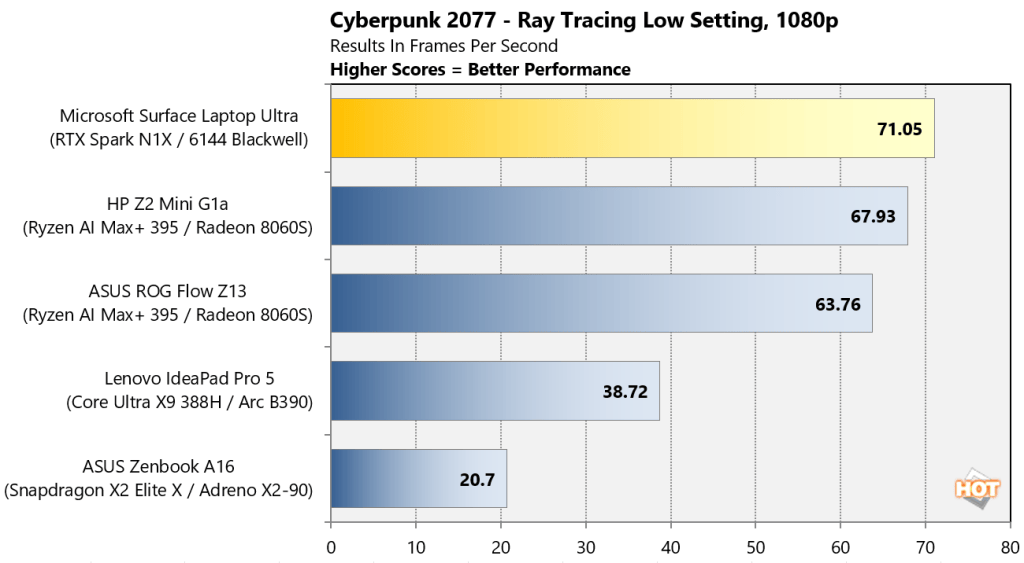
Surface Laptop Ultra benchmark: Cyberpunk 2077

Dave Altavilla

Actual gaming performance was similarly strong. In Cyberpunk 2077, the Surface Laptop Ultra averaged 71.05 FPS, ahead of the ROG Flow Z13’s 63.76 FPS. However, the AMD system narrowly led in The Talos Principle 2, delivering 89.5 FPS versus the Surface’s 84.5 FPS at 1080p medium settings.

CPU performance for tasks like 3D rendering also holds up well. In Cinebench 2026, the Surface scored 6,787 in the multi-threaded test, edging out the AMD-powered ROG Flow Z13’s 6,546. Notably, the Surface retained 99% of its multi-threaded performance on battery power as well.

For creative professionals, native Arm applications including Blender, DaVinci Resolve and Adobe Photoshop offer opportunities to leverage RTX Spark’s potent GPU. However, Windows on Arm compatibility remains a consideration. Microsoft’s Prism translation supports many x86 applications, but specialized software, drivers and certain games (like EA anti-cheat-supported titles currently) may still encounter limitations.

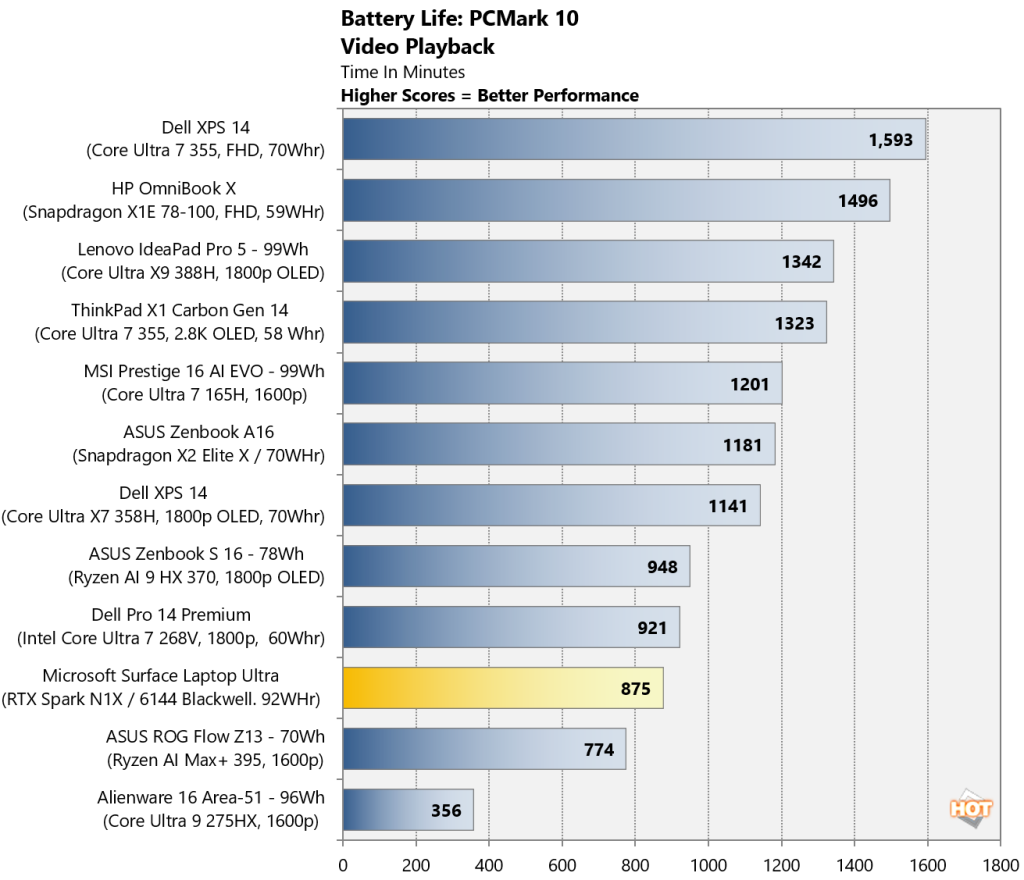
Surface Laptop Ultra benchmark: Battery life

Dave Altavilla

Battery endurance was respectable for the Surface Laptop Ultra, at 14 hours and 35 minutes in my PCMark video playback testing, though competing mainstream thin-and-light laptops lasted considerably longer. The Surface Laptop Ultra and RTX Spark operate within a different power envelope, however, more akin to a beefier gaming laptop, rather than a svelte 2 – 3-lb business machine.

Final thoughts: A serious new AI Windows PC competitor

The Surface Laptop Ultra marks an important milestone for NVIDIA’s expansion into Windows PCs and Microsoft’s ambitions for high-performance Arm-based computing.

My initial testing shows the RTX Spark-powered Surface Laptop Ultra delivers exceptionally strong AI acceleration, competitive multi-threaded CPU performance and impressive graphics horsepower. Combined with Microsoft’s premium industrial design, extensive connectivity and I/O options, and Windows platform integration, RTX Spark makes a convincing first impression.

Starting at $2,600, this is a specialized, premium system, and mainstream business users will find more economical alternatives to be sure. However, for developers (even vibe coders), creative professionals and organizations evaluating local AI workflows, the Surface Laptop Ultra offers a compelling combination of performance, beautiful industrial design, portability and local AI capability, especially with its higher-tier memory configurations.

NVIDIA has arrived in the Windows PC market with serious technology, and Microsoft’s Surface Laptop Ultra is an impressive first showcase of what this new partnership can deliver.

  •  

Apple’s A20 Pro rewrites the rules for chip design — again

IDC analyst Francisco Jeronimo said something interesting following the iPhone Duo introduction on Wednesday: “Apple showed up years after everyone else, yet it walks in and sets the rules.”

He’s right. From the IP resistance to the little touches that set the new foldable apart from most of the competition, Apple has set expectations for the entire market, and while competitor Samsung is trash talking the foldable, even it stands to benefit from the millions Apple is about to sell. Apple is, after all, allegedly paying Samsung $250 for each iPhone Duo display.

But it is not just the rules concerning foldables the company has now defined; it has also set the standard competitors must follow in chip design with its A20 Pro, a super-powered processor that delivers noticeable performance improvements even compared to last year’s iPhone 17. 

What’s new in the chip?

With six CPU cores, seven GPU cores and a new Dual 16-core Neural Engine, the new chip boasts numerous improvements compared to the A19 Pro, not the least of which is that it’s the first 2nm chip Apple has put inside a smartphone. These enhancements bestow it with a series of superlatives:

  • Memory bandwidth is 50% higher than last year’s chip.
  • GPU graphics performance increases up to 40% over the A19 Pro.
  • AI performance is expected to double.

These are all significant improvements that make for noticeable experience boosts for anyone using one of these phones. Prosaically, I anticipate first reviews will celebrate how fast and responsive these devices are, and this will be most evidenced in tasks such as video capture and photography. Pictures will capture more swiftly, open faster, and edit features will become (and already are) more advanced and sophisticated than before. Apple spent ample time celebrating the iPhone 18 Pro series for the new frontiers in digital photography they open up, and not just because of the new reflexive lens.

The point is that the devices have the horsepower to get through computationally intensive tasks, including AI, thanks to the Neural Engines and GPU.

Thermal management is the icing on the quake

What those tasks have in common is heat, which Apple’s product designers have addressed in two critical ways: liquid cooling and processor design.

The processor design is the important thing, because in this case Apple has moved away from the InFO POP packaging of the A19 Pro in which the DRAM is stacked above the chip. It’s now embraced a side-by-side design it described as “inspired by” M-series Apple Silicon.

That works because placing both components alongside each other, rather than in a perpetual embrace, reduces the overall temperature of both by putting a little space between them. As Apple explained it, this Wafer-level Multi-Chip Module (WMCM) approach means the memory gets out of the way of the processor, allowing the latter to make direct contact with the vapor chamber cooling system.

In layman’s terms, it means both memory and chip can perform more intensively while being more efficiently cooled, a move that helps Apple’s iPhone meet those astonishing performance achievements. The vapor chamber is also bigger, made of new material with three times the surface area of before, making it even better at cooling the device.

It also means Apple has achieved a lot of things competitors have not, most particularly in packaging, the use of 2nm chips in a mass market product, and overall design.

That’s where it gets interesting. Both Qualcomm and MediaTek now plan to follow in Apple’s footsteps with the adoption of 2nm chips and side-by-side packaging.

Digitimes suggests it is a move others will follow, as vendors work furiously to ensure their hardware can run AI effectively on device, which iPhones already do. Apple, of course, already knows its Macs, iPhones, and iPads have been designed from the ground-up to support on-device AI as it works to provide the world’s best mass market platforms for secure and private use of the tech.

Friends don’t let friends bet against Apple

All the same, even at the microprocessor level, it’s hard to ignore that where Apple goes, others follow — even while where others go, Apple frequently follows later, but seems to do it better. It has never been a company to bet against, after all. People really should stop doing that.

Please subscribe to my daily, human-curated Apple-related news headline feed at The Core, or follow me on BlueSky, LinkedIn, or Mastodon.

  •  

Qualcomm’s next Snapdragon mobile chip comes into focus with on-device AI

Qualcomm is taking an unusual approach to the launch of its next-generation premium Snapdragon mobile platform this year. Instead of holding everything for its annual Snapdragon Summit in Maui happening later this month, the company has been methodically disclosing the architecture that will power the next wave of flagship Android phones over the past couple of weeks.

First, the company disclosed its new Oryon CPU architecture, followed by a major overhaul of its Adreno GPU. Today, Qualcomm is detailing the next-generation Hexagon NPU that will serve as the platform’s primary AI engine.

Taken together, the disclosures give us a pretty good picture of where Qualcomm is going before we even know the chip’s official name.

There is obviously a strong performance story here, anchored by a 5GHz CPU, but the more interesting theme running through the architecture is memory locality and specialized AI acceleration. Qualcomm is trying to keep more data close to the compute resources that need it, while distributing AI workloads across the CPU, GPU and NPU.

These architectural changes are important as the company continues to drive on-device AI beyond relatively simple generative features toward more persistent, agentic workloads.

Oryon hits 5GHz, bolstered by FlexCache

Qualcomm disclosed in August that its next Oryon CPU will be the first mobile CPU to reach 5GHz. The eight-core design includes two 5GHz Prime cores and six Performance cores, with Qualcomm attributing the frequency gains to its fully custom Oryon microarchitecture, an in-house Arm-based CPU design that gives the company full control over the cores, cache and memory hierarchy, branch prediction and CPU subsystem.

The 5GHz headline is certainly going to get attention. However, Qualcomm’s new FlexCache architecture may ultimately have a larger impact on sustained performance. FlexCache allows Oryon’s Prime and Performance cores to tap into the same shared cache pool, with capacity dynamically allocated based on the workload. So rather than a demanding core being limited to a fixed slice of cache, it can draw on more of the available pool when needed. This keeps larger working data sets close to the CPU cores and reduces high-latency trips out to system memory.

This approach should benefit everything from gaming and multitasking to content creation, but it also aligns well with agentic AI workloads, where tasks may move through several stages of processing and across different CPU cores. The basic goal is straightforward: keep the CPU fed and avoid expensive trips to external memory.

Qualcomm’s next-gen Adreno GPU adds dedicated AI engines

Qualcomm’s next disclosure focused on graphics, where the company is making one of the more significant changes to its Adreno GPU engine in recent years. The new GPU adds dedicated Adreno Matrix Cores for running AI models directly inside the graphics pipeline. They’re paired with 18MB of Adreno High-Performance Memory, or HPM, which provides low-latency local storage for tile-based rendering, frame buffers and GPU compute.

Qualcomm claims HPM provides a 12% power improvement compared to its previous-gen Snapdragon 8 Elite Gen 5.

The more visible feature for users, however, may be Adreno Neural Fusion, which combines AI super resolution, neural processing and frame generation in a unified graphics pipeline. There are obvious parallels here to what NVIDIA, AMD and others are doing with neural rendering on the PC, though Qualcomm’s next-gen Snapdragon SoC has to operate within a much tighter mobile power envelope.

Qualcomm claims enabling Neural Fusion reduces power consumption by up to 40% in its internal testing using the company’s Dragon Alley graphics demo. That’s an impressive number, though as always, we’ll want to see how the technology behaves across actual shipping games and devices before drawing any definitive conclusions.

Qualcomm has also helped integrate Neural Fusion technology into Unity and Unreal Engine, which may ultimately be just as important as the underlying hardware. Developer adoption determines whether features like this become meaningful platform advantages or just another tick box on a spec sheet.

Qualcomm’s Hexagon NPU is being reworked for agentic AI

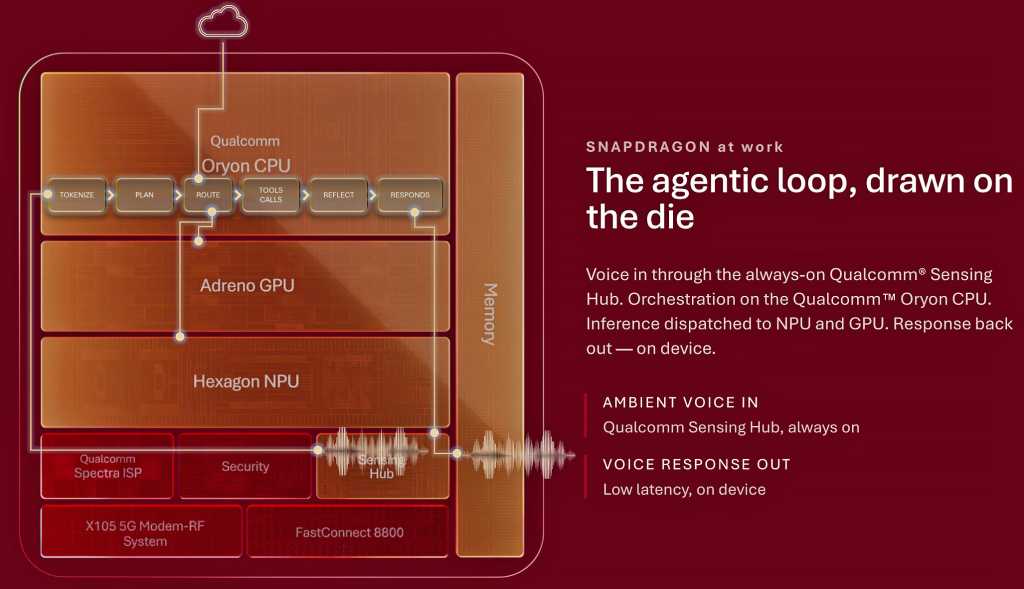
Qualcomm Snapdragon at work: The agentic loop, drawn on the die.

Qualcomm

The most recent disclosure centers on Qualcomm’s Hexagon NPU, where the broader architecture starts to come together. The company’s next-generation Hexagon introduces a new Element Accelerator designed for transformer workloads, alongside its existing vector and scalar processing resources. Qualcomm says the new block is optimized for fast action loops, key-value (KV) cache acceleration and context lengths of up to 32K.

Hexagon is also getting 50% more shared memory, and again, that memory complement is important. Model state, context and KV-cache data can generate substantial memory traffic, particularly with larger language models. Keeping more of that data close to the NPU can reduce latency and power consumption. Qualcomm says the architecture is designed for long-context reasoning, multimodal models, concurrent agents and low-latency action loops.

For INT4 quantized models, the company claims up to a 50% improvement in pre-fill performance versus its previous-generation Snapdragon 8 Elite Gen 5. Qualcomm is also targeting Mixture-of-Experts, or MoE, models as large as 30 billion parameters. In its example, the company points to a 30B model that activates only about 3 billion parameters during a given token-generation step. That selective approach is a natural fit for the tight power and memory constraints of a handset.

Qualcomm isn’t suggesting that a smartphone will simply run a 30B dense model entirely from DRAM, however. By activating only the experts needed for a particular task, MoE architectures can dramatically reduce active compute and memory bandwidth requirements, potentially making much larger classes of AI models practical on mobile hardware.

Qualcomm’s next-gen Snapdragon mobile impact

There is a larger competitive story here as well. For years, flagship smartphone competition largely came down to CPU, GPU, modem performance and power efficiency. AI is now another major area of differentiation, and Qualcomm is clearly designing its next-gen Snapdragon mobile platform around this need.

Apple has the advantage of controlling its silicon, operating system and software stack end-to-end. MediaTek continues to push aggressively into premium Android devices as well. Qualcomm’s response is to make its custom Oryon CPU, Adreno GPU and Hexagon NPU work more like a fully integrated compute platform, tuned for modern AI and agentic workloads.

This is a solid advantage for Android handset OEMs because many don’t have the resources to engineer this level of silicon integration themselves. Qualcomm can effectively provide its Android OEM partners, including Samsung, Xiaomi, Honor and others, with a common hardware foundation for on-device AI, advanced graphics and agentic computing. It also gives Qualcomm another way to defend its premium Snapdragon position.

The company’s custom Oryon architecture now spans smartphones and Windows PCs, and soon servers, while AI acceleration is distributed across its CPU, GPU and NPU. For business users, that could mean more AI processing happens locally, reducing cloud and network dependence, improving response times and keeping more potentially sensitive data on-device. And for IT organizations, Qualcomm now has an opportunity to provide a more consistent AI compute foundation across Windows PCs with Snapdragon X and premium Android handsets.

There is still plenty we don’t know, however. Qualcomm hasn’t disclosed the complete SoC specifications, final performance or power characteristics, or which devices will ship with it initially. Many of these AI experiences will also depend heavily on Android, app developers and the models themselves.

The new 5GHz mobile CPU may generate the biggest headline at Snapdragon Summit, but the more important developments may be what sit around it: more local memory, specialized AI acceleration and tighter integration between the CPU, GPU and NPU.

If Qualcomm can translate this architecture into better sustained performance, enhanced power efficiency and useful on-device AI experiences, it could strengthen its position in premium Android phones while putting more competitive pressure on Apple. For business users, the payoff could be more capable local AI without sacrificing the performance and battery life expected of a flagship device.

That is the part I’ll be watching most closely when the complete silicon picture is unveiled at Snapdragon Summit later this month. And I may even get some hands-on time with it in some benchmarks, as we have in years past, so we shall see.

  •  

Macs don’t just do AI, they’re replacing the cloud for it

I surprised myself this morning when I came across an interesting Apple-commissioned report — Rethinking critical AI infrastructure — I’d not seen before. It looks at the shifting expectations for AI infrastructure and recognizes that enterprise users want (and need) secure, on-device AI solutions for critical parts of their business.

That’s why tens of thousands of companies are already investing in Macs, because they recognize that Macs do indeed do AI. The study, published earlier this year and put together by Omdia, reflects insights gathered across 1,500 conversations with enterprise tech leaders and practitioners, noting that for many in business the current cloud-based approach to AI fails to deliver on three key metrics:

  • Costs: Current pricing models seem unsustainable. Particularly when it comes to agentic AI, costs climb fast and business users need to get those costs under control. 
  • Security: Even the most secure cloud services include some degree of data risk. When it comes to using AI for regulated data in industries such as healthcare, business users need much more security than the cloud inherently provides. After all, data that is not transmitted will not leak in transmission.
  • >Capacity>: Workload requirements change and capacity needs to scale. That can boost the cost of accessing additional cloud capacity, or impose limitations in the event it can’t be found. It’s also true that while frontier models can provide all the bells and whistles of AI for advanced tasks, the vast majority of the AI work does not require anything near as much power. As Omdia explains: “57% of enterprise models are under 10 billion parameters, well within the capabilities of modern devices like MacBook Air or the entry-level MacBook Pro.”

What they think

As you might expect, the researchers believe on-premises AI set-ups respond to all three needs; not only that, but once you’ve coughed up cash for the necessary computational infrastructure, you don’t have to pay much more. “On-device infrastructure has near-zero marginal cost after initial investment, enabling unlimited experimentation without budget constraints,” the report said. 

Basically, once you’ve invested in on-premises capacity, you can divert mundane AI tasks to those machines for processing — limiting costs, boosting security and releasing capacity, turning to cloud-based models only when higher end AI solutions are required. While that’s good news for Apple, that’s bad news for many AI companies’ revenue models. (Perhaps they should have recognized that even the most advanced LLM’s will run on a standard iPhone eventually.)

The other advantage is that if AI is not used as widely as expected across a company, the same hardware can be used for other company tasks.

What’s actually happening

Enterprises already using AI are learning these lessons, which is why we see more of them buying Macs for these tasks. They do so because Apple’s computers deliver the computational power and performance to run AI effectively, from chip design to power consumption to the OS itself. Apple has intentionally built its platforms to be the best in class for running AI on device, and the Unified Memory architecture Apple has created in Apple Silicon scales really well, meaning you can run ever larger LLMs on Macs. 

It’s not just Macs, either. An iPad can run up to 14 billion parameter models quite happily; a Mac Studio reaches 480 billion; and a cluster of four Mac Studios will take you all the way to 1.6 trillion parameters using off-the-shelf cables.

To put that into context, Omdia found that 57% of the AI models typically used by the enterprise come in at under 10 billion parameters, which implies that enterprises could run a huge chunk of their AI tasks on an iPad, an iPhone, and certainly on a Mac. The ability of Apple’s ecosystem to scale is precisely why most AI developers at frontier model companies already use Macs. “Organizations that build AI solutions in-house adopt Mac for AI workloads at nearly double the rate of organizations buying commercial solutions,” the report explained.

The takeaway

Apple is emerging as an important component of an overall ecosystem for applied AI in the enterprise — or anywhere else — challenging frontier models with a scalable, controllable, economical, and secure approach to deployed AI that delivers most of the bang expected for the enterprise buck. 

While Apple paid for the report, that doesn’t necessarily invalidate its conclusions, which are not myopic around the Apple platform. Apple does not replace everything else, it just becomes one of the pillars to build success with AI. Companies can use other AI services and solutions, but they’ll want Macs along for at least some of the ride. And as the models themselves evolve and become slimmer and more refined, the platforms that run them best will deliver the advantage business users need.

Now, we need Apple to develop tools for the management, deployment, and governance of these solutions.

Please subscribe to my daily, human-curated Apple-related news headline feed at The Core, or follow me on BlueSky, LinkedIn, or Mastodon.

  •  

Nvidia lets you build your own AI clusters locally with PAIR software

Nvidia has released a free tool that will enable users to build an AI inferencing cluster from disparate PCs on the same network, accessible from a single interface.

Released as a beta, Nvidia Personal AI router (PAIR) connects devices running Windows, macOS or Linux to process AI inferencing workloads privately.

While the system is aimed primarily at home users, it could find favour with enterprises looking to put idle desktop compute capacity to use.

PAIR works with DGX Spark desktop supercomputers, PCs containing RTX GPUs, and some MacOS devices. The systems in the cluster run tasks in parallel, but PAIR does not turn them into a virtual GPU, Nvidia said.

The beta version of Nvidia PAIR is available for download now.

This article first appeared on Network World.

  •  

Apple’s memory crisis is a big red flag for tech

The memory crisis is getting worse for Apple, which is struggling to get enough memory chips together for its upcoming iPhone 18 Pro series smartphones. That’s according to tech journalist Tim Culpan.

As he details it, Apple and its assembly partners are still attempting to secure sufficient quantities of memory, and though they’re confident they can meet initial demand once the devices are introduced, they apparently remain concerned that wait times could rapidly extend as retail inventory evaporates.

Apple’s manufacturing process compounds the problem. The A20 processor is packaged with memory using a new TSMC process, meaning processors are reportedly piling up while manufacturers wait for memory chips. You should read Culpan’s report to get the full picture.

What’s the frequency?

You don’t need to read between the lines to see the challenge. Despite demand for TSMC’s new processors, Apple seems to have been able to secure the supply it needs. But when it comes to churning out the final packaged chips memory, supply constraints have created significant obstacles to producing in quantity.

This is bad for Apple, particularly as the challenge doesn’t appear to be confined to iPhones; customers are experiencing delays getting new Macs. “Many new orders are now not arriving until September,” Bloomberg’s Mark Gurman wrote earlier this week. 

It isn’t just Apple that will be impacted by the AI-driven memory drought. The scale of Apple’s orders is among the greatest in the industry, and if its product plans are feeling the pain, every other manufacturer will be feeling it as well.

Conscious uncoupling

This is certainly in tune with expectations voiced at the beginning of the year when Ranjit Atwal, senior director analyst at Gartner, warned: “This is the steepest contraction in device shipments witnessed in over a decade. Higher prices will narrow the range of devices available, prompting buyers to hold on to devices for longer, fundamentally altering upgrade cycles.”

Gartner in February predicted a 10.4% decline in global PC shipments and an 8.4% drop in smartphone shipments as a result. The analyst also predicted a 130% surge in combined memory and SSD storage prices by the end of this year, with steep product price increases to follow. Recent data from IDC, Gartner, Counterpoint, and Omdia confirm PC market declines, but only at around 4% (the estimates vary).

Today’s report from Culpan suggests we’ve not yet experienced the full extent of this decline — hinting that while the initial fall reflected price, the next impact will be defined by lack of supply. While this hurts big brands like Apple, smaller entities could be left high and dry. 

When the chips are down

It is interesting to reprise Atwal’s warning in February that, “the sub-$500 entry-level PC segment will disappear by 2028,” as this seems to be what’s happening. That’s something long-time Mac users like me find particularly ironic, given it was only this year Apple briefly offered up its superbly priced $499 MacBook Neo. The industry direction we’re seeing now suggests we’ll never see that again, though the success of that device gave Apple a phenomenal 28.7% increase in sales in its just-revealed June quarter.

Despite memory supply challenges, Apple seems to be faring fairly well, with market share increasing across its business. Counterpoint data reveals that Apple has achieved an astonishing 65% share of the premium smartphone market. In part, that’s because as an existing premium brand, Apple was able to better absorb rising memory costs through higher margins and reduced promotions. Realistically, this means we can expect an overall increase in iPhone prices when the new range is announced up to $300 more, Jeff Pu, of GF Securities, recently claimed. 

Building the moat

Once again, what’s sustainable but difficult for larger brands such as Apple is existential disaster for smaller players — and it’s only now a matter of time before we see some real blood. That’s particularly true in smart home and device markets, where manufacturers lack the margins to sustain higher memory prices while delivering products customers can afford. A recent Global Electronics Association report tells us 62% of electronics manufacturers are already experiencing constrained availability or extended lead times. It also tells us 82% expect rising prices, including 33% who cite a “significant increase.”

This is already being felt by consumer and business users, as networking equipment is experiencing significant shipping delays. So, while we may find ourselves waiting a month or more for an iPhone, the wait for new routers, external storage devices, and home automation systems could be even longer once available inventories disappear. 

This doesn’t appear to be a short-term challenge; a recent Digitimes report warns that vendors have already sold their entire allocation of memory capacity for 2027.

Don’t even get me started on the likely impact on the military and defense markets as high-performance memory, storage, and processor supplies become constrained. Just like declining river levels in Europe, lack of memory threatens severe disruption. With so much turbulence impacting the tech economy, all we need now is for one or more of theinvestor-supported AI companies that have helped create the memory shortages to default on loan payments.

Got to keep the customer satisfied

Eager to protect sales, Apple recently introduced the Apple Upgrade leasing service in the US. This should enable consumers to purchase new devices at prices more sustainable to them over time. Apple isn’t alone in taking such action, which will inevitably extend beyond America.

“OEMs are expanding financing, trade-in and buyback programs to improve affordability,” said Counterpoint’s Harshit Rastogi. “Samsung has also expanded its Galaxy Forever program to several markets to make flagship devices more accessible.” 

Such schemes are all well and good, of course. Consumers will embrace them in hopes of a better tomorrow. But the tech industry is not immune to the wider constellation of existential challenges impacting economic environments.

In the end, if Apple, the industry’s biggest buyer of advanced components, is struggling to secure memory, the rest of the electronics sector is likely to face even greater challenges. For consumers, the initial impacts will be longer waits and higher prices. But the longer term consequences could be slower innovation and increased consolidation across the industry.

You can follow me on social media! Join me on BlueSky,  LinkedIn, Mastodon and subscribe to The Core.

  •  

MacBook Neo’s success wasn’t luck, it was a plan

It’s difficult to ignore the fact that Apple seems to have turned its MacBook Neo into a weapon to promote platform growth, with enough performance under the hood to make competitors seem inferior.

And even as the PC industry moves to try to compete with Apple’s last huge Mac success, the company is already planning a powerful follow-up.

That points to the discipline Apple has applied to the Mac since the introduction of Apple Silicon. The company has built a clear product roadmap, strong entry-level pricing, and steady performance gains. This focus is now paying dividends, giving people the impetus to keep placing their trust in Apple and its Macs — even as the industry raises prices in the face of RAMageddon and price increases. 

The numbers don’t lie

“Apple’s recent price increase seems to be an inevitable response to these cost increases. In the second half of the year, other PC OEMs are expected to continue to raise prices, and the overall ASP increase is expected to continue,” Counterpoint said in a post Wednesday. The researcher tells us global PC shipments shrank 4% in the second quarter of 2026 as rising costs hit demand. The Mac maker, by contrast, moved in the opposite direction, generating 13% growth in the quarter — mainly on the back of the MacBook Neo introduction. 

Recent IDC data gives Apple 10.1% year-over-year growth and just under 10% (9.9% to be exact) of the worldwide PC market, even as the overall market declined 4.9%.

“With emerging supply chain and tariff challenges inflating memory prices…, Apple’s incredibly aggressive price-point for the MacBook Neo makes its release feel all the more like a gut punch to one of the PC market’s most valuable price tiers,” Futurum Research Director Olivier Blanchard said when the Neo was released. 

Neo 2.0 is already coming

In the immediate future, as competitors raise prices on the PCs that compete with Apple’s lower-cost device, Cupertino is already plotting the path toward MacBook Neo 2. Reports claim this will debut in March in new colors and use the A19 Pro chip from the iPhone 17 Pro, with performance boosted by slightly more unified memory (12GB, rather than 8GB). That’ll make it a much better Mac, likely with 10-15% performance gains and the ability to run Apple Intelligence, making it the best and most affordable AI PC in its class.

Just four months after the Neo’s rollout, Apple is already in position to leak rumors of an even more computationally capable follow-up, while competitors struggle to compete with the original on performance, build quality, and price. Still, the Neo might get more expensive, reporting warns, with the lowest-price 256GB model now gone, making the $599 Mac a mirage we can only wistfully hope to see again. 

That might matter less in context, as PC makers everywhere boost prices while RAM, chips, and storage prices head north, along with transport, logistics, and energy costs. “While [Apple] did raise prices in line with the broader market, it still remains well positioned against rivals facing the same cost pressures,” said Jean Philippe Bouchard, vice president for consumer devices at IDC. 

“As market conditions continue to worsen, the importance of supply chain management and capabilities are increasingly important,” Bouchard said. “The largest vendors, with their buying power and long-standing supplier ties, are best positioned to take share from smaller rivals.”

This was never about luck

This isn’t solely a market take about competition, it’s about planning.

Few in the industry seemed prepared for the massive memory price increases that hit this year. Apple clearly planned its low-cost Mac well before that happened, hoping to seize the PC market at the low-mid-range. This is precisely what it seems to have done, what it continues to do, and what it will continue to do.

The recent reports that it has a successor planned shows the breadth of the Mac company’s strategic vision, as Apple has quite clearly sought to fully exploit the failings of Windows and the internal contradictions of a value-conscious industry in stiff competition with itself.

With the first M-series Macs about to enter the replacement cycle, Apple has built a market it can capitalize on for at least a decade, meaning it already has a vision for PC sales that extends at least as far. That’s the kind of road map corporate purchasers want when they make platform deployment decisions, which is why Apple’s 10% share gains are the beginning of even more significant market change. 

You can follow me on social media! Join me on BlueSky,  LinkedIn, Mastodon and subscribe to my daily Apple-related news summaries at The Core.

  •  

OpenAI’s new hardware is a $230, 13-switch keyboard for Codex

OpenAI is selling its first hardware — without any help from Jony Ive. It describes the Codex Micro as a “command center for agentic work” but it’s really a 13-switch wireless keyboard customized to help developers keep tabs on what their Codex agents are doing. It costs $230.

The keyboard has 13 mechanical switches (one keycap covers two of them by default), a rotary encoder, joystick, and RGB backlighting around the whole keypad and individual keys. It comes with 32 customizable icon keycaps.

OpenAI claims that the Codex Micro is a serious business tool: The command keys enable Codex users accept changes, reject outputs, push-to-talk, start new chats, and trigger custom actions. The rotary encoder can be used to dial up the “brainpower” allocated to tasks — or in more conventional terms, how many tokens to allocate to reasoning on a task. And the RGB lighting can provide feedback on how various tasks are progressing. And the RGB lighting under the “agent” keys can provide feedback on how various tasks are progressing.

The Codex Micro’s manufacturer, Work Louder, already has a similar device on the market, the Creator Micro, which offers similar functionality, but without the colorful keys. It costs $56 less than the Codex Micro, however.

The Codex Micro will fit in snugly with OpenAI’s other merchandise, where using Codex is as much about a fashion statement as a technological choice.

This article first appeared on InfoWorld.

  •  

‘Agentic AI’ PCs? Not much new here, say analysts

Nvidia and Microsoft this month touted the reinvention of computers with a new class of “agentic AI PCs” that will “reinvent the way PCs work.” 

That’s how Nvidia CEO Jensen Huang described the computers at the recent Computex trade show. At the event, Nvidia introduced its first AI-focused PC chip called N1X, which has an integrated CPU and GPU and will be used in agentic AI PCs.

Nvidia’s new RTX Spark PCs are the first in a major “PC reinvention for 40 years,” Huang said, likening them to AI phones. “You could talk to it, it could look at you. You could ask it to read files… [or] go help you do research.”

Not so fast, say analysts, who argue the computers are mostly repackaged AI PCs that shouldn’t necessarily drive enterprise upgrades.

“Agentic AI PCs is a strange term that should probably be deemphasized,” said Leonard Lee, principal analyst at neXt Curve. “Depending on use case, PCs of the last two generations are ‘agentic AI’-capable.”

Skeptical of the hype, analysts said many current PCs are already capable of running agents, such as those spun up on device by OpenClaw. Those agents don’t need to communicate with AI models in the cloud.

In fact, Lee said, Apple has already shown that Windows isn’t needed to run agentic workloads, with the Mac Mini among the most talked-about device for hosting personal AI agents and OpenClaw.

Analysts said the definition of agentic AI PCs really comes down to the hardware inside, which largely defines their capabilities. Most are really just an evolution of earlier AI PCs, which arrived a few years ago amid similar hype.

AI PCs, specifically CoPilot+ PCs, were originally designed with neural processing units (NPUs) to support the requirements of Windows Recall. “Some argue agentic AI PCs need more GPU compute, but…Qualcomm and Microsoft would counter that agentic AI PCs have been around for a while,” Lee said.

To highlight the capabilities of the RTX Spark PC, a demonstration at Computex showed how an architectural design workflow could be split between the PC and the cloud. (An MCP server managed data exchange to facilitate the cloud-PC workflow.)

Adobe has reengineered Photoshop and Premiere for RTX Spark PCs, allowing the software to communicate with AI agents on PCs and tools to run twice as fast, Huang said.

And at the company’s recent Build conference, Microsoft CEO Satya Nadella demonstrated the new Surface Laptop Ultra AI PC based on the RTX Spark design. He positioned agentic AI PCs as running a new execution layer that can act across files and devices, including generating and executing code. 

While AI PCs with agents will be capable, they still lack applications, said Jim McGregor, principal analyst at Tirias Research. “However, PCs — especially the small form factor PCs and workstations — are likely to be the home AI appliance,” he said.

For enterprises, upgrading to RTX Spark PCs at this point could pose problems. That’s because Nvidia’s N1X CPU is based on the Arm processor architecture and could run into compatibility issues with x86 applications designed for Intel and AMD chips.

“Despite Arm processors being available for a while, enterprise penetration stays small, since compatibility with all apps, drivers, and corporate systems is critical and requires extensive testing…, even though Microsoft has done a reasonably good job with Windows 11 on Arm,” said Jack Gold, principal analyst at J. Gold Associates.

Because Microsoft is moving to natively incorporate AI into Windows, those PCs will land in enterprises ultimately, Gold said.

Regardless of hype, it might be a good time for enterprises chasing an agentic AI agenda to upgrade laggard Windows 10 devices, Lee said. “Considering the considerable hype about agentic AI, early adopters will need to upgrade their fleets if they pursue a broad agentic AI agenda for their organizations,” he said.

  •  

Apple scrambles to handle component price hikes

Apple execs are now acknowledging the company is going to need to raises prices to cope with higher component costs, particularly memory. Apple has been battling to avoid doing so, but warned this week that those efforts are “unsustainable.”

The price pressure is being felt across the tech industry. Omdia predicts the average selling price (ASP) of smartphones globally will increase by around 20% this year — partly because AI industry demands have pushed up RAM prices and partly because of rapid cost increases in processor production as a direct consequence of war in the Middle East. This impacts anything that uses memory or processors.

Apple must raise prices, CEO warns

“We’re doing our best to mitigate the huge increases that are being passed to us, and we’ve been trying to shield our customers from the increases, but the situation has become unsustainable,” current Apple CEO Tim Cook told the Wall Street Journal.

OK, so prices are going to go up. But how?

If Apple must raise prices, the way it does so matters. Will it increase prices across the board, or choose a subtle, strategic approach that protects margins while also maintaining rapidly accelerating market share growth?

Until now, Apple has been benefiting from the rising tide in memory prices. While competitors have been steadily increasing prices across the board, Apple introduced its first $599 laptop even as it eats into mid-range smartphone sales. 

To grow, or to grow less?

The PC industry is not growing (outside of Cupertino), and Apple and its investors already know that the inordinately high customer satisfaction ratings its platforms enjoy mean that when people switch to them they tend to stick around. That’s why it matters that Cook highlighted record switchers and first-time platform users during the company’s most recent fiscal call. Apple is growing new customers, people who are likely to sign-up for services, accessories, and future upgrades. Winning the customer is an investment in future performance.

When it comes to increasing prices, we’ve seen some gentle experimentation in the Mac mini line, where the entry-level $599 model was effectively replaced by a more expensive $799 SKU. There have been suggestions Apple could do the same with the $599 MacBook Neo, dumping the entry-level build in favor of the (better) $699 model. I’m not certain that’s the best approach. 

A matter of choice

I’d argue that the $599 price point is psychologically the best bit of marketing Apple has ever done as it draws new users to look at its platforms. I also think substantial numbers of people already shift up to the $699 version, if they can, making that entry-level price an incredibly effective marketing tool with which to woo customers. It looks like that approach is working; the MacBook Neo has led the Amazon Laptop Sales chart ever since it was introduced and is selling in huge quantities globally.

Francisco Jeronimo, IDC vice president for data and analytics, sees this, writing: “It will be interesting to see whether Apple raises prices across its entire portfolio or plays strategically by subsidizing its more affordable products to gain market share and grow its installed base.”

If Apple raises prices at the price sensitive, entry-level end of its market, it runs the risk of slowing its own resurgence. Given that a 10% price hike here is only worth around $60, the revenue generated might not justify blunting Apple’s offer to new users.

Pricing and strategy

But Apple isn’t defined by its entry-level markets. Its biggest earning opportunities continue to be generated by the aspirational middle class, who, while feeling the pinch of declining living standards in many markets, can still handle the price of a top-of-the-range iPhone Pro. A 10% price increase at that end of the market will generate a much more significant chunk of revenue – and since rival vendors are raising their prices at this end of the market, Apple can follow suit while still seeming affordable. It’s an approach that maintains growth while optimizing margins.

Apple generates roughly half its revenue from iPhone sales, with the Pro and Pro Max devices accounting for a significant chunk of that money. Consumers looking to buy one of Apple’s high-end devices are likely to be less price-sensitive than those making purchases at the low- and mid-points of the company’s market range. 

With that in mind, it makes more sense for the company to raise prices at the top, while working to maintain the cost of entry at the lower end. It could, of course, raise prices universally, but doing so makes less sense.

What next?

Whatever strategy Apple adopts, company leadership is clear that component pricing is hitting hard. “We definitely need memory pricing and supply to return to reasonable levels for consumer products. That’s the bottom line,” Cook said.

You can follow me on social media! Join me on BlueSky,  LinkedIn, Mastodon and subscribe to The Core for your daily fix of Apple News.

  •  

Apple Silicon boosts the TCO benefit of Macs — report

Apple Silicon Macs fail at less than half the rate of Intel Macs, dramatically reducing the platform’s already industry-leading total cost of ownership (TCO), according to data revealed by London, UK-based Apple reseller Hoxton Macs.

While it’s true the data is based on a relatively small sample group, it does seem to reflect what the industry in general sees.

Apple’s chip design transforms Mac reliability

The success of Apple Silicon hardware is attributed to its simpler design, which integrates multiple components into a single chip, reducing the number of potential failure points. Additionally, Apple Silicon Macs run cooler, leading to less wear and tear on components such as batteries and USB-C ports, the report says. Across the wider laptop market, most studies show hardware faults affect one in five non-Apple machines over their first three years in use.

This builds on Apple’s enduring record for making good hardware as independent reliability surveys consistently rank the company as the most reliable laptop brand. To some extent, the data reflects the anecdotal experience most Mac users have — their computers seem to last much longer than other systems do, which helps them retain value on the second-user market.

Apple already had a good story to tell in terms of tech support before it introduced Apple Silicon machines. More than a decade ago, Fletcher Previn, then vice president of Workplace-as-a-Service at IBM, told the Jamf Nation User Conference that just 5% of IBM’s Mac-using employees needed to call the help desk; in contrast, an astonishing 40% of PC-using staff had to do so. That difference is significant because it translates into serious differences in cost; each tech support call made by those working on your ailing PC fleet has a price.

That TCO difference prompted Previn to say, “I can confidently say every Mac that we buy is making and saving IBM money.” Years later, as CIO at Cisco, he said the company’s tens of thousands of Mac users experienced five times fewer cyberthreats and nine times fewer virus issues than PCs, and that Cisco needed 33% fewer engineers to manage the Macs.

Those impressive real-world data points reflected Macs in the pre-Apple Silicon world. Those Intel Macs already worked better for longer and required less tech support. This month’s Hoxton Macs data, while based on a much smaller sample group, suggests that this particular advantage has grown even greater now. And it’s not just down to the silicon.

Fewer parts, less heat, fewer failures

Apple has designed its processors to deliver excellent performance per watt. Because these are SoCs (System on Chips) the power requirement to drive all the system components is that much lower, and it means whole categories of component failure are removed. The design also means they use less energy and generate less heat to run, dramatically reducing thermal wear and tear. 

“Fewer parts, less heat, simpler construction: the result is a machine with markedly fewer ways to break,” Hoxton Mac said in an extensive article explaining its data.

>Failure rates are consequential to everyone. Even a small failure rate means some people will end up with Macs that have hardware issues, which is always a problem for those affected. But the low fail rate should be reassuring to the millions of people switching to Apple’s  href="https://www.computerworld.com/article/4180406/after-a-quick-1-1m-sales-macbook-neo-set-to-reshape-the-pc-industry.html">even cooler-running MacBook Neos>. 

Those users might now justifiably look forward to lower running costs from their new computers, combined with good resale rates once they’re ready to upgrade. It doesn’t hurt Apple’s platform loyalty either — making it even more likely those millions of users will stay with the Mac rather than going back to where they were before.

You can follow me on social media! Join me on BlueSky,  LinkedIn, Mastodon and The Core.

  •  

Google brings local AI agents to laptops with Gemma 4 12B

Google has released new tools that allow developers to run agentic AI workflows locally using Gemma 4 12B, a 12-billion-parameter model from Google DeepMind.

In a blog post, the company said the model, combined with the Google AI Edge stack, can be used to build and test applications on everyday machines. The model-runtime combination supports capabilities such as autonomous data processing, visual insight generation, webpage creation, and tool use.

The release includes Google AI Edge Gallery for macOS, where developers can use Gemma 4 12B to generate and run scripts for tasks such as data analysis. Google also said its Eloquent voice dictation and editing app now runs fully on-device on macOS, with support for local transcription and voice-driven text editing.

Google has also expanded LiteRT-LM, its lightweight command-line tool for running language models locally, with a new serve command. The company said this allows the CLI to act as a local LLM server and lets developers connect Gemma 4 12B to standard tools, SDKs, and frameworks through a local endpoint.

“Your data stays on your device while maintaining reliable responsiveness, utility, and cost efficiency,” the company said in the blog post.

The announcement comes as enterprises are looking beyond large, general-purpose models for some AI workloads. Gartner predicted that by 2027, organizations will use small, task-specific AI models at least three times more than general-purpose large language models, citing demand for more contextualized and cost-effective AI systems.

Challenges to overcome

But running agents on employee devices brings a number of problems. Companies must work within the limits of endpoint hardware, which can restrict the size of models that run effectively and the number of model instances that can operate at one time.

“While the AI can now fit on a laptop, enterprise IT infrastructure is largely unprepared to manage it,” said Rishi Padhi, principal analyst at Gartner. “Even highly optimized models like the Gemma 4 12B require around 16GB of unified memory or VRAM to run alongside standard applications. Many standard-issue enterprise laptops lack the memory bandwidth and NPUs/GPUs required for fluid, multi-turn agentic execution.”

Anand Joshi, AI analyst at TechInsights, said local deployment also changes the nature of the workloads. On a PC, search may mean finding information across internal folders and files. In a data center, the same function could involve searching the internet or querying a large database such as SQL.

“The framework for local deployment of agentic AI is different from that of a data center,” Joshi said. “The models are smaller; you can run only one instance of a large model at a time. You are limited by memory, CPU, and so on.”

Security and governance are also likely to become bigger concerns as AI agents move closer to enterprise endpoints. Agentic AI is designed to take actions, creating new security risks when local models are given access to employee files or allowed to interact directly with applications and scripts.

“Sandboxing these agents without breaking their utility is still a major operational challenge,” Padhi added. “And all this while enterprises need to audit AI usage for compliance and security. When inference happens entirely offline, capturing logs, tracking model drift, and ensuring employees are using the approved, compliant ways for a model becomes incredibly difficult.”

The cost tradeoff

Running AI agents locally could reduce some cloud inference costs, but the savings may be offset in the near term by higher spending on endpoint hardware and management.

“First and foremost, it is an OpEx-to-CapEx shift, as it shifts that financial burden by forcing accelerated hardware refresh cycles for premium PCs or edge devices,” Padhi said. “It would require buying expensive, high-memory laptops for employees at a time when memflation in the hardware industry is already driving up end-user average selling prices for laptops.”

Many enterprises refreshed PCs in 2025 to support Windows 11, but at that point, most AI inference still ran in the cloud, and the case for on-device AI remained unclear, Padhi said.

Enterprises may therefore move cautiously, buying AI-capable PCs only where local inference has a clear business case.

Over time, however, on-device AI could make enterprise AI spending more predictable by reducing exposure to variable cloud inference bills. The tradeoff is that companies may face a higher baseline cost for equipping and managing employees’ devices.

Complementing cloud AI

For enterprises, local AI is unlikely to replace cloud-based AI outright. Analysts said local AI is more likely to be used for workloads that benefit from endpoint processing, especially when applications must operate offline or when privacy and response times are critical.

“For local agentic AI to proliferate, the use cases on edge will have to complement data center/cloud use cases,” Joshi said. “I don’t expect local agentic AI to replace cloud AI, but it has potential to take a slice away from the cloud, and models like Gemma are significant steps towards enabling that.”

The market, Joshi added, is still determining where local AI fits best. “I estimate that use cases that require privacy or have strict latency needs will move to local node first, with further migration of others in the next 2-3 years,” he said.

Padhi said model placement will depend on the privacy requirements of a workload, the computing power it needs, and where the relevant data resides. Tasks such as code generation or analysis of local files could increasingly run on employee devices, while enterprise-wide RAG systems and more complex AI workflows are likely to remain cloud-based.

The article originally appeared on InfoWorld.

  •  

After a quick 1.1M sales, MacBook Neo set to reshape the PC industry

Apple’s MacBook Neo appears to be a triumph of strategic disruption that has already cast shock waves across the industry — and that energy is still playing out.

Approximately 55,000 MacBook Neo computers have been sold every day since it was introduced in March, according to IDC data (as first noted by TechCrunch). In fact, it looks as if Apple sold 1.1 million of these Macs in the first 20 days of sale, the analysts said.

There’s no real reason to imagine that level of demand has declined very much.

MacBook Neo: Millions sold

After all, not only do these Macs continue to dominate Amazon’s US laptop charts, but supply chain rumors claim Apple has doubled its manufacturing orders. “MacBook Neo shipments have come in better than expected, with the 2026 shipment forecast raised from 5 million to 10 million units,” Apple analyst Ming-Chi Kuo said recently. 

IDC’s March data may not capture the larger extent of the demand, as IDC analyst Navkendar Singh pointed out that MacBook Neo shipments “began to spike from early April”, which suggests demand has accelerated since then.

MacBook Neo demand exceeded expectations across multiple nations, including in India, where the company shifted 18,000 of them in the opening weeks.

Doing the business

Apple has also instructed processor maker TSMC to manufacture additional A18 processors specifically for its affordable laptop, while earlier speculation has claimed the company has been using ongoing memory price increases as a strategic competitive tool.  (The Neo starts at $599, with a pricier model set at $699.)

By expanding the potential customer base for Macs with a lower cost Neo, Apple is aiming a claim at the biggest-selling part of the PC market. And it is doing so even as rapidly increasing component prices force others to choose between higher product prices and profitability, or much-reduced margins in to compete at the same price. levels

That’s a losing battle; competitors for the most part can’t hope to match Apple’s bargaining position when it comes to the cost of components like memory because they don’t have the same scale. That means that even when component costs increase for everybody, Apple pays less, because it orders more. 

That scale means that for many component suppliers, it’s Apple’s business that keeps the meat on the table while other customers merely contribute the gravy. So, suppliers are happy to make deals with Apple to secure that main course — to continue the analogy — but are less likely to match those deals for dessert. As such, Apple is expected to be the only laptop vendor to see growth this year.

Apple’s great game

IDC’s figures confirm Apple’s strategy is working, with strong demand for the Neo, and, indeed, all Apple’s new laptops. At the same time, the researcher predicts overall global PC shipments will decline 11.3% this year, with a painful 20% sales drop envisioned for Q4. 

“We’re not seeing any relief to the memory shortage situation before the end of 2027, which means prices will continue to rise and PC manufacturers will struggle to maintain full product portfolios for the foreseeable future,” Jean Philippe Bouchard, vice president of devices and consumers at IDC said in a statement.

“The introduction of the MacBook Neo is putting real pressure on the entire PC ecosystem,” added Jitesh Ubrani, research manager for IDC’s Consumer Devices Trackers. 

Competitors are already responding with new devices equipped with ARM-based processors and aggressive promotional pricing. But none truly match what Apple has with MacBook Neo, and all must reach profitable scale to compete long-term. 

None have yet done so.

The strategy makes sense

“The MacBook Neo launch stands out as one of Apple’s most strategically important recent Mac releases,” Counterpoint analyst David Naranjo said. 

Apple is directly targeting customers that previously saw its products as too expensive. That allows it is also to aggressively build business in parts of the market such as education that tend to be more resilient to economic headwinds. MacBook Neo is also enjoying strong demand across the enterprise.

Both these parts of the market give Apple’s competitors their lunch. “The competitive pressure from the Neo is providing a partial offset to broader price increases, keeping some low-cost notebook options alive,” Ubrani said. “But the overall trajectory for average selling prices (ASPs) is firmly upward. IDC forecasts ASP growth of 17% in 2026, and even as memory capacity expands over the next two years, pricing is unlikely to return to 2025 levels.” 

Apple’s control over its processors, along with its strategic approach to component purchasing, means it should be able to maintain its existing Mac price points for a while. “Apple’s vertical integration (own silicon, own OS) gives it more levers than competitors reliant on third-party chips and Microsoft licensing,” Hexnode CEO Apu Pavithran told me recently.

So, while PC makers either exit the market or raise prices in pursuit of profits, MacBook Neo will continue racing off the shelves, particularly to large enterprise and education customers. 

The endgame? 

The Neo is more than a lower-cost Apple notebook. It’s a hugely disruptive product that is already driving noteworthy change across the PC industry; it’s forcing competitors to make difficult choices between cost and price — even as they grapple with the existential challenges of memory shortages, component price hikes, and raw materials costs. 

That’s not bad for a product that costs your local school just $499.

Just a reminder: the original $399 iPod cost only slightly less when it was first introduced, before subsequently disrupting the music industry.

You can follow me on social media! Join me on BlueSky,  LinkedIn, Mastodon, and follow The Core.

  •  

Apple’s M1 MacBook Air refuses to die

Apple surprised everyone with the power and performance of the M1 MacBook Air when it launched the laptop in late 2020. And more than five years later, those Macs show no sign of slowing down, handling everything users care to throw at them.

The Mac still boots almost instantly, races through daily tasks, offers battery life that puts even some newer Windows laptops to shame and, perhaps most importantly, still gives millions of users no compelling reason to upgrade. 

Why the MacBook Air is still going strong

The M1 wasn’t merely better than the Intel Macs it replaced. It delivered a dramatic step forward. Silent, fast, and with remarkable energy efficiency, these laptops have proved themselves to be more reliable and longer-lasting than almost any other notebook.

Apple has continued to deliver impressive improvements ever since the M1 Macs first appeared. The recently introduced M5 MacBook Air delivers double the multi-core and 50% better single-core performance than M1; that means it provides similar performance to the MacBook Pro of around three years ago. 

Apple Silicon has improved every single year and is now extremely powerful — so much so that Apple is about to sell 10 million units of the A-series MacBook Neo, a $599 machine with an iPhone-derived chip that delivers more performance than many mainstream users need.

Meanwhile, even when using a nearly-six-year-old MacBook Air, you still experience a fast browser, responsive Office apps, great battery life and powerful photo editing capabilities. 

To the Moon and back

At the high end of Apple’s range, you’ll find Macs so accomplished they can handle almost every imaginable professional task. It means that right now, today, Apple’s product range extends from good enough to simply amazing. 

Despite heavy marketing hype from competitors who boast of their own ARM-based competitors in similar price brackets, those PCs remain compromised in comparison, if only by their use of Windows, build quality, and overall higher running costs.

Think about it: All things being equal, if you gave a typical office worker an M1 MacBook Air and an M5 MacBook Air and asked them which models they were using, how long would it take them to figure it out? 

Sure, a highly experienced Mac user would likely know. But for a lot of people, the difference would be hard to spot because what they do on their computers just isn’t particularly demanding. 

Making people happy is good for business

Surely that’s bad for Apple’s business, right? I think not. It means Apple has created a huge population of happy Mac users who are still having a good time with the Mac they acquired in 2020. Those people tell other people about their experience, which helps evangelize the platform and can’t have hurt MacBook Neo sales this year. 

They also become more interested in other Apple products, which they can afford to invest in instead of investing in the standard PC “upgrade’”cycle. After all, if you have a platform that doesn’t need an upgrade every three years, you can spend your money on something else instead. For consumers, that might be AirPods and Apple services, while for enterprise professionals that investment might become an iPad or iPhone Pro. 

Apple doesn’t mind. It still makes bank.

The company generally finds that giving people what they want is good for business. It boosts customer satisfaction scores, reduces maintenance costs, and builds repeat customers.

That long replacement cycle delivers a second benefit, too. Apple talks extensively about sustainability. With the M-series Macs, it has achieved it. 

Sustainable technology

People use these laptops longer and get more value later when they sell them on. And when they eventually get returned for recycling, Apple can tear the machines down for parts as it works toward establishing circular manufacturing within the next four years.

The M1 MacBook Air might eventually be remembered not just as the first Apple Silicon Mac, but as representing the moment when ordinary people didn’t have to worry about performance anymore. That’s why the product refuses to die — not because it’s immortal, but because for millions of users it still does everything they need. And all the M- and A-series Macs that follow it do exactly the same thing.

One more thing, however: Intel Macs will no longer be supported by macOS 27 when it ships this year. Apple typically ends support for products around 6-7 years after it removes them from sale, so when will it end support for the M1? Potentially, not too soon.

Apple only stopped selling the M1 MacBook Air in 2024, which suggests support could continue until 2030 or 2031. So, if you bought an M1 MacBook Air in 2020, you’ve actually invested in something designed to work for you for a decade. Which PCs can truly deliver that?

No wonder the M1 MacBook Air refuses to die.

You can follow me on social media! Join me on BlueSky,  LinkedIn, Mastodon, and read The Core.

  •  

Intel stakes new claim in physical AI with robotics chips

Intel is invading the physical AI space with a reentry into the robotics market it quit many years ago amid financial struggles.

The robotics strategy is part of the company’s larger plan to establish AI on the “edge,” in which devices have the computing capability to run AI locally. Many devices lack AI capabilities and have to offload processing to the cloud.

The chipmaker said its Intel Series 3 processors are now in 130 edge AI and robotics designs. It also had a design win with SensoryAI, which provides technology for robots that include Ella, a robotic barista made by Crown Digital.

The company’s Core Ultra Series 3 processors are derivatives of chip designs intended for laptops. But Intel has achieved a level of power efficiency for long battery life that allows those chips to be adapted for handheld devices and laptops.

Intel also said it can build advanced robotics chips thanks to its latest manufacturing technologies.

For example, many robotic functions, such as computer vision and real-time controls, can be integrated into a single chip. Previously, functions like graphics and movement and control were distributed among different cores in a chip.

SensoryAI, for example, has a chip architecture that provides the robotic barista — which is more like a robotic arm — with AI capabilities, Intel said.

The main “Avatar” agent handles customers as the main “Ella” agent reasons and executes the task. If Ella encounters errors, it passes on the issue to a Guardian agent, which helps with the recovery. Some issues could include making sense of an order, or cups that might be stuck. 

The three agents are embedded in a single piece of Core Ultra Series 3 silicon.

Intel is displaying some of those robots at the Computex trade show in Taiwan. The company shared a video of a humanoid-style robot from the floor in a X.com post  

This is not Intel’s first attempt at the robotics market. Intel sold robotics chips and kits when it was a dominant chip player in the field, but curtailed efforts in 2021 after Pat Gelsinger took over as CEO and restructured the company to focus on manufacturing.

Robotics is now back on the menu under new Intel CEO Lip-Bu Tan, who replaced Gelsinger last year. He has restructured to company to focus on high-growth areas that can generate high returns.

A Morgan Stanley study last year indicated the robotics market could be worth $5 trillion by 2050 — and more than 1 billion humanoid robots could be in operation. 

Robots are seen to improve human productivity and manufacturing output. For example, they could help factories that are facing labor shortages or be used to complete tasks that are dangerous. 

However, challenges remain. There isn’t yet enough real-world data to train robots to do targeted work. And the AI models — generally called world models — they will need are still under development. 

Training robots to do a specific job requires a sequence of events to happen in succession without any errors. Companies are still training robots to spot and understand errors, analyze possible resolutions, and take the right corrective action.

  •  
❌