❌

Normal view

Chinese hackers spied on thousands of companies after breaching IT giant ConnectWise

22 October 2026 at 17:47
Microsoft points the blame for ConnectWise's breach at a China-aligned hacker, which relied on AI agents to rapidly hack into thousands of its customers.

Microsoft deixa projeto de datacenter com Nscale no Reino Unido. Planos para Sines estΓ£o em risco?

21 October 2026 at 18:56

A Microsoft saiu de um acordo com a Nscale para um projeto de datacenter de IA no Reino Unido devido a constrangimentos no acesso Γ  rede elΓ©trica. Apesar da decisΓ£o no projeto britΓ’nico, os planos para Portugal mantΓͺm-se, avanΓ§a uma fonte familiarizada com o processo ao TEK NotΓ­cias.

The post Microsoft deixa projeto de datacenter com Nscale no Reino Unido. Planos para Sines estΓ£o em risco? appeared first on Tek NotΓ­cias.

Quanto vale Xbox?

21 October 2026 at 17:35

In queste ultime settimane si Γ¨ parlato molto del futuro di Xbox, la divisione gaming di Microsoft, che sotto la guida di Asha Sharma sta attraversando un periodo difficile, ma a quanto pare necessario, di profonda ristrutturazione, che ha visto massicci tagli al personale (e a quanto pare ancora non Γ¨ finita) e chiusure / riorganizzazioni degli studios interni. Spesso si Γ¨ parlato anche di una possibile cessione, o quantomeno di uno scorporo dalla β€œcasa madre”. E benchΓ© Microsoft abbia sempre confermato di non essere interessata a vendere, qualcuno ha manifestato interesse.

Stando a quanto racconta The Information, qualche fondo di investimenti si Γ¨ fatto effettivamente avanti. Le discussioni, tuttavia, sono rimaste nelle fasi preliminari, senza mai diventare delle trattative formali. Non sono stati resi noti i nomi delle societΓ  interessate, nΓ© sono emersi dettagli sufficienti per ricostruire le motivazioni alla base dei contatti. Il report parla di confronti esplorativi di breve durata; che, in effetti, Γ¨ abbastanza in linea con la linea dichiarata pubblicamente da Microsoft. Qualcuno ha manifestato interesse, Microsoft ha detto di no, fine dell’interazione.

Quello che Γ¨ interessante Γ¨ che da queste conversazioni, per quanto brevi, sono trapelate alcune valutazioni di massima di Xbox, che a quanto pare si aggirano tra i 100 e i 150 miliardi di dollari - certo, Γ¨ una bella forbice, che possiamo interpretare come una sorta di ulteriore conferma che la questione non Γ¨ stata approfondita piΓΉ di tanto, ma Γ¨ quantomeno indicativa delle dimensioni raggiunte dal brand.


Il miglior smartphone pieghevole del momento? Samsung Galaxy Z Flip 7, compralo al miglior prezzo da Amazon Marketplace a 559 euro.

CLICCA QUI PER CONTINUARE A LEGGERE

Windows 11 potrebbe presto avere un Lock Screen molto piΓΉ efficace

21 October 2026 at 17:15

Microsoft sta lavorando a una modifica al Lock Screen di Windows 11 che promette di rendere piΓΉ semplice e immediato l'accesso al desktop dal dispositivo bloccato: in sostanza non sarΓ  piΓΉ necessario specificare che metodo di autenticazione si vuole usare - saranno tutti attivi a prescindere, basterΓ  usarli. È un cambiamento relativamente piccolo, ma Γ¨ proprio quello di cui ha bisogno l’interfaccia di Windows di questi tempi: non necessariamente rivoluzioni, ma rifiniture, ottimizzazioni e levigature, come del resto ha riconosciuto anche Microsoft stessa.

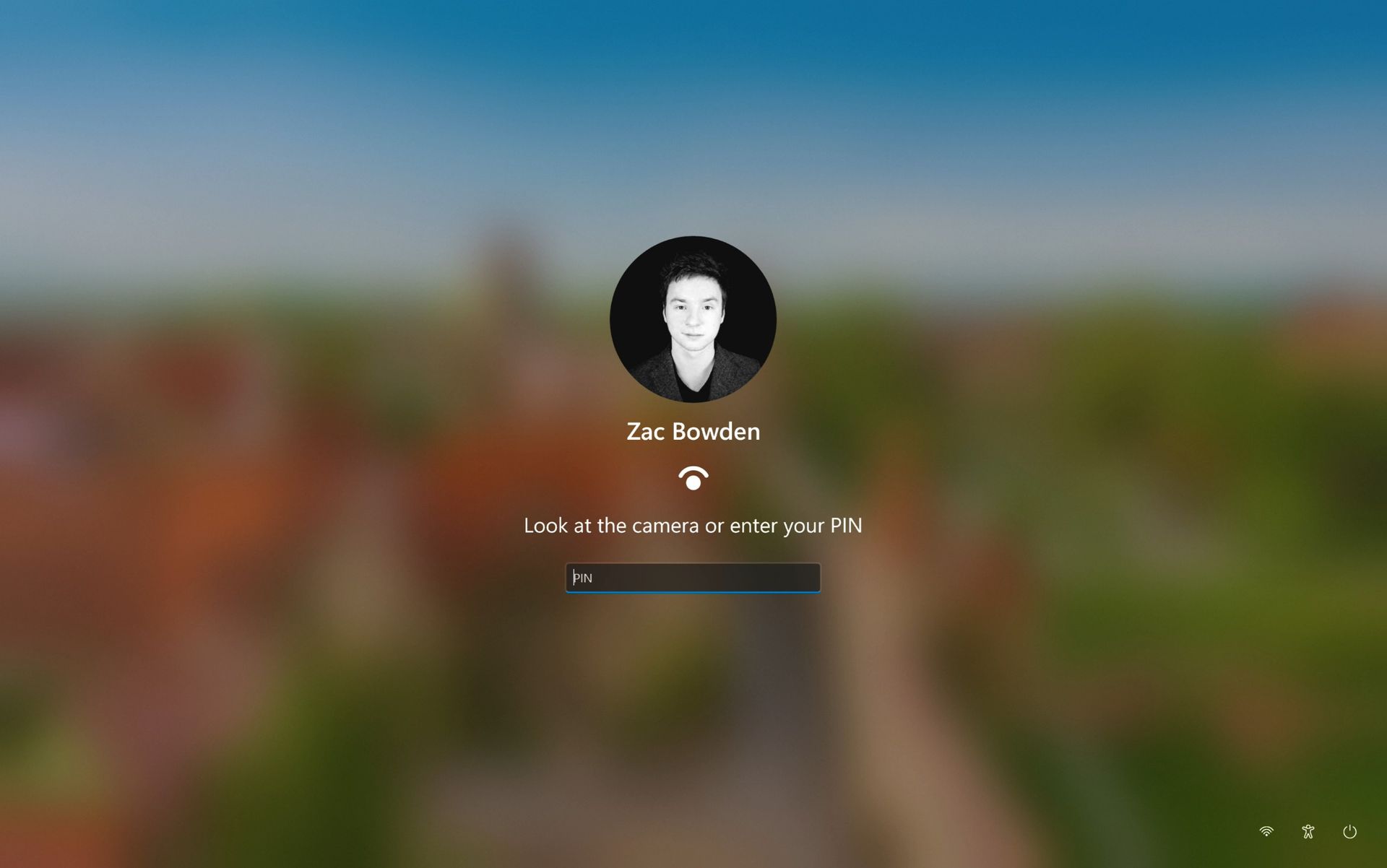
Allo stato attuale il Lock Screen richiede di scegliere la procedura di accesso desiderata tra quelle configurate sul dispositivo - ci sono pulsanti per esempio per il PIN, per il riconoscimento del volto e per lo scanner di impronte digitali, se il computer lo supporta. In una delle ultime build rilasciate agli Insider, c’è invece una nuova funzionalitΓ  nascosta che cambia leggermente il layout del Lock Screen: il campo del PIN Γ¨ sempre visibile e attivo, basta semplicemente digitare il codice, oppure guardare la webcam, oppure appoggiare il dito sullo scanner di impronte.

Nei primi test la feature sembra giΓ  funzionare esattamente come ci si aspetta, senza particolari problemi o complicazioni; questo potrebbe voler dire che il rilascio nel canale stabile potrebbe non richiedere tantissimo tempo. Tuttavia Γ¨ meglio non farsi troppe false illusioni, queste cose sono sempre estremamente difficili da prevedere e non c’è mai un caso uguale all’altro. FinchΓ© Microsoft non dirΓ  qualcosa a livello ufficiale, bisogna essere preparati a qualsiasi eventualitΓ  - anche che il progetto venga cancellato e la feature completamente rimossa.


Il miglior smartphone pieghevole del momento? Samsung Galaxy Z Flip 7, compralo al miglior prezzo da Amazon Marketplace a 559 euro.

CLICCA QUI PER CONTINUARE A LEGGERE

Microsoft is streamlining Windows 11's sign-in experience, here's how

Microsoft is working on a small yet meaningful change to the lock screen and sign-in experience on Windows 11 that will streamline the authentication process that users must go through to log into their desktop.

The current Windows sign-in flow requires the user to manually select the method of authentication they wish to use to login. If you've set up a PIN, face unlock, and fingerprint unlock, the only method of authentication that is active is the one you manually click on to use on the lock screen.

This is a huge gripe of mine, and it's super frustrating when you want to login using your face, but Windows has selected PIN or fingerprint. It means your webcam isn't looking for you in that moment, and you have to manually switch to face unlock to force Windows into checking for your face and logging in.

Well, it looks like this is finally changing. In the latest Windows 11 preview builds, a hidden feature ID enables a new experience that automates this. Now, by default, the PIN box is always on show, but face unlock and fingerprint unlock are also active and ready to authenticate at the same time.

The new sign-in flow on Windows 11

No longer does the user need to manually choose their login method. (Image credit: Zac Bowden / Windows Central)

This means users no longer need to manually select the login method of their choice. Windows will automatically capture whichever biometric authentication method is set up, even when the PIN box is on screen. This also means the lock screen looks cleaner as a result, as the options to choose which authentication method you want to use is no longer displays as it's not necessary. It's also faster for those with biometric authentication enabled.

I really like this change, as it encourages Windows to keep trying my face unlock even if it fails the first time. Of course, there's an eventual timeout if it fails too many times, but I find it is able to log me in before it ever reaches that point. Also, being able to just type my PIN without having to manually select the PIN option first is also great.

Microsoft is yet to announce this new sign-in flow, but I suspect it won't be long until it's officially put into testing as it's already very polished and has been in the works for a number of months now. What do you think? Is this a good change for the Windows lock screen? Let us know in the comments.

Click to join us on r/WindowsCentral

Join us on Reddit at r/WindowsCentral to share your insights and discuss our latest news, reviews, and more.

Microsoft expands sovereign cloud offerings as data control concerns grow

21 October 2026 at 12:13

Microsoft expanded its sovereign cloud offerings on Tuesday, adding new security, governance and AI capabilities as customers, particularly in Europe, demand greater assurance over where data is stored, who can access it and how critical services operate during disruptions.

The announcement builds on Microsoft’s ongoing digital sovereignty efforts, assisting organizations in applying appropriate levels of control to each workload rather than forcing a rigid, one-size-fits-all approach.

β€œOrganizations are considering more than where data resides. They also seek to understand who can access and operate their systems, how sensitive digital assets remain protected, which technology dependencies matter most and whether critical services can continue as regulatory, geopolitical, security or network conditions change,” Douglas Phillips, president and CTO at Microsoft Specialized Clouds, said in a blog post.

The developments come amid growing international scrutiny of how global tech providers handle sensitive data and the extent of control customers retain over their digital infrastructure.

β€œThree factors are driving this, including stricter data regulations, rising geopolitical tensions, and growing AI adoption,” said Pareekh Jain, CEO at EIIRTrend & Pareekh Consulting. β€œGovernments and enterprises want greater control over where their data is stored, who can access it, and whether critical systems can operate during disruptions. For instance, governments and big enterprises in Europe are worried about keeping their important data on an American company’s computers. Europe has proposed a new law that would limit the use of US cloud companies for sensitive government data in many areas. Microsoft is responding to these concerns while competing with local sovereign cloud providers.”

New controls across cloud and AI workloads

Microsoft is introducing the Sovereign Control Panel, a unified Azure portal experience that will allow organizations to assess their sovereignty posture, identify risks and gaps, apply controls, and evaluate workload portability. The panel is scheduled to enter public preview at Microsoft Ignite.

Expanding on Azure Key Vault Managed Hardware Security Module (HSM), which gives customers dedicated protection over encryption keys, Microsoft is now extending control beyond its own infrastructure. External key management with Azure Managed HSM is now generally available, enabling organizations to keep root encryption keys in hardware they own and operate on-premises or through a trusted third party.

In limited preview, Azure Confidential Clean Rooms will use confidential computing to support collaboration involving sensitive data, where participants will be able to analyse shared information while limiting broader exposure of the underlying data.

Microsoft is also expanding Azure Local to bring more cloud capabilities into customer-operated environments. The ability to transition workloads between connected and disconnected states is entering public preview. Additionally, DocumentDB and Blob Storage are entering public preview on Azure Local, while SQL Server on Azure Local is already generally available for connected and disconnected deployments.

On the AI front, Foundry Local is scheduled to become generally available at Microsoft Ignite for connected and disconnected operations on Azure Local. It will support local inference and agentic retrieval in natural language, backed by an expanded model catalog from Microsoft, partner networks, and the open-source community.

To further protect data during processing, Confidential Virtual Machines on Azure Local is now generally available, leveraging hardware-encrypted memory and isolation alongside workload attestation before sensitive keys or data are released.

While these additions give enterprises greater flexibility, industry analysts emphasize that localized deployments do not automatically erase vendor dependency.

β€œDepending upon the deployment model, in the public cloud, enterprises get better visibility, stronger access controls, and more control over encryption keys,” said Ashish Banerjee, senior principal analyst at Gartner. β€œIn the Sovereign Private Cloud, they can operate infrastructure locally and even disconnect selected workloads from Azure. But I would not call this complete control. Enterprises still need to check whether Microsoft remains involved in identity, software updates, management, or technical support for the services they use.”

The article originally appeared on CIO.

European oversight and partner options

For customers in the EU and the European Free Trade Association (EFTA), Microsoft is rolling out Data Guardian. Under this model, a trusted regional partner will provide independent oversight of remote access requests by Microsoft engineers. Simultaneously, a Production Touch Ledger will create tamper-evident logs of all technical actions performed.

Microsoft is also broadening its Sovereign Partner Ecosystem, highlighting regional operators like Bleu Cloud in France and Delos Cloud in Germany, alongside independent software vendors specializing in security, identity, observability, and backup.

Geopolitical realities and market limits

Despite these additions, analysts note that technical controls cannot eliminate geopolitical dependence entirely. US hyperscalers (Amazon, Google, and Microsoft) continue to account for roughly 70% of the European cloud market, whereas European providers’ market share has contracted over the last decade.

The new measures introduced under Microsoft Sovereign Cloud do reduce risks but cannot eliminate them. β€œLocal infrastructure, independent encryption keys, and disconnected operations make it harder for external parties to access data or disrupt services. However, Microsoft remains subject to applicable US laws, sanctions, and export restrictions. Enterprises gain greater operational independence but not complete legal or technological independence,” added Jain.

Furthermore, while sovereign cloud capabilities can offer greater control over data, infrastructure, and operations, this often comes with trade-offs in cost, performance, scalability, and access to services.

Banerjee noted that sovereignty should be assessed workload by workload, rather than applied as a label to the entire cloud environment. Greater sovereignty generally comes with greater cost and responsibility. Local or disconnected environments may not receive every Azure service at the same time. Enterprises may also need dedicated infrastructure, specialist skills and separate continuity arrangements. On top of that, they may lose some elasticity and economies of scale.

β€œSo, I would not recommend maximum sovereignty for every workload. Reserve it for workloads where the legal, operational or geopolitical risk genuinely justifies the additional complexity,” added Banerjee.

Microsoft's Project Perception Adds Controls for AI Agents Acting as Insiders

21 October 2026 at 11:30
Microsoft expands Project Perception with dynamic permissions, continuous risk scoring, and automated safeguards for AI agents. Here's what's confirmed and what remains untested.

Microsoft reportedly projects $1,200 to $1,800 price for 2028 Project Helix

20 October 2026 at 22:14

We haven't heard many details about Microsoft's upcoming "Project Helix" gaming hardware since the company announced it in March as a device that will "play your Xbox and PC games." In a new wide-ranging profile of Xbox CEO Asha Sharma, though, Fortune alludes to a dual release strategy for upcoming Microsoft gaming hardware, with "a next-generation handheld device" planned by the end of next year and a 2028 holiday season console release that could cost between $1,200 and $1,800.

That future console price range is based on what has "internally been projected" at the company, according to Fortune. But the price for consumers could come down if "Microsoft decides to subsidize the cost," the outlet says, as many console makers have done in the past.

While a $1,200 starting price would be historically high for the game console market, even accounting for inflation, it also reflects a new normal: The slowdown in Moore's Law and AI-driven component shortages means cutting-edge gaming hardware just isn't as cheap as it used to be. This year, the Steam Machine broke the $1,000 starting price, while the 2-year-old technology in the PlayStation 5 Pro is now going for $900, and the 6-year-old Xbox Series X now starts at $750.

Read full article

Comments

Esquemas de phishing imitam Microsoft, Apple e Google para roubar dados e atacar computadores

20 October 2026 at 17:44

Os cibercriminosos estΓ£o a explorar a confianΓ§a nas marcas tecnolΓ³gicas mais conhecidas, com a Microsoft a concentrar jΓ‘ um em cada trΓͺs ataques de phishing que imitam empresas. Apple, Google, LinkedIn e Amazon tambΓ©m estΓ£o no top das mais visadas.

The post Esquemas de phishing imitam Microsoft, Apple e Google para roubar dados e atacar computadores appeared first on Tek NotΓ­cias.

Microsoft walks away from flagship UK AI data center project

Microsoft will no longer be part of a multibillion-dollar data center in Loughton, Essex, England, according to a report by The Telegraph. The planned data center is set to have thousands of NVIDIA processors and was originally planned to start operating next year. Now, major questions surround the project's future.

The data center, which is being planned by Nscale, will be part of a wave of data centers opening in the UK, assuming plans come to fruition.

Microsoft's recent decision could affect the future of the data center, but the power grid is another pressing concern. Nscale has been told by grid operators that the required power supply for the data center will not be available until 2030.

The problems could be connected. The Guardian reports that Microsoft withdrew from the project because of the power grid concerns.

Microsoft was the only company that had publicly committed to plans to use the data center. It's unclear if other tech giants will step in to fill the void.

Despite Microsoft's reported cancellation of plans to be involved with the Essex data center, Microsoft and Nscale continue to have a professional relationship. The Telegraph reports that over 40 percent of Nscale's $103 billion in contracted revenue comes from Microsoft. The Essex data center was only believed to be a small part of that even before Microsoft changed its plans.

"We remain committed to both the Loughton project and the UK and we are exploring alternative power sources for the site, in addition to other expansion sites in the UK," said Nscale. The company added,
"Our relationship with Microsoft remains strong and long-term."

Microsoft is at the center of data centers

As demand for processing power increases, Microsoft finds itself increasingly at the center of data center headlines. Just in the UK, there are three ongoing stories about Microsoft and data centers.

Almost 45,000 people have signed a petition to prevent the construction of a data center in Leeds, England. Over in Slough, England, politicians and residents have debated the construction of a different data center.

Now, Microsoft has withdrawn its planned involvement in what could become the UK's largest data center.

Windows Central take

It seems inevitable that data centers will pop up around the world. There's a good chance that a site only a few miles from my house will have a data center in the near future. I live in Nottingham, England. A former coal plant that has been shut down is expected to house a data center.

Despite several tech giants calling for AI development to be slowed down or paused, demand for data processing is accelerating. I suppose the data centers have to be built somewhere, but I confess I'm not thrilled at the prospect of one being so close to my house.

Data centers can pollute the local environment and emit noise pollution into the surrounding area. They can also raise energy prices nearby and put stress on the local grid.

Click to join us on r/WindowsCentral

Join us on Reddit at r/WindowsCentral to share your insights and discuss our latest news, reviews, and more.

Windows 11's design boss admits it needs work, while AI fixes OS inconsistencies

20 October 2026 at 14:14

In what may be one of the year's least surprising stories, Microsoft's VP of Product Design, Diego Baca, has explained how AI is being used to help designers after being asked whether it's possible to launch a "fleet of viable agents" to address issues in Windows 11.

On AI agents, 100% agree. I’m not the best person to speak to the engineering side, but AI has already helped our design team accelerate significantly. We’re even seeing designers contribute directly to code fixes that improve craft, consistency, and quality. That’s exciting progress, and we’re only getting started.

Diego Baca, Microsoft

Now, this all comes shortly after an Xbox Business Strategist spiraled on X over how everyone is using AI, expressing frustration with the pretense that people aren't. That said, I do appreciate Baca’s honesty here. I always find that kind of candor refreshing.

Windows 11 still has a consistency problem

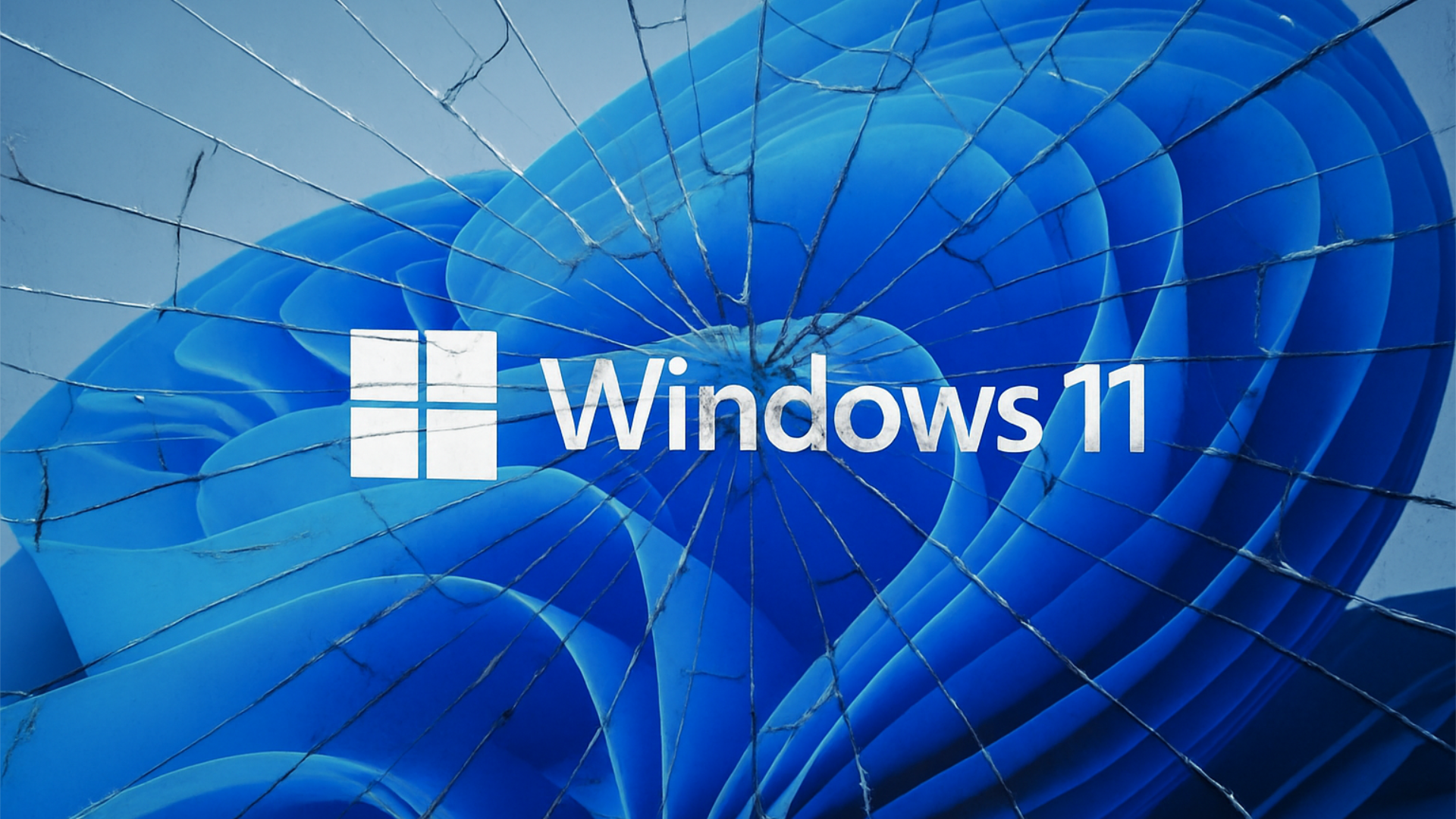
Windows 11 logo displayed over the default blue Windows wallpaper with a shattered glass effect across the image.

Microsoft acknowledges Windows 11's longstanding design inconsistencies as AI helps accelerate improvements across the operating system. (Image credit: Microsoft)

Interestingly, Baca's post on X (formerly Twitter) also acknowledged something Windows users have been complaining about for years in his reply to tech enthusiast Chris Pirillo, and that's consistency:

β€œConsistency across Windows is something we all want, and it’s an active workstream we’re continuing to accelerate,” he explained.

And to be fair, I have to agree. Windows 11 is now five years old (that's made me feel so old), yet parts of the operating system still feel like they're lacking the modern stylings, almost as though some of it still belongs in Windows 7, or even earlier, as Windows Latest points out in its own take.

Don't get me wrong, Microsoft has made progress, particularly with its efforts to modernize Windows Search, Run, and other legacy interfaces using WinUI 3. But I do wish these inconsistencies had been addressed before Windows 11 launched, though perhaps I’m wishing for too much.

Baca also acknowledged the criticism, admitting, β€œFinally, I completely recognize that people expect more from Windows. We expect more from ourselves, too.”

Finally, he added that Microsoft hopes to β€œearn back your enthusiasm for Windows through what we deliver, not just what we say.” It’s a refreshingly open response, and one I massively appreciate. How do you feel about Diego Baca's comments? Let me know in the comments and be sure to take part in our poll below:

Click to join us on r/WindowsCentral

Join us on Reddit at r/WindowsCentral to share your insights and discuss our latest news, reviews, and more.

Microsoft wants Edge to install security updates without restarting

Microsoft is testing a way to update Edge without forcing a restart, potentially letting you keep working while it switches to a more secure version.

Browser updates can interrupt your work, so you might put off restarting the browser. However, this can delay important security fixes. Microsoft's solution aims to solve both problems by updating Edge in the background while keeping compatible tabs open.

The project is still an early experiment, not a feature you can use today. Microsoft says the prototype isn't part of Edge's production code or the Chromium project.

Microsoft wants Edge updates to be seamless

Currently, browser updates require a restart to safely switch to a newer version. Although Microsoft Edge can restore your open tabs afterward, restarting can still interrupt your work. Microsoft's prototype aims to change that by downloading an update in the background and moving the browser and its supporting processes to the newer version while keeping your work available.

For example, imagine you're filling out a long online form when a security update becomes available. Instead of asking you to restart Edge and interrupt your work, the browser would update in the background while you continue working.

Microsoft demonstrated the prototype in a video, and when the company clicked the "Update" button, the browser switched to the new version while keeping compatible tabs open. Eventually, the goal is to apply updates automatically without requiring users to click anything.

One limitation is that existing tabs can stay open only if they're compatible with the new version. Other tabs will switch to the updated version when you navigate to them.

AI makes faster security updates more important

Image of Microsoft's new Copilot Mode option for its Edge web browser in July 2025.

(Image credit: Future | Daniel Rubino)

The project isn't only about convenience. Microsoft notes that AI is accelerating vulnerability discovery and changing the pace of attacks, increasing the need to roll out security fixes more quickly. The company describes the time between a security fix becoming available and an update being applied as the "patch gap." During this period, users who don't install the fix remain vulnerable.

A security update can only protect you after apply it. Restarts add friction to that gap: people may keep a browser open for days because they are in the middle of something important.

Microsoft

The requirement to restart the browser can also make the problem worse when people postpone updates because they don't want interruptions. As a result, applying security updates faster could reduce the time users remain exposed to known vulnerabilities.

So, when can we use it?

This isn't built into the current version of the browser, so don't go through the settings trying to find the option. Microsoft says that the prototype isn't part of the browser or the Chromium project. Instead, the company is sharing its work early and inviting developers and other organizations to collaborate on this project.

Edge already has an update option for idle devices

Microsoft Edge Update Restart

(Image credit: Daniel Rubino / Windows Central)

While the company continues developing its new update mechanism, Microsoft Edge already offers a feature called "Restart to update on idle," previously known as "Instant Updates."

The feature restarts Edge when your device is idle, installs the update, and reopens your tabs. It still requires a restart, but the interruption happens when you're not using the browser.

What's next?

For now, Microsoft Edge's existing update options help reduce delays, while the seamless-updates prototype offers a glimpse of what could come next. Microsoft hasn't announced when, or whether, this approach will become available. The company is sharing the prototype early to encourage collaboration with the community.

However, we'll have to wait and see whether the concept will make it into a future version of the browser. What are your thoughts on this new way to update the browser? Let me know in the comments.

More resources

Explore more in-depth how-to guides, troubleshooting advice, and essential tips to get the most out of Windows 11 and 10. Start browsing here:

Click to join us on r/WindowsCentral

Join us on Reddit at r/WindowsCentral to share your insights and discuss our latest news, reviews, and more.

Podcast: Surface Laptop Ultra and RTX Spark reviewed!

In this episode of the Windows Central Podcast, Daniel Rubino and Zac Bowden regroup following a week of extensive hands-on hardware testing and benchmarking. The central focus is the initial review wave for the Surface Laptop Ultra and the broader Nvidia RTX Spark mobile platform.

Zac details his full review of the Surface Laptop Ultra, highlighting its MacBook-inspired design improvements, haptic touchpad, outstanding audio, sleep battery efficiency, and magnetic USB-C connectorβ€”while contrasting its 2,000-nit Mini-LED display against competing Tandem OLED panels. Daniel shares first impressions of two rival RTX Spark flagships: the ultralight 3.9 lb ASUS ProArt P16 and the robust HP OmniBook Ultra 16.

The hosts dig into real-world local AI and agentic workflows (including tests with Hermes Agent and local LLMs), explain the critical architectural advantage of configurable unified memory allocations for GPUs, discuss gaming performance with DLSS/frame gen, and showcase the newly launched ASUS ROG Xbox Ally X20 handheld console bundle featuring XREAL AR glasses.

This episode of the Windows Central Podcast is sponsored by Surfshark VPN. Unlimited devices, access your content from anywhere, and auto-block malware on Windows, Edge, and other platforms from $2.50/mo, with 3 months extra FREE. Sign up today!

  • [01:44] – Introduction: Daniel and Zac kick off Episode 407, outlining their week spent benchmarking and testing retail RTX Spark laptops and handhelds.
  • [05:51] – Surface Laptop Ultra Design & Build: Zac breaks down the chassis aesthetics, MacBook Pro styling parallels, lack of a notch, seamless lid lip design, and weight (4.5 lbs).
  • [08:00] – The Mini-LED Display: Deep dive into Microsoft’s 2,000-nit Mini-LED panel, evaluating ghosting zones (1,344 dimming zones), glossy reflections, and comparisons to Tandem OLED screens.
  • [13:09] – Battery Life & Standby Sleep Performance: Real-world longevity on the 92 Wh battery (10–12 hours light use) and standout sleep endurance matching Apple Silicon.
  • [15:18] – Magnetic Breakaway USB-C: Testing the breakaway angle, data capabilities, and custom charging brick interoperability.
  • [18:04] – RTX Spark CPU & Gaming Benchmarks: Breakdown of 20-core multi-threaded CPU output versus single-core scores, plus gaming results with DLSS in titles like Cyberpunk 2077 (approaching RTX 4070/5060 laptop levels).
  • [25:59] – Local AI & Unified Memory Allocation: Why configurable system RAM sharing to the GPU CUDA cores enables large local LLM deployment that traditional gaming laptops cannot match.
  • [29:11] – Agentic AI Experiments: Practical workflows with Hermes Agent, desktop automation in Photoshop, automatic folder cleanup, and local data safety risks.
  • [46:00] – Speakers, Haptics & Missing Copilot+ Features: Praise for the class-leading haptic signals and audio alongside the notable delay of Windows Recall and semantic search on RTX Spark.
  • [53:56] – ASUS ProArt P16 Review Preview: Daniel highlights the 3.9 lb featherweight design, dual-fan thermals, 4K anti-reflective touch options, and port selection.
  • [58:50] – HP OmniBook Ultra 16 Breakdown: Frame build quality, rear tower exhaust design, Zero-Lattice Gen 2 keyboard, and compact 140W GaN charger.
  • [01:06:08] – PCIe SSD Speed Shootout: Massive speed discrepancies across devicesβ€”Surface’s 14,000 MB/s drive vs. HP's 10,000 MB/s and ASUS’s variable read speeds.
  • [01:14:55] – ASUS ROG Xbox Ally X20 Handheld Impressions: Translucent chassis, 7.4-inch 120Hz anti-reflective OLED panel, Z2 Extreme performance, and testing the bundle with XREAL AR glasses.
  • [01:24:02] – Live Audience Q&A: Viewer questions regarding boot/restart bugs, NVMe expansion, OneDrive Microsoft 365 storage allocation backlash, and future low-tier RTX Spark silicon.

Have a question you want us to answer on the podcast? Send it to us at podcast@windowscentral.com

Hosts:

Subscribe to the Windows Central Podcast

If you like the show, please let us know by give us a rating on your podcast platform of choice. It really helps us!

LIVE Video Podcast

You can watch the live, uncut version of the Windows Central Podcast on our YouTube channel!

Click to join us on r/WindowsCentral

Join us on Reddit at r/WindowsCentral to share your insights and discuss our latest news, reviews, and more.

Microsoft's Windows Insider wallpapers were made on a Mac

Microsoft just celebrated 12 years of the Windows Insider Program by sharing a collection of wallpapers. But the origin of those wallpapers has drawn a bit of criticism. It turns out that they were not made on a Surface Laptop Ultra or, in fact, any Windows 11 device. Instead, they were created using a Mac.

Rafael Rivera checked the properties of the wallpapers and noticed that they were created using the Mac version of Adobe Photoshop.

New Windows Insider email: "we created new backgrounds for all Insiders inspired by 12 years of the Windows Insider Program and the latest Surface design aesthetic"https://t.co/4gzu6wPcWOCreated on a Mac. https://t.co/0d8HgHlvh0October 15, 2026

Rivera noted in a follow-up post on X that the images were made by Microsoft's in-house design team. If accurate, that precludes the possibility of a contracted company happening to use Macs in their normal workflow and being commissioned to make the images.

Even if the images were made by a contracted company, Microsoft would have a little bit of egg on its face because that would indicate that even a creator that works with Microsoft prefers to use an Apple product.

Windows Central take

I don't think this is a big deal, but the situation has emerged at an awkward time. Microsoft is in the middle of refreshing Windows 11. The tech giant just shared a massive blog post positioning Windows 11 as a selling point to buy a new PC.

Having Windows Insider wallpapers created on a Mac opens the door to jokes like "even Microsoft staff prefer Mac."

It's perfectly reasonable for Microsoft to use tools created by another company. It's not as if Microsoft should force its design team to use the new Photos app instead of Photoshop. Creators, and any worker, need to use tools that can get the job done.

But considering Adobe Photoshop is available on Windows 11, it's a bit strange that Microsoft couldn't send a few Windows 11 PCs over to its design team.

Alternatively, Microsoft could call up ASUS and make a deal to get some ProArt P16 laptops to the design team. Our friends at Tom's Guide said "The ASUS ProArt P16 is an outstanding laptop for creativity."

The best news for whoever made the Windows Insider Program anniversary images is that Adobe Photoshop works on Windows on Arm, so it should run smoothly on any of the new RTX Spark laptops.

Click to join us on r/WindowsCentral

Join us on Reddit at r/WindowsCentral to share your insights and discuss our latest news, reviews, and more.

Windows 11's Hybrid Intelligence features will breathe new life into NPUs

Microsoft is finally giving Copilot+ PCs more capabilities on Windows 11. After the disastrous launch of Copilot+ PCs in 2024 which ultimately led to the company retiring the brand as a marketing asset this year, Microsoft has announced Hybrid intelligence, a new wave of AI features that will utilize on-device processing and the cloud.

If you thought the Copilot+ PC promise of NPU-powered local AI experiences was dead, I wouldn't blame you. Microsoft has been slow to build out NPU-based AI features on Windows 11, with Click To Do and Semantic Search being the last Copilot+ PC exclusive features to launch over a year ago.

But that seems to be finally changing with "Hybrid intelligence," a part of which is being built directly into the Copilot app on Windows 11 and will intelligently route AI tasks and experiences between on-device processing and the cloud on Copilot+ PCs. Here's what's coming soon to Windows 11:

  • Local context:β€―With your permission, Copilot can understand relevant content on your PC, including files and recent activity, bringing local context into the flow of work.Β 
  • Local actions: Copilot can take action on your behalf across Windows, helping complete tasks like organizing files, assessing device diagnostics, troubleshooting issues, coding, and carrying out workflows directly on your device.Β 
  • Local models: Copilot can tap into AI models running on your PC, using local compute for the right tasks while combining it with cloud intelligence when needed.Β 

Hybrid Intelligence looks to be a natural evolution of Copilot+ PCs. Microsoft is finally giving this AI hardware more to do, with the ability to reach out to the cloud when required for more complex workloads. These Hybrid Intelligence features enhance the new Copilot Home, Code, and Autopilot experiences that were recently announced.

"Copilot understands your PC, takes action with your permission, and uses local models when it makes sense, with you in control at every step," Microsoft says. "Copilot features powered by hybrid intelligence are expected to begin rolling out on Copilot+ PCs in the coming months."

Hybrid Intelligence logo

(Image credit: Microsoft)

Microsoft says Hybrid intelligence requires Copilot+ PC compatibility, which naturally implies that these new AI experiences will lean on the NPU for local processing, as that's one of the hardware requirements for meeting the Copilot+ PC feature bar.

Microsoft believes that a hybrid approach to AI will be the way forward for computing. It's important for PCs to have local AI compute power and capabilities to reduce pressure on data centers, and it's also important for privacy and security reasons too.

Agents on Windows are being heavily pushed as a local AI experience, though it requires PCs with powerful GPUs and lots of system memory to really take advantage of. The NPU is not powerful enough to handle most large language models at current, and so is reserved for less power intensive tasks and automations.

The company has also announced Aion Instruct, an on-device AI model that replaces Phi Silica and runs on not just the NPU, but GPU and even CPU in some cases. It's a small language model capable of handling text generation, instruction following, and web tasks.

Microsoft has confirmed that the Copilot+ PC brand is going away as a marketing asset, but it will continue to exist as a feature set. OEMs and Microsoft itself have stopped calling their new Surface PCs Copilot+ PCs, even though they are all Copilot+ PC compatible.

Now, the Copilot+ PC moniker is simply a checkbox on a spec sheet, and it looks like Hybrid intelligence PCs is the new marketing term that Microsoft wants to get in front of as many people as possible.

Click to join us on r/WindowsCentral

Join us on Reddit at r/WindowsCentral to share your insights and discuss our latest news, reviews, and more.

Calls to strengthen workplace privacy in Australia as employers turn to AI to track staff

Monitoring tools common in a range of workplaces, including factories, office jobs, delivery work and in retail – often without employees being informed

Employers are increasingly using technology, from CCTV to keystroke monitoring, to track workers’ moves and it is being accelerated by the use of AI, the Human Technology Institute has warned.

Examples provided to Guardian Australia by the institute include a fast-food restaurant using surveillance cameras to stop workers using their phones, and AI tracking leading to a cashier warned over making a mistake once every 533 scans.

Continue reading...

Β© Photograph: Bloomberg/Getty Images

Β© Photograph: Bloomberg/Getty Images

Β© Photograph: Bloomberg/Getty Images

Microsoft celebrates 12 years of Windows Insiders with free wallpapers

Microsoft just celebrated 12 years of the Windows Insider Program by sharing special wallpapers with Insiders. The images are all reminiscent of the Windows Bloom wallpaper that ships with Windows 11 and that has been remixed several times by Microsoft and enthusiasts.

I'm partial toward the blue version, likely because I learned how to use a PC on Windows 95. There are also white, green, orange, and purple variants as well as several dark-theme wallpapers.

This direct download link should get you all of the wallpapers, but you should also see them in an email from Microsoft if you're a Windows Insider.

Microsoft shared the following message alongside the wallpapers:

"Thank you for 12 incredible years, Windows Insiders!

From exciting program changes to meetups that brought us together in the past year, you're at the heart of it all. As a thank-you, we created new backgrounds for all Insiders inspired by 12 years of the Windows Insider Program and the latest Surface design aesthetic."

The Windows Insider Program has been around for 12 years, but it has shifted in structure in that time. I've been an Insider since the beginning, as have many members of our team at Windows Central. In that time, we've seen everything from major Windows features not being tested with Windows Insiders to feedback directly shaping the future of Windows.

Microsoft refocused on the Windows Insider Program by refreshing it earlier this year. Since that refresh, we've seen more Insider builds per week and significant upgrades being tested in those builds.

Windows Insider meetups also returned this year, giving the community a chance to meet in person and interact with the Windows product team directly. The first Windows Insider meetup was in Seattle, Washington. Later, events took place in New York City (USA), Hyderabad (India), Taipei (Taiwan), San Francisco (USA), and London (UK).

I'm happy to see the Windows Insider Program on the right track. Microsoft is engaging with the community and shaping Windows 11 based on feedback.

Microsoft has shown the positive impact of listening to feedback through its recent changes to Xbox. Sometimes grabbing low-hanging fruit and addressing the top community concerns is exactly what's needed.

The wallpapers shared by Microsoft are a small gesture thanking Windows Insiders, but such gestures can go a long way. Ignored Insiders become Insiders who disengage from the Windows Insider Program, and that hurts all Windows users in the long run.

Click to join us on r/WindowsCentral

Join us on Reddit at r/WindowsCentral to share your insights and discuss our latest news, reviews, and more.

❌