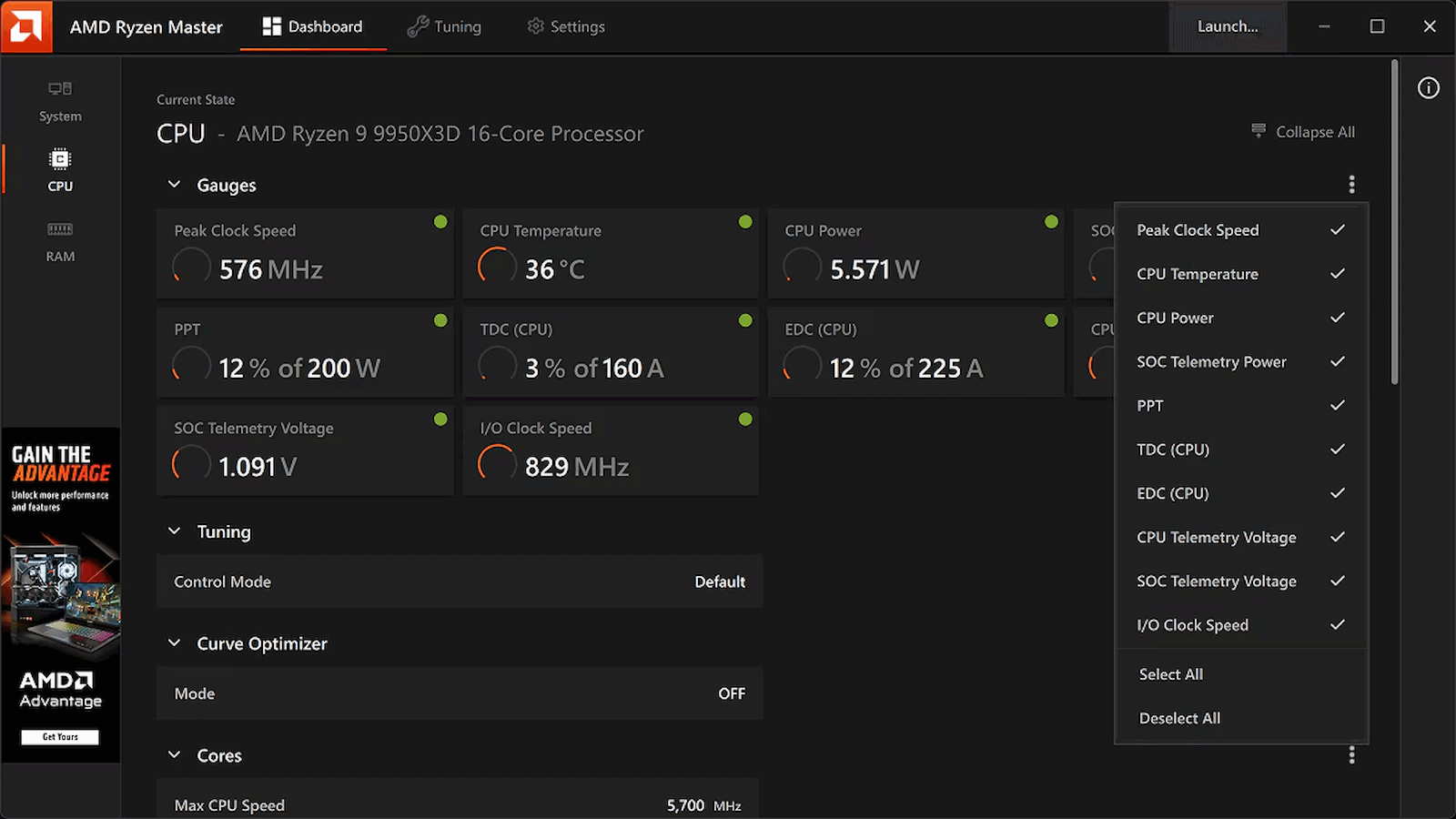
While Windows overclockers have spent years lazily sliding UI controls to adjust frequency curves and tweak voltages inside Ryzen Master, Linux users have largely had to treat their CPU tuning like an archaeological dig into the opaque veil of UEFI/BIOS firmware. Well, rejoice, Linux users, as AMD has officially published a fresh set of patches for the Linux kernel introducing AOD (AMD Overclocking Driver) support for Ryzen processors, Phoronix reports.
Instead of forcing developers to reverse-engineer closed-source firmware hooks or rely on messy, machine-specific ACPI workarounds, this new kernel driver is a direct pipeline to AMD's platform adjustments. By exposing core tuning capabilities straight through the standard sysfs interface, AMD is laying down an official, upstreamed foundation for software-level CPU management.
Right out of the gate, the driver handles platform-level SMT toggling, memory clock visibility, and power tunables. That's right: you can now toggle Simultaneous Multithreading (SMT) dynamically through this driver interface. That works through the CPU hotplugging mechanism and acts as a clean alternative to passing the old 'nosmt' boot parameter to the kernel. The new driver also allows real-time monitoring of memory clocks, and initial power controls are being wired up, too.
This tool isn't available on Linux, and may never be, but at least its functions will be soon. (Image credit: AMD)
Now, if you're expecting a polished, one-click official AMD application equivalent to Ryzen Master for Linux, just pump the brakes. AMD is following its open-source amdgpu graphics driver playbook here, building the kernel plumbing and then leaving the user-space presentation layer entirely up to the community. That means you're going to have to wait for utilities like CoreCtrl to build out interfaces for this new driver, but it shouldn't be long now before that work gets underway in earnest.
This approach is arguably a better fit for the Linux philosophy anyway. Because the controls are being exposed via clean kernel sysfs nodes, it won't be long before independent developers integrate these knobs into powerhouse open-source monitoring and tuning suites, or even write dedicated desktop environment extensions specifically for the purpose of tweaking Ryzen processors.
The new patches are currently winding their way through review on the mailing lists, meaning mainstream kernel integration is on the horizon. For a DIY enthusiast who loves squeezing every last MHz out of silicon while maintaining a fully open-source software stack, this is easily the most exciting hardware-enablement milestone I've seen in a long time.
The revelation that there was a ton of performance lying on the table in the remastered The Elder Scrolls Part IV: Oblivion won't be a surprise to people who have played the game, which is notorious for its hitching and stuttering. The reason primarily lies in its poor utilization of hardware, and that's a big part of what LTSharpe and Claude have addressed in the new Oblivion Remastered Performance Fix that changes nothing about the game's visuals yet increases performance by as much as 68% in the worst case. (h/t to ComputerBase)
Yes, this mod is just about 100% vibe-coded, and yet, rather than hacking Minecraft into GTA V on iPhone, or hacking CoD Black Ops 2 maps into Minecraft, this mod is a binary code modification for Oblivion Remastered that seeks to improve performance and stability considerably, and according to numerous jubilant and thankful posts on NexusMods, it seems to do exactly that, with one user proclaiming that the performance increase was "dramatic" and that the overworld stuttering that plagues the game is "completely gone."
(Image credit: LTSharpe on GitHub)
The story goes like this: gamer and mod creator LTSharpe has a slightly older system with a Ryzen 7 5800X CPU. Not the newest chip on the block to be sure, but Zen 3 isn't so old that it should be crumpling under the weight of games just yet. Frustrated with the verifiably awful performance of the remaster of The Elder Scrolls Part IV: Oblivion, he paid for a subscription to Anthropic's Claude AI agent and started working with the assistant to diagnose and fix the performance problems.
"Diagnose" is a critical keyword here, because it isn't like Claude was hallucinating an engine.ini tweak somebody else published for the original game 20 years ago. The partners, with Claude doing the hard work and LTSharpe directing, reverse-engineered the game to the point that they were able to build a repeatable benchmarking framework. That allowed them to systematically diagnose the causes of the performance problems and then test fixes against the real behavior of the game with modified machine code.
That's the thing; this was done without source code. Neither TES4 Oblivion nor the remaster's Unreal Engine is open-source software. The sheer magnitude of the task would be incredibly daunting to a team of human engineers, much less a single person. According to LTSharpe, over the course of two weeks Claude successfully diagnosed and fixed bugs in not only the Remaster's Unreal Engine code, but also in the underlying Gamebryo original engine, in AMD's frame generation code, and even in the Unreal Engine itself, improving performance and avoiding crashes.
The developer—or perhaps we should say, coordinator?—is careful to acknowledge that the performance tweaks were created with his system specifically in mind and that they may not work well for others. Indeed, he has a Radeon graphics card, which puts him within a surprisingly small minority of PC gamers, and some portion of his fixes were aimed at making sure AMD's FSR upscaling and frame generation remain in effect despite a long-standing game bug that disables them when you task-switch (Alt+Tab) out of the game. The good lieutenant invites other gamers to try out the fix and report back, and he's even helping out with support requests on NexusMods, too. Head over there if you're keen to grab the fix and try it for yourself.
Folks with Nvidia-based gaming laptops can now use a new tool called NvpwrControl to unlock additional performance from their assuredly power-limited mobile GPU, as long as they're willing to accept the risks of cranking their GPU power limit by as much as 40 watts. The tool, spotted by VideoCardz, is available for download on GitHub, and it is labeled as 'experimental', so you'll want to be very sure you're willing to damage the reliability, if not the lifespan, of your fancy discrete GPU gaming laptop before using it.
NVIDIA GeForce RTX 50 Series Laptop GPU Power Limits
GPU Name
GPU Power (varies per laptop)
Dynamic Boost Max
Mod Max (Experimental)
GeForce RTX 5050 Laptop
35 - 100W
15W
140W
GeForce RTX 5060 Laptop
45 - 100W
15W
140W
GeForce RTX 5070 Laptop
50 - 100W
15W
140W
GeForce RTX 5070 Ti Laptop
60 - 115W
25W
180W
GeForce RTX 5080 Laptop
80 - 150W
25W
225W
GeForce RTX 5090 Laptop
95 - 150W
25W
225W
In Nvidia's case, the GPU models (aside from the RTX 30 Series) don't match at all between laptop and desktop, but even with the smaller size of the laptop GPUs, the chips are still sharply limited in performance by their stringent power limits. These limits top out at 150W, with an extra jolt, usually 25W, available from Dynamic Boost if the CPU isn't heavily loaded. This is, frankly put, not enough power for even the mobile GeForce RTX 5070 Ti to stretch its legs, to say nothing of the GeForce RTX 5080 Laptop or GeForce RTX 5090 Laptop. In high-intensity gaming situations, these GPUs can score pretty similarly due to having the same power limit.
That's what makes this tool attractive. By cranking the power limit, you can give these power-limited GPUs a performance boost. The developer doesn't provide any benchmarks, but I can say from experience that testing power limit adjustments on a power-limited GPU can give nearly linear performance gains, meaning that increasing the power limit from a stock 140W all the way up to 180W could potentially give a GPU performance uplift in the neighborhood of 25% or more, although it is impossible to verify this without testing.
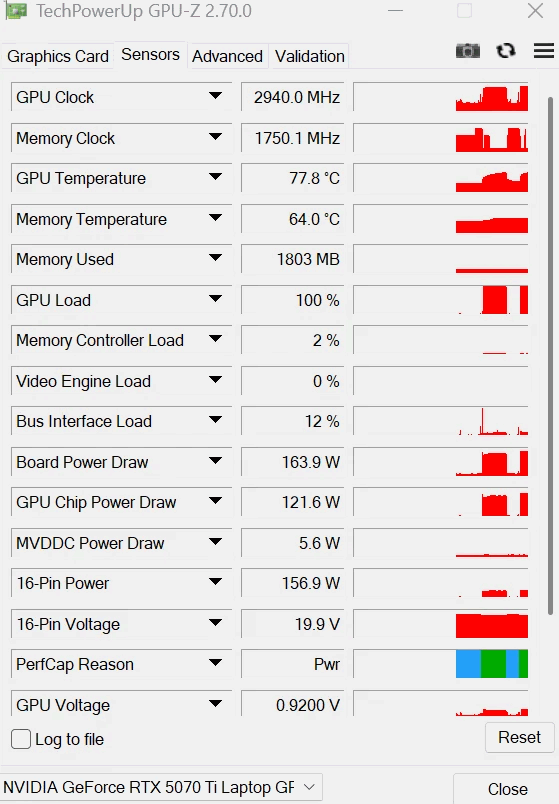
There are quite a few caveats to this utility, though. For one thing, even the author describes it as 'experimental ', and for another thing, it's clearly AI-generated in the largest part. The developer is called "LevinAI", after all, and there are the hallmarks of generative AI all over the GitHub repository. Still, there are a few reports on both GitHub and Reddit suggesting that users have been testing it, and the developer claims that it works on his GeForce RTX 5070 Ti laptop, posting the proof below.
The developer's screenshot of GPU-Z, showing a board power draw of 163.9 watts on a GeForce RTX 5070 TI Laptop, well above the stock 140W cap. (Image credit: /u/Ecstatic_Hamster2208 on Reddit)
Other notable qualifiers include that it only supports Blackwell GPUs for now, and it only enables power controls when it can recognize the power policy layout and OEM baseline. If your GPU already ships with a wacky power configuration, this tool may not work for you. It's also not verified to work on every brand of laptop nor every model of GeForce RTX 50-series GPU, so we absolutely wouldn't try this unless you're willing to replace your Blackwell-based laptop.
The partially AI-generated project description (likely chosen as the author's native language appears to be Russian) explains that the developer investigated numerous layers of the software stack on top of the GPU to see where the power limit could be modified. The controls that NVIDIA exposes generally won't let the user raise the power limit above the value set by the OEM for fear of potentially damaging the hardware, since the power delivery and cooling mechanisms were likely not designed with the higher power draw and thermal output in mind.
The solution he found was apparently to modify a low-level NVIDIA power policy that isn't normally exposed to end-users. He says, "One of the important findings was that the power-management chain contains internal policy values that are not exposed through the normal consumer power-limit controls. This is the path that eventually led to a working experimental implementation." However, due to the method employed, the tool does require the user to disable Windows driver signature verification, which is yet another 'gotcha' of the mod.
As amusing as it is to see that the developer left his AI assistant's instructions for constructing his GitHub repository (which he didn't follow), it's a reminder both of the reliability concerns around "vibe"-coded software in production as well as of the incredible potential of AI software development. Since we spotted the story on this utility, the developer has already bumped the version from 1.5.0 to 1.8.0 with a new release on GitHub, suggesting that the pace of improvements is extremely rapid.
A few users on Reddit, where the author posted the above screenshot, lambasted the developer for taking ownership of what they claim is "100% AI generated work" and also for not structuring his code repository correctly (since all of the source is packed in a ZIP file, not properly viewable on GitHub). However, the majority of other users seem enthusiastic about his work, and several have already posted proof that it seems to work, with huge gains in 3DMark and other benchmarks.
With the latest ROCm updates, AMD finally brought robust, official PyTorch and HIP SDK support to Windows for consumer GPUs, fully supporting the Radeon RX 7000 and the RX 9000 series. For native, supported frameworks, AMD on Windows is finally a viable reality, but what happens when you want to run a proprietary application, an older repository, or a specialized AI tool that absolutely refuses to support anything but NVIDIA's CUDA? That's where a new project, Speedstu's "CUDA-for-AMD-Windows," could save the day. It proves that running rigidly CUDA-exclusive workloads on AMD hardware in Windows is possible without virtualization or dual-booting.
To be clear, this project is not a brand-new runtime. Instead, it is a highly automated and reproducible PowerShell setup that bridges the gap between ZLUDA, the well-known, formerly AMD-funded translation layer, and AMD's native HIP/ROCm SDK for Windows. Through a series of clever scripts, the toolkit automatically detects the user's GPU architecture, grabs a specifically pinned version of ZLUDA (v6-preview.69), and, at least in theory, seamlessly maps it to the ROCm math libraries already present in Windows.
Several important CUDA libraries link up, but the important cuDNN doesn't work yet. (Image credit: Speedstu/GitHub)
The result is that the developer successfully intercepted and mapped the CUDA driver API as well as the cuBLAS, cuSPARSE, and cuFFT libraries directly over to their AMD equivalents. As a proof-of-concept, the author even trained a 2.2-million-parameter PPO reinforcement-learning network end-to-end using unmodified CUDA libraries on an AMD Radeon RX 9060 XT, which happens to be the only officially supported GPU at this time.
Even with AMD's official ROCm support on Windows, the local developer community frequently runs into dependency hell when trying out experimental GitHub repos or specialized AI tools that hardcode CUDA as a requirement. For developers who want to experiment with these CUDA-only tools natively on their Windows daily driver machines without dealing with WSL2 passthrough issues or waiting for the original author to write a HIP port, this project offers a highly desirable translation pipeline. It acts as a sort of hacky adapter for software that stubbornly demands an NVIDIA card.
Benchmark testing included in the project's documentation offers some interesting findings. In a controlled A/B test running a 2.2M-parameter reinforcement learning workload on a Radeon RX 9060 XT, the "public upstream path," which relies purely on official ZLUDA releases and AMD's stock HIP SDK 6.4, achieved a median throughput of 13,278 steps per second (SPS). By contrast, an optional "recovered custom overlay" apparently built from salvaged legacy ZLUDA binaries ran slightly worse at 12,876 SPS, making it roughly 3% slower. While the clean official setup is faster, the author notes that "a later rewrite removed LibTorch/ZLUDA from PPO and achieved substantially higher throughput," indicating that there is still a performance hit for this stack of translators.
CUDA for AMD Windows Official benchmarks (BENCHMARKS.md)
Metric
Public upstream
Recovered custom
Custom delta
Overall SPS, median
13,278.46
12,875.80
-3.03%
Overall SPS, mean
13,172.49
12,649.83
-3.97%
Collection SPS, median
63,306.00
59,360.67
-6.23%
Consumption SPS, median
16,806.36
16,445.66
-2.15%
Inference time, median
0.5863 s
0.6293 s
+7.33%
PPO learn time, median
3.2076 s
3.2958 s
+2.75%
Now, before anyone declares the CUDA moat officially drained, it is crucial to set realistic expectations. First, this is a solo open-source project, not an enterprise-grade solution. The author is extremely transparent about its narrow scope, as crucial machine learning libraries like cuDNN, TensorRT, and NCCL do not resolve yet. This means compatibility is strictly workload-dependent; if your specific AI tool relies heavily on cuDNN, this setup will fail. Furthermore, it's worth pointing out that ZLUDA itself is currently being maintained as a "weekend hobby project" after losing its commercial backing a second time. Relying on this pipeline for production-level work remains a massive risk. This repository is a tinkerer's tool, not a corporate IT deployment strategy.
Despite these limitations, "CUDA-for-AMD-Windows" is pretty exciting, as it proves that the barrier to entry for running CUDA-exclusive software on AMD GPUs isn't an insurmountable hardware flaw, but a relatively tractable translation tooling problem. Because the project is entirely open-source, its potential extends far beyond this initial proof-of-concept. With community contributions, we could see expanded hardware detection and clever patches to get more stubborn CUDA libraries resolving properly.

 Login
Login